 This article has a talk page!
Nancy Drew: Message in a Haunted Mansion is the 3rd game in the series. In it, Nancy has to solve a series of mysterious accidents, mostly by doing puzzles and looking through people's belongings.
Sub-Pages#
 Prerelease Info
 Unused GraphicsEarly renders and cut content.
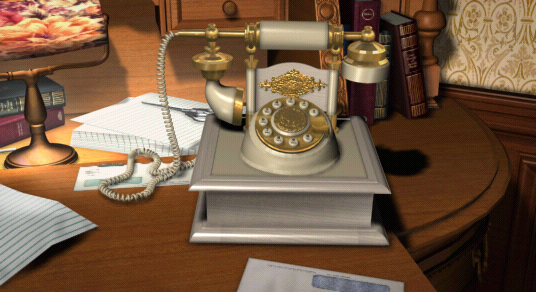 Unused AudioLots of unused voice lines.
Debugging Options#
Debugging options can be accessed during gameplay (except during dialogue) by pressing CTRL+⇧ Shift+Tab ↹.
- F2 instantly opens the Main Menu.
- F3 opens the view of the save slots.
- F4 acts the same as the Second Chance option.
- F6 instantly opens the Game Setup (option) menu.
- F7 shows the credits.
- F10 instantly closes the game.
- F toggles Fast Convo, which allows you to skip conversation lines.
- E toggles End Convo, which allows you to end a conversation (however it's prone to crashing the game).
Debug Output#
Pressing D toggles debug output visibility.
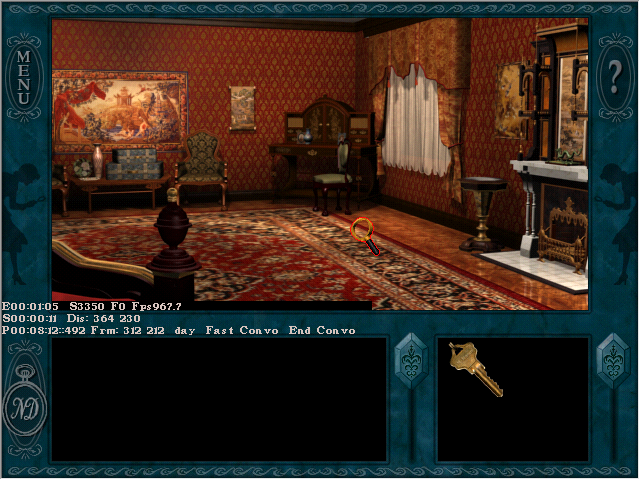
- E hh:mm:ss is the amount of time elapsed while in-game.
- S #### is the current scene number.
- F # is the current frame number (of an .avf file).
- Fps shows the frames per second.
- S hh:mm:ss is the amount of time spent in the current scene you're in.
- Dis is cursor coordinates for the whole screen.
- S - ?
- Frm is cursor coordinates for the interactable part of the screen inside the menu overlay.
- day/night corresponds to in-game time.
- Fast Convo, End Convo - shows whether these two options are toggled.
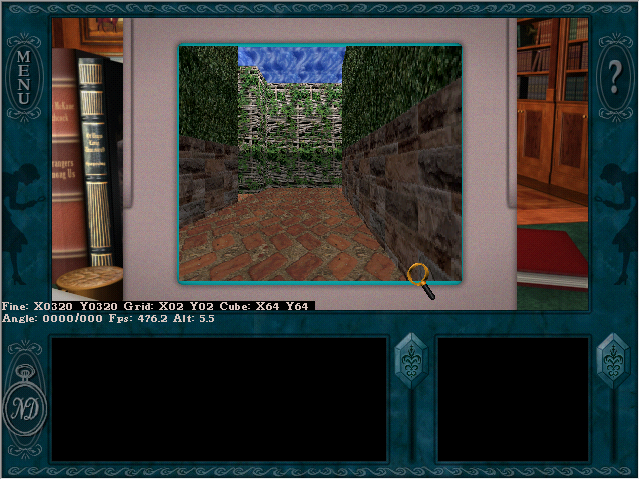
This output is also different during the maze puzzle you have to solve on Louis' laptop. Here, values like your X and Y position and angle in the maze are shown. Note that Alt is always 5.5.
Cheat Sheet#
Pressing C opens the "cheat sheet" menu.

The 'General' tab has options for changing the current scene, the player's current amount of hints, in-game time, difficulty level and for toggling a software timer. There are also options for saving or loading an existing cheat file. "Load Game Settings" will load the current parameters into the menu, and "Apply Cheat Settings" applies any changes made. Note that just pressing "OK" doesn't save any changes.

The 'Inventory' tab enables you to modify Nancy's inventory and held items.

The 'Logic' tab can be used to toggle logic flags for events, conversations, etc. Note that the tab inside this menu seems incomplete compared to the "Events Cheat Sheet".

Finally, there's a 'Slider Puzzle' tab specifically for the phoenix slider puzzle near the end of the game.
Events Cheat Sheet#
Pressing 1, 2 or 3 opens various menus similar to the cheat sheet one, but for modifying event flags.


Debug Log#
Setting DebugOutput in the game.ini file in the installation directory to 1 will write to debug.LOG while running the game.
Testing Mode#
Setting TestingModeEnabled in the game.ini to 1 will enable this mode, presumably used to test whether your PC can run the game. On launching the game, a menu prompting the player to enter information about their PC will appear.

After filling out all the fields and clicking "Begin Test", Start Test in with a 10-second countdown will appear on the game's title screen. The game usually crashes after this. Regardless of whether or not the test crashed, a log file named
Build Date#
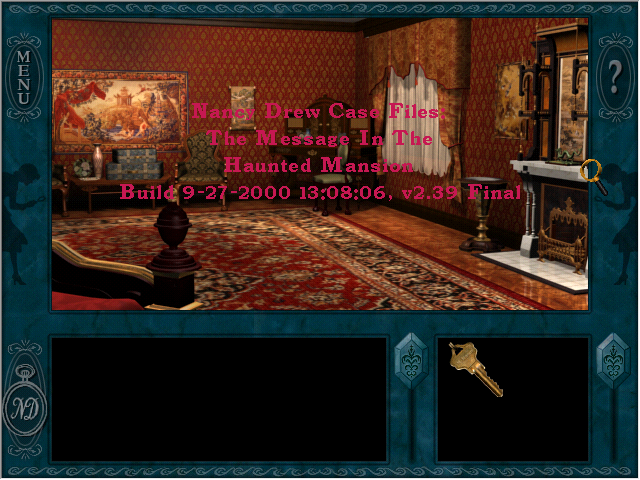
Pressing CTRL+V at any point in the game shows the (internal) game title, build date and version number for about 5 seconds. According to the text, the final build is from 27th September, 2000, 13:08:06.
Developer Message Easter Egg#
If the PlayerWonTheGame variable in the Game.ini file is equal to "AcedTheGame" (ending has been reached at least once), the on-screen text will display one of the developer quotes instead.
Developer Messages#
Setting up meetings here is
like wrangling cats.
-- Robert

You're not going to take that out - not if you
want a very mad pregnant woman on your hands...
-- Tina

Bat phone! 3...2..1...
NOW! NOW!
-- Gabe in a fit of sales delusion

You got a nice deep case...
I like that.
-- Curtis

I'm going back to the arctic
-- Robert

Robert said...pull your pants up!
-- Sonia trying to say
   two things at once

Warning: you may have art in your
home that you are not aware of.
-- Laura

Just puking on a page.
-- Curtis describing our script
   building process

Whenever I try to talk to her, her head
turns into a big black hole.
-- Wayne, fighting the video player

Now if we could only get them
to open their mouths.
-- Robert describing the artists

They're our age.
-- Megan referring to anyone
   younger than herself

That's a lot of mustard.
-- Jan misinterpreting the
   Orange Juice

You just can't polish a turd...
-- Wayne's response while reviewing
  some badly written code

It's not a bug - that's just the way it works...
-- Wayne, concerning an 'undocumented feature'
  in the game engine

Our previous game was VD, then we had SCK as in
SICK, and this game is STD. What's up
with that? -- Robert

Now I know why there's a bald spot on top
of my head. Hair is growing inward instead
of outward now. -- Wayne commenting on his hair

We don't care about no stinkin' head movement...
-- Wayne

No brag, just fact.
-- Wayne

Josh, put the ear back...
-- Wayne

Do you wanna just tweak my thing a little bit?
-- Gabe requesting IS assistance
  from Curtis
Like in Nancy Drew: Stay Tuned For Danger, some developer messages from previous games (including Nancy Drew: Secrets Can Kill) appear, and some are new.
Unused Text#
Secrets Can Kill leftovers#
Maxine's Diner
Vandelay Pharmacy
Paseo Del Mar High School
Leftover location names from the first game in the series.
Internal Name#
The game is referred to in various ways in the files, including Nancy Drew: The Message In The Haunted Mansion, Nancy Drew Case Files: The Message In The Haunted Mansion or simply The Message In The Haunted Mansion.
Unused puzzle#
DF Bomb Puzzle SurfaceBOMB PUZZLE OVERLAYSSeveral references to the bomb puzzle in Stay Tuned for Danger, probably related to debugging.
Version Info#
The version of the Nancy Drew engine used for this game is 2.3.9.2.
|
The Nancy Drew series | |
|---|---|
|
Windows |
Secrets Can Kill • Stay Tuned for Danger • Message in a Haunted Mansion • Treasure in the Royal Tower • The Secret of Shadow Ranch • Curse of Blackmoor Manor • Last Train to Blue Moon Canyon • Secrets Can Kill Remastered |
|
Game Boy Advance |
|