 This article has a talk page!
Gradius IV: Fukkatsu is notable for being the first main installment in the series to use 3D models.
Debug Menu#

|
This needs some investigation.
|

Enabling the following MAME cheat replaces the operator menu with a series of debugging functions. Annoyingly, the 1P Start button is used both for entering and exiting the sub-menus (sans one exception) with zero distinguishing between when the button was pressed, resulting in most of the options exiting immediately unless you use frame advance to make sure 1P Start was only pressed for one frame.
<cheat desc="Debug Menu">
    <script state="run">
        <action>maincpu.pd@803c8da0=803b4700</action>
    </script>
    <script state="off">
        <action>maincpu.pd@803c8da0=803b4288</action>
    </script>
</cheat>
The functions that can be found are as follows:
GAMEDEMO REC |
SOUND TEST |
VRAM CHECK |
|---|---|---|
|
|
|
MEMORY EDIT |
COLOR TEST |
IO TEST |
|
|
|
JVS TEST |
NAGATOMO TEST |
NIIHAMA TEST |
Doesn't work. |
Doesn't work. |
Doesn't work. |
ASAKI TEST |
ZAKO VIEWER |
STAGE VIEW |
Doesn't work. |
|
|
MODEL CHECK |
||
Doesn't work. |


(Source: WindyFairy)
Unused Graphic#
Found alongside the power-up name graphics in the K037122 chip are tiles referring to the ! power-down items from Gradius III, which do not appear here.
Tiles |
Assembled |
|---|---|
 |
 |
(Source: Tiniest Turtles)
Unused Sounds#
The announcer has several unused voice clips; most of them are for explaining how powerups work, all of them in factǃ They would have most likely of been used in the Attract Screen like Gradius Gaiden but wasn't. There are also two other unused voicelines, one of them being a "hint" for defeating an enemy or a boss, and the other referring to a scrapped mode selection.
Sound File |
Transcript |
|---|---|
Speed up, there are five different levels. The max level speed is faster than the bullets. |
|
Missile, crawls on the ground and destroys enemies. |
|
Spread Bomb, wide-range blast will destroy more enemies. |
|
Photon Torpedo, penetration power can break through anything. |
|
2-Way, threaten enemies above and below. |
|
Vertical Mine, bomb explodes vertically when enemies hit it. |
|
Flying Torpedo, soars through the sky and penetrates enemies. |
|
Double, normal bullets that also shoot upward. |
|
Tail Gun, normal bullets that also shoot backward. |
|
Laser, destroys all enemies with the strongest power of penetration. |
|
Ripple Laser, widespread laser destroys enemies in a wide range. |
|
Armor Piercing, high speed bullets. |
|
Twin Laser, reflects and destroys enemies. |
|
Option, an additional ship. |
|
Multiple, an additional ship. |
|
Shield, the Shield guards in front of you! |
|
Force Field, a barrier that protects you all around! |
|
Shoot the tentacles! |
|
Select the game mode. |
It is worth to mention that some of these audio samples do not correlate with their appropriate function. There is also an additional voice clip for Multiples, which was what the Options was called in the non-Japanese versions of Gradius and Gradius II and in all versions of Salamander and Gradius III. Although non-Japanese versions of the game were found (see below), they still use the Option name.
(Source: Tiniest Turtles)
Version Differences#
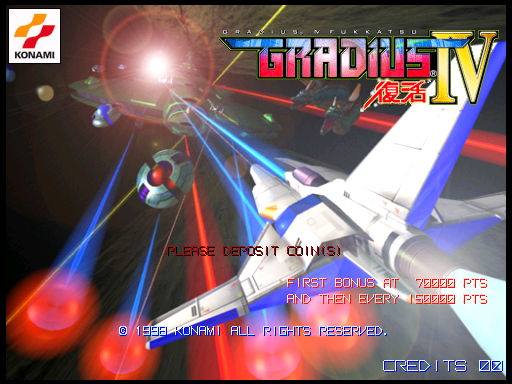
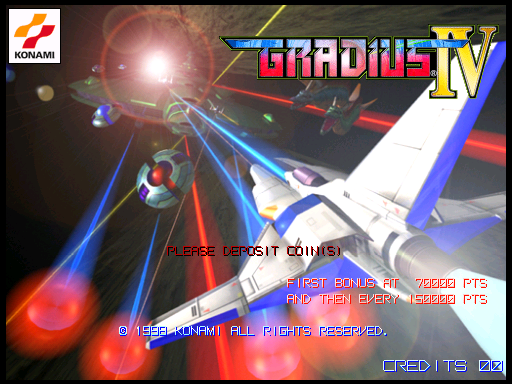
While it is not known if the arcade version of Gradius IV was ever released officially outside of Japan, American (UAx) and Asian (AAx) sets have since been added to MAME. Two revisions for each set are also known to exist, ending with A and C.
Title Screen#
Ver. JAA/JAC |
Ver. UAA/UAC/AAC |
Ver. AAA |
|---|---|---|
 |
 |
 |
The JAA and JAC sets contain Gradius IV: Fukkatsu in small font above the title as well as 復活 ("Resurrection") underneath. The UAA, UAC, and AAC sets remove those and shift "Gradius" and "IV" to better align them. In addition, the AAA set also removes the trademark symbol.
Continue#
In the Japanese sets (JAA and JAC), the continue feature is disabled by default. In the other sets, it is enabled.
This is a typical behavior taken on how continues worked in the first two games of the series.
References#
|
The Gradius series | |
|---|---|
|
Arcade |
Nemesis • Vulcan Venture • Gradius III • Solar Assault • Gradius IV: Fukkatsu |
|
NES |
|
|
MSX |
|
|
PC-88, Sharp X1 |
|
|
ZX Spectrum |
|
|
SNES |
|
|
Game Boy |
|
|
Sharp X68000 |
|
|
Sega Saturn |
|
|
PlayStation |
|
|
Game Boy Advance |
|
|
J2ME, BREW |
|
|
PlayStation 2 |
|
|
WiiWare |
|
|
Salamander | |
|
Arcade |
|
|
NES |
|
|
Related Games | |
|
Arcade |
|
|
See Also | |