
|
This needs some investigation. |
FIFA 11 is the whateverth installment of the FIFA franchise.
Unused Camera Modes#
A few unused camera modes in the game. The codes below apply to all of the European, Australian and North American releases.
Overhead#
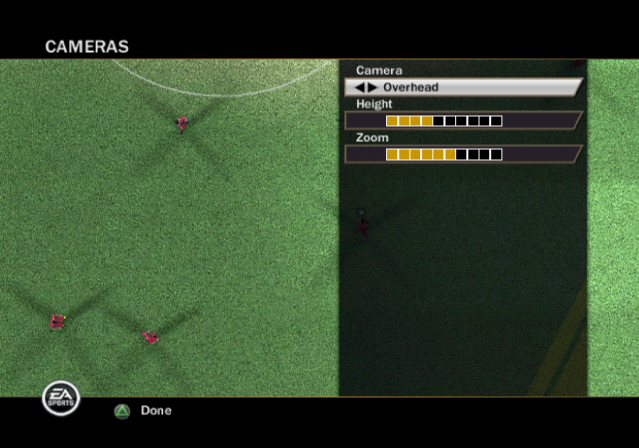
Internally labelled as RETROCAM and Overhead in the camera options.
201934CC 00000000DBG: Free Camera#

Internally labelled as ALLOW_DEBUG_FREE_CAM, but it seems to be barely functional. There's no way to control it yourself, it may randomly freak out, and even crash the game. It can be very slightly moved around by screwing with the Height and Zoom parameters of the camera while in the options menu, but that's just awful.
20193560 00000000(Source: Edness)
Debug Displays#

A few debug displays that shows the frame rate and memory usage. It also has a different Online debug display that can only be drawn if the FPS/Memory display is active, but since this game has no online play, it's quite useless. The 1st code activates the FPS/memory usage and the 2nd one activates the Online display.
EUR, AUS |
USA |
|---|---|
006E0E54 00000001 |
006E0DD4 00000001 |
(Source: Edness)
|
The FIFA/FC series | |
|---|---|
|
CD-i |
|
|
SNES |
|
|
Genesis |
FIFA Soccer '95 • FIFA Soccer '96 • FIFA '97 • FIFA Road to World Cup 98 |
|
Game Boy (Color) |
FIFA International Soccer • FIFA '96 • FIFA 97 • FIFA Road to World Cup 98 |
|
Game Gear |
|
|
DOS |
FIFA Soccer '96 (Prototype) |
|
Sega Saturn |
|
|
PlayStation |
|
|
Nintendo 64 |
|
|
PlayStation 2 |
|
|
GameCube, Xbox |
|
|
Nintendo DS |
FIFA Soccer 06 • FIFA World Cup: Germany 2006 • FIFA Soccer 07 • FIFA Soccer 08 • FIFA Soccer 09 |
|
Wii |
|
|
Windows |
FIFA Soccer 2005 • FIFA Soccer 06 • FIFA 11 • FIFA 14 • FIFA 15 • FIFA 17 |
|
Xbox 360, PlayStation 3 |
|
|
Xbox One, PlayStation 4 |
|