The fifth main installment in the Darius series, which introduced concepts such as screen-clearing black hole bombs. Retrospectively, it is often considered one of the greatest side-scrolling shmups of all time.
Debug Functions#
Expanded Input Test#
|
Normal |
Full |
|---|---|

|

|
Entering the Taito Code (1P Start (×3), Service Coin, 1P Start) on the switch test will greatly expand the number of inputs tested to include every possible input that the F3 system supports.
(Source: Original TCRF research)
Debug Menu#
 |
 |
Original |
Extra Version |
Enabling the following MAME cheat grants access to a debug menu upon inserting a credit. The code for the Original version applies to the dariusg, dariusgj and dariusga sets, while the Extra Version code applies to dariusgx.
Original |
Extra Version |
|---|---|
|
|
The functions are as follows:
- GAME - Redirects the player to the "credit entered" screen.
- BOSS TEST - Allows the player to fight against the bosses of each zone over a blue background. The only ways to exit this screen are by going to the operator menu or by resetting the game.


- OBJECT TEST - Allows the player to view objects, as well as their palettes and addresses. The only ways to exit this screen are by going to the operator menu or by resetting the game.
Controls:- 1P Up/Down - Switch parameters
- 1P Left/Right - Toggle parameters
- 1P A - Confirm
- 2P Up/Down/Left/Right - Move object
- 2P A - Change color profile


- SCREEN TEST - Allows the player to view background tiles, as well as their palettes and addresses. The only ways to exit this screen are by going to the operator menu or by resetting the game.
Controls:- 1P Left/Right - Change tile
- 1P Up/Down - Change color bank
- 2P Up/Down/Left/Right - Move tile

- TRIGGER EDIT - Allows the player to view and edit enemy trigger points in levels.

Exclusive to Extra Version#
Aside from the functions below, a series of parameters are displayed on the top half of the screen; while they might be related to each of the game's level "phases", what they show is uncertain.
- SHOT TEST - Allows the player to verify enemy distance detection. The only ways to exit this screen are by going to the operator menu or by resetting the game.

- ENEMY TEST - Also allows the player to view and edit enemy trigger points in levels, though it seems to be much less elaborate. It's possible to exit the main editing screen by pressing 1P C twice.

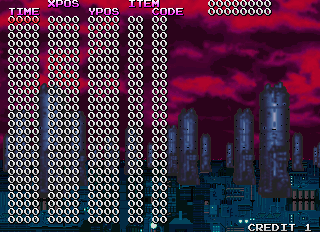
- OTHER TEST - A background stretching function. The only ways to exit this screen are by going to the operator menu or by resetting the game.
Controls:- 1P Left/Right - Stretch horizontally
- 1P Up/Down - Stretch vertically
- 2P Up/Down/Left/Right - Move

(Source: ねこ自慢ブログ (升) Wayder Cheat 0.168)
"Pause" Debug Functions#
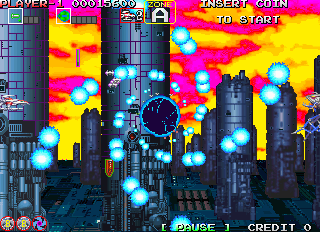

In the Extra Version, pressing 1P C allows the player to pause/unpause the game; pressing it while holding 2P C brings up a series of debugging functions. While they are not normally accessible in the original releases, they can be enabled by using the following code:
<cheat desc="Pause Button">
  <script state="run">
    <action>maincpu.mb@01029F=A2</action>
    <action>maincpu.mq@010322=611C4EB9000B6F74</action>
    <action>maincpu.mq@01032A=082D0000EBB567EE</action>
    <action>maincpu.mq@010332=2F3C0000FFFE4E42</action>
    <action>maincpu.mq@01033A=588F6000FEF86100</action>
    <action>maincpu.mq@010342=00DE610E1B6DEBB4</action>
    <action>maincpu.mq@01034A=EBB508AD0007EBB4</action>
    <action>maincpu.mq@010352=4E754A2DA23F667E</action>
    <action>maincpu.md@0B6FDC=0006A225</action>
    <action>maincpu.md@0B6FEC=0006A228</action>
    <action>maincpu.md@0B702C=4E714E71</action>
    <action>maincpu.md@0B7072=6600FFC8</action>
    <action>maincpu.mq@0B7076=4E714E714E714E71</action>
    <action>maincpu.mb@0C3A17=8C</action>
    <action>maincpu.mb@0C3A33=8C</action>
    <action>maincpu.mq@0C3F62=1168000C001D082D</action>
    <action>maincpu.mq@0C3F6A=00001D3667003B26</action>
    <action>maincpu.mq@0C3F72=4AA800246E003C62</action>
    <action>maincpu.mq@0C3F7A=217C000100000024</action>
    <action>maincpu.mq@0C3F82=117C0002001D6000</action>
    <action>maincpu.mw@0C3F8A=3C50</action>
    <action>maincpu.mw@0C7A90=4EF9</action>
    <action>maincpu.mw@0C7A94=3F62</action>
  </script>
  <script state="off">
    <action>maincpu.mb@01029F=9E</action>
    <action>maincpu.mq@010322=61000018082D0000</action>
    <action>maincpu.mq@01032A=EBB567F22F3C0000</action>
    <action>maincpu.mq@010332=FFFE4E42588F6000</action>
    <action>maincpu.mq@01033A=FEFC610000E26100</action>
    <action>maincpu.mq@010342=00101B6DEBB4EBB5</action>
    <action>maincpu.mq@01034A=08AD0007EBB44E75</action>
    <action>maincpu.mq@010352=4A2DA23F6600007E</action>
    <action>maincpu.md@0B6FDC=0000A221</action>
    <action>maincpu.md@0B6FEC=0001A220</action>
    <action>maincpu.md@0B702C=536D8090</action>
    <action>maincpu.md@0B7072=67000010</action>
    <action>maincpu.mq@0B7076=082D0000A22166BE</action>
    <action>maincpu.mb@0C3A17=62</action>
    <action>maincpu.mb@0C3A33=62</action>
    <action>maincpu.mq@0C3F62=0000000000000000</action>
    <action>maincpu.mq@0C3F6A=0000000000000000</action>
    <action>maincpu.mq@0C3F72=0000000000000000</action>
    <action>maincpu.mq@0C3F7A=0000000000000000</action>
    <action>maincpu.mq@0C3F82=0000000000000000</action>
    <action>maincpu.mw@0C3F8A=0000</action>
    <action>maincpu.mw@0C7A90=1168</action>
    <action>maincpu.mw@0C7A94=001D</action>
  </script>
</cheat>
The functions are as follows:
- EXIT - Goes back to regular gameplay.
- GAME LEVEL - Adjusts the game difficulty. The higher the meter, the harder the game.

- SLOW LEVEL - Adjusts the game's speed. It is normally set to 0 (normal speed), and the higher the meter, the slower the game gets. When it's active, a "SLOW" text appears at the bottom corner of the screen.


- NO DEATH - Enables/disables invincibility.

- HIT MARK - Enables/disables hitbox viewing.


- AUTO SHOT - Adjusts the bullet shooting frequency. The higher the meter, the shorter the bullet shooting interval is.

- COLOR EDIT - Allows the player to edit color palettes.


- DISPLAY - Toggles between upright and flipped screens.
- AUTO PLAY - Would presumably toggle between human-controlled gameplay and autoplay, using routines from the game's demo, but it doesn't seem to work.

- AUTO ZONE - Presumably a level warping function, but it doesn't seem to work.

- TEST MODE - Redirects the player to the operator menu.
(Source: ねこ自慢ブログ (升) Wayder Cheat 0.168)
Unused Graphic#

This object, labeled as BOS0R14 in the game's Object Test menu, is a placeholder stored alongside the graphics for the Zone A boss, Golden Ogre.
(Source: ねこ自慢ブログ (升) Wayder Cheat 0.168)
Unused Text#
Starting from 0xB8AE8 (original)/0xB8C20 (Extra Version) in the game's memory is a set of unused text strings. Given the Taito copyright text strings directly follow them, these strings could have been part of an earlier version of the game's title screen.
THE SUPPLEMENTAL STORY

 OF

  OOOO   OOO  OOOO  OOO O   O  OOO
  O   O O   O O   O  O  O   O O   O
  O   O O   O O   O  O  O   O O
  O   O O   O O   O  O  O   O O
  O   O OOOOO OOOO   O  O   O  OOO
  O   O O   O O O    O  O   O     O
  O   O O   O O  O   O  O   O     O
  O   O O   O O   O  O  O   O O   O
  OOOO  O   O O   O OOO  OOO   OOO
Revisional Differences#
Sometime in 1995, a revision of Darius Gaiden, known as Darius Gaiden Extra Version, was released. Its origin is uncertain, with some claiming it is an unofficially hacked version of the original, while others claim it is official, albeit with an extremely limited release. Internally, it is known as v2.7, with a build date of March 6, 1995, compared to the original release's v2.5, dated September 19, 1994.
- The interval between each bullet fired by the player is lower in Extra Version; this can be seen in the "Pause" Debug Menu, in which the Auto Shot value is set to 80 by default, rather than the original version's 1D.
- In Extra Version, inserting a new credit as Player 2 enters a new mode in which the player goes through all of the game's zones in order, rather than in branched paths like the original release. The branched path still occurs when inserting a new credit as Player 1, but the level order was modified. Note that the level names take in consideration the original version's order.
Original |
|
|---|---|
Zone |
Captain/Bosses |
Phase 1 |
|
Zone A |
Deep-Sea Smelt |
Phase 2 |
|
Zone B |
Slug Fish |
Zone C |
Slug Fish |
Phase 3 |
|
Zone D |
Crested Bigscale |
Zone E |
Crested Bigscale |
Zone F |
Crested Bigscale |
Phase 4 |
|
Zone G |
Prickly Angler |
Zone H |
N/A |
Zone I |
Prickly Angler |
Zone J |
N/A |
Phase 5 |
|
Zone K |
Valdivia Hoshinonis |
Zone L |
Valdivia Hoshinonis |
Zone M |
N/A |
Zone N |
Valdivia Hoshinonis |
Zone O |
Valdivia Hoshinonis |
Phase 6 |
|
Zone P |
Sheepshead Wrasse |
Zone Q |
Sheepshead Wrasse |
Zone R |
Sheepshead Wrasse |
Zone S |
Sheepshead Wrasse |
Zone T |
Sheepshead Wrasse |
Zone U |
Sheepshead Wrasse |
Phase 7 |
|
Zone Z' |
Vampire Squid |
Zone V |
Vampire Squid |
Zone W |
Vampire Squid |
Zone X |
Vampire Squid |
Zone Y |
Vampire Squid |
Zone Z |
Vampire Squid |
Zone V' |
Vampire Squid |
References#
|
The Darius series | |
|---|---|
|
Arcade |
Darius • Sagaia • Darius Gaiden • G-Darius |
|
TurboGrafx-16 |
|
|
TurboGrafx-CD |
|
|
Genesis |
|
|
Sega Saturn |
|