 This article has a talk page!
 Prototype Info
 Prerelease Info
 Unused DialogueThe announcer might have more unused lines than used ones.
Unused Graphics#
BPO_load_controller#
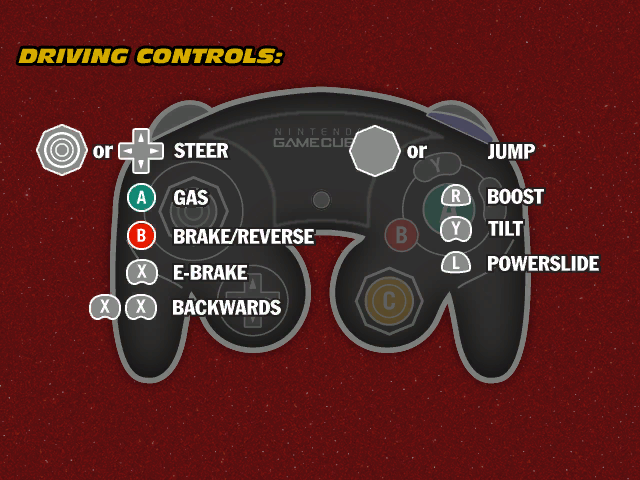
UI\BPO_load_controller is an unfinished version of the driving controls screen that appears while the game is loading the first level. Oddly, While the Xbox controller and PlayStation 2's DualShock 2 controller versions of this loading screen can be found in their respective versions, the GameCube controller can not be found in the files in the Nintendo GameCube version of the game. Instead it's found in the Nintendo Wii version of the game, suggesting that the Wii port is built off of the GameCube version. 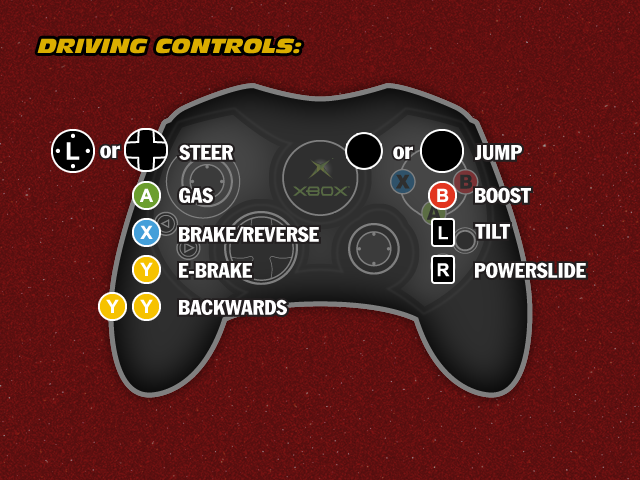

Character Icons#


Unused icons for Lizzie, Frank, Model Ts, and Stanley can be found in UI\Tex. There is also an early Lenny icon only present in the GameCube and Wii version's files.
Asphalt_slow_test.bmp#

Scenes\CD\Tex\Asphalt_slow_test.bmp appears to be some sort of placeholder texture. 
Preview Placeholders#
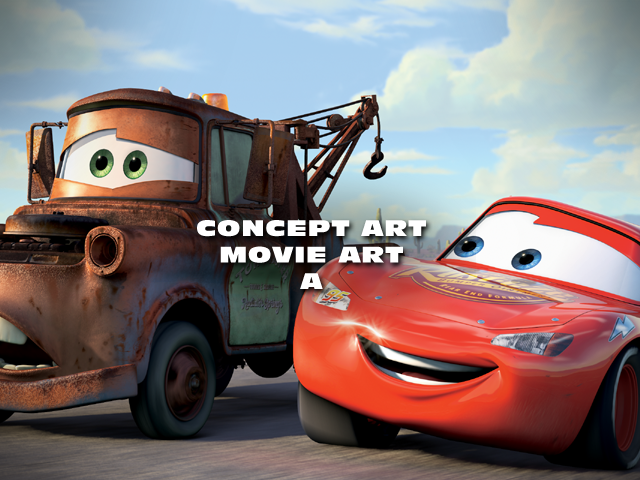
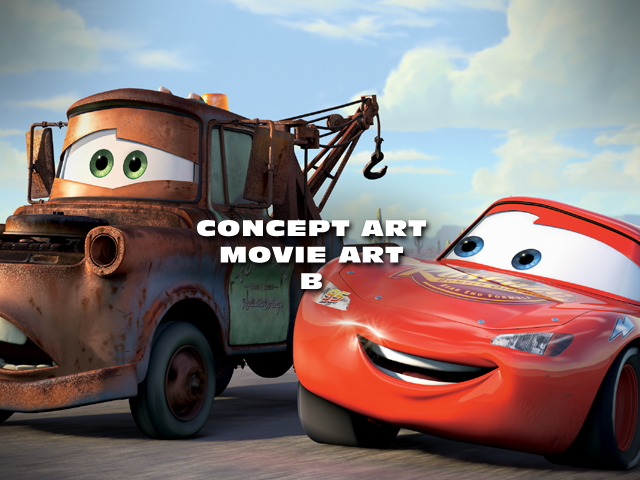
Two placeholder preview graphics for concept art are present in UI\FE_UI.xbox.str. 

Bonus Content Placeholders#
UI\FE_UI_Full.xbox.str contains eight placeholder images for various items that can be unlocked in the Bonus Content menu.


Loading Screens#



Placeholder loading screen artwork for "Mater's Speedy Circuit" and "Mater's Countdown Clean-up." The word "Target" in their names refers to the fact that, in most versions of the game, these two events have to be unlocked through a cheat code that was only included with copies of the game sold at Target stores.
There's also a nighttime variant of the default loading screen which isn't used, even when loading the night version of Radiator Springs.
Unused Audio#
Unused Music#
An additional unused licensed song, Licensed6, can be found in all console versions. It is a copy of "Go Faster" by The Black Crowes.
(Source: Vladimir29)
Score_DP_1 is a song found in the PlayStation 2 and Xbox releases, which is a copy of "Drivin' My Life Away" by Eddie Rabbitt.
Unused Cutscenes#
|
|
To do: |
There are a bunch of cutscenes that go unused in the game. Some are part of existing events while others are part of events that went unused.
Tow Mater#
Watch on YouTubeAll cutscenes from the unused event Tow Mater are still present in the files of the game. This includes the opening cutscene that was included as an unlockable FMV in the deleted scenes section, a cutscene of Mater grabbing a car with his hook, a success cutscene of Mater dropping off a car at Doc's garage and a failure cutscene if Mater fails to tow the car to Doc's garage in time.
The opening cutscene is split into 2 files, meaning that you can skip from the first half to the cutscene to the second half. Despite this, the finalized audio of the cutscene can be found in the Wii and PS2 versions of the game as one singular file. This suggest that the split happened after mastering the audio was finished.
In the cutscene, the objects Mater tows that are present in the deleted scenes FMV version of the event are missing. McQueen's eyelids are also animated slightly differently. Each cutscene uses a singular camera to cut from shot to shot instead of multiple like other cutscenes in the game. This change in how the camera works was presumably made to avoid the issue of the camera quickly moving to the correct position in the 1-camera set-up instead of instantly cutting to it, causing a weird effect.
The cutscene also had yet to have its subtitles timed with the dialogue, meaning that they don't show up at all. They can be manually timed to the cutscene so they can show up in-game, as shown in the video.
The other cutscenes cut to black too quickly, due to referencing an outdated fade-in/fade-out system. This too was changed in the video to see the full cutscene. The towing and success cutscenes were seemingly meant to feature other cars being picked up and dropped off, but none are properly set up to appear.
Flo's Fuel Up Countdown Opening Cutscene#
Watch on YouTubeUnlike Tow Mater, this cutscene is very unfinished. Aside from missing audio, no subtitle timings and early camera system, neither of the characters animate much, if at all. Aside from that, Flo's wheels keep bizzarely growing in size until the end of the cutscene.
Sherrif's Hot Pursuit: Success#
|
|
To do: |
Watch on YouTubeSherrif's Hot Pursuit has a success cutscene that works with every speeder he catches, including McQueen for the multiplayer mode. Some of these characters have broken eye animations, but the cutscene fully works otherwise.
Despite it being a single cutscene, there are multiple audio files for the same cutscene, meant for each respective speeder. The audio files don't seem to be different though, which makes having multiple audio files rather odd.
Oddly enough, some of the characters were re-animated in the Xbox 360 port, despite the cutscene going unused there as well.
Darrell Cartrip Announcement; Los Angeles International Speedway#
|
|
To do: |
Watch on YouTubeRight before the final race in Los Angeles International Speedway would've started, there would've been a cutscene of Darrell Cartrip announcing the race. This cutscene is much more finalized than other unused cutscenes, having finalized audio and multiple cameras instead of 1.
When the camera pans over the raceway, you can see Darrell's booth in the center of the map.
Just like the Sherrif's Hot Pursuit Succes cutscene, Darrell was re-animated in the Xbox 360 port, despite the cutscene still going unused.
Unused Cutscene Menu#
Found in Act\FrontEndUI is a file called CutsceneMenu.aty. Loading into this menu reveals a rather rudementary menu with no background that allows the user to select any of the storymode cutscenes used in the final game, along with the unused cutscene of Darrell Cartrip in Los Angeles International Speedway, suggesting that the cutscene was scrapped very late in development.
Each cutscene is referred to by its internal name (actfolder/cs_chapternumber_eventnumber_prefix). Among these cutscenes is an option to play all listed cutscene in order of the list. The user can press A to play a cutscene. Pressing A will skip the current cutscene. In the case of "Play All", this will bring up the next cutscene. If all cutscenes have played or if B is pressed, the game will go back to the cutscene menu.
(Source: Not Pronounceable)
Unused Text#
|
|
To do: |
config.txt#
The file debug/config.txt is present but does not appear to be read. It might have been just something that was used only in debug builds.
[General]
PrintFPS=True
PrintFOPEN=T
VibrateControllers=T
AssertsOn=True
VSync=30hz
ForceMin30hz=FALSE
DefaultKeyboardLayout=CARS
ResourceFileOverride=True
OutputCMTCollisionMessages=F

[Cars]

;startingbonuspoints=100000
;unlockallbonuscontent=T

;-----GameMode-----
GameMode = Story
;GameMode = Arcade
;GameMode = VS
;GameMode = Test

;-----Difficulty-----
Difficulty = Easy
;Difficulty = Normal
;Difficulty = Hard
;Difficulty = Practice

;-----Story Type-----
;StoryType = None
;StoryType = Compact
StoryType = FullSize

;-----TimeOfDay------
TimeOfDay = Day
;TimeOfDay = Night

;-----Language------
LanguageText = English
LanguageDialogue = English

;LanguageText = French
;LanguageDialogue = French

;LanguageText = German
;LanguageDialogue = German

;LanguageText = Italian
;LanguageDialogue = Italian

;LanguageText = Spanish
;LanguageDialogue = Spanish

;LanguageText = Swedish
;LanguageDialogue = Swedish

;LanguageText = Japanese
;LanguageDialogue = Japanese

;LanguageText = Russion
;LanguageDialogue = Russion

;LanguageText = Polish
;LanguageDialogue = Polish

;LanguageText = British
;LanguageDialogue = British

;LanguageText = Portuguese
;LanguageDialogue = English

;LanguageText = Dutch
;LanguageDialogue = English

;LanguageText = Danish
;LanguageDialogue = English

;LanguageText = Norwegian
;LanguageDialogue = English

;LanguageText = Finnish
;LanguageDialogue = English

;LanguageText = Korean
;LanguageDialogue = English

;-----AnimViewer-----
;Set GameMode to Arcade and EnableUIStreaming to False.
;Activity = AnimViewer

;-----UI Activities-----
;Activity = FrontEndUI\BootUpUI
;Activity = FrontEndUI
;Activity = Credits

;-----Piston Cup Race Activities-----
;Group = PC_1_8_MCQ
;Activity = PC_1_8
;Activity = PC_2_11
;Activity = PC_3_8
;Activity = PC_4_8
;Activity = PC_6_5

;-----World Explore Activities-----
CurrentChapter=Chp_1A
Activity = EX_RS
;Activity = EX_OV
;Activity = EX_TF
;Activity = EX_CD

;-----World Race Activities-----
;Activity = RR_1_1
;Activity = RR_1_2
;Activity = RR_1_5
;Activity = RR_2_0
;Activity = RR_2_3
;Activity = RR_2_5
;Activity = RR_2_7
;Activity = RR_3_4
;Activity = RR_3_6
;Activity = RR_3_7
;Activity = RR_4_2
;Activity = RR_4_3
;Activity = RR_4_7
;Activity = RR_5_2
;Activity = RR_5_3
;Activity = RR_5_4
;Activity = RR_6_1
;Activity = RR_6_2
;Activity = RR_6_3

;-----Mini Games Activities-----
;; LEVEL 1
;Activity = MG_1_6TT\MG_1_6TT12
;; LEVEL 2
;Activity = MG_1_6TT\MG_1_6TT15
;; LEVEL 3
;Activity = MG_1_6TT\MG_1_6TT6
;; LEVEL 4
;Activity = MG_1_6TT\MG_1_6TT13
;; LEVEL 5
;Activity = MG_1_6TT\MG_1_6TT9
;; LEVEL 6
;Activity = MG_1_6TT\MG_1_6TT4
;; LEVEL 7
;Activity = MG_1_6TT\MG_1_6TT11
;; LEVEL 8
;Activity = MG_1_6TT\MG_1_6TT14

;Activity = MG_2_4HH\MG_2_4HH1
;Activity = MG_2_4HH\MG_2_4HH2
;Activity = MG_2_4HH\MG_2_4HH3
;Activity = MG_2_4HH\MG_2_4HH4
;Activity = MG_2_4HH\MG_2_4HH5
;Activity = MG_2_4HH\MG_2_4HH6
;Activity = MG_2_4HH\MG_2_4HH7
;Activity = MG_2_4HH\MG_2_4HH8
;Activity = MG_3_5HP\MG_3_5HP1
;Activity = MG_3_5HP\MG_3_5HP2
;Activity = MG_3_5HP\MG_3_5HP3
;Activity = MG_3_5HP\MG_3_5HP4
;Activity = MG_3_5HP\MG_3_5HP5
;Activity = MG_5_6HS\MG_5_6HS
;Activity = MG_5_7LS\MG_5_7LS
;Activity = MG_Pitstop\MG_Pitstop_PM_MCQ
;Activity = MG_Pitstop\MG_Pitstop_LA_MCQ
;Activity = MG_Pitstop\MG_Pitstop_MS_MCQ
;Activity = MG_Pitstop\MG_Pitstop_SM_MCQ
;Activity = MG_Pitstop\MG_Pitstop_SV_MCQ

;-----Skill Activities-----
;Activity = SK_1_4
;Activity = SK_2_6\SK_2_6_1
;Activity = SK_2_6\SK_2_6_2
;Activity = SK_2_6\SK_2_6_3
;Activity = SK_3_2

;-----Cutscenes-----------
;Activity = RR_1_1\CS_1_1A
;Activity = RR_1_1\CS_1_1A2
;Activity = RR_1_1\CS_1_1B
;Activity = RR_1_1\CS_1_1C
;Activity = RR_1_1\CS_1_1Z
;Activity = EX_RS\CS_Intro
;Activity = RR_1_2\CS_1_2A
;Activity = RR_1_2\CS_1_2C
;Activity = SK_1_4\CS_1_4A
;Activity = RR_1_5\CS_1_5A
;Activity = RR_1_5\CS_1_5C
;Activity = RR_1_5\CS_1_5S
;Activity = MG_1_6TT\CS_1_6A
;Activity = MG_1_6TT\CS_1_6B
;Activity = MG_1_6TT\CS_1_6F
;Activity = PC_1_8\CS_1_7A
;Activity = PC_1_8\CS_1_8A
;Activity = PC_1_8\CS_1_8B
;Activity = RR_2_0\CS_2_0A
;Activity = RR_2_0\CS_2_0A2
;Activity = RR_2_0\CS_2_0C
;Activity = RR_2_0\CS_2_0S
;Activity = SQ_2_2PH\CS_2_2A
;Activity = SQ_2_2PH\CS_2_2S
;Activity = RR_2_3\CS_2_3A
;Activity = RR_2_3\CS_2_3C
;Activity = RR_2_3\CS_2_3S
;Activity = MG_2_4HH\CS_2_4A
;Activity = RR_2_5\CS_2_5A
;Activity = RR_2_5\CS_2_5C
;Activity = SK_2_6\CS_2_6A
;Activity = SK_2_6\CS_2_6I
;Activity = SK_2_6\CS_2_6II
;Activity = SK_2_6\CS_2_6III
;Activity = RR_2_7\CS_2_7A
;Activity = RR_2_7\CS_2_7C
;Activity = PC_2_11\CS_2_10A
;Activity = SK_3_2\CS_3_2A
;Activity = SK_3_2\CS_3_2S
;Activity = RR_3_4\CS_3_4A
;Activity = RR_3_4\CS_3_4C
;Activity = RR_3_4\CS_3_4S
;Activity = MG_3_5HP\CS_3_5FF
;Activity = MG_3_5HP\CS_3_5SS
;Activity = RR_3_6\CS_3_6A
;Activity = RR_3_6\CS_3_6A2
;Activity = RR_3_6\CS_3_6C
;Activity = RR_3_7\CS_3_7A
;Activity = RR_3_7\CS_3_7C
;Activity = RR_3_7\CS_3_7S
;Activity = PC_3_8\CS_3_8A
;Activity = RR_4_2\CS_4_2A
;Activity = RR_4_2\CS_4_2C
;Activity = RR_4_2\CS_4_2Z
;Activity = RR_4_3\CS_4_3A
;Activity = RR_4_3\CS_4_3C
;Activity = RR_4_7\CS_4_7A
;Activity = RR_4_7\CS_4_7C
;Activity = RR_5_2\CS_5_2A
;Activity = RR_5_2\CS_5_2A2
;Activity = RR_5_2\CS_5_2C
;Activity = RR_5_2\CS_5_2z
;Activity = RR_5_3\CS_5_3A
;Activity = RR_5_3\CS_5_3C
;Activity = RR_5_3\CS_5_3S
;Activity = RR_5_4\CS_5_4A
;Activity = RR_5_4\CS_5_4C
;Activity = RR_5_4\CS_5_4S
;Activity = MG_5_6HS\CS_5_6A
;Activity = MG_5_6HS\CS_5_6I
;Activity = MG_5_6HS\CS_5_6II
;Activity = MG_5_6HS\CS_5_6S
;Activity = MG_5_7LS\CS_5_7A
;Activity = MG_5_7LS\CS_5_7S
;Activity = PC_4_8\CS_5_8A
;Activity = PC_4_8\CS_5_8B
;Activity = PC_4_8\CS_5_8C
;Activity = PC_4_8\CS_5_8S
;Activity = RR_6_1\CS_6_1A
;Activity = RR_6_1\CS_6_1C
;Activity = RR_6_2\CS_6_2A
;Activity = RR_6_2\CS_6_2C
;Activity = RR_6_3\CS_6_3A
;Activity = RR_6_3\CS_6_3C
;Activity = PC_6_5\CS_6_5A
;Activity = PC_6_5\CS_6_5B
;Activity = PC_6_5\CS_6_5S
;Activity = PC_6_5\CS_6_5S2
;Activity = PC_6_5\CS_6_5S3

;-----VS Activities-----
;Activity = RR_1_1\RR_1_1_VS
;Activity = RR_2_3\RR_2_3_VS
;Activity = RR_2_7\RR_2_7_VS
;Activity = RR_3_6\RR_3_6_VS
;Activity = RR_4_3\RR_4_3_VS
;Activity = RR_5_4\RR_5_4_VS

;Activity = MG_1_6TT\MG_1_6TT12_VS
;Activity = MG_1_6TT\MG_1_6TT15_VS
;Activity = MG_1_6TT\MG_1_6TT6_VS
;Activity = MG_1_6TT\MG_1_6TT13_VS
;Activity = MG_1_6TT\MG_1_6TT9_VS
;Activity = MG_1_6TT\MG_1_6TT4_VS
;Activity = MG_1_6TT\MG_1_6TT11_VS
;Activity = MG_1_6TT\MG_1_6TT14_VS

;Activity = MG_3_5HP\MG_3_5HP_VS
;Activity = PC_1_8\PC_1_8_VS
;Activity = PC_2_11\PC_2_11_VS
;Activity = PC_3_8\PC_3_8_VS
;Activity = PC_5_8\PC_5_8_VS
;Activity = PC_6_5\PC_6_5_VS
;Activity = MG_Pitstop\MG_Pitstop_PM_MCQ_VS


;-----Temp Activities-----
;Activity = EX_FE
;Activity = EX_CD
;Activity = EX_PM
;Activity = EX_SM
;Activity = EX_MS
;Activity = EX_SV
;Activity = EX_PH
;Activity = EX_LA
;Activity = TestUI
;Activity = RustBucket
;Activity = SargesBootCamp
;Activity = ImportChallenge02
;Activity = CUP_Indy_Race01
;Activity = stress_test

;-----EX_RS Start Positions-----
;Start=DocGarageStart
;Start=FillmoreStart
;Start=DocStart
;Start=DriveInStart
;Start=MatStart
;Start=FlosStart
;Start=LizzieStart
;Start=LuigiStart
;Start=MaterStart
;Start=OV2RSStart
;Start=RamoneStart
;Start=RR_1_1Start
;Start=SallyStart
;Start=SargeStart
;Start=SheriffStart
;Start=TF2RSStart

;-----EX_TF Start Positions-----
;Start=WheelWellStart
;Start=ImportsStart
;Start=SallyTFStart
;Start=RS2TFStart

;-----EX_OV Start Positions-----
;Start=OVGasStart
;Start=RS2OVStart

;-------Default Start--------
Start=Player1Start

SplashScreen=UI\load_logo
CharName=McQ
Char2Name=McQ
;charName=DJ
;charName=Imp2
;charName=Imp3
CharNumber=0
charPaintType=Solid
charColor1=173,243,3,255
charColor2=173,243,3,255
VehicleManualTransmission=F
LoadAI=T
BuildTrackResFiles=F
UseVehicleEngineSound=T
PlayMusic=T
BuildSplineMode=F
BrakeWhenResting=F
BrakeWhenRestingThreshold=10.0
AnalogGas=F
ShowCoords=T

ControlType=VehicleRelative
;ControlType=CameraRelativeWithPhysics
;ControlType=CameraRelativeNoPhysics

CameraType=Follow
;CameraType=LooseFollow
;CameraType=Bezier

;use this to tune the motion blur that occurs when the player uses NOX boost
NOXMotionBlurPercentage=60.0

;use these to tune the NOX boost camera
NOXCameraFieldOfView = 93.0
NOXCameraOffset = 3.0

;Use this to set the Boost at load time
Boost_Lvl = 1

;Use this to set the suspension model, 1 for sim, 0 for arcade
SuspensionLoadType = 1.0

;Use this to enable/disable vehicle audio
EnableVehicleAudio=TRUE

;Use this to enable/disable vehicle motion blur overlays
EnableVehicleMotionBlurOverlay=True

;Use to enable/disable camera snap-back while moving.
EnforceFreeCameraSpeed=TRUE

;Use to set-up cinema mode. This allows second controller to control camera.
CinemaMode=FALSE

UnlockAllEvents = TRUE
UnlockAllAbilities = TRUE

;
;Streaming and resource file flags
;

;this flag enables/disables ALL resource files
;
EnableAllResFiles              = TRUE

;this flag enables/disables activity motion streaming
;   (activity motion streaming resource files)
;   *_ActMot.platform.str
;   *_ActMot.platform.res

EnableActivityStreaming        = TRUE

;this flag enables/disables dialogue motion streaming
;   (character dialogue motion streaming resource files)
;   *.Dlg.platform.str
;   *.Dlg.platform.res

EnableDialogueMotionStreaming  = TRUE

;this flag enables/disables non streaming resource files
;   (character resource file)
;   *.arc.platform.res

;   (scene resource file)
;   *.ns.platform.res

;   (activity group resource file)
;   *_ActGrpNS.platform.res

;   (dialogue audio resource file)
;   DlgAudio.res

;   (story data resource file)
;   Story.res

EnableNonStreamingResFiles     = FALSE

;;;;;;;;;;;;;;;;;;;;;;;;;;;;;;;;;;;;;;;;;;;;;
; Resource Building
;;;;;;;;;;;;;;;;;;;;;;;;;;;;;;;;;;;;;;;;;;;;;
EnableResourceBuilding         = FALSE
BuildResourceFiles             = FALSE
BuildIniFiles                  = TRUE
BuildNewResourcesOnly          = TRUE
IniFileOutputDirectory         = "Res\Ini\"

AllowVehiclePhysicsRecording   = FALSE

[Arcade]
;NumberOfAI=4
;AINames=Sal, Hud, Ram, Fle
Debug Menu Text#
At 0x33647F in the Xbox executable is a bunch of text that seems to be from a debug menu.
F0 (~): CollisionObject - Increment DisplayLevel 0 (L-ALT): Network - Lobby Set Room 0 1 (~): Reload Shaders 1 (L-ALT): Network - Lobby Set Room 1 2 (~): Toggle UI On/Off 2 (L-ALT): Network - Lobby Set Room 2 3 (~): Toggle Ecosystem 3 (L-ALT): Network - Lobby Set Room 3 4 (~): Print Shader Timings 4 (L-ALT): Network - Lobby Set Room 4 4 (CTRL): TMM - Toggle Debug Dump 5 (~): Toggle SkyCube 6 (~): Toggle Shadows 6 (L-ALT): Network - Connect to Remote 123 7 (~): Toggle TimeGPU 7 (L-ALT): Network - Connect to Remote 023 8 (~): Portals - Render Debug Graphics 8 (L-ALT): Network - Connect to Remote 013 8 (R-CTRL): Portals - Toggle Portal Culling 8 (L-CTRL): Portals - Increment Debug Recursion Depth 9 (~): CollisionObject - Decrement DisplayLevel 9 (L-ALT): Network - Connect to Remote 012 9 (L-SHIFT): UI - Reload all layouts in the current page set 9 (L-CTRL): UI - Restart the current page A (~): Toggle AmbientLight Edit Mode A (L-ALT): ScriptManager - Write ClassList.txt A (R-ALT): ScriptManager - Print Registered Types A (R-CTRL): AnimatedToy - Show Debug Graphics B (~): Toggle Water On/Off B (L-SHFT): Increase Blue B (R-SHFT): Decrease Blue B (R-CTRL): Show BaseDisplacement Debug B (L-ALT): ScriptManager - Print Scripts B (R-ALT): ScriptManager - Print Registered Names/Scripts C: Physics Character - Toggle Debug Render C (~): CollisionObject - Set RenderMode C (L-SHFT): Reload Cinema Camera Parameters C (R-SHFT): Toggle Visibility Camera Lock C (L-ALT): Network - Lobby Eject Player C (L-CTRL): Network - Connect to Remote Address B C (R-CTRL): Network - Connect to Remote Address A D (~): Toggle DebugOverlay on/off D (L-CTRL): Toggle Light Debug Draw D (L-CTRL): Network - DebugContentExchange Connect D (R-CTRL): Network - DebugContentExchange Connect E: Toggle Ecosystem Debug E (~): Reload Particle Emitters E (L-ALT): Network - Lobby End Game F (~): Toggle Fog Edit Mode F (L-ALT): FourWheelVehicle - Reload Physics Params F (R-ALT): FourWheelVehicle - Reset Position/Orientation F (L-CTRL): FourWheelVehicle - Start Wreck F (R-CTRL): FourWheelVehicle - Render Physics Info G (L-SHFT): Increase Green G (R-SHFT): Decrease Green G (L-ALT): Network - Query String G (~): Decrement DebugOverlay NetPage H (~): Reload Water H (L-SHFT): Increase Haziness H (L-CTRL): Decrease Haziness H (L-ALT): Network - Lobby Host Room I (~): TMM - Rebuild IPU Cache J (~): TMM - Dump Texture Queue J (L-ALT): Network - Lobby Join Room J (R-CTRL): Particles - Render Debug Lines L: Physics Character - Reload L (~): Toggle Light Edit Mode L (L-CTRL): UIManager - Increment Language L (R-CTRL): UIManager - Decrement Language L (SHFT): Reload Physics Parameters L (L-ALT): Network - Lobby Leave Room M (ALT): UIManager - Force Strings to Max Length M (~): Dump Memory Map to File M (CTRL): Print SIF Memory Report N (L-CTRL): Network - Connect to cnn.com N (R-CTRL): Network - Connect to yahoo.com O: Objective Manager - Set Next Objective as competed P: Physics Character - Toggle ManuallyEnablePhysics P (~): Print Debug Overlay P (R-CTRL): ParticleToys - Reset & Enable P (L-ALT): Network - Lobby Dump Players R: Physics Character - Reset R (~): Reload Materials R (L-SHFT): Increase Red R (R-SHFT): Decrease Red R (CTRL): Reload Materials and Textures R (L-ALT): Network - Lobby Dump Rooms R (R-ALT): ScriptManager - Reload Scripts S: Modify SceneSoundRenderMode S (~): Decrement DebugOverlay Page S (R-CTRL): Network - Send Public Message S (L-CTRL): Network - Send Private Message S (L-ALT): Network - Lobby Start Game S (R-ALT): Display Sound Driver Memory Used S (L-SHFT): Motocross - Enable Steering Simulation S (R-SHFT): Motocross - Debug Stunts T: Physics Character - Toggle ManuallyEnableJointTorques T (~): Render Triggers T (ALT): Start Time Accelerator T (SHIFT): Render Matrix Toys T (L-CTRL): Reload Toy Params T (R-CTRL): Dump Timing Log V (~): Cycle VSync 30Hz, 60Hz, OFF V (L-SHFT): Increase Visibility V (L-CTRL): Decrease Visibility V (ALT): Reload CarEngineSoundEmitter W: Cause Wreck W (~): Increment DebugOverlay NetPage W (SHFT): TMM - Display Loaded Textures W (CTRL): Reload Walker File X (~): Filter Debug Id X (L-CTRL): Network - DebugContentExchange Exchange Y (~): Dump DMA Buffer Size Y (L-ALT): Network - Lobby Ready Player Z (~): Render Collision Objects Only Z (L-CTRL): Increment Collision Rendering Lighting Modes F1: Switch to DEV_KEYBOARD F2: Switch to DEV_KEYBOARD_ALT_1 F3: Switch to DEV_KEYBOARD_ALT_2 F4: Switch to DEV_KEYBOARD_ALT_3 F5: Switch to DEV_JOYSTICK F5 (ALT): Toggle Available Joysticks F6: Switch to DEV_JOYSTICK_ALT_1 F6 (~): Multipass Enable/Disable F7: Switch to DEV_JOYSTICK_ALT_2 F7 (~): Toggle WireFrame F8: Toggle Force 30hz F9: Increment Visual Memory Heap Page F10: Toggle Visual Memory Heap Mode F10 (~): Toggle Backface Cull F11 (~): Toggle Viewport Cull F12 (~): Toggle Draw Bounding Boxes NumPad0 (~): Toggle DebugLODMode NumPad1 (~): Increment Profile Mode NumPad5 (~): TMM - Decrement SceneTextureLODBias NumPad6 (~): TMM - Increment SceneTextureLODBias NumPad7 (~): TMM - Toggle MIP Edit Mode NumPad8 (~): TMM - Decrement MIP Edit K Value NumPad9 (~): TMM - Increment MIP Edit K Value NumPad. (~): Reload Config.txt NumPad- (CTRL): Decrease Near Clip Distance NumPad- (ALT): Decrease Far Clip Distance NumPad+ (CTRL): Increase Near Clip Distance NumPad+ (ALT): Increase Far Clip Distance LEFT: Decrement DebugOverlay Page LEFT (ALT): Decrement SurfaceShaderList Begin LEFT (CTRL): Decrement SurfaceShaderList Begin by 10 RIGHT: Increment DebugOverlay Page RIGHT (ALT): Increment SurfaceShaderList Begin RIGHT (CTRL): Increment SurfaceShaderList Begin by 10 UP: Increase debug overlay text size UP (ALT): Decrement SurfaceShaderList Range UP (CTRL): Decrement SurfaceShaderList Range by 10 DOWN: Decrease debug overlay text size DOWN (ALT): Increment SurfaceShaderList Range DOWN (CTRL): Increment SurfaceShaderList Range by 10 ESC: Print Debug Keys (alphabetical) ESC (SHFT): Print Debug Keys Space: Water - Render Displacement Maps SPACE (CTRL): Toggle Occlusion END: Toggle SurfaceShaderList Debugging [ (R-CTRL): Decrement PlaneView ] (R-CTRL): Increment PlaneView Print Screen: Take Screenshot Print Screen (CTRL): Set Dump Cube View Parameters F1 : Cars Camera Controller - Free Camera (CinemaCam) 2 : Cars Camera Controller - Cycle Camera Type (Follow, LooseFollow, Bezier) 3 : Cars Camera Controller - Cycle Control Type (CameraRelative, VehicleRelative) 4 : Cars World - Toggle Streaming 5 : Cars Race Activity - Toggle AI control of player vehicle 6 : Cars Race Activity - Display TargetNextNode number 7 : Cars Vehicle - toggle on and off the shadows for the vehicle 8 : Cars Race Activity - toggle vehicle player numbers on and off in race activities A (~): AmbientVehicleToys - Render line to the player A (LCTRL): AmbientSplineToys - Render splines B : Cars World - Advance to next VideoFXManager screen filter. (?) C : Simple Filtered Camera - Reload presets from file D : DebugGPS - Toggle Measure Mode (?) D (LCTRL): Cars UI Manager - Toggle debug container visibility (?) D (LSHIFT): Tractor Tipping - Test Dialogue Syncing F : Cars Follow Camera - Reload Follow Cam Presets E : CarsActivityRace - Export a snapshot of the racers physics L : CarsActivityRace - Reload the race track file E (ALT): Cars Game - Exit Game. E (CTRL): Cars Game - During object freeze, advance one frame. F (CTRL): Cars Game - Toggle object freeze H (ALT): Cars Game - Dump Hierarchy (?) K : DebugGPS - Toggle auto-marker (?) L : CarsVehicle - Reload city physics parameters (.phy file) L (CTRL): CarsVehicle - Reload cup physics parameters (.phy file) M : DebugGPS - Mark Current Location (?) N : CarsVehicle - Reload Nitrous Oxide Canisters P (~): Re-enables all PickUp Toys P : DebugGPS - Toggle Marker Visibility (?) P (ALT) : Turn on Debug PickUp Markers Q : CarsVehiclePhysics - Toggle Off writing physics to file Q (L-CTRL): ToyManager - Reload Pickup Toys R (ALT) : CarsStoryModeManager - read state to file P (LCTRL) : Cars Camera Controller - Reset Camera Controllers R (~): CarsCameraFollow - Toggle Camera Roll on and off R (LSHIFT): CarsCameraFollow - increase the camera roll amount R (RSHIFT): CarsCameraFollow - decrease the camera roll amount R (Control): CarsActivity - Reload current activity. S (~): CarsCameraFollow - Toggle Camera Swing on and off S (LSHIFT): CarsCameraFollow - increase CameraSwing S (RSHIFT): CarsCameraFollow - decrease CameraSwing S (LALT): CarsCameraFollow - increase LookSwing S (RALT): CarsCameraFollow - decrease LookSwing T (~): RaceBoundary - Render Spline Y (~): RaceTrack - Render Next AI Path M (~): CarsActivityRace - Toggle the debug map on and off V: Toggle Reverb V (CTRL): CarsWorld - Cycle through viewport configurations V (LSHIFT): CarsActivity - start vcr recording V (RSHIFT): CarsActivity - stop vcr recording V (LSHIFT): CarsActivity - start vcr playback V (RSHIFT): CarsActivity - stop vcr playback W : CarsVehiclePhysics - Toggle On writing physics to file W (ALT) : CarsStoryModeManager - write state to file * (~): CarsActivity - TIMING LOG: Record timing log. Numpad + (~): CarsActivity - TIMING LOG: Increase playback speed. Numpad - (~): CarsActivity - TIMING LOG: Decrease playback speed. Numpad Enter (~): CarsActivity - TIMING LOG: Advance one frame. Numpad / (): CarsActivity - TIMING_LOG: Play timing log. TAB: Cars Race Activity - Toggle Camera Between Racers) ; (LCTRL): Cars Race Activity - Test Left PIP Camera) ; (RCTRL): Cars Race Activity - Test Right PIP Camera) W (RCTRL): Cars Race Activity - Trigger Scripted Wreck) ~ , : CarsVehicle - increase motion blur percentage ~ . : CarsVehicle - decrease motion blur percentage (ALT) , : CarsVehicle - increase motion blur filter size (ALT) . : CarsVehicle - decrease motion blur filter size (CTRL) , : CarsVehicle - increase motion blur dialation (CTRL) . : CarsVehicle - decrease motion blur dialation ~ ] : CarsVehicle: Test next animation. ~ [ : CarsVehicle: Test prev animation. ] (CTRL) : CarsCharacter: Test next animation. [ (CTRL) : CarsCharacter: Test prev animation. INSERT (~) : CarsVehicle: Move player1 vehicle to camera position. INSERT (SHIFT) : CarsVehicle: Move player1 vehicle to next start position. DELETE (SHIFT) : CarsVehicle: Move player1 vehicle to prev start position. F1 (ALT): Network - Request Object 1 1 (ALT): Network - Release Object 1 2 (ALT): Network - Request Object 2 2 (ALT): Network - Release Object 2 C (ALT): Network - Create test arbitration object IDsSpreadsheets#
 |
Download Cars_WindowsSpreadsheets.zip File: Cars_WindowsSpreadsheets.zip (info) |
Inside the Windows port's Loc folder are three spreadsheets that were used during the game's development. BXCarsFrontEndUI.xls tracked frontend strings, while Cars_PC_Mac_Strings.xls and Cars_PC_Mac_Strings.xls.old tracked strings that needed to be localized for international releases.
Developer Comments#
Many configuration files have some comments left by the developers.
camera.ini#
; CollisionSizeFilter is the min radius of a col object needed before collision detection occurs.
; Can be used to ignore things like rails, posts, trees, etc.
; Measured in feetcinecam.ini#
; --------------------------------------------------------------
; Cinema Cam 2.0 Faq
; --------------------------------------------------------------
; pan      = left analog stick
; look     = right analog stick
;
; square   = toggle look at active object locked-on/filtered-on/off
; triangle = toggle pan speed 25%, 50%, 100%, 200%
; X        = toggle missile mode on/off
; select   = toggle ground collision on/off
; start    = re-load this file on the fly
; R3       = toggle freeze time on/off
; L1       = Climb +Y
; R1       = Dive  -Y
; L2       = Zoom FOV In
; R2       = Zoom FOV Out
; --------------------------------------------------------------
;False works like an airplane...push up to look down
;True looks where you point...push up to look uprscamera.ini#
; Follow Cam Presets

; *NOTES*
; - Define here only the cameras presets that you would like to change from their default values.
; - You can change the number of follow cams by changing 'NumberOfPresets'.  *However*, this
;   will zero out ALL follow cam preset defaults and only assign the presets given here.
; - You can edit camera presets for different viewports by naming param blocks as follows:
;   1 Player ... Preset1
;   2P horiz ... Preset1h
;   2P vert  ... Preset1v
; 3P & 4P ... Preset1qrscameraMG_TW.ini#
;This file is for the minigame towing camera, each preset corresponds to a different tow vehicle.
;1 - presets while driving to pickup location
;2 - presets for Flo
;3 - presets for Fle
;4 - presets for Ramone
;5 - presets for Doc
;6 - presets for Fillmore
;7 - presets for Sally
;8 - presets for Liz
;9 - presets for ElGarcade.txt#
This seems to say the player should not be able to choose Lightning McQueen, which would make no sense as he is the main character. The purpose of this appears to be identifying minigames starring other characters, such as Luigi to the Rescue.
; NOTE: Remove mcq as playable character. Player should not be able choose.StoryModeSubscreen.ini#
This appears to be an early outline of story mode. Of note, it lists a sixth chapter and several nonexistent events. Several of the events listed aren't referenced anywhere else. For comparison, the used file is StoryModeUI.ini.
[Chapter1]
ChapterMap = RS_Map

[Chapter1Event1]
EventLabel   = STR_RADIATOR_SPRINGS_GRAND_PRIX_LABEL
EventName    = RR_1_1
MapX         = .32
MapY         = .554

[Chapter1Event2]
EventLabel   = STR_RADIATOR_CAP_CIRCUIT_LABEL
EventName    = RR_1_2
MapX         = .32
MapY         = .554

[Chapter1Event3]
EventLabel   = STR_TOW_MATER_LABEL
EventName    = MG_1_3TW
;MapX         = .32
;MapY         = .554

[Chapter1Event4]
EventLabel   = STR_LESSON_POWERSLIDE_LABEL
EventName    = SK_1_4
MapX         = .35
MapY         = .1

[Chapter1Event5]
EventLabel   = STR_DOCS_CHALLENGE_LABEL
EventName    = RR_1_5
;MapX         = 70
;MapY         = 30

[Chapter1Event6]
EventLabel    = STR_TRACTOR_TIPPING_LABEL
EventName     = MG_1_6TT
MapX         = .52
MapY         = .554
StartActivity = MG_TractorTipping\MG_TractorTipping1

[Chapter1Event7]
EventLabel   = STR_LESSON_DRAFTING_LABEL
EventName    = SK_1_7
MapX         = .32
MapY         = .554

[Chapter1Event8]
EventLabel   = STR_PALM_MILE_SPEEDWAY_LABEL
EventName    = PC_1_8
MapX         = .32
MapY         = .554

[Chapter2]
ChapterMap = RS_Map

[Chapter2Event1]
EventLabel   = STR_SALLYS_SUNSHINE_CIRCUIT_LABEL
EventName    = RR_2_0
MapX         = .45
MapY         = .6

[Chapter2Event2]
EventLabel   = STR_PAVIN_CRAZY_LABEL
EventName    = MG_2_1PR
MapX         = .775
MapY         = .6

[Chapter2Event3]
EventLabel   = STR_LIZZIES_POSTCARD_HUNT_LABEL
EventName    = SQ_2_2PH
MapX         = .35
MapY         = .6

;[Chapter2Event4]
;EventLabel   = STR_VIEW_POSTCARD_GALLERY_LABEL
;EventName    = MG_2_2_G
;MapX         = 60
;MapY         = 30

[Chapter2Event4]
EventLabel   = STR_BOOSTIN_WITH_FILLMORE_LABEL
EventName    = RR_2_3
MapX         = .45
MapY         = .54

[Chapter2Event5]
EventLabel   = STR_LUIGIS_HUBCAP_HUNT_LABEL
EventName    = MG_2_4HH
MapX         = .33
MapY         = .58

[Chapter2Event6]
EventLabel   = STR_RADIATOR_SPRINGS_DESERT_DASH_LABEL
EventName    = RR_2_5
MapX         = .37
MapY         = .54

[Chapter2Event7]
EventLabel   = STR_SARGES_BOOT_CAMP_LABEL
EventName    = SK_2_6
MapX         = .43
MapY         = .54

[Chapter2Event8]
EventLabel   = STR_SARGES_OFFROAD_CHALLENGE_LABEL
EventName    = RR_2_7
MapX         = .08
MapY         = .22

[Chapter2Event9]
EventLabel   = STR_JUMP_AND_TILT_LABEL
EventName    = SQ_2_8
MapX         = .3
MapY         = .54

[Chapter2Event10]
EventLabel   = STR_RAMONES_JUMP_JAM_LABEL
EventName    = SQ_2_9
MapX         = .3
MapY         = .54

[Chapter2Event11]
EventLabel   = STR_MOTOR_SPEEDWAY_OF_THE_SOUTH_LABEL
EventName    = PC_2_11
MapX         = .37
MapY         = .54

[Chapter3]
ChapterMap = RS_Map

[Chapter3Event1]
EventLabel   = STR_LIZZIES_OLD_TIME_RACE_LABEL
EventName    = SQ_2_9
MapX         = .35
MapY         = .59

[Chapter3Event2]
EventLabel   = STR_MATERS_BACKWARDS_RACE_LABEL
EventName    = SK_3_2
MapX         = .55
MapY         = .59

[Chapter3Event3]
EventLabel   = STR_SHERIFFS_CHASE_LABEL
EventName    = RR_3_4
;MapX        = 30
;MapY        = 30
MapName      = OV_Map

[Chapter3Event4]
EventLabel   = STR_SHERIFFS_HOT_PURSUIT_LABEL
EventName    = MG_3_5
;MapX         = 70
;MapY         = 30
MapName      = OV_Map

[Chapter3Event5]
EventLabel   = STR_ORNAMENT_VALLEY_CIRCUIT_LABEL
EventName    = RR_3_6
;MapX        = 70
;MapY        = 50
MapName      = OV_Map

[Chapter3Event6]
EventLabel   = STR_RUSTBUCKET_RACEORAMA_LABEL
EventName    = RR_3_7
;MapX         = 90
;MapY         = 50
MapName      = OV_Map

[Chapter3Event7]
EventLabel   = STR_SUN_VALLEY_INTERNATIONAL_RACEWAY_LABEL
EventName    = PC_3_8
MapX         = .32
MapY         = .554

[Chapter3Event8]
EventLabel   = STR_FLOS_FUEL_UP_COUNTDOWN_LABEL
EventName    = MG_3_3CD1
MapX         = .84
MapY         = .45

[Chapter4]
ChapterMap = RS_Map

[Chapter4Event1]
EventLabel   = STR_SALLYS_WHEEL_WELL_SPRINT_LABEL
EventName    = RR_4_2
;MapX         = 20
;MapY         = 100
MapX         = .47
MapY         = .60

[Chapter4Event2]
EventLabel   = STR_TAILFIN_PASS_CIRCUIT_LABEL
EventName    = RR_4_3
MapX         = .35
MapY         = .55
MapName      = TF_MAP

[Chapter4Event3]
EventLabel   = STR_MATERS_TOW_N_THROW_LABEL
EventName    = MG_4_5
;MapX         = 10
;MapY         = 100
MapName      = OV_Map

[Chapter4Event4]
EventLabel   = STR_DOCS_CHECKUP_LABEL
EventName    = RR_4_7
MapX         = .4
MapY         = .53

[Chapter4Event5]
EventLabel   = STR_SMASHERVILLE_INTERNATIONAL_SPEEDWAY_LABEL
EventName    = PC_4_8
MapX         = .32
MapY         = .554

[Chapter5]
ChapterMap = OV_Map

[Chapter5Event1]
EventLabel   = STR_MONSTER_TRUCK_MAYHEM_LABEL
EventName    = RR_5_2
;MapX         = 90
;MapY         = 10

[Chapter5Event2]
EventLabel   = STR_CHICKS_CHALLENGE_LABEL
EventName    = RR_5_3
;MapX         = 90
;MapY         = 50

[Chapter5Event3]
EventLabel   = STR_DELINQUENT_ROAD_HAZARDS_LABEL
EventName    = RR_5_4
;MapX         = 90
;MapY         = 70

[Chapter5Event4]
EventLabel   = STR_HIGH_SPEED_HEIST_LABEL
EventName    = RR_5_6
MapX         = .32
MapY         = .554
MapName      = RS_Map

[Chapter5Event5]
EventLabel   = STR_LIGHTNING_STRIKES_BACK_LABEL
EventName    = RR_5_7
MapX         = .32
MapY         = .554
MapName      = RS_Map

[Chapter5Event6]
EventLabel   = STR_PINE_HILLS_SPEEDWAY_LABEL
EventName    = PC_5_8
MapX         = .32
MapY         = .554
MapName      = RS_Map

[Chapter6]
ChapterMap = RS_Map

[Chapter6Event1]
EventLabel   = STR_RSGP_RS_LABEL
EventName    = RR_6_1
MapX         = .32
MapY         = .554

[Chapter6Event2]
EventLabel   = STR_RSGP3_ORNAMENT_VALLEY_LABEL
EventName    = RR_6_2
;MapX         = 70
;MapY         = 20
MapName      = OV_Map

[Chapter6Event3]
EventLabel   = STR_RSGP2_TAILFIN_PASS_LABEL
EventName    = RR_6_3
;MapX         = 50
;MapY         = 20
MapName      = TF_Map

[Chapter6Event4]
EventLabel   = STR_RSGP4_EAST_VALLEY_LABEL
EventName    = RR_6_4
;MapX         = 20
;MapY         = 70

[Chapter6Event5]
EventLabel   = STR_LOS_ANGELES_INTERNATIONAL_SPEEDWAY_LABEL
EventName    = RR_6_5
;MapX         = 20
;MapY = 50L_InGameUI_ENG.bin#
A large file in the game's Loc folder containing the game's English menu and UI text, which includes many lines meant for scrapped events as well as used ones.
Flo is stuck! Get out there in time and then tow her back to Doc's Garage!
Sally is stuck! Get out there in time and then tow her back to Doc's Garage!
Doc is stuck! Get out there in time and then tow him back to Doc's Garage!
Fillmore is stuck! Get out there in time and then tow him back to Doc's Garage!
Mission briefing text for the unused Tow Mater minigame.
You saved Flo!
You saved Fillmore!
You saved Doc!
You saved Sally!
You Rescued Flo!
You Rescued Fillmore!
You Rescued Sally!
You Rescued Doc!
All 4 Radiator Springs tow missions are COMPLETE!
Rescue more cars later in Ornament Valley
These would have been used after successfully towing a car back to Doc's. This also shows that the minigame would have split its levels across both Radiator Springs and Ornament Valley, similar to Sheriff's Hot Pursuit.
Tow Flo back to Doc's! Use Flo to smash junk along the way! Dont' run out of time!
Tow Fillmore back to Doc's! Use Fillmore to smash junk along the way! Don't run out of time!
Tow Sally back to Doc's! Use Sally to smash junk along the way! Don't run out of time!
Tow Doc back to Doc's! Use Doc to smash junk along the way! Don't run out of time!
Tow Fletcher back to Doc's! Use Fletcher to smash junk along the way! Don't run out of time!
Tow Ramone back to Doc's! Use Ramone to smash junk along the way! Don't run out of time!
Tow McQueen back to Doc's! Don't run out of time!
Tow Lizzie back to Doc's! Use Lizzie to smash junk along the way! Don't run out of time!
Tow El Guapo back to Doc's! Use El Guapo to smash junk along the way! Don't run out of time!
It seems you would have also been able to use towed cars to destroy obstacles. Several of these characters have unused dialog seemingly meant for when you use them to smash junk.
Sorry, but you can't enter Ornament Valley yet.
Sorry, but you can't enter Tailfin Pass yet.
Sorry, but you can't enter the Interstate Area yet.
These messages would display if the player attempted to enter a locked area. The triggers to load the Ornament Valley and Tailfin Pass text are actually loaded in -and used in-game, but they are blocked off with rock slides, making them inaccessible. The mention of an "Interstate Area" may imply a fourth hub section that didn't make the cut.
Doc's Lesson: Drafting
Draft behind Doc for at least  seconds. As you continue to draft, your speed will increase!
A title and directions for a second "Doc's Lesson" tutorial, explaining a mechanic that exists in the PSP version of Cars but was removed from the console and PC releases.
WHILE DRAFTINGThis would have been used for a score multiplier if you performed other tricks while drafting.
You've learned the jump skill!
Jump: <cmp>Icon1, 10, 10, 0</cmp>
Lightning has the ability to jump by default, so its unlock text goes unused.
View Postcard Gallery
Postcards Collected:
Visit Lizzie's Curio Shop to see all the postcards you have found so far!
These suggest that Lizzie's Postcard Hunt would have featured a gallery or checklist of some sort.
Bump a speeder 3 times to stop 'emEarly instructions for Sheriff's Hot Pursuit. The final game requires you to tail speeders instead of hitting them.
Monster Truck Mayhem
Crunch the competition!
Drive around the pylons in sequence!
Charge a Lightning Strike, then smash the bad guys!
LIGHTNING CHARGE
Instructions for a completely different version of Monster Truck Mayhem. This would ultimately be turned into a straightforward race.
1st Place: Win an upgrade from Doc! Doc never gives the player any upgrades. This line may have been meant for Doc's Check-Up, as its pre-race cutscene has Lightning say that "this new upgrade feels great" despite no actual upgrade being given to the player.
Unused Subtitles#
Who's that? Hey Lizzie, it's just me. Me? Who's me? You're not me. I've never seen you before in my life. No, Lizzie, it's Lightning McQueen. Remember? I paved the road. Only guy strong enough to pave that road is Big Al... Big Al, is that you? Lizzie, don't you recognize me? Hey, wait a second... I know you. You're that Lightning feller who likes bumper stickers. Here ya go! Whoa! That's right, it's me. Anyway, Sally's looking for a classic shot of the old Four Corners for her office. Do you have anything like that? Well, I got this one right here. Taken back in 1927... Would you look at my Stanley? Handsome devil. Now HE was one fast racer... L_Dialogue_3_1_ENG.bin contains subtitles for a conversation between Lightning and Lizzie. Judging by the contents, as well as the presence of racer icons for Lizzie and Stanley, it's likely that this would have been a cutscene for the "Lizzie's Old Time Race" listed in StoryModeSubscreen.ini.
Flo, what's all this? I call it Flo's Fuel-Up Countdown! You wanna take a sip from each one of these to keep the clock runnin'! Just think of it as a little exercise. An exercise? Flo, if I drink all of these, I'm gonna be carsick! Nonsense, honey. This is the finest fuel on the Mother Road! A cutscene involving Flo in L_Dialogue_3_3_ENG.bin. the StoryModeSubscreen file lists an unused event called "Flo's Fuel-Up Countdown", so this was clearly meant to be used there.
Practicing for another demolition derby, Mater? The Tow n' Throw? What are you throwing? This I gotta see. I am a very aerodynamical vehicle. Heck no. I can't be gettin' dizzy for the Tow n' Throw! Well, just my good ol' cousin Tommy Joe here. L_Dialogue_4_5_ENG.bin has subtitles for a Mater-related event that seemingly would have involved throwing one of his cousins around. The sequel, Mater-National Championship, has an unused loading screen graphic for an event called "Mater's Tow & Throw" leftover from this game, and StoryModeSubscreen once again mentions this event.
Development Leftovers#
ELF Executable#
Only in the GameCube release is an ELF executable with debug symbols named CarsGCN.elf. It is just the retail executable, as the MD5 hash matches with main.dol after converting it to a dol file.
CVS Repository Fragment#
|
File: Cars_TexRepo.zip (info) |
In UI\Tex from the Windows release is a leftover folder from a CVS Repository. While no actual files from the repository were in the folder, some metadata about the file entries and internal location of the repository were left behind.
Unused Mini-Games#
|
|
To do: |
Many events were cut during development of the game. The removal of several of these events lead to the removal of chapter 6, along with changing which event is part of which in-game chapter in the final game. Still, there are remnants of events present in the files of the game, with some having more data present than others.
Corresponding with unfinished cutscenes present in the Bonus Content section, there exist remnants of three unfinished minigames, titled 'Ramone's Jump Jam," "Pavin' Crazy," and the rather generic-sounding "Tow Mater." All three minigames have pre-game tutorial screens, though the one for Tow Mater appears empty despite text existing for it. StoryModeSubscreen.ini lists Tow Mater as the third event of Chapter 1 and Ramone's Jump Jam as the tenth event of Chapter 2. It's not yet known how much of these remain playable, if anything at all.
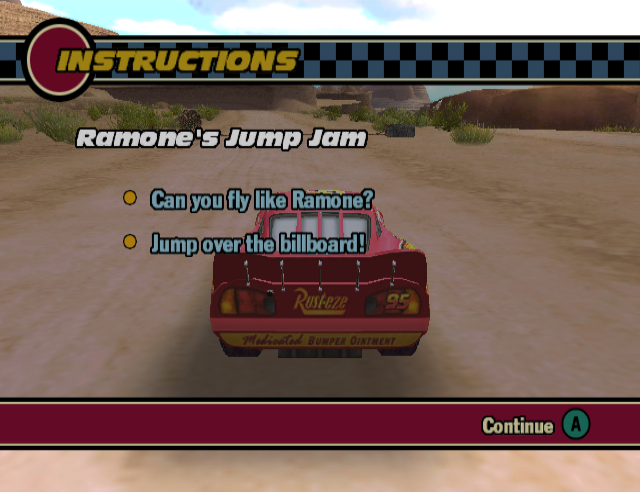
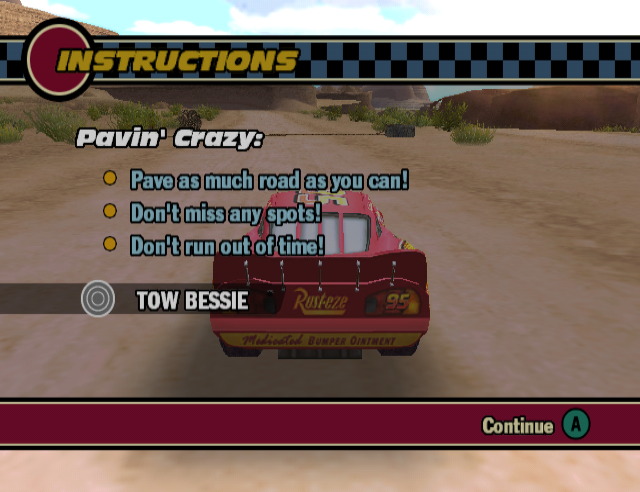
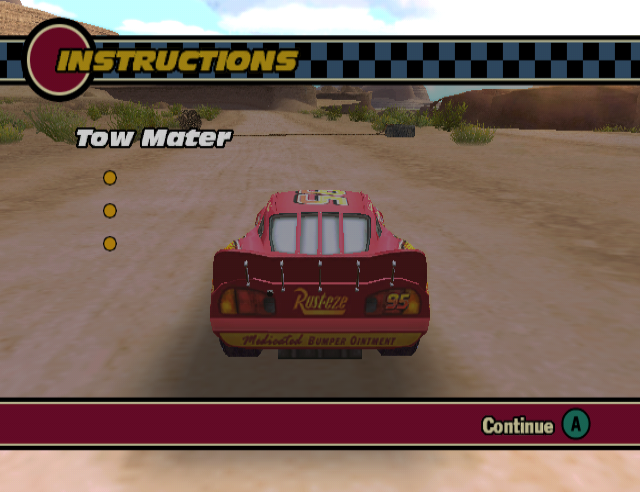
Ramone's Jump Jam#
|
|
To do: |
Ramone's Jump Jam (listed as event SQ_2_9) is currently the only known unused minigame that can (partially) be re-implemented in some way. Tweaking the game to unlock the event and to play the correct scenes in order, the minigame will become available at Ramone's House of Body Art, using the same event marker as the one used to access the paintjob menu.
The minigame would've revolved around McQueen being challenged to jump over the "Here It Is" sign at Lizzie's Curioshop by Ramone. In its current state, the minigame spawns McQueen in an empty version of Radiator Springs, having no NPC cars and missing some objects that are usually present in other events.
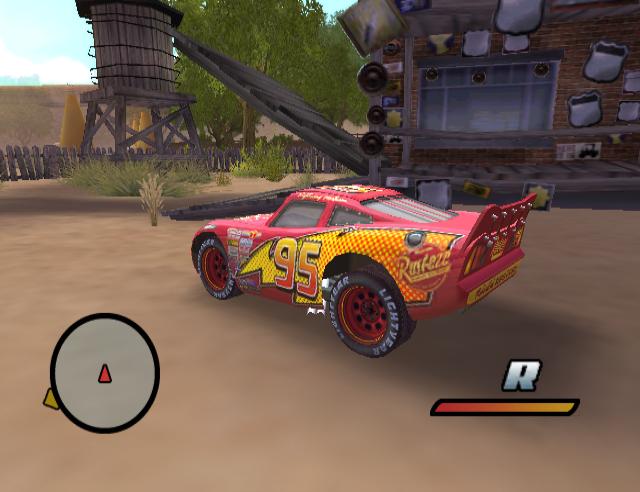
The event spawns one object at the end of the porch of Lizzie's Curioshop; a ramp to help with jumping over the sign. After successfully jumping over the sign, the success cutscene will play, after which the player returns to the Explore version of Radiator Springs.
The opening cutscene is a bit unfinished. The timing for the subtitles had yet to be added and the audio for the cutscene is missing. The cutscene uses a singular camera to cut between shots instead of having multiple. The missing subtitles, audio and additional fade-in/fade-out have been manually re-added in the footage. McQueen's model also moves around strangely.
The ending cutscene is much less complete, despite the deleted scenes FMV included in the game showing that it was fully animated. On top of missing audio and subtitles, the character positions are wrong, their faces are not animated and their body movements are less detailed. Sally is also missing from this scene, despite being present in the deleted scenes FMV version of the cutscene.
It seems that the minigame was being simplified before ultimately being scrapped. The mini-game shares the same prefix as Lizzie's PostCard Hunt (SQ), hinting that the minigame was originally structured similarly to that, possibly with the goal to jump over multiple different gaps while exploring Radiator Springs.
This is further evidenced by a story file named GapsEnable.as, which tries to enable multiple gap triggers as part of event SQ_2_9, which is Ramone's Jump Jam. It seems the code for this file was copied from another file named PostCardEnabled.as, as GapsEnable.as contains a comment ripped straight out of PostCardEnabled.as.
;Lizzie's Post Card Hunt - Enables Post Card Triggers

[Gap1]

[Gap1Step1]

[Gap1Step1Action1]
ActionType=EnableTrigger
ActionTest=!T1
T1=StoryEventTest
T1EventName=SQ_2_9
T1SubEventName=Gap1
T1Status=Completed
TriggerName=RB_CarsGap01a
Enable=TRUE

[Gap1Step1Action2]
ActionType=EnableTrigger
ActionTest=!T1
T1=StoryEventTest
T1EventName=SQ_2_9
T1SubEventName=Gap1
T1Status=Completed
TriggerName=RB_CarsGap01b
Enable=TRUE

[Gap2]

[Gap2Step1]

[Gap2Step1Action1]
ActionType=EnableTrigger
ActionTest=T1 & !T2
T1=StoryEventTest
T1EventName=SQ_2_9
T1SubEventName=Gap1
T1Status=Completed
T2=StoryEventTest
T2EventName=SQ_2_9
T2SubEventName=Gap2
T2Status=Completed
TriggerName=RB_CarsGap02a
Enable=TRUE

[Gap2Step1Action2]
ActionType=EnableTrigger
ActionTest=T1 & !T2
T1=StoryEventTest
T1EventName=SQ_2_9
T1SubEventName=Gap1
T1Status=Completed
T2=StoryEventTest
T2EventName=SQ_2_9
T2SubEventName=Gap2
T2Status=Completed
TriggerName=RB_CarsGap02b
Enable=TRUE

[Gap3]

[Gap3Step1]

[Gap3Step1Action1]
ActionType=EnableTrigger
ActionTest=T1 & !T2
T1=StoryEventTest
T1EventName=SQ_2_9
T1SubEventName=Gap1
T1Status=Completed
T2=StoryEventTest
T2EventName=SQ_2_9
T2SubEventName=Gap3
T2Status=Completed
TriggerName=RB_CarsGap03a
Enable=TRUE

[Gap3Step1Action2]
ActionType=EnableTrigger
ActionTest=T1 & !T2
T1=StoryEventTest
T1EventName=SQ_2_9
T1SubEventName=Gap1
T1Status=Completed
T2=StoryEventTest
T2EventName=SQ_2_9
T2SubEventName=Gap3
T2Status=Completed
TriggerName=RB_CarsGap03b
Enable=TRUE

[Gap4]

[Gap4Step1]

[Gap4Step1Action1]
ActionType=EnableTrigger
ActionTest=T1 & !T2
T1=StoryEventTest
T1EventName=SQ_2_9
T1SubEventName=Gap1
T1Status=Completed
T2=StoryEventTest
T2EventName=SQ_2_9
T2SubEventName=Gap4
T2Status=Completed
TriggerName=RB_CarsGap04a
Enable=TRUE

[Gap4Step1Action2]
ActionType=EnableTrigger
ActionTest=T1 & !T2
T1=StoryEventTest
T1EventName=SQ_2_9
T1SubEventName=Gap1
T1Status=Completed
T2=StoryEventTest
T2EventName=SQ_2_9
T2SubEventName=Gap4
T2Status=Completed
TriggerName=RB_CarsGap04b
Enable=TRUE

[Gap5]

[Gap5Step1]

[Gap5Step1Action1]
ActionType=EnableTrigger
ActionTest=T1 & !T2
T1=StoryEventTest
T1EventName=SQ_2_9
T1SubEventName=Gap1
T1Status=Completed
T2=StoryEventTest
T2EventName=SQ_2_9
T2SubEventName=Gap5
T2Status=Completed
TriggerName=RB_CarsGap05a
Enable=TRUE

[Gap5Step1Action2]
ActionType=EnableTrigger
ActionTest=T1 & !T2
T1=StoryEventTest
T1EventName=SQ_2_9
T1SubEventName=Gap1
T1Status=Completed
T2=StoryEventTest
T2EventName=SQ_2_9
T2SubEventName=Gap5
T2Status=Completed
TriggerName=RB_CarsGap05b
Enable=TRUE

[Gap6]

[Gap6Step1]

[Gap6Step1Action1]
ActionType=EnableTrigger
ActionTest=T1 & !T2
T1=StoryEventTest
T1EventName=SQ_2_9
T1SubEventName=Gap1
T1Status=Completed
T2=StoryEventTest
T2EventName=SQ_2_9
T2SubEventName=Gap6
T2Status=Completed
TriggerName=RB_CarsGap06a
Enable=TRUE

[Gap6Step1Action2]
ActionType=EnableTrigger
ActionTest=T1 & !T2
T1=StoryEventTest
T1EventName=SQ_2_9
T1SubEventName=Gap1
T1Status=Completed
T2=StoryEventTest
T2EventName=SQ_2_9
T2SubEventName=Gap6
T2Status=Completed
TriggerName=RB_CarsGap06b
Enable=TRUE

[Gap7]

[Gap7Step1]

[Gap7Step1Action1]
ActionType=EnableTrigger
ActionTest=T1 & !T2
T1=StoryEventTest
T1EventName=SQ_2_9
T1SubEventName=Gap1
T1Status=Completed
T2=StoryEventTest
T2EventName=SQ_2_9
T2SubEventName=Gap7
T2Status=Completed
TriggerName=RB_CarsGap07a
Enable=TRUE

[Gap7Step1Action2]
ActionType=EnableTrigger
ActionTest=T1 & !T2
T1=StoryEventTest
T1EventName=SQ_2_9
T1SubEventName=Gap1
T1Status=Completed
T2=StoryEventTest
T2EventName=SQ_2_9
T2SubEventName=Gap7
T2Status=Completed
TriggerName=RB_CarsGap07b
Enable=TRUE

[Gap8]

[Gap8Step1]

[Gap8Step1Action1]
ActionType=EnableTrigger
ActionTest=T1 & !T2
T1=StoryEventTest
T1EventName=SQ_2_9
T1SubEventName=Gap1
T1Status=Completed
T2=StoryEventTest
T2EventName=SQ_2_9
T2SubEventName=Gap8
T2Status=Completed
TriggerName=RB_CarsGap08a
Enable=TRUE

[Gap8Step1Action2]
ActionType=EnableTrigger
ActionTest=T1 & !T2
T1=StoryEventTest
T1EventName=SQ_2_9
T1SubEventName=Gap1
T1Status=Completed
T2=StoryEventTest
T2EventName=SQ_2_9
T2SubEventName=Gap8
T2Status=Completed
TriggerName=RB_CarsGap08b
Enable=TRUE

[Gap9]

[Gap9Step1]

[Gap9Step1Action1]
ActionType=EnableTrigger
ActionTest=T1 & !T2
T1=StoryEventTest
T1EventName=SQ_2_9
T1SubEventName=Gap1
T1Status=Completed
T2=StoryEventTest
T2EventName=SQ_2_9
T2SubEventName=Gap9
T2Status=Completed
TriggerName=RB_CarsGap09a
Enable=TRUE

[Gap9Step1Action2]
ActionType=EnableTrigger
ActionTest=T1 & !T2
T1=StoryEventTest
T1EventName=SQ_2_9
T1SubEventName=Gap1
T1Status=Completed
T2=StoryEventTest
T2EventName=SQ_2_9
T2SubEventName=Gap9
T2Status=Completed
TriggerName=RB_CarsGap09b
Enable=TRUE

[Gap10]

[Gap10Step1]

[Gap10Step1Action1]
ActionType=EnableTrigger
ActionTest=T1 & !T2
T1=StoryEventTest
T1EventName=SQ_2_9
T1SubEventName=Gap1
T1Status=Completed
T2=StoryEventTest
T2EventName=SQ_2_9
T2SubEventName=Gap10
T2Status=Completed
TriggerName=RB_CarsGap10a
Enable=TRUE

[Gap10Step1Action2]
ActionType=EnableTrigger
ActionTest=T1 & !T2
T1=StoryEventTest
T1EventName=SQ_2_9
T1SubEventName=Gap1
T1Status=Completed
T2=StoryEventTest
T2EventName=SQ_2_9
T2SubEventName=Gap10
T2Status=Completed
TriggerName=RB_CarsGap10b
Enable=TRUE
While the minigame ultimately went unused, it might've served as inspiration for the Photo-Op minigame in the third game Cars Race-O-Rama, where the player had to jump through rings to get a picture taken.
Explorable Events#
Every piston cup track along with the interstate have acts that allow them to work as explore events, allowing you to fully explore them with regular physics and abilities. The Act names are as follows:
- EX_CD (Interstate)
- EX_PM (Palm Mile Speedway)
- EX_MS (Motor Speedway of the South)
- EX_SV (Sun Valley International Raceway)
- EX_SM (Smasherville International Speedway)
- EX_LA (Los Angeles International Speedway)
According to the debug.txt file, these were all merely meant to be temporary events, though the interstate might've been planned to be an actual explorable environment. Watch on YouTube
Version Differences#
- Due to disc space limitations, the GameCube version removes all unlockable videos and promo clips.
References#
|
The Cars series | |
|---|---|
|
Windows |
Cars • Mater-National Championship • Cars 2 • Fast As Lightning (Prototype) |
|
Game Boy Advance |
|
|
Nintendo DS |
|
|
Nintendo 3DS |
|
|
Wii |
Cars • Mater-National Championship (Prototype) • Race-O-Rama • Cars 2 |
|
PlayStation 2 |
|
|
Xbox, GameCube |
|
|
Xbox 360 |
Cars • Mater-National Championship • Race-O-Rama • Cars 2 • Cars 3: Driven to Win |
|
PlayStation 3 |
|
|
Mac OS X |
|
|
Arcade |
|
|
Plug & Play |
|
|
iOS, Android |
|
|
Adobe Flash |
|
|
PlayStation 4, Xbox One, Wii U, Nintendo Switch |
|
|
Planes | |
|
Nintendo DS |
|
|
Nintendo 3DS |
|