 This article has a talk page!
This is a sub-page of Proto:Pokémon Mystery Dungeon: Red Rescue Team and Blue Rescue Team.

Build Date#
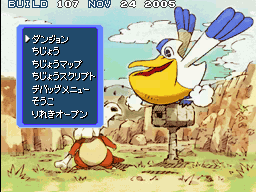
As noted on the menu screen, this build was created on Nov 24 2005, a week after its Japanese release. This is the same build date as revision v1.1 of the retail Japanese version, which was created to fix a serious save-wiping bug that could affect inserted Game Boy Advance games outside of Red Rescue Team.
Top Debug Menu#
The main debug menu, which can be accessed through the Top Menu.
Dungeons#
Allows the player to access all but one dungeon in the game. Any unofficial string translations are marked by italics.
Japanese |
Translation |
Notes |
|---|---|---|
ダンジョン |
Dungeon |
Includes every dungeon, used and unused. Selecting the Autopilot dungeon will crash the game during the loading screen. |
フロア |
Floor |
Selects the floor the player will start from. |
ヒーロー |
Hero |
Selects any leader. Pikachu is chosen by default. |
パートナー |
Partner |
Selects any partner. Squirtle is chosen by default. The End/Switch option will decide if they act as a regular 2nd team member, or as the partner during the main story; this includes counting their fainting as a defeat, and makes them use special partner dialogue in dungeons if available (if not, their message will be blank). |
nowrap|END/こうたい |
End/Switch |
Toggles between "あと" (After) and "まだ" (Not yet). This decides if the player is considered to have cleared the main story, which will allow the player to send the partner home. |
なかまになる |
Can be recruited |
Toggles between "OK" and "まだ" (Not yet). This will allow for recruitment. However, if a dungeon is entered using this menu, the player will always have only the Mt. Cleft and Turtleshell Pond friend areas, severely limiting the amount of recruitable Pokémon. The hero and partner selections do not appear to affect this. |
しんかじょ |
Evolution (?) |
Toggles between "OK" and "まだ" (Not yet). Does not appear to have any effect; it may be related to the scrapped "enemy evolves on party member's defeat" function, but this option does not make it work. "しんかじょ" might refer to "しんかじょう", which appears to be an early name for Luminous Cave. |
ポケモンズ |
Pokémon |
Toggles between "けっせい" (Has formed) and "まだ" (Not yet), deciding whether the player's team has formed. The latter option means the player does not have the Toolbox and can only hold a single item per team member. "ポケモンズ" refers to the default team name, which was localized simply as "Pokémon". |
モード |
Mode |
Toggles between "Normal", "Real rescue" and "Random rescue". The second option unceremoniously crashes the game, while the third does not appear to have any effect. |


Field#
Transports the player to the debug room; it functions exactly the same as the original game.
The player controls a Charmander, without a partner Pokémon to follow them around. This happens whether a save file is present or not.
Documentation of the area can be found here.
Field Map#
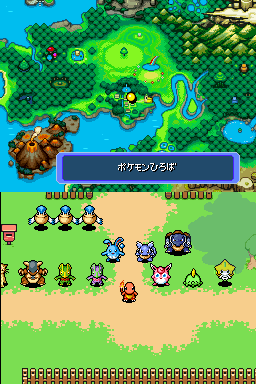
Functions as a background viewer for overworld and cutscene maps, pre-rendered dungeon floors used for rest areas and bosses, and various boot screens.
The D-pad can be used to explore the backgrounds in full.


Field Script#
Appears to be an event transporter, partially broken, as some of the warps will stick the player into invalid areas of the Team Base.
The player controls a Charmander once more, this time including a Squirtle partner.

Debug Menu#
Another debug menu, this time all in English.

Quick Test#
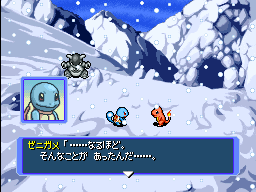
A text box test, in which shows a Bulbasaur portrait at the beginning of the test.
Monster Anim#
An animation viewer for Pokémon sprites. Crashes the game unless you've already been to a dungeon once since boot, as it seems to need some dungeon elements to be loaded to work properly.
- "KIND" switches Pokémon.
- "MOTION" changes the animation played. Additionally, changes portrait expression.
- "DIR" changes the direction. Additionally, changes portrait direction (normal or inverted).
- "EFFECT" does nothing, except in "PALETTE" mode where it determines the palette used.
- "TRICK" plays the selected move animation for this Pokémon when A is pressed.
- "POS_XY" changes the position of the sprite, between "UP", "DOWN" and "CENTER".
- "OFFSET" changes the offset to display in "OFFSET" mode.
- "MODE" changes the mode between "NORMAL", "OFFSET", "PAUSE" (stops animation) and "PALETTE"
- "HELP" display the help (shown in the image below).
Select exits this mode, Start hides/shows all options and the L or R buttons advance the animation by one frame, which is most useful in "PAUSE" mode.

Efct-Ground#
An animation viewer for the ground effects; ground in this context refers to the overworld or cutscenes. It is surprisingly elaborate: all visual effects are conveniently labeled.

Efct-Dungeon#
An animation viewer for the dungeon effects. It has a ton of overlap with Efct-Ground, but some animations only function in one viewer or the other.

Status#
Viewer for status sprites. Crashes the game unless you've already been to a dungeon once since boot, as it seems to need some dungeon elements to be loaded to work properly.
This displays each status icon as they should appear in dungeons by setting and resetting each status flag with the D-pad and pressing the A button.

Re Random Re#
Crashes the game; it hangs while the music keeps playing, and prints a crash handler error to the top screen.

Re Random Sw#
Shows a screen filled with jobs.

Re Random Po#
Shows your mail from the mailbox at your Team Base.

Re Random Bo#
Shows jobs you've accepted from your mailbox.

Re User Bo#
Displays a screen filled with rescue jobs, but accepting any of them will crash the game.

Sound#
As implied by the name, this is a sound test where you can play music from the game and preview sound effects. Like the effect viewers, it is surprisingly elaborate: even the sound effects are conveniently labeled.

Mn Diagnosis#
Prints letters to the screen; pressing the A button will display a dialog box. If you choose any option from the dialog box, it will overwrite the textbox with the previous text.
This function serves as diagnostics for the personality test at the beginning of the game.

Mn Name#

|
This needs some investigation. |
Calls up the Friend Rescue password screen.

Mn Bank#
Invokes the menu for the Persian Bank, with the maximum amount of money deposited.

Mn Keeper#
Displays the Kangaskhan Storage menu.

Mn Store#
Opens the Kangaskhan Storage menu without any NPC dialogue, as would be seen whenever the player uses a Kangaskhan Rock.

Mn Merchant#
Brings up the Kecleon Shop menu.

Mn Territory#
Shows the Friend Area expansion menu from Wigglytuff.

Mn Formation#
Displays the menu for selecting Pokémon from their respective Friend Areas.

Mn Evolution#
Displays the menu for evolving in Luminous Cave.

Mn Synthesis#
Shows the Gulpin Link Shop menu.

Flash Load#
Only prints a dialog box with the message "Debug Only." Judging by the name, this was meant to load your save file.
Flash Save#
Saves your game.
Flash Reset#
Erases your save file.
Storage#
Crashes the game when selected.
h-open#
Does nothing and simply closes the debug menu.
Ground Debug Features#
A number of debug options can be found during regular gameplay in the overworld.
Personality Test#
Unlike the retail version of the game, once the personality test has been finished the player has the option to either accept the result, pick one of five random alternative hero candidates, or retry the test using a reshuffled pool of questions. Notably, through these alternatives it is possible to select a hero candidate which is exclusive to the other gender, allowing for normally impossible selections such as a female Meowth or a male Eevee.


Debug Color#
Found within the Game Options menu is an extra option that switches between "おとこ" (male) and "おんな" (female); this will change the border color between blue and pink. As it turns out, the long-requested ability to change the border color was in fact included at one point, but only as a debug function...

Azumarill#
This Azumarill NPC, found next to the Team Base, offers a few debug options relating to the area.

Change level#
Changes the state of the Team Base building between 3 levels; original, under construction and final.

Change type#
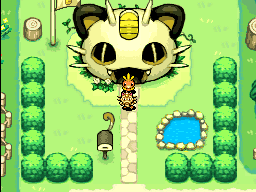
Changes the appearance of both the exterior and interior of the Team Base building between 16 variants, corresponding to each hero candidate.

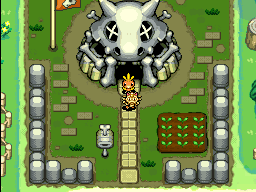
Placement of fixtures#
Adds the Bonsly, Mime Jr., Lucario and Weavile statues to the Team Base area, all at once. There is no option to remove them again.

Scenario Progress Dummy#
This debug option can be found at the exit south of the Team Base. It ends the day and skips ahead to the next story event.

Ground Debug Menu#
This sub menu can be accessed by selecting the last option in the menu, while outside of dungeons. Options are all listed in the same order as presented in the menu.

Main Menu#
Immediately returns to the top menu. As the game does not reload your save from this option, continuing will get you back as if you saved from this point.
Main Scenario Progress#
Opens a menu displaying information about the current main scenario and sub scenarios. The first option seems to change the main scenario progress. The second and third option respectively change the hero and partner Pokémon.

Sub Scenario Progress#
Opens a menu displaying the progress of all sub scenarios. This also lets change your progress throughout all of them.

Status#
Opens a menu displaying some numerical values and lets you change them. These values are, in order: Money, Savings, Rescue Points, Adventure Count, Rescue Count and Evolution Count.

Save#
Immediately saves your game.
Sound#
Displays a window showing an history of BGM and SE IDs previously played.

Storage#
Opens a menu which lets you edit how many items of each kind are present in your Kangaskhan storage. Note that it does not let you edit items that cannot be stored, such as Used TMs or Poké.

Kangaskhan Rock (storage)#
Opens the usual Kangaskhan Rock menu.
Formation#
Opens a menu similar to the Mn Formation option found in the Debug Menu. It allows the managing and adding to the team of any Pokémon present in the player's Friend Areas.

Pokémon Friends#
Opens a menu showing all your recruits. This menu lets you rename your recruits and change their level, but it does not seem to affect their stats.

Friend Areas#
Opens a menu displaying all Friend Areas. This menu lets you open/close any Area.

Open all Friend Areas#
Opens all Friend Areas, as described.
All Pokémon Friends#
Recruits all kinds of Pokémon in all available Friend Areas. All recruits are level 1.
All Pokémon appear#
Unknown.
Full storage#
Fills the Kangaskhan Storage with 999 of each storable item.
Open all news#
Unlocks all news from your Post Box.
Set random jobs#
Creates new random jobs at the Pelipper Bulletin Board.
Random identical dungeons#
Unknown.
Pelipper Bulletin Board#
Opens the regular Pelipper Bulletin Board menu.
Random job content change#
Opens a menu which lets you create one job in your Job List.

Set merchandise#
Refills both Kecleon Shops with new random items.
Dojo not cleared#
Clears all Mazes at the Makuhita Dojo except for the Normal Maze. Its purpose appears to be for testing the "Clear All Mazes" reward.
Toolbox#
Opens a broken menu, which actually lets you add items to your Toolbox.
Text#
Opens a window and displays a few messages, to see if they fit within the boundaries.
VRAM OUTPUT#
Crashes the game.
Build Version Check#
Displays the version number of the current build, "107 Nov 24 2005".