 This article has a talk page!
This is a sub-page of Proto:Mario Kart DS.
 Early ObjectsBullet Bills without eyes?
 Early MapsSo many maps from Yoshi Circuit?
 Early AudioDouble Dash!! instruments?
Unused Content#
 Unused TexturesDouble Dash!! menus?
 Unused CoursesChequered areas?
 Unused AudioLots of leftover Double Dash!! horns!
Build Date#
Build: 2005 4/28(Thu) 9:57:13The build date of this demo.
Menu Differences#
Copyright Text#
Prototype |
Final JPN/EUR/KOR |
Final USA |
|---|---|---|
 |
 |
 |
The top screen was unchanged, but the bottom screen is different compared to any released version as it only has a basic copyright.
Title Screen#
|
Proto |
Final |
|---|---|

|

|
The most notable difference is the different logo, which is the same logo from the older Mario Kart games.
Graphical Differences#
Banner#
|
Proto |
Final |
|---|---|

|

|
The boot-up banner is also different. It depicts Mario and his kart with their models from E3 2004 (which tends to borrow from Mario Kart: Double Dash!!), rather than the final design.
Items#
Proto |
 |
|---|---|
Final |
 |
Nearly all of the item icons were redrawn and/or enlarged. Additionally, the demo uses a few textures from Mario Kart: Double Dash!!. The Blooper also has its appearance from Super Mario Sunshine.
Countdown Numbers#
Proto |
Final |
|---|---|
|
|


START Text#
|
Proto |
Final |
|---|---|

|

|
The prototype says GO! while the final says START.
Goal Text#
|
Proto |
Final |
|---|---|

|

|
The countdown numbers and the goal text are bigger than in the final, but are paler and lacking in detail.
Gameplay Differences#

|
To do: |
- The map on the bottom screen can be zoomed in and out by sliding horizontally on the touchscreen. This feature still exists in the final, but disabled. It can be re-enabled with an AR code.
- No smoke particles appear if the player fails the turbo start at the beginning of the race.
- Touching other drivers slows the player down dramatically.
- The player can hold the Spiny Shell, which can still be done in the final but is disabled. It can be re-enabled with a simple AR code (220FCB30 00000000). This feature would eventually see the light of day in Mario Kart World.
- If another player or a CPU touches the Spiny Shell behind the player, they'll both get hit.
- If the driver touches the road while upside-down, they will instantly flip vertically. A similar reaction exists in Mario Kart 64.
- If the player drifts on a boost panel and bumps into a wall with the outer drift side, they will stand on the boost panel without receiving a boost.
- Characters' winning animations...
- Do not play when the player gets a Star, much like in previous and future Mario Kart games.
- Will sometimes get stuck. Also happens in the final's battle mode sometimes.
Audio Differences#
- Characters' hurt voice clips will play if the player gets struck by Lightning (which is similar to the past games, starting with Mario Kart 64), but are silent in the final.
- As well, the music uses a different Lighting effect.
- The sound effect that plays when reaching the second lap also plays during the final lap, which doesn't in the final, although it also does in Mario Kart World if a course is played in a intermission.
Multiplayer#
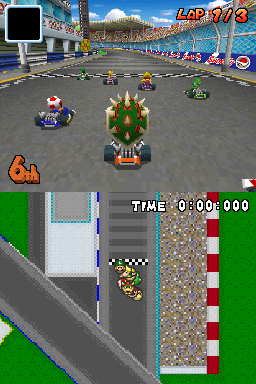

 Without cheat codes, this is a multiplayer-only game, and it will only boot to the title screen if you connect at least two cartridges, otherwise it will just sit on the copyright screen. This can be accomplished by booting the ROM on multiple nearby DS's. After a minute or so, they should all advance into the title screen. If a communication error occurs after booting, then the game(s) will be reset back to the copyright screen.
The title screen lacks the "Demo Version" text, and there is no attract mode. There is no character select or course select in this version of the game. The character is random, and the courses are in a pre-determined order, that loops infinitely. This is likely because of the game being multiplayer-only. The courses are in the following order:
- Figure-Eight Circuit
- SNES Mario Circuit 1
- Yoshi Falls
- N64 Moo Moo Farm
- Cheep Cheep Beach
- GBA Peach Circuit
- Luigi's Mansion
- GCN Luigi Circuit
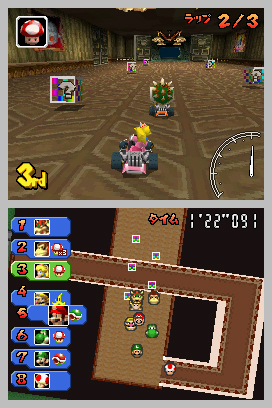
To start a race, there must be at least 2 "registered" racers. If there are 3 or more DS's connected, but not all of them register, then the unregistered DS's will be CPU's. All the HUD elements will be displayed, and map screen can be toggled, but a replay-like camera will be used, instead of a camera behind the kart. The CPU DS('s) will briefly display a message saying "Unable to enter race. The CPU is runnig this race. Please wait for the next race.", with "running" misspelled as "runnig". There is only 1 race before the game resets to the title screen.
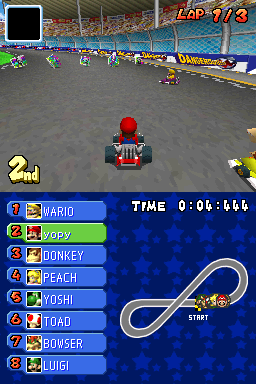
When racing, human players are represented with the first 4 characters of the name of their DS (ex. A DS named TCRFWiki would be shown as TCRF). If you get 1st, "YOU WIN!" will be displayed. If you do not get 1st, then it will say which player won (ex. "P3 WINS!").
The game will not reset to the title screen if there is no user input on any of the DS's (unlike the US Demo, which resets if there is no user input for awhile). It will only reset after a race is completed (to the title), or if there is a communication error (to the copyright screen).
Single Player#
Using cheat codes, it is possible to play in single player modes, and access every course.
Debug Menu#
Using an Action Replay code (see below), and following a few steps, the debug menu can be accessed.
- Boot the ROM to the copyright screen.
- Press Select, which will bring up the cup award screen.
- Press Start to enter the Debug Menu.
If step 2 is skipped, the game will crash when attempting to enter the Debug Menu. After completing step 3, the debug menu can be accessed any time with just the Start button (i.e. step 2 does not need to be repeated).
94000130 000003FB
220E6578 0000000A
220E6579 00000000
D2000000 00000000
94000130 FFF70000
220E6578 00000004
220E6579 00000000
D2000000 00000000
94000130 FF7D0000
220E6578 00000002
220E6579 00000000
D2000000 00000000
Credit to Ermelber & Gericom for the codes.
In this build, the debug menu only has VS and Battle modes, selected with Left/Right. After making your selections, press Down+B to start the race or battle.
VS |
Battle |
|---|---|
Speed (50cc, 100cc, 150cc, Mirror - Press Left/Right) |
Battle Courses (Press Up/Down, X for Shine/Balloon) |
Race Courses (Press Up/Down for course, L/R to skip 4) |
Other menus (between Speed and Race Courses for example) do exist, but the game automatically pushes you through them. If you hit B to try to go back to these options, the game will automatically go forward again, as if you hit A.
It is also possible to do a Mirror battle, if your most recent VS race was Mirror.
Race Courses#
In the Debug Menu, race courses are listed in the following order below. If you know where you are in the list (start a race to find out), you can access any course you want.
Figure-Eight Circuit
Yoshi Falls
Cheep Cheep Beach
Luigi's Mansion
Desert Hills
Delfino Square
Waluigi Pinball
Shroom Ridge
DK Pass
Tick-Tock Clock
Mario Circuit
Airship Fortress
Wario Stadium
Peach Gardens
Bowser Castle
Rainbow Road
SNES Mario Circuit 1
SNES Donut Plains 1
SNES Choco Island 2
SNES Koopa Beach 2
N64 Moo Moo Farm
N64 Frappe Snowland
N64 Choco Mountain
N64 Banshee Boardwalk
GBA Peach Circuit
GBA Bowser Castle 2
GBA Luigi Circuit
GBA Sky Garden
GCN Luigi Circuit
GCN Baby Park
GCN Mushroom Bridge
GCN Yoshi Circuit
luigi_course
dokan_course
test1_course [CRASH, unless patched]
donkey_course
wario_course
nokonoko_course [CRASH (works on DeSmuME)]
old_mario_gc (GCN Mario Circuit)
test_circle
Battle Courses#
In the Debug Menu, battle courses are listed in the following order below. If you know where you are in the list (start a battle to find out), you can access any course you want.
mini_block_course (GCN Block City)
Block Fort
Pipe Plaza
Nintendo DS
mini_stage2 (GCN Block City)
mini_stage3 (GCN Block City)
mini_stage4 (GCN Block City)
Grand Prix#
A Nitro grand prix can be started by using an Action Replay code found here, and by following these steps:
- Boot the ROM to the copyright screen.
- Press Select, which will bring up the cup award screen.
- Press Down+B.
After this, a Nitro grand prix will start. After the results screen is shown, the game will automatically advance to the next course. The grand prix will never end, looping the final course (Luigi's Mansion) over and over.
Multiplayer With Debug Menu#
Along with the normal multiplayer gameplay, you can also play multiplayer with the debug menu, which allows multiplayer gameplay with all the courses, and battle mode too. If you want multiplayer with the debug menu, use the Action Replay code found here and follow these steps:
- Boot the ROM on multiple DS's to the copyright screen at the same time.
- Wait for the DS's to load into the title screen, which will take a minute or so.
- Press A on all the DS's, and load into a race.
- Press Start on all the DS's at the exact same time, to load the debug menu.
If you skip step 3, then only Player 1 will be human, and the other DS's will be CPU. At this point, all DS's should be in the debug menu, and only Player 1 will have control at this point.
VS P1 |
VS P2+ |
Battle P1 |
Battle P2+ |
|---|---|---|---|
Speed (50cc, 100cc, 150cc, Mirror - Use Left/Right) |
No Control |
Character Select (Use Left/Right) |
|
Character Select (Use Left/Right) |
Kart Select (Use Left/Right) |
||
Kart Select (Use Left/Right) |
Course Select (Use Up/Down, X for Shine/Balloon) |
No Control |
|
Course Select (Use Up/Down, or L/R to skip 4) |
No Control |
||
The character selection is in the following order: Mario, Donkey Kong, Toad, Bowser, Peach, Wario, Yoshi, Luigi, E. Gadd, Daisy, Waluigi, R.O.B.
E. Gadd, who ended up being replaced with Dry Bones in the final release, appears with Toad’s model and voice lines here, though the race results screen will properly display his name as “GADD”. It’s unknown if this build was made before or after the decision to cut him.
In single player, a race/battle must be forced to start when using the debug menu, but in multiplayer, the race/battle will start automatically if everything is good.
Karts#
Below is a list of the karts that can be chosen in the European Kiosk Demo multiplayer debug menu, using Left and Right. The kart selection resets to the selected character's default kart every time the debug menu is loaded, indicated by "Character Default" in the below table. CRASH means the game will crash if this kart is selected.
Kart |
Character Default |
|---|---|
Standard Mario |
Mario |
Standard Mario |
|
B-Dasher |
|
Standard Donkey |
Donkey |
Standard Donkey |
|
Rambi Rider |
|
Standard Toad |
Toad |
Standard Toad (Weird Texture) |
|
4-Wheel Cradle (Early) |
|
Standard Bowser |
Bowser |
Standard Bowser |
|
Tyrant (Early) |
|
Standard Peach |
Peach |
Light Tripper |
|
Standard Peach |
|
Standard Wario |
Wario |
Brute (Early) |
|
Standard Wario |
|
Standard Yoshi |
Yoshi |
Egg 1 (Pink) |
|
Standard Yoshi |
|
Standard Luigi |
Luigi |
Poltergust 4000 |
|
Streamliner |
|
Standard Gadd |
Gadd |
CRASH |
|
CRASH |
|
Standard Daisy |
Daisy |
CRASH |
|
CRASH |
|
Standard Waluigi |
Waluigi |
CRASH |
|
CRASH |
|
Standard R.O.B |
R.O.B. |
CRASH |
|
CRASH |
|
Standard ??? |
Duplicate mission.mr file#
Aside the mission.mr file in /Scene/Menu.carc directory, there's another one in /Scene/E3Menu.carc.
Its contents are the same as the other one except it doesn't have the boss missions (mr09 and mr10), having only 8 missions registered.
This file does not exist in the USA demo.
Early Item Box Model#

 /Main/MapObj.carc > itembox.nsbmd is an earlier version of the itembox model, with itembox.nsbca in the same directory being its animation. Suggests the itemboxes originally used a bone animation, rather than its animation being hard-coded.
This item box model can be seen in earlier screenshots.
Other files in the archive, such as itembox_hahen.nsbmd which might be used for when the itemboxes are broken, and copies of used final itembox model. Itemboxes are, however, loaded from /Main.carc > MapObj folder, rendering the ones in MapObj.carc unused.
Like the mission.mr duplicate mentioned above, MapObj.carc also does not exist in the USA demo, but strangely it does in the final game.
N64 Moo Moo Farm Sign#
|
Early |
Final |
|---|---|

|

|
The sign in N64 Moo Moo Farm is written MOH MOH FARM in this European demo, as in the Japanese version of Mario Kart 64. This was changed to international versions' MOO MOO FARM in the USA demo and the final.
Donkey Kong's Name#

While Donkey Kong's name appears as "DK" in the USA demo, it appears as "Donkey" in this demo, as in earlier footages and screenshots. Interestingly, it can also be seen in /Scene/E3_Menu.carc/E3_select_character_gp_m_name.NCGR, but since there's no character selection menu in this demo (as the character is chosen randomly), this goes unused.

Extra Notes#
The Europe and US demos are so similar in terms of the filesystem, that a US demo ROM can be converted to a multiplayer-only ROM by replacing arm9.bin and header.bin in the US ROM with the ones from the European ROM. Conversely, a European multiplayer only ROM can be converted to a single player ROM by replacing the same files and E3_Title.carc with the US demo versions.
Camera Displacement Glitch#
While doing some experiments and such, a CPU DS that was supposed to be Luigi ended up having the camera focused on Bowser. The HUD and map were all for Luigi, but the camera was on Bowser. Interestingly, the other DS it was previously (but no longer) connected to was also focused on Luigi when doing races, but the camera was not displaced. This happened when doing tests with the Emblem Editor (see below), then putting them into the trophy screen, and starting a race.
A similar bug can be executed in the US demo if the attract demo plays and the debug menu is fiddled with to a point. The user forgot how to do it, but it's definitely possible.
Multiplayer Emblem Editor#
If you connect a pair of DS's, then load into the Emblem Editor by pressing Start on both DS's at the same time, using an Action Replay code (see below), then Player 1 will have control of the Emblem Editor, and Player 2 will have no control, but will see what Player 1 is doing (i.e. Player 1's screen will be on Player 2's screen). After saving, a race will begin, and each DS will have the (glitched) custom emblem, but only on their own kart.
94000130 000003FB
220E6578 00000003
220E6579 00000000
D2000000 00000000