the cutting room mirror

Tsioque

Tsioque (pronounced "/tsɪɒk/") is a point-and-click adventure game about a child princess of the same name who has to fend off an evil wizard while home alone.

The game was initiated on Kickstarter in July 2015 and features hand-drawn Flash animation.

Uncompiled Source Code#

On the Steam Windows version, the source code can be found in the file TsioqueSteam.swf in the form of action script files. On the image on the right, the SWF file's file tree is shown as seen in JPEXS Free Flash Decompiler, with the scripts directory opened where the action scripts are located.

Debugging Material#

Tsioque.as#

To do:
Research what dialogs are and how they are enabled and used.

The script Tsioque.as contains code for the purpose of testing various functionalities. The Steam Demo version 2 that was released on October 12, 2018, 11:41 UTC is the only version where the code is still left intact; In fact, a lot of debug functionalities have been left activated in that version probably by accident. It got replaced by Steam Demo version 3 the same day at 12:20 UTC, just 39 minutes later, with a version where the functionalities have been disabled.

The function keyDownHandler(param1:KeyboardEvent) contains:

Steam Windows Demo 2

Other versions

private function keyDownHandler(param1:KeyboardEvent) : void
      {
         var _char:String;
         var a:MovieClip;
         var T:int;
         var _isactive:Boolean;
         var e:KeyboardEvent = param1;
         e.preventDefault();
         if(e.keyCode == 27)
         {
            if(_escState == 1)
            {
               popup();
            }
            else if(_model.currentScreenVO.type == "zoom" && _model.currentScreenVO.masterScreenID == 0 && _escState == 0)
            {
               GameDispatcher.dispatch(new ZoomScreenEvent("hideZoomScreen"));
            }
            else
            {
               popup();
            }
         }

 private function keyDownHandler(param1:KeyboardEvent) : void
      {
         var _char:String;
         var a:MovieClip;
         var T:int;
         var _isactive:Boolean;
         var e:KeyboardEvent = param1;
         e.preventDefault();
         if(e.keyCode == 27)
         {
            if(_escState == 1)
            {
               popup();
            }
            else if(_model.currentScreenVO.type == "zoom" && _model.currentScreenVO.masterScreenID == 0 && _escState == 0)
            {
               GameDispatcher.dispatch(new ZoomScreenEvent("hideZoomScreen"));
            }
            else
            {
               popup();
            }
         }

No difference here yet. This brings up the menu during gameplay, when pressing Escape.

else if(e.keyCode == 32)
         {
            trace(_model.soundController.toString());
            trace("MAX MEMORY:",AppStats.maxMemory);
            if(_model.dialogController.isDialogInProgress && _model.dialogController.wasCurrentDialogCompleted())
            {
               _model.dialogController.hideDialog();
            }
         }

else if(e.keyCode == 32)
         {
            if(_model.dialogController.isDialogInProgress && _model.dialogController.wasCurrentDialogCompleted())
            {
               _model.dialogController.hideDialog();
            }
         }

Steam Windows Demo 2 has additional trace calls. Pressing Space would close open dialog screens, possibly used in the developer's software and is no longer of significance as it does nothing in-game.

else if(e.keyCode == 87)
         {
            _model.accController.wobble(null,0.7,0.3);
         }

else if(false && e.keyCode == 87)
         {
            _model.accController.wobble(null,0.7,0.3);
         }

Pressing W would shake the screen, used for testing the shaking during certain cutscenes. Has been disabled by adding false.

else if(e.keyCode == 83 && e.ctrlKey)
         {
            _model.states.save(true,"_" + getTimer() + "_" + _model.currentScreenName,true);
         }

         else if(false && e.keyCode == 83 && e.ctrlKey)
         {
            _model.states.save(true,"_" + getTimer() + "_" + _model.currentScreenName,true);
         }

Pressing S + Ctrl would seemingly save the game. Has been disabled by adding false.

else
         {
            _char = String.fromCharCode(e.charCode).toLowerCase();
            if(_char != "")
            {
               if(_cheat == null)
               {
                  _cheat = _char;
               }
               else
               {
                  _cheat += _char;
                  if(_cheat.length > 3)
                  {
                     _cheat = _cheat.substr(1,3);
                  }
               }
            }

else
         {
            _char = String.fromCharCode(e.charCode).toLowerCase();
            if(_char != "")
            {
               if(_cheat == null)
               {
                  _cheat = _char;
               }
               else
               {
                  _cheat += _char;
                  if(_cheat.length > 3)
                  {
                     _cheat = _cheat.substr(1,3);
                  }
               }
            }

Identical. This commences a simple cheat entry feature.

_isBetaTestVersion)

                 {
                    a.x = 100;
                 }
                 break;
              case "m01":
                 _model.soundController.playSound("test","music",null,false,15751);
                 break;
              case "m02":
                 trace(">>==-- SOUND POSITION:",_model.soundController.getSoundPosition("test","music"));
                 break;
              case "blk":
                 TSModel.blocked = !TSModel.blocked;
                 break;
              case "cur":
                 if(CursorController.cursor != "door")
                 {
                    CursorController.cursor = "door";
                    setTimeout(function():void
                    {
                       TSModel.blocked = true;
                       setTimeout(function():void
                       {
                          CursorController.cursor = "up";
                          TSModel.blocked = false;
                       },T);
                    },T);
                 }
                 break;
              case "fps":
                 _model.config.forceFPS = !_model.config.forceFPS;
                 stage.frameRate = stage.frameRate == FPSParams.max ? FPSParams.min : FPSParams.max;
                 updateFPSEqualizer();
                 break;
              case "act":
                 _isactive = _model.containers.parent.mouseChildren;
                 _model.containers.parent.mouseChildren = _model.containers.parent.mouseEnabled = !_isactive;
           }
        }
     }

Steam Windows Demo 2 had a few cheat codes for testing purposes that have been removed in other releases.

ind
???

hub
On the Demo, this transitions you to the walls where the Demo ends.

bag
This transforms the small inventory bag into the bigger inventory bag.

nvs
This makes the inventory bag invisible.

nvh
This makes the inventory bag visible.

nve
This makes the inventory bag clickable.

nvd
This makes the inventory bag unclickable.

err
???

m01
Plays a different background music.

m02
Nothing. Just prints a trace log.

blk
Will cause the game to not allow actions. You will have a cogwheels cursor.

cur
Will change the cursor into the walking animation.

fps
Will cause animations to play significantly faster.

act
???

Console Log#

To do:
Find a way to view console messages, either in-game or in some software that runs the .swf file.

There are hundreds of instances of trace(), error(), log(), gameLog() and similar throughout the script files. There is no known way to access any output console in-game.

Unused Music#

outro_credits.mp3#

The last minute of this staff roll music cannot be heard because the game cuts off.

Fail Sequence#

The game uses nine different fail sequence sounds. Due to the cutscene lasting only about 2 seconds, they will get cut short. Two examples are shown below.

Full sound file

In-game

Unused Graphics#

Mirror Room#

Tsioque-WashPowder2.png Tsioque-WashPowder.png

One of the "TV channels" on the mirror depicts a woman holding what seems to be a box of washing powder. By extracting the image from the file s18_z13_tv04.swf, you can see what's written on it.

The appearance of "Polsupah" in Tsioque is a joke by the developer, referencing their Flash animation from 2005.

Armory#
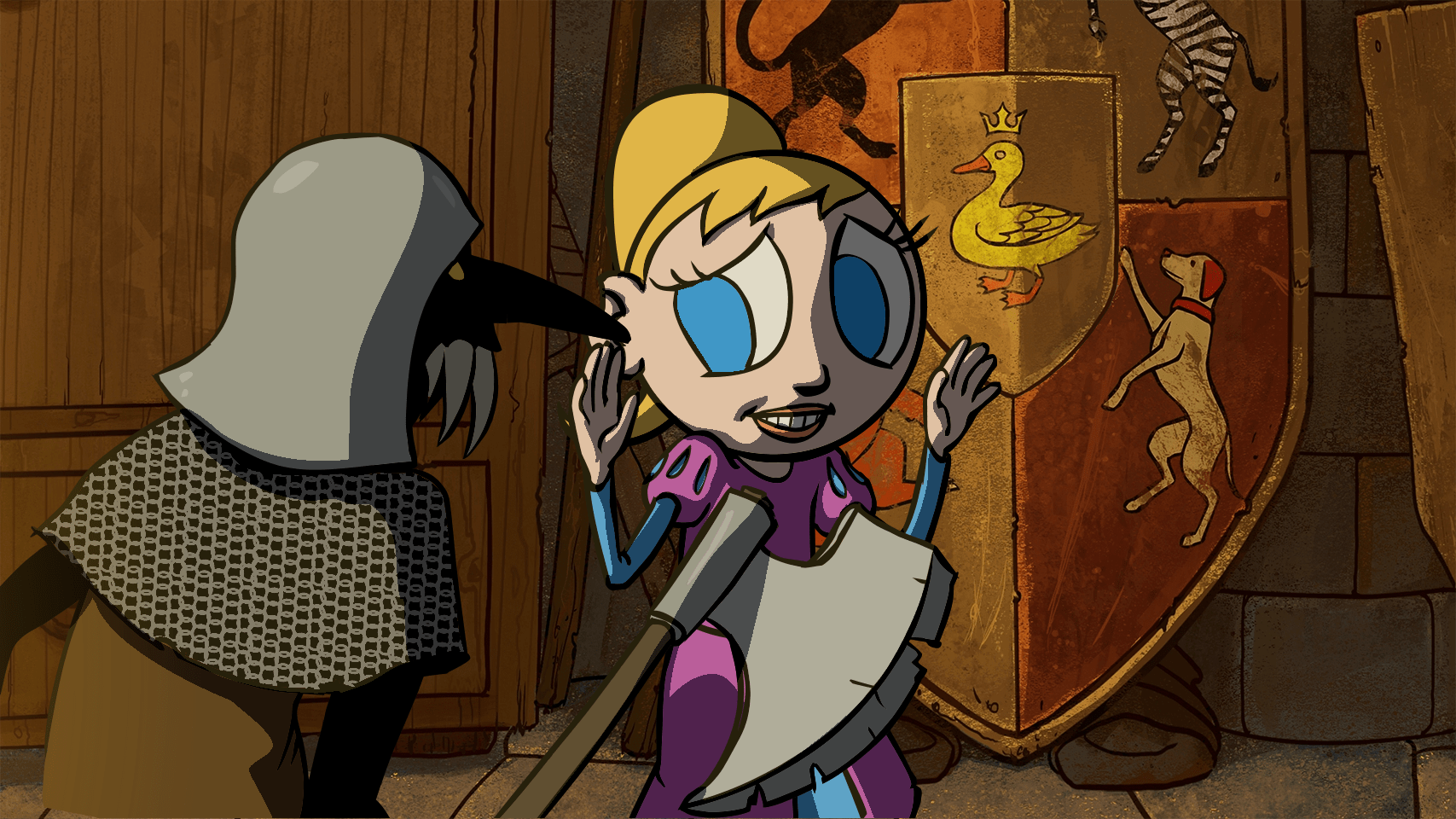
There is a background for a fail sequence in the armory that isn't used.

The duck piece can only be accessed and inserted into the shield at a point in the game's story at which the fail sequence can not be triggered anymore.

Miscellaneous#

On the Steam Windows version, the file TsioqueSteam.swf contains these seemingly unused icons.

Tsioque-DemoIcon.png

- A leftover from the demo version.

Tsioque-Bar.png

- The background of a slide-bar that was going to be used in the options menu but got scrapped.

Tsioque-Bubble.png

- A cursor icon.

Unused Text#

'...But what does it mean?'
This game has text or audio that needs to be translated. If you are fluent with this language, please read our translation guidelines and then submit a translation!

On the Steam Windows version, these text entries can be found in TsioqueSteam.swf. They might have been used for testing subtitles:

Straciłeś przytomność, gdy się ocknąłeś nic już nie wyglądało tak samo.
Drzwi były zamknięte, zostałeś uwięziony w pułapce. Drzwi były zamknięte, zostałeś 
uwięziony w pułapce.
Blessed is he who, in the name of charity and 
good will, shepherds the weak through the valley of 
darkness for he is truly his brother's keeper and the finder 
of lost children.
Oczy, abym mógł widzieć.
Serce, abym mógł czuć. 
Światło, by rozświetlić ciemność.
Oczy, abym mógł widzieć.
Serce, abym mógł czuć. 
Światło, by rozświetlić ciemność.
Donec sed justo lorem. Vivamus interdum tortor sit amet purus imperdiet in ullamcorper ante 
rhoncus. śćą,    ,    ,    ,     Чч

These are text graphics found on the Steam Windows version in TsioqueSteam.swf, asking the player if he is sure about deleting his progress. The German version shown, as well as golden versions of Spanish and Russian were actually used until they got replaced in Ver. 1.2.0 with "Are you sure?" equivalents.

For all the other translations, their "Are you sure?" equivalents were used from the start, respectively. For the English language, only "Are you sure?" exists.

These text graphics also existed in the demo version, where the German text was actually still white-colored like the others.

To do:
Extract the words "screen..w" and "..le" properly.

The file assets\config\dialogs\en.xlg contains these entries, explaining the structure of the file. The first two already existed in the Standalone Demo version (from June 25, 2019) in the file en.xml:

Text

English Translation

To są komentarze defaultowe, używane wiele razy w grze w różnych planszach

These are default comments, used many times throughout the game on different screens.

gdy próbujemy użyć przedmiotu, który nie powinien być w tym miejscu użyty

When using an item that should not be used there.

komentarze dla poszczególnych screen..w

Comments for individual screens.

gdy kolejny raz klikamy ..le

When we click on that again