 This article has a talk page!
This page contains notes for the game Tsioque.
Downloading all versions
You can use this method if you own the game on Steam.
Downloading all Steam Windows versions#
To download all Steam Windows versions, you can download DepotDownloader and run it with this command line:
DepotDownloader.exe -app 393190 -depot 393191 -manifest <manifestID> -username <steam username> -password <steam password>You can get the manifestIDs from SteamDB on the Patches page or the Manifests page.
ManifestID |
Version you get |
Date |
Notes |
|---|---|---|---|
6433693491812259564 |
Steam Windows Ver 1.0.5 |
November 07, 2018 |
|
1734190743686739202 |
Steam Windows Ver 1.0.6 hotfix 1 |
November 08, 2018 |
|
213995592052236585 |
Steam Windows Ver 1.1.0 |
November 21, 2018 |
|
3028658683978651936 |
Steam Windows Ver 1.1.0 |
November 21, 2018 |
This and the previous version are not identical. |
9019866044839224283 |
Steam Windows Ver 1.1.2 |
November 28, 2018 |
|
8372663043962498516 |
Steam Windows Ver 1.1.3 |
December 13, 2018 |
|
968808959083514180 |
Steam Windows Ver 1.1.4 |
February 08, 2019 |
|
1897011920533055279 |
Steam Windows Ver 1.1.4 |
February 10, 2019 |
Unless I made a mistake, this and the previous version have the same filesize. It is currently unknown if there is a difference. |
7763814277292921730 |
Steam Windows Ver 1.1.5 |
February 21, 2019 |
|
4127202492377699807 |
Steam Windows Ver 1.2.0 |
April 12, 2019 |
|
4000446215301516679 |
Steam Windows Ver 1.2.1 |
June 25, 2019 |
Downloading all Steam Windows Demos#
Similar to above, you can also download all Steam Demo Windows versions with this command line:
DepotDownloader.exe -app 393270 -depot 393271 -manifest <manifestID> -username <steam username> -password <steam password>Steam DB Patches page, Manifests page
The version numbers listed below are not official.
ManifestID |
Version you get |
Date |
Notes |
|---|---|---|---|
780527197478511463 |
Steam Windows Demo 1 |
October 12, 2018 |
|
5327808720410899963 |
Steam Windows Demo 2 |
October 12, 2018 |
|
910619739336608149 |
Steam Windows Demo 3 |
October 12, 2018 |
|
4352899007410084971 |
Steam Windows Demo 4 |
November 07, 2018 |
According to SteamDB, this version was live for only about 2 hours and 11 minutes. |
1496267722531692920 |
Steam Windows Demo 5 |
November 07, 2018 |
According to SteamDB, this version was live for only about 5 hours and 25 minutes. |
7486410500145573120 |
Steam Windows Demo 6 |
November 07, 2018 |
|
4521405609764582446 |
Steam Windows Demo 7 |
November 08, 2018 |
|
8392901606265934836 |
Steam Windows Demo 8 |
November 22, 2018 |
According to SteamDB, this version was live for only about 11 hours and 15 minutes. |
3934610435237864557 |
Steam Windows Demo 9 |
November 22, 2018 |
According to SteamDB, this version was live for only about 11 hours and 35 minutes. |
3836009503498979756 |
Steam Windows Demo 10 |
November 23, 2018 |
|
5379140206139926900 |
Steam Windows Demo 11 |
February 08, 2019 |
|
7280119858320909552 |
Steam Windows Demo 12 |
February 21, 2019 |
|
344302225383756583 |
Steam Windows Demo 13 |
April 12, 2019 |
|
7448900918988385870 |
Steam Windows Demo 14 |
June 25, 2019 |
Downloading Standalone Windows Demos#
- Windows Demo Standalone - August 21, 2015: download
- Windows Demo Standalone - July 15, 2015: Not available
The version from August 21, 2015, is not identical to any of the Steam Demos that you can get through the method described under Downloading all Windows Demos.
Downloading Steam macOS versions#
You can use DepotDownloader to download all full and demo macOS versions. Look at the SteamDB pages to find out the required parameters.
Code
Notes about the source code found in the file TsioqueSteam.swf follow. Someone more dedicated should possibly looking into these further:
- The tower sneaking minigame has a lot of code for printing debug information. There are several calls to a function named gameLog().
- In the tower with the guard that needs to go to the toilet, there is a _test object that is referenced in the function buttonClickedHandler() inside the script S07_Sien in tsioque.view.screens.screen_07. It is not certain how to enable this and what it does:
            case _btn_nogi.name:
               if(_model == null)
               {
                  if(_test == null)
                  {
                     _loc3_ = -1;
                     _test = "test";
                  }
                  else if(_test == "test")
                  {
                     _loc3_ = 7;
                     _test = null;
                  }
               }
               if(_loc3_ == -1)
               {
                  _imp.moveToFrame("imp_wc_nogi",true);
                  _btn_nogi.visible = false;
               }
               else if(_loc3_ == 7)
               {
                  TSModel.blocked = true;
                  _imp.moveToFrame("tsq_pajeczyna",true);
               }
               else
               {
                  tsqNO();
               }
break;- When inserting the combination at the shield in the armory, there are actually two "bad" combinations that will make Tsioque say: "It was worth a shot, but I don't think it's the right combination..."
Zebra, dog, cat, duck, bear (BAD_1:String = "24153";)
Bear, duck, cat, dog, zebra (BAD_2:String = "35142";) - On Ver. 1.0.6, in OptionsClip inside view.screens.options, there is code for possibly enabling French, Italian, Spanish and Russian language when those languages were not added to the game yet. The developers possibly planned on supporting these languages before release.
         fr.visible = false;
         it.visible = false;
         es.visible = false;
ru.visible = false;- This is the code in S01 in tsioque.view.screens.screen_01 that fixes the invisible inventory bug. (I think placing this in the main article causes too much clutter.)
Ver. 1.0.6 hotfix |
Ver. 1.1.0 |
|---|---|
|
|
There is also this (zaciemnienie meaning "blackout", probably the black circle fade-in effect when clicking on Tsioque for the very first time). Might have been to address a different issue with the screen being permanently black.
Ver. 1.0.6 hotfix |
Ver. 1.1.0 |
|---|---|
|
|
- This is the code in S23_TR in tsioque.view.screens.screen_23 that fixes the softlock when using the bubble maker on the dragon's fluids and then on the top part of his stomach immediately after.
Ver. 1.0.6 hotfix |
Ver. 1.1.0 |
|---|---|
|
|
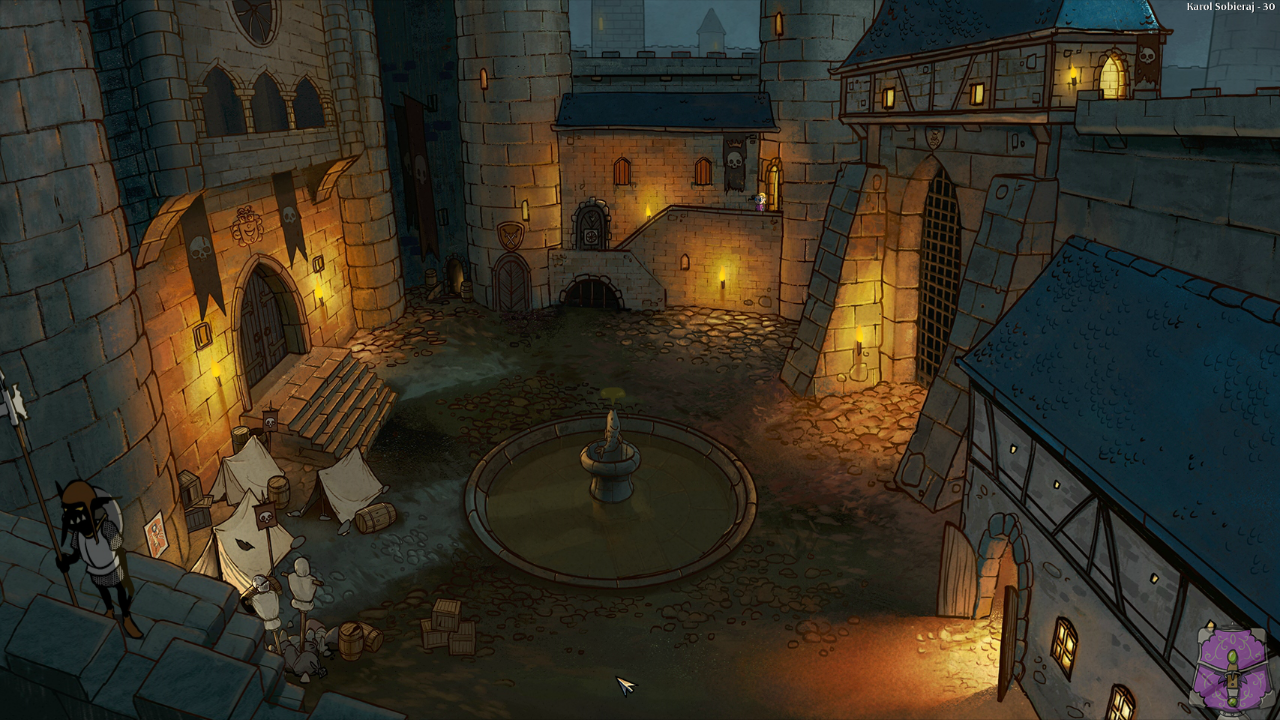
- In TsioqueSteam.swf, the script Tsioque.as in the default package has a function private function updateBetaNotes() that is interesting. It seems to be designed for beta testers.
The file also has a boolean _isBetaTestVersion used in a few places. When replacing that with true and starting the game, a beta tester's name will show up in the top right corner with some numbers; This information will change on each screen.