

Unused text#
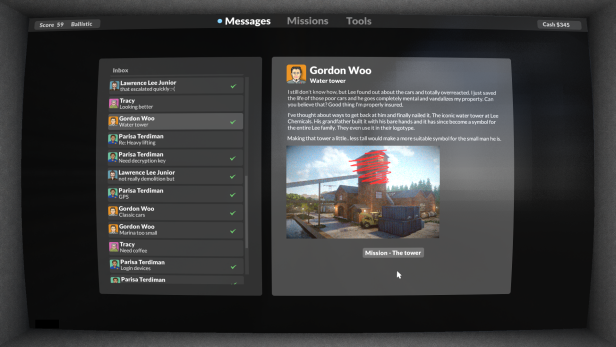
If you played the game before the update that added the second part of the campaign (0.9.0), you would have seen the following email in the hub terminal after you reached the end of the first part. This email can still be accessed in-game, but only if you got the email in the past. The profile picture is the old Tuxedo Labs logo.

Tuxedo Labs
Thank you
Congratulations! You have finished part one of Teardown. We are currently working on part two and it will be released as a free update when ready.
Thank you for playing through the game and participating in the early access. We are eager to hear your feedback! If you have any questions, comments or suggestions, head over to the official discord server or reach out to us on twitter. You'll find links at the game homepage: teardowngame.com
If you want to increase your score and rank, you can go back and replay some of the previous missions and try to complete more optional targets. If you haven't already, you can also try out the sandbox or challenge mode, check out the mods in Steam Workshop or build your own!
Sincerely,
The Teardown Developers
Unused enemy#
There are references to an enemy element in all executables before 0.9.6, but it's only actually usable in 0.4.5 (launch day). They don't inflict any damage (unless you stand on their head, in which case you might take fall damage, which probably isn't intentional), but they will either back away from you while holding their front legs up, or get really uncomfortably close to you and stare at you. The enemy element has no properties besides the standard ones all elements have. The spiders can be attacked or picked up and thrown, but they cannot die, and they cannot be spraypainted.
According to a developer, this element was not intended to be left in the game, and they were removed as not to spoil their comeback in the game
. This was likely referring to the spider robot in part 2 (which is powered by a Lua script and made of regular voxels and shares absolutely no code with the prototype spiders).
Unused graphics#

An aliased black box with a rounded white outline at data/ui/common/optionsbox.png. Filename, resolution, and this Twitter post by the main developer suggest that it was used in place of box-solid-shadow-50.png as the background for UI elements at one point. Present in all known versions of the game, including the performance test.


box-round-6.png, box-round-10.png, button-bright-round-6.png, and button-round-6.png in data/ui/terminal/ all go unused. This directory is used for the computer you access your emails, missions, and upgrades from in the campaign hub, so we can infer that these were probably going to be the backgrounds for UI elements of the terminal at one point. In the final release, the terminal interface is in the same style as the rest of the game, but this post by one of the developers suggests it was not always going to be like that. Present since launch day.


box-inverted-10.png and box-inverted-32.png in data/ui/common/ go unused. Present since 1.1.0 (8942147).
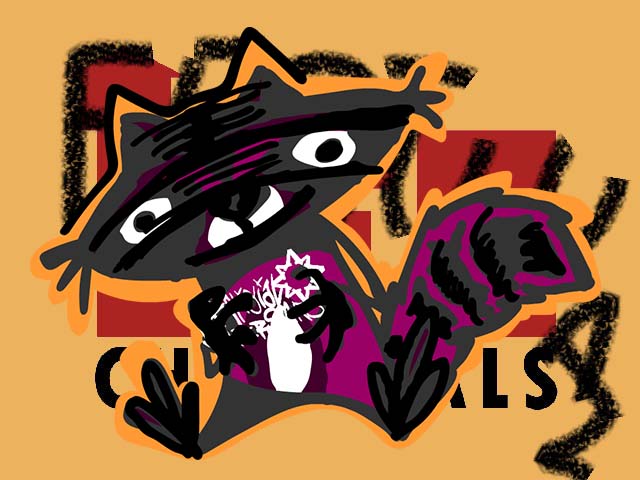


In data/level/mall/script/tv/ are edited versions of the images used on the television in Lee Chemicals. There is also a Lua script at data/level/mall/script/tv.lua, which is identical to the one used on Lee Chemicals. There is no television in any of the Evertides Mall levels. These images were added in 1.0.0 (8558212) and are still in the game. These were used as test images for screens that were planned to be on or around the stage in the parking lot.
Strings in executable#
Debugging symbol path#
The executable (teardown.exe) includes the path C:\tuxedolabs\teardown\trunk\teardown.pdb (exact path varies from build to build). Unfortunately for us, the actual symbol file is not distributed with the game.
Early featured mods#
We wouldn't get the "Featured mods" menu until 1.2.0 (9734688), but the executable for 1.1.0 (8942147) actually had some unused code for it, and some of the graphics that would end up being used later were present in the files at this time. None of the necessary Lua code was present however. If you had gone to the old endpoint at http://promo.teardowngame.com/?version= which could be found in the executable, you'd've gotten the response:
http://promo.teardowngame.com/2022-06-07.zipIf you had then gone to that URL before it was taken down, you'd've gotten some (unfinished) data for the "Featured mods" menu.
 |
File: teardown_2022-06-07.zip (461 kB) (info) |
<promo>
    <group title="New favourites" format="landscape" size="large">
        <item id="steam-2812070512" title="Dog Companion" author="DimasVoxel" tags="global" image="new/dog.jpg">
            Adorable dog companion that spawn next to you on any level. Pet your companion to make it happy! Follows you everywhere and can play fetch.
        </item>
        <item id="steam-2794946945" title="The Vault of the Future" shorttitle="The Vault" author="=HammeR=" tags="content map" image="new/vault.jpg">
            Underground vault with great attention to detail.
        </item>
        <item id="steam-2807752513" title="IKEA Showrooms" shorttitle="IKEA" author="BorderLIGHT" tags="content map" image="new/ikea.jpg">
            Get lost in a huge furniture store, with the option of being chased by deadly robots.
        </item>
        <item id="steam-2797610758" title="Piano Fall" author="Jiffy UP" tags="global tool" image="new/piano.jpg">
            Grand pianos falling from the sky. There not much more to it, but it's more than enough.
        </item>
    </group>

    <group title="Essential Tools">
        <item id="steam-2400310320" title="Physgun" author="Fall Guy 2106" tags="tool" image="tool/physgun.jpg">
            Move things around with this tool inspired by the iconic physics gun from Half-Life 2. It has remained the most subscribed mod since the release of the Teardown Workshop. We love the attention to detail, the precise controls and versatility of this tool.
        </item>
        <item id="steam-2412621869" title="Hook Shotgun" author="My Cresta" tags="tool" image="tool/hook-shotgun.jpg">
            Why would anyone add a grapple hook to a shotgun? Because why not! Use the right mouse button to attach the grapple hook and then right mouse button again to pull in. You can use this both to swing between buildings and to pull objects.
        </item>
        <item id="steam-2539026789" title="Thermite Cannon" shorttitle="Thermite" author="el Boydo" tags="tool" image="tool/thermite-cannon.jpg">
            The Thermite Cannon is by far the best way to set things on fire in Teardown. This is an incredibly powerful tool with a masterful presentation.
        </item>
        <item id="steam-2625710852" title="Vacuum Cleaner" shorttitle="Vacuum" author="My Cresta" tags="tool" image="tool/vacuum.jpg">
            With this vacuum cleaner you'll never find yourself tidying up debris ever again. Suck up small objects with ease and it gets even better - you can spit them back out with the right mouse button. Genious!
        </item>
        <item id="steam-2682733876" title="Laserkraftwerk" author="Swivel Guy" tags="tool" image="tool/laserkraftwerk.jpg">
            Play with laser and watch voxels melt into glowing particles with this tool inspired by the Wolfenstein series.
        </item>
        <item id="steam-2789549013" title="Fire Hose" author="My Cresta" tags="tool" image="tool/fire-hose.jpg">
            If you think the built-in fire extinguisher is a bit weak, this might be for you. Put out any fire with this massive fire hose, which will also affect dynamic objects in front of it.
        </item>
        <item id="steam-2401575709" title="AC130 Airstrike" shorttitle="Airstrike" author="My Cresta" tags="tool" image="tool/airstrike.jpg">
            Feeling a little lazy? Call in an armored gunship to do the destruction for you. There is plenty of ammunition to choose from to cause just the right amount of destruction.
        </item>
        <item id="steam-2419814408" title="Attack Drone" author="My Cresta" tags="tool" image="tool/attack-drone.jpg">
            This tool adds an autonomous drone that follows you around the level and does the shooting for you. This mod also offers first-person view from the drone if you desire.
        </item>
        <item id="steam-2417823738" title="Remote Control" author="pahapua" tags="tool" image="tool/remote-control.jpg">
            Remote control any vehicle. Simply click on the vehicle you want to control and use J,K,L,I to drive. This mod is surprisingly useful and fun to play with!
        </item>
        <item id="steam-2598610013" title="Sith Saber" author="BattleBob72" tags="tool" image="tool/sith-saber.jpg">
            Very carefully implemented light saber that you can both swing as a sword with left mouse button or throw like a boomerang with the right mouse button.
        </item>
        <item id="steam-2415643616" title="C4" author="Punished Bernadetta, Slash by Zero" tags="tool" image="tool/c4.jpg">
            Place C4 charges anywhere and detonate them all at once by pressing K. You can configure both the size of the explosion and the time in between.
        </item>
    </group>

    <group title="Essential Sandbox Levels" format="landscape">
        <item id="steam-2414968003" title="Inverted pyramid house" shorttitle="Inv Pyramid" author="gusono" tags="content map" image="sandbox/invpyramid.jpg">
            Beautiful map inspired by a real house in Spain.
        </item>
        <item id="steam-2453693772" title="Russian Town 3" shorttitle="Russian Town"  author="Igor_AI88" tags="content map" image="sandbox/russiantown.jpg">
            Who are the agents on the roof? What's going on in town hall and what really happened to the public school? Environmental storytelling at it's best in this huge map.
        </item>
        <item id="steam-2481708623" title="Off the Grid Cabin" shorttitle="Off the Grid" author="Jack" tags="content map" image="sandbox/offthegrid.jpg">
            Sit back and relax in this beautiful cabin in the woods. Amazing attention to detail in this small map by Jack.
        </item>
        <item id="steam-2480490943" title="The Junkyard" shorttitle="Junkyard" author="BattleBob72" tags="sandbox spawn" image="sandbox/junkyard.jpg">
            Take the ShredDozer around BattleBob's Junkyard, crush vehicles and cause mayhem. This was one of the first mods for Teardown and still one of the most iconic!
        </item>
        <item id="steam-2430961153" title="Voxel Plaza" author="o_O-r." tags="content map" image="sandbox/voxelplaza.jpg">
            Large buildings and detailed architecture. This ambitious mod has a lot of customization options.
        </item>
        <item id="steam-2465001487" title="Public Library" author="De-Alpha" tags="content map" image="sandbox/library.jpg">
            An old wooden library. Blah blah.
        </item>
    </group>

    <group title="Great Gameplay">
    </group>

    <group title="Fun Vehicles">
    </group>

    <group title="Object Spawning">
    </group>

    <group title="Miniature Landscapes">
    </group>

    <group title="Dreadful Enemies">
    </group>

    <group title="Weird and Wonderful">
    </group>
</promo>Characters#
Before 0.5.0 (including perftest), there were many strings referenced by unused code that have to do with "characters", body parts, and bones. There is also a shader called character.glsl that is still present in latest (1.4.0). In the Discord, Dennis Gustafsson (lead developer) referred to these animated humanoids as "characters", which strongly suggests that the unused code that references these strings is for them.
aTangent
aBone0
aBone1
aBone2
aBone3
characters/
.chr
Could not open character file
Could not decompress character file
c.png
n.png
hand_l
hand_r
thigh_l
thigh_r
upperarm_l
upperarm_r
lowerarm_l
lowerarm_r
spine_01
spine_02
spine_03
calf_l
calf_r
foot_l
foot_r
pelvis
arm
Unused debugging code#
Debug menu#
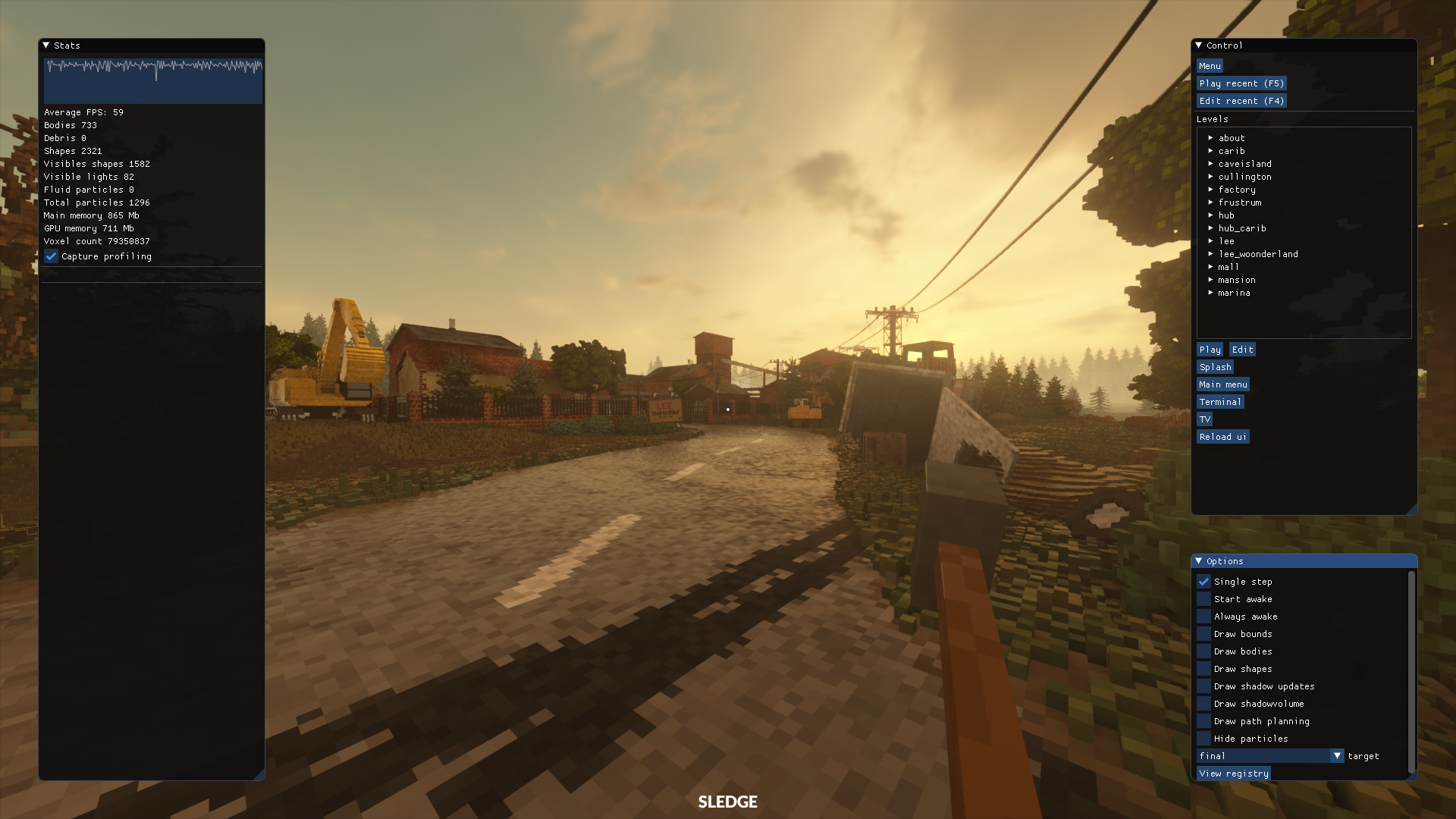
There's a debug menu visible in some developer streams. It contains a variety of options, including a (laggy) registry viewer (in-game registry, not Windows registry), shortcuts for playing and editing built-in levels (only works if you have the source files, which are not in release builds), various rendering options, and options to view the hub terminal or TV in full screen.
It can be enabled by changing byte [0x520050+0x90]+0x0 in memory from 0x00 to 0x01. The 0x520050 is the offset of certain struct. If it changes, you can find the beginning of it again by searching for its first 3 fields (all little endian uint32s), which are your screen width, screen height, and current game state; if you're on the main menu while using a screen resolution of 1920x1080, search for value "80 07 00 00 38 04 00 00 02 00 00 00" with type "bytearray" in Cheat Engine (or scanmem/GameConqueror). The 02 near the end will change to 04 when you enter a level.
"Debug" option on main menu and terminal#
In some developer streams and this censored screenshot on the Tuxedo Labs blog, there's a debug menu in the bottom left of the main menu and hub terminal. While the majority of the code for it has been removed in all Steam releases, some remnants remain. More remnants are in the perftest build.
data/ui/menu.lua#
#include "debug.lua"gDeploy = GetBool("game.deploy")if not gDeploy and mainMenuDebug then
mainMenuDebug()
endThe game.deploy registry key has a value of 1 in every public build.
data/ui/terminal.lua#
#include "debug.lua"function draw()
UiPush()
if gDebugScale > 0 then
local w = UiWidth()
local h = UiHeight()
local dw = 300*gDebugScale
local mw = UiWidth() - dw
UiPush()
UiScale(gDebugScale, 1)
UiWindow(300, h, true)
if terminalDebug then
terminalDebug()
end
UiPop()
UiTranslate(dw, 0)
UiScale(mw/w, 1)
UiWindow(w, h, true)
end
drawTerminal()
UiPop()
if not GetBool("game.deploy") then
UiPush()
setFont("h2")
UiTranslate(60, 1066)
UiColor(1, 1, 1, 0.5)
UiAlign("center middle")
gHoverDebug = UiIsMouseInRect(100, 30)
if UiTextButton("Debug") then
if gDebugScale > 0 then
SetValue("gDebugScale", 0, "cosine", 0.2)
else
SetValue("gDebugScale", 1, "cosine", 0.2)
end
end
UiPop()
end
enddata/ui/debug.lua#
Unfortunately, this file has its contents removed for retail builds.
--CONTENT REMOVEDdata/ui/testbild.lua#
An script at data/ui/testbild.lua has been present since launch day. The name can be translated from Swedish as "test image", and there are zero references to it anywhere else in the files. According to the lead developer, Dennis Gustafsson, it was used for testing screens acting as light sources.
It displays nothing for 1 second, then a red rectangle for 1 second, then green, then blue, then nothing again, then yellow and cyan, then magenta and yellow, then black and white, then it loops.
function draw()
    local i = math.floor(GetTime())%8
    if i== 1 then
        UiColor(1,0,0)
        UiRect(640, 480)
    end
    if i== 2 then
        UiColor(0,1,0)
        UiRect(640, 480)
    end
    if i== 3 then
        UiColor(0,0,1)
        UiRect(640, 480)
    end
    if i== 5 then
        UiColor(1,1,0)
        UiRect(320, 480)
        UiTranslate(320, 0)
        UiColor(0,1,1)
        UiRect(320, 480)
    end
    if i== 6 then
        UiColor(1,0,1)
        UiRect(320, 480)
        UiTranslate(320, 0)
        UiColor(1,1,0)
        UiRect(320, 480)
    end
    if i== 7 then
        UiColor(0,0,0)
        UiRect(320, 480)
        UiTranslate(320, 0)
        UiColor(1,1,1)
        UiRect(320, 480)
    end
end