This is a sub-page of Super Smash Bros. Melee/Master Debug Menu.

|
This page or section needs more images. |

The Master Debug Menu of Super Smash Bros. Melee is a very powerful leftover development tool: not only can you customize just about everything and mess with a ton of other fun stuff, but actually save your changes!
Enter the appropriate Action Replay code for your version, then select any mode or press B to go to the Debug Menu.
Version |
Action Replay code |
|---|---|
Korea |
041AF594 38000004 041AF598 900D9368 |
(Source: GameFAQs, SUPER DIAMOND SMASH (JP codes))

|
To do: |
VERSUS MODE#
DAIRANTOU#
CHAR SELECT#
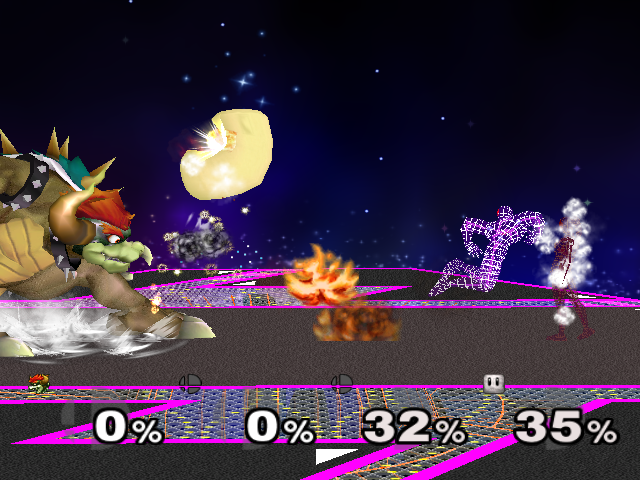
Allows you to choose which characters you want to play as/with for Versus Mode. CHARA_1, CHARA_2, CHARA_3, CHARA_4 and ALL_CHAR is the first player, second player, third player, fourth player, and fifth player, respectively. Each one begins with CKIND_ except for the last three, which end with CHKIND_. Italics mean that this character can only be accessed through the Debug Menu and they may not function properly with normal game events. Watch on YouTube
Debug name |
Character |
Notes |
|---|---|---|
CAPTAIN |
Captain Falcon |
|
DONKEY |
Donkey Kong |
|
FOX |
Fox |
|
GAMEWATCH |
Mr. Game & Watch |
|
KIRBY |
Kirby |
|
KOOPA |
Bowser |
Koopa is Bowser's name in Japan. |
LINK |
Link |
|
LUIGI |
Luigi |
|
MARIO |
Mario |
|
MARS |
Marth |
There's no "th" sound in Japanese, so "s" is used instead. |
MEWTWO |
Mewtwo |
|
NESS |
Ness |
|
PEACH |
Peach |
|
PIKACHU |
Pikachu |
|
POPONANA |
Ice Climbers |
Popo is the male Ice Climber's name and Nana is the female Ice Climber's name. |
PURIN |
Jigglypuff |
Purin is Jigglypuff's name in Japan. |
SAMUS |
Samus |
|
YOSHI |
Yoshi |
|
ZE->SE |
Zelda |
"ZE" stands for Zelda and "SE" stands for Sheik. |
SE->ZE |
Sheik |
Same as previous. |
FALCO |
Falco |
|
CLINK |
Young Link |
"C" stands for "Child". |
DRMARIO |
Dr. Mario |
|
EMBLEM |
Roy |
The developers of the game didn't decide which Fire Emblem character to put in the game until late in development, where Roy was chosen. This is probably why Roy's debug name is "EMBLEM". |
PICHU |
Pichu |
|
GANON |
Ganondorf |
Ganon is the name of Ganondorf's true form. |
MASTERH |
Master Hand |
Can't be KO'd under normal means, though he can be defeated as expected in Stamina Mode. If he wins a match outside Stamina Mode (which never goes to the results screen), the game will freeze because he doesn't have a victory animation. His intro cutscene from Classic Mode will play upon the start of a match. A controller must be plugged into port 3 in order to control Master Hand. This doesn't apply to CPUs, so they can be the first, second, third or fourth player. Master Hand cannot pick up items. However, he can be affected by mushrooms, the Metal Box, Starmen, and Lip's Stick, all of which don't need to be picked up to be used or receive the effects of. For a list of attacks and their button combinations, see this section. The H in his debug name stands for "Hand." |
BOY |
Male Wire Frame |
Weak clone of Captain Falcon, with no special attacks, no chargeable smash attacks, less damaging moves overall, and removed flame and electric effects. |
GIRL |
Female Wire Frame |
Weak clone of Zelda, with no special attacks, no chargeable smash attacks, less damaging moves overall, and removed flame/electric/slash effects. |
GKOOPS |
Giga Bowser |
Was probably used for either programming the AI or testing, such as making sure all of his moves worked properly. |
CREZYH |
Crazy Hand |
Essentially identical to Master Hand in terms of how he operates when selected, though a controller must be plugged into the fourth port instead of the third to control him. For a list of attacks and their combination of buttons, please read this section. Any items that affect Master Hand affect Crazy Hand in the same way. |
SANDBAG |
Sandbag |
Sandbag can actually move, jump and shield, a feature that went unused in the final game as all he does is just stand still. Attempting to attack, grab, roll, sidestep or airdodge will crash the game. If the player makes Sandbag as a CPU, the game will probably crash because the AI will attempt to attack, grab, roll, sidestep or airdodge. Sandbag is unable to pick up any items, although he can be resized by mushrooms, frozen by Freezies, sucked into a Barrel Cannon, made invincible by a Starman, and receive the flower status from Lip's Stick. A moveset swap hack can be used to give Sandbag another character's moveset, which will remove some of the restrictions but still freeze in several cases. |
POPO |
Popo |
Ice Climbers without Nana, used in Target Test mode. Using an alt color that will put Nana in the lead will work here. |
NONE |
Attempting to play as this crashes the game. It can be used on the results screen without crashing, but it has no stock icon or poses and has a name that cycles between other characters' names. Could possibly be used for holding blank spots in one-player modes before a character shows up later. When the game crashes, the following error is left in the log:
|
SCALE SELECT#
Changes the size of each character, from 0.10 (very small) to 5.00 (gargantuan). 1.00 is default. You can only make the scaling option go down to 0.10 by going all the way up to 5.00 and then going all the way back down. Otherwise, it'll stop at 0.20. 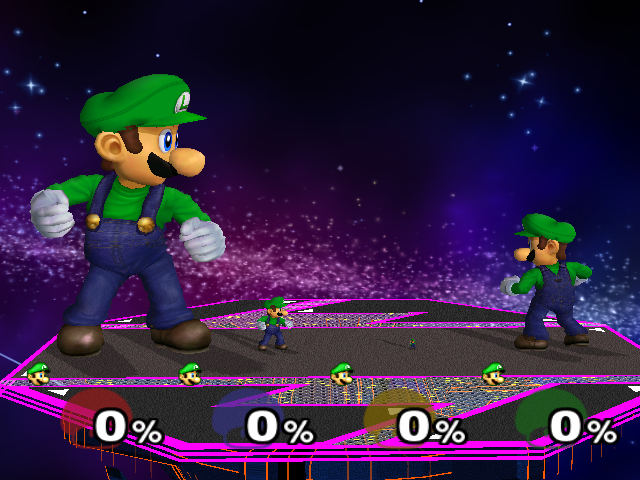
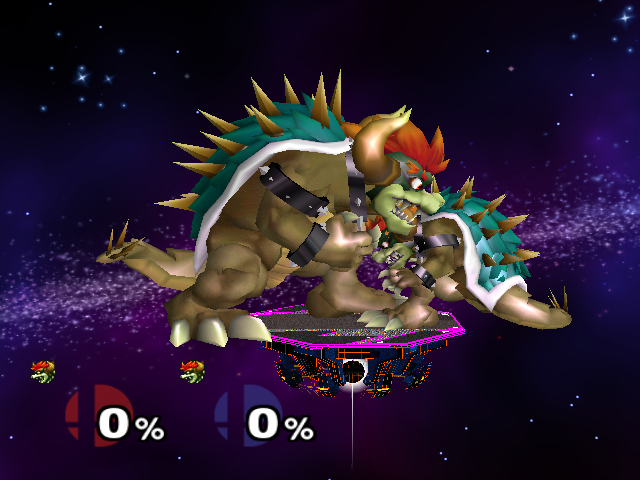
KIND SELECT#
Selects what type each player will be: GM_HUMAN (human player), GM_CPU (computer player), GM_DEMO (human-controlled CPU), and GM_NONE (will not be in the match).
COLOR SELECT#
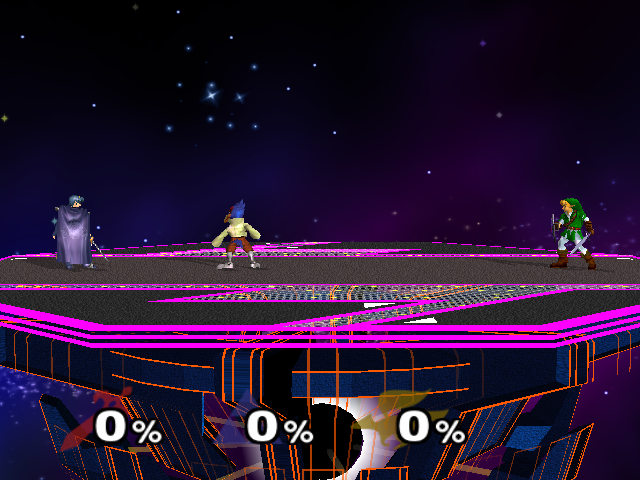
Color your character's outfit color, from 0-9. 0 is the default, while 1-5 are the alternate costumes (depending on how many alternate costumes the character has). 6-9 will give you the default with no life icon.
SUB COLOR#
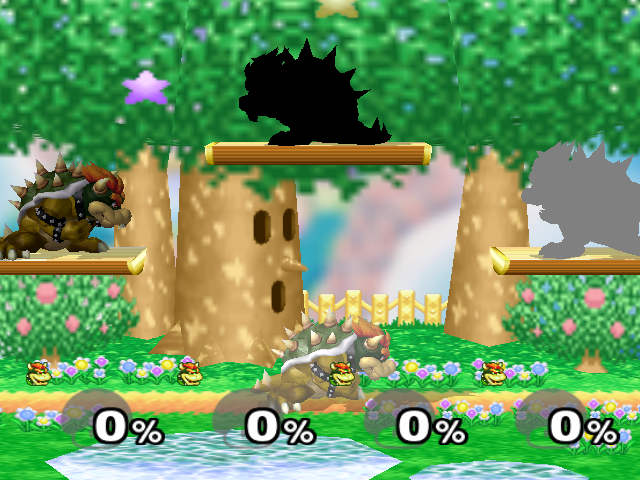
Change your character's secondary outfit color, from 0 to 9, though 0-4 are the only functional values (5-9 crash the game upon starting a match). SUBCOLOR_1, SUBCOLOR_2, SUBCOLOR_3, and SUBCOLOR_4 set the sub colors of the first, second, third, and fourth players respectively. Subcolors 1 and 2 are used normally in team battle if there are three characters who are on the same team and they are the same character (three Marios on the Green Team, for example). Sub color 3 is used for Dark Link in the event match "Link's Adventure" (and can even be accessed by a glitch), while sub color 4 actually matches Mr. Game and Watch's "outline", and cannot be selected in any way outside of the debug menu. Sub color 5 is entirely unused and cannot be used without a code to force it to load.
1.2代码:
- KAN1-6C1J-RQARH
- FBM4-R1M8-H2D3A
Sub Color Number |
Effect |
|---|---|
0 |
Default. |
1 |
Brighter. |
2 |
Darker. |
3 |
Totally black. |
4 |
Totally gray. |
5 |
Totally pink (crashes the game, requires codes to force it to load). |
6 |
Crashes the game. |
7 |
Crashes the game. |
8 |
Crashes the game. |
9 |
Crashes the game. |
DAMAGE SET#
The amount of damage players will have when they start/respawn, ranging from 0% to 999%.
OFFENSERATIO#
How much knockback each player deals, from 0.10-3.00. (Despite this range, enemies in single-player modes can go up to 5.00 and possibly beyond.)
DEFENCERATIO#
How much knockback each player takes, from 0.10-3.00. Same as above.
CPUTYPE SET#
The type of AI used for CPU players. Changing this setting causes the corresponding CPU player to behave differently. This is much like setting the CPU player's behavior in Training Mode, though there are a few behaviors that aren't available outside of the Debug Menu. Note that with the exception of NOACT, CPU players will always try to get back on the stage.
Debug Name |
Effect |
|---|---|
AIR |
The height of the CPU's first and second jumps is limited. Recovery special moves are unaffected. |
COOPERATE |
The AI follows the player around the stage. It will attack if it gets in range. |
DEFENSIVE |
The AI does its best to avoid taking damage. It constantly runs away, shields, and dodges. It will attack, but protecting itself is its first priority. |
ESCAPE |
The AI will run away from characters, be they players or other CPUs. Once they're as far away from everyone else as possible, they wait in one place. They will never attack. |
EVZELDA |
A CPU Zelda will transform much more often than usual, as seen in the event match "Hide 'n' Sheik". |
FREAK |
The CPU stands in one place and only attacks if another character gets close. This behavior is used for Kirby in the event match "Kirbys on Parade". |
ITEM |
The CPU will grab any items that appear, but other than that, they are normal CPUs. |
JUMP |
The CPU constantly jumps (first jump only). It only performs the second if it is trying to get back on the stage. |
MANUAL |
Plugging a controller into the corresponding port allows a player to control the CPU. The CPU's kind under KIND SELECT does not have to be set to "DEMO" for this to work. |
NANA |
Using this on the Ice Climbers causes them to behave very strangely. The pair remains stationary if they are left alone. If they're attacked, though, they'll go absolutely bonkers. They'll run and jump around the stage with no apparent pattern. Sometimes they try to dash back and forth so quickly that they don't actually go anywhere. Using this on any other character causes them to behave normally. |
NOACT |
This makes the AI do literally nothing. They won't even try to recover. |
NORMAL |
This causes a CPU to behave normally. It will attack, run, jump, dodge, etc. |
ONLYITEM |
The AI will only attack if it is holding an item, and even then it uses them sparingly. |
SPLWLINK |
A CPU Link will constantly use his down special (Bomb), as seen in the "Bomb-fest" event match. Despite being named after Link, any character set to this mode will use their down special exclusively. |
SPLWSAMUS |
This is used for Samus in the "Bomb-fest" event match, and is essentially identical to SPLWLINK. |
STAY |
The CPU remains stationary. |
STRUGGLE |
Allegedly causes CPUs to attack other CPUs more frequently, rather than just focusing on human players. |
WALK |
Makes the CPU walk back and forth along the stage. On aerial stages, the CPU will turn around when it reaches an edge. On stages where the ground extends past the boundaries, though (Mushroom Kingdom II, for example), it might walk right off the edge of the screen and die. |
CPULEVEL SET#
Selects the CPU's skill level, from 0-9. 1-9 are the same as when chosen through normal gameplay, while 0 indicates that the CPU will not attack even when its AI tells it to do so. The general idea is that a higher-level CPU will perform actions more reliably; both a level 1 and a level 9 will decide to dodge an attack, but the level 9 will do it much more often.
TEAM SELECT#
The team each player is on; BLUE-TEAM and GREEN-TEAM are the green team and blue team, respectively.
STAGE#
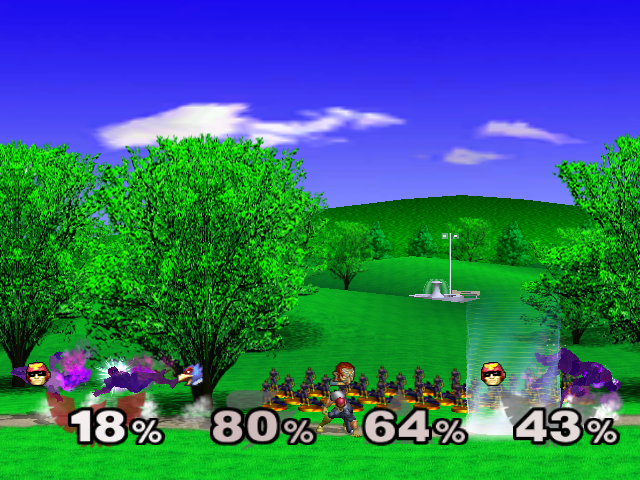
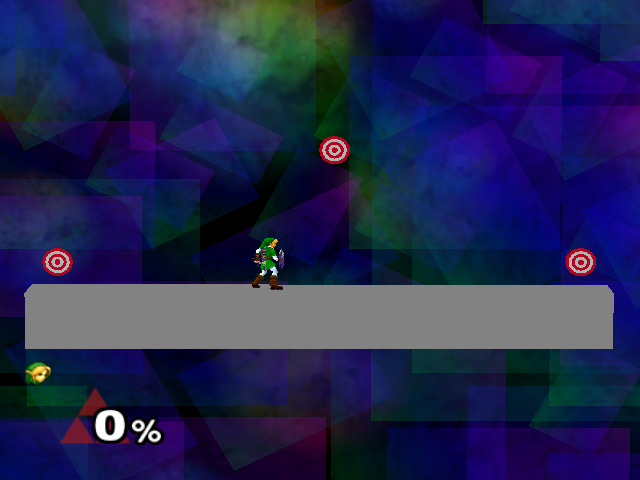
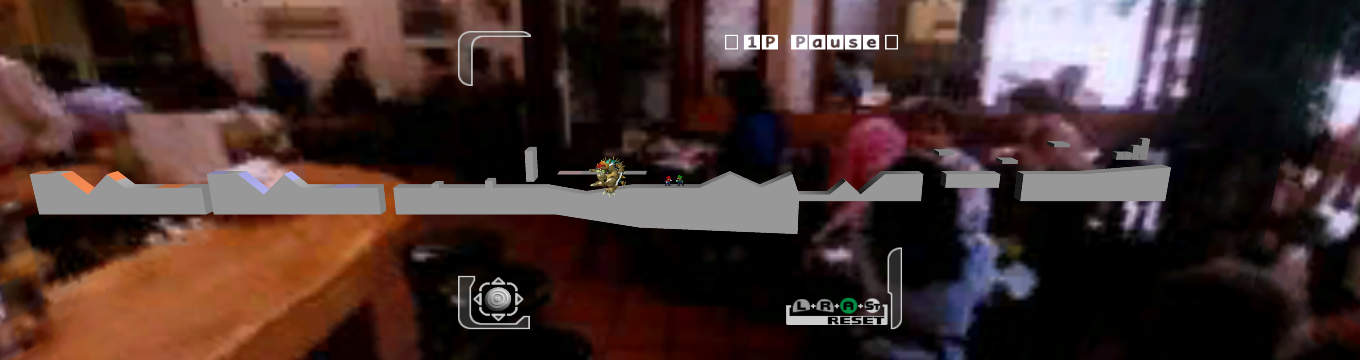
The stage you'll play on. Italics mean that stage is exclusive to Adventure Mode and bold names are for unused stages (documented on the game's main page). To play on hidden stages, you will need to activate the Level Number Select code found here.
Debug Name |
Stage |
Notes |
|---|---|---|
1-1KINOKO |
Mushroom Kingdom |
The Mushroom Kingdom stage from Adventure Mode. The game freezes when you reach the Yoshi battle halfway through the stage, though other codes can fix this. Reaching the goal ends the match. |
1-2CASTLE |
Mushroom Kingdom: Princess Peach's Castle |
Plays Rainbow Cruise music. |
2-1KONGO |
DK Island: Kongo Jungle |
|
2-2GARDEN |
DK Island: Jungle Japes |
|
3-1MEIKYU |
Underground Maze |
The Underground Maze stage from Adventure Mode. The game freezes if you enter a room where you would fight Link, though other codes can be used to prevent this. The match ends if you touch the Triforce. |
3-2SHRINE |
Hyrule: Temple |
Plays Great Bay music. |
4-1ZEBES |
Planet Zebes: Brinstar |
Has a possibility of playing Brinstar Depths music. |
4-2DASSYUT |
Brinstar Escape |
The vertical escape level from Adventure Mode. Reaching the top ends the match. |
5-1GREENS |
Dream Land: Green Greens |
Has a possibility of playing Fountain of Dreams music. |
5-2GREENS |
Dream Land: Green Greens |
|
5-3GREENS |
Dream Land: Green Greens |
Has a possibility of playing N64 Dream Land music. |
6-1CORNERI |
Lylat System: Corneria |
Has a possibility of playing Venom music. |
6-2CORNERI |
Lylat System: Corneria |
The Arwings fly around in the background of the stage and attack with laser beams much more frequently than usual. This stage is also used in the event match "Target Acquired". |
7PSTADIUM |
Kanto: Pokémon Stadium |
|
8-18BROUTE |
F-Zero Grand Prix |
The F-Zero stage from Adventure Mode. This stage is also used in the event match "Lethal Marathon". Reaching the goal ends the match. |
8-2MUTECIT |
F-Zero Grand Prix: Mute City |
|
9-1ONETT |
Eagleland: Onett |
|
10-1ICEMT |
Infinite Glacier: Icicle Mountain |
May have some enemies, but the game freezes when the player would normally fight the Ice Climbers. |
11-1BATTLE |
Special Stage: Battlefield |
Used in Fighting Wire Frames matches, this stage has lower gravity than normal. |
11-2BATTLE |
Battlefield |
Used in the Metal Mario (or Metal Mario Bros., if Luigi has been unlocked) mini-boss in Adventure Mode. The background and music for this stage are different than the ones from the original stage (11-1BATTLE). |
12-1LAST |
Special Stage: Final Destination |
|
12-2LAST |
Final Destination |
Used in the Giga Bowser battle, it also plays the Giga Bowser music. |
BATTLE |
Special Stage: Battlefield |
|
BIGBLUE |
F-Zero: Big Blue |
|
CASTLE |
Mushroom Kingdom: Princess Peach's Castle |
|
CORNERIA |
Lylat System: Corneria |
|
FIGUREGET |
Snag the Trophies |
The Snag the Trophies stage from Classic Mode. The game freezes when a trophy touches the bottom of the screen, though codes can be used to prevent this. |
FLATZONE |
Superflat World: Flat Zone |
|
FOURSIDE |
Eagleland: Fourside |
|
GARDEN |
DK Island: Jungle Japes |
|
GREATBAY |
Termina: Great Bay |
|
GREENS |
Dream Land: Green Greens |
|
HEAL |
All-Star Rest Area |
Ends the match if the portal is entered; shows multiple Captain Falcon trophies in the background. |
HOMERUN |
"Home-Run Contest" Stage |
|
ICEMT |
Infinite Glacier: Icicle Mountain |
|
INISHIEI |
Mushroom: Kingdom |
|
INISHIEI2 |
Mushroom: Kingdom II |
|
IZUMI |
Dream Land: Fountain of Dreams |
|
KONGO |
DK Island: Kongo Jungle |
|
KRAID |
Planet Zebes: Brinstar Depths |
|
LAST |
Special Stage: Final Destination |
|
MUTECITY |
F-Zero Grand Prix: Mute City |
|
OLD KONG |
Past Stages: Kongo Jungle |
From Super Smash Bros. It can be unlocked as a Past Stage. |
OLD PPP |
Past Stages: Dream Land |
From Super Smash Bros. "PPP" probably means Pupupu, which is part of Dream Land's original name in Japanese. It can be unlocked as a Past Stage. |
OLD YOSH |
Past Stages: Yoshi's Island |
From Super Smash Bros. It can be unlocked as a Past Stage. |
ONETT |
Eagleland: Onett |
|
PSTADIUM |
Kanto: Pokémon Stadium |
|
PURA |
Kanto Skies: Poké Floats |
|
RCRUISE |
Mushroom Kingdom: Rainbow Cruise |
|
SHRINE |
Hyrule: Temple |
|
STORY |
Yoshi's Island: Yoshi's Story |
|
TUKISUSUME |
"Race to the Finish" Stage |
|
VENOM |
Lylat System: Venom |
|
YOSTER |
Yoshi's Island: Yoshi's Island |
|
ZEBES |
Planet Zebes: Brinstar |
|
T(Character's debug name) |
"Target Test" Stage |
Selecting any of these stages takes you to the corresponding character's Target Test. If the player breaks all the targets, then the match will end normally. |
TSEAK |
Based on the name, this was meant to be a Target Test specifically for Sheik. However, the stage only contains three targets and one untextured platform. |
|
AKANEIA |
Crashes the game before the match can start. No known additional hacks can help. The name suggests it was to be a Fire Emblem stage, which is likely since it's the only series of a playable character to not have a stage, in addition to the Fire Emblem theme's filename being AKANEIA.HPS. When the game crashes, the following error is left in the Log.
|
|
DUMMY |
Crashes the game before the match can start. Additional hacks can avoid the crash and force the stage to load: it is a completely black screen with a lone invisible platform in the center only visible with the debug menu's tools (enabled by changing DBLEVEL to something other than MASTER in the first panel of the debug menu). |
|
TEST |
Ridiculously long stage with a rough shape and a coffee shop as a background. |
|
ICETOP |
Normally crashes the game before the match can start. Name suggests was to be the top of the Icicle Mountain. Other codes can be used to force the stage to load, but it is simply Icicle Mountain with no music. |
|
10-2 |
Normally crashes the game before the match can start. Name suggests was to be part of Icicle Mountain segment of Adventure Mode. Forcing the stage to load is the same as ICETOP. |
MELEEKIND#
Allows to set the type of match, either BATTLE ROYAL (Versus Mode) or TEAM BATTLE (Team Battle).
EXIT#
Let's start the fight already! (Don't worry, you can enter matches without any players...but you'll be unable to exit the match.)
RULE#
A basic set of rule customization for multiplayer fights, not unlike the settings in regular play.

- RULE - Allows you to select from TIME MODE (a time match), STOCK MODE (a stock match), COIN MODE (a coin match), and ENDLESS MODE (a time match with no time limit). Bonus Mode cannot be selected.
- TIME(MIN) - Sets the number of minutes for the battle, from 0-100.
- TIME(SEC) - Sets the number of seconds for the battle, from 0-59.
- STOCK(CNT) - Select the number of lives each player gets, from 0-99.
- DAMAGERATIO - Changes the knockback ratio just as normal (0.10-3.00).
- VIBRATION SELECT - Enable or disable the rumble feature on controllers 1-4 (default is OFF). See the bottom of this page to be able to switch this option to a fun FLAGS selector!
- ITEM SWITCH - Select the item appearance rate. NOTHING, VERYLOW, LOW, MIDDLE, HIGH, and VERYHIGH are the equivalent of None, Very Low, Low, Medium, High, and Very High.
RESULT TEST#
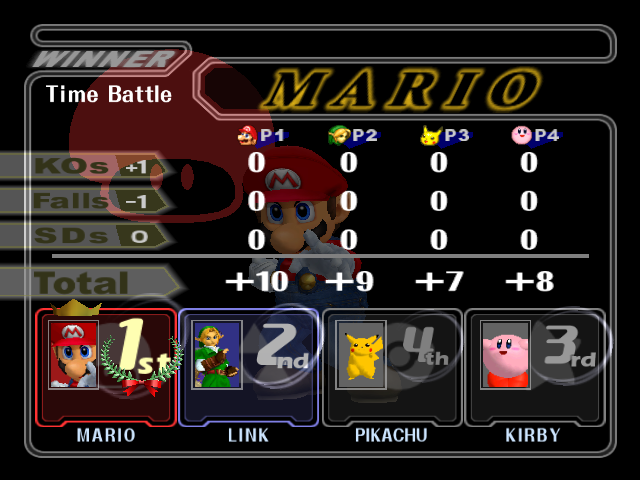
Tests the result screen.
- 1P KIND, 2P KIND, 3P KIND, and 4P KIND - Changes that player's character.
- ALL PLAYER - Connected to the above, it changes all four at once.
- 1P RANK, 2P RANK, 3P RANK, and 4P RANK - Changes that player's rank.
- 1P WIN, 2P WIN, 3P WIN, and 4P WIN - Changes each player's pose.
- ALL COLOR - Changes each player's costumes.
- STEP ANIM - A switch for the animations. 0 is on, 1 is off (although you must set the DBLEVEL to Develop and press Z to advance a frame if you do the latter).
- PANEL HIDDEN - Like it says, it hides the panels.
LANGUAGE (语言)#
游戏的语言。(日本语或者英语)
PUBLICITY#
While this is normally set to OFF, changing this option to ON and pressing A will erase all data from the game's save file. The select sound effect will play when A is pressed on this option, confirming that the data has been erased.
DBLEVEL#

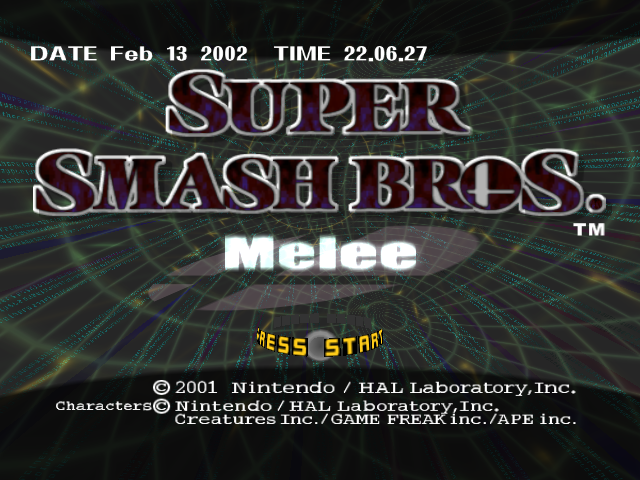 If set to DEVELOP and then B is pressed until you get back to the title screen and then X is pressed, you can access a debug sound test. In this debug sound test, you can listen to every sound in the game, including the ones in the "Unused Audio" section in the main page. If set to DEVELOP or DEBUG, you'll get a bunch of new controls for battles.
IK DEBUG FLAG#
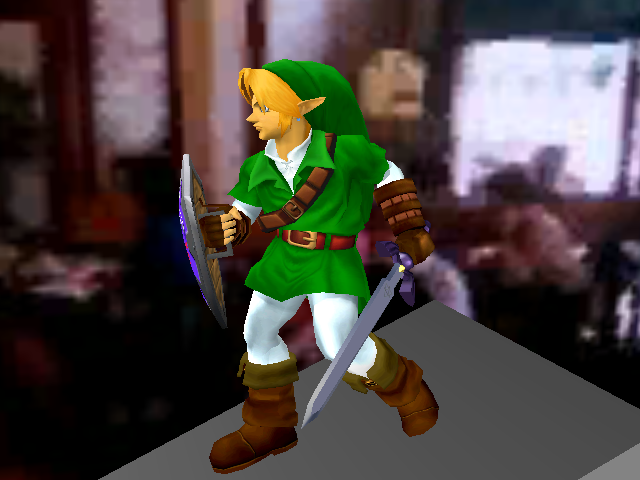
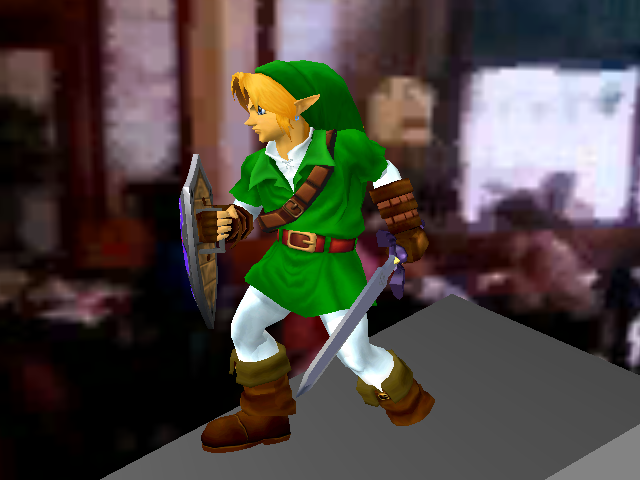
This toggle is set to 1 by default. Setting this option to 1 enables foot snapping, which makes the characters' feet angled depending on whether or not they are standing on a slope. Setting this toggle to 0 disables foot snapping.
|
IK Debug - 1 |
IK Debug - 0 |
|---|---|
|
|
NEW DEFCALC#
What this does exactly is unknown. The name suggests it toggles whether an older or a newer version of a formula is used for "defense", which from previous debug menu items is likely to mean "knockback taken".
GLOBAL DATA EDIT#

According to ARCentral, this allows modifications to memory addresses that handle many in-game variables, such as unlocking all characters, stages, bonus messages, trophies, etc. This, unlike the other options, uses Hexadecimal values. There are 6 values.
Value |
Note |
|---|---|
ADDR4 |
This had 4 digits and it goes up in 4s. |
U32 |
This has 8 digits, and it goes up in 1. Like the name applies, this is a 32-bit value. |
ADDR2 |
This has 4 digits and adds up in 2s. |
U16 |
This has 4 digits and it goes up in 1s. Like the name applies, this is a 16-bit value. |
ADDR |
This has 4 digits and adds up in 1s. |
U8 |
This has 2 digits and it goes up in 1s. Like the name applies, this is a 8-bit value. |
(Source: Action Replay Central)
MODE TEAM TEST#
HANYU#
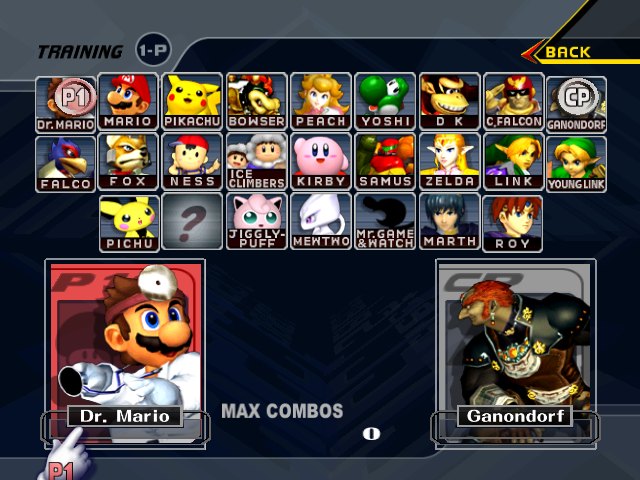
SELECT STAGE will freeze the game. But, SELECT CHAR will take the player to the character selection screen in Melee mode with every character unlocked (at least in v1.2 and PAL version). If the player goes back, they will go in this loop of modes. This will also happen if the language is set to Japanese. 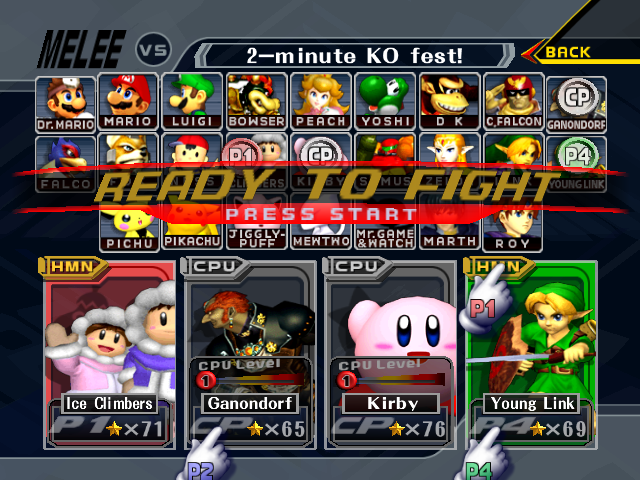
- Melee Vs. Mode.
- Training (Luigi will be missing from the character roster)
- Cruel Melee
- Endless Melee (Luigi will be missing from the character roster)
- 15-minute Melee
- 3-minute Melee (Luigi will be missing from the character roster)
- 100-man Melee
- 10-man Melee (Luigi will be missing from the character roster)
- Home-Run Contest
- Target Test (Luigi will be missing from the character roster)
- Event Match (Unknown which one)
- All-Star (easy by default) (Luigi will be missing from the character roster)
- Adventure (easy with one stock by default)
- Classic (easy with one stock by default) (Luigi will be missing from the character roster)
- Slo-mo Melee
- Lightning Melee (Luigi will be missing from the character roster)
- Single Button mode
- Fixed Camera (Luigi will be missing from the character roster)
- Invisible
- Tiny (Luigi will be missing from the character roster)
- Giant
- Super Sudden Death (Luigi will be missing from the character roster)
- Stamina
- Camera (Luigi will be missing from the character roster)
Once the player gets to Camera mode, if they press B, it takes them back to Melee mode causing an endless loop. If the player attempts to go forwards to the stage selection screen, it shows the previous character selection screen instead. For example, if the player was on Vs. Mode and presses Start, they will end up in Camera Mode. For some strange reason, Luigi will be missing from the character roster in half the modes. He goes and comes back in a zigzag way; for every mode he's not in, the next one he'll be selectable.
Also, whenever you're in a mode that supports four players (such as Tiny or Single Button), the player KO counter will be set to 71, 65, 76, and 69. This translates to 47 41 4C 45 in hexadecimal, which converts to "GALE" in ASCII; "GALE" is the four-character game ID for the North American release of Melee.
Presumably named after Akio Hanyu, one of the game's programmers.
OTOGURO#
This was probably named after Seiji Otoguro, one of the game's programmers.


- SET GOLD COIN - Select the number of coins you have for the Lottery/FiguPon (also applies to Continues).
- FIGURE MAX - Hands you every trophy (except Tamagon, for some reason, but that's another story) and sends you to the gallery.
- SAMUS MASK GET - Awards the "Samus Unmasked" trophy, normally unlocked through long-since-passed Nintendo events.
- MARIO YOSHI GET - Awards the "Mario and Yoshi" trophy, normally unlocked through long-since-passed Nintendo events.
- SET MELEE COUNT - Sets the counter for the number of times you've played each mode.
- SET HOMERUN RECORD - Sets each character's Home Run Contest record.
- SET TARGET CLEAR - Sets flags for whoever you want to have cleared Break The Targets.
- SET BEAT TOTAL - Sets the KO total in the Melee records. One must press A for changes to take place. If you press A, it will take you to the main menu.
- GO TO MEIKYU - Sends you to the Underground Maze as the Ice Climbers, but crashes if you fight a Link. If you reach the Triforce, the results screen will play. If you go to VERSUS MODE>DAIRANTOU you will see that the options have been adjusted to what "GO TO MEIKYU" has done.
- GO TO KINOKO - Sends you to the Mushroom Kingdom Adventure stage as the Ice Climbers, but crashes when you get to the Yoshi Team. Impossible to go past them without extra hacks.
- MELEE START - Begins a Melee with the specified settings.
TANIGUTI#
- MELEE START - Begins a Melee with the specified settings.
- REG NORMAL - Sends you to the Adventure Mode character select. By changing the number of this option, you can select which world you start from. You can't select individual levels, however (for example, you can't start from 1-2).
- REG EASY - Sends you to the Classic Mode character select. By changing the number of this option, you can select which stage you start from.
- REG ALLSTAR - Sends you to the All-Star Mode character select. By changing the number of this option, you can select which stage you start from.
TANIGUTI has a similar name to a programmer named Yoshiya Taniguchi, and "ti" is one (albeit incorrect) way to romanize what would otherwise be "chi."
NAGASIMA#
- VISUAL SCENE START - Plays all movie clips in the game. If a player-selected character is supposed to appear, it will choose Ice Climbers. The enemies can change colour every time you play it, with the exception of the Mario and Luigi cutscene. The player (Ice Climbers) can also change colour, even between cutscenes. One cutscene can be skipped by pressing the Start/Pause button. In the end, it will always show Mario's All-star Congratulations picture, where he performs an aerial kick on Fox.
- OPENING START - Plays the intro movie.
- OMAKE 15 START - Plays the special movie. The European version, which removed the special movie to accommodate 4 additional languages, plays Captain Falcon's "clear movie" instead, though strangely with the special movie's audio.
- REGULAR ENDING TEST - Displays the falling trophy and congratulation screen for the characters. This counts as actually beating the mode you choose, so characters can be unlocked through this.
- REGULARENDING REAL - Displays the falling trophy, credits, and congratulation screen for each character. This counts as actually beating the mode you choose, so characters can be unlocked through this. When you DO end up in a fight, your character will have a mysterious empty nametag.
Like before, this name is similar to Yasuyuki Nagashima, who was one of the programmers. Like the ti/chi error, "si" is an alternate (but acceptable in this case) romanization of "shi."
KIM#


- RESULT TEST - Set up a results screen scenario (see Result Test section).
- EASY END - Shows the "Continue?" or "Game Over" screen for the selected character with 99999 score (the continue screen is only shown if you have enough coins; otherwise, the game over screen will be shown and you'll be returned to the debug menu). Both options will take you back to the debug menu.
- GOHOUBI ID - Shows the various bonus messages (cannot be seen properly if Gohubi Figure is set to anything other than 0).
- GOHUBI FIGURE - Shows the trophy messages (cannot be seen properly if Gohubi ID is set to anything other than 62, 63, 64, or 65).
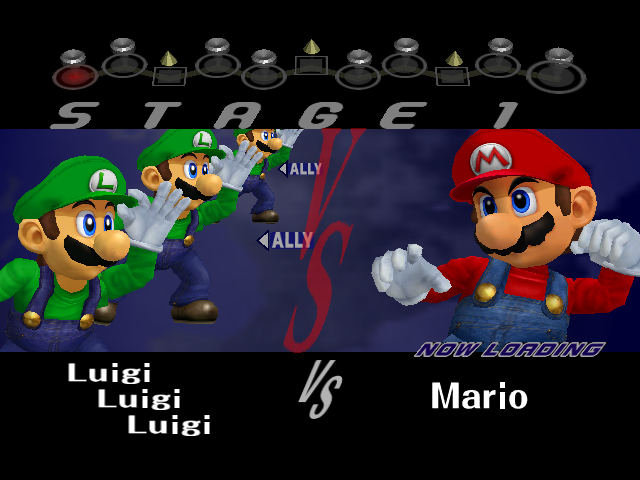
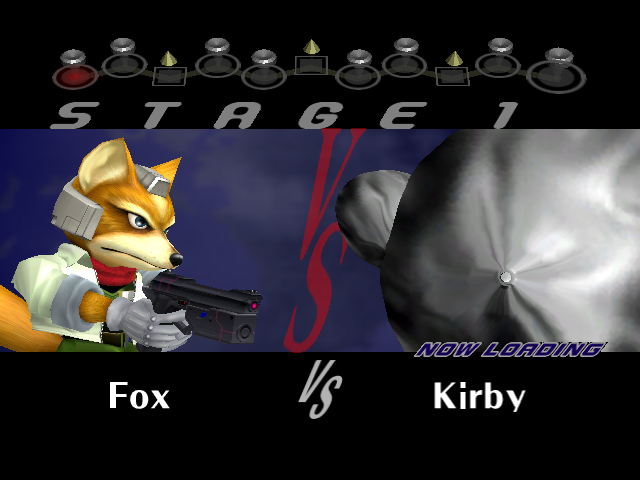
- INTRO EASY - Set up a character VS. screen that would be shown in Classic Mode. Will take you back to the debug menu once it's done.
- STAGENUM - Simulates what stage the VS. screen would look like. Choices are from 1-9.
- STAGE FLAG - Modifies what the enemy would be like.
- NORMAL - A simple plain ol' enemy.
- TEAM - A team of maximum three enemies. Not required to have team matches, but if this isn't selected with multiple enemies selected, the announcer won't say "TEAM
". - GIANT - A giant enemy.
- BONUS - What appears to be an unused function if used with "NORMAL" in "STAGE TYPE". It shows no characters and it's just simply the VS sign without the announcer saying anything if "NORMAL" is selected as the "STAGE TYPE". It has different effects if used with different options in "STAGE TYPE".
- CORPS - A team of a lot of characters. These are the weak enemies that die from normal attacks. The name comes from "Dummy Corps", the Japanese name of the Fighting Polygon Team in Super Smash Bros.
- STAGE TYPE - Edits what type of match or event you do. These will only work with "BONUS" selected in "STAGE FLAG" with the exception of "NORMAL". If not, it will freeze the game.
- NORMAL - A normal match against a CPU player(s). Does not require "BONUS" to be selected.
- TARGET - The target test.
- TUKISUSUMI - Race to the finish.
- FIGUREGET - Snag the trophies (or Grab a Trophy in the PAL versions).
- DISP LEFT NUM - Displays how many people are on the left. if you select more than 1, you have allies with "ALLY" written next to them.
- DISP RIGHT NUM - Displays how many people are on the right. If you select more than 1 without selecting TEAM in "STAGE FLAG", the announcer won't say "TEAM
. - METAL LEFT Makes the player (and allies) metal. You cannot become metal in the final game, so this goes unused.
- METAL RIGHT Makes the enemies metal. In the final game, you can only fight one metal opponent. If "TEAM" is selected in "STAGE FLAG", the announced will say "TEAM
" instead of "METAL " or "TEAM METAL " as it is not used in the proper game. Same thing goes to "GIANT" and "CORPS". - LEFT PLAYER - Choose what character appears on the right. There are three of these.
- RIGHT PLAYER - Choose how many opponents the person will fight. There are three of these.
- TEST> - Very self-explanatory.
- ALLSTAR ENEMY - Shows pictures of the characters which don't normally appear in-game (see the main page for more).
- TEST MOVIE OPENING - Plays the intro movie.
- KUMITE SUB - Unusable. "Kumite" is the Japanese name of Multi-Man Melee and its counterparts in later games.
- PROGRESSIVE TEST - Allows you to change the display to progressive scan, provided you're using a component video cable and a TV that supports this mode. This option is normally available by holding B while the game boots.
- APPROACH - Displays the "A new foe is approaching!" screens. NOCHARA 0 and NOCHARA 12 both show Ganondorf's screen (these do not count as unlocking the character).
Possibly named after Kim Sung-Kwen, another programmer.
SAKODA#
EVENT STAGE will send you to your choice of Event number (1-51), while FIXCAMERA sends you to select characters for a Fixed Camera Melee.
Appears to be named after Katsuhiro Sakoda. Who programmed the items and special moves.
SUGANO#
MELEE START will begin a Melee, while STAFF ROLL START begins the credit roll (plays Venom music or Mute City in version 1.2 and in the PAL version).
Most likely named after Takayuki Sugano, yet another developer of the game.
YOSHIKI#

A menu that has a reputation of giving memory cards an unwanted Spring cleaning. All of these options only affect the Memory Card in Slot A. You choose these options with A (they may look like they don't do anything, but they do).
Option |
Effect |
|---|---|
INIT |
Appears to do nothing. |
FORMAT |
Formats the Memory Card completely without any warning. Literally, the sound when you choose an option in the main menu won't even play, it just formats the Memory Card. |
ACCESSABLE |
Appears to do nothing. |
CREATE |
Creates a Super Smash Bros. Melee save file on the Memory Card if one is not present. |
SAVE |
Saves to the Memory Card. This can be useful for keeping any alterations made in the Debug Menu. |
LOAD |
Loads the save data from the Memory Card. This only truly functions when swapping out Memory Cards, and there's not much of a reason to do so anyway. |
DELETE |
Deletes only the Super Smash Bros. Melee save file. Same as FORMAT, it doesn't produce any form of sound to inform you that the save file is deleted. |
SNAPMOUNT0 |
Appears to do nothing. |
SNAPLOAD0 |
Appears to do nothing. You can change a number, which can go up to 127. |
SNAPDELETE0 |
Appears to do nothing. You can change a number, which can go up to 127. |
SNAPSWAP0 |
Appears to do nothing. You can change a number, which can go up to 127. |
Who this was named after isn't as clear as the other names, though there is a designer who is called Yoshiyuki Tagawa. Perhaps the "SNAP----" items operate on snapshots from Camera Mode?
DBLEVEL Controls#

If DBLEVEL is set to DEVELOP or DEBUG, you'll get a bunch of new button combinations in battle (all directions are on the D-Pad).
- Start - Pauses the game without an overlay or a zoom-in - looks as if the game froze, even though it clearly hasn't because sounds continue as normal. Press Z while pausing in this way to advance one frame. (As a result, you can't use Z as an input while doing frame-by-frame, you must use L+A or R+A.)
- A + Right - Toggles Lightning-Fast Melee.
- A + Y + Left - Applies Poison Mushroom effect on character.
- B + Down - Displays a set of coordinates, which are in order: unknown, CPU level, AI type, handicap, unknown, knockback given, knockback taken.
- B + Left - Shows the bonuses you've won so far, albeit with debug mode-style names.
To do:
List the bonuses and their silly names. - X + Up - Acts as the regular Start button, so it opens the regular pause menu and must be used in the L+R+A+Start combo to quit.
- X + Down - Rotates through the following: turns off screen icons, shows stage as white (characters etc. are fine), shows stage as black, back to normal.
- X + Left - Toggles sound effects and music. One press turns off music, another turns off SFX as well, a third turns on music only, and a fourth goes back to both on.
- X + Right - Displays a set of numbers and bars that seems related to how much work the GameCube is doing. Probably used for stress-testing/performance monitoring.
- Y + Down - Displays every character's currect action, subaction (animation), and frame number. Actions and subactions shared by all characters have names such as "WALK" and "DAMAGEFALL"; those relating to special moves are simply numbers. To the right of the frame count are some letters that indicate the character's current ground contour state - "L" and "R" means that the character's left and/or right foot is contoured, while "T" means the whole character is (probably for "total").
- Y + Left - Applies Super Mushroom effect on character.
- Y + Right - Restores you to your default size.
- R + Up - Press once to show all characters and other elements as its collision bubbles, and again to overlay said bubbles on the models. A third press goes back to normal.
- R + Down - Causes various effects to the stage when pressed several times. Eventually will return to normal with enough presses. One of these brings up a blue and yellow box, which are the camera (blue) and death boundaries (yellow). Also shows (in separate views) item spawn locations, character camera boxes, whether parts of the stage are floors/walls/ceilings, what parts of the stage are grabbable/dropthroughable, and what kind of terrain each part of the stage is (rock grass etc.).
- R + Left - Press multiple times to display white boxes along with white pivot spheres on characters. These help to position some attacks. Can also activate the orange quads that deal with character-stage collision detection, or the boxes that show characters' item-grabbing range.
- R + Right - Turns character into yellow figure (same as R + Up, but only you and not everything).
All other button + direction combinations do nothing.
Item Controls#
Item rate must be higher than NOTHING in VERSUS MODE > RULE > ITEM SWITCH.
- Down - Drops the selected item. Does nothing if the list isn't on-screen.
- L + Up - Cycle forward through the list of items to drop.
- L + Down - Cycle backward through the list of items to drop.
- L + Left - Cycle forward through the list of Pokémon to summon from a Pokéball.
- L + Right - Cycle backward through the list of Pokémon to summon from a Pokéball .
Debug Item Name |
Real Item Name |
|---|---|
CAPSULE |
Capsule |
BOX |
Crate |
TARU |
Barrel |
EGG |
Egg |
KUSUDAMA |
Party Ball |
TARUCANN |
Barrel Cannon |
BOMBHEI |
Bob-Omb |
DOSEI |
Mr. Saturn |
HEART |
Heart Container |
TOMATO |
Maxim Tomato |
STAR |
Starman |
BAT |
Homerun Bat |
SWORD |
Beam Sword |
PARASOL |
Parasol |
G SHELL |
Green Shell |
R SHELL |
Red Shell |
L GUN |
Ray Gun |
FREEZE |
Freezie |
FOODS |
Food |
MSBOMB |
Motion Sensor Bomb |
FLIPPER |
Flipper |
S SCOPE |
Super Scope |
STARROD |
Star Rod |
LIPSTICK |
Lip's Stick |
HARISEN |
Fan |
F FLOWER |
Fire Flower |
KINOKO |
Super Mushroom |
DKINOKO |
Poison Mushroom |
HAMMER |
Hammer |
WSTAR |
Warp Star |
SCBALL |
Screw Attack |
RABBITC |
Bunny Hood |
METALB |
Metal Box |
SPYCLOAK |
Cloaking Device |
M BALL |
Pokéball |
KURIBOH |
Goomba |
LEADEAD |
Redead |
OCTAROCK |
Octarock |
OTTOSEI |
Topi |
OLD-KURI |
Nothing |
MATO |
Target |
HEIHO |
Fly Guy |
NOKONOKO |
Green Koopa Troopa |
PATAPATA |
Red Koopa Paratroopa |
LIKELIKE |
Like Like |
OLD-LEAD |
Nothing |
OLD-OCTA |
Nothing |
OLD-OTTO |
Nothing |
WHITEBEA |
Polar Bear |
KLAP |
Klaptrap |
ZGSHELL |
Green Koopa Troopa (Inside Shell) |
ZRSHELL |
Red Koopa Troopa (Inside Shell)1. |
1. The color of the shell is green, but it behaves exactly like the red Koopa shells in Adventure Mode (as in, it deals fire damage when it hits a player).
Debug Pokémon Name |
Real Pokémon Name |
|---|---|
RANDOM |
Random Pokémon |
TOSAKINTO |
Goldeen |
CHICORITA |
Chikorita |
KABIGON |
Snorlax |
KAMEX |
Blastoise |
MATADOGAS |
Weezing |
LIZARDON |
Charizard |
FIRE |
Moltres |
THUNDER |
Zapdos |
FREEZER |
Articuno |
SONANS |
Wobbuffet |
HASSAM |
Scizor |
UNKNOWN |
Unown |
ENTEI |
Entei |
RAIKOU |
Raikou |
SUIKUN |
Suicune |
KIREIHANA |
Bellossom |
MARUMINE |
Electrode |
LUGIA |
Lugia |
HOUOU |
Ho-Oh |
METAMON |
Ditto |
PIPPI |
Clefairy |
TOGEPY |
Togepi |
MEW |
Mew |
Cerebi |
Celebi |
HITODEMAN |
Staryu |
LUCKY |
Chansey |
PORYGON2 |
Porygon2 |
HINOARASHI |
Cyndaquil |
MARIL |
Marill |
FUSHIGIBANA |
Venusaur |
Camera Controls#
You'll get bunch of camera control features during the battle. They also work while the game is paused by the START button.
- Up changes the camera view from 3 types:
- The first push of Up button locks all standard camera movements, and can only be moved by debug camera controls.
- The second push moves the camera closer to player 1's character. For this camera type, all camera-related controls and movements are based on player 1's position.
- The third push will reset the camera type to default.
- Up also toggles Peach and Zelda's dress visibility.
- C-Stick can be used to rotate the camera.
- Hold Left + C-Stick to zoom in and out.
- Hold Right + C-Stick to pan around.
If you use any of the camera controls in "default" camera type, the game will automatically set the camera to "locked" type. The camera position will be used to determine whether characters are offscreen and should take bubble damage, so even characters in the middle of the stage might get it if the camera's zoomed in on an edge somewhere.
Boss Controls#
Watch on YouTubeTo play as Master Hand and Crazy Hand, plug a controller into Slot 3 and 4, respectively. As above, all controls use the D-Pad.
Master Hand#
- Up + A - Flaming twirling finger.
- Right + A - Flying punch.
- Down + A - Slams the ground.
- Up + B - Laser attack.
- Right + B - Fires its finger gun.
- Up or Right + Z - Attempts to grab you.
- Left + R - Finger jab.
- Right + R - Punches the ground.
- Down + R - Slaps the ground.
- Up + R - Twirling finger into the ground.
- Up + L - Sweeps the stage.
- Down + L - Finger walking attack.
Crazy Hand#
- Up + A - Flying punch.
- Left or Down + A - Flaming twirling finger.
- Right + A - Slams ground.
- Up, Left, or Right + B - Laser attack. (Crashes the game if Master Hand is not in a battle)
- Down + B - Drops bombs.
- Up or Right + L - Sweeps the stage.
- Down + L - Spaz.
- Left + L - "Spider" attack.
- Up + R - Punches the ground.
- Down + R - Jabs its finger.
- Left + R - Twirling finger into the ground.
- Right + R - Slaps the ground.
- Up, Left, or Right + Z - Attempts to grab you.
Combos#
Note that Crazy Hand must initiate each combo. If you do an incorrect combo, Master Hand won't respond and Crazy Hand will more than likely do nothing, probably locking up the hands for the rest of the battle.
- Hand Clap - Right + Y (Crazy Hand) and Left + Y (Master Hand).
- Double Flaming Punch - Up + Y (both hands).
- "Come Here!" Punch - Down + Y (Crazy Hand) and Up + Y (Master Hand).
- Grab (disabled in-game) - Left + Y (Crazy Hand).
Flag Switch#
A hidden flag switch is present in the game, and when its respective code is activated it will replace the RUMBLE switch in the RULE menu. See the notes page to get your code and numbers. Does not work with the 6 players code.
PAL Differences#

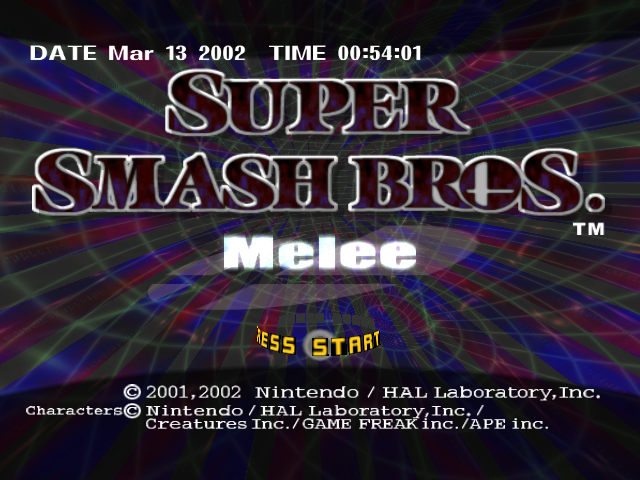
 The European and Australian versions, built months after the US and Japanese versions, have a few differences, primarily in regards to extra languages or video mode differences:
- PAL, unlike the NTSC versions, has 5 languages: UK (English), GM (German), FR (French), IT (Italian), and SP (Spanish).
- EURBG60 SET is now a main option. This sets the video mode to 60Hz if you are running in 50Hz. If you're already in 60Hz, this does nothing.
- WIDTH+ is now added, which allows you to toggle through numbers, but it doesn't seem to have any function.
- NAGISAMA in MODE TEAM TEST has an option called DUTCH LANG that allows you to change the language to English, German, French, Spanish, or Italian.
- NAGISAMA also has a 50-60HZ CHANGE option, which (like you'd expect) lets you change the video mode to 50Hz or 60Hz. This is normally accessible by holding B while booting, replacing Progressive Scan Mode.
- The unused message "You got the 〇〇〇 Trophy!" is now "You got the 000 Trophy!", and it's also present for the last seven Gohubi Figures.
- Due to the removal of Progressive Scan Mode in favor of switching between 50Hz and 60Hz, the Progressive Scan screen has nothing but the select bar and the GameCube logo.
- Selecting OMAKE15 START will not show the Special Movie, since it was removed from the game altogether. Instead, Captain Falcon's ending scene is shown with the audio from it, and only lasts as long as the regular ending.