Super Real Mahjong VS is the sort of strip mahjong title Nintendo has spent decades insisting it doesn't license on its platforms. Guess arcades don't count. Notable for networked play between machines--and how often that desyncs.
Hidden TEST Menu Items#
To access two additional options in the TEST menu, set eeprom bytes 1 through 6 to the string "Linux" and correct the inverse checksum at 0x1E. An example, blank file is provided here.
 |
Download Super Real Mahjong VS - TEST MENU File: Super_Real_Mahjong_VS_-_TEST_MENU.7z (225 B) (info) |

Pressing the H key opens ANM TEST. This replays any of the (often NSFW) animations in the game.
A decreases the animation number, B increases it. C decreases the animation type, D increases it. Few animations actually include alternates. Press N to exit this menu.
Pressing K runs all animations in sequence. L plays only the current animation with sound, M without sound. During an animation, press P1 Start to return to this menu.

Pressing I or above opens ROM TEST. This runs a simple 32-bit sum of all words in the first 512Mbit of the ROM, comparing it to an embedded, expected value.
While running CHK is displayed. If good, the checksum is displayed as an eight-digit hexadecimal value. If not, N O is written.
Debug Printers#
Three on-screen debug printers can be found unused in code. One prints a series of values at the top of the screen, another messages at the bottom of the screen, and a third fills the screen with memory allocation data. Both of these use the same font and setup as the TEST Menu. There is also a long list of unused functions printing information to a Partner64.
On-Screen Debug Output#

Messages are printed to the bottom of the screen. A new message replaces the one prior. Even when printing isn't enabled, these messages are written using 8000B92C (rev. 1.0) / 8000C8BC (rev 1.1). More than simple debug and error messages are printed here. Among the more entertaining are kirbies used to visualize how good the current tile is based on the hand you have. (^o^), as shown, is used for a real winner. Other messages like Makun Loop indicate steps in game setup, and messages appear when melds/riichi are accepted or declined.
The top row of ten values are laid out differently in revision 1.0 and 1.1. From left to right:
Revision 1.0 |
Revision 1.1 |
|
|---|---|---|
1 |
Unused |
Lowest byte of game counter. |
2 |
Current menu mode. (256) |
Current menu mode. (256) |
3 |
Difficulty modifier. |
Current mahjong state. (160) |
4 |
Current mahjong state. (151) |
Most recent Tx output. |
5 |
Outgoing network command; FF when unconnected. |
Most recent Rx input. |
6 |
Most recent Tx output.* |
Attempted receive count. (~120 max) |
7 |
Most recent Rx input.* |
Sequential connection errors. (~120 attempts) |
8 |
Current menu interface. (96) |
Total UART reinitializations. |
9 |
Allocated memory.* |
Allocated memory.* |
10 |
Allocated memory.* |
Allocated memory.* |
As an important note, revision 1.0 only writes the Tx & Rx values when a connection has already been established. This makes debugging connection errors extremely difficult.
Allocated memory values are not used consistently. When animations are playing, these are the upper two bytes of total allocated image data, little-endian. During normal gameplay, this is a big-endian count of 0x100 page allocations. If a riichi animation plays it takes precedence until another operation rewrites these registers.
Even when printing is not enabled, these values are written using 8000B3D0 (rev. 1.0) / 8000C360 (rev 1.1).
Memory Allocation Debug Display#

Another unused function at 8000080C in both revisions displays memory allocation information. Two entries appear on each line, each with two 4-byte words. The left word's value is the offset from the start of allocated memory to the data, and the right word is the size of the allocation.
Only 14 entries are printed (7 lines), and there is no way to set a start offset or scroll this list. In addition, this display only includes allocations made with malloc. It does not include allocations managed by other functions or the additional 4MB SDRAM on the Aleck64 board.
Partner64 Output#

|
This needs some investigation. |
A large number of unused, unlinked printers send long lists of specialized info to a connected Partner64. These are found in both revisions of the game. Many of them also mirror the on-screen debug messages but provide more details, such as those that print when the player called a meld in error.
??? (rev 1.0) / 8001D20C (rev 1.1) prints a player's game state variables. This includes over 40 fields, not counting tile-specific data.
??? (rev 1.0) / 8001D594 (rev 1.1) prints win statistics for every tile to the Partner64. For each of the 42 tiles, it prints its expected value (how good it is to keep), win probability (likelihood it will be in your winning hand), and meld probability. If it fulfills conditions for any of the 48 yaku, it prints the yaku's name and probability.
Home Release Artifacts#
A few bits of data and images only used on home console & PC releases goes unused in this release.
Unused "9 Mummies" Message#

There are several types of abortive hands that all share the same print function. One of those, known alternatively as "9 types of 9 tiles" or "9 mummies", has a message but lacks a condition handler. This is a known abortive hand in home console & PC releases, giving the option to continue playing or force a reshuffle.
Unused Meld & Play Select Menus#
Meld Menu |
Play Menu |
Cursors |
|---|---|---|
 |
 |
 |
The abortive hand printer includes options to print other message boxes including two only used in home releases in lieu of a dedicated input panel. The first is a menu to select meld options, the second a list of plays/calls. There are also two cursors, one for selecting options from these menus and another for selecting tiles, in the image file following the menu options.
Both the cursors and the menu text lack image handles, a structure used to call the images when printing. However, there are placeholders for the handle pointers. Cursors are never used, but the menu printer does use the text pointer. If you try to call the printer without first setting the handle, nothing will be printed.
The images use their original tile sizes, not those compatible with this game. If printed without any editing all but one will display garbage on the screen. To be printed as seen above, the tile sizes need to be set to a multiple of eight.
Unused Graphics#

This blank box image is found alongside the meld/play menu and cursor images in the gameplay resources. Like those images, it has room allocated for an image handle but it is never loaded to memory. Reason would lead you to believe this is a backdrop for that menu, but in this game and other titles in the series menus are written to the message box used for scores.
Gameplay consists of two sets of three characters, followed by one unique to that route. Internally, each set has its own textbox image. These images are duplicates, and only one of the three is ever used. The other two do not have image handles.
The opening route select menu has copies of the first line of dialog, but this goes unused.
The tiebreaker has copies of the same "You Win" and "You Lose" messages from a normal VS match. Both are given image handles but neither is used. Instead, the characters announce this themselves in the dialog.

Only the first of three VS select titlebars are drawn. No logic exists to switch images. The messages reflect the current state described by the on-screen dialog though, so this may be an intentional change and not an oversight.
Additional Credit#
|
Animation 3 Only |
All Others (Unused) |
|---|---|

|

|
Each character's ending is split into sets of animations, and each animation has a full collection of the credits to the game. The first animation plays two, ignoring the rest; the second animation plays one, the rest going unused; and the third plays the remaining three. There is a minor difference though in these unused credits.
The fourth page of credits lists a single name for "collaboration": Horimoto Takahisa (堀本隆久). However, the first two animation sets list an additional name, Mochizuki Tetsuo (望月哲夫). Only the credit listing a single name will ever be shown. This may be carried over from the arcade release of Super Real Mahjong P7 where they held the same credit.
VS Prompt Button Palette Bug#
|
In-Game |
Corrected |
|---|---|

|

|
When one cabinet tries to start a VS match, a prompt will appear on the opposing cabinet. It consists of two tilesheets: one for the prompt itself, another for the two buttons. Both of these tilesheets have their own palettes, but when images are loaded only the image itself is written into the display list. Palettes have to be added to the display list manually.
The image on the left with dark buttons is the result of only the prompt's palette being loaded. If you insert code to load the button palette, they would appear silver as seen on the right.
Saved Data#
With the exception of the selected audio mode, the "LINUX" string mentioned above, and the save file's CRC, no other data is saved. However, save data is flushed back to EEPROM after finishing the game, at the end of a VS game, or when the player continues. In other titles these are points where counters would be incremented. Unlike every other SeTa Aleck64 release, no ADS are kept or coinage tracked across power down.
Revisional Differences#
Although somewhat minor, a later revision 1.1 release updated graphics, network communication reliability, and even the hardware.
Updated Images#
In the third panel of Natsuki Asahina's "defeat" animation, the image went from panning 140 pixels to 132. This prevents noticeable errors on the right edge of the image, though roughly two pixels still overflow in revision 1.1. Being memory overflow, the peculiar pixels may vary from what is shown here.
|
Revision 1.0 |
Revision 1.1 |
|---|---|

|

|
Within the Mizuki Tohno ending, a single bit difference in block 3's 9th compressed image data corrupted data from 0xB87 to 0xC7A in the original release, a span 230 bytes shorter.
|
Revision 1.0 |
Revision 1.1 |
|---|---|

|

|
Scoring Print Bug#
When printing yaku that have six moji--and only six moji--the normal line spacing shared by all other printers is not used. Instead, it used the formula "line number * 17" pixels to print the name. The han value is printed at the correct position. Note this does not affect yakuman, only standard yaku with han values. Maybe not by coincidence, this is the line spacing formula used by the meld and play menus. The bug was corrected in revision 1.1.
Modified Hardware#
The cartridge board, an E99-0014 ROM PCB, was modified slightly to regulate current coming from the input panel. Traces were scratched out on the front face and jumped on the reverse.
Revision 1.0 |
Revision 1.1 |
|
|---|---|---|
Front |
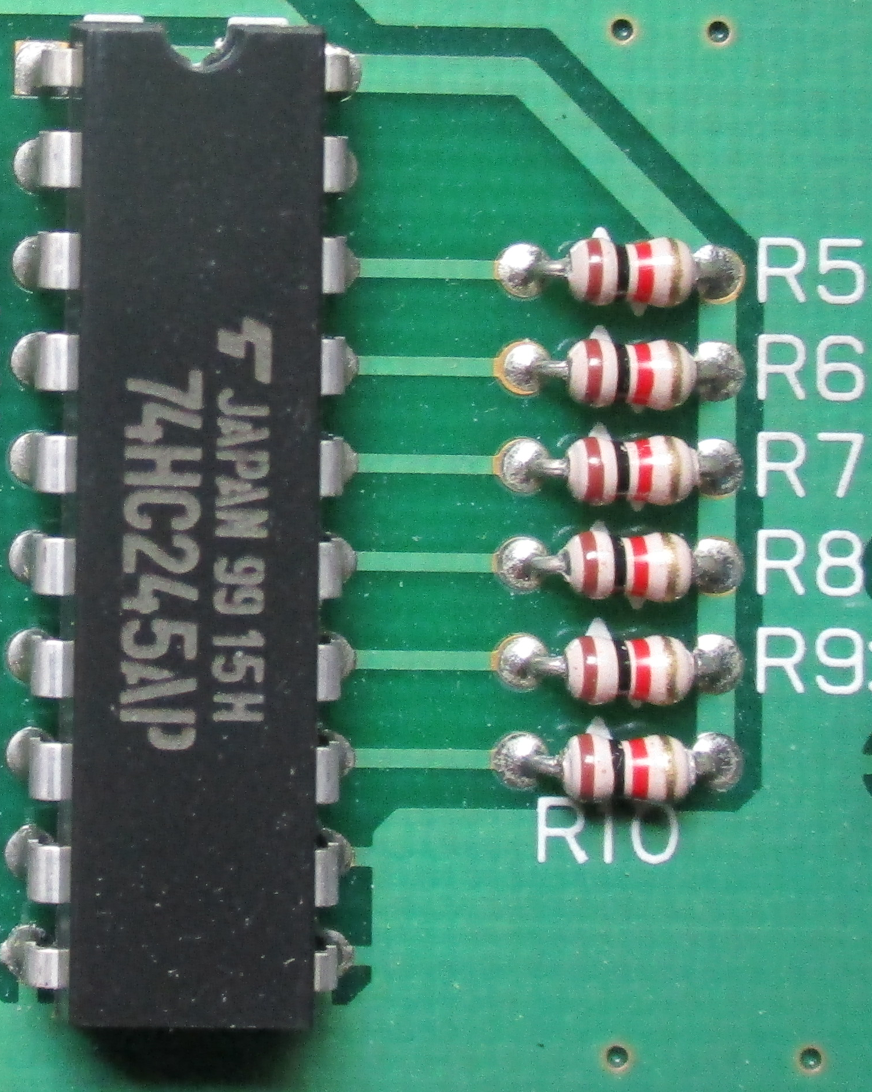 |
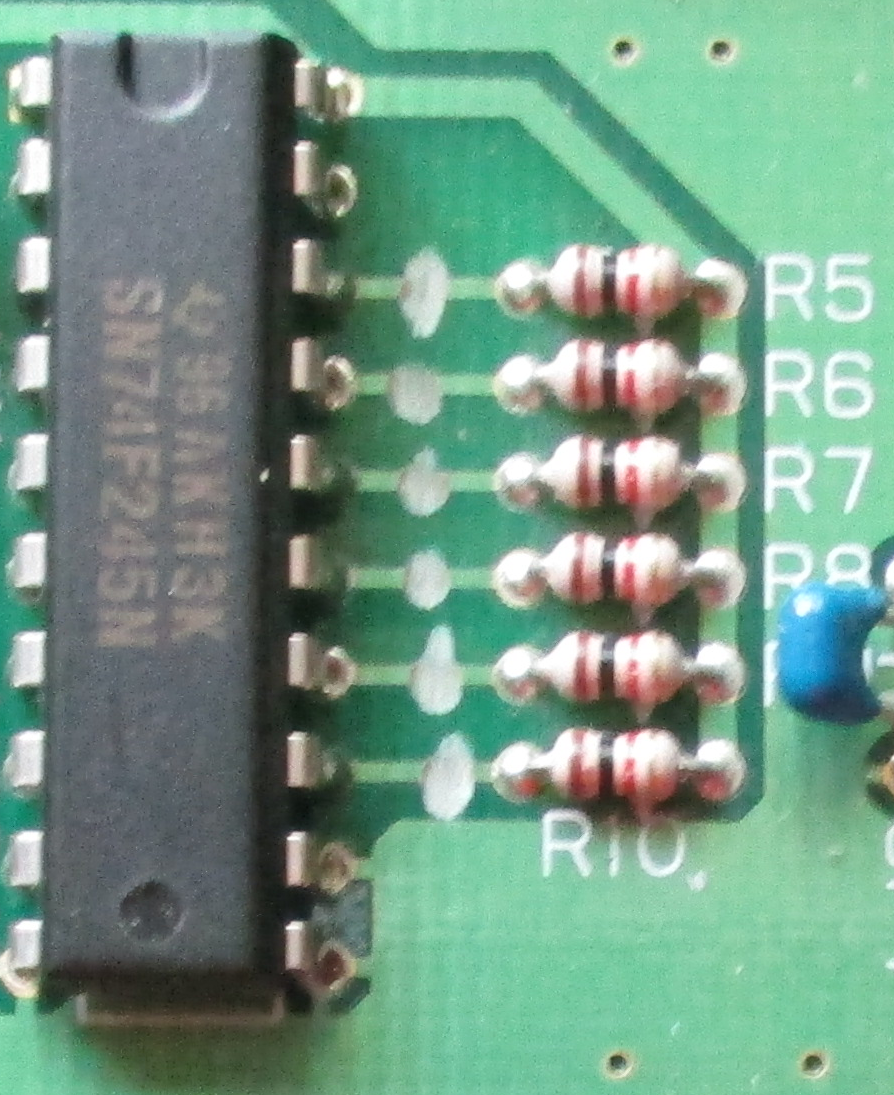 |
Back |
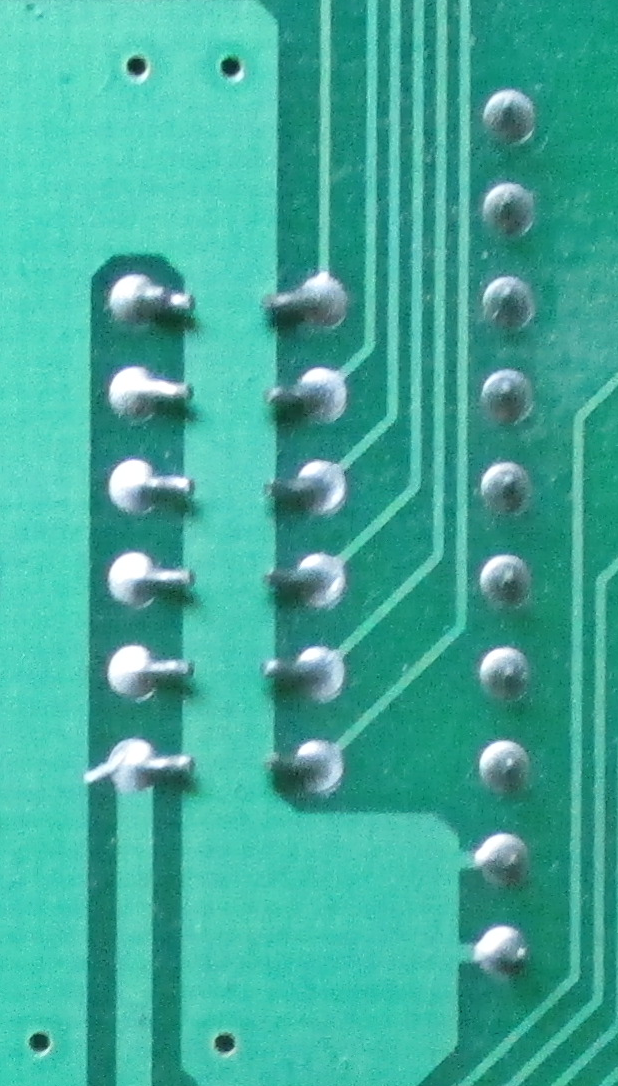 |
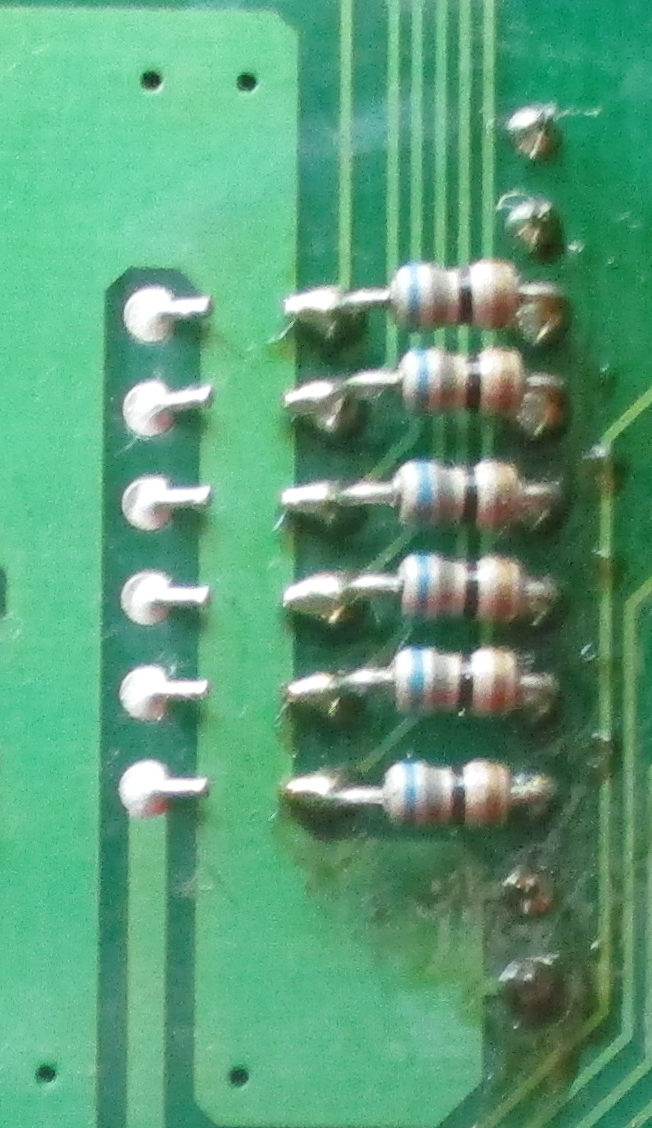 |
Networking Code Differences#
Almost all other code differences between revisions are made to networking. Desynchronization was a serious problem, effectively by design. A single line is shared or incoming and outgoing messages and the interrupt pin was not used. Receiving messages relies on periodic polling. The primary culprit for desynchronization is sending a message while one is incoming. There are few checks for the validity of messages.
Revision 1.1 added a series of validity tests for correct lengths and valid data ranges. Polling tests are more frequent, and some effort is made to check that a message isn't being transmitted (or in the process of being read) before sending another. The on-screen debugger updates the network state, Tx, and Rx registers at all times in revision 1.1, even when a connection fails. This way the entire state can be monitored, not just an active, working connection. The TEST Menu also reports more than a pass/fail. There are four different "No Good" states for "hardware error", "no connected cabinet", "transmit not acknowledged", and "invalid receipt".
Unfortunately, to remain backward-compatible interrupts weren't implemented or dedicated channels wired. It's more likely to recover from what would desync a revision 1.0 game but overall doesn't solve the underlying problem.
Revision 1.1 added several more mahjong game substates running synchronization test conditions for networked games. To remain backward-compatible, it does not post these states to the network like virtually all other game/menu state differences. The additional tests are only run by master, not as a slave.
Bonus Rounds#
It's possible to unlock two extra bonus rounds before the final match. This is based on the total points the CPU lost during the first and second set of three stages. This total resets after matches 3 & 6. First bonus match is versus Tamami Kayama after the CPU lost 16000 points total. A second bonus match versus Yurina Asahina can happen after the third normal match, bonus match 1 was played, and the CPU lost 25000 total points. There's no noticeable advantage to unlocking these outside of playing more mahjong...except maybe to the operator, as losing to them is still a game over and they have a large number of points to take.
Random Partner Select#
Pressing N on the Partner Select screen will randomly select one of the nine characters.
|
The Super Real Mahjong series | |
|---|---|
|
FM Towns |
|
|
SNES |
|
|
Arcade |
|
|
Neo Geo Pocket Color |
|
|
Game Boy Advance |
|