This is a sub-page of Super Mario World (SNES).
A gigantic number of unused graphics and objects can be found hidden in the ROM. Even more stuff from earlier builds of Super Mario World can be found in the SNES Test Program and SNES Burn-In Test Cart.
Objects#
Sprite-Based Objects#
Classic Piranha Plant#

Sprite ID: 1A
A classic Piranha Plant. If you've ever played a Mario game, you should know how this works. Its vine tile has been replaced in memory with one of the frames of Cheep Cheep flopping around on land, using the red palette instead of their normal yellow palette. Note that the upside-down variation of this is used in Vanilla Dome 3, but its stem has been made tileset-specific to the Cave object tileset, and since both Piranha Plants share their stem tilemaps, this explains why the stem of this has been moved.
An unused, yellow upward facing Piranha Plant variant was shown in a prerelease screenshot however.
There is in fact code in the game to make the stem use the same tiles as the upside-down variation, but due to a bug, it doesn't work properly. There is an Asar patch to correct this problem.
Floating Platform#

Sprite ID: 5E
This platform will move to the right constantly once Mario lands on it. It also activates Fast BG Scroll if existing. If Sprite Buoyancy is enabled in the current level, this object will act like the smaller floating platforms found in levels such as Yoshi's Island 4.
Flying Coin#

Sprite ID: 7E
A red coin that continuously moves to the right like a P-Balloon. Collecting it will give the player five coins. Funnily enough, they can be killed with the Fire Flower fireballs. Red coins would not make their official debut until Super Mario World 2: Yoshi's Island, five years later.
Flying Mushroom#

Sprite ID: 7F
Similar to the above object, this floating "gold" (it actually uses the tan palette of the Monty Moles) mushroom gives the player an extra life.
Flying Cage#

Sprite ID: 88
This graphically-glitched flying cage can be put into the game. Mario is automatically placed inside the cage when the level starts, and if used in conjunction with an autoscroll object will make the cage move across the level on a set path.
Interestingly, the tile numbers and proportions used to draw the wings match up with sprite graphics found in the SNES Test Program (at least for the larger tile), making this an old leftover.
Unused Chargin' Chuck#
Sprite ID: 96
A duplicate of the normal Chargin' Chuck, used nowhere in the game.
Swooper Spawner#

Sprite ID: E4
This object will spawn a bunch of Swoopers at whatever Y position it's placed, acting much like the Boo spawner found in Ghost Houses. These Swoopers cannot be defeated and will hurt Mario if he tries jumping on them. Note that one of their two flying frames has glitched graphics, hinting that Swoopers had a tilemap change at some point in development, and the fact that jumping on them deals damage hints that they may have once been something completely different.
It should be noted that the Swoopers spawned by this object have a completely different palette than the ones used in-game; a blue and red palette is used instead of the green and orange one used by the normal Swooper objects. Curiously, later games would use the alternate coloration for Swooper, meaning that this may have been the intended palette after all.
Dummy Floating Platforms#

Sprite IDs: 56, 58
These platforms are like the checkerboard platforms, but their sizes are 3 × 2 pixels.
Eerie Generator#
Sprite ID: CB
Like the other spawners, this one spawns Eeries. You probably already guessed that.
Flat Green Palace Switch#
It's a flat (Pressed) green palace switch.
Floating Checkboard Platform#
Same as brown floating platform, but the size is 5x1 pixel.
Small Musical Note#
Minor Extended Sprite ID: 08 (Moving left) & 09 (Moving right)

A small musical note sprite that bears a resemblance to the one on Note Blocks. It moves towards the left or right depending on its number.

In the game's code, there's an unused routine for spawning these minor extended sprites that's set to be called by the Exploding Block (Sprite ID: 4C) prior to its explosion. But due to a branch being placed right before the routine is called, both extended sprites and its related graphic end up unused.
Sprite Commands#
Layer 1 Horizontal into Layer 2 Vertical#
Sprite ID: EC
When this object is put into a level, the level will start out with a horizontal Layer 1 section, then transition into a vertical Layer 2 section. It only functions if the level mode is set to 05 or 06, both of which are also unused in the final game.
Layer 2 Fall#
Sprite ID: ED
A sprite that causes Layer 2 to fall. It also disables horizontal scrolling. Intended for use in Vertical Layer 2 Level with Layer 2 interaction (Level Mode 08).
Layer 2 - Give Some#
This command is slightly sinking when player stand on, rise back if player is not on the ledge.
Layer 2 Scroll - Smash Range 11#
Variation of Layer 2 Smash, but this uses Layer 2 Scroll - Range 06 (at Y=1).
Medium/Fast Auto-scroll#
A command for endless autoscrolling. Might cause some bugs if added in a level, though.
Other Autoscroll Specials#
Only Special 1 (Donut Plains 2), 1-A (Wings Level) & 4 (Butter Bridge 1) are used.
Special 1 & 3 affects layer 2.
Special 2, 2-A & 4 only affects layer 1.
Foreground Objects#
Vertical Pipe Double Ended#
This is double ended vertical pipe object, never used in the original game.
Blue Coin#

FG Object ID: 16
This acts just like a normal coin, but it's all...blue. Blue coins made their official debut several years later, in Super Mario 64.

Hitting a P-Switch will turn these blue coins into magenta blocks. They can still be collected like coins, since the code that makes regular coins solid does not apply to this particular object.
Global Rope#

FG Object ID: 17
A horizontal rope platform resembling those found in the mountain tileset, only this one isn't tileset specific. This shares its object ID with the 16x16 cloud platform.
Small Door#

FG Object ID: 10 (Extended object)
Half-sized doors that can only be entered by Small Mario. Both normal and P-Switch versions are coded in the game.
Question Mark Block with Shell#

FG Object ID: 37, 38 (Extended object)
Question Mark Blocks that contain Koopa shells are fully coded in the game! Well, not just a Koopa shell. The actual Koopa is still inside, and it will get back up if you wait too long. Unlike a normal shell, fireballs have no effect on it. This is because items from blocks or the reserve box are immune to fireballs in order to prevent the player from frying them. These blocks can be seen by using the block duplication glitch. Shells (and by extension, Koopa as well as other enemies) can later be officially put in blocks in the Super Mario Maker series.
Empty Turn Block#
FG Object ID: 2E (Extended object)
Acts like a Turn Block with an item inside, but doesn't actually contain anything.
Bounce Block#

FG Object ID: 39 (Feather - Extended object)
Block with "Nothing" not defined as an object but is in Map16 at 12B
These blocks aren't activated by Koopa shells or jumping, but by running into them from the side. They are finished, but the object part of this block uses the wrong graphics (hinting that something else other than the P-Switch and Springboard was here). This graphical error can be fixed by changing the two 0x03 bytes at PC address $0729A to 0x00. Two versions of this block are coded: one with nothing in it, and one with a Cape Feather, the latter turning into the former when hit. Similar blocks appeared in Super Mario Bros. 3.
Seaweed#

FG Object ID: 81 (Extended object)
An object-ified version of the seaweed commonly seen in underwater backgrounds. This is only found in the Ghost House tileset, and was likely intended to appear in the Sunken Ghost Ship.
Grass#

FG Object ID: 3F X5 where X is the object length (Plains tileset only)
In the tileset-specific object set, Bushes 4 and 5 are considered unused, although Bush 5 is finished and works fine. The graphics for it are also finished, available in the forest tileset.
Conveyor Ropes#


FG Object ID: 36 X_ (Flat), 37 SS (Diagonal) (Mountain tileset only)
These are completely functional conveyor belts using special animated rope tiles. They can go either left or right, and the diagonal ones can face either direction, giving a total of six different unused ropes.
Note Block (All Sides)#
FG Object ID: 27 (Extended object)
A Note Block that will bounce Mario away from all sides, not just the top, similar to the pink Note Blocks in Super Mario Bros. 3.
Log Objects#

FG Object ID: 3E (Horizontal), 3F (Vertical) (Mountain tileset only)
These logs are bright yellow, and can be both horizontal and vertical.
Side Cloud Fringes#
FG Object ID: 3E (Plains tileset only)
Side cloud fringes. Used nowhere in original game.
Top Cloud Fringe on white#
FG Object ID: 3D X1 (Plains tileset only)
Cloud fringe inside the white tile.
Cloud Fringe edges#
FG Object ID: 68-6F (Extended object)
Cloud Fringe edge tiles.
Semisolid Forest Tiles#
These tiles are never used in the original game.
Unbreakable Turn Block#
Map16 Tile ID: 140
Self-explanatory.
Overworld Sprites#
Lakitu#

This Lakitu will follow Mario around on the main overworld map, but he won't appear on any submaps (e.g., Vanilla Dome). Lakitu can be activated by using Pro Action Replay code 7E0DE501.
It also has a flag that causes it to lunge at Mario. This could suggest it was planned to trigger an enemy battle stage, like those in SMB3.
(lunging code: Kaizoman666)
Blue Jay#


This odd-looking bird also follows Mario around on the overworld map, but it will also appear on submaps (except Vanilla Dome). Like the Lakitu, it can be activated using Pro Action Replay code 7E0DE602. Once activated, the bird will continually fly upwards, and shortly after leaving the screen, it will reset back to Mario's position.
It has been suggested that the bird was used around levels that contained the flying cage, since the mysterious winged objects holding up the cage use a blue palette.
Piranha Plant#

The Classic Piranha Plant really got shafted in this game. This is a sprite meant to go on the overworld as decoration, but it's never used.
Koopaling#


Three Koopalings are actually present on the overworld map, but are never visible; the path tiles that were originally supposed to make them appear were changed into oddball corner tiles and used in the Star World. Unlike the rest of the overworld sprites, these actually had a purpose: they were to drag you into levels, much like the hands in World 8 of Super Mario Bros. 3.
The positions of the sprites (visible in Lunar Magic's overworld editor) suggest a vastly different overworld layout at the time of their "removal" than what was seen in the final, though it's notable that none of the early overworld tilemaps found in the leaked source files match up correctly to their positions either.
Other Unused Graphics#

|
To do: |
Old P-Switch#

A graphic from an old version of the P-Switch, when this sprite was an object. This idea was scrapped, but the complete graphics were found among the July 2020 Nintendo leaks.
Hills Background Star#

An animated star tile found in the hilly and Ghost House background tilesets. It's not used in either. In the final game, a different tileset is used for starry nights.
Dotted Hill Intersection#

A map tile meant for when a hill intersects with a big hill, notably uses a dotted hill design similar to the big hills. Originally used in several early world map designs.
Early Yoshi Berry#

This rounder, shinier, non-animated version of the Yoshi berry is loaded into VRAM at the beginning of each level, but is immediately overwritten with the animated version, which looks much different. In fact, three different versions of the berry graphic exist in the ROM, as shown below:


Mario Flying Without His Cape#

An interesting sprite of Mario flying, except without his cape. The sprite appears to be identical to his second frame of his flying animation. The rest of the sprites were found in the July 2020 Nintendo leaks.
Fire-Spitting Dino Rhino#


Dino Rhino was supposed to have an actual attack! These frames and a vertical version of Yoshi's fireball appear in the Dino Rhino tileset. In the actual game, Dino Rhino just walks back and forth; only the smaller Dino Torch actually attacks.

Interestingly, one of the transformed kings in the Super Mario All-Stars version of Super Mario Bros. 3 uses a scaled-down, differently-colored variant of the horizontal frame with a crown tacked on top.
Galoomba and Koopa's Squished Frames#


If a Galoomba or Koopa Troopa or a spinning shell with a Beach Koopa inside it is stomped while flying with the cape feather they will be squished while displaying garbage graphics, this is not a bug, the graphics for squished Galoombas and squished shells did exist as seen in the gigaleak and were overwritten by the wings and blinking shell eyes respectively; This feature was probably meant to be removed when these tiles got overwritten, but since it's a bit tricky to pull off they most likely forgot about it.
Chain Chomp's Chain#

In the graphics set for the forest enemies is Chain Chomp's chain. It was revealed that the Chain Chomp and Hammer Bros. were intended for the forest enemy group during the July 24, 2020 gigaleak. The chain was likely forgotten after Chain Chomp was overwritten with the Fishing Lakitu, while the Hammer Bros. were completely overwritten with dummy tiles. Chain Chomps would later use something similar to this in the Super Mario World style in the Super Mario Maker series.
Yoshi#

Several unused Yoshi parts intended for the ending. Bizarrely, slightly edited versions of the first and third sprites would later end up being used as part of one of the clock animations in Game & Watch: Super Mario Bros. of all things.
Yoshi Dust#

This dust is supposed to appear when Mario hops on Yoshi, but it's unused in the final game. Game Genie code 8B68-AFDC will enable this feature.
Iggy's Hair#
In the game, Iggy and Larry both have the same hairstyle.


However, in Super Mario Bros. 3, Iggy had a significantly different hairstyle. Graphics for this hairstyle do exist in Super Mario World, but are unused:

If used, it would look like this:


This seems to have been a mere oversight, as Iggy has his proper hair style during the ending. The tilemaps used during the ending are separate from the in-game ones, hence the discrepancies.

Iggy and Larry's Hand Leftover#

In Iggy and Larry's graphic file this 8x8 tile can be found, this is a leftover from the gigaleak sprites where the same tile is used as part of the front facing sprites, said sprites were cut with only this tile remaining.
Morton and Roy's Attack#


It seems that Morton and Roy were intended to have a secondary attack! This makes sense, since both of them have the same appropriate frames as Ludwig, who has a fireball attack, weirdly Morton uses one of these frames in the credits.
Morton, Ludwig and Roy's Early Attack Frames#
|
Early |
Final |
|---|---|

|

|
These are apparently early frames for the firebreathing animation, they take less space in their graphics file than the final ones due to them re-using most of the "idle" tiles and only changing their mouths, the final one added more movement to the animation; Interestingly the early sprites for Iggy, Larry, Lemmy and Wendy in the gigaleak do a similar thing to these early frames since they have very few space in their graphics file.
Morton, Ludwig and Roy's Unused Frames#

The first frame is a falling or in Ludwig's case jumping frame meant for when they are in the air, the second one is a landing frame meant for when they hit the ground, in the game none of these are used and instead the bosses just always use the "standing" pose for everything; Though Ludwig uses the falling frame in the credits.
The falling/jumping frame could also be used in a "unused" damage animation all of them have, said animation is never normally seen due to it playing two identical frames, if the first frame is changed to something different (such as the falling frame) it can would look like this:
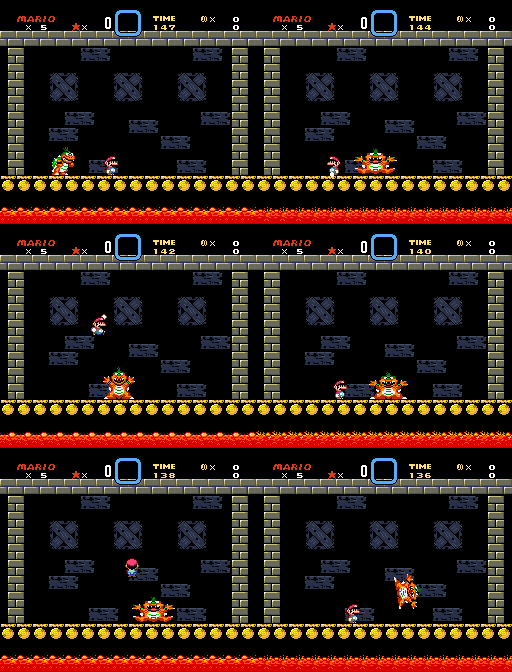
If you do this they will also use the new frame when falling, though when they land the pose is never updated for the landing frame or the standing one, wich makes it look awkward, this also may suggest that the code for the animation was planned to be implemented but never finished.
Ludwig's Walking Animation#

A frame for Ludwig walking like Morton and Roy, goes unused since the boss never walks.
Shell Duplicates#

In Morton, Ludwig and Roy's graphics file there's a duplicate of Iggy and Larry's shells (with two pixels at the top for some reason), these were most likely early shells for them or placeholders until the bigger ones were made.
Lemmy and Wendy#
|
Unused |
Used |
|---|---|
|
|
|


Lemmy and Wendy have Unused graphics for one of their taunts, these appear to be propper tiles that should have been used for the animations, Altough Lemmy's used taunt looks normal, Wendy's looks completely broken; Tough Wendy's unused taunt did get used during the credits.
Early Koopa Clown Car Teardrop#

A tile version of the teardrop that appears when damaging the Koopa Clown Car. In the final game, it is a sprite that animates slightly and uses a blue palette, so this static tile version ends up unused.
Placeholder Block Graphics#
|
Before |
After |
|---|---|

|

|
These placeholder graphics for the on/off and spinning blocks are loaded before the animated versions are. "ブロック転送" means "Block transfer".
Early Brick Graphics#
|
Early |
Final |
|---|---|

|

|
An earlier version of the bricks seen in the boss fights. Compared to the final version, the early one is poorly shaded.
Old Mario Palette Leftovers#
The SNES Test Program used a slightly different Mario palette scheme compared to the one used in Super Mario World, though Nintendo forgot to fix the palettes for some frames: the pink colors on some of the frames were originally for the colors for Mario's clothes, however those were later replaced for Peach's dress. The reason that color is being used for Mario's clothes instead is that Mario's shoes had shading earlier in development, and thus it appears in the Test Program.
Early Mario |
Final Mario/Luigi |
|---|---|

|

|
As you can see, Mario's shoes lost their shading by the final.
Flying Birds#


The birds found atop Yoshi's House have two unused flying frames. While these were left unused in the original game, the tiles found a purpose in the Game Boy Advance remake during the 96 exits cutscene, and as part of the reward for completing the coin-collecting challenge in Donut Plains 1.
5-Up#

Graphics for a 5-Up bonus, which can only be seen via a glitch.
Older Title Screen Graphics#
Super Mario Bros. 4#

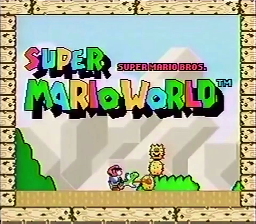
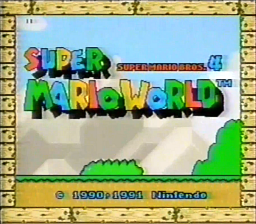
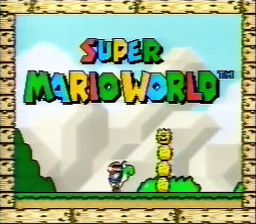
These graphics appeared in an early version of the U.S. title screen, and are still present in the ROM. Strangely enough, they are not present in the Japanese ROM, even though the official Japanese label art did have the subtitle of "SUPER MARIO BROS. 4".
Japan Retail |
"SUPER MARIO BROS." Subtitle |
Found in Gigaleak |
|---|---|---|
 |
 |
 |
"SUPER MARIO BROS. 4" Subtitle (1991) |
Near Final + No Copyright |
Final US |
|---|---|---|
 |
 |
 |
AND#

Just the word "AND", which was meant to be used for the international title screen.