 This article has a talk page!

General#

|
This page or section needs more images. |
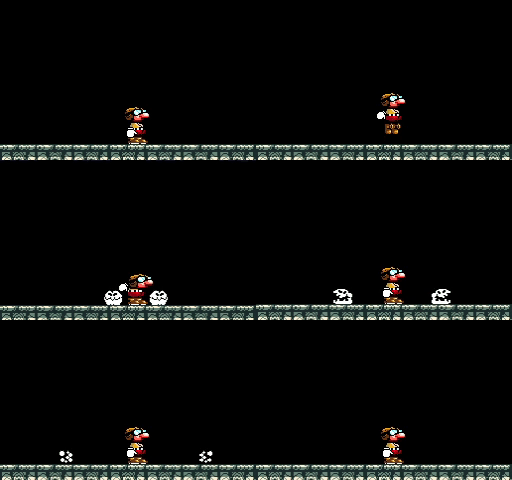
- Performing a ground pound produces smoke clouds with faces, possibly meant to be a secondary attack. Notably, updated versions of these graphics would be used much later for the same move in the Super Mario Maker series.
|
Super Donkey |
Super Mario Maker Series |
|---|---|
|

|
- If you fly offscreen while holding an object, the object itself is deleted while you're still in a holding position.
- While flying, you ignore all kinds of level collision.
- Pressing Start will turn the level palette sepia, as well as disable all level collision. Every pause toggles the collision. Doing this any further after the initial pause and unpause will further corrupt the level palette, until cycling back to the normal level palette after 34 pauses. Previously it was unknown that there was actually a second functionality to this gimmick: changing the level (internally). In the insides of every level 2 house there are hidden, unused, and unseen objects that can be toggled with this feature (which switches 2 by 2) like a hangable second floor, a chimney, and (likely) some boxes.
Controls#
- D-Pad: Movement
- Hold Down to crouch
- Hold Up or Down while hanging to climb up/drop down
- A: Use held object
- B: Jump, climb up (while hanging)
- Down + B: Drop through jump-through platforms
- X: Ground pound
- Y: Throw held object; hold button to charge up meter
- B (if not fully charged): Jump higher (jump height depends on the meter)
- B (if fully charged): Fly around the area
- L: Pause
- R: Frame advance (while paused)
- Start: Temporarily pause for 1.5 seconds then toggle player collision
Character Movement and Actions#
- Colliding with an enemy leads to the player being knocked back and stunned without damaging health.
- You can stun enemies by jumping on them.
- You can grab onto and hang from various jump-through platforms, and also drop through them.
- There are also platforms that you can only grab onto and hang from, but cannot walk on. It is hard to tell what these are, but when observed in a tilemap viewer on BG layer 2, they appear to be chains.
- The character can climb by pressing Up while against sides of tree trunks. Pressing Right or Left while climbing makes the character swing around to the other side of green vines, trees, and the thinner grey tree trunks. You cannot climb some objects, like stone surfaces and the houses.
- You can crawl through 1-tile high gaps by holding Down, then moving towards the gap.
- The character will push against solid walls after about half a second. This doesn't seem to affect objects in either build.
Levels#
Level 1#
A pretty sizable jungle area.
- There's a cannon object you can pick up, though its missiles can only defeat a select few enemies.
- There's a friendly monkey that roams around. You can jump on it to stun it.
- This level also features three enemies: a weird mushroom that chases after you, a dog that chases after you, and an early version of the Melon Bug from Yoshi's Island which has the same behavior as its final counterpart (curling up into a ball and rolling into you).
- There are objects hanging from a few trees, as well as a few stars hanging from a ceiling. You can ground pound to knock these objects down. These objects cannot be collected, however.


Level 2#
A short level featuring various houses.
- Holding Down while on top of a chimney drops you "inside" a house and changes the palette, similar to the collision-disabling pause button.


Level 3#
A cave area with multiple doors you can enter and small alcoves you have to crouch under. Also, dogs; lots of dogs.
- The background is an early version of one of the Yoshi's Island cave backgrounds, with visible windows.


Level 4#
A very small level that seems to test sprite scaling and how it affects collision, thanks to tubes that jump up and stretch themselves. The tubes cannot be flown through.

Boss#
A giant bird that jumps around. Stomp it once, and it jumps higher. Stomp it a second time, and it ricochets off the walls. Stomp it a third time, and it turns into a small harmless bird that flies away. Once this level is cleared, you loop back to Level 1.


Unused Graphics#


Present in the ROM are sprites for several unused creatures, which can also be seen in rensa-bg.CGX. Interestingly, the green striped creature bears a faint resemblance to a giant orange bird-like thing found among various Super Mario World assets in the July 2020 Nintendo leak.

It seems like the mushroom enemy could defend itself.

A full set of numbers for the nonfunctional timer.


An unused font directly from Super Mario World, plus a number set and a "POINT" element for the HUD. The "missing" numbers would have been constructed by flipping and reusing existing tiles.

What appears to be a rough sketch of some sort of ring is present at 0x62000. Could be an early version of the Start and Exit rings. No palettes seem to work nicely with this.