 This article has a talk page!

Blank Monitor#

There is an unused variation of the monitors from single-player mode which displays a blank grey screen. Interacting with it from the hub world will result in a CD error (or in the Eggbert versions, return the player to the title screen) as it attempts to load a file that doesn't exist (world080.blp). Substituting in a different world file works perfectly fine, and that world will be loaded instead.
The monitor can be placed in the level editor with the xmission cheat activated.
Changeable Settings#
In the Data directory there is a file called config.def which has the settings "FullScreen=1", "TrueColor=16", "MouseType=1", "SpeedRate=1", and "Timer=50ms". Changing these settings allows the player to use a different cursor setting, play the game out of fullscreen mode, adjust the speed of the game, and change the color depth. These settings are also found Blupi at Home and Planet Blupi.
Unused Cursor Setting#
Changing "MouseType" from "1" to "2" changes the normal cursor to the default cursor, the link cursor to a glove and the loading cursor to a timer. The glove cursor can be seen on Epsitec's website under 1996.
Debugging Feature#
While playing the game, typing in znetdebug brings up yellow text at the top-left corner of the screen that measures the number of sent and received packets in the multiplayer mode. Some extra information is also logged to the file debug.txt, which is created in the executable's directory if it doesn't already exist.
Hidden Messages#
In the main navigation room for single-player mode, there are blocks that spell "WWW.EPSITEC.CH" hidden through the wall at the right-most corner of the room. These blocks normally cannot be seen without cheating. This message is also present in the v0.8 demo, despite the differences in the hub's design. The sequel has a similar message in its navigation room, spelling out "WWW.BLUPI.COM".
Mission 6 of the "mechanical" world also contains a hidden "EPSITEC.CH" message outside of the level.
In the v0.8 demo version, there is a message outside the main level's playable area that spells out "dr.", referring to the game's programmer Daniel Roux.
Revisional Differences#
Demo#
|
Demo |
Final |
|---|---|
In the demo version of Speedy Blupi available on the EPSITEC Games website, sound032.blp (the sound effect used for starting a mission) sounds slower than in the final version, and is missing the reverb effect.
Though the menu buttons to access quicksaves are disabled, the hotkeys F3 and F4 are not. Pressing one of these keys will immediately close the game. This is a demo-exclusive failsafe to handle missing graphics (in this case, "gread.blp" and "gwrite.blp"). If proper graphics are provided, these menus function identically to the final game.
One of the pre-recorded demo movies was made for a previous iteration of its respective level, causing it to desync and stop short of the goal.
eGames Version#
|
Original |
eGames |
|---|---|

|
|
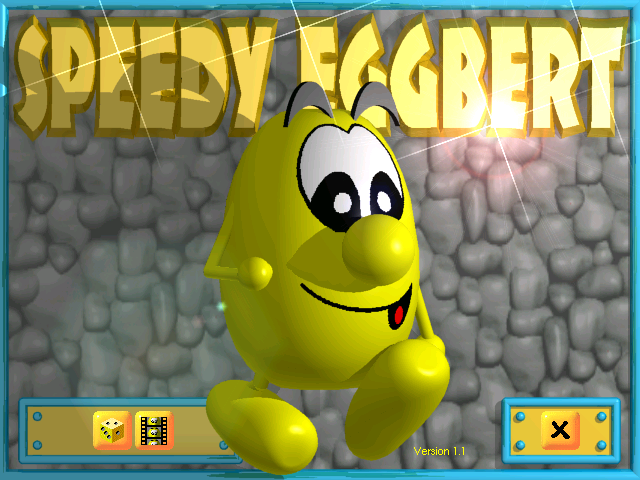
The game was renamed to Speedy Eggbert when published by eGames, and given an updated title screen graphic (although there are still numerous references to "Blupi" within the game). The game CD is no longer required to be inserted during gameplay (likely to facilitate its inclusion in various demo disks by eGames), and a CD-related graphic (insert.blp) was removed from the Eggbert releases.
Version 1.1#
Two versions of Speedy Eggbert are known to exist: 1.0 and 1.1. Inexplicably, only one byte was modified: the version number on the title screen.
It's worth noting that Planet Blupi had previously been updated from version 1.7 to 1.8, "because a bug was discovered on the cdroms (deployment problems only)". Speedy Blupi may have had a similar issue that necessitated version 1.1.
Obfuscated Cheat#

The xmission cheat found in the game's executable can't be activated like the other cheats; each letter but the X must be shifted forward one place in the alphabet: xnjttjpo. With the cheat activated, the player can edit the game's built-in missions, rather than their own. A new drop-down is also added in the level editor that allows the player to place doors, "start mission" monitors, and gold keys. Additionally, playing missions 300 or higher allows the player to record a demonstration movie, which will be played on the title screen. A video of editing single-player missions in Speedy Eggbert II can be found here.
This cheat can also be activated by editing one of the info###.blp files in the Data folder with a hex editor, and setting the 16-bit value at offset 86 to a non-zero value.
The proper method of activating of this cheat was left undiscovered for over 20 years, until the corresponding code was found in the open-source Planet Blupi. Prior to this, a common method of activating the cheat was to recklessly corrupt the save file using Notepad.
Health and Tomatoes#
During gameplay, an integer variable is set to a value of 100 and never used. It can be saved and loaded with quicksaves, and will maintain its value if modified externally. Judging by its location in memory immediately next to the power-up energy and air meters, this was likely intended to be a health meter.
The actor with ID 0x12 (18) is never referenced in the code, except for a sole line allowing it to be destroyed by dynamite. The Windows Phone port identifies this actor as TYPE_TOMATES, corresponding to unused text referring to "Tomatoes".
This information suggests Tomatoes were planned to be a healing item, much like Epsitec's previous game, Planet Blupi. In Speedy Blupi, Blupi always dies in a single hit and respawns nearby, effectively using lives as health.
Unused Text#
The game's STRINGTABLE resource contains several leftover strings from Planet Blupi. Despite being unused, several strings have been edited since Planet Blupi, and all were translated into each respective language (in some cases more than once!).
The Portuguese translation of Cancel last action used the superseded spelling of the word "ação" (action), not used in Brazil since 1943 and in Portugal since 1990.
ID |
English |
French |
German |
Italian |
Portuguese |
Russian |
Spanish |
|---|---|---|---|---|---|---|---|
100 |
training %d, time %d |
entraînement %d, temps %d |
Training %d, Zeit %d |
addestramento %d, tempo %d |
treino %d, tempo %d |
ОБУЧЕНИЕ %d, ВРЕМЯ %d |
entrenamiento %d, tiempo %d |
101 |
free |
libre |
frei |
libero |
livre |
СВОБОДНО |
libre |
105 |
Missions |
Tableaux |
Levels |
Missioni |
Missões |
МИССИИ |
Misiones |
106 |
Training |
Entraînement |
Training |
Addestramento |
Treino |
ОБУЧЕНИЕ |
Entrenamiento |
150 |
Training # |
Entraînement numéro |
Training Nummer |
Addestramento # |
Treino # |
ОБУЧЕНИЕ # |
Entrenamiento # |
152 |
mission %d, time %d |
tableau %d, temps %d |
Level %d, Zeit %d |
missione %d, tempo %d |
missão %d, tempo %d |
МИССИЯ %d, ВРЕМЯ %d |
misión %d, tiempo %d |
154 |
No Video |
Pas de vidéo |
Keine Videosequenzen |
Senza video |
Sem Vídeo |
БЕЗ ВИДЕО |
Sin vídeo |
155 |
Show videos |
Montre les vidéos |
Zeigt die Videosequenzen |
Mostra video |
Mostre os vídeos |
ПОКАЗАТЬ ВИДЕО |
Mostrar vídeos |
190 |
Design %d, time %d |
construction %d, temps %d |
Benutzerlevel %d, Zeit %d |
Crea %d, tempo %d |
Construção %d, tempo %d |
ПРОЕКТ %d, ВРЕМЯ %d |
Diseño %d, tiempo %d |
197 |
Game paused |
Partie interrompue |
Partie unterbrochen |
Pausa gioco |
Jogo interromprido |
ПАУЗА |
Juego en pausa |
198 |
Cancel last action |
Annuler la dernière opération |
Letzte Handlung widerrufen |
Annulla ultima azione |
Cancelar a última acção |
ОТМЕНИТЬ ПОСЛЕДНЕЕ ДЕЙСТВИЕ |
Cancelar la última acción |
209 |
Skill level |
Niveau de difficulté |
Schwierigkeitsgrad |
Livello di difficoltà |
Nível de capacidade |
УРОВЕНЬ МАСТЕРСТВА |
Nivel de dificultad |
210 |
Easy |
Facile |
Einfach |
Facile |
Fácil |
ЛЕГКИЙ |
Fácil |
211 |
Hard |
Difficile |
Schwierig |
Difficile |
Difícil |
СЛОЖНЫЙ |
Difícil |
2009 |
Tomatoes |
Tomates |
Tomaten |
Pomodori |
Tomates |
ПОМИДОРЫ |
Tomates |
3200 |
Now go on mission. |
Passe maintenant aux tableaux. |
Spiele jetzt mit den normalen Levels. |
Ora inizia la missione. |
Agora parta para a missão. |
ТЕПЕРЬ ЗА МИССИЮ. |
Ahora, empieza la misión. |
3201 |
Very good, success on all missions ! |
Magnifique, le jeu est terminé ! |
Phantastisch, Du hast sämtliche Levels beendet ! |
Molto bene, hai avuto successo con tutte le missioni! |
Muito bem, saiu-se bem em todas as missões ! |
ОЧЕНЬ ХОРОШО, УСПЕХ ПО ВСЕМ МИССИЯМ! |
¡Muy bien, terminaste todas las misiones! |
3202 |
Last design resolved ! |
Dernière construction résolue ! |
Letzter Benutzerlevel beendet ! |
L'ultima pianificazione è stata creata! |
A última construção foi resolvida ! |
РЕШЕН ПОСЛЕДНИЙ ПРОЕКТ! |
¡El último diseño está resuelto! |
Unused Level Properties#
Via hex editing or glitches, it is possible to change some levels' properties that are never fully taken advantage of in the game. The majority of these are located near offset 9FA4 in any given level file, as this is where the level's entity data is stored.
Pixel-Precise Entity Placement#
Despite the level editor restricting entity placement to a grid, entities' positions are measured in individual pixels, with a scale of 64 pixels to 1 block. The starting positions of the four players are also subject to this, and are located at offsets 0148, 0150, 0158, and 0160 for the yellow, orange, blue, and green player, respectively. Entities' positions can also be set to negative values.
Entities Moving Like Lifts#
Every entity has properties that would allow it to move like a lift, even entities that never move in-game. Each entity has a set speed forward and backward, a delay before it starts moving and a set position to move to. For most entities, the two positions are identical and the speed is set to 0, causing them to never move. This also allows lifts to move at custom speeds, rather than the four predetermined settings offered in-game.
Full Level Title#
Custom levels can be given a 40-character-long name in-game. However, editing the level file allows for a name up to 100 characters long. Names longer than 40 characters cause crashes when edited in-game.
Obscure Data Fallback Feature#
If the game's configuration file config.def is modified to contain the line CD-Rom=, all levels and save data will be loaded from a specific folder: c:\Speedy Blupi (these files are normally loaded from the folder of the game's executable).
The obscurity of this feature is due to several reasons:
- Eggbert-titled versions of the game do not require a CD, and are not installed with the
CD-Romline in the config file. - Blupi-titled versions of the game refuse to start up in this state unless launched with the hidden
-nocdflag. - The game's installer doesn't put anything in this folder, leaving the game largely unplayable in this state as no levels can be loaded. However, the game will function normally if the necessary level files are created.
Unimplemented User Manual#
The game engine uses a table of "events" to handle actions caused by menu buttons, each with its own ID. A certain subset of events, called a phase, represents an individual menu screen. Most phase events have an ID between 1524 and 1590.
However, a single ID in this range (1553) is conspicuously never referenced in the game. In the source code of Planet Blupi (a previous game by the same developer on the same engine), this ID is referred to as WM_PHASE_MANUEL, and is similarly unreferenced. This was likely intended as a user manual describing the features of the game, but was scrapped in favor of a physical instruction book. (In addition, Speedy Blupi has a tutorial level at the beginning of the game which teaches the basics through its level design and scripting, as well as text annotations.) This same Event ID remains reserved, unused, in Speedy Blupi.
Mistranslation#
Though the game's translations are quirky at best, a particular example stands out.

In the Russian version, "spring" (as in "bouncy metal coil") was falsely interpreted to mean "water source", and translated to Russian as "ИСТОЧНИК" (istočnik). This is the only language with this mistake.
|
The Blupi series | |
|---|---|
|
Windows |
|
|
Mac OS X, Linux |
|