

Unused Text#
A hidden note, which is written in Polish, can be found in "Executabling", the startup frame.
|
Original |
Translated |
|---|---|
|
|
mafosav.ini is used for saving the game's progress and forevermopt.ini is used for saving options after changing them.
(Source: Original TCRF research)
Info Mario Forever, the instruction manual EXE and its associated frame, contains two strings of unused text:
WELCOME IN MARIO FOREVER GAMEUnused |
Used (PL) |
Used (EN) |
|---|---|---|
|
|
|
Debug Keys#
In version 7.02, holding down both Q and O will jump through frames in a predefined order as long as you keep holding these keys. Versions 6.1 and 6.11 have this debug functionality too, assigned to a Space key.
World 7-2#
In versions 4.15 and below, there are some debug keys that can be accessed in World 7-2.
- Pressing numeric keys from 1 to 5 will transform the player to Super Mario, Small Mario, Fire Mario, Lui Mario, and Beetroot Mario respectively.
- Holding Q will teleport the player to the right by 32 pixels relative to their position every frame.
- Pressing A turns off the bubble graphic going out of Mario.
Save Game Room Warp#
Pressing Q in Save Game Room in versions from 4.0 to 4.15 inclusively will teleport the player right to the Lost Map warp pipe.
World 0 & Great Journey#
In World 0 and Great Journey, there are two debug keys left in the release build:
- Q + W + U will teleport Mario above a checkpoint. Some levels have a ceiling above the checkpoint though, so Mario may be stuck there upon teleporting.
- Q + W + I will teleport Mario above a goal gate, if the level has one.
(Source: Original TCRF research)
Mario Minix#
During the game play, pressing A will spawn a moving Koopa shell that will fly across the screen. This debug key is available from versions 4.0 to 6.11.
Unused Frames#
Great Journey Levels#
Nine Great Journey levels exist in Version 7.02-31, four of which are unused due to a glitched cutscene that softlocks the game.
Level |
Image |
|
|---|---|---|
Great Journey-6 |
 |
|
Great Journey-7 |
 |
|
Great Journey-8 |
 |
|
Great Journey-9 |
 |
|
(Source: Original TCRF research)
"Graphics" Frame#
This is a leftover from Mario Worker 1.0. It has a background color of RGB 23,23,55 and is named "Graphics" in the game's data. In version 1.16.1, this frame was mostly intact, containing earlier versions of the final game's tile set (and some unused variants!). It also contains a few promotional images of some Mario games for whatever reason. All of its contents seem to have been wiped completely clean in later versions, reducing it to a mere 100x100px frame.
(Source: Original TCRF research)
mafosav.ini code of the frame (Version 7.02-31):
ata1save1=72022
ata2save1=48566
ata3save1=61199
ata4save1=26299
ata5save1=59367
ata6save1=45189
stringlev1=104
chlebent1=7777
vv1=3087526
Duplicated World 8 Map#
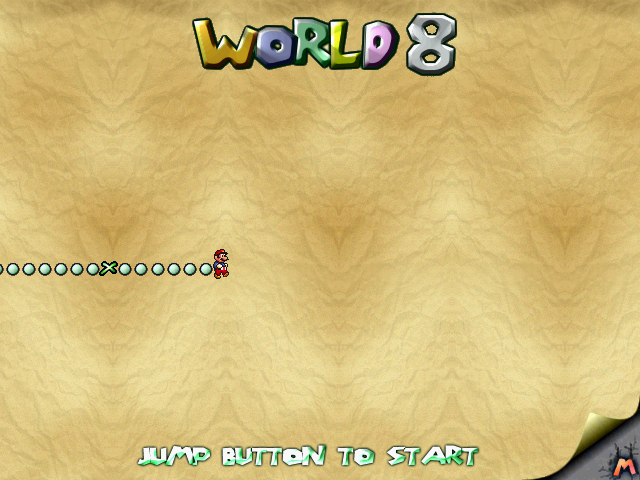
An unused World 8 map frame that doesn't include the map's graphic. In the frames list, it's located before every Hardcore World level, suggesting that this frame could have been used as a world map for one of the Hardcore Worlds. The contents of the frame were removed in Version 5.08, leaving only a blank white background.
mafosav.ini code of the frame (version 5.01):
ata1save1=70952
ata2save1=48226
ata3save1=60521
ata4save1=25961
ata5save1=58875
ata6save1=44661
stringlev1=102
chlebent1=7777
vv1=3087526
Duplicated Koopa Troopa Liberation Level#
Found in versions 4.4 and later, an unused copy of Koopa Troopa Liberation can be found in the frames list. Oddly, it's named "starman run" and is located right after the frame of the same name that actually contains Starman Running. It is identical to Koopa Troopa Liberation, but the level width has been extended by 4192 pixels of empty space.
mafosav.ini code of the frame (Version 7.02-31):
ata1save1=93422
ata2save1=55366
ata3save1=74759
ata4save1=33059
ata5save1=69207
ata6save1=55749
stringlev1=144
chlebent1=7777
vv1=3087526
Modified World 1-3#
In version 7.02, there is an unused copy of World 1-3 that has completely different level design. The level itself is quite short and ends abruptly with a pipe that warps you to the Goomba Party level.
It was confirmed by the developer Michał Gdaniec to be the supposed "Frustration World", although it never got finished. Oddly enough, it's named "Mirror Castle" internally.
This level is technically accessible: beating the third level of World of Stupidity warps you straight to this level, but since there is a game breaking bug in the World of Stupidity levels that prevents you from progressing at the third level on version 7.02, this level becomes inaccessible.
4 completely empty frames follow up this level in the frame list, which suggests that they may have been used as placeholders for future levels.
(Source: Original TCRF research)
"Game Over Transition"#
This is an empty frame consisting of a black background and a fade-in transition, added in version 7.02. Judging by the fact that it's located below the World 0 and Great Journey levels, it might have been used there after getting a game over, but these levels move you straight to the save room instead.
The "jump to frame" event wasn't corrected in this frame, so it moves you to the World 2 Completed frame after the fade-in finishes.
Early Level Design Leftovers#
The Lost Map#
Lost Map Title Screen |
Lost Map-5 |
|---|---|
 |
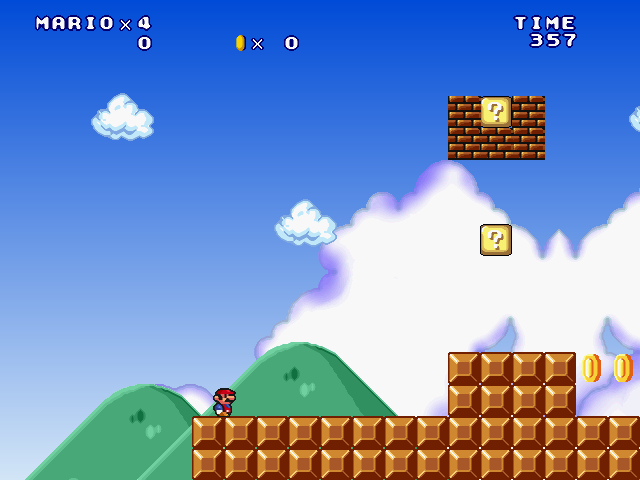 |
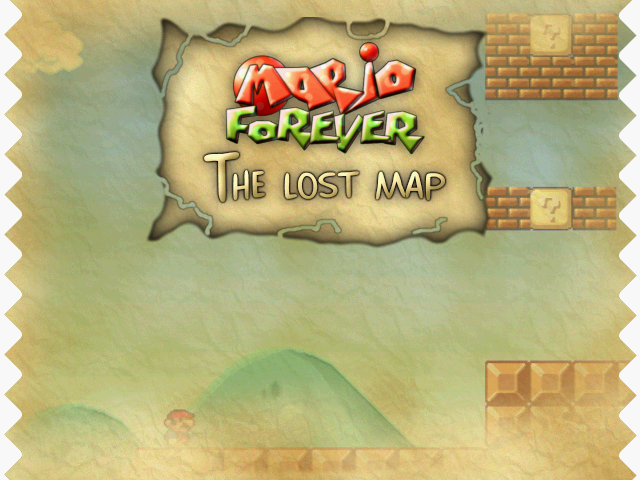
The background of Lost Map's title screen depicts an early version of Lost Map-5. The giant cloud is absent, and there are some bricks that aren't in the final level.
Unused Enemies#
Koopa Troopa Liberation contains some unfinished enemies that were planned but ended up getting cut out of the final game. Shame, since the final design of this level leaves a lot to be desired.
Lakitu Paratroopa#


Lakitu in Koopa Troopa Liberation is based on Hardcore World 2's variant, and never appears in the level. Nevertheless, all his graphics have been replaced with a green Koopa Paratroopa, with his throwing delay being increased, albeit still lower than World 4-1.
(Source: Original TCRF research)
"Silver Hammer" Koopa Bro#


A variant of the Koopa Bro seems to have been planned. Since Koopa Bros are just slightly altered Hammer Bros, this can be proven by the fact that the fireball variant of their throwing animation still use Hammer Bro sprites. The "Silver Hammer" Koopa Bro's throwing animation and their projectile sprites are identical to a regular Koopa Bro's, except their projectiles rotate faster than usual. Everything else has been left intact.
(Source: Original TCRF research)
Unused Objects#

|
To do: |
Heart#

An unused heart object is located in the Mario Minix game mode. When placed, it behaves similarly to the Mario life HUD object, but starts its wave at the bottom, rather than at the top.
Lava Run Objects#
There are several unused objects in the "Lava Run" sequence from versions 5.08 and later. Since Lava Run is essentially a port of the Flash game Mario Forever Dark Dungeon, these objects ended up being leftovers from there.
Bowser#
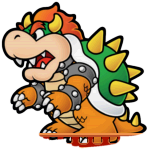
When Bowser is placed in the level, he will do nothing but can still hurt Mario. Oddly enough, Bowser's graphic has a part of a platform that obstructs his feet.
There's still some code left over from Dark Dungeon, which can be patched to make Bowser appear from the right side of the screen every 10 seconds, laugh, throw 2 hammers, then go back into hiding. Bowser's laughing sound effect is the only thing from this sequence that's still working in the final game, although it only plays once.
Sawblade#

Sawblades were supposed to spawn from the top of the screen at a random X position, going down in a straight line while rotating, but their entire code is disabled, making them unused.
(Source: Original TCRF research)
Toad#


Toad and his message are coded to move along with the scroll if placed in the frame, but other than that, they have no functionality.
(Source: Original TCRF research)
Cannon#
Cannons were supposed to spawn in intervals at the left border of the screen and shoot bullets, but their spawn code is disabled.
Lakitu#
Unlike other unused objects, Lakitus are set to spawn after about 2 minutes and 13 seconds into the level and throw spiny eggs, however, despite the absurdly large level timer, the Lava Run sequence always ends before Lakitus are able to spawn.
(Source: Original TCRF research)
Bonus Mini-Game Objects#
There are quite a bunch of unused objects located outside the frame boundaries in Bonus Mini-games from versions 5.08 and later. Most of them are remnants of the Super Mario Starshine flash game (not to be confused with Super Mario Sunshine), since this Mini-game is also a port of it with some modifications.
Unlike all other objects in the mini-game including the UI, all of the objects below except for the object with website sprite do not have any fade transitions.
Developer's Website#

A text graphic of the developer's website. Changes transparency on mouse hover; does nothing when clicked other than consuming your remaining tries.
Handles the code responsible for preventing the player from holding their mouse button and collecting everything that way.
(Source: Original TCRF research)
Speaker#

An object with speaker icon. Initially invisible, but changes its transparency on mouse hover like the object above.
Does nothing when clicked, but does not consume your remaining tries. The "On Click" code checks if a specific missing sound is playing (which has been replaced during development), although in both situations it sets a variable, which isn't used anywhere.
In Super Mario Starshine, the missing sound is actually game soundtrack, and the object is used to mute and unmute it.
(Source: Original TCRF research)
Pause Remnants#
Judging by the remaining unused code, the following objects are connected to a removed Pause function. It's unknown if the objects above were related to that function. The game always used Multimedia Fusion's built-in pause option, so implementing a custom pause option only in this mini-game seems redundant.
Super Mario Starshine used these to advertise games made by the same developer, and although pausing still seems useless for that game, some other flash games (Super Mario Coins) had a time limit, and since they are supposed to be exported as SWF, built-in pause was not an option.
(Source: Original TCRF research)
Toggler#

Another initially invisible object with the name "buziolinekikonek" and sprite that was taken from Real-DRAW Pro. If set to visible, it changes its transparency on hover like the objects above.
When clicked, it plays one of Lakitu's sounds, does not consume your remaining tries, and toggles a flag, which always enables an already enabled mini-game code and disables an already disabled unpause code. It's easy to guess that the pausing behavior of the flag was removed during development.
(Source: Original TCRF research)
Return To Game#


The "Return To Game" object named "Znikaczprzyciskowy", which translates to "Button disappearance", has some disabled code: if you click on it, it should toggle the flag and set the background object transparency to fully opaque, despite the initial value being the same. No other code remains that would be connected to this huge background object.
(Source: Original TCRF research)
Unknown Objects#


These two initially invisible objects seem to inherit the collectibles code for clicking behavior, although they still consume your remaining tries.
It's unknown what the first object was supposed to be used for. The second one is somehow a remnant of another flash game named Super Mario Peach Party, specifically from the last level, and is used as a detector for the mouse cursor.
(Source: Original TCRF research)
Unused Sprites#
Graphics Sprites#
In version 1.16.1, the Graphics frame contains a bunch of sprites. While most of them are tiles that are actually used in the final game, there are some early/unused variants that end up being unused in Mario Forever. Some of these early variants can be found and even be placed in levels in Mario Worker 1.0, which the frame itself originates from.
Taller Trees#


There are two more variants of grassland trees that are even taller than the usual tall tree. These can be placed in levels in Mario Worker 1.0, but are nowhere to be seen in Mario Forever.
Early Giant Cloud#
|
Early |
Final |
|---|---|

|

|
Giant Clouds used to have more shading and an odd light blue spot in the bottom middle of the sprite. These were eventually cleaned up for World 4.
Backstage Tiles#


Background tiles for a "backstage", like Super Mario Bros. 3. These ended up never being used in both Mario Worker 1.0 and Mario Forever.
Early Cave Tileset#
The early versions of the underground graphics were hastily put together from upscaled screenshots of the Super Mario All-Stars version of Super Mario Bros. These were drastically cleaned up for the final game.
Lamp
|
Early |
Final |
|---|---|

|

|
Lamps looked closer to the source material, with the lighting on the background being baked into the sprite. The final version uses a cleaner sprite with the lighting being a separate object.
Ground
|
Early |
Final |
|---|---|

|

|
The caves' grounds only consisted of a single tile with an oddly even surface. It was then turned into a proper tileset for World 3-2.
Castle Stairs#

Despite being ripped and arranged into a tileset, these tiles were never used anywhere.
Posters#
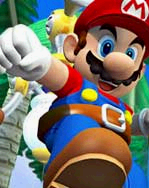


Random promotional images of Mario from Super Mario Sunshine and Super Mario Bros. 3. Why Graphics had these in the first place is unknown.
(Source: Original TCRF research)
Broken Flamethrower#

This graphic is located in the first ending frame inside of the flamethrower objects that fly off the screen. Even though it gets loaded in memory, the flamethrowers never change to this graphic, rendering it unused.
(Source: Original TCRF research)
Roto-Disc#

This unused sprite is found in every Roto-Disc object in the game, labelled "Animation 12".
(Source: Original TCRF research)
3-4 Platform#

A dark variant of the platform is supposed to be used in World 3-4. Since its animation's loop point wasn't correctly set, it would always appear for the first frame before reverting back to a regular platform.
"Disconnected" Text#

An unused graphic with the text "DISCONNECTED TRY NEXT TIME" can be found in the loading frame from Version 5.9. It was supposed to be used when the game detects a connection break while loading the website, but went unused after the code for loading the website was removed from the game.
"Enter To Start"#

The object with this graphic can be found outside of the frame boundaries in every frame of Lost Map's world map. It's not set to move with the scroller, unlike the "Jump Button To Start" graphic regularly seen in the main worlds' maps.
Dark Red Clouds#

Clouds were supposed to appear in tank levels with different sprites, but this idea was omitted possibly because they were always displayed above tiles. They are set to scroll along with the autoscroller, i.e. not visually moving in-game, just like the ground.
(Source: Original TCRF research)
Empty Sign#

An unused empty sign is located in the Save Game Room outside of the frame boundaries, likely used as a template for other signs.
Jumping Map Mario#

This sprite of Mario jumping is loaded in every world map but goes unused as there is no code related to it.
Small Castle Platform#

An unused variant of the castle platform in World 7-4 that looks like an ordinary small castle brick.
"-" Character in Counters#


The counters in the HUD are made of Clickteam Fusion's Counter objects which contain frames for the characters 0-9, -, +, . and e. Oddly, these sprites are used for the - character in the score and coin/time counters respectively, and since these counters never show negative and fractional numbers, these are impossible to see in-game along with the rest of the non-digit characters.
(Source: Original TCRF research)
Shrunken Map Corner#
|
Lost Map |
Other maps |
|---|---|

|

|
This is a "shrunken down" version of the map corner sprite located below the boundaries of every map frame of Lost Map. It was likely trashed due to the fact that the edges of the sprite didn't blend in well with the clouds below Lost Map's map and translucent sprites were not a thing until after version 4.4.
(Source: Original TCRF research)
Shrunken Pre-4.0 Title Leftovers#
|
4.0 and newer |
3.5 and older |
|---|---|
|
|
|


In the title screen of versions 4.0 and later, leftovers of the older title screen can be found outside of the frame boundaries. Instead of being outright removed, these were also shrunken down.
Hidden Sprites#
Hidden Water Animation#

A more boring and static-looking water animation can be found in secret worlds, such as Hardcore Worlds and Lost Map. The object using this graphic is available and even used in The Lost Map's second and fourth levels, but can't be seen due to it being outside of the frame boundaries.
(Source: Original TCRF research)
Gray Block#

These blocks are located in Hardcore World 2-4 outside of frame boundaries. These are placed as a hidden barrier in order to stop Mario from walking too far to the right after defeating Bowser.
Unused Audio#
Mario's 3rd Checkpoint Voice Line#
Mario saying "Yippee!". The file name is Mario_Check_Point_Speech_3, pointing to the fact that it's supposed to be one of the few voice lines being played whenever the player reaches a checkpoint. It never ends up playing in-game due to an oversight with how Clickteam Fusion's Random function is used, since the output range is exclusive.
(Source: Original TCRF research)
Alternate Starman Theme#
A different Starman theme can be found in versions 6.0 and later. This can be heard by getting a star in World 9, but since there are no stars in that world this theme ends up being unused.
(Source: Original TCRF research)
Unused Fart Castle Music#
This goofy variant of the Yoshi's Island castle music theme with added voices and one of the samples being replaced with a "fart" noise could be found in versions 2.16 - 3.0 masked under the file "ktkm39.dll". There are multiple voice lines recorded by Michał Gdaniec and randomly placed throughout the music track. Version 3.5 replaced it with the then used Hardcore World 1-4 music track.
mapG.mod#
A rather catchy module named "World of dentro", composed by Matthew "4mat" Simmonds. This was added into the game files in version 7.02 and can be found with the file name "mapG.mod" alongside the game's EXE. This track isn't used anywhere in the game and its location in the game files is rather unusual, since all music files in version 7.02 are in a separate folder. It was likely meant to be Great Journey's map theme as it was in Mario Forever Fanmade (the fangame where this world is originated from), but in Mario Forever that world has no map, leaving the track unused. The file's name also seems to prove that.
(Source: Original TCRF research)
World 1-1 Variants#
File Name |
Track |
Notes |
|---|---|---|
world1.it |
||
world12.it |
||
world14.it |
||
world19.it |
Left channel is empty. |
Version 6.01 and later added 4 unused variants of World 1-1's track, which seem to have been tampered with in ModPlug Tracker. Whatever the purpose of these variants are is unknown.
(Source: Original TCRF research)
Oddities#
|
|
To do: |
"LOL" in Save Game Room#

In versions 4.0 and 4.15, a "LOL" made out of Super Mushrooms can be found at the far right of the Save Game Room, past the Funny Tanks? entrance. Since there is a long pit before it, this easter egg cannot be spotted without the use of cheats, i.e. moonjumping. This was removed in version 4.4 to make way for more secret levels.
Lava Fading In in World 1-4#
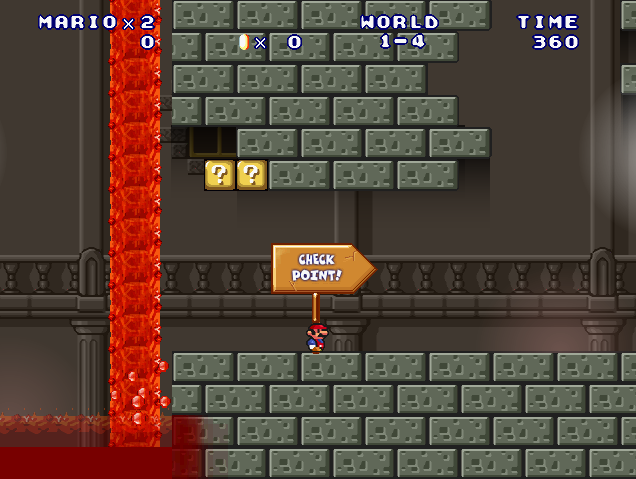
Versions 5.08 and later introduced an oddity in World 1-4 where the lava fades in at the start of the level for 0.9 seconds. This is easier to spot when restarting at the checkpoint. This is purely visual and does not affect gameplay.
(Source: Original TCRF research)
Waving Lava Debugging#
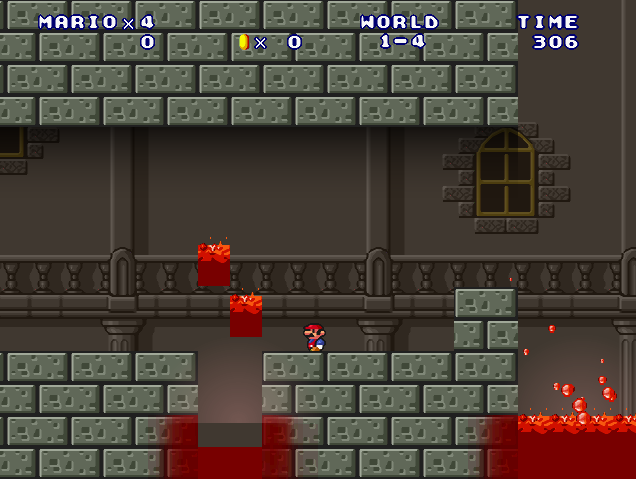
In levels starring Bowser, the lava can be interacted with using a mouse. Clicking on a lava surface will cause that spot to wave up and down. This was likely used as a debug feature to test the waving animation when Bowser falls into a pool of lava and remained forgotten in the game. Clicking on the lava while it is waving will cause it to be displaced from its original spot. In versions 6.0 and later, this debug feature was disabled...but only in World 1-4.
(Source: Original TCRF research)
Inaccessible Coins in World 3-2#
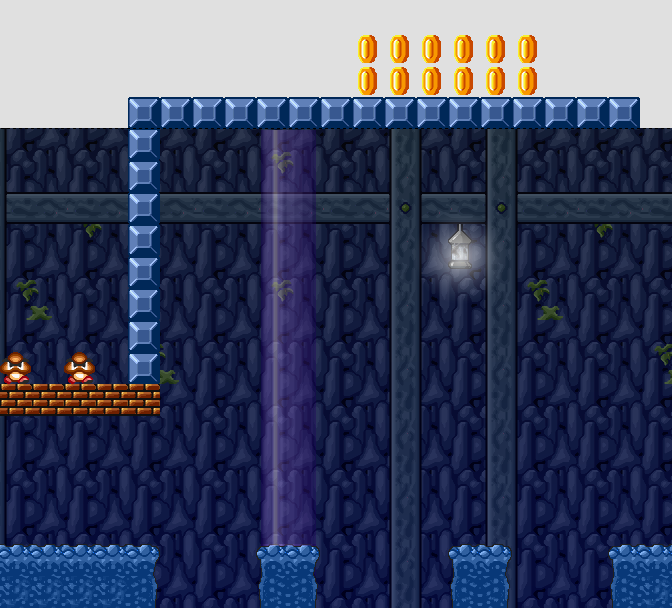
In World 3-2, there are a bunch of coins placed on a ceiling. They can't be reached even with the Green Lui power-up, which makes them inaccessible through normal gameplay.
Fake Block in World 8-3#

In World 8-3, there is a single block at the start of the level with no collision. This is actually an empty object that has no purpose other than hiding other objects behind it.
Hidden Coin Blocks in Human Laboratory-1#

Two hidden coin blocks in the first level of Human Laboratory World (Portal O2 in versions before 3.0) are placed next to each other two blocks above the pit with a falling platform. One of the blocks can be triggered while standing at the left side of the platform. Bit of an odd place for invisible coin blocks.
Fake Blocks in Hardcore World 2-1#

In Hardcore World 2-1, there are two blocks to the left of the starting pipe that have no collision. These are actually copies of the same object used to hide the Fire Flower at the start of the level which comes out of a block, since objects cannot be obstructed by backdrops (which most tiles in the game usually are). Version 6.0 added proper collisions to these tiles.
Excess objects in Lost Map-4#

Level 4 of Lost Map contains a few minor spots that can't be reached nor seen at all during gameplay. These include a coral structure next to the exit pipe, an unused checkpoint and a single electric coral. The last two are leftovers from Lost Map-2, since this level uses that as a base.
Unseen Finish Line Structure in Castles#

All castle levels with Bowser, except for World 3-4, have an unusual structure beyond Bowser's arena containing brown blocks and a finish line. This structure cannot be seen in-game, since the camera never scrolls this far. Furthermore, Worlds 1-4 and 2-5 have an oddly placed platform marker used to smoothly turn a moving platform to the left, despite neither of those levels having any moving platforms.
Corrupted Spike Ball Cannon in World 9-4#
World 9-4, for some mysterious reason, contains several instances of an object without any graphic, which is unusual for a Clickteam Fusion project. This causes the runtime to load garbage animation data for this object, which will make the object flicker between random graphics most of the time, even ones that aren't supposed to be seen in-game. Oddly enough, this phenomenon doesn't seem to happen in Version 6.0, which uses an older build of Clickteam Fusion.
This object seems to be an early Spike Ball Cannon, as it contains code for launching Spike Balls.
(Source: Original TCRF research)
References#
- Buziol Games↩︎
- Replace or put the strings at the top below
[]inmafosav.inito access the frames.↩︎