

Alain#
There are various references to an "Alain" boss or boss minion in the code, though it's unsure what this could have referred to. It has two unused GrabSequenceIds, a SoundEvent: "TauntAlainComeFight". It has its own BossPhase: AlainPhase, BossPhaseContainer: BossPhaseAlainContainer.
(Source: Original TCRF research)
Leftover Console-related Stuff#
The RenderResolutions class stores resolutions for each console.
public RenderResolutions.PlatformResolution ps4;
public RenderResolutions.PlatformResolution xboxOne;
public RenderResolutions.PlatformResolution nintendoSwitch;
public RenderResolutions.PlatformResolution nintendoSwitchDocked;
SplashScreenInitState has a method which will show a splash screen for consoles, but is set to false.
public override void OnStateEnter(Animator animator, AnimatorStateInfo stateInfo, int layerIndex)
{
base.OnStateEnter(animator, stateInfo, layerIndex);
animator.SetBool("Console", false);
animator.SetBool("ChineseVersion", TweakablesLocalDynamic.Instance.pcSettings.useChineseSplashscreen);
}
It also has a parameter associated with it.
private const string CONSOLE_PARAM = "Console";
TweakablesLocalDynamic has settings specific for consoles.
public TweakablesLocalDynamic.PS4Settings ps4Settings;
public TweakablesLocalDynamic.SwitchSettings switchSettings;
[Serializable]
public class PS4Settings
{
public bool isDiscVersion;
}
[Serializable]
public class SwitchSettings
{
public ulong applicationID;
public bool useJapanCircleSplashscreen;
}
The class UnitySocialSettings includes IDs and strings for the Social services associated with each console.
public UnitySocialSettings.RankingID ps4;
public UnitySocialSettings.RankingID ps5;
public UnitySocialSettings.RankingID xboxOne;
public string xboxOneFuriClearTimeStatisticsName;
public string xboxOneFuriHitsStatisticsName;
public string xboxOneFurierClearTimeStatisticsName;
public string xboxOneFurierHitsStatisticsName;
Playstation#
FirstMenu has an empty method to import your PS4 save public void ImportPS4Save(). It's likely that this method is filled out in the PS5 release of the game. GlobalGameManager has an empty method AskUserToSignIntoPSN. It also has the following method:
public void OnScoreReportPSNDialogConfirmed()
{
this.TryToReportEndSpeedRunScores();
}
NPCSettings has fields and a method related to getting the Lightbar color on a Playstation 4 controller depending on the boss.
public Color GetPS4PadLightBarColor(string pawnName)
The following classes are also related to being ran on a Playstation.
public class PS4Achievement : IAchievement
public class PS4FileInfo : TGBFileInfo
public class PS4FileInfoFactory : FileInfoFactory
public class PS4LightBarOwner : MonoBehaviour
public class PS4PadLightBarManager : UnitySingleton
public class PS4VSyncSelection : SelectionSettingsHandler
public class PSNManager : UnitySingleton
An empty class for testing something with the Playstation online services.
public class PS4SocialTest : MonoBehaviour
Xbox#
GameOverMenu.OnChangeDifficultyPopUp has a section related for use on the XBox.
if (UnitySingleton.Instance.CurrentDifficulty != (GameDifficulty)Enum.Parse(typeof(GameDifficulty), nextDifficulty))
{
this._furiCanvasGroup.alpha = 0f;
this._lineCanvasGroup.alpha = 0f;
string text = "PU_CHANGEDIFFICULTY_LOWER_DESC";
string text2 = "PU_CHANGEDIFFICULTY_HIGHER_DESC";
text += "_XBOX";
text2 += "_XBOX";
if (nextDifficulty == GameDifficulty.Easy.ToString())
{
UnitySingleton.Instance.OpenPopup("PU_DIFFICULTY_TITLE", text, "PU_CHANGE", ok, "PU_CANCEL", cancel, UIPopupManager.PopUpType.Difficulty, true);
return;
}
UnitySingleton.Instance.OpenPopup("PU_DIFFICULTY_TITLE", text2, "PU_CHANGE", ok, "PU_CANCEL", cancel, UIPopupManager.PopUpType.Difficulty, true);
}
GeneralVibrationSettings has a specific field for the vibration power on the XBoxOne release.
[Space]
[Tooltip("Modifies the vibration power on XBoxOne")]
public float _xboxOneModifier;
RankingsMenu has a call to open a popup for being disconnected from Xbox Live: "You have been disconnected from Xbox Live."
UnitySingleton.Instance.OpenPopup(title, "TRC_ONLINE_DISCONNECTED_MSG_XBOX", "PU_OK", new Action(this.CloseMenu), null, null, UIPopupManager.PopUpType.Normal, true)
SocialManager has a method to clear the current leaderboard ID for Furi difficulty upon changing the user.
private void OnXboxOneUserChange(User currentUser)
{
this.currentLeaderboardID = Tweakables.instance.unitySocialSettings.xboxOne.furiClearTimeBoardID;
}
SplashScreen has a field that specifies which scene to switch to on the XboxOne "EngagementScreen". The string isn't referenced, and instead it uses _nextScene = "ScenesMenu". There are also other references in-game to send the user to the Engagement Screen, including a debug command GoToEngagementMenuDC
public string _nextSceneXboxOne = "EngagementScreen";
There are also other Xbox-specific classes
public class SplashScreenInitState : StateMachineBehaviour
public class XboxOneFileInfo : TGBFileInfo
public class XboxOneFileInfoFactory : FileInfoFactory
public class XboxOneUserManager : UnitySingleton
public class XBoxSelectProfileButton : MonoBehaviour
public class XboxShowGamertag : MonoBehaviour
The unused class XBoxSelectProfileButton sends the user to the EngagementScreen.
public void Click()
{
UnitySingleton.Instance.GoToEngagementScreen(EngagementPopupType.ProfileChange);
}
private bool _goingToEngagementScreen;
The class Events has lots of references for XboxOne events.
(Source: Original TCRF research)
Unused Hit Property#
AlainGrabMCHit#
It's a Sword type attack that deals 10 damage, and regenerates 1 health on parry.
"hitProperties": {
    "type": 1,
    "damage": 5,
    "hitImpulse": 0,
    "hitDamage": 10,
    "hitImpulseForce": 0,
    "knockdownType": 0,
    "isKnockdown": 0,
    "charged": 0,
    "regenOnParry": 1,
    "specialProperty": 0,
    "grabSequenceId": 0
  }
(Source: Original TCRF research)
Unused Grabs#
Grabs are used based on a GrabSequenceId, and a few go unused.
AlainHit#
AlainDirect#
Two grab sequences associated with Alain.
(Source: Original TCRF research)
WingDive#
A grab sequence where The Song grabs The Rider, flies into the air, then crash lands onto the ground. Watch on YouTube
The Song has 5 states associated with this grab: SGrabWingDive1, SGrabWingDive2, SGrabWingDive3, SGrabWingDive1Success, and SGrabWingDive2Success. These 5 states are hashed both in the Rider's StateController, and the Song's StateController.
(Source: Original TCRF research)
WiseGrab#
A grab sequence where The Rider gets thrown twice onto the ground by The Line while the camera erratically shakes. Watch on YouTube
(Source: Original TCRF research)
HornStance1#
A grab sequence for The Beat in which nothing happens. It is unknown whether this is a placeholder or if there was existing animations. Of note, is that the grabs are sometimes used as an uninterruptible in-game cutscene such as "HornDestructionDevice" which is the cutscene for when the Beat activates the laser. It's possible this was used similarly. Watch on YouTube
(Source: Original TCRF research)
MothershipSurrenderInvasion#
The grab sequence associated with the unused "surrender" event. The camera centers, and then it transitions to the invasion ending. It is highly likely that there were animations for this, though there are none when played ingame.
(Source: Original TCRF research)
Unused Endings#
ChangeYourMind#
This 4th ending would result from giving up during the scrapped Surrender condition during the fight with The Star. It is an ingame cutscene that connects to the invasion ending. Its associated achievement event is "AchievementEvent.EAchievementEvent.EndingChangeYourMind"
(Source: Original TCRF research)
Unused Achievement Events#
We Will Restore You#
This achievement is associated with the scrapped Surrender condition during The Star. There is unused text associated with this line.
Do Your Homework#
This achievement would activate after viewing all the how to videos.
There is unused text associated with this line.
(Source: Original TCRF research)
TGB Code#
This achievement would trigger once the player enters the TGB Code. (Dpad-Up, Dpad-Down, Dpad-Left, Dpad-Right, Left Trigger, Right Trigger, Left Bumper, Right Bumper)
There is unused text associated with this line.
(Source: Original TCRF research)
Unused Behavior#
The Star#
Surrendering#
Each boss has their own BossPhase for their own specific logic. The Star's BossPhase (MothershipPhase) has an unused boolean named "proposeMCToSurrender" . The Star would tell The Rider to abandon the fight, and if The Rider does not damage the boss for 30 seconds, they would get an achievement and perform the invasion.
The unused grab uses the GrabSequenceId "GrabSequenceId.MothershipSurrenderInvasion", and the unused achievement uses the "AchievementEvent.EAchievementEvent.EndingChangeYourMind".
(Source: Original TCRF research)
VoicePhase#
All bosses use a BossPhase which stores some special logic and their patterns, including the Voice (though his is just used to play different patterns for the animations he uses). Comparing the fields used in his VoicePhase, it becomes clear that it was copied from the Strap's NemesisPhase due to them both having the following fields: hideAndSeek, damagesBeforeFleeing, and distanceBeforeFleeing.
(Source: Original TCRF research)
Platform Differences#
The Flame Encounter#
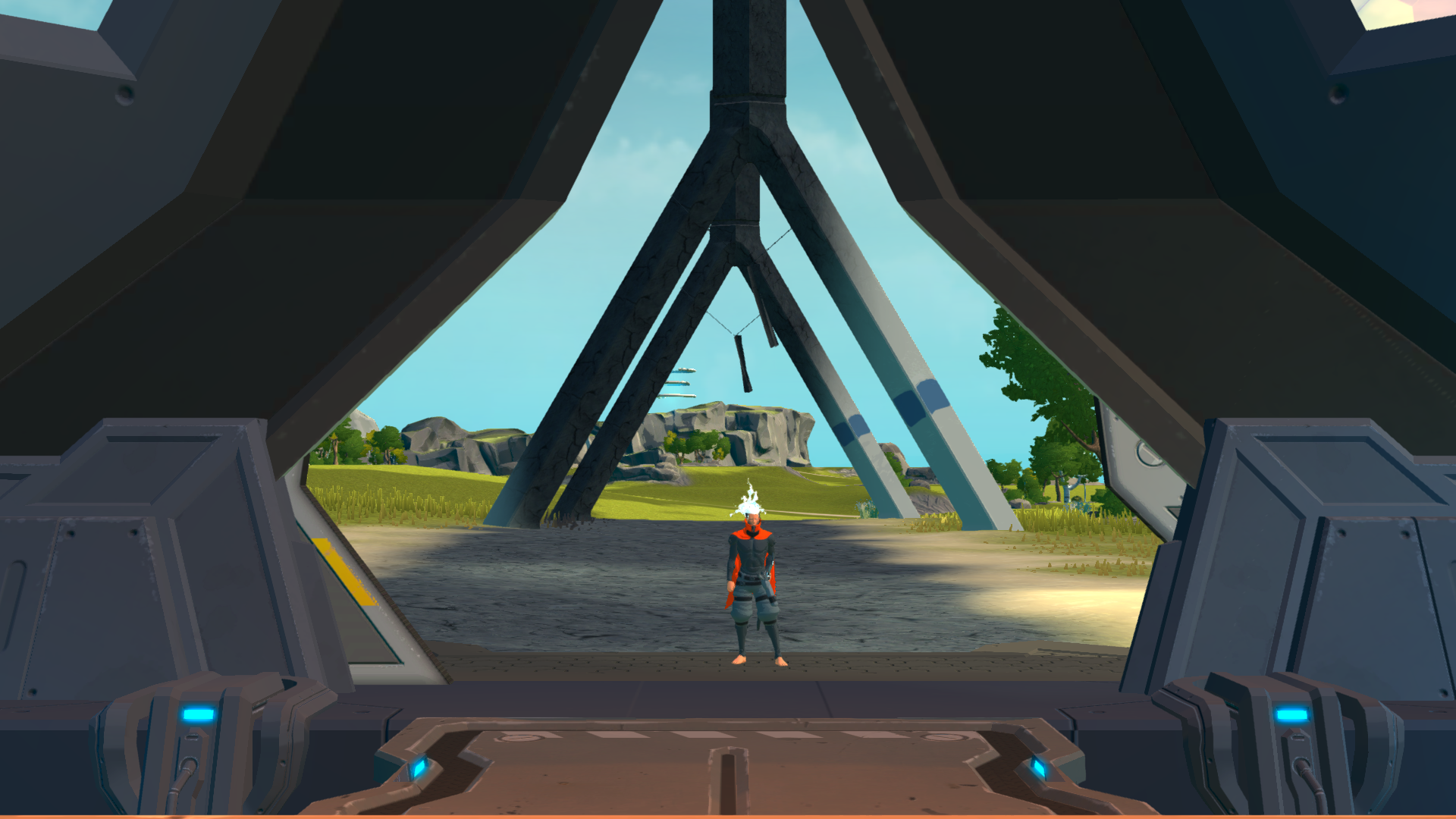
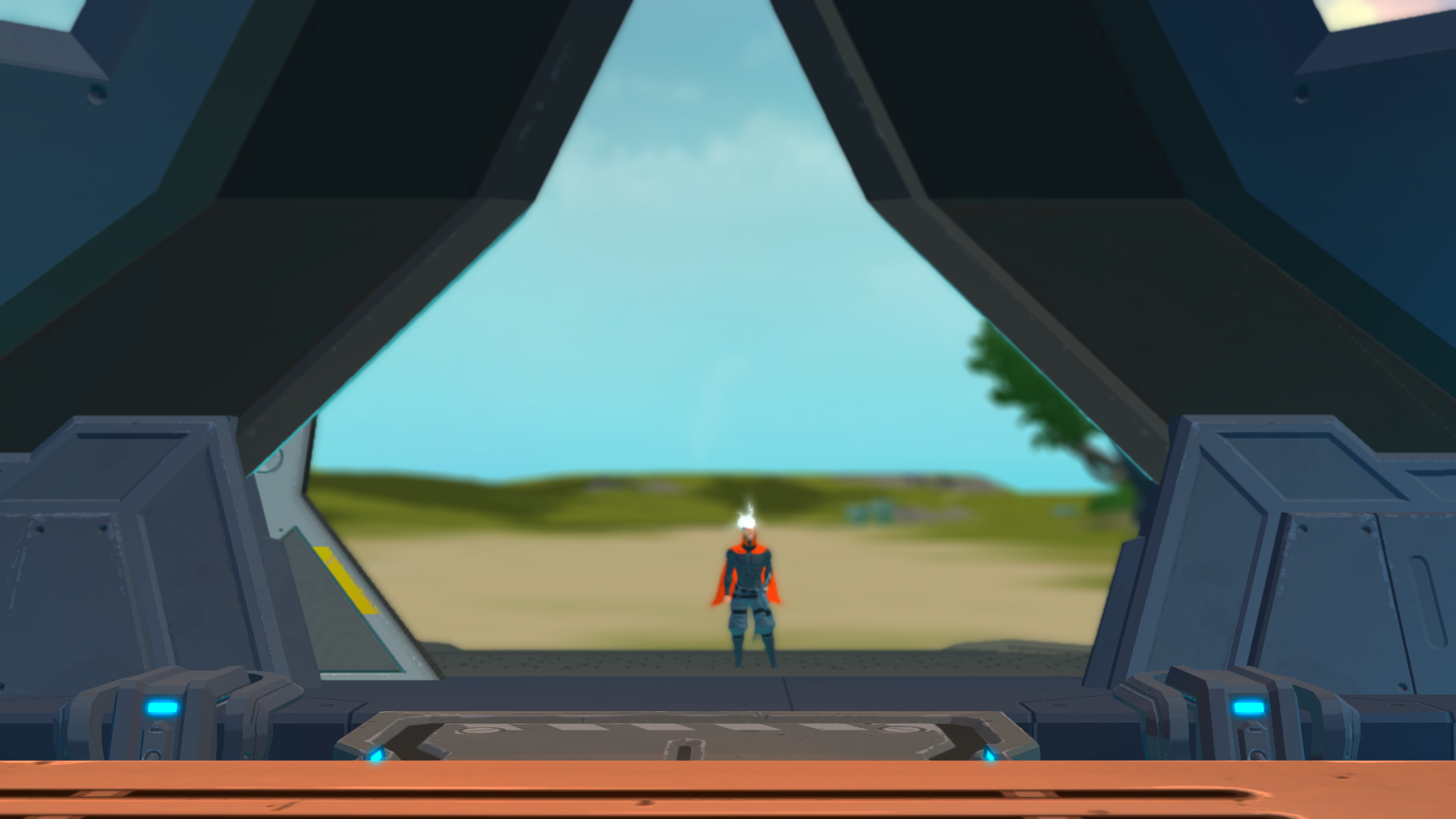
On the Xbox One release, The Rider will encounter and fight The Flame on the elevator platform leading to their flight suit. This story sequence is exclusive, but the fight itself is available on all version as part of the "One More Fight" DLC which was later integrated in the base game with the Onnamusha update.
Under the hood, this sequence is peculiar: while normally the elevator cutscene takes place in the Free World scene, with The Flame encounter it instead takes place in his scene. This is evident because the cutscene is preceded by a loading screen, and that the Free World seen in the background is much less detailed.
The story encounter can naturally be restored on PC by removing an hardcoded instruction that skips the level if its ID is "AVENGER" and by modifying DebugSettings::includeAvengerInStory (mainly controls the transitions, otherwise you'd see the regular elevator scene before The Flame's elevator scene). Instruction how to do so can be found here.
|
The regular elevator cutscene |
The Flame's elevator cutscene |
|---|---|
|
|
(Source: Original TCRF research)
Rider Voices#
Rider is a completely silent protagonist; However, only in the PS4 release of the game can Rider make several hurt or grunting sounds during battles.
(Source: Mangotastic)
Regional Differences#
Modifying the debug setting "TweakablesLocalDynamic.Instance.pcSettings.useChineseSplashscreen" to true enables a splash screen on game start.
(Source: Original TCRF research)
Additionally, there is also a Chinese Government warning screen.


(Source: Kritaka)
Debug Menu#
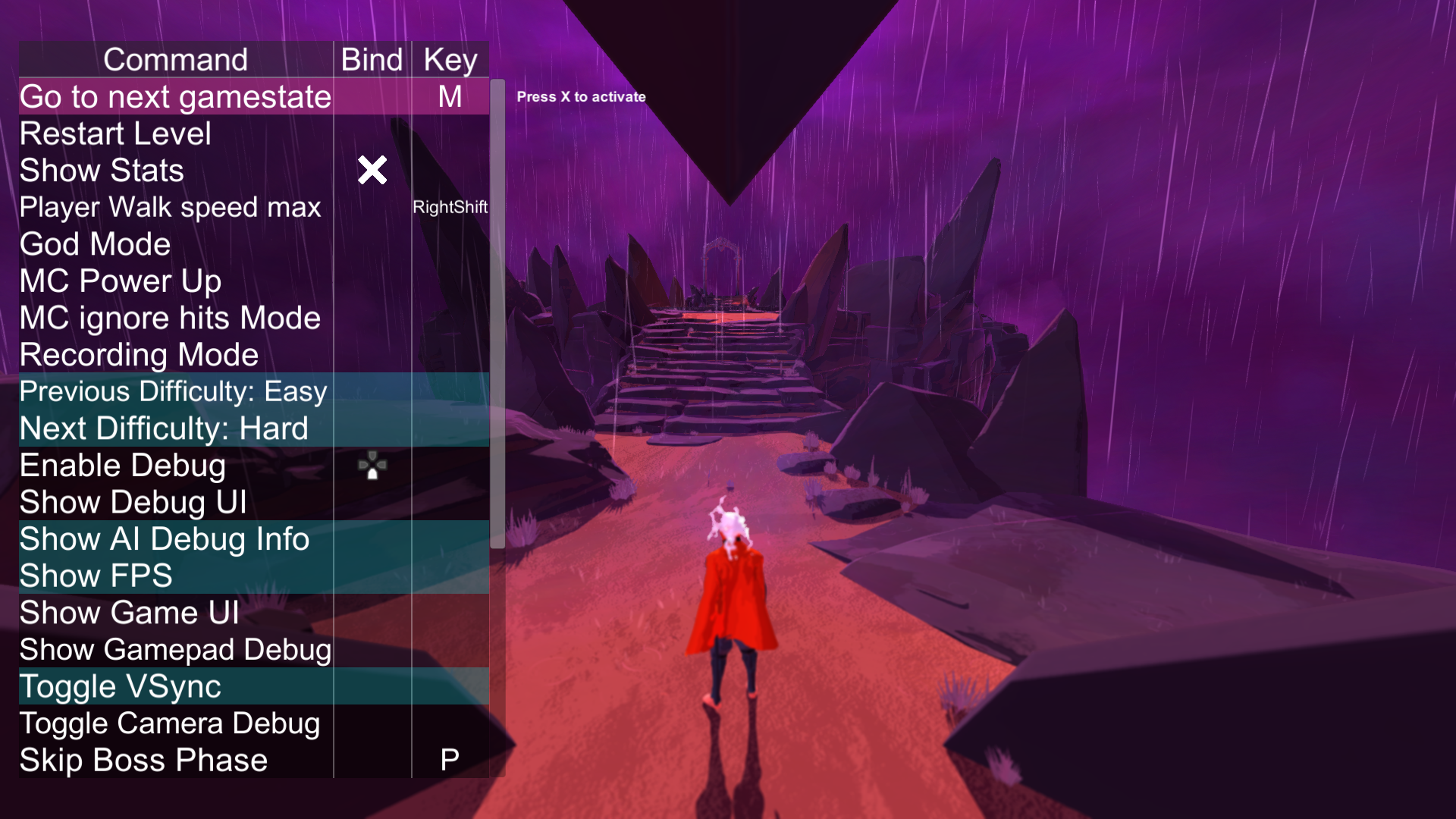
A mostly functional debug menu is present in the game and accessible. It features many different commands to assist in debugging of the game. A patch is required to activate it which can be downloaded below. The menu can be navigated through use of the arrows keys or left stick and most commands can have buttons bound to them for quick use ingame.
Please note that this menu will require a controller to activate it as it can only be brought up by pressing the left and right bumpers simultaneously.
 |
File: Furi Debug Patch.zip (922KB (compressed)) (info) |
(Source: Original TCRF research)
Level Select#
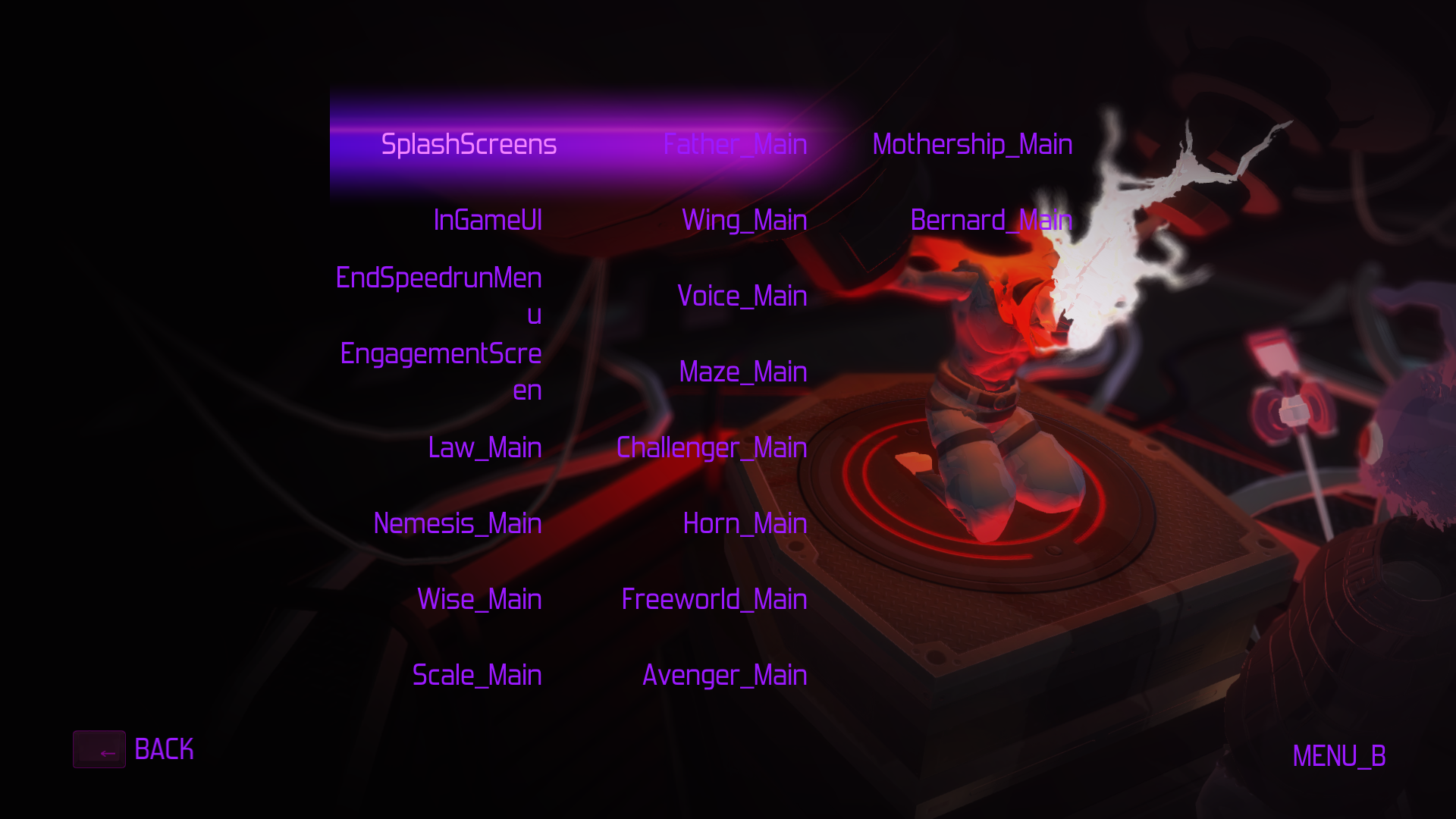
A level select is hidden in the game and is accessible through use of the debug menu.
To access it, open the debug menu (after enabling it with the above patch) and then use the "Enable Debug" option. A new option should appear on the menu allowing you to open the level select menu.
Selecting any of the options will load that character's specific story level, rather than the fight itself like in Practice mode.
Each of the menu options refers to the internal name of a specific scene in the game and the corresponding stages.
Internal Name |
Name In-Game |
|---|---|
Law_Main |
The Chain's Stage. |
Nemesis_Main |
The Strap's Stage. |
Wise_Main |
The Line's Stage. |
Scale_Main |
The Scale's Stage. |
Father_Main |
The Hand's Stage. |
Wing_Main |
The Song's Stage. |
Voice_Main |
The Voice's stage. |
Maze_Main |
The Burst's Stage. |
Challenger_Main |
The Edge's Stage. |
Horn_Main |
The Beat's Stage. |
Freeworld_Main |
The Freeworld stage post-credits. |
Avenger_Main |
The Flame's Stage. |
Mothership_Main |
The Star's Stage. |
Bernard_Main |
Bernard's Stage. |
Accessing the level Avenger_Main from the level select will start the console-exclusive introductory cutscene for The Flame, including the also console-exclusive victory cutscene upon completion, despite those scenes being unused in the PC version of the game.
(Source: Original TCRF research)