Dungeon Magic is a unique non-linear isometric action-RPG arcade game where the player must explore many rooms and find his way to the exit.
Sub-Pages#
 Unused MapsUnreferenced maps, sketch maps, and chunk data.
 Unused ObjectsEnemies, items, obstacles, etc.
 Unused GraphicsHere there be dragons (and a bunch of other stuff)
Debug Functions#
Level Select/Screen Editor#

This game uses the Taito Code:
- Hold the Service Coin button upon booting, and wait until a "SERVICE SWITCH ERROR" message pops up on the screen.
- Press 1P Start (x3), Service Coin, then 1P Start again.
Afterwards, the game boots as normal. However, upon inserting a credit, the game redirects to a level select screen. The inputs are the same between P1 and P2.
- Left/Right or Up/Down - Switch between "GAME" and "SCREEN EDITER".
- Button 1 + Left/Right / Up/Down - Change Round value.
- Button 2 + Left/Right / Up/Down - Change Room value.
- Start - Apply
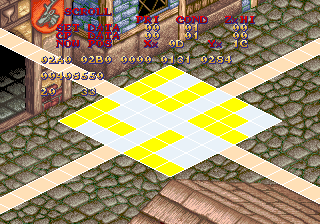
Should the "Screen Editor" function be chosen, the player is redirected to what seems to be a level editor of sorts. Controls:
- 1P Start: Switch between "Scroll" and "Edit" functions.
- SCROLL
- 1P Up/Down/Left/Right - Move camera.
- 1P Button 1 + 1P Up/Down - Change PRI parameter of tile.
- 1P Button 2 + 1P Up/Down - Change COND parameter of tile (by 1).
- 1P Button 2 + 1P Left/Right - Change COND parameter of tile (by 10).
- 1P Button 3 + 1P Up/Down - Change ZxHI (height) parameter of tile (by 1).
- 1P Button 3 + 1P Left/Right - Change ZxHI (height) parameter of tile (by 10).
- EDIT
- 1P Button 1 - Change boundary shape.
- 1P Up/Down - Move X placement of shape.
- 1P Left/Right - Move Y placement of shape.
(Source: RyogaMasaki)
Debug Flags#
There are doubleword-sized flags at ROM addresses 0x00300 to 0x00324 that enable debug functions if set to non-zero values. Put the codes listed below in MAME's dungeonm.xml (Dungeon Magic) or lightbr.xml (Light Bringer) cheat file to enable the functions described in each subsection.
Game Pause#
  <cheat desc="Game Pause">
    <script state="run">
      <action>maincpu.md@000300=00000001</action>
    </script>
    <script state="off">
      <action>maincpu.md@000300=00000000</action>
    </script>
  </cheat>
This tool allows the user to pause and resume the game at their leisure.
Controls
- 1P Button 3: Pauses the game. If already paused, advances the game by 1 frame.
- 2P Button 3: Resumes the game at normal speed.
Enable Crash Handler#
  <cheat desc="Enable Crash Handler">
    <script state="run">
      <action>maincpu.md@000304=00000000</action>
    </script>
    <script state="off">
      <action>maincpu.md@000304=00000001</action>
    </script>
  </cheat>

Has the following effects:
- When the game crashes, an exception handler will be displayed that lists the exception name, the last running task, and the values of the status register, program counter, and data/address registers at the time of the crash. There are two different messages at the bottom that are picked at random.
- The Tilt and Coin Error screens, which normally wailt until the game detects that it's an infinite loop - about 80 frames - will instead wait for 180 frames before the game resets.
CPU Meter#
  <cheat desc="CPU Meter">
    <script state="run">
      <action>maincpu.md@000308=00000001</action>
    </script>
    <script state="off">
      <action>maincpu.md@000308=00000000</action>
    </script>
  </cheat>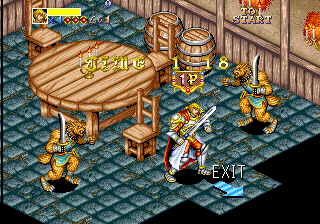

Adds a CPU usage meter to the left side of the screen. This is normally black, but will turn different colors if the game is under heavy load, like when the game loads a new area.
Sprite Viewer#
  <cheat desc="Sprite Viewer">
    <script state="run">
      <action>maincpu.md@000320=00000001</action>
    </script>
    <script state="off">
      <action>maincpu.md@000320=00000000</action>
    </script>
  </cheat>
Enables a sprite viewer. The game will keep running while this is active, so it's advised to pick an uncluttered screen (Like the stage select) and pausing the game to use this viewer - the editor will remain active while the game is paused.
Controls
- 1P Left/Right: Adjusts sprite number by 01.
- 1P Up/Down: Adjusts stprite number by 40.
- 1P Button 1 + 1P Joystick: Adjusts the position of the current sprite.
- 1P Button 2 + 1P Left/Right: Adjusts palette number by 20.
- 1P Button 2 + 1P Up/Down: Adjusts palette number by 02.
Extended Sound Test / Demo Recorder#
  <cheat desc="Extend Sound Test / Demo Recorder">
    <script state="run">
      <action>maincpu.md@000324=00000001</action>
    </script>
    <script state="off">
      <action>maincpu.md@000324=00000000</action>
    </script>
  </cheat>

This debug flag adds information to the game's sound test that lists the raw data of each sound effect / BGM, and adds a couple more features:
- The "Reset" option resets the game.
- The "Code Volume" option lets the player play the selected sound / music track and also lets them set their relative volume.
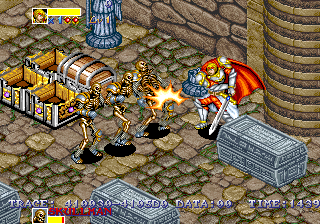
This flag also enables a demo recorder. In attract mode, when a demo is triggered, the player has full control of the character and the game records the player's input to RAM:
Type |
Start |
End |
|---|---|---|
Ash Demo |
0x410030 |
0x4108C8 |
Cisty Demo |
0x4108E0 |
0x41136C |
Tutorial |
0x411380 |
0x411C0E |
Gren Demo |
0x411C20 |
0x4126AC |
Vold Demo |
0x4126C0 |
0x41314C |
The "TRACE" text at the bottom displays the starting address and the address that's currently being written to, "DATA" is the raw value of the player's input (Inverted from how it's actually stored in RAM), and "TIME" keeps track of how many frames have passed in the current demo.
Running Debug#
  <cheat desc="Running Debug">
    <script state="run">
      <action>maincpu.md@0E3C22=0x4EB90006</action>
      <action>maincpu.md@0E3C26=0xE1884E71</action>
      <action>maincpu.mw@0E3C2A=0x4E71</action>
    </script>
    <script state="off">
      <action>maincpu.md@0E3C22=0x082D0000</action>
      <action>maincpu.md@0E3C26=0x82206700</action>
      <action>maincpu.mw@0E3C2A=0x058A</action>
    </script>
  </cheat>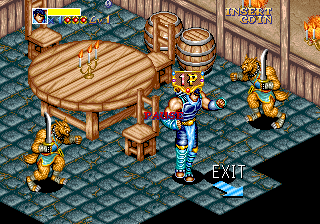
Controls
- 1P Button 3: Pauses the game. If game is already paused, advances the game by one frame.
- 2P Button 3: Unpauses the game.
- 4P Button 3: Loads next tool.
This debugger allows the user to cycle through sixteen different debugging tools while playing the game. A few notes on using this feature:
- The stage timer keeps going while the game is paused, so a separate cheat should be enabled to stop the timer.
- Some of the graphic overlays use will be gray if the game isn't paused beforehand. To fix this, simply pause and then unpause the game.
- Overlay graphics may be corrupted when entering a new room. To fix this, cycle through each debug until the dialogue viewer is reached, then press 4P Button 3.

Tool 1
Displays the floor (cyan) and ceiling (pink) collision points for each object.

Tool 2
Displays the floor and ceiling collision boxes for each object. The subroutine to draw these boxes is highly CPU-intensive, and the game will lag or even crash if there are too many objects on screen.
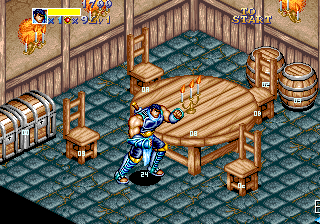
Tool 3
Displays the sequence number of each object. Lower-numbered objects are loaded into the map before higher-number objects.

Tool 4
Displays the starting points in RAM for each object. The address on top is for the main object, and address on the bottom is for the object's sub-sprites like weapons, shields, etc.

Tool 5
Displays unknown data for each object in the room.

Tool 6
Displays the state of eight player status bits:
- ATTACK: Player is performing an attack.
- SYNCOPE: Player is currently being controlled by another object (For example, being held and thrown by an enemy)
- NOCONTROL: Unknown
- ATT_HIT: Player is performing a dash attack and has collided with an object.
- TOUCH_HIT: Player is colliding with a solid object (Crates, platforms, etc.)
- NODAMAGE: Player is currently invincible.
- NOTUCH: Unknown
- DAMAGE: Player has just taken damage.
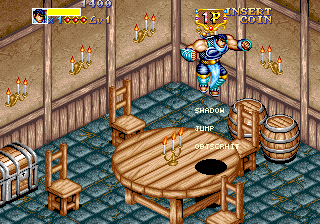
Tool 7
Displays the state of seven more player status bits:
- SHADOW: Player's shadow is rendered.
- INOUT: Unknown
- NOTCLR: Unknown
- JUMP: Player is currently in the air.
- PRTCHG: Unknown
- OBJSCRHIT: Player is not currently standing on a solid object.
- SCRHIT: Unknown
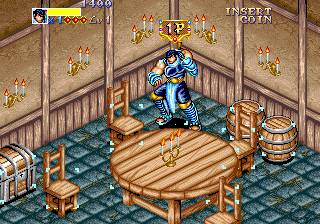
Tool 8
Displays the hurtboxes of each object in the room.
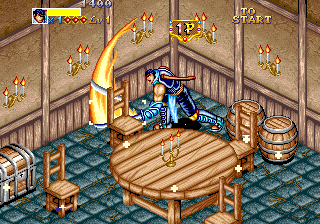
Tool 9
Displays the hitboxes of each object in the room.
Tool 10
Displays both hurtboxes and hitboxes, alternating between the two every frame.

Tool 11
Displays the state of eight additional player status bits:
- JUMPATT: Player is jumping and not attacking.
- TOUCHCHK: Unknown
- SCRAVOID: Player is pushing against a wall or screen boundary.
- PICKUP: Player is holding an object.
- PICKOK: Player is currently able to pick up an object.
- HAIKEI: Unknown
- PRTONETM: Unknown. Always seems to be active.
- NAGE: Player has just performed a throw.

Tool 12
Displays the state of still more player status bits:
- VINV: Player's vertical rotation bit is set. Doesn't seem to be used.
- HINV: Player's horizontal rotation bit is set.
- DISP: Player's sprite is visible. Disabled when the player is flashing while dying.
- ZADJ: Unknown. Always seems to be active.
- SD: Unknown. Always seems to be active.
- NOHIT: Unknown.
- BUSY: Unknown. Always seems to be active.

Tool 13
Displays the X, Y, and Z coordinates of each object in the room.

Tool 14
A handy in-game sound test feature.
Controls
- 3P Left/Right: Selects which sound to play
- 3P Button 1: Plays the selected sound.

Tool 15
Should act like a sprite viewer, but doesn't seem to work - no sprites are displayed.
Controls
- 3P Left/Right: Adjust style number by 1.
- 3P Button 1 + 3P Left/Right: Adjusts style number by 10.
- 3P Button 2 + 3P Left/Right: Adjusts style number by 80.
- 3P Up/Down: Adjusts palette number by 2.


Tool 16
Lets the user view all of the game's dialogue. Even-numbered entries are JP, and odd-numbered entries are EN. Japanese text will only display correctly on a JP region set.
Controls
- 3P Left/Right: Adjusts text number by 1.
- 3P Button 1 + 3P Left/Right: Adjusts text number by 10.
- 3P Button 2 + 3P Left/Right: Adjusts text number by 80.
- 3P Up/Down: Adjusts palette number by 2. This doesn't seem have any effect on the dialogue window.
- 3P Button 1: Displays the selected text by ID.
(All other functions: Original TCRF research)
Unseen Object Names#
There are many object labels that the game assigns to objects that are never seen in-game. This is mainly due to two factors:
- The player has to directly interact with an object for a label to appear.
- The only label and health bar displayed in boss fights are for the boss.
Object ID |
Icon |
Name |
Context |
|---|---|---|---|
001 |
 |
''' ''' |
Players can't directly interact with or attack other players. |
002 |
 |
''' ''' |
|
003 |
 |
''' ''' |
|
004 |
 |
''' ''' |
|
00A |
 |
''' ''' |
This is the large explosion that makes up the main part of Gren's crash attack. |
09D |
 |
''' ''' |
The spiders that pop out of the Queen Spider after her abdomen bursts. The icon is otherwise completely unused. |
0A5 |
 |
''' ''' |
The blue fire that appears in the Queen Spider fight. "ELEMENT" wouldn't be used anyway because the label is coded to only use a single line of text. |
0C0 |
 |
''' ''' |
The princess that Venom kidnapped. The player can't directly interact with her at any point. |
0C3 |
 |
''' ''' |
These are the smoke sprites generated by the Lesser Demon when he flies off with the princess at the start of the game. |
0C6 |
|
''' ''' |
This is the giant web that the Queen Spider shoots out when the player is cornered. |
0C8 |
|
''' ''' |
"WIRESHOT" splits into these once the web hits something. |
0C9 |
 |
''' ''' |
Applies to both Dark Knight's sword and shield. |
0CA |
|
''' ''' |
Used by both the freed blue crystals in the Northern Ruins and the harmful red crystals in the Lesser Demon fight. |
0CC |
|
''' ''' |
This is the game's term for Venom's after-images. |
0CD |
|
''' ''' |
Used by the passed out Fontaine in the Queen Spider fight. Also used by the dying guards in Fontaine's temple and by the old man in the Northern Ruins. |
0CE |
|
''' ''' |
The label for the princess-carrying Lesser Demon that appears outside The White Deer. |
1C0 |
|
''' ''' |
This is the object that generates the energy waves from Gren's fully charged attack... |
1C1 |
|
''' ''' |
...and these objects are the left and right waves respectively. |
1C2 |
|
''' ''' |
(Source: Original TCRF research)
Unused Floor Types#
Put the codes listed below in MAME's dungeonm.xml (Dungeon Magic) or lightbr.xml (Light Bringer) cheat file to change the southern border of the lava in Round 00, Room 0B with an unused terrain type:
  <cheat desc="Change Border of Burning Floor">
    <parameter>
      <item value="0x04000400">Steep Slope - SE</item>
      <item value="0x05000500">Steep Slope - SW</item>
      <item value="0x06000600">Steepest Slope - SE</item>
      <item value="0x07000700">Steepest Slope - SW</item>
      <item value="0x0A000A00">Freezing Floor</item>
      <item value="0x0B000B00">Spark Floor</item>
    </parameter>
    <script state="run">
      <action>maincpu.md@14768C=param</action>
      <action>maincpu.md@147690=param</action>
      <action>maincpu.md@147694=param</action>
      <action>maincpu.md@147698=param</action>
      <action>maincpu.md@14769C=param</action>
      <action>maincpu.md@1476A0=param</action>
      <action>maincpu.md@1476A4=param</action>
    </script>
    <script state="off">
      <action>maincpu.md@14768C=0x09000900</action>
      <action>maincpu.md@147690=0x09000900</action>
      <action>maincpu.md@147694=0x09000900</action>
      <action>maincpu.md@147698=0x09000900</action>
      <action>maincpu.md@14769C=0x09000900</action>
      <action>maincpu.md@1476A0=0x09000900</action>
      <action>maincpu.md@1476A4=0x09000900</action>
    </script>
  </cheat>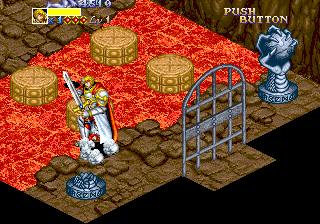
Types 0x04 + 0x05: Steep slopes.
Types 0x06 + 0x07: Steepest slopes.
Unused slope types. Steel slopes push the player back down if they stay on them too long without moving, while the steepest slopes only allow players to walk up for a few seconds before they're pushed back down. The SE steep and steepest slopes are used on a few unused maps, but both SW slope types are completely unused.
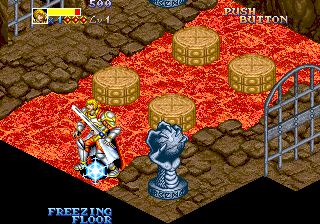
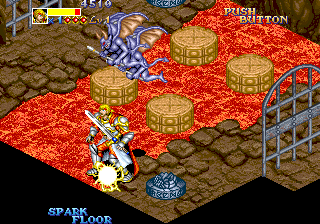
Type 0x0A: Freezing Floor.
Type 0x0B: Spark Floor.
Unused elemental hazards. Act identically to the used Burning Floor, just with different elements.
There's one more unused floor type that doesn't have a type ID assigned to it in the final game. Use this code (and disable the previous cheat) to change the way Burning Floors work:
  <cheat desc="Change Burning Floor Behavior">
    <script state="run">
      <action>maincpu.mw@0642AE=0x1043</action>
    </script>
    <script state="off">
      <action>maincpu.mw@0642AE=0x1041</action>
    </script>
  </cheat>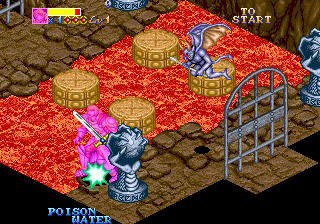
This is an early version of the poison water behavior that's used in Fontaine's Temple. Instead of constantly taking poison damage while in contact with the floor, the player is knocked back (taking the same amount of damage as the other hazard floors) and then takes residual poison damage.
(Source: Original TCRF research)
Unused Dialogue#
All of the following text can be viewed using the dialogue debugging tool.
Japanese |
Translated |
English |
|---|---|---|
はいってないのよ |
There's nothing in here. |
Message undefined. |
Message IDs: 30, 32, 34, 36 (JP), 31, 33, 35, 37 (EN)
Simple placeholder messages that were never filled in.
 |
Now printing! |
Message IDs: 63, 65, 67, 69, 6B, 6D, 6F, 71, 73, 75, 77 (EN only)
In the Japanese set, the even-numbered message IDs in this set are used for character endings. The English-language sets uses a different text system for those endings, leaving these IDs unused.
Japanese |
Translated |
English |
|---|---|---|
「キャー・・・・・・」 |
Kyaa...... |
Help! |

Message IDs: C2 (JP), C3 (EN)
In the Northern Ruins, one of the Old Man NPCs says the seemingly non-sequitur line, "It's her!". The above line from the princess was supposed to appear before that, but it was mistakenly excluded, leaving the old guy to come across as a loon.
Japanese |
Translated |
English |
|---|---|---|
「フハハハハハ・・・・ |
Fwahahahahaha... |
Heh heh heh... foolish human. |

Message IDs: 1A (JP), 1B (EN)
Dialogue from Venom that would have been placed at some point after the second Dark Knight fight.
(Source: Original TCRF research)
Unused Text#
Developer Credit#
The following text is at 0x00D040 in the main CPU:
hayalib.s programed by HAYA. mercury power make up !Haya is Toshiyuki Hayashi (林 俊幸), a Taito programmer who worked on Prime Time Fighter. The message is a reference to Sailor Moon's Sailor Mercury; similar messages are in Grid Seeker: Project Storm Hammer.
Region 0 Text#
The region flag at 0x0FFFFF is normally set to one of three values: 01 (Japan), 02 (US), or 03 (World). Setting it to the invalid value 00 will allow the user to use two strings that were probably assigned to one of the other region flags during development.
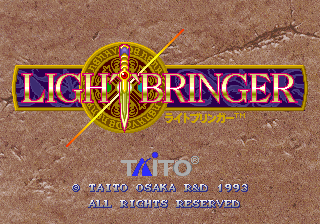
First, the copyright string changes to "Taito Osaka R&D 1993."

Second, the game name in the test mode changes to "Ninja Kids 2"! This was most likely just added in as a joke , but it does make one think.
(Source: Original TCRF research)
Revisional Differences#
|
2.1 |
2.2 |
|---|---|

|

|
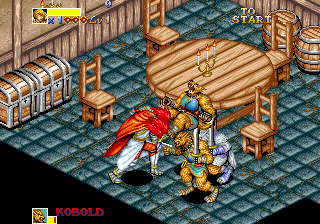
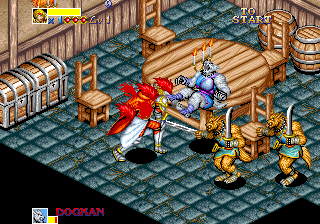
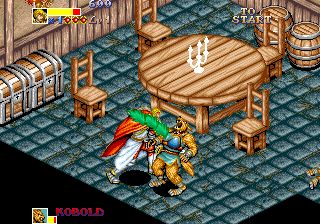
Early game sets had a "Violence Mode" option in the game configuration menu. This could be set to one of four values:
Normal |
Hard |
Change |
|---|---|---|
 |
 |
 |
- Normal: Enemies and players will spurt out three blood sprites on most hits.
- Hard: Enemies and players spurt out five blood sprites on most hits. These are randomized between a standard blood spray and a darker-colored spray.
- Change: Same as Normal, but the blood is now bright green.
- None: Disables blood sprays.
Starting with Version 2.2, this option was removed and blood is instead determined by the region flag: JP and World sets are bloodless, while the US set uses the green "Change" blood spites.
Regional Differences#
Title Screen#
|
JP |
US |
|---|---|
|
|
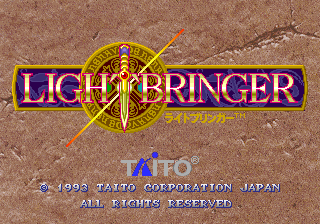
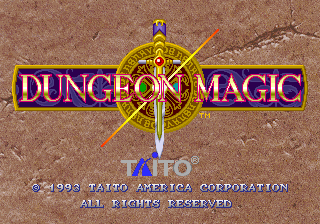
The game's name is different depending on the region flag and game version:
- The JP sets always use the original name, Lightbringer.
- The US sets rename the game Dungeon Magic; this might have been an attempt to link the game with the otherwise unrelated NES title Dungeon Magic: Sword of the Elements, which Taito also published.
- The World set uses Dungeon Magic in Version 2.1 and Lightbringer in Version 2.2.
Character Bios#
|
JP |
INT |
|---|---|
|
|
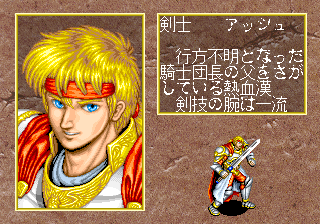
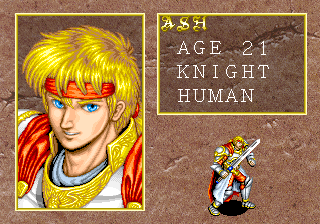
Both Japanese and English-language bios have information that the other set doesn't: The Japanese bios give background information for each character, while the English bios list character ages and races.
Japanese |
Translated |
English |
|---|---|---|
剣士 アッシュ |
Swordsman Ash
|
ASH |
戦士 グレン |
Warrior Gren
|
GREN |
エルフ システィー |
Elf Cisty
|
CISTY |
魔術士 ヴォルド |
Wizard Vold
|
VOLD |
Bunny Girl#
 |
 |
In the Japanese version, you can trigger a secret after defeating the last boss. First, collect all the chests in the room, then walk near the entrance or the right-side of the room (the location can vary) and a bunny will magically appear. The bunny will turn into a bunny girl and she'll drop several pieces of equipment for you.