 Featured article
 This article has a talk page!

Unused Playback Demo#
The DOS version has an undocumented parameter: -ATTRACT. If the game is started with this parameter, it will start a playback demo after the game is kept idle on the title screen for one minute. This playback demo is very obviously unfinished, as it crashes after 45 seconds of gameplay. The demo is read off the otherwise unused RECORD.BIN file, stored inside the TRANSIT.MIX file, and by truncating this file, it is possible to have the demo finish. The feature is a leftover of the Dune II demo, which had full recording and playback ability. It's very likely that the developers simply ran out of time and were forced to ditch its implementation in C&C.
The parameter was carried over to the Windows 95 version as well. However, it crashes right away as soon as it attempts to load the demo, most likely due to the higher resolution causing objects on the screen not to match their recorded locations.
Special Options#

This excerpt from the game's strings file reveals a number of interesting options:
600=Special Options
601=Targeting flash visible to all.
602=Allow targeting of trees.
603=Allow undeploy of construction yard.
604=Employ smarter self defense logic.
...
606=Use three point turn logic.
...
609=Disable building "bib" pieces.
610=Allow running from immediate threats.
...
676=Allow separate helipad purchase
...
678=Tiberium grows quickly.
From research into the exe file, it was revealed that there is a hidden dialog that can be called up in the game which contains these options.
A number of these options, and more, appear as ini keys that can be read from the game's configuration file, CONQUER.INI, by placing them under the [Options] header in the file, along with the game's normal configuration options. However, the text to trigger these options were saved as hash values, making the actual original passwords a mystery. A number of these (often humorous) passwords were later recovered through brute-force methods using a reconstruction of the hashing algorithm. The passwords are case insensitive.
The final identified options are:
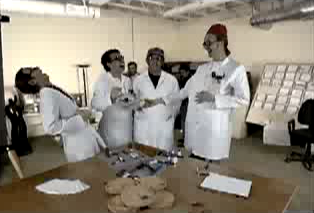
'''TrueNames - Hash value: 0xB1A34435 | Recovered password: "TARBOSH"
- Shows the actual names of civilians and civilian buildings in tooltips, rather than just "Civilian" / "Civilian Building." Many of the building names are humorous, and all of the people are named after Westwood Studios employees.
- The code recovered for this, "TARBOSH", refers to a fez-like type of hat called a Tarbosh or Tarboosh. The code has been encountered in multiple Westwood games from that era, and a picture of the actual hat was found as hidden single frame in a trailer for the game. It was probably some kind of insiders joke at the company.
Players - Hash value: 0x5D9F6F24 | Recovered password: "6"
- Allows six players in LAN games. Note that the C&C player spawning logic has bugs when the map contains less spawn points than this internal maximum. Almost all official maps have 6 player start positions, though.
- Older versions of the game had hash value 0x9CAFC93B for this, for which the password "CROWDED" was recovered; and indeed, 6-player games on C&C's 64x64 cell maps are rather crowded.
Watch on YouTube'''Rotation - Hash value: 0x03552894 | Recovered password: "DANCING"
- Wheeled vehicles will make three-point turns, rather than turning on the spot like treaded vehicles. This is... interesting, to say the least. Given the password linked to it, Westwood was clearly aware of this.
(Video: Nyerguds)
Helipad - Hash value: 0x53EBECBC | Recovered password: "A LA CARTE"
- Helipads will be built without helicopters; their price will be adjusted from $1500 to $300 accordingly.
MCV - Hash value: 0x104DF10F | Recovered password: "TRANSFORMER"
- Selling a Construction Yard will undeploy it into a Mobile Construction Vehicle. Note that the game has a bug in the power drain adjustment done when deploying MCVs, making frequent use of redeploying MCVs drain power that can't be recovered.
Bibs - Hash value: 0xF7867BF0 | Recovered password: "RECKLESS BABY GRIEFS"
- Disables the "bib" of cleared land in front of structures. This can cause serious issues though; firstly because buildings like the Refinery require that area to be open to function correctly, and secondly because it is not remembered in savegames, so loading a saved game with bibs will cause disconnected bibs to get left behind when buildings get sold or destroyed.
- Although many possible matches were found for unlocking this option, such as "puddingprecombating" and "bluebottleparabolist", the "a la carte" one shows that phrases with spaces were used for these, and the only found phrase that is actually plausible is "reckless baby griefs". Given the connection with bibs, and the fact you can really mess up your base by not having bibs enabled, this seems to be the most likely match.
TreeTarget - Hash value: 0x00AB6BEF | Recovered password: "LIGHTNING"
- Makes trees valid targets. Normally trees have to be force-fired on. Note that this also makes the larger tree clumps into valid targets, despite them being indestructible.
Combat - Hash value: 0xDC57C4B2 | Recovered password: "CHARGE!"
- According to OPTIONS.CPP, this option is called "PARM_COMBAT". The description says "Allow infantry to fire while moving. Attacker gets advantage with this flag.". By default, it's off (infantry only fire when stationary, aka Special.IsDefenderAdvantage is TRUE) and so infantry approaching a position will be fired upon first before they can stop and shoot back.
(Source: Obfuscate)
Scores - Hash value: 0x7FDE2C33 | Recovered password: "REMIX"
- Enables remixed variants of several music tracks, often with added vocals. This option will not work in v1.22 due to the removal of the option. It will also not work when running the Windows 95 version in normal CD-reading mode using the GDI or Nod CDs, due to the fact the remixed music tracks were stripped out as part of a cleanup of "unused" files in that release. However, when playing with the Covert Operations CD, the remixes are available, since the contents of that CD are unchanged from its DOS release.
(Source: Nyerguds)
CombatIQ - Hash value: 0x9E3881B8 | Recovered password: "SERGENT" (sic)
- This option most likely corresponds to the game string "Employ smarter self defense logic." Essentially, it makes both infantry and vehicles move away any time they're shot at, which mostly makes managing an army very tedious.

'''Overrun - Hash value: 0x4EA2FBDF | Recovered password: "PANCAKE"
- This option should make squished infantry leave behind a crushed corpse, however, due to a badly written line of code, the option does not work, and instead disables all spawning of tiberium in a mission, including the initial population on mission start. Because of this, it was long believed the option was related to tiberium, but recent digging into the released source code showed what it really did, and analysis of the code allowed the broken logic to be repaired. However, the result is still rather buggy; the crushed corpses are impassable objects that are difficult to get rid of. In the Windows 95 version, however, they act as completely passable objects, but are indestructible.
Watch on YouTube'''Sounds - Hash value: 0xACB58F61 | Recovered password: "7TH GRADE"
- Enables alternate audio composed of human-vocalized versions of the sound effects. Probably done as a joke; given the fact they had already made Dune II it is unlikely they actually needed placeholder sounds. The sounds have file extension .JUV, which, according to the source code, stands for "juvenile".
Scrolling - Hash value: 0xC084AE82 | Recovered password: "RESTRICTED"
- Disables scrolling upwards on the Options and Sidebar buttons, to avoid accidental scrolling when the player wants to click one of the buttons. Scrolling diagonally from the corner still works, though. Due to the logic being inherited from the DOS version, however, the width of the blocked areas is only equal to the size of the buttons in DOS C&C, which means that in C&C95, they only cover the first half of the Options button and the last half of the Sidebar button.
(Source: Rich Nagel)
Ignoring the existing normal options already in that file, the options would look like this in CONQUER.INI:
[Options]
TrueNames=tarbosh
Players=6
Rotation=dancing
Helipad=a la carte
MCV=transformer
Bibs=reckless baby griefs
TreeTarget=lightning
Combat=charge!
Scores=remix
CombatIQ=sergent
Overrun=pancake
Sounds=7th grade
Scrolling=restricted
Two tools were created to enable these options by changing bytes in the exe file:
- Nyerguds's C&C/C&C95 Hidden Options Enabler (supports several C&C95 and DOS C&C versions)
- Rich Nagel's C&C DOS v1.22p Hidden Options Enabler
Note that in the unofficial v1.06 patch for C&C95, the options are all changed to simple true/false boolean switches, removing all need for the secret codes. Some of the codes that could interfere with multiplayer games were also moved to an internal rules.ini file.
Difficulty Levels#
The game contains more values hashed in the same way as the CONQUER.INI option inputs. However, these are command line options. One of those, "FROMINSTALL", can be found as plain text in the DOS game's _SETUP.EXE; it forces the game to play the intro, and immediately continues to the sides selection screen, without ever showing the game's main menu. Another, "FUNPARK", was deliberately leaked by developers in gaming magazines, and enables the secret dinosaur campaign. However, besides those two, there are also two parameters which were figured out to be the words "EASY" and "HARD", hinting at the difficulty levels logic that would only be fully implemented in Red Alert.
Unlike in Red Alert, where the difficulty levels cause massive changes in all game object stats, including cost, damage, and health, the difficulty levels in the original C&C have more subtle influences on the game. Normally, AI behavior changes gradually as you play the campaign, with the enemy being more lenient in the early missions, and more unforgiving in the later ones. One specific aspect of this that can easily be seen is vehicles crushing infantry, which becomes an active behavior at a certain point. These two difficulty levels basically force the game to always act like either the beginning of the campaign, or the end.
Additionally, a little option called "IsHealthBar", which is normally always enabled, is disabled in Hard mode. The effect of this option is that the game no longer shows enemy health bars.
Easy mode tweaks
- The AI normally has an "equalizing" logic on its build speed for structures, making cheaper buildings take longer, and more expensive ones take less long. The handicap on this logic is doubled in Easy mode, making all AI build times slower than in Normal mode.1
- AI vehicles will never try to crush infantry.C&C Remastered source code: UNIT.CPP:
In the logic that determines whether to crush or not, the BuildLevel check is skipped on Hard difficulty. The whole check fails on Easy difficulty, making the AI never crush at all.
- AI infantry will not scatter when they are about to get crushed.2
- The AI does not rebuild harvesters.3
- The AI has a longer delay between sending out attack teams as part of the "Autocreate" routine.4
Hard mode tweaks
- The AI builds structures at the same speed as the player. Ironically, on expensive buildings like the Construction Yard, this makes the AI build slower on Hard difficulty than on Normal or Easy.
- AI vehicles will try to crush enemy infantry that attacks them from close by in all missions. Normally they only start doing this from mission 8 onwards.
- AI infantry will always scatter when threatened to be crushed. Again, this normally only starts happening on mission 8.
- The AI has a shorter delay between sending out attack teams as part of the "Autocreate" routine.
- When selecting an enemy unit or structure, no health bar is shown.
Stereo Sound in MS-DOS#

The MS-DOS installation / setup program for Command & Conquer normally allows players to only test and use monaural sound for digital audio playback. The graphics and code to test a stereo driver exist in the setup, but since none of the listed drivers in the tool are stereo, they are never used. However, by finding certain hex strings from the audio driver file (HMIDRV.386) and placing them in the game's configuration file (CONQUER.INI), it is actually possible to hear positional left-and-right sound effects in this version of the game.
(Source: Rich Nagel)
A practical demonstration of how this would have worked can be seen and heard in the "Welcome Back, Commander" bonus video of the Remastered Collection, which is a full remake of the MS-DOS installation sequence.
Note: This has no effect on the music, which, like the sound effects, is all encoded in 16-bit mono.
Subtitles#
Although the game contains no subtitles for the game videos, and there is no mention of subtitles in the game's released source code, some traces remain that indicate that this feature was originally planned:
- The default
CONQUER.INIfile contains a "Subtitles=0" key in the [Sound] section. However, the key is never read by the game. - Every single video in the game has a range of reserved colour indices that are unused by the video's image material. This is required if subtitles are to be shown in 256-colour mode; videos can make use of the entire colour palette, but if they would, then any text shown on the videos that uses fixed colour indices would show up in random colours depending on the colours used in the scene. For this reason, all videos in Command & Conquer only use 251 colours, specifically reserving the last five indices on their palettes for the subtitles system. These final five colours seem to generally be filled up with a purple-ish colour, two black colours, a dark blue and a pink, though the exact colours vary per video. If a subtitle system had been implemented, they would most likely be overwritten by the subtitle system. In contrast, Red Alert's videos, which are in the same video format, do not have these reserved palette indices at the end (though there are indications that in those, the first two indices were reserved for this purpose).


Unused Music#
Besides the aforementioned remixes that can be enabled through the settings file, several music tracks are flagged to never appear in the Sound Controls menu's playlist. Two of these tracks are the score screen and mission selection screen themes; omitting them makes sense; but the following tracks are also omitted:
C&C 80's Mix (Covert Operations)
Peculiarly, the Japanese DOS release of C&C, which has the unique version 1.21 (putting it between the 1.20 version of The Covert Operations and the final 1.22 patch), has this track enabled in the playlist.
DIE!!
Frank Klepacki confirmed there was originally also a voices version of the "Die" track, but it was too loud and chaotic to be included. Even this toned-down version was disabled, though.
Enemies To Be Feared
Enemies To Be Feared (Remix)
"Enemies To Be Feared" does appear on the official soundtrack CD, but unlike most soundtrack versions, it is the version without voices.
Heartbreak
Reaching Out
"Heartbreak" and "Reaching Out" were supposed to be enabled by triggering the hidden remix music option, but because the game's preliminary scan to check which music files exist only looks at the non-remix versions, they never appeared in the playlist even with the option enabled.
Two more unused (and unreferenced) tracks in the game files were confirmed by Westwood's composer Frank Klepacki as unused side-specific score screen and mission selection screen music for the Nod side. The fan-made v1.06 patch for the Windows 95 version of the game implemented that side-specific score and map music logic, enabling the unused music.
Nod Map Theme
Nod Score theme
All of these tracks, except for the "Enemies To Be Feared" mix with voices, were brought back for the Command & Conquer Remastered Collection released in 2020, with some of them being remade from scratch by Frank Klepacki because the original audio projects were lost. However, the Nod score screen track was not used on the Nod score screen, because testing revealed that people preferred the iconic "Great Shot!" track.
Unused Sounds#
Setup#
The EVA computer voice saying "left", "center", and "right", found in SETUP.MIX. While "center" is used by the setup program to test the digital audio, "left" and "right" go completely unused due to the setup tool only showing mono sound drivers. When played, those clips would likely be heard solely on respectively the left and right speaker.
(Source: Rich Nagel)
left16.aud (unused) |
center16.aud (used) |
right16.aud (unused) |
|---|---|---|
In-Game Sound Effects#
A short "popping" or "whooshing" sound effect is supposed to be played when a grenadier throws a grenade. The game tries to play toss.aud, but the sound's filename is actually toss1.aud. The remaster restores this sound.
|
Normal |
Vocalized |
|---|---|
In-Game voices#
A vehicle response voice saying "Negative!" is present in the game's Windows Theme pack, as "C&C Negative.wav". A reference to this voice clip exists in the game's source code (as negatv1), but the file is not present in the game, and nothing ever tries to play it. These kinds of voice clips normally exist in four voice variants, with two of those containing static to indicate they come from vehicles. This voice matches the first vehicle voice set, and would have had the .v00 extension in the game files.
negatv1.v00 (from theme pack) |
|---|
According to the source code, Dr. Mobius had seven different idle voice clips he would randomly say during gameplay. Only two of those ended up getting played in the final game. Only one of the unused clips, with him saying "Thank you!" (mthanks1), is present in the game files of the DOS version. Another such clip, with him saying "A most remarkable Metasequoia glyptostroboides!" was included and used in the Nintendo 64 version of the game.
mthanks1.aud |
mmg1.aud (from N64 version) |
|---|---|
In-Game Announcements#
The game contains an option in its configuration file called DeathAnnounce, which, when enabled, will make the EVA computer voice make a specific announcement for every killed unit, telling the player "GDI Unit destroyed", "Nod Unit destroyed" or "Civilian killed". There are also voice clips in the game files for announcing when GDI and Nod structures get destroyed, but these are unused.
The nstruct1.aud sound file is used in Command & Conquer: Renegade.
gstruct1.aud |
nstruct1.aud |
|---|---|
There are also generic announcements for an "enemy unit/structure destroyed", which are likewise unused.
enmyunit.aud |
estrucx.aud |
|---|---|
Another set of unused voice clips warn the player about an "enemy approaching" and "enemy planes approaching".
enmyapp1.aud |
enemya.aud |
|---|---|
An alternate unused version of "Nuclear warhead approaching", which simply says "Incoming missile".
income1.aud |
|---|
Two voice clips informing the player that they don't have enough money. These are both unused. However, the Remaster does use the "Insufficient funds" (nocash1) one.
nocash1.aud |
mocash1.aud |
|---|---|
A clip warning the player that they need a harvester.
needharv.aud |
|---|
When the maximum amount of objects in memory was reached in Dune II, the player would get a text message saying "Unable to create more". Command & Conquer contains an audio clip for a similar message, saying "Unable to build more", but even though the internal maximums in the game can indeed be reached (by, e.g. building 300 infantry units), the voice clip is not played.
nobuild1.aud |
|---|
Unused Missions#
GDI mission 5eb#
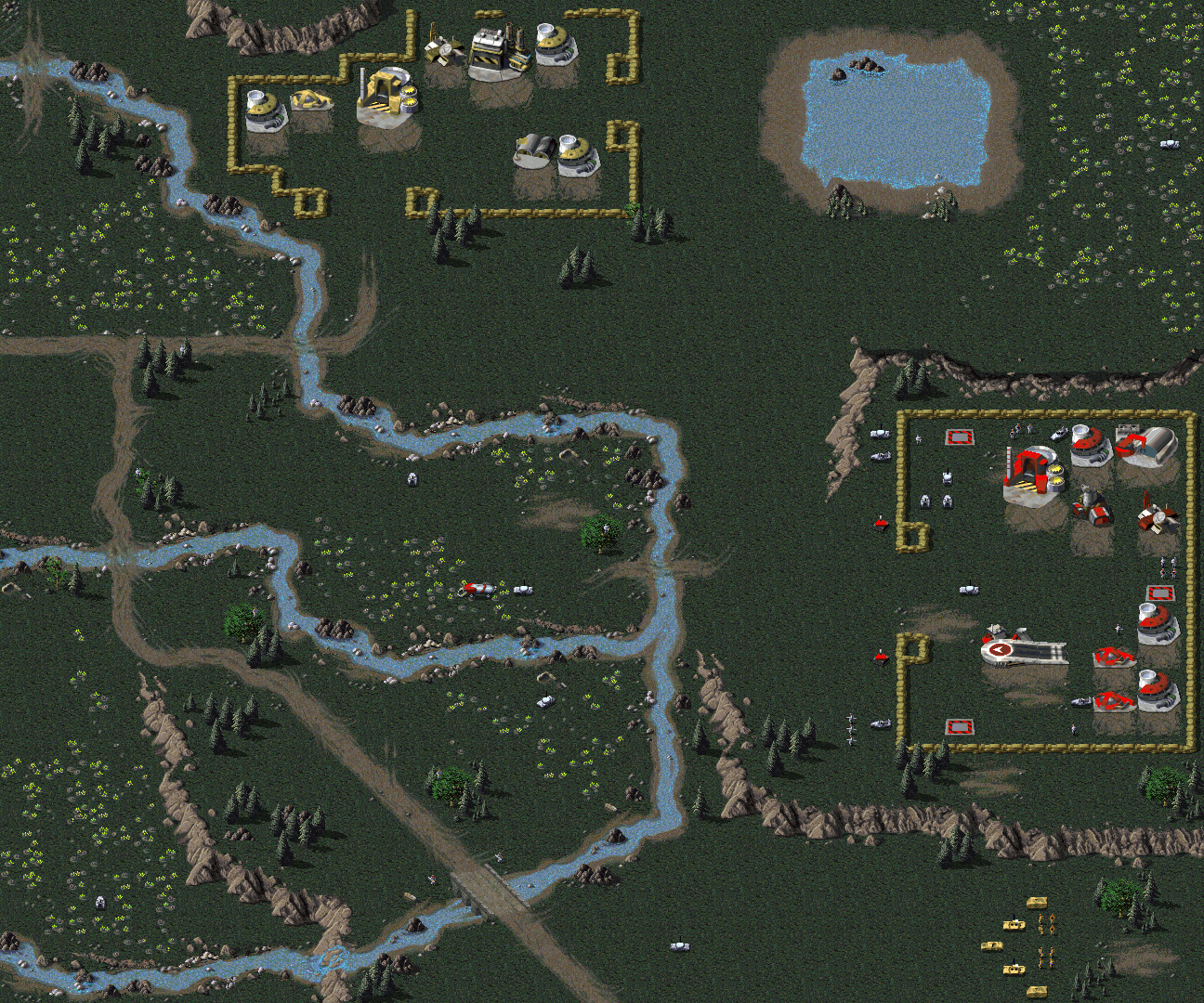
GDI mission 5eb is unreachable in the DOS, Win95 and Sega Saturn versions of the game. The selection of this stage is supposed to be available after choosing the eastern Belarus area for mission 4. Despite the mission selection after that mission showing two arrows, they both lead to the SCG05EA mission, rather than one of them leading to SCG05EB.
(Source: C&C Strategy FAQ, Roger Wong)
The mission appears to be fully playable, with enemies attempting to attack the player's base from both entrances, as well as attempting to sneak around behind the GDI base. Furthermore, this bug does not appear in the Nintendo 64 port of the game, where the mission is playable as it should be. The mission also appears in the BradyGames Official Strategy Guide, indicating that the mission selection bug was probably not present in earlier versions of the game.
The mission was reactivated in the unofficial 1.06 patch for the game, by overwriting mission 5ea by the unreachable 5eb. The overwritten mission is a 99% duplicate of another choice for mission 5 on the West side of the mission tree, so no real content was lost.
The issue is not present in the Remastered Collection, where the mission is selectable on the map of Europe as it should be. As a side effect, though, this once again gives a situation where two of the four alternates for mission 5, namely 5ea and 5wa, are 99% identical.
GDI mission 13eb#
While GDI 13eb is technically accessible, no arrows appear on the mission selection map to select it, making it hard to find. The actual 13eb mission is completely identical to the 13ea one.
When showing the selection map for mission 13, two arrows are drawn on the map, which both point to one single spot. Clicking that spot will always lead the player to mission 13ea. The b-mission can be accessed by clicking more to the north-west of the country. This is probably a bug, since that area is not indicated as conquered after finishing mission 13, and, in fact, is the region to click to start mission 14. The "point of conflict" indicated on the map after selecting the north region will also say "Belgrade", as it does for mission 14.
Given the fact both variants are completely identical, the 13ea mission files were probably copied to the 13eb variant as last-minute fix to cover up the bug in the mission selection system.

This mission is normally accessible in the Remastered Collection. The mission selection map shows the country divided into an east and west half, with the two arrows leading to the most southern point in each half, pretty much identical to where the original arrows were, but each leading to a different region to click. After the mission, the north-west part of the country is shown as unconquered, as it was in the classic game. The fact the original b-mission was the result of a bug went unnoticed and unfixed, forcing players to complete two identical missions to mark all missions as 'completed' in the full missions list.
Unused Mission Areas#
Various Command & Conquer maps have terrain surrounding the mission area. Usually, this off-map terrain is a wall of mountains with a gap used to channel incoming reinforcements, which is used by the game. Sometimes, there are more things present, giving hints at earlier stages in the map's development.
GDI Mission 1 uses a smaller layout of Mission 2, keeping features that were present off the map. It has slight differences - Mission 1 has a tiberium patch near the road, and also has the road branch to the east then north, coinciding with Mission 2's gap on the north wall.
(Source: GDI Mission 1, GDI Mission 2.)
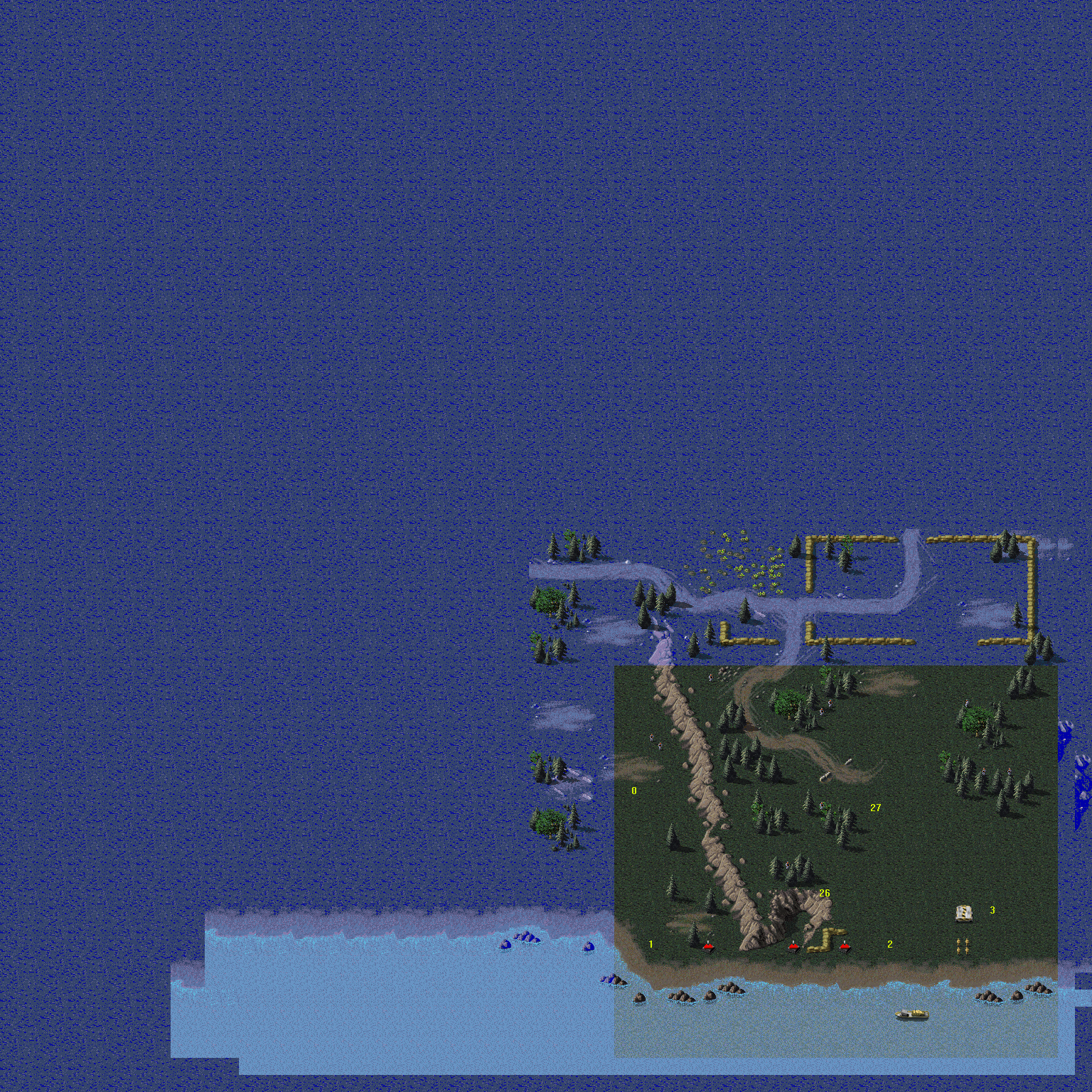
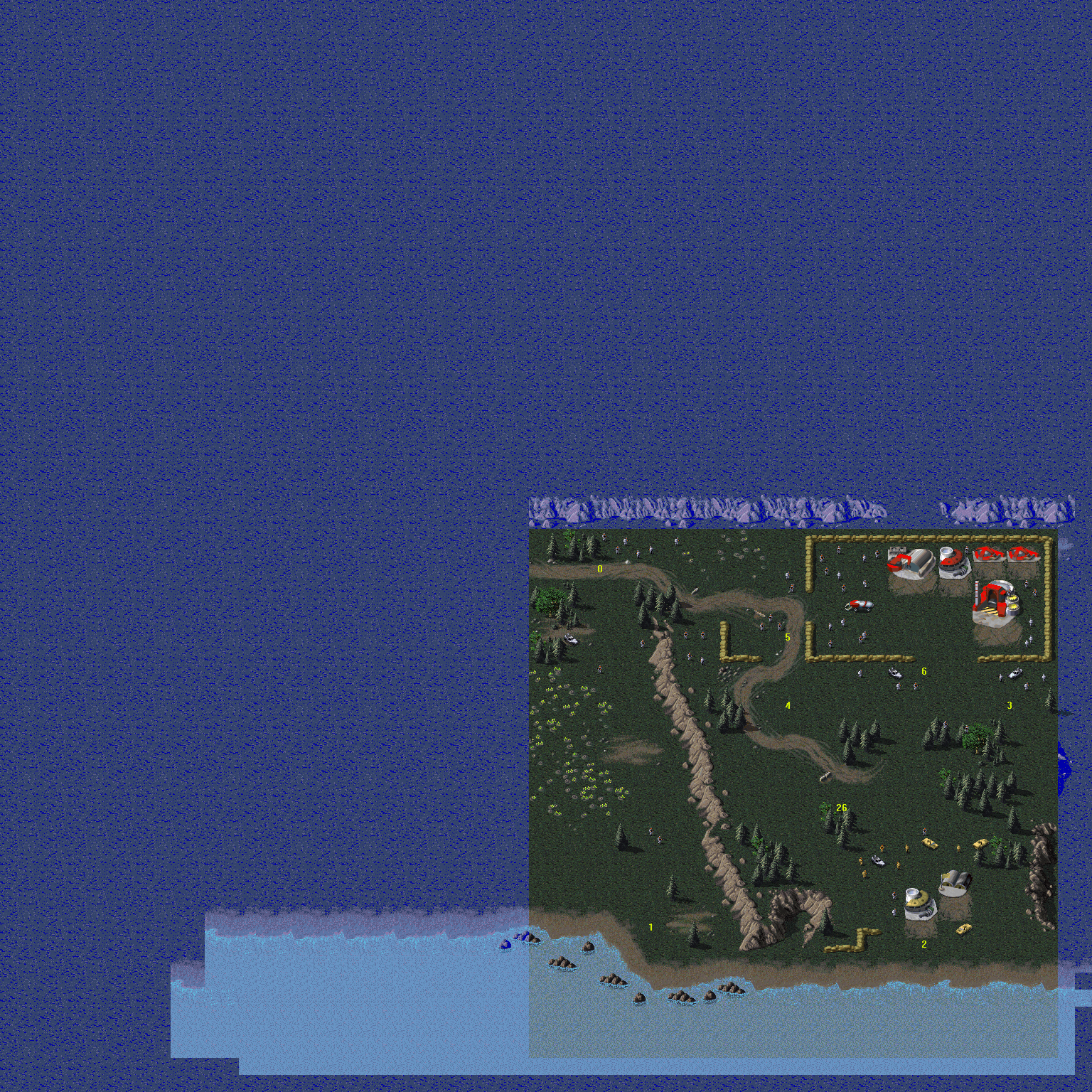
|
GDI 1 |
GDI 2 |
|---|---|
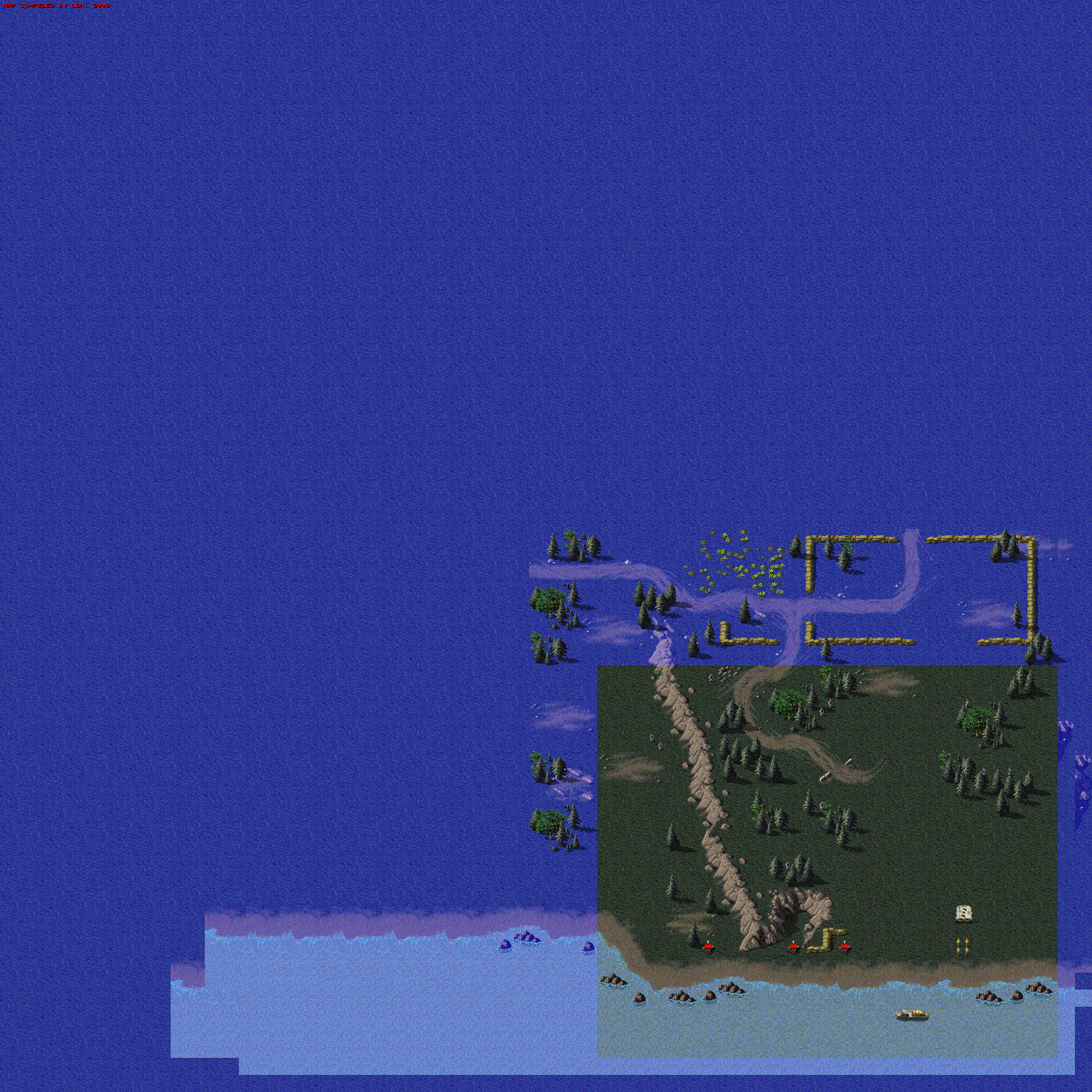
|
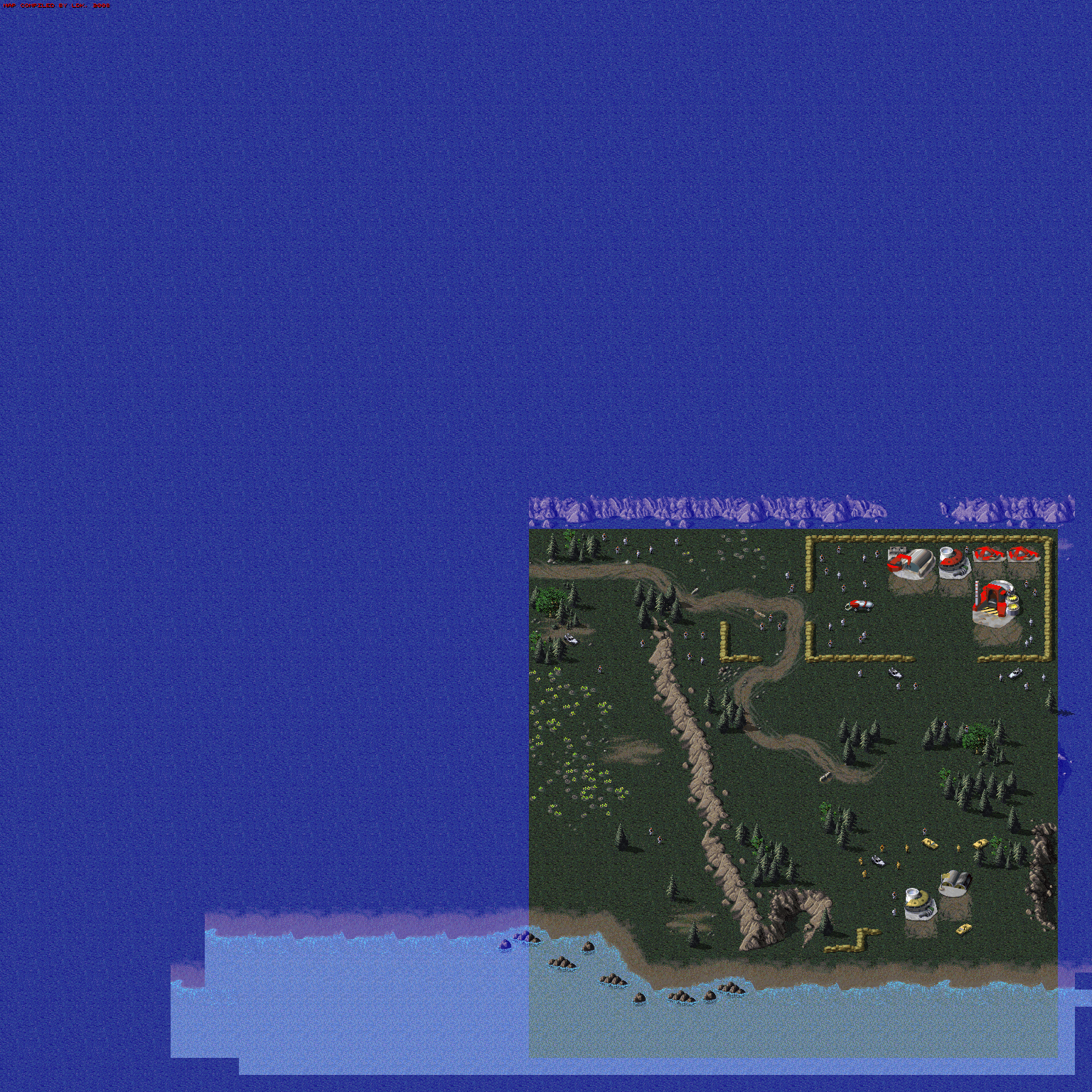
|
GDI Mission 4, variant WA, has additional roads to the south of the map, as if the southern route was intended to be longer. 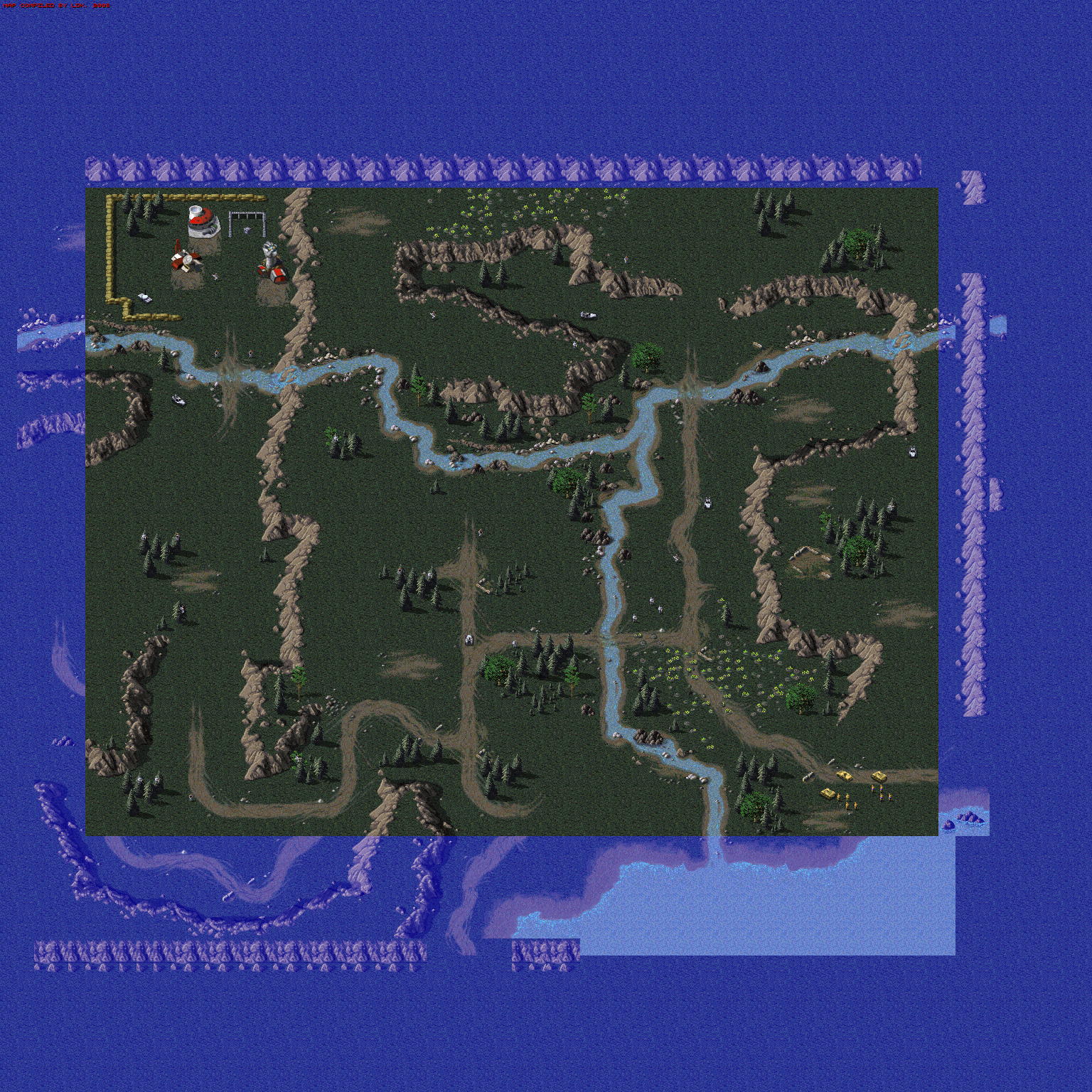
GDI Mission 9 had the southern half of the map extend a bit further, including a few trees. 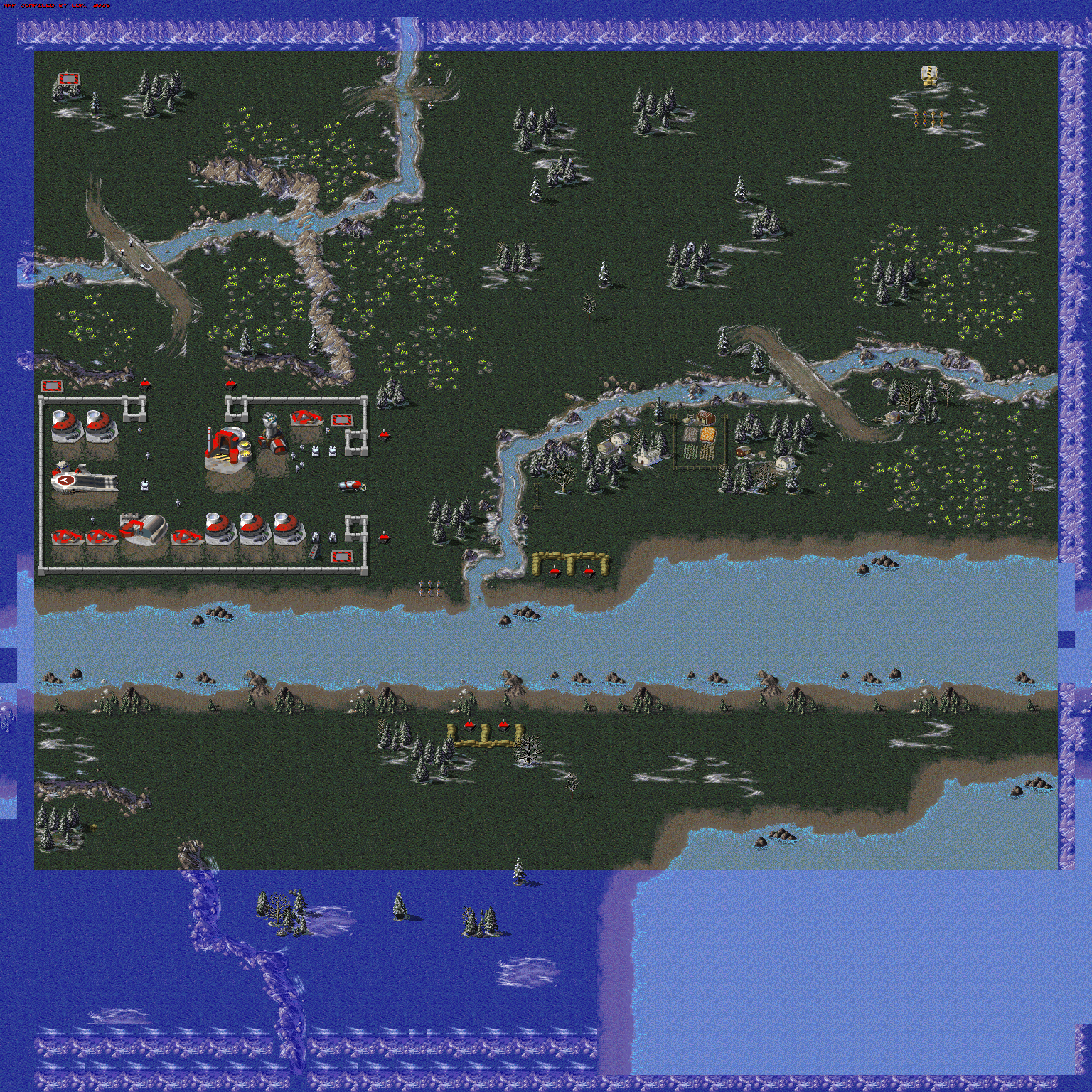 There are prerelease screenshots from game magazines showing a base with gunboats travelling to the north of it, with the shoreline in these shots lining up exactly with the retail version of GDI mission 9, indicating that this was a version of the same mission with a full Nod base on the southern part.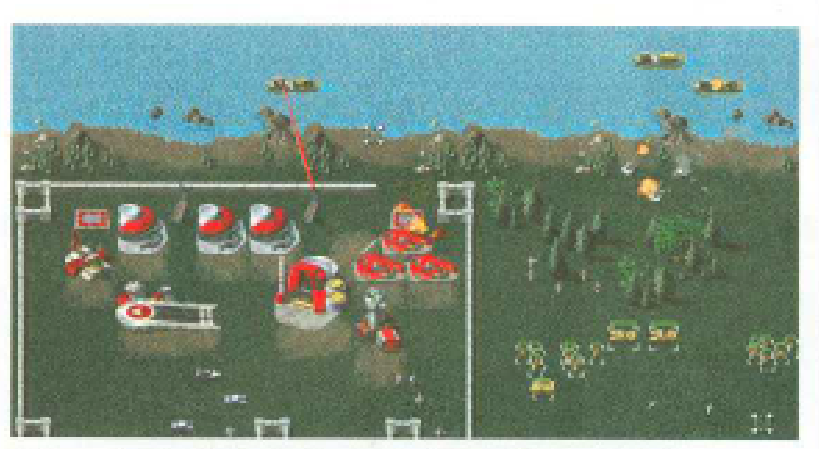
Nod Mission 1 has signs of being smaller than originally planned, with the road extending to the south. There are additional cliffs to the left and right of the road, which are cut off as soon as they enter the map. Additionally, there are spare trees and rocks dotted to the far south. 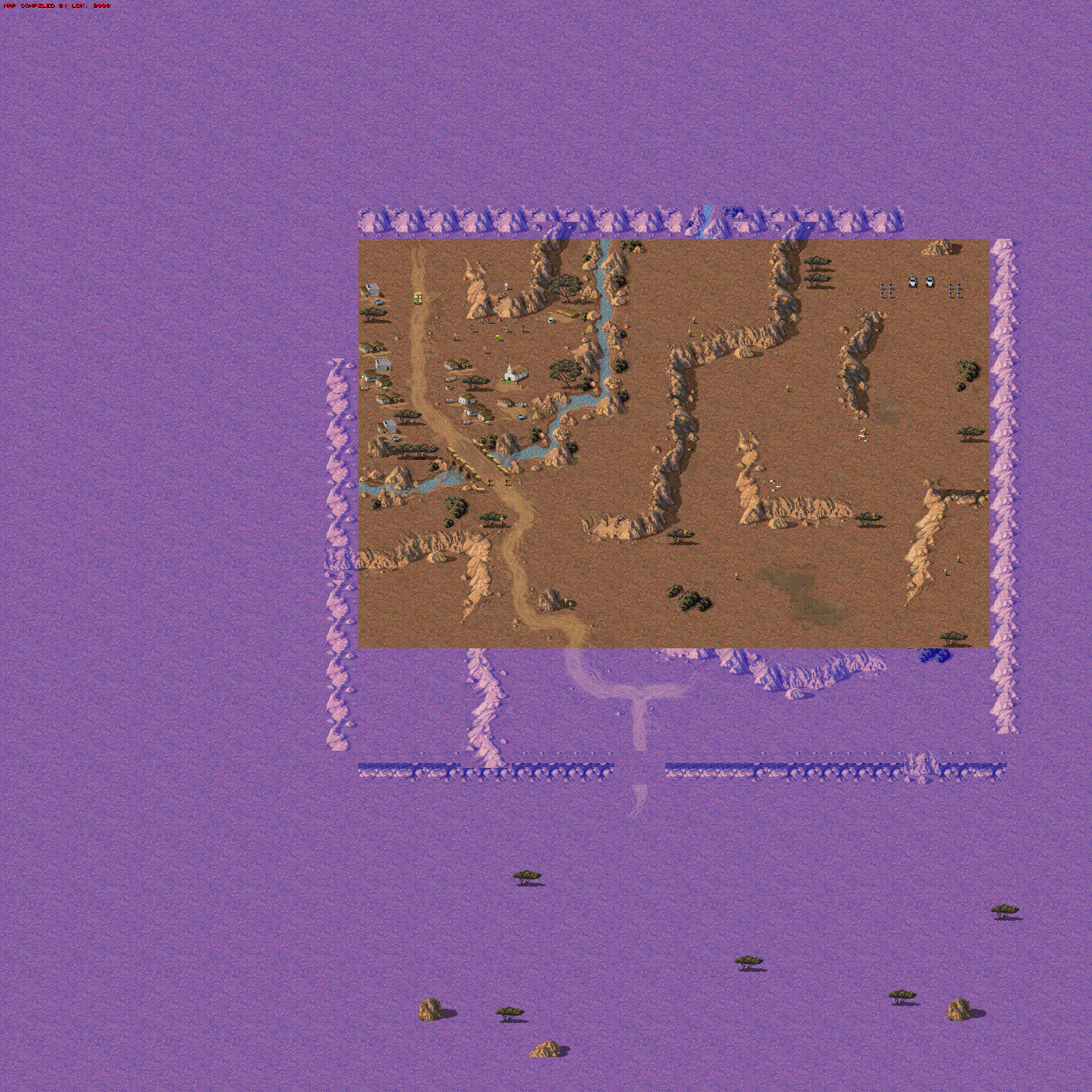
Nod Mission 2 has a long road circling beyond the south and east edges of the map. There's also a river in the south-west corner. These features don't match any existing mission or map in the game, so they are likely remains of a map that never made it to the final retail version. 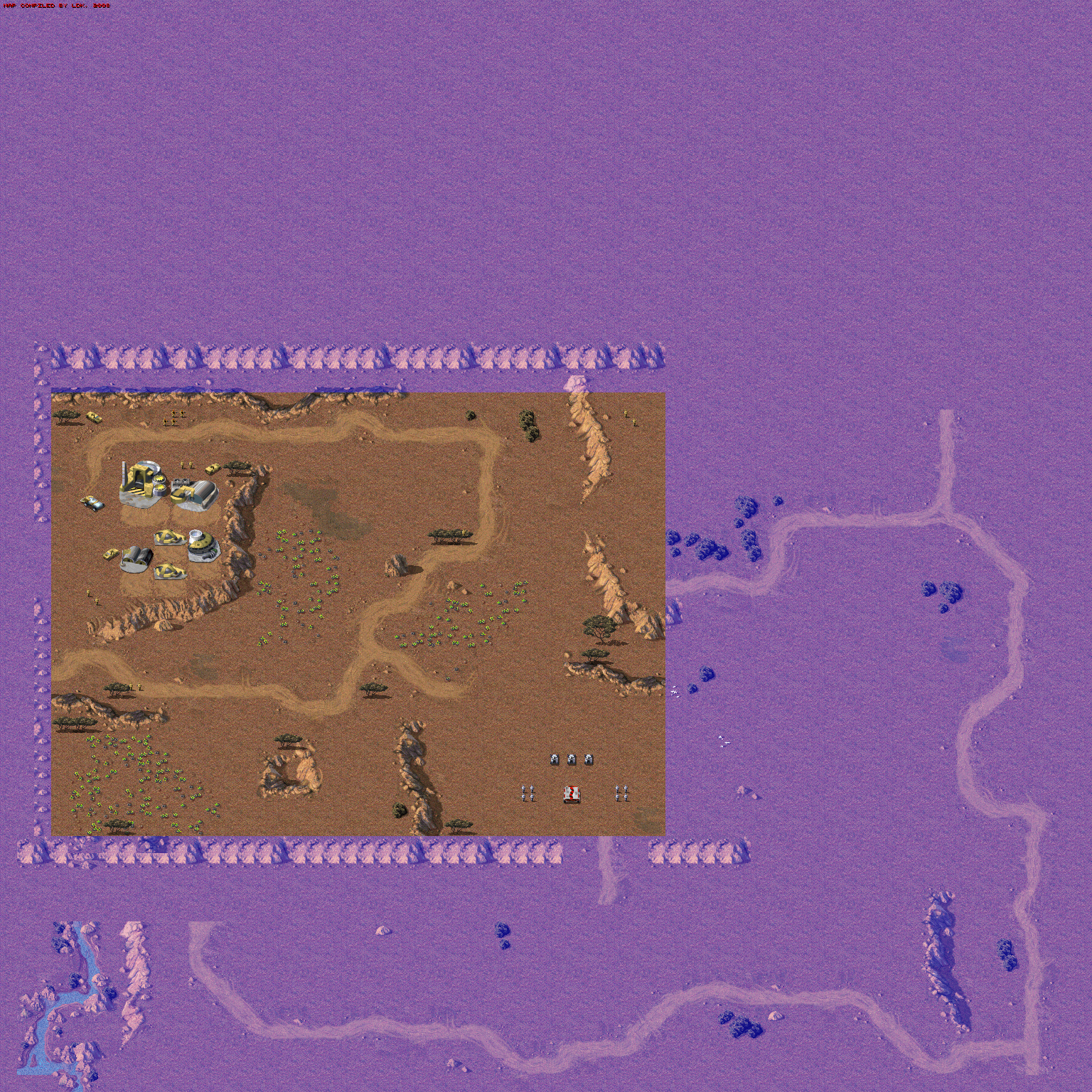
Nod Mission 3A shows that the lake in the south-west was created completely, with a river flowing off to the south. There is also a piece of road visible on the east side. 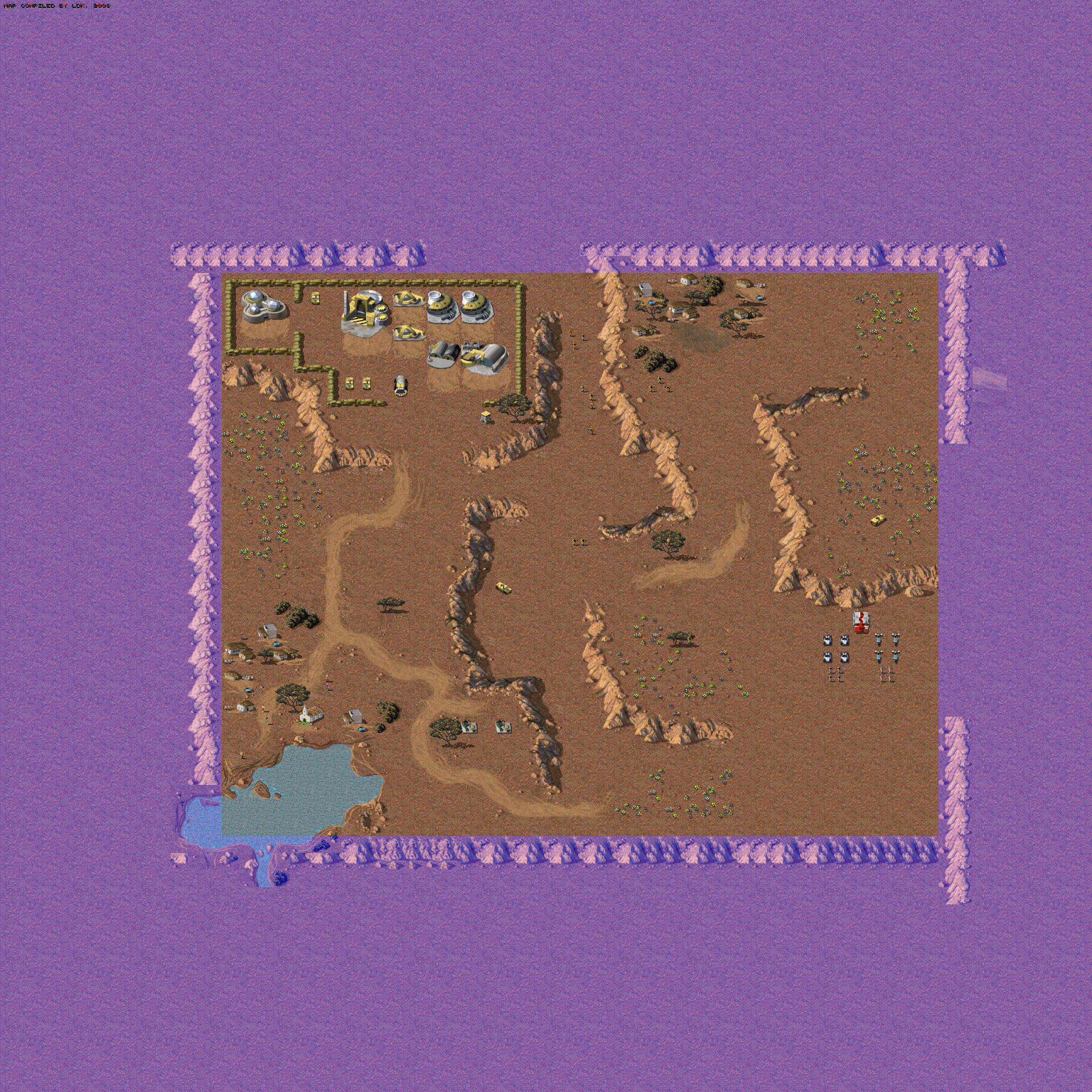
Nod Mission 6B has some water to the west of the north-west corner. 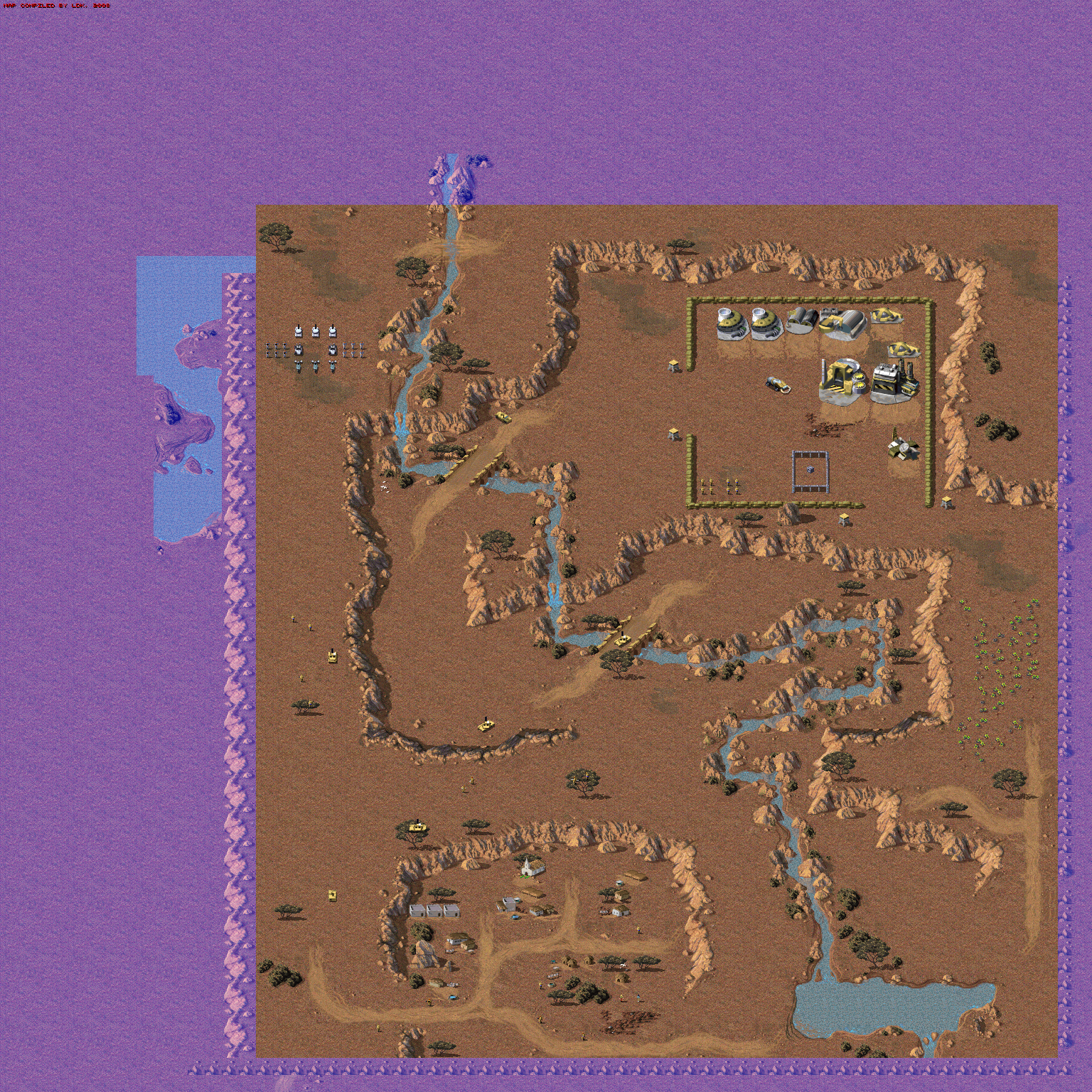
Unused Mission Content#
- Nod Mission 9: The enemy airstrikes are caused by a looped trigger named "yyyy". A trigger named "dely" exists to disable the "yyyy" one. This trigger is typically linked to the enemy Communications Center, so destroying that building stops the airstrikes, however, in this mission, the "dely" trigger is not linked to anything. This bug was fixed in the Remastered release of the game.
- Nod mission 10A: When a tech center is destroyed in Nod mission 10, special code will activate that will make the survivors include the
CHANinfantry unit, and if a trigger called "CHAN" is found in the mission's triggers, this unit will immediately be linked to it. This would allow for a chain of events in this mission where you first destroy the tech center, then see Dr. Chan coming out, and then have to kill him to win. Unfortunately, none of this special code is used; instead, Dr. Chan is placed in front of the tech center, and connected to a win trigger called "WIN". There is a trigger called "CHAN", but it is just a set of celltriggers that activate the flare to reveal the island where the tech center is located. As a bizarre side effect, this means that destroying the tech center will result in two Dr. Chans being on the map; one connected to the win condition, the other (uselessly) linked to those flare celltriggers. Both the unofficial C&C95 patch and the Remastered edition restore this mission to how it was supposed to work.- A trigger to fly in a transport helicopter for the player in this mission often doesn't work, because the landing destination is set too close to tiberium. If the landing location is overgrown before the helicopter reinforcement script gets triggered, the helicopter will bug out and never appear at all. The unofficial patch fixed this by moving the landing location farther away from the tiberium. The August 2020 patch of the Remaster fixed the actual logic behind it, making helicopters look for alternate nearby landing spots if needed.
- Nod Mission 11A/B: There is a drop zone flare trigger in the scripts of the A variant of this mission, set to activate on a "Player Enters" script, which hints at activation through moving over a specific location. The trigger is not linked to anything, so it can never activate. The flare location is set on a point which would unveil the back of the base the player is meant to find, without actually reactivating the base. The B variant of the mission has its flare location set inside the perimeter of the base to find, also at a point where it would not reactivate the base, but it contains no scripting that would activate it. This indicates that the mission designers originally considered giving the player more hints on where to go to find the base.
- Nod Mission 13A: Triggers "ion1" and "ion2" call an Ion Cannon strike if something specific is attacked or destroyed. No units or buildings have been linked to these two triggers, thus they will never activate. If functional, this would be similar to the way two Ion Cannon strikes are defined in Mission 12.
- Nod Mission 13B: Trigger "yyyy" reinforces the player with an MCV and two light tanks, when the advanced guard tower, guard tower, and power plant in a small outpost in the center east of the map are destroyed. However, since the only way to get there is by Transport Helicopter, this requires sending infantry against specifically anti-infantry defenses. While normal Guard Towers can be taken out with careful micromanagement, the Advanced Guard Towers are impossible to take on with soldiers alone. Furthermore, a timed event (trigger "mcv") will eventually send in the same units anyway. The arriving reinforcements will drive over cells triggering the "dely" trigger, which disables the "yyyy" trigger, so the units can't be received twice. The script's purpose seems to be to get the reinforcements earlier, but its requirements are completely implausible.
- Nod Mission 13C:
- Trigger "delx" doesn't have associated units or buildings that need to be destroyed, therefore the airstrikes provided by trigger "xxxx" will never stop. Typically, this trigger is linked to the Communications Center. One of the Communications Centers on the map is already used for another trigger setup, so this one was most likely supposed to be linked to the remaining one, inside the northern GDI base. Like the unlinked airstrike removal trigger in Nod 9, this bug was fixed in the Remastered release of the game.
- This mission contains a similar trigger setup to the one in mission 13B, which allows an MCV to be received earlier than normal by taking out a Communication Center. Again, though, this requires using only infantry against anti-infantry defenses, which is completely infeasible, and again, after a certain time passes, the same vehicle will arrive anyway, and its arrival will disable the other script.
Unused Mission Options#
Aircraft section#
The missions contain ini sections for placing [Units], [Structures] and [Infantry] on a map, but are lacking one for air units. Deactivated code for reading an [Aircraft] section exists inside the game, but when it is reactivated it doesn't work correctly; the aircraft spawn in the air, leave an impassable spot on the ground below their spawn location which will never go away, and generally just fly off the map in a straight line in the direction they are facing according to their configuration in the mission file.
Some unit orders will slightly affect the behaviour; for player owned units, a C17 set to "Retreat", or "Hunt" will leave towards the nearest map border, an A10 set to "Hunt" will seek out enemies (because of the Airstrike logic), and an ORCA or HELI set to "Guard", "Area Guard" or "Hunt" will land at the nearest friendly building. Only the "Unload" order seems to actually fulfil the intended purpose; it will cause the normally controllable air units (ORCA, HELI and TRAN) to actually land at the spot they were spawned at, thereby fixing the impassable cell issue, unless they are destroyed/diverted before they can land. For Transport helicopters (TRAN), "Guard" will also make it land on the placement spot, without seeking a nearby building. Non-controllable airplanes (C17, A10) set to "Unload" will still leave the map, but rather than flying in a straight line they seem to go towards the nearest border. The behaviour on AI-owned units is identical, except that armed helicopter types (ORCA, HELI) will always seek out a friendly building after landing on the spawn location. This does clear the blocked spawn cell.
The Remaster re-enabled this section, and made it usable in the included map editor, but it remains almost exactly as broken as on the original game. Due to a change related to Nod delivery time normalisation, which causes the game to spawn the C17 in mid-air on the map, a fix was made that seems to solve the impassable cell issue for fixed-wing planes (C17 and A10), but for the others, the behaviour remains identical.
Note that several missions contain transport helicopters that appear to be placed on the map, but these are actually reinforced by triggers at the start of the mission; they fly in from the edge of the map and land on the scripted spots.
Unused Theater#
The game has three "Theaters of war"; terrain sets that can be used in missions. Temperate and Winter are used in European missions, and Desert is used in African missions. This is, of course, not very logical; a lot of Africa's equatorial areas are lush jungle. So it should come as no surprise that such a theater was planned as well. This was also mentioned in some magazine articles before the game's release.
The game contains a perfectly valid Jungle theater in the internal listing of theaters, which would use a jungle.mix with .jun files inside it, but no such files exist, meaning the theater has no graphics. Additionally, since all templates (map tile graphic pieces) and terrain decorations (trees and rocks) have an 'ownership' value that determines which theaters they can appear in, and none of them are set to be available for the Jungle theater, the missing Jungle can't be reactivated simply by adding graphics for it. Even if one of the existing theaters' files are copied to match the correct names, the theater would not be able to use any of the terrain templates or decorations without further modding in the hardcoded game data, and would consist purely of clear open terrain.
Unused Unit Functionality#
Boxing!#
There are unused sprites for a disabled mechanic allowing Infantry units to fistfight in the middle of the battlefield, à la General Chaos, if they're directly to the left or right of one another. The code is still present in the Infantry source code, disabled via the BOXING preprocessor.
A mod is available for Command & Conquer: Remastered Collection that restores this feature and fixes several bugs in the old code. Amusingly, the unused sprites for this were all given HD equivalents like all the other Infantry frames!

Unused/removed building functionality#
Upgrading#
The game's strings file containing all the text in the game starts with the following data:
%3d.%02d
Upgrade
Upgrade Structure
Upgrade
Sell
Sell Structure
Demolish Structure
Repair
Repair Structure
Repair
From this, we can conclude that the game originally had plans to include features to both upgrade and demolish structures. From the source code, it can be determined that the demolition feature was transformed into the Sell function; several parts of the source code referring to the Sell function still use the term "demolish".
Structure upgrading is a feature that exists in Dune II, which allows upgrading individual placed buildings to a more advanced variant to unlock more advanced items in their production. Prerelease screenshots show that the sidebar originally contained an "Upgrade" button rather than a "Sell" button, which means the command to upgrade a structure was most likely meant to be given by a mouse cursor, just like how repairing and selling is done in the final game.

The game contains several buildings that have an Advanced version. All of these were probably originally meant to be upgraded to the Advanced variant through the Upgrade feature, and in all of those except the Guard Tower, the footprint of both buildings is the same, and the design of the Advanced version clearly looks like an upgraded version of the basic building.
Power Plant:
Basic |
Advanced |
|---|---|
 |
 |
Communications Center:
Basic |
Advanced |
|---|---|
 |
 |
Guard Tower:
Basic |
Advanced |
|---|---|
 |
 |
The Hospital and Bio-Research Laboratory also have a very similar plus-shaped basic design, and look like the Bio-Lab might have been meant to be an upgraded version of the Hospital. This is especially noticeable in their build-up animation. This makes sense canonically, too, since both buildings are tiberium research facilities. Additionally, in the game's coding, the Bio-Lab has the Hospital as its building prerequisite, just like the Advanced Power Plant and Advanced Communications Center require their basic variant in the retail version. This also hints that originally, both structures were normally buildable. Both buildings can also store an identical tiny amount of tiberium; 100 credits.
Hospital |
Bio-Lab |
|---|---|
 |
 |
Debug Mode#
Another undocumented parameter, -X, was used by the developers to enable the game's debug modes. The only parameter still recognized by the game, however, is -XQ, which disables all sound and music output.

|
To do: |
Editor Mode#
It was discovered in Red Alert that there is a command line parameter "EDITOR" which causes the game to start in a strange mode which loads the first game mission automatically on startup, where no sidebar is drawn, where projectiles don't spawn (and thus no damage can be done by anything), and where the mouse controls for commanding units are disabled (though the keyboard commands still work). This was theorized to be the defunct remains of a map editor built into the game engine. In Red Alert, notably, the editor functionality was split off into the separate EDDOS and EDWIN editors, though with the functionality trimmed down to only make multiplayer maps, limited to placing map tiles, resources and terrain decorations.
Command & Conquer 1 does not contain the actual "EDITOR" command line parameter, but the game can be manipulated to launch in that mode too. The editor mode in C&C1 appears to be exactly as defunct as the one in RA1, though.
Additionally, research into the game binary revealed that for all functions that read ini sections from mission files to load the mission, equivalent writing functions exist as well. Though, in the retail version, the overarching "Write_Scenario_Ini" function that combines them all is not present, and so the full functionality to write a mission to file is not complete.
The full code for the internal map editor was later found in the released code of the Remastered Edition, and the editor is usable in the Vanilla Conquer project, which reconstructed the entire game code from the released Remastered source. Unlike the external editors included into Red Alert, it has full editing support for all types of objects and all scripting capabilities the game can use.
Regional Differences#
Release Name#
While the original version of the game is simply called Command & Conquer, with the working title Tiberian Dawn mentioned in some of the readme documents, the German and French versions of the game bear a specific sub-title. In German, the game was released as Command & Conquer – Teil 1: Der Tiberiumkonflikt, meaning "Command & Conquer – Part 1: The Tiberium Conflict". In French, it was not specified as "part 1", but was still released as Command & Conquer – Conflit du Tibérium, also giving it a "Tiberium Conflict" sub-title. That sub-title might have been meant as a more literal variation of the "rise of tiberium" referred to in the working title.
Strangely enough, in the French version of the official FAQ document, the section on the sequel refers to original game as "C&C: Tiberian Dawn" instead of the localised "Conflit du Tibérium". A similar section in the German version of the FAQ, about the upcoming Red Alert, does refer to the original game as "COMMAND & CONQUER: Der Tiberiumkonflikt".
The system of naming C&C titles as "parts" in the German releases was continued on the next two C&C games; Red Alert 1 was called "Part 2", and Tiberian Sun was "Part 3". The release of Red Alert 2 messed up this system, since it would have become "C&C part 2, game 2", and the later release of "C&C 3: Tiberium Wars" would add further confusion. Nonetheless, Red Alert 1 is still generally referred to as "C&C2" in the German C&C community.
Build Icons#
In the Windows 95 version of the game, the sidebar icons normally have text on them showing the names of the units and structures. However, in the French and German versions of the game, these names were not translated on the icons. Instead, the icons contain no text at all. Unfortunately, details in shading show that these textless versions are not the original versions before the text was added, but rather edits of the English versions where they removed the names.
German Translation#
Censorship#
Due to very strict laws against human violence in video games, Command & Conquer had to be censored for German shelves, a trend that would continue on throughout the entire series.
- All humans were changed to cyborgs. The unit names and the game's cinematics were changed accordingly. The censorship even applies to the game's box (the photo is zoomed in so the gun is cut off) and the game's manual (the soldiers' faces are hastily covered with "TOP SECRET" labels).
- Despite normally not being visible, the actual names of the civilians were likewise replaced, with humorous robotic versions of common countryside or household jobs, including names that would translate to "Farmbot PK 7", "Mobile Milker M3", "Robocook 2", "Femdroid M.A.I.D.", and "AutoShepherd V.3.11". The "Civilian" label itself (which overrides these names unless the
TrueNamesoption is enabled) was replaced with "Farmbot". - The red blood was recolored to black.
- The screams when people are killed was changed to a sound of a machine shutting down. The squish sound for infantry getting crushed by a vehicle was replaced by the sound of a tin can getting crumpled.
- Many of the game's cinematics were censored:
- The intro to GDI mission 8b, describing the effects of tiberium on humans, had a small bug added: the labels "EXPOSURE" and "DEATH" were erroneously switched around when the cinematic was censored.
- In the victory video to GDI mission 10, the Nod soldier was edited out of the video, so the GDI units just shoot thin air.
- In the intro to GDI mission 12, the picture of a human baby crying was replaced with an X-ray scan of a human upper body.
- In the victory scene of GDI mission 15, the scene where a Nod officer is shot by his colleague was censored so neither the shot itself nor the dead corpse can be seen.
- The Nod failure video, showing a Nod soldier being ambushed and killed in the desert, was removed completely; even the file itself was deleted from the Nod disc.
- The victory video to Nod mission 3 was censored in a very similar fashion to GDI mission 10 by editing out the GDI soldier so the Nod units just shoot thin air.
- The victory video to Nod mission 4, showing a prisoner of war being beaten up and then killed, was removed completely.
- The scene in the Nod mission 8 briefing where Kane shoots Seth in the head was covered up by static. In the intro to that same mission, the picture of a human baby crying was replaced with a picture of doctors in an operation room already shown earlier in the same video.
The Remastered Collection removes all censorship from the German version, but still uses the original German voice dub, so the people in the briefing videos inevitably still talk about cyborgs and such. However, the static-censored part of the Nod mission 8 briefing was fully restored, with Seth's cut-off sentence professionally reconstructed. Remastered versions of the German censored infantry death sound effects are present in the game files, but are unused.
Name Changes#
The German translation also features a number of unit and building name changes which aren't related to the censorship. Unlike in the English version, where the names simply describe the functions (e.g. 'Light Tank'), the German version gives many of them more symbolic names, such as 'Fist of Nod'. Below are some of the examples of such name changes.
Name in German |
Translation |
Original name |
|---|---|---|
Hammer der Gnade |
Hammer of Mercy |
Artillery |
Kampfbuggy |
Combat Buggy |
Nod buggy |
Fackel der Erleuchtung |
Torch of Enlightenment |
Flame Tank |
Mammut |
Mammoth |
Mammoth Tank |
Wüstenjäger |
Desert Hunter |
Hum-vee |
Faust von Nod |
Fist of Nod |
Light Tank |
Raketenwerfer |
Rocket Launcher |
SSM Launcher |
Stahlhagel |
Hailstorm of Steel |
Rocket Launcher |
Panzer M1A1 |
M1A1 Tank |
Medium Tank |
Mantel des Schweigens |
Cloak of Silence |
Stealth Tank |
Funk- und Radarzentral |
Radio and Radar Center |
Communications Center |
Kommunikations-Zentrale |
Communications Center |
Advanced Com. Center |
Wachturm |
Watchtower |
Guard Tower |
Befestigungsturm |
Fortification Tower |
Advanced Guard Tower |
Großkraftwerk |
Large Power Plant |
Advanced Power Plant |
Werkstatt |
Workshop |
Repair Bay |
Luftangriff |
Air raid |
Air Strike |
Ionenwerfer |
Ion Launcher |
Ion Cannon |
Japanese Briefings#
Due to the fact the full scope of the Japanese language contains over two thousand characters, and the game engine's text handling is limited to one byte per character, typically taking its special characters from byte values 128-255 (using the Extended ASCII system), the game was not easy to translate to Japanese. So instead, the translators opted to leave practically all in-game text in English, focusing their translation on the video dubs and in-game voices. Unlike the European dubs, however, the text shown in the videos is kept in English. A readme document on the CD contains the translations for any such text that doesn't come with a voiceover.
One text-aspect of the game was deemed too vital to leave untranslated, namely the mission briefings that can be viewed in-game using the "Restate" button. For this part, the issue with character encoding limits was circumvented by simply showing an image containing the briefing text. This solution is also used in the Japanese Playstation and Nintendo 64 versions of the game.
However, this system completely replaces the original text reading, meaning there is no fallback mechanism in case no image is found for a mission. The Japanese PC version of The Covert Operations lacks the required briefing images, leaving Japanese players to face the toughest official missions released for the game with no clue on what to do, in any language. The Playstation version does contain these expansion pack briefing images, though, and when ported to the PC version, the briefings are automatically shown at the start of the mission, as they should be.
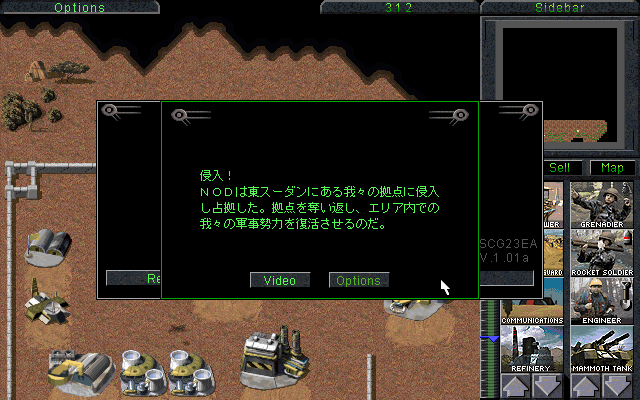
The update to the Command & Conquer: The Ultimate Collection pack of March 7, 2024, which added the Japanese game to the collection, has the Covert Operations briefings added, finally officially fixing this issue.
References#
- C&C Remastered source code: TECHNO.CPP: The AI structure build time equalising logic is to take the cost of the building (minus any attached vehicles), add 2000, and then divide the result by two. On Easy mode, the added value is 4000. On Hard mode, the logic is skipped entirely.↩︎
- C&C Remastered source code: DRIVE.CPP: "Scattering is controlled by the game difficulty level."↩︎
- C&C Remastered source code: HOUSE.CPP: "A computer controlled house will try to build a replacement harvester if possible. Never replace harvesters if the game is in easy mode."↩︎
- C&C Remastered source code: HOUSE.CPP: Generated values for
AlertTime(time after which the AI is alerted) are lower for Hard mode, and higher for Easy mode.↩︎
|
The Command & Conquer series | |
|---|---|
|
DOS |
|
|
Windows |
Command & Conquer (Demos) • Red Alert (Prototypes) • Tiberian Sun • Red Alert 2 • Renegade (Prototype) • Generals (Prototypes) • Tiberium Wars • Red Alert 3 (Prototypes) • Tiberian Twilight |
|
Sega Saturn |
|
|
PlayStation |
|
|
Nintendo 64 |
|
|
See Also | |