This is a sub-page of Command & Conquer (DOS, Windows).
Terrain Tiles#
Prerelease Bibs#
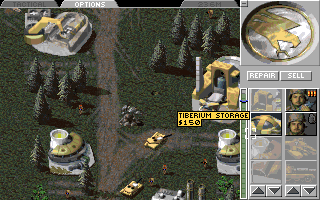
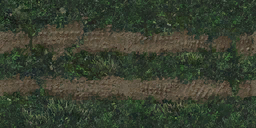
Prerelease screenshots showed that in older versions, bases were meant to have all buildings connected with roads. Rather than an area of dirt under most of the building, the terrain cells just south of the building were permanently overwritten (rather than overlayed) by graphics looking like tire tracks:
In the final game, these graphics survived, but they only exist in the Temperate theater. They are completely unreferenced in the retail game's binaries or source code. Prerelease screenshots show that the two-cells-wide SR2.TEM was used under buildings that were two cells wide (including civilian buildings and SAM Sites), and under three-cell wide buildings, it was combined with the one-cell SR1.TEM to form a three-cell-wide road. As in the final game, buildings that were only one cell wide did not get a bib.
The Remastered Collection contains remastered versions of these tiles. This probably means the developers used the community tool XCC Mixer to extract the original game graphics; the game's mix archives only contain one-way hashes of the filenames, and the source code contains no references to these tiles, but the creator of XCC Mixer used brute-force methods to find several of the filenames of unused files like these so his tool could identify them.
SR1 |
SR2 |
|---|---|
 |
 |
Boulder Tiles#
Three terrain templates in the game, with names "B4", "B5" and "B6" (the "B" stands for "Boulder"), are defined to only be usable in the Temperate theater, but don't have graphics in that theater. However, they do have graphics in the Desert theater. But since their definition is configured wrong, even if they are placed on a Desert map, the game never loads their graphics, making them show as black non-refreshing tiles.
The Remastered game not only contains remastered versions of these tiles, but, since it uses its own separate definition files for determining what can be used in its high resolution UI, they actually work in-game. However, when switching the game to classic graphics mode, they are once again shown as black holes.
Tile |
Classic |
Remastered |
|---|---|---|
B4 |
 |
 |
B5 |
 |
 |
B6 |
 |
 |
Unit / Structure Graphics#
A-10 airplane#
Despite being unbuildable, the A-10 plane has a cameo.
DOS |
Windows |
Remastered |
|---|---|---|
 |
 |
 |
C-17 airplane#
The C-17 aircraft used to deliver Nod vehicles has a DOS cameo. In C&C95, a grayscale cameo for it is shown in the PDF manual, but it does not exist in the actual game files. However, the plane shown in the manual is quite clearly not A C-17; it is a rotor plane, not a jet plane. This airplane is shown in a cutscene in the game, dropping off paratroopers.
DOS |
Windows |
Remastered |
|---|---|---|
 |
 |
N/A |
Hovercraft#
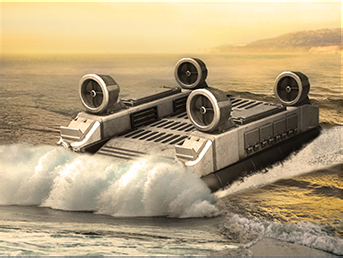
The Hovercraft has cameos, and graphics for an East-West facing. The DOS cameo seems to be of an APC, but is not the same one used by the APC. The Remastered cameo seems to be a misinterpreted remake of the Windows version; it shows the Hovercraft moving towards the camera, while the Windows version is based on the GDI mission #1 cutscene, where Hovercrafts are seen moving away from the camera.
DOS |
Windows |
Remastered |
|---|---|---|
 |
 |
 |

Gunboat#
The Gunboat, likewise, has cameos, with the placeholder APC one in the DOS version.
DOS |
Windows |
Remastered |
|---|---|---|
 |
 |
 |
Construction Yard#
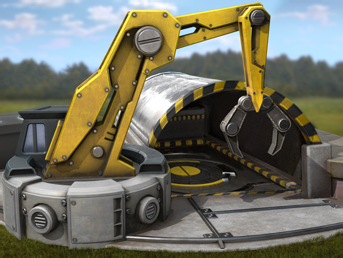
The Construction Yard, which is never buildable from the sidebar, has a DOS cameo. In C&C95, a grayscale cameo for it is shown in the PDF manual, but it does not exist in the actual game files. A coloured version of the C&C95 icon, but without text, can be found in the unused files of C&C: Renegade. The icon appears to have been edited to remove the text, as was the case on the German and French versions of C&C95, rather than being the original render before the text was put on.
In the Remaster, the icon is included in the game files, but does not appear in-game, even if the game is modded to unlock the building. It was most likely produced purely for the Tech Tree Sheets, which were included as laminated sheets in the game boxes, and also available for download from the Remaster's official "Getting Started" page (C&C wiki mirror). The icon's design seems to be based on the Windows version, despite that icon only existing in peripheral sources.
DOS |
Windows |
Remastered |
Renegade |
|---|---|---|---|
 |
 |
 |
 |
The sprite PUMPMAKE.SHP shows an old version of the MCV deploying, with the last frame hinting at the faction logos that appeared on the Construction Yard in prerelease versions. It is cut off at the left side to fit a 2×2 cell footprint, which might hint at it having been used as temporary graphics for something else. The final game contains no building called PUMP to associate with it, though. There is an "Oil Pump" building, but it has internal code "V19", and has a 1×1 footprint.
|
Unused |
Used |
|---|---|

|

|
Wooden Fence#
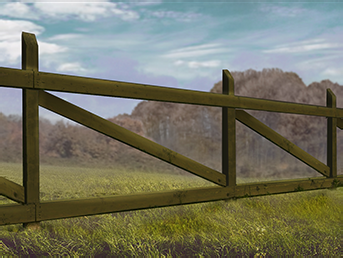
The wooden fence is used to decorate villages in the game, but it is only accessible to build in one situation; in the fourth Funpark dinosaur mission, if GDI is chosen as side. The Remastered version no longer has this side selection, so it is inaccessible there.
DOS |
Windows |
Remastered |
|---|---|---|
 |
 |
 |
Barbwire Fence#
Barbwire fence is only buildable in the fourth Funpark dinosaur mission, but it is in fact used. However, its Windows and Remastered cameos show a fence much more like the soviet barbed wire fence in Red Alert, despite the actual objects in the games looking nothing alike. The fence is also visible in the Nod Covert Operations mission "Hostile Takeover", where it protects a GDI Advanced Guard Tower.
DOS |
Windows |
Remastered |
|---|---|---|
 |
 |
 |

Hospital#
The Hospital is not buildable but has a build-up animation. It also has a cameo in DOS C&C, but not in the Windows version. Note that in the Windows version, it can be sold, meaning the build-up animation can be seen in reverse that way. This is a bug, though; the building is almost always mission-critical, and for that reason, it is unsellable in the original DOS version. The Remaster fixed this bug, making it unsellable as it should be.
DOS |
Windows |
Remastered |
|---|---|---|
 |
N/A |
N/A |

Bio-Research Laboratory#
The Bio-Research Laboratory, like the Hospital, is unbuildable but has a build-up animation and a cameo in DOS C&C only. When edited into a mission's script as pre-placed player-owned object, it can be sold, though, meaning the build-up animation can be seen in reverse.
DOS |
Windows |
Remastered |
|---|---|---|
 |
N/A |
N/A |

Oil Tanker#
The civilian building ARCO, named "Oil Tanker" in its tooltip, shows a fuel truck attached to a pump. The object is used in villages in the game, but is unbuildable, and yet has a cameo in the DOS version. Its damaged state is never shown in the game, due to a bug related to the fact the building graphics are missing their final collapse-state frame.
DOS cameo |
Healthy |
Damaged |
|---|---|---|
 |
 |
 |
The Studio#
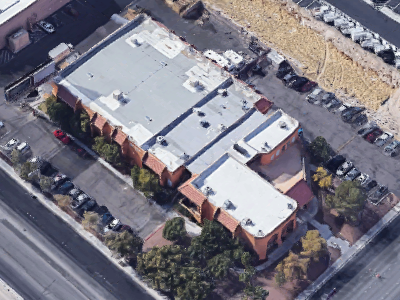
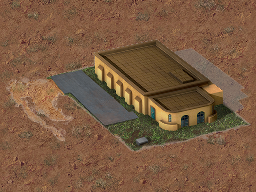
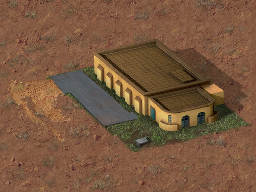
An unused civilian building in the game, V37, is an Easter egg. When the option to show civilian names is enabled, its shown name is "The Studio". The building is a recreation of the secondary building Westwood Studios rented to do their filming when they were creating the game, which they nicknamed "The Studio" because it was their video recording studio.1 The actual address of the building is 5333 South Arville Street, Las Vegas. While unused in-game, the building is partially visible in Nod briefing cutscenes 4A and 4B.
The building was remastered along with the other civilian buildings, though is lacking a post-processing step to use black as base colour on the transparent parts, making its semitransparent edges and shadows look too bright. With this (purely mathematical) extra processing step applied, the building can be seen as intended.
In-game |
Remastered |
Real building |
|---|---|---|
 |
Retail: |
 |

Pavement#
ROAD slabs#
The game contains an unused Overlay-type tile called ROAD, which is not buildable in any way, but which can be put in maps. It has an icon in DOS C&C, which is completely empty. The tile itself has two stages; first a gray checkerboard pattern that was meant as half-built stage, and then the final finished slab. When ROAD is placed on a map and viewed in-game, it will always show the checkerboard stage. According to the source code, the pavement had to be built and placed down twice on the same cell to get the final frame. In mission files, this can be achieved by adding two lines of ROAD for the same cell, but prefixing second line with one or more zeroes to ensure it still has a unique ini key. Simply duplicating the lines actually works too, but it technically creates a corrupted ini file, since each key in a section should be unique. However, since the game first lists all keys, and then looks up and processes each key, non-unique keys will just make it process the first-found line for that key multiple times. In this case, that will achieve the same effect of applying the ROAD overlay on the same cell twice, even if the later lines have a different value.
DOS Icon |
Stage 1 |
Stage 2 |
|---|---|---|
 |
 |
 |
As mentioned, the developers had already been playing with the idea for bases to be connected with a system of roads. Given the tile's name, the graphics' striking resemblance to the Dune II slabs, and the fact pavement in Dune II fulfilled a similar secondary role of spacing out structures, this was probably an experiment related to this. Most likely, they had a system in mind much like the one in Warcraft 1, where the player needs to build their own roads to connect structures to each other.
The source code contains a disabled building entry for ROAD in BDATA.CPP, and several prerelease screenshots show an empty icon in the sidebar that matches the one found in the game files, so in these versions, the ROAD pavement was apparently usable. The UI name connected to this building entry still exists in the game's strings file, and is indeed "Road". However, no screenshots have been found where it was ever constructed or placed on the map.
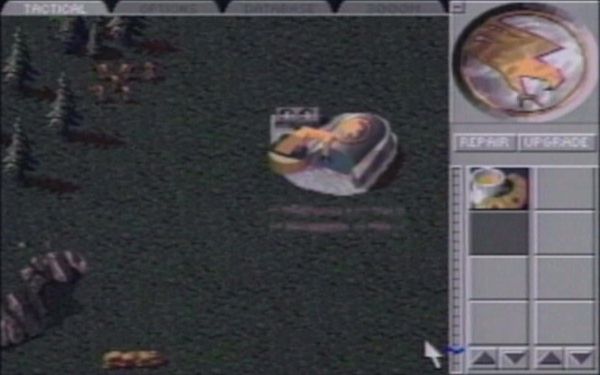 |
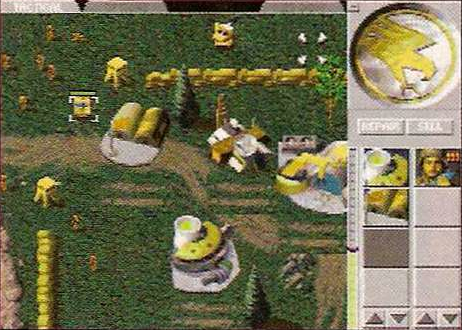 |
The Remaster is lacking remastered graphics for this tile, and will show it as a white block with semitransparent edges, as it does with any missing graphics.
CONC pavement#
Another Overlay-type pavement type called CONC is likewise present in the game but unused. It is a high-tech looking isometric pavement made up of diamond-shaped white concrete plates. Each individual tile is a triangle that is right or left facing depending on whether it is placed on an even or odd X-coordinate, making the triangles connect per two to form the full diamond shape. However, outside of this simple connection per pair, the connection mechanic between adjacent tiles looks bugged and chaotic. This pavement was also not given updated graphics in the Remastered edition.
The graphics of the CONC pavement contain tiles that are never used when it is placed down in-game. These were intended to fill up corners, to always make the pavement show full left or right pointing half-diamond shaped triangles, and fill up the space to full slabs where appropriate.
Tileset |
|---|
 |
Additionally, there is logic in the source code that is meant to always fill the neighbouring cell, to ensure the pavement can only be placed down as full 2-cell diamond shapes. However, this code is broken and doesn't work.
In-game |
Intended |
|---|---|
 |
 |
Bibs placed as map objects#
The actual final bib pieces put under buildings in the retail game, BIB1, BIB2 and BIB3, can in fact be put inside maps as well, but they are not used that way in any official missions or maps. The objects are part of the Smudge type, along with craters and scorch marks. When placed down like this, they are not treated as unbuildable terrain, and helicopters can land on them. Even though they are indicated in the mission ini script by their top-left corner, like buildings, and this causes the game to place down the entire bib, the game actually treats them as a set of individual filler graphics placed down on multiple cells. Such preplaced bib cells can be cleared by placing a structure's bib over them; this will permanently replace any overlapped cells with the structure's attached bib, which will disappear as normal if the structure is ever sold or destroyed. Remaining cells of the preplaced bib are unaffected by this.
 |
 |
The |
A built structure cutting a corner out of a pre-placed bib. |
Death Graphics#
Death Animations#
The sprites of all military infantry units (E1-E6 and RMBO) contain three animations for a "death by explosion"; one messy fragmentation-grenade death, one death showing them blown off their feet, and one showing them being violently thrown around by a powerful explosion. In the source code, three explosion deaths are indeed defined, namely, DO_EXPLOSION_DEATH, DO_EXPLOSION2_DEATH, and DO_GRENADE_DEATH. Note that the names are misleading; the first of these is used for death from high-explosives, like grenades and missiles, and the third is used for death from anti-armor explosives, like the Bazooka rockets and tank shells. The second one, however, is not used at all. Furthermore, the sequencing information of almost all infantry skips the gory first animation in the sprite, and configures both DO_EXPLOSION_DEATH and DO_EXPLOSION2_DEATH to the second, less violent explosion death present in their respective sprite files.
The only exception to this is the Engineer, which has both EXPLOSION death animations sequenced, in the correct order, meaning it has a unique and especially-gory death animation when dying from a grenade. Its sequencing also contains an error that makes the DO_GRENADE_DEATH animation start from the start-frame of the second explosion death, causing it to play the second explosion death and then part of the third one. This issue was fixed in the Remaster.
A possible explanation for this configuration could be that all soldiers besides the Engineer wear body-armour, preventing them from getting extremely torn apart when dying from an explosion.
The civilians, including Dr. Moebius, Chan and Agent Delphi, don't have this alternate at all; their explosion is always a gory splatter. Because of this, both of their explosion deaths are configured to the same frame sequence.

E1.SHP sprite; the unused gory splatter, blown off their feet to the right, and ragdolled to the left.The civilians do have an alternate death animation where they first beg for their life (DO_PLEAD in the source code), only to then be messily executed with a headshot (DO_PLEAD_DEATH). This animation, while never used in the actual gameplay, was seen in one of the cutscenes:

The sequenced graphics in the game source code for the pleading and subsequent death are not actually the same as the ones in the cutscene; the cutscene shows the whole scene with the villager facing right, while the sequenced graphics show the person facing left.

C4)A second set for these right-facing animations exists in the graphics files, but they are unreferenced in the code. They might have been inferred automatically, since this is the case for the unused boxing animations.
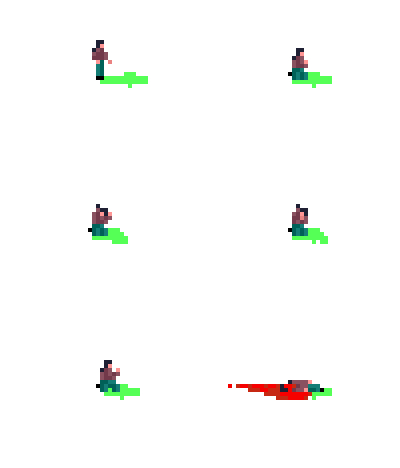
In the Remaster, possibly as reference / remedy to the unused status of these animations, the Nod score screen's indicator for the amount of Nod units and civilians that got killed during the battle is indicated by respectively the gory splatter death of the Flamethrower Infantry (E4), and the execution death of the Civilian "Phil" (C7). While these animation are separate files from the actual infantry sprite sets, the remastered infantry sprites themselves in fact contain all of these unused animations as well.
Decomposing Animations#
Four of the infantry units, namely the Minigunner (E1), Grenadier (E2), Bazooka (E3), and Flamethrower (E4), have specific animations that show their corpse slowly disappearing. These animations, bundled into one E?ROT.SHP file per unit, were made to follow the different death animation in the actual infantry SHP file. Note that they contain eight different animations; four for the actually used deaths in the game (gun fire, grenade, explosion, fire), one for the alternate explosion one mentioned above (fragged), two for the hand-to-hand combat deaths (beaten, kicked), and most likely one for the execution death, which isn't present for military units in the final game.
The animations do not adapt to house colours, but instead show the infantry in a neutral desaturated gray.
 |
 |
 |
|
Minigunner "rot" animation |
Grenadier "rot" animation |
Bazooka "rot" animation |
Flamethrower "rot" animation |
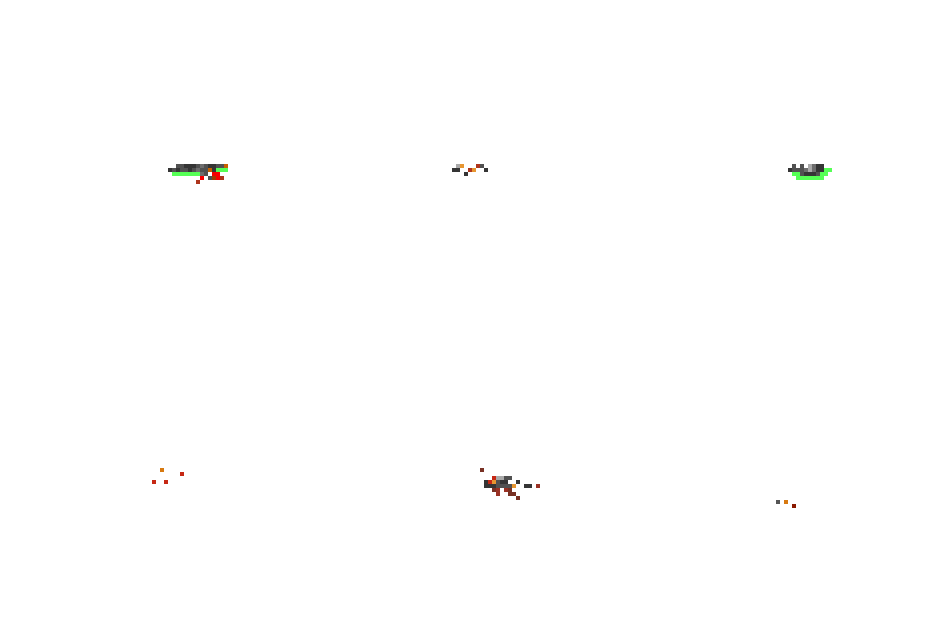
For some reason, the last one (E4ROT.SHP) was not cropped to remove the large amount of empty space around it. This may be indicative of the fact they stopped making them at that point, so that final one may not have been processed to its final intended in-game representation.
This system would later be implemented in Red Alert in a more simplified form, where one single fading-away animation per theater was used for all infantry, following any death animation.
Crushed Corpse#

There is an Overlay-type tile called SQUISH, which shows a crushed soldier. The game uses these when infantry units are crushed by a vehicle, if the IsGross logic is activated. (See "Overrun" under "Special Options" in the main article.) Unfortunately, the entire logic is severely broken, causing the tile to never show up even with the secret mode unlocked. The graphics only show a single centered corpse, even if multiple infantry units were squished together.
Like the decomposing animations, the corpse does not get adapted to the colour of the original infantry's player side. Its uniform has a mix of yellow and grey colours that can represent both the GDI and Nod colours. This could be meant as a messy and blood-stained version of a desaturated uniform, like the decay animations use, but the grays used in this are notably lighter than the ones in the decay animations, and perfectly match Nod's unit colours.

Cell Indicators#
The file TRANS.ICN contains the diagonal stripe tiles used as placement preview to show the required space when placing down a structure. The game uses a white version for clear terrain, and a red one to indicate that something is blocking placement on that cell.
However, the file contains four tiles; the white one, an unused yellow one, the red one, and a totally different tile, which looks like some kind of targeting cursor.

Research into the game showed that the yellow one was used if player-owned units were obstructing the build location. Clicking to place a structure with yellow tiles shown would order these units to move, and then place down the structure. Sadly, this didn't work reliably, since it only ordered the units to scatter in a random direction, rather than actually having a logic to move them off the placement area. Because of this, the logic never made it into the final game.
The purpose of the final tile was found on a screenshot of the very earliest in-game footage of the game. It shows how a group of five soldiers is selected as one single group, with normal selection brackets around the center unit, and a health bar underneath (as also seen in another shot from that version), and with that graphic around them all to show that the whole group is selected:
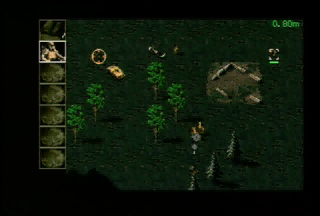
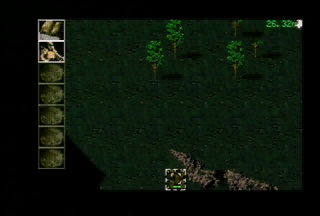
In Dune II, infantry could exist as a single soldier, or as a group of three soldiers. Such a group of three was technically a single unit of a completely separate unit type than the single soldier, which just had a set of graphics containing three soldiers together. It is likely that this early infantry squad was also a single unit, and the system to let five individual soldiers occupy sub-cells on each cell of the game evolved from this later.
Craters#
When a cell takes explosion damage, the game checks which exact position on the cell was hit, and creates a small crater on the spot that is closest to that position. These positions are the same as the infantry sub-cell positions; distributed like the five points on a die, with position 0 being the center, and 1, 2, 3 and 4 being the north-west, north-east, south-west and south-east corners respectively. As the cell gets more damage, the existing crater grows until its graphics envelop the entire cell. This system has some side effects, though.
Unused Crater CR6#
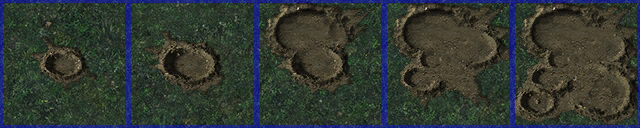
The crater type is chosen as ID in the Smudges list, starting from CR1, and with the sub-position added to it to select the later craters in the list. This only ever results in getting CR1 to CR5, though. The game contains a sixth crater, CR6, which seems to be an alternate version of the center crater. It has distinct graphics, but is never used by the game.
The only code that references CR6 is the function that randomly places smudge marks as debris when a building is destroyed. This code randomizes over the whole range of craters, including CR6, when choosing what to place down. However, as mentioned, the exact crater type is irrelevant. The same code also randomly selects a spot inside the cell to act as origin point of the crater, and only that determines the final crater type.
This shows all states of all crater types in Temperate theater, with outline indicators to clearly demonstrate the start positions. The unused CR6 is the one at the bottom. The Winter theater versions are identical, so they are not explicitly shown.

The Desert version of CR6:

The unused crater CR6 was also included in the Command & Conquer: Remastered Collection, with remastered graphics. Again, the Temperate and Winter versions are identical.

Placement in missions#
Technically, craters can be placed in mission files, under the [Smudge] section, and this system accepts all crater types, and all sizes. However, craters placed on the map this way are considered to be placed on the center of the cell, which causes the automatic crater selection logic to revert them all to the CR1 type.
Additionally, due to the fact the placement code double-checks that the smudge object on the cell is indeed the one that was requested to be placed, the step to apply the crater size is skipped when the type is changed to CR1. So only the CR1 type works correctly from missions.
Unused mouse cursors#
The mouse cursor sprite contains 178 frames, all 30×24 pixels, of which a few are unused. The full list of mouse cursor definitions, including available smaller minimap equivalents, can be found at the end of MOUSE.CPP, which can indicate what each frame is used for.
Empty cursor#
Index 28 in the mouse cursor sprite shows a completely empty frame. This frame is not part of the animations of any of the other cursors, and might have been intended as an easy way to hide the mouse cursor. However, it does not show up in the mouse cursor definitions, so it is completely unused.
No Entry sign#
There is a specific cursor for "Can't move", which is the No Entry sign overlayed on the Move cursor. However, a separate cursor at index 8 showing just the No Entry sign is completely unused. A smaller version of this exists as well, but that one is used, as minimap version of the "Can't move" cursor.

Blinking green block#
Frames 138-139 show a small blinking green block. Given its size, this cursor was probably meant as minimap cursor, however, no reference to these frames exists in the list of cursor definitions, so its real purpose remains a mystery. It does not resemble any of the larger cursors.

Guard Target minimap cursor#
The "Guard Target" function, which can be accessed by holding down the Ctrl and Alt keys together, uses a red version of the game's normal "move" cursor. Notably, though, this function does not work on the minimap. The list of mouse frames does define a small version of it, though, and its graphics exist in the mouse sprite at index 152.

The fact this is not usable seems to be a bug; in the RadarClass::TacticalClass::Action function, there is a check on which actions are allowed on the minimap, and for some reason, the Guard Target action, "ACTION_GUARD_AREA", is not included in that list. Another item missing from this list is "ACTION_HARVEST", which prevents giving a harvester minimap orders to go harvest somewhere. Given the fact harvesting uses the normal "Attack" cursor, there is also no reason for it to be excluded.
References#
- GDC Vault - Classic Game Postmortem: 'Command & Conquer' at 24:41 (-32:20 "time remaining" on the player) "So when it was time to record, yea, we'd go over to «The Studio» and we'd hike ourselves over there"↩︎