 This article has a talk page!
Ape Escape is a wacky game featuring a 10-year-old catching monkeys using a net. It was the first PlayStation game to require the use of a dual analog controller to play.

Debug Functions#
Debug menus are present in all regions. The following cheat codes change the behavior of the New Game and Load Game choices on the title screen.
Option |
Japan |
US |
Europe |
|---|---|---|---|
New Game |
30137744 ???? |
30137734 ???? |
30137754 ???? |
Load Game |
30137748 ???? |
30137738 ???? |
30137758 ???? |
Where "????" is one of the below values:
Behavior |
Code Value |
|---|---|
Time Station |
0098 |
New Game |
00AC |
Load Game |
00B4 |
Option Menu |
00B8 |
Mini Game |
00C8 |
Sound Test |
00D0 |
Time Station#
301377?? 0098 sends you directly to the time station, skipping the intro movie and bypassing the first level.
Option Menu#
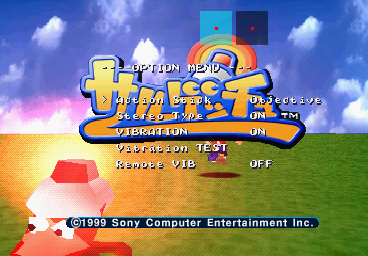
301377?? 00B8 enables an unused option menu with light debug features.

The two boxes present at the top of the screen represent the Left Analog and Right Analog sticks. Rotating the right stick clockwise will cause the right box to flash green, while rotating counter-clockwise will cause it to flash blue.
Moving the right analog stick will cause red and blue waves to appear, flowing across the screen from right to left. The red wave represents the stick's raw Y-axis value, while the blue wave represents the stick's Y-axis velocity.
"Action Stick" relates to the right stick, and has two settings:
- Objective is the default behavior
- Subjective allows the player to hold a spinning motion without having to continuously rotate the stick, when using the relevant gadgets. For example: Spinning with the Stun Club. This functionality is imperfect and causes the camera to slowly turn with the player, with each rotation.
These settings can also be toggled in-game using one of the following codes:
Setting |
Japan |
US |
Europe |
|---|---|---|---|
Objective |
300E5100 0000 |
300E54E0 0000 |
300E55A0 0000 |
Subjective |
300E5100 0001 |
300E54E0 0001 |
300E55A0 0001 |
Stereo Type and Vibration are accessible in-game via the Pause menu.

|
To do: |
Mini Game#

301377?? 00C8 opens a debug menu where you can open mini games, though only Ski Kidz Racing and Specter Boxing can be selected from this menu - Galaxy Monkey is not present.
Quitting a mini-game will send you back to the title screen.
Sound Test#

301377?? 00D0 opens an unused sound test. In the menu, press Start to open an option.

COMMON tests sound effects that are common for all levels.
Press the face buttons to play sound effects and Select to stop playback. Start exits back to the Sound Test menu.

SIGHT tests the background music for any given stage, and any sound effects that are unique to the selected stage.
Unused Graphics#

Graphics of a spinning cookie (health) and T-shirt (1UP). It seems there were initially plans for these items to be flat sprites, but in the game they are 3D models.
If you look closely, you can see "KAKERU" spelled in the center of the cookie, which is Spike's Japanese name.
Also notice the shirt design is different from the one Spike wears in the game. This one has red and white horizontal stripes, while his final shirt is solid red with a single vertical white stripe.
Unused Sounds#
Analog Controller Warning#
While the Japanese version uses an audio clip informing the player to use a DualShock controller at the controller warning screen, the English version doesn't. Interestingly, there's an unused English audio clip informing the player to use a DualShock or Analog controller.
Death#
There are two possible lines Spike can say upon running out of health. There are two additional ones that are never heard in-game.
Level Start#
Two unused voice clips for Spike when beginning a stage can be found grouped with the ones heard in the final game.
Unused Behavior#
TV Tower Cars#
The TV Tower stage has cars in the starting area's background that cannot be interacted with through normal means. It is possible to reach said area through cheats or using the Infinite Jump glitch. Upon doing so, the cars can be seen to have semi-functional interactions with the player, albeit with very unpolished hitboxes.
One can stand on top of the cars and ride them to the end of the boundary, upon which one will fall down onto collision under the floor. Additionally, if one stands in front of the moving cars and get hit by them, the player will die instantly. No other object in the game has this behavior.
Unused Powerup#
There's an unused powerup that turns Spike gold and surrounds him in a big rotating sphere. While the powerup is active, Spike will have a massively reduced presence, and monkeys will notice him only once he's very close, making capturing them trivial.
The powerup can be activated by setting RAM address 0x0EC2E2 to 0x01 on an NTSC-U version of Ape Escape. To turn it off, set the address back to 0x00.
Oddities#

The image of the Super Hoop in the training space has a different design than everywhere else in the game, with a set of dark green stripes instead of yellow.
Regional Differences#
Character Name Changes#
The main characters have different names between the three versions of the game. In Europe, the names would later be reverted to their Japanese names from Ape Escape 2 onward, save for the PSP remake, which uses the US names except for Natalie.
Japanese |
Literal Translation |
US version |
EU version |
|---|---|---|---|
カケル |
Kakeru |
Spike |
|
ナツミ |
Natsumi |
Natalie |
Katie |
ヒロキ |
Hiroki |
Jake |
Buzz |
チャル |
Charu |
Casi |
|
Era/Level Name Changes#
The era and level names also differ between each regional release. Generally the EU release's names seem to be closer to the Japanese names than the US release.
Japanese |
Literal Translation |
US version |
EU version |
|---|---|---|---|
中生代終 |
Mesozoic Era |
The Lost Land |
Prehistoric Era |
こだいのはらっぱ |
Plain of Ancient History/Ancient Plain |
Fossil Field |
Ancient Plain |
ちゃぷちゃぷいけ |
Splish-Splash Pond |
Primordial Ooze |
Raining Lake |
きょうりゅうバレー |
Kyouryuu Valley/Dinosaur Valley |
Molten Lava |
Dinosaur Valley |
Cenozoic Era |
Mysterious Age |
Cenozoic Era |
|
ジャングルリバー |
Jungle River |
Thick Jungle |
Jungle River |
ナンデココニいせき |
Why Here Ruins |
Dark Ruins |
Dark Ruins |
ダレガタテタいせき |
Who Built This Ruin |
Cryptic Relics |
Cryptic Relics |
Dimension |
Dimension X |
Dimension |
|
ヒロキアタックパート1 |
Hiroki Attack Part 1 |
Stadium Attack |
Buzz Attack Part 1 |
Primitive Age |
Oceana |
Primitive Age |
|
げんしビーチ |
Primitive Beach |
Crabby Beach |
Primitive Beach |
すいちゅうケイブ |
Underwater Cave |
Coral Cave |
Primitive Ocean |
ガブリンのしま |
Gaburin's Island |
Dexter's Island |
Dexter's Island |
Ice Age |
New Freezeland |
Ice Age |
|
カッチンコールのうみ |
Frozen Ocean |
Snowy Mammoth |
Frozen Ocean |
ツラーラどうくつ |
Icicle Cave |
Frosty Retreat |
Icicle Cave |
サルおんせん |
Monkey Hot Springs |
Hot Springs |
Monkey Hot Springs |
Dimension |
Dimension X |
Dimension |
|
ヒロキアタックパート2 |
Hiroki Attack Part 2 |
Gladiator Attack |
Buzz Attack Part 2 |
Recent Past |
Medieval Mayhem |
Recent Past |
|
わびさびテンプル |
Wabi Sabi Temple |
Sushi Temple |
Tranquil Temple |
テクテクバンリ |
Walking the Great Wall of China |
Wabi Sabi Wall |
The Great Wall |
からくりキャッスル |
Trick Castle |
Crumbling Castle |
Trick Castle |
Present-Day |
Futurama |
Present-Day |
|
マチノシティ |
City Neighborhood |
City Park |
Urban City |
サルテックファクトリー |
Monkey Tech Factory |
Specter's Factory |
Monkey Tool Factory |
スカイTVタワー |
Sky TV Tower |
TV Tower |
TV Tower |
Present-Day 2 |
Specter Land |
Present-Day 2 |
|
スペクターランド |
Specter Land |
Monkey Madness |
Specter Land |
Dimension |
Dimension X |
Dimension |
|
ファイナルゲッチュ |
Final Get You |
Peak Point Matrix |
Final Get |
Texture Differences#
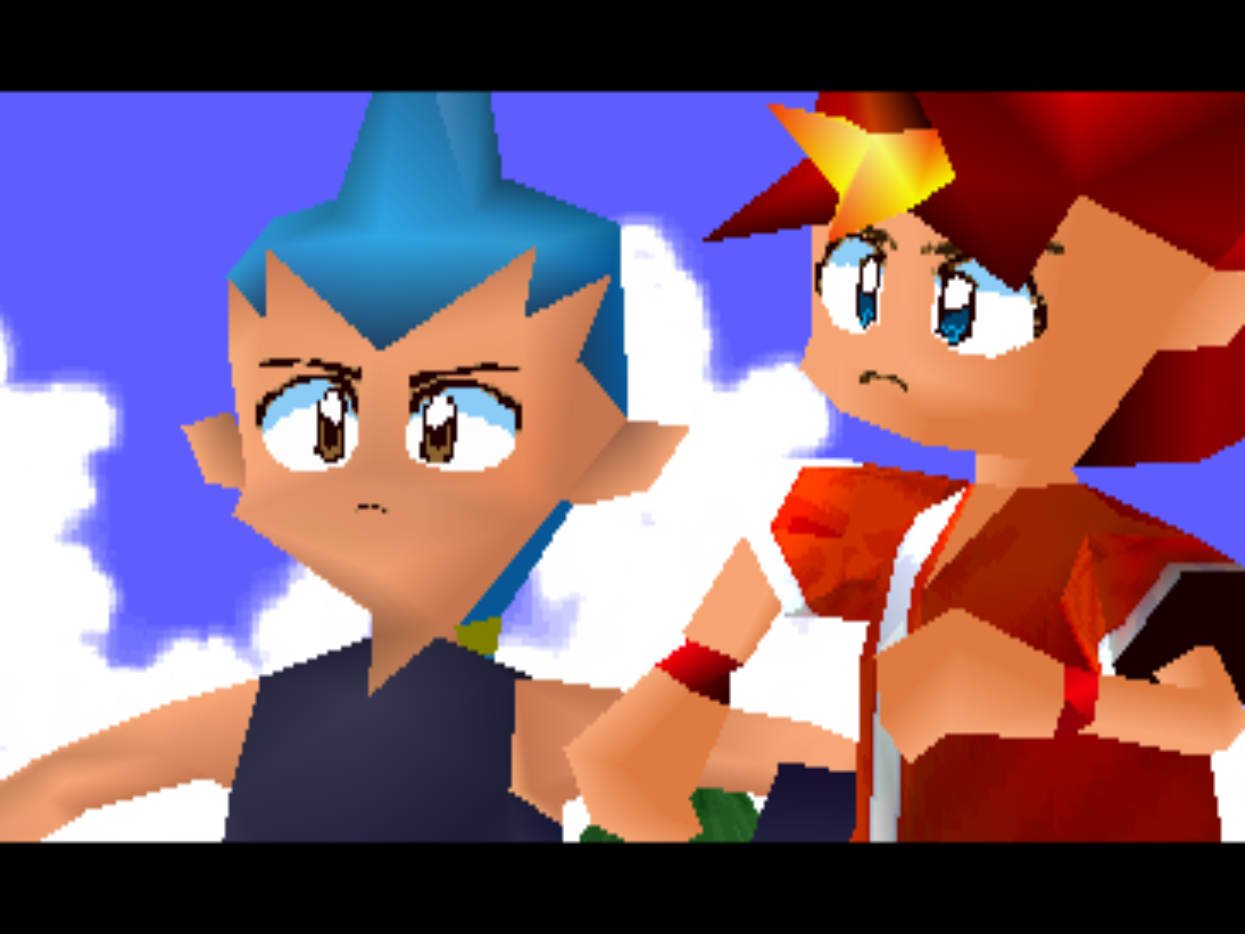
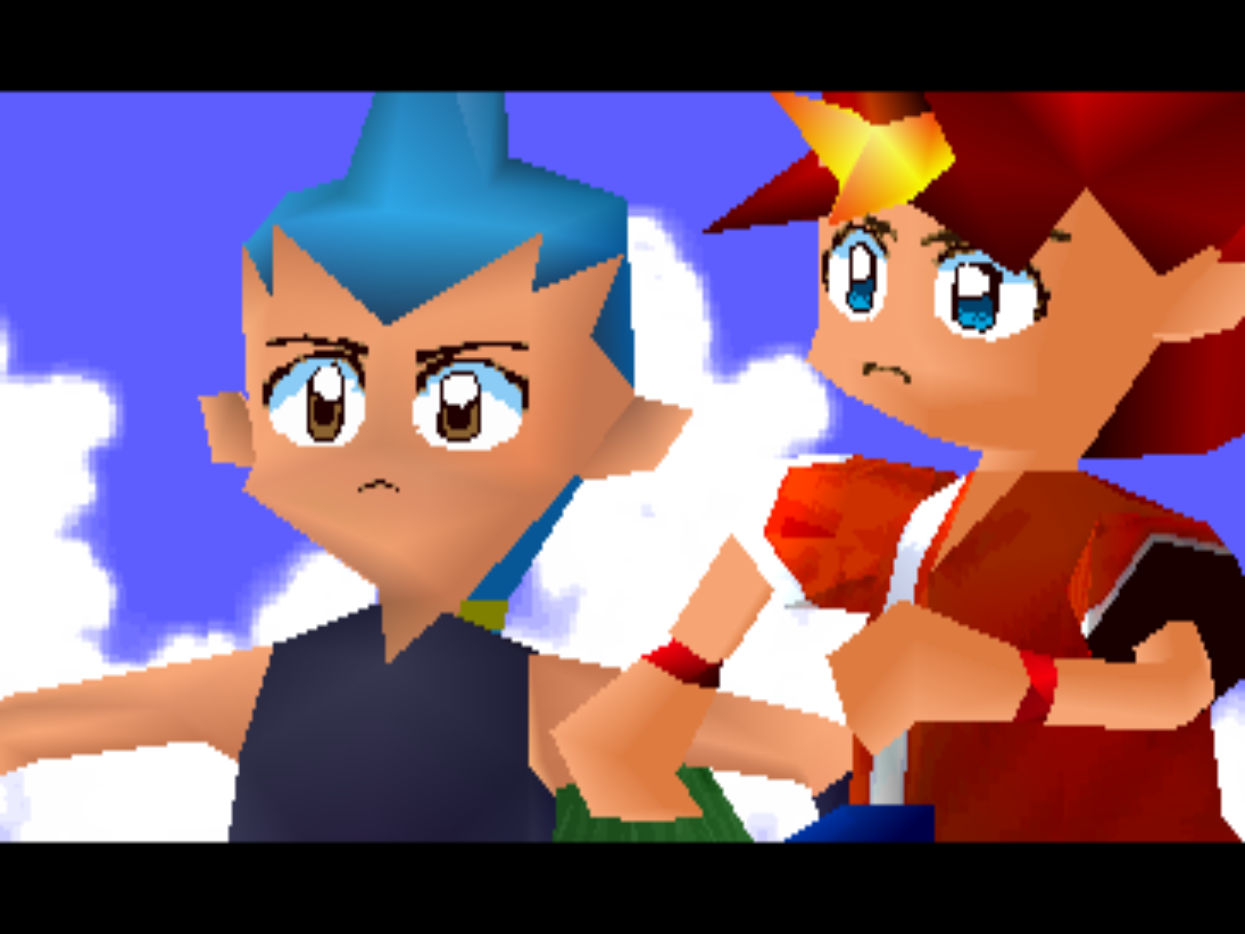
Certain characters' eye textures such as Kakeru/Spike's and Hiroki/Jake's were altered from the JP to US/EU releases, making them larger and spaced further apart.
|
Japan |
US/Europe |
|---|---|
|
|
European Version#
Despite the later release date, the European version is likely an earlier build than the US version, as it is slightly less polished and bears some similarities to the demo.
DualShock Controller Required#
Europe |
US |
|---|---|
 |
 |
 |
 |
The controller warning screens were rewritten in the US version to remove references to the original (pre-DualShock) Dual Analog controller, although the game does work with both. The US version also uses the same font for both screens.
Title Screen#
|
|
To do: |
|
Europe |
US |
|---|---|
|
|
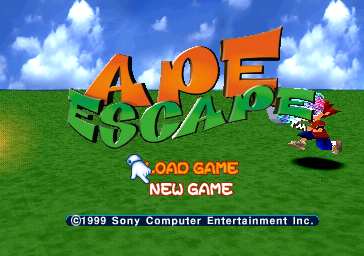
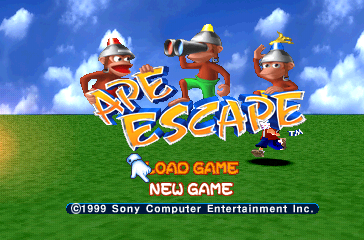
The European title screen features a rather bland WordArt-inspired logo that is notably monkey-free.
Dub#
The UK release features a completely separate voice cast from the US release, although they remain uncredited. This feature of having a UK dub would exist in all later UK versions of Ape Escape games.
Japanese Version#
- The Japanese version has a voice calling out the game's title (Saru, Get You!) on the title screen.
- The Japanese version has PocketStation support that allows you to play "ホルゲッチュ" (Horugechu) from the Data Switch found in the Time Station room.
- In the Japanese version, cutscenes can only be skipped with Start. In the international versions, cutscenes can be skipped with Start, X, or O.
- Every gameplay demo in the international versions has a constant "DEMO" graphic flashing at the bottom-right of the screen. The "DEMO" graphic is missing in the Japanese version.
- The Monkey Book in the Data Station has a different graphic between versions. The Japanese version has a floppy disk while the international versions have a book. Also, the Memory Card is missing the PlayStation logo in the International versions.
|
Japan |
US/Europe |
|---|---|

|

|
American Version Differences#
In later editions of the game, an ape named Freeto with the description "Needs clean underwear" is changed to Quiff with the description "Bad fur day."
Anti-Piracy#
The Japanese and European versions use different methods of anti-piracy measures. While the Japanese version uses anti-modchip protection and displays the standard "software terminated" screen, the European version instead uses LibCrypt protection, and disables controller input on the main menu. The player may only skip the intro and view the title screen.
This unfortunately prevents the European version from being played on a PlayStation 3 due to the software emulation not having a config for the game, thus setting off this measure.
|
The Ape Escape series | |
|---|---|
|
PlayStation |
|
|
PlayStation 2 |
Ape Escape 2 • Ape Escape: Pumped & Primed (Demo) • Ape Escape 3 |
|
PlayStation Portable |
|