 This article has a talk page!
This is a sub-page of Proto:Sonic the Hedgehog (Genesis).

|
To do: |
Unused Graphics#
Unless otherwise specified, all of the art listed below is stored compressed in the ROM, using the Nemesis compression format.
Sprite |
Offset |
Notes |
|---|---|---|
 |
018000 |
Three copies of an 8×8 font in different colors. The palette used in this image is a mockup. |
 |
02656E |
Some dust or puffs of smoke. These are also unused in the final game, but are noteworthy in this build for being loaded in VRAM where the checkpoint graphics are in the final version. |

|
026672 |
The Labyrinth Zone water splash, not used in this build as there is no water. It has simpler shading and seems to be intended to use Sonic's palette, unlike the final game which uses Labyrinth's cycling palette. It should be noted that these sprites were re-used in Sonic CD. |
 |
0267D4 |
Some sparkles. |
 |
026BF6 |
Some fireballs, possibly for use in Marble Zone. |
 |
02A386 |
The art for the unused early version of the Ball Hog. |
 |
02ADFE |
The art for the unused explosion object. |
 |
02BBC2 |
The art for the early Ball Hog's bomb. This art is compressed separately from the early Ball Hog's art; in the final game, the Ball Hog bomb art and the Ball Hog art are compressed together into a single archive. |
 |
060864 |
A spring included in the boss attachments art file. The base of the spring was recycled for the Marble Zone boss' fire disposer. Given that the boss attachments tend to follow the gimmicks of their Zone, this was probably intended for the Sparkling/Spring Yard Zone boss. |
|
06C8A0 |
A 6th frame for the animated UFOs in Marble Zone. To properly restore it in the animation script, use PAR code 011430:0006. This art, as with the rest of the used animated UFO art, is stored uncompressed. |


Special Stage#
Given their incompleteness, unsurprisingly, the Special Stage has graphics for a few unused blocks. Only their graphics exist, though, as there's no code for them anywhere.
Sprite |
Offset |
Notes |
|---|---|---|
 |
06505E |
An R Block, whose intended use was probably the same as final, although no code for it appears anywhere. This graphic doesn't load in the Special Stage's VRAM. |
 |
06512E |
A skull. Use unknown, though it probably had something to do with either death or losing. |
 |
0651FE |
What appears to be a magnet icon. Unknown purpose, though it's suggested that it could be used for two possibilities: it could be an item to allow Sonic to pull any rings towards him whenever he nearly reaches them, or an object to either pull Sonic in or push him away. |
 |
065B76 |
The graphics for the blue Chaos Emerald are present in the prototype, despite being absent from the Special Stages proper. The presence of only the blue Chaos Emerald without all the others may imply that the Emeralds were planned to all be blue at this point in development, akin to how they are in the 8-bit versions. |
Unused Objects#
The list of objects by offset can be found at ROM address 8580. There are only 94 objects in this build, well below the final's 140.
|
|
To do: |
Object 02 & 03 (Development Tests)#
Object ID: 02
Code Offset: 4B82
Mappings Offset: 4BF2
Object ID: 03
Code Offset: 4C5A
Mappings Offset: 4BF2
|
In-Game |
Footage |
|---|---|

|
These objects date back to the game's earliest development stages. They both share the same sprite mappings and tile ID base, and have similar code.
- Object 02 uses frames 1 and 2 of the mappings data, being a 32×32 block that displays a set of tiles one after the other. It has a sprite priority value of 3.
- Object 03 uses frame 3 of the mappings data, being a large 32×256 vertical rectangle, built from 8 individual 32×32 blocks. It has a sprite priority value of 5.
Both of these objects, on initialization, set their object variable at offset 21 to a value of 1. This variable (obColProp in the GitHub disassemblies, colicnt in the original source code) is normally used to store whether or not Sonic has touched the object, or how many times Sonic has hit the object in the case of bosses, so this variable initialization is rather odd and may hint at a different use for that object variable early on in development.
Object 02 has a hardcoded X position of 200 and Y position of 60; in other words, it will always appear at those exact coordinates of any level it is placed in. Object 03 also has a hardcoded X position of 100 and Y position of 40.
Object 02 has a simple timer built into it to alternate between sprites every 16 frames. Object 03 has a similar timer built into it as well, but the code never actually uses the results of the timer to update its sprite, making its internal timer rather useless. Both Object 02 and 03 expect tile information from VRAM at 0x9E00, which is the exact same location that the unused debug HUD digits are loaded. They do not interact with the player object in any way, and likely never served a purpose in actual gameplay.
These same objects can be seen in on-site Sega R&D footage uploaded to YouTube by Yuji Naka, dating all the way back to February 1990.
Object 03 also contains a secret: The column contains an additional block that cannot be seen as it is loaded off-screen. This block is defined at 0x4C54 (four bytes long), and can be loaded in-game by shifting the column down. To view in-game, shift the column down by replacing the value at 0x4C7D with 60.
Object 04 (Development Test)#

Object ID: 04
Code Offset: 4CBE
Mappings Offset: 4BF2
Object 04's code is very similar to Object 02 and 03, and shares the same mapping data. However, instead of the debug HUD digits, it uses the art tiles used for monitors. Object 04 also has a simple timer built into it, alternating between sprites every 21 frames; its first frame displays as a jumbled mess of static / Eggman icon / Sonic icon, while its second frame displays more reasonably as a "stack" of monitors, one on top of the other.
Object 04 can be placed anywhere on the X-axis, but its Y-coordinates are hardcoded to 40.
Just as Object 02 and Object 03 do, its object variable at offset 21 is set to 1 on initialization. It has a sprite priority of 3.
Like Object 03, Object 04 also contains a hidden tile block that doesn't appear on-screen. This can be viewed by shifting the column down, which can be done by replacing the value at 0x4CDB with 60.
Object 05 & 06 (Debug Numbers)#
Object ID: 05
Code Offset: 4D2E
Mappings Offset: 4D6E
Object ID: 06
Code Offset: 4DEE
Mappings Offset: 4D6E
Objects that make up each individual digit of the unused debug HUDs. Both objects share the same mappings and nearly identical code.
Object 05 is loaded into object RAM in both debug setup routines, while 06 is unused anywhere and seems to have been used for an even earlier implementation of the debug routines, as it sets a screen position Y value of 160 pixels, unlike 05 which expects onscreen positions to be supplied when loaded.

Object 05 expects the art for the digits to be at 0x9E00 in VRAM, while 06 expects them to appear at 0x8E00.
Object 07 (Unknown)#
Object ID: 07
Code Offset: 4E34
Does nothing except increment its object routine counter before deleting itself.
Object 10 (Animation Player)#
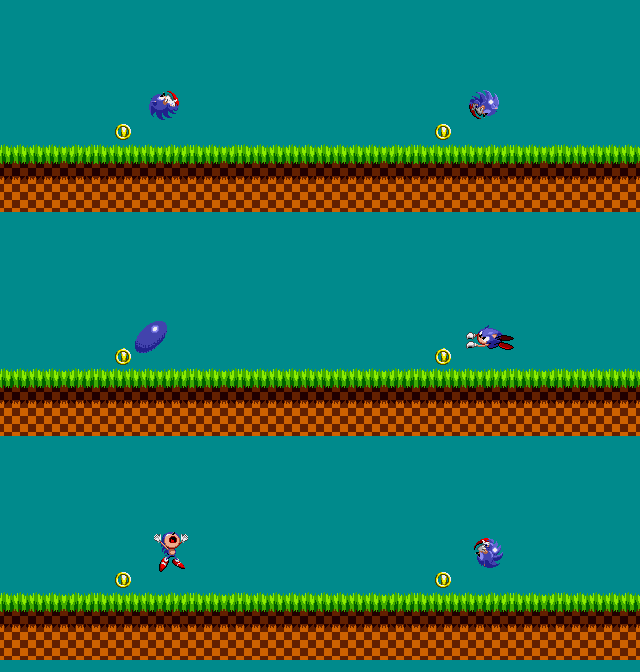
Object ID: 10
Code Offset: 111C2
An object that allows you to cycle through and view almost all of Sonic's animations. Sonic's own tiles will be jumbled up when this object is placed in a level, unless his current action matches the currently displayed animation. (such as jumping while the jumping animation is being displayed).
The object has a unique set of controls, which are as follows:
Input |
Effect |
|---|---|
D-Pad |
Moves the animation test object in the direction pressed. Sonic's own controls are not disabled, so the D-Pad inputs will move him as well. |
B |
The intent seems to be to cycle through flipping the sprite horizontally and vertically, but it doesn't quite work. The effect can be briefly seen if the B button is spammed on specific animations, such as the pushing animation. |
C |
Cycles to the next defined animation. Once it gets to the last animation it's programmed to display (Sonic's death sprite), pressing C again will cycle back to the first animation (walking) |
Not all of Sonic's animations can be viewed as expected using this object. For example, the running animation is defined after the walking animation, but this will display identically to the walking animation when viewed with the object. Sonic's "hurt" animation and unused shrinking animation (which are defined after Sonic's death animation) also cannot be viewed using this object.
The Sonic 2 Nick Arcade prototype's symbol table refers to it as play02.
While the object technically exists in the final game, all of its code was replaced with a simple return command.
Object 1B (Unknown Platform Object)#

Object ID: 1B
Code Offset: 6626
Mappings Offset: 66DC
An object that has collision seemingly based on its subtype argument. If no subtype is supplied (aka a subtype of 0), the object simply displays with a high sprite priority (renders in front of Sonic) and performs no collision calculation. If Object 1B has a subtype set, its resulting collision is flat despite its jumbled graphics appearing more circular or sloped. The collision is also "placed" at the very bottom of the platform; Sonic physically stands slightly below where the art appears to end.
It appears to have been a child object for another, possibly removed object, as it calls routines used for objects with moving parts that Sonic can stand on (such as the swinging platforms), despite Object 1B not having any code itself that would cause itself to move. In addition, the mappings data specifies an additional frame with a rectangular shape that goes unreferenced by this object or any other object in the prototype.
It doesn't fit any existing art in this build, but appears to have used a Zone's tileset for its sprite graphics, as it sets the mappings base to 0 and the palette flag to the third palette line.
It was replaced by the Water Surface object in the final game.
Object 1D & 2A (GHZ Hidden Button and Door)#

Object ID: 1D
Code Offset: 67BA
Mappings Offset: 6878
Object ID: 2A
Code Offset: 6890
Mappings Offset: 6A2C
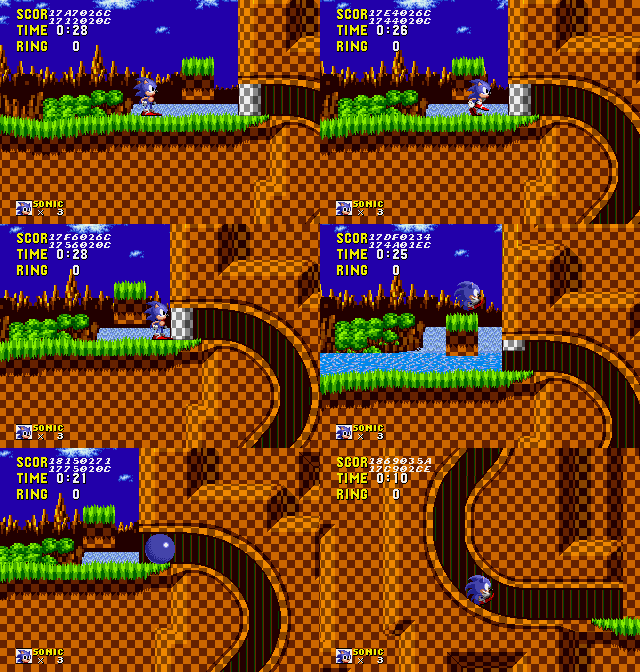
Object 1D is a button, intended to be disguised as grass. Object 2A is the door that this button most likely would have opened.
The grass button's code and mapping data survives into (and is identical to the code and data in) the final game, still unused. The door's object ID was repurposed for the small one-way doors in Scrap Brain Zone in the final game, and its corresponding code and mapping data overwritten.
Both of these objects display jumbled graphics when placed in-game. This is because their mapping data was designed for an earlier version of the Green Hill Zone tileset. By shifting their sprite mappings base location backwards (in the button's case, by 9 tiles), they display as originally intended. In particular, the door ends up using some otherwise-unused tiles within the Green Hill Zone tileset.

The grass fits perfectly with the switch, as it only activates if the top of the sprite is walked through.
Subtype 0 of object 2A serves as the actual door. The object is solid from below and from its sides, and slowly rises upwards if a switch is pressed (specifically switch ID 0, matching the switch flag set by the grass button).
Any other subtype for object 2A appears to function as a sprite mask for where the door would have retracted into. This sprite mask subtype has no collision, but has a higher sprite priority than the other door subtype and displays different graphics. If physically placed above the other door subtype, it will make the door appear as if it is disappearing into the ceiling as the door rises.
Object 1E (Ball Hog)#
Object ID: 1E
Code Offset: 6F30
Animation Data Offset: 7244
Mappings Offset: 725A

Ball Hog is completely programmed in the prototype, but its movement, sprites, and attack are different from the final version: It walks from side to side, facing towards the screen. After walking for a short while, it stops in place to drop a singular bomb downwards. This seems to match the version seen in early prerelease footage, rather than the version seen in leaked Digitizer artwork from the game's development.
The version of the Ball Hog in the final game is completely stationary (aside from visually hopping in place), faces left or right rather than facing the screen, and drops multiple bombs at a time in the direction it's facing.
Object 20 (Ball Hog Bomb)#
Object ID: 20
Code Offset: 7062
Mappings Offset: 729A
A sub-object of Ball Hog, its bombs. The bomb simply drops to the ground, and creates a miniature explosion on impact.
Unlike the Ball Hog bombs in the final game, these bombs do not bounce against the ground at all or visually flash.
Object 24 (Buzz Bomber / Ball Hog Explosion)#
Object ID: 24
Code Offset: 70F4
Mappings Offset: 72A2
An object that represents an explosion. Just like the other used explosion objects, it has no collision, and simply plays an explosion animation. This object is also present in the final game's code, completely unused.
In this build, the object is spawned by the Ball Hog's bomb when it hits the ground. The Buzz Bomber missile code in this build, as in the final, also contains the same unreachable logic that would spawn this object.
There is a single difference in this object's code compared to the final: the sprite priority of this object is set to 2, whereas the final game sets the sprite priority of this object to 1. The same change was also made to the other used explosion objects.
Object 2C (Jaws)#
Object ID: 2C
Code Offset: 8C5E
Animation Data Offset: 8CB2
Mappings Offset: 8CBA
Art Offset: 2B938 (compressed, Nemesis format)
Used in the final, but not in the proto.

In this build it uses Sonic's palette and can only swim to the left, never to return. Its sprite is loaded in Labyrinth Zone, but is allocated to the wrong VRAM address.
Object 2D (Burrobot)#

Object ID: 2D
Code Offset: 8CEE
Animation Data Offset: 8E4C
Mappings Offset: 8E64
Art Offset: 2AFE6 (compressed, Nemesis format)
Used in the final, but not in the proto.
In this build, Burrobot uses the second palette line instead of Sonic's. It also does not start buried in the ground, and has no code to handle being buried in the ground.
It's unknown what Zone this enemy was planned for at this point in development; Labyrinth Zone's second palette line is completely black in this build. The palettes for most of the existing Zones result in a Burrobot with a yellow helmet, pauldrons, and claws, and a purple body. Strangely, this Badnik's appearances in future games (along with some of its official artwork for this game) appear to use a combination of the final game's coloration and the most likely prototype coloration from using the second palette line, with yellow helmets and shoulders but blue faces and torsos.
Object 43 (Roller)#

Can be accessed via debug mode in Sparkling Zone, and also appears in the unused object layout for Sparkling Zone Act 1. It has different behavior compared to the final version:
- Uses the second palette line instead of Sonic's.
- Instead of making its entry by rolling on screen, it stands stationary until the player approaches it, to which it then takes off.
- Doesn't uncurl when it gets close to the player.
- Is completely invulnerable.
- Moves at a slower speed.
- In the final game, Caterkiller's art is loaded over part of Roller's art, which causes one of the ball animation frames to appear glitched. Caterkiller doesn't exist in this build, so this bug doesn't happen.
Object 4A (Warp Effect)#
Object ID: 4A
Code Offset: F83A
Animation Data Offset: F9DC
Mappings Offset: F9F2
Art Offset: 26C48 (compressed, Nemesis format)
This object is a sub-object spawned by the giant ring object in this build. It causes Sonic to temporarily disappear for 2 seconds. As he disappears, sound effect A8 is played, resembling the sound of something warping.
The object survived into the final, still unused, and its code and art unchanged.
Object 4B (Giant Ring)#
Watch on YouTubeObject ID: 4B
Code Offset: 7EC0
Mappings Offset: 7FA4
In this build, the giant ring does not take you to Special Stages when jumped into. Instead, when touched, the unused warping object is spawned in causing Sonic to temporarily vanish; the giant ring itself disappears after this occurs.
This version of the giant ring does not perform any Rings or Chaos Emerald checks, in comparison to the final where the giant ring only spawns in if Sonic is carrying at least 50 rings and has less than 6 Chaos Emeralds.
The art for the giant ring doesn't seem to exist in this build, but the mapping data exists and matches that of the final game.
Object 4F (Splats)#

Object ID: 4F
Code Offset: D1F4
Mappings Offset: D30C
Art Offset: 2D0B4 (compressed, Nemesis format)
A scrapped Badnik that can be placed in Marble Zone using Debug Mode. Splats waits until Sonic gets close enough (though "close enough" is still while the Splats is off-screen), then begins bouncing in Sonic's direction. Once it begins bouncing, it will continue bouncing in the same direction unless it encounters a wall, where it will then switch directions.
A Splats with a non-zero subtype set checks a significantly wider range to determine if Sonic is in range, so it begins hopping much sooner than a Splats with a subtype of 0.
Its code and mappings (but not its art) were removed in the final game.
Object 5E (SLZ Seesaw)#

Object ID: 5E
Code Offset: E69E
Mappings Offset: E7CE
Art Offset: 2905A (compressed, Nemesis format)
Only accessible through Debug Mode in Star Light Zone.
The code to handle the spiky balls on the seesaws, and the subtype that spawns the spiky ball to give Sonic a boost to reach higher places doesn't exist yet.
Null Objects#
Objects 08, 0A, 0B, 0C, and 16 all point to the Null Object subroutine (which just falls through the subroutine to apply gravity to objects since they never added any code). In the final, these were replaced with the water splash, the countdown bubbles, the breakable pole in LZ, the flapping door also in LZ, and the harpoon objects, also in LZ.
Unused Object Subtypes#
Object 1C - Subtypes 0-2#

Subtypes 0, 1, and 2 of object ID 1C are unused in the prototype. There doesn't seem to be any art in this build that fits these object subtypes; the screenshot above displays how subtype 0 and 2 appear in-game if they were to be placed in Green Hill Zone.
Subtype 0 has a collision type representing a hitbox that is 24 pixels wide and 40 pixels tall (this collision type is unused in the final game) and damages Sonic when touched. Visually, it doesn't seem like the hitbox matches the object's graphics.
Subtype 1 is similar to Subtype 0, but its hitbox is 40 pixels wide and 24 pixels tall (also an unused collision type in the final game). However, this subtype's data specifies frame 1 when only a single frame exists in the mapping data (frame 0); this subtype appears invisible in-game.
Subtype 2 has no collision, and renders in front of Sonic.
In the final game, subtype 0's data has been replaced with the data for the Star Light Zone fireball launchers. Subtype 1 and 2's data have also been overwritten with copies of the fireball launcher data. Subtype 3 is used in both the prototype and the final, as it represents the stump background objects that show up next to the log bridges.
Unused Object Layout#

Located at 0x729CA is an unreferenced object position list that is presumably used for Sparkling Zone Act 1. Loading it in-game shows a number of differences, including Crabmeats near the entrance which are spawned on top of each other. To load, open the ROM in a hex editor and at 0x70040, replace 2460 with 29CA. You'll then be able to see the changes in SZ1. Interestingly, the object positions seem to match up with an early Sparkling Zone layout seen in screenshots of the pre-WCES and WCES-like builds.
Unused Level#
Watch on YouTubeThe last level, level ID 06 act ID 00, reserved for the ending cutscene in the final version, has a map of chunks at $6E348 that don't fit any Zone very well, nor does it align with any existing stage layout in this build. The game softlocks when accessing it directly, but it can be restored by hacking the layout into a working stage. Interestingly, this map holds 128 chunks and appears to be a normal level. Based on the overall structure, it seems this originally started as an early stage layout, probably dating back to the CES build; however, all level chunks besides 00 (empty space) or 01 (solid wall) appear to have been overwritten at some point, evidenced by the remaining chunks progressing in perfect sequential order going left to right, top to bottom. Whether this was deliberate (i.e. converting the old layout into some kind of test map) or an unintended side effect of other data being written to the ROM is unknown.

Unused Level Data#
|
|
To do: |
Between the level data of Marble Zone and Star Light Zone, there lies chunk data and other unused data for another level at 0x3DA48. There's also some more unused level data that can be seen after Clock Work Zone's level data at 0x570DC. Whether these are entire sets of level data or are just partial bits is currently unknown.
Unused Palette#

Located after Labyrinth Zone's palette is this unused 4-line palette. It seems to have been intended for the Green Hill Zone tileset, as it fits extraordinarily well, with only minor palette errors around rocks and such. The palette is nearly identical to the results screen in the Mega Play version of Sonic 1, which - coupled with this prototype's unused font (which bears similarities to the Mega Play font) - seems to suggest that leaderboard had been intended for the Genesis version as well.
The palette also seems to have been made early on, as the cycling palette's first color is dark blue, which was changed to a grayish blue after the WCES builds. This may also explain why the top of the mountains in the background are pink.

(Source: Sonic Retro)
Unused Code#

Plenty of unused code is hidden within this prototype. This includes:
- Alternate code for the invincibility stars trailing behind, making them trail behind a bit less. This is also left over in the final release.
- Code that calculates square roots, which is also left over in the final release.
- Code that doesn't seem to do anything at first, but commenting out a part of it lets Sonic respawn immediately after dying. This was likely removed as it doesn't quite work right with being crushed or falling into pits. The final game still backs up Sonic's pre-death Y-position in $38 for this purpose.
- An oddity that makes the Special Stage's goal orbs flash blue and yellow.
Unused Debug HUDs#
There are two unused debugging HUDs in the game's data, both rely on a set of dummied out routines in Sonic's object code to function correctly.

- The first routine is located in ROM at 0x2ED0-0x2F23. It spawns 4 individual objects in reserved object RAM starting at 0xFFD400 for each digit in each line, and sets them up with a list of screen positions, totaling 12 entries for 12 objects. The topmost line reports Sonic's current velocity, and the bottom two lines report his X and Y positions respectively.

- The second routine comes right after the first one, at 0x2F24-0x3017. It is set up like the first one, spawning 4 objects for each line, starting in reserved object RAM at 0xFFD280. It proceeds to try and set up 13 lines, spawning a total of 52 individual objects.
This overflows into dynamic object RAM and causes many object slots to immediately be partially overwritten with bad data, causing visual issues and crashes. If it does load normally, this causes intense lag.
None of the routines to make this variant function are present, and the routine intended for the first variant is unfortunately incompatible.
H-Blank Interrupt Tests#
Watch on YouTubeThere exist three unused routines for testing water functionality. They are all extremely early and underdeveloped.
- The first routine is actually pointed to from the vector table. It sets up a Color RAM DMA from RAM where the palette buffer for fading is located. It is incredibly hard to tell the difference immediately, since all this does is overwrite the main palette in CRAM with a static one, meaning that palette cycling information is simply paused. It can be controlled on-screen by holding Up or Down. Enabling horizontal interrupts is all that is needed for this routine to work, as the code that actually handles the onscreen line it fires at always executes from the main level loop.
- The second routine comes directly after where the first one ends. This one is set up very differently from the final game, as it swaps the VRAM nametable address for the background with the position of the window plane nametable. Art is usually loaded into VRAM at this location, meaning the background will change to garbage halfway up the screen. This routine seems to have worked alongside some other drawing routines to draw a separate background layer.
Unused Lives Counter#
Watch on YouTubeIn a set of functions used by the level initialization code, at 0x485C-0x48B9, there is an unused function that appears to would have set up an early lives counter on-screen. It writes tile IDs to an area of VRAM that contains art for the shield and invincibility graphics data normally, but would have corresponded to the VDP window plane nametable's location that is setup upon initialization. By clearing this area and setting the window plane size to an appropriate size, it will display a set of 16×16 blocks for each spare life the player has. It displays 4 at maximum with no representation for any lives acquired past that, and it shows nothing when 1 life remains. It may have been used with an earlier version of the lives system that capped at 5 lives. Notably, this lives counter is extremely similar to the one from the Genesis port of Ghouls'n Ghosts, which Yuji Naka had previously worked on.
Unused Auto Scrolling#
There exists an unused auto-scrolling function from 0x413C-0x414A.
The game checks if the input value is positive or negative, if it's positive, the camera will move to the right, and vice-versa, at a fixed rate of 2 pixels per frame.
It's unknown what purpose this function had, if any.
This function remains unused and unchanged in the final game, from 0x6962-0x6970.
Unused Special Stage Layout Loader#
There exists an unused version of the routine for loading Special Stage layouts from 0x10C98-0x10CB6.
The format for this unused routine has a much larger limit compared to the one that ended up being used. The Special Stage layout size is also larger, coming in at 4096 bytes, compared to the one in-game which ends up coming out at 510 bytes.
This code does not exist in the final game.