 This article has a talk page!
This is a sub-page of Wii Sports.

|
To do:
|
The debug prints with Shift-JIS strings containing Japanese characters do not display properly on the North American or European versions of the game.
Performance Meter
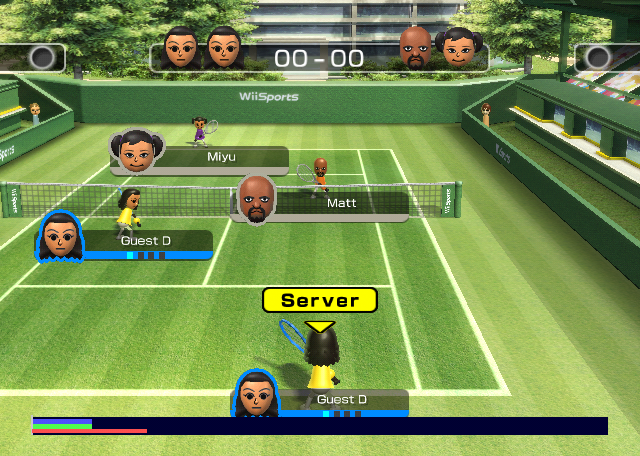
The game's code initializes an instance of the ProcessMeter from the EGG library, used by some first party Wii games. The green bar measures the CPU sending commands to the GPU, the blue one shows the GPU rendering from said commands, and the red one displays the total frame time.
In one of the initialization functions (RPSysSystem::setup0), the game deliberately hides the performance bar from the screen (at 0x80183b18 (US v1.1)). To show it, use one of these Gecko codes below:
Exception Handler


The NintendoWare exception handler is present in the Rev 0 versions of the game (i.e. the ones built prior to 2007). When the game crashes, press the following buttons (in order, from left to right) on the first Wii Remote, held vertically, to display it:
HOME, A, B, 1, 2, -, +
Use the D-Pad to scroll through the output. The button data above is located at the below virtual addresses.
JP Rev 0 |
US Rev 0 |
EU Rev 0 |
|---|---|---|
|
|
|
Debugging Functions
Build Dates#
Originally, Nintendo developed a prototype software which included several tech demos that tested the Wii Remote's capabilities. The tech demos were divided into 2 categories: sports games, which became part of Wii Sports, and family-oriented games, which became part of Wii Play.
(Source: Nintendo)
Included in the file timeStamp.txt at the root of the disc is a build date, alongside the internal name of the prototype software, "Pack Project". On the Wii Sports + Wii Sports Resort combo disc, this file is located with the rest of the game's files; e.g., on the European disc, in /EU/sys/sports.
JP |
JP Rev 1 |
NA |
NA Rev 1 |
EU |
EU Rev 1 |
KR |
TW |
NA (Sports + Resort) |
|---|---|---|---|---|---|---|---|---|
|
|
|
|
|
|
|
|
|
EU (Sports + Resort) |
||||||||
|
There are two different functions which were used to print the contents of timeStamp.txt to the screen on the title screen.

The function used to print the build date in Revision 0 prints the region, build type and the date and time in different lines.

The function used to print the build date in Revision 1 only prints the date and time in a single line.
JP Rev 0 |
JP Rev 1 |
US Rev 0 |
US Rev 1 |
EU Rev 0 |
EU Rev 1 |
|
|---|---|---|---|---|---|---|
Gecko Code |
|
|
|
|
|
|
Virtual address |
|
|
|
|
|
|
To enable this on bootup, either use the Gecko codes above, or enter the key combo mentioned in Wii Fit Plus' internal docs, "A, Up (D-Pad), 2, Down (D-Pad), B, 1, 1, B, Left (D-Pad), A and Right (D-Pad)" on a Wii Remote.
Bowling#
Pin Debug Displays#
Located at the following virtual addresses:
JP Rev 0 |
JP Rev 1 |
US Rev 0 |
US Rev 1 |
EU Rev 0 |
|---|---|---|---|---|
|
|
|
|
|
There exists a function that, for a given pin, may display its axes, its collision spheres, its vertices, and/or spheres which represent the pin's state, depending on the arguments given.
(Source: xUniverse1/GibHaltmannKill)
Collision Spheres#
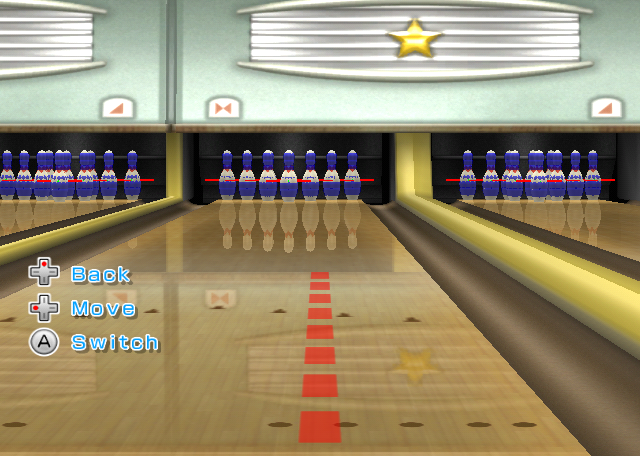
If the first boolean argument given is true, then the function will render blue spheres representing the pin's collision. The function will also display the pin's axes.
JP Rev 1 |
US Rev 0 |
US Rev 1 |
EU Rev 0 |
EU Rev 1 |
|
|---|---|---|---|---|---|
Standard, |
|
|
|
|
|
Power Throws |
|
|
|
|
|
To enable this, use the Gecko codes above.
Vertices#
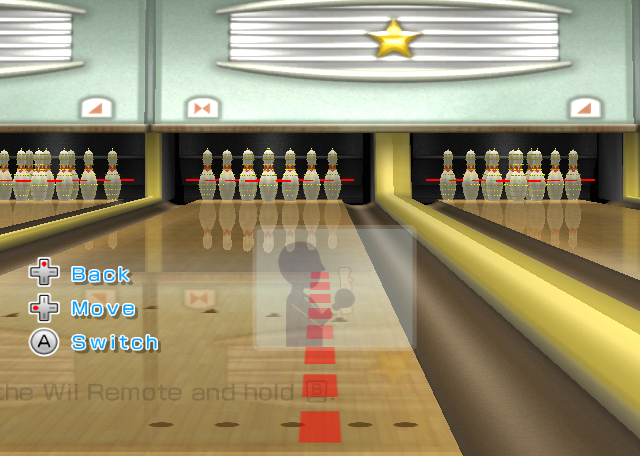
If the second boolean argument given is true, then the function will render yellow spheres representing the pin's vertices. The function will also display the pin's axes.
JP Rev 1 |
US Rev 0 |
US Rev 1 |
EU Rev 0 |
EU Rev 1 |
|
|---|---|---|---|---|---|
Standard, |
|
|
|
|
|
Power Throws |
|
|
|
|
|
To enable this, use the Gecko codes above.
Status Spheres#
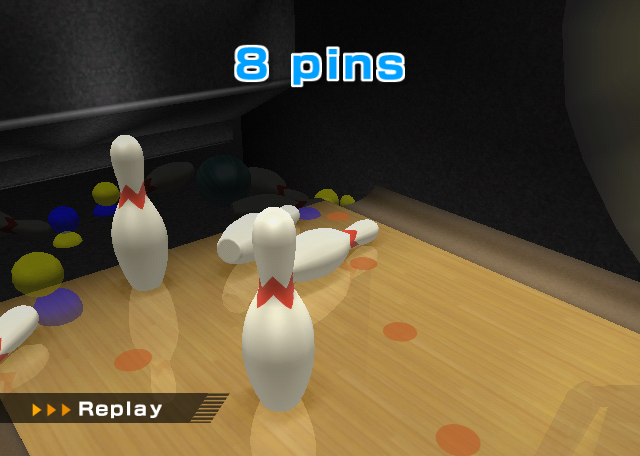
If the third boolean argument given is true, then, after the ball has stopped moving, the function will render blue spheres above the pins which aren't moving. In every game mode except for Power Throws, the function will also render yellow spheres above the pins which have been knocked down.
JP Rev 1 |
US Rev 0 |
US Rev 1 |
EU Rev 0 |
EU Rev 1 |
|
|---|---|---|---|---|---|
Standard, |
|
|
|
|
|
Power Throws |
|
|
|
|
|
To enable this, use the Gecko codes above.
Scene Status Displays#
Located at the following virtual addresses:
JP Rev 1 |
US Rev 0 |
US Rev 1 |
|---|---|---|
|
|
|
There exists a function that checks for three debug flags in the game's main bowling data structure, with each flag enabling a different part of the debug display.
"Try Again" Placeholder#
The function checks for one of the debug flags, and if the flag is set, it prints the string "トライアゲイン" to the screen.
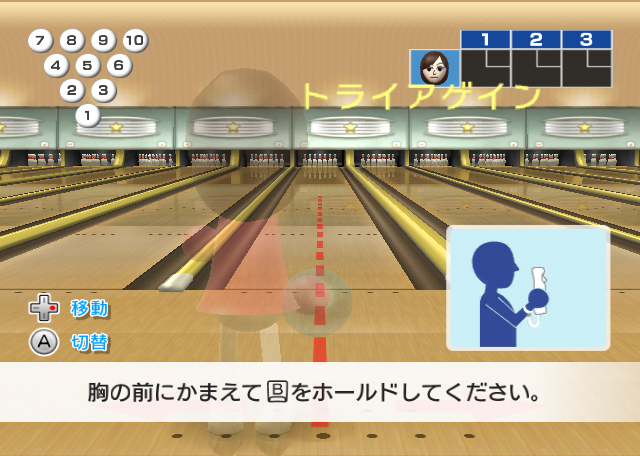
JP Rev 1 |
US Rev 0 |
US Rev 1 |
EU Rev 1 |
|---|---|---|---|
|
|
|
|
To enable this, use the Gecko codes above.
Score Display#
The other two debug flags checked by the function display the score for the minigames.
Gecko Code |
||
|---|---|---|
JP Rev 1 |
US Rev 0 |
US Rev 1 |
Power Throws |
|
|
Spin Control |
|
|
The top score is used for the Training game mode, while the bottom score is used for the Wii Fitness game mode (albeit the bottom score is based on the top score). The top score is updated every frame, while the bottom score is only calculated when the game ends, and the calculation is based on the top score.
To enable the score display, use the Gecko codes above.
Debug Graphs#
|
|
To do:
|
There is a function which, when its debug flag is set, draws many graphs to the screen.
JP v1.01 |
NA v1.01 |
EU v1.01 |
|
|---|---|---|---|
Gecko Code |
|
|
|
Virtual address |
|
|
|
This display was developed with widescreen in mind, as attempting to view this with a 4:3 aspect ratio results in much of the right edge of the display getting obscured from view. Because of this, these images were captured with a widescreen (16:9) aspect ratio.
The Gecko codes above enable the graphs.
Phase 1 Display#
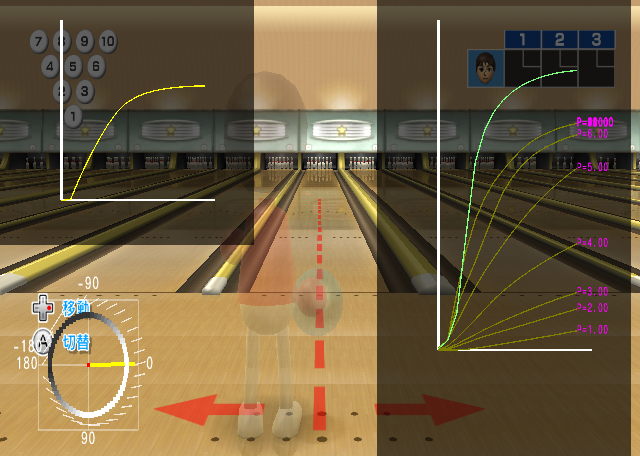
The graph is in its first phase when the Mii is still holding the ball.
Phase 2 Display#
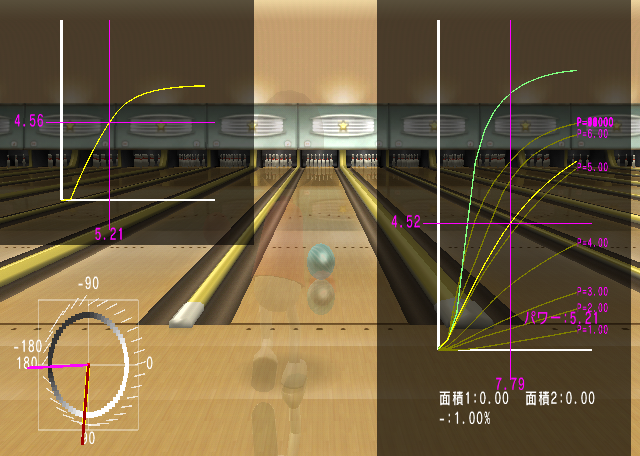
The graph transitions to its second phase when the Mii drops the ball, or at the start of a roll.
Phase 3 Display#
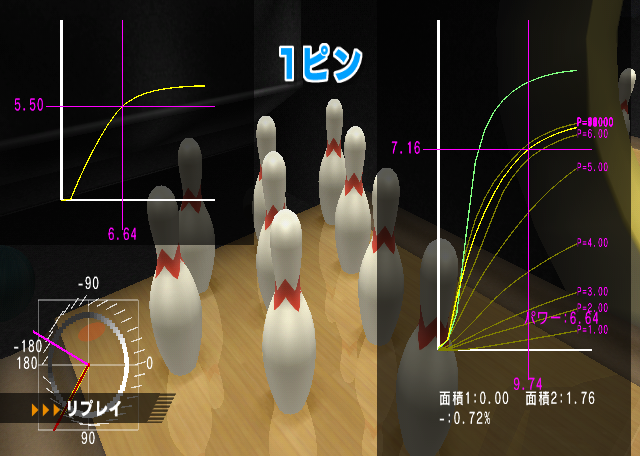
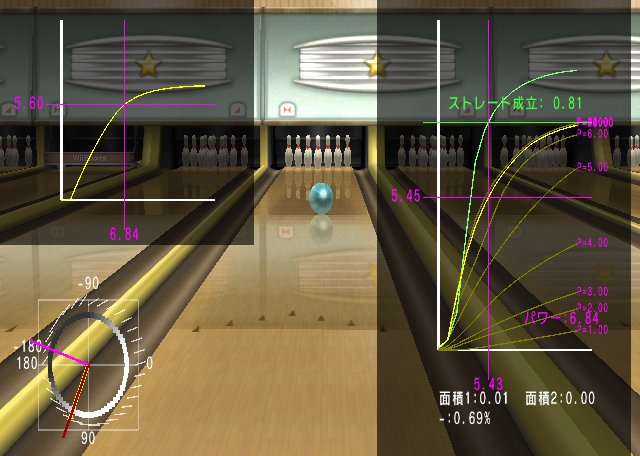
NPC Data Display#
The 6 Miis bowling in the neighboring lanes are referred to internally as "NPCs", and the DOL function at 80331654 (US v1.01 offset) displays information about them on-screen, presuming the debug flag it checks is set.
The NPCs have 6 states they can be in at any time, which describe the actions they will take on the lane: IDLE, WAIT_PREPARE_LINE, PREPARE, RUN, SEE, and BACK.
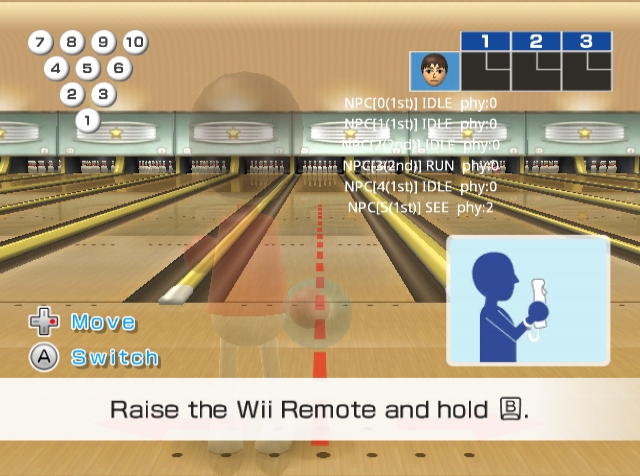
To enable this in the US v1.01 release of the game, change the byte at 0x32D717 in the DOL from 00 to 01 or use the gecko code below.
To enable this in the EU v1.01 release of the game, change the byte at 0x32D8E3 in the DOL from 00 to 01 or use the gecko code below.
{| class="wikitable" style="text-align: left;" ! !Region Free |- !Gecko Code |
F6000001 8000817F
93C10008 88030020
14000008 2C000001
E0000000 80008000
|}
(Gecko Codes: Boshi/BowserJrGamer)
Debug Menu#
|
|
To do: |
Bowling has a debug menu; some of the options available on menu may be disabled depending on the current game mode of Bowling.
Gecko Code |
||
|---|---|---|
JP v1.01 |
NA v1.01 |
EU v1.01 |
Standard |
|
|
Power Throws |
|
|
Spin Control |
|
|
Picking Up Spares |
|
|
To enable the debug menu, use the Gecko codes above.
(Source: xUniverse1/GibHaltmannKill)
Options#
Text |
Translation |
Effect |
|---|---|---|
試合 |
Game |
Starts the game with the given parameters (Only on Standard). |
ナギタオシ |
Power Throws |
Starts the game (Power Throws) with the given parameters (Only in Training). |
ゲートチャレンジ |
Gate Challenge |
Starts the game (Gate Challenge) with the given parameters (Only in Training). |
トライアル |
Trial |
Starts the game with the given parameters (Only in Training). |
デモカメラエディター: |
Demo camera editor. |
|
ステージ |
Stage |
Used to force playing on a specified round in any of the training modes Can be set to 1面から順に (from stage 1) or 1-20面から順に (stage 1-20) |
モード |
Mode |
Used on the training minigames Can be set to Training (トライアル, Trial) or Wii Fitness (ゲートチャレンジ, Gate Challenge) |
プレーヤー数 |
Number of players |
Can be set to 1人, 2人, 3人 or 4人 All added players are randomly selected from the saved Miis in the player's console (unless the user has previously selected all the Mii characters before playing). If the user only has one Mii saved on their system, all the players are set the exact same as P1's Mii. |
デバッグモード |
Debug mode |
Can be set to 無効 (disabled) or 有効 (enabled). When enabled, replays are no longer skipped automatically. |
強制ステージクリア |
Force Stage Clear |
Forces perfect stage clears/strikes regardless if any pin is knocked over or not. Can be set to 無効 (disabled) or 絶対クリア/絶対ストライク (always clear / strike) |
チャレンジの最終面 |
Final stage of the match |
How many innings it takes before ending the game Can be set to デフォルト(クリアシーケンスのデバッグ用)(default (used to debug clear sequence)) or 1-30(クリアシーケンスのデバッグ用) |
パッドによるカーブ方向判定 |
Decide curve direction with pad |
Something with using the D-Pad for curve adjustment, unknown. Can be set to 左 (left) or 右 (right) |
利き手1P |
Dominant hand for player 1 |
Sets the hand type of Player 1 Can be set to 左 (left) or 右 (right) |
利き手2P |
Dominant hand for player 2 |
Sets the hand type of Player 2 Can be set to 左 (left) or 右 (right) |
利き手3P |
Dominant hand for player 3 |
Sets the hand type of Player 3 Can be set to 左 (left) or 右 (right) |
利き手4P |
Dominant hand for player 4 |
Sets the hand type of Player 4 Can be set to 左 (left) or 右 (right) |
絶対スプリット |
Always split |
Setting the option to 有効 (enabled) will, for each Bowling frame, make the game think that after the first ball the pins will be in a split configuration (i.e. the number representing the score for the first ball will be encircled and every spare would be considered as a split spare), regardless of which pins were knocked down in the first ball. |
----------- |
----------- |
Crashes the game. |
Camera Editor#
|
|
To do: |
The fifth option in the menu is a camera editor; however the game doesn't have an interface that allows the player/user/debugger to change between the different cameras. It is only possible to open the camera editor in a minigame; attempting to open the camera editor in the standard main mode of Bowling causes the game to crash.

The following Gecko codes provide the user an interface of switching between different cameras (by using the D-Pad):
JP v1.01 |
NA v1.01 |
EU v1.01 |
|
|---|---|---|---|
Gecko Code |
|
|
|
(Source: xUniverse1/GibHaltmannKill)