
|
This game is defunct. |
Unite the Deeqs was a virtual world platformer made to promote Dairy Queen's kids meals. The game launched with Chapter 1, also titled "Unite the Deeqs", with Chapter 2 releasing later in 2008. Unfortunately, no further chapters were released, leaving the story unfinished, and the game was abruptly taken down in mid-2013.
The currently preserved version is from April 30, 2008, and only features the first chapter; the content documented here takes in consideration that version of the game.
Debugging Parameters#
The game's configuration script, found within scripts\dq.Config of Shell.1.swf, contains several debugging parameters. These will be sorted by the order they appear in.
(Source: Nimbus T)
infiniteFuel#
Setting this parameter to true will make the player never run out of fuel while flying.
showPhysics#
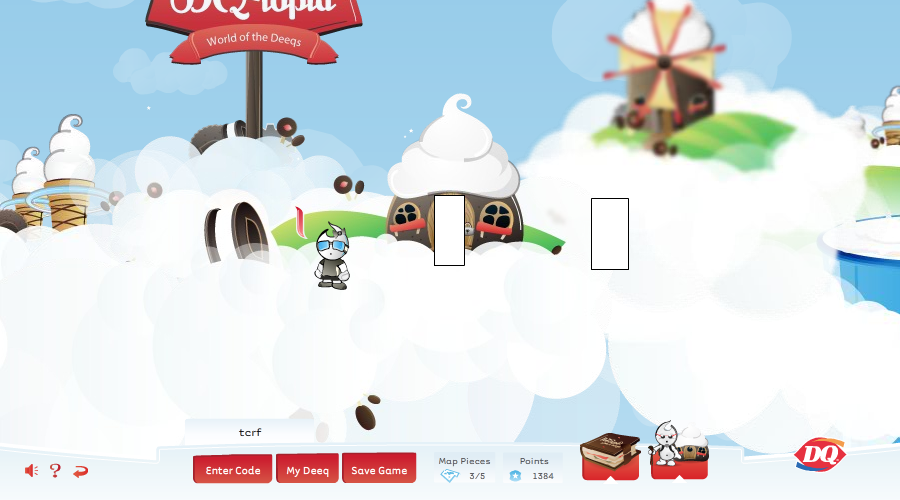
Changes all interactive objects' sprites to their hitboxes. The player's sprites are relocated to the center of whatever map they are in.
showHintBoundries#
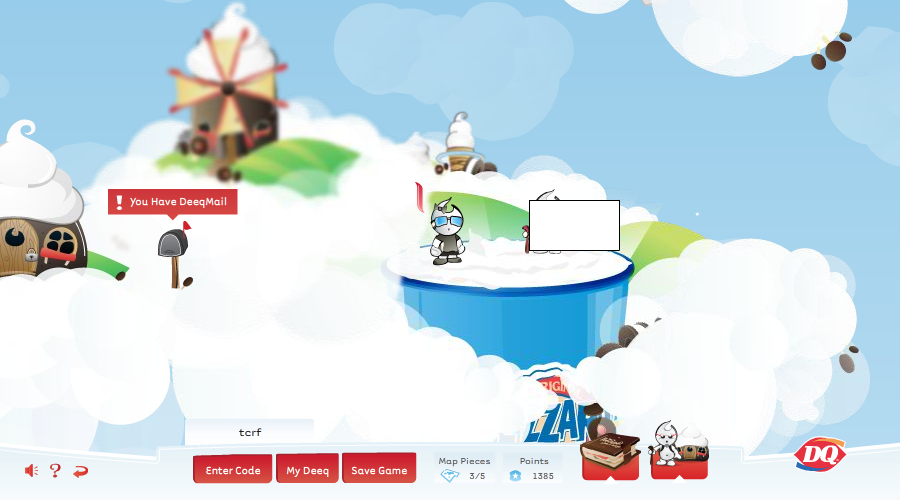
Displays the hitboxes of the hints that appear throughout the game.
DEBUG_MODE#
Setting this parameter to true will make several changes to the game:
- Upon loading the game, the player will automatically spawn at the main hub, without entering the profile selection screen; the first save slot is automatically chosen.
- The game starts muted, though the icon on the bottom-left corner of the screen indicates otherwise.
- All four trivia questions are answered.
- The following flags are toggled on, while the others are off:
- The player has completed the tutorial level.
- The player has talked to Cloudkeeper after completing the tutorial.
- The player has completed Grilla's level, and obtained his map piece.
- The player has completed Chilly's level, and obtained her map piece.
- The player has completed Blender's level, and obtained his map piece.
- The aforementioned infiniteFuel parameter will be set to true, independent of the previous value set by the configuration script.
According to scripts\dq.GameEngine, something would have happened if the player pressed W while this parameter was active, though the code has since been emptied out.
showPlayerDebug#
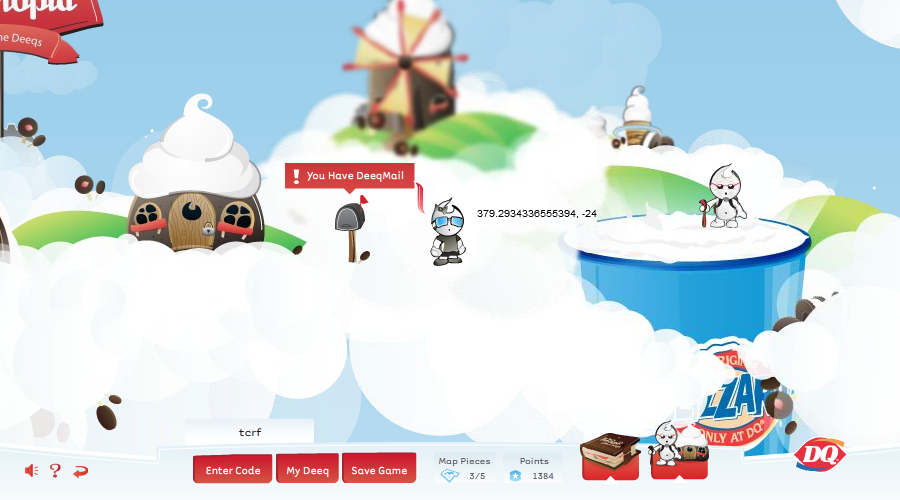
Displays the player character's current X and Y coordinates on the top right corner of their sprite.
SHOW_DEBUG#
This parameter no longer works, as no other scripts make reference to it.
Sound Effect Test/999 Points Cheat#
While in the Chapter 1 hub, type the Konami Code (Up, Up, Down, Down, Left, Right, Left, Right, B, A) then press any key six times. The player's points counter will change to 999, and all of the game's sound effects will be played in alphabetical order. If he's visible, Grilla will eat a hamburger upon activation; this animation is otherwise not seen. Curiously, the code for this cheat, found in scripts\dq.GameEngine, references a specific parameter only present in the script file of the Chapter 1 hub level; it will not work on the main hub, despite Grilla also being there.

if(_recentKeys.getAt(0) == 38 && _recentKeys.getAt(1) == 38 && _recentKeys.getAt(2) == 40 && _recentKeys.getAt(3) == 40 && _recentKeys.getAt(4) == 37 && _recentKeys.getAt(5) == 39 && _recentKeys.getAt(6) == 37 && _recentKeys.getAt(7) == 39 && _recentKeys.getAt(8) == 66 && _recentKeys.getAt(9) == 65)
{
   if(_level.characters.blaze)
   {
      _level.characters.blaze.frames.gotoAndPlay(76);
   }
   App.getInstance().gameStatus.points = 999;
   new SoundEffectsTester();
}
(Source: w)
Unused Screens/Pop-Ups#
The following graphics are associated with screens and pop-ups that never appear during gameplay.
(Source: Nimbus T)
Ready Screen#
Sprite 730; dq.screens.ReadyScreen depicts an unused screen showing the text "It's Time!", an image of Cloudkeeper, and a guide for the game's controls. It could have been used in earlier versions of the game upon loading a profile. Furthermore, this screen has associated code (scripts\dq.screens.ReadyScreen), but it doesn't ever appear to be called.

package dq.screens
{
   import caurina.transitions.Tweener;
   import com.space150.fsm.IState;
   import flash.events.Event;
   import flash.utils.setTimeout;

   [Embed(source="/_assets/assets.swf", symbol="symbol730")]
   public class ReadyScreen extends AbstractScreen implements IState
   {

      public function ReadyScreen(param1:* = null)
      {
         super();
         graphics.beginFill(16777215,1);
         graphics.drawRect(0,0,900,460);
         graphics.beginFill(10066329,1);
         graphics.drawCircle(450,230,20);
      }

      public function dispose() : *
      {
         this.parent.removeChild(this);
      }

      override public function shutdown() : void
      {
         trace("ReadyScreen#shutdown");
         Tweener.addTween(this,{
            "alpha":0,
            "time":2,
            "transition":"easeoutexpo",
            "onComplete":function():*
            {
               dispose();
            }
         });
      }

      override public function startup() : void
      {
         alpha = 0;
         trace("showing ready screen");
         Tweener.addTween(this,{
            "alpha":1,
            "time":1,
            "transition":"easeoutexpo",
            "onComplete":finish
         });
      }

      private function finish() : *
      {
         setTimeout(function():*
         {
            trace("closing ready screen");
            dispatchEvent(new Event("AnimationEvent.ANIMATE_OUT"));
         },2000);
      }
   }
}
Congratulations Dialogue#
Sprite 602; dq.dialogs.CongratulationsDialog could have been used in earlier versions of the game upon obtaining the four map pieces. This pop-up also has associated code (scripts\dq.dialogs.CongratulationsDialog), but it doesn't ever appear to be called either.
 |
Congratulations! |
package dq.dialogs
{
   import dq.App;
   import dq.Config;
   import flash.display.MovieClip;
   import flash.events.MouseEvent;
   import flash.net.URLRequest;
   import flash.net.navigateToURL;

   public class CongratulationsDialog extends AbstractDialog
   {


      public var play_again:MovieClip;

      public var register:MovieClip;

      public function CongratulationsDialog()
      {
         super();
         play_again.visible = true;
         dialogManager.alignToCenter(this);
         register.addEventListener(MouseEvent.CLICK,onRegister,false,0,true);
         register.buttonMode = true;
         play_again.addEventListener(MouseEvent.CLICK,playAgain,false,0,true);
         play_again.buttonMode = true;
      }

      override public function dispose() : *
      {
      }

      private function playAgain(param1:*) : *
      {
         dialogManager.hideDialog(this);
         App.getInstance().resetApp();
      }

      private function onRegister(param1:*) : *
      {
         navigateToURL(new URLRequest(Config.url_for.register),"_blank");
         close();
      }

      public function close() : *
      {
         register.removeEventListener(MouseEvent.CLICK,onRegister);
         play_again.removeEventListener(MouseEvent.CLICK,playAgain);
         dialogManager.hideDialog(this);
      }
   }
}
Unused Character Animations#
Most of the game's characters, playable and non-playable alike, have animations that go unused, either partially or completely.
(Source: Nimbus T)
Player#
The player character has animations associated with unused states, as well as a partially unused animation. These states are referenced by the player's script file, but there's no code to properly display them. The same Deeq set is used for all renders for consistency (Girl / Grey / White).
pointing

The player character pointing at something. Uses Sprite 1720; App_fla.PlayerSprites_615.
sidelaughing

The player character not facing the camera and laughing. Uses Sprite 1739; App_fla.PlayerSprites_643.
sidetalking

The player character not facing the camera and talking. Uses Sprite 1740; App_fla.PlayerSprites_644.
laughing

The player character facing the camera and laughing. Uses Sprite 1788; App_fla.PlayerSprites_645.
talking

The player character facing the camera and talking. Uses Sprite 1789; App_fla.PlayerSprites_655.
stopping

While this animation is not entirely unused (releasing left/right while on a regular surface), the game's physics make it impossible for the other frames to be seen by normal means.
NPCs#
Chilly (Sprite 1152; dq.gameobjects.chilly), Blender (Sprite 1135; dq.gameobjects.blender), and Cloudkeeper (Sprite 2299; dq.gameobjects.cloudkeeper) also have unseen animations, which, by extension, use graphics that are otherwise not used either. For the render of Blender's animation, the framerate has been halved.
 |
Chilly raises her cup then points to the right... |
 |
...while Blender uses his gadget. |
 |
Cloudkeeper's three unused animations all have descriptive labels. This one is labeled jump... |
 |
...and this one point. |
 |
speak is a combination of the previous two animations with a little more pointing. |
Unused Objects#
The game's data contains several unused objects. They have complete graphics and associated scripts, but are not referenced by any level.
(Source: Nimbus T)
Signs#
Of the six sign objects in the game's data, two are unused.
sign2
Depicts a lightning bolt. Possibly meant to be used in future chapters?
Sprite 25; dq.gameobjects.sign2

scripts\dq.gameobjects.AbstractGameObject
         "sign2":{
            "width":53,
            "height":51
         },
scripts\dq.gameobjects.sign2
package dq.gameobjects
{
   import flash.display.MovieClip;

   [Embed(source="/_assets/assets.swf", symbol="symbol25")]
   public dynamic class sign2 extends MovieClip
   {

      public function sign2()
      {
         super();
      }
   }
}
sign4
Depicts a swaying leaf. Possibly meant to be used in Blender's level?
Sprite 19; dq.gameobjects.sign4

scripts\dq.gameobjects.AbstractGameObject
         "sign4":{
            "width":53,
            "height":51
         },
scripts\dq.gameobjects.sign4
package dq.gameobjects
{
   import flash.display.MovieClip;

   [Embed(source="/_assets/assets.swf", symbol="symbol19")]
   public dynamic class sign4 extends MovieClip
   {

      public function sign4()
      {
         super();
      }
   }
}Trampolines#
Two trampoline objects, labeled trampolineLarge and trampolineSmall, respectively.
trampolineLarge
Sprite 371; dq.gameobjects.trampolineLarge
{| | |
| |}
|}
scripts\dq.gameobjects.AbstractGameObject
         "trampolineLarge":{
            "width":224,
            "height":35
         },
scripts\dq.gameobjects.trampolineLarge
package dq.gameobjects
{
   import flash.display.MovieClip;

   [Embed(source="/_assets/assets.swf", symbol="symbol371")]
   public dynamic class trampolineLarge extends MovieClip
   {

      public function trampolineLarge()
      {
         super();
         addFrameScript(0,frame1);
      }

      internal function frame1() : *
      {
         stop();
      }
   }
}
trampolineSmall
Sprite 376; dq.gameobjects.trampolineSmall
{| | |
| |}
|}
scripts\dq.gameobjects.AbstractGameObject
         "trampolineSmall":{
            "width":135,
            "height":35
         },
scripts\dq.gameobjects.trampolineSmall
package dq.gameobjects
{
   import flash.display.MovieClip;

   [Embed(source="/_assets/assets.swf", symbol="symbol376")]
   public dynamic class trampolineSmall extends MovieClip
   {

      public function trampolineSmall()
      {
         super();
         addFrameScript(0,frame1);
      }

      internal function frame1() : *
      {
         stop();
      }
   }
}
Lever Switch#
There are two lever switch objects, a floating one (leverSwitchFloating) and a grounded one (leverSwitchGround), though only the latter is used.
Sprite 381; dq.gameobjects.leverSwitchFloating
{| | |
| |}
|}
scripts\dq.gameobjects.AbstractGameObject
         "leverSwitchFloating":{
            "width":86,
            "height":73,
            "actionSound":"dq.sounds.switch"
         },
scripts\dq.gameobjects.leverSwitchFloating
package dq.gameobjects
{
   import flash.display.MovieClip;

   [Embed(source="/_assets/assets.swf", symbol="symbol381")]
   public dynamic class leverSwitchFloating extends MovieClip
   {

      public function leverSwitchFloating()
      {
         super();
         addFrameScript(0,frame1);
      }

      internal function frame1() : *
      {
         stop();
      }
   }
}
Bubble Switches#
While there are four variants of the bubble switch object, each in different colors (red, blue, green, and yellow), only the red one is ever used.
bubbleSwitchYellow
Sprite 391; dq.gameobjects.bubbleSwitchYellow
{| | |
| |}
|}
scripts\dq.gameobjects.AbstractGameObject
         "bubbleSwitchYellow":{
            "width":86,
            "height":29
         },
scripts\dq.gameobjects.bubbleSwitchYellow
package dq.gameobjects
{
   import flash.display.MovieClip;

   [Embed(source="/_assets/assets.swf", symbol="symbol391")]
   public dynamic class bubbleSwitchYellow extends MovieClip
   {

      public function bubbleSwitchYellow()
      {
         super();
         addFrameScript(0,frame1);
      }

      internal function frame1() : *
      {
         stop();
      }
   }
}
bubbleSwitchGreen
Sprite 396; dq.gameobjects.bubbleSwitchGreen
{| | |
| |}
|}
scripts\dq.gameobjects.AbstractGameObject
         "bubbleSwitchGreen":{
            "width":86,
            "height":29
         },
scripts\dq.gameobjects.bubbleSwitchGreen
package dq.gameobjects
{
   import flash.display.MovieClip;

   [Embed(source="/_assets/assets.swf", symbol="symbol396")]
   public dynamic class bubbleSwitchGreen extends MovieClip
   {

      public function bubbleSwitchGreen()
      {
         super();
         addFrameScript(0,frame1);
      }

      internal function frame1() : *
      {
         stop();
      }
   }
}
bubbleSwitchBlue
Sprite 401; dq.gameobjects.bubbleSwitchBlue
{| | |
| |}
|}
scripts\dq.gameobjects.AbstractGameObject
         "bubbleSwitchBlue":{
            "width":86,
            "height":13
         },
scripts\dq.gameobjects.bubbleSwitchBlue
package dq.gameobjects
{
   import flash.display.MovieClip;

   [Embed(source="/_assets/assets.swf", symbol="symbol401")]
   public dynamic class bubbleSwitchBlue extends MovieClip
   {

      public function bubbleSwitchBlue()
      {
         super();
         addFrameScript(0,frame1);
      }

      internal function frame1() : *
      {
         stop();
      }
   }
}
Build Date#
Also within scripts\dq.Config is a parameter labeled TIMESTAMP, which contains a Unix timestamp and is a possible build date. In the currently preserved version, the date corresponds to April 30, 2008, 17:39:08 in UTC time.
Furthermore, the Shell.swf archive that was preserved in Wayback Machine prior to the game's shutdown has a timestamp of October 14, 2008, 14:55:31, but since the other files were not preserved, that specific version cannot be played.
(Source: w)
Internal Names#
In the game's scripts and sprite names, Grilla is consistently referred to under the earlier name "Blaze".