 This article has a talk page!

|
This page contains no introduction. |

|
To do: |
Developer Mode#
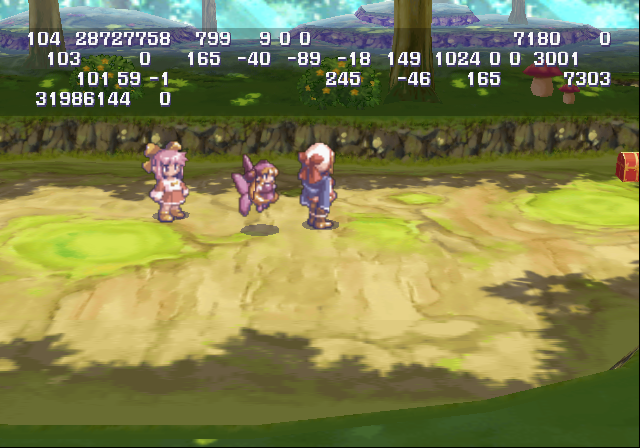
While this mode is active, you can display debug info, or a debug menu on-screen at anytime. This allows you to warp to stages, view demos, edit game related flags, and many more. Apply the code below to activate this mode.
SLPS-20066 Codes:

Master Code (Needed for an actual PlayStation 2)
90107C60 0C041EC0

Enable Developer Mode
2019075C 00000001
20190758 00000001
D031832A 0000FFFB
102306D0 00000001
D031832A 0000FFFD
102306D0 00000000
With the above code active, pressing L3 on controller one will bring up some debug info. Pressing L3 / R3 on controller two will open / close the debug menu.
Known controller one inputs:
- L3 to bring up debug info. This only works when not at the main menu.
- Start to pause the game.
- Select to start a battle or to end a battle.
- L1 / L2 change enemy encounters. Increase / decrease.
- R1 / R2 change camera angles.
Known controller two inputs:
- R3 open debug menu.
- L3 close debug menu.
- D-Pad / Left Stick moves through the menu.
- Right / Left will toggle the option on or off you have highlighted.
- R1 / R2 zoom in / out.
- Circle to enter a option.
- Select opens a flag editor menu. It is unclear what these all do.
(Source: Original TCRF research)
Debug Menu#
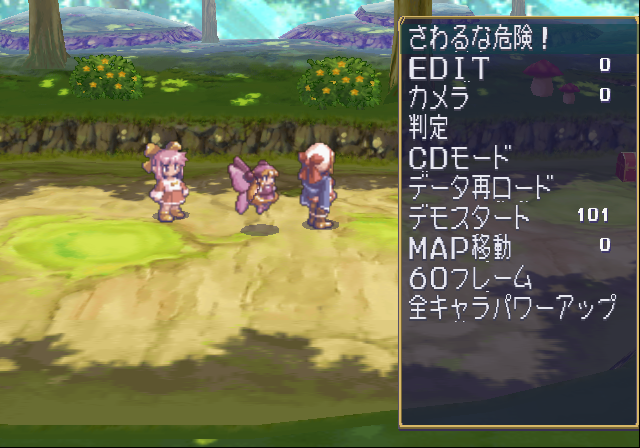
Pressing R3 on controller two will open this debug menu.
Text |
Translation |
Effect |
|---|---|---|
さわるな危険! |
Danger! Do not touch |
Contains memory card format options. Don't touch. |
EDIT |
Edit |
Presumably, this allows you to edit maps, however it is unclear if it works at all. |
カメラ |
Camera |
Presumably, this allows you to edit camera settings. It is unclear if it works at all. |
判定 |
Decide |
This doesn't appear to do anything. |
モード |
Mode |
Sets the drive to load data from. This probably won't work without a development kit. |
データ再ロード |
Reload Data |
Reloads data from a selected drive. |
デモスタート |
Demo Start |
Starts playing a selected cutscene. |
MAP移動 |
Map Movement |
Sends you to a map. |
60フレーム |
60 Frames |
Sets 30, or 60 frames-per-second. You cannot change it to 30 for some reason. |
全キャラパワーアップ |
All Characters Level Up |
Levels up your party. |
|
The Marl Kingdom series | |
|---|---|
|
PlayStation |
Rhapsody: A Musical Adventure • Little Princess: Maru Oukoku no Ningyou Hime 2 |
|
PlayStation 2 |
|
|
Nintendo DS |
|