 This article has a talk page!
Now under the ownership of FromSoftware (with some help from Sega), Tenchu: Fatal Shadows is just more stealth with ninjas, though this time, you play as one of two kunoichi (female ninja).
Debug Menus#
Several debug menus can be re-enabled with the below code. These include sound tests, model viewers, and a movie player.
USA code:

Enable Debug Menus
D05BD242 00007FFF
0016ED08 0000000C
D05BD242 0000FEFF
0016ED08 0000000A
D05BD242 0000FBFF
0016ED08 0000000B
D05BD242 0000FDFF
0016ED08 0000000D
D05BD242 0000F7FF
0016ED08 0000000F
D05BD242 0000DFFF
0016ED08 00000012
D05BD242 0000FFFF
0016ED08 00000004
Press the following button combinations over the Tutorial main menu option:
- Square + X for sound test menu.
- L2 + X for model viewer.
- L1 + X for unknown debug option (doesn't appear to work).
- R2 + X for level select (doesn't appear to work).
- R1 + X for movie player.
- Circle + X for level object viewer.
(Source: Original TCRF research)
Sound Test#

This allows you to play voices, sounds, and music here.
Model Viewer#


This allows you to view all models and animations in the game.
Unknown Menu#

It's not clear what this could have been. It does not work when selecting anything.
Level Select#

Unfortunately, nothing appears to work here.
Movie Player#

This allows you to play all of the pre-rendered movies in the game. The TGS 2003 movie is no longer present on the disc.
Level Object Viewer#

This allows you to view various models from levels. This only appears to work for cutscenes.
Debug Display#
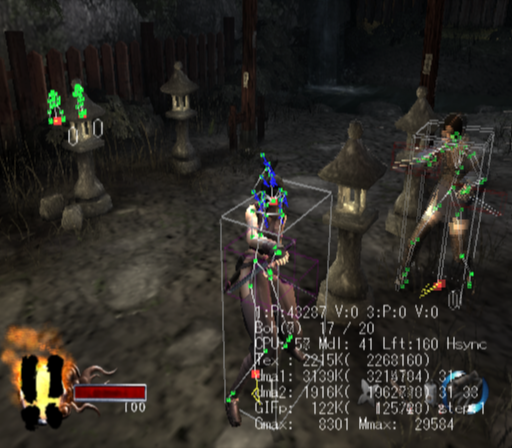
Apply the below code to enable various debug information on-screen.
USA code:

Enable Debug Displays
204777E8 xxxxxxxx

xxxxxxxx =
00000008 = model collision ranges
00000010 = debug displays
00000018 = above two combined
01000000 = disable wall rendering
01000008 = disable wall rendering + model collision ranges
01000018 = disable wall rendering + model collision ranges + debug displays
02000000 = player invisible
02000008 = player invisible + disable wall rendering + model collision ranges
02000018 = player invisible + disable wall rendering + model collision ranges + debug displays
03000000 = disable wall rendering
03000008 = disable wall rendering + player invisible + disable wall rendering + model collision ranges
03000018 = disable wall rendering + player invisible + disable wall rendering + model collision ranges + debug displays
00000100 = debug bones 1
00000200 = debug bones 2
00000300 = debug bones 3
00000400 = debug bones 4
F0FFFFFF = Everything (except disable wall rendering)
FFFFFFFF = Everything
(Source: Original TCRF research)
|
The Tenchu series | |
|---|---|
|
PlayStation |
|
|
PlayStation 2 |
|