This is a sub-page of Super Mario 64 (Nintendo 64)/Debug Content.

|
To do: |
Muchos menús y herramientas debug siguen en el juego final. Estos se pueden activar con hacks o códigos de GameShark. por que algunos caracteres en la fuente usada por el texto debug fueron sobreescritas para Norte America, jugadores que usen características debug verán que algunas letras no se muestran bien.
Visualización Debug clásica#
Este menú debug fue de los primeros que se encontraron en el juego con el uso de un GameShark. muestra información de el Angulo, velocidad y acción de Mario, también información de memoria.
Access#

To enable the classic debug display, enter the appropriate Gameshark code for your version of the game.
Japan |
USA |
Europe |
Japan (Shindou) |
iQue |
|---|---|---|---|---|
|
|
|
|
|
Items#
Label |
Meaning |
Description |
|---|---|---|
ANG |
Angle |
The steepness of the floor Mario is standing on. |
SPD |
Speed |
Mario's current speed. |
STA |
State |
Mario's current action (in hex). Shows only the 9 least significant bits of a 32-bit value. |
MEM |
Memory |
Current RAM usage. |
BUF |
Buffer |
Size of the display list buffer. |
Complex Debug Display#
This more comprehensive debug display depicts everything from map information to the current number of loaded objects.
|
|
To do: |
Access#

To enable the complex debug display, enter the appropriate Gameshark code for your version of the game.
Japan |
USA |
Europe |
Japan (Shindou) |
iQue |
|---|---|---|---|---|
|
|
|
|
|
Options#
D-Right - Map Info#
Press D-Right to display the "MAPINFO" screen.
Option |
Meaning |
Description |
Notes |
|---|---|---|---|
AREA |
Area |
What cell of the collision grid Mario is in. |
|
WX |
World X |
Mario's current X coordinate. |
|
WY |
World Y |
Mario's current Y coordinate. |
|
WZ |
World Z |
Mario's current Z coordinate. |
|
BGY |
Boundrary Ground Y |
Y coordinate of the ground below Mario. |
|
ANGY |
Angle Y |
Y angle of the ground below Mario. |
|
BGCODE |
Boundrary Ground Code |
Type of the triangle below Mario. |
Terrain types can denote slipperyness, camera mode, special properties (sand, snow, wind, water flow), special triangles (painting entrances) |
BGSTATUS |
Boundrary Ground Status |
Status bits of triangle below Mario. |
1 means the triangle is part of an object, 2 means the camera won't collide with this triangle. 3 means both apply. |
BGAREA |
Boundrary Ground Area |
Which room the floor triangle belongs to. |
In the castle, Hazy Maze Cave and Big Boo's haunt the area is split up into rooms which are defined by this property of triangles. |
DPRINT OVER |
Debug Print Overflow |
Appears when text doesn't fit on the screen anymore. |
|
WATER |
Water level |
Y coordinate of surface of water if Mario is standing or swimming in it |
Only appears when you ensure DPRINT OVER doesn't happen |
OBJ |
Objects |
Number of objects currently loaded. |
Only appears when you ensure DPRINT OVER doesn't happen |
D-Down - Stage Info#
Press D-Down to display the "STAGEINFO" screen.
Option |
Meaning |
Description |
Notes |
|---|---|---|---|
STAGE PARAM |
Stage Parameter |
At what time you entered Tick-Tock Clock. |
0 means that the long hand was pointing to 3, resulting in slow time; 1 means that the long hand was pointing to 9, resulting in fast time; 2 means that the long hand was pointing to 6, resulting in things moving at random; 3 means that the long hand was pointing to 12, resulting in a still stage. |
OBJ |
Objects |
Number of objects currently loaded. |
D-Left - Effect Info#
Press D-Left to display the "EFFECTINFO" screen.
Option |
Meaning |
Description |
Notes |
|---|---|---|---|
A |
? |
Currently unknown. |
Value does not seem to change. |
A0 |
? |
Currently unknown. |
Value does not seem to change. |
A1 |
? |
Currently unknown. |
Value does not seem to change. |
A2 |
? |
Currently unknown. |
Value does not seem to change. |
A3 |
? |
Currently unknown. |
Value does not seem to change. |
A4 |
? |
Currently unknown. |
Value does not seem to change. |
A5 |
? |
Currently unknown. |
Value does not seem to change. |
A6 |
? |
Currently unknown. |
Value does not seem to change. |
A7 |
? |
Currently unknown. |
Value does not seem to change. |
OBJ |
Objects |
Number of objects currently loaded. |
D-Up - Check Info#
Press D-Up to display the "CHECKINFO" screen. This screen shows info related to collision checking.
Option |
Meaning |
Description |
Notes |
|---|---|---|---|
AREA |
Area |
What cell of the collision grid Mario is in. |
|
DG |
Data Ground? |
Amount of floor triangle checks / such triangles in Mario's area. |
Two columns |
DW |
Data Wall? |
Amount of wall triangle checks / such triangles in Mario's area. |
|
DR |
Data Roof? |
Amount of ceiling triangle checks / such triangles in Mario's area. |
|
LISTAL |
List Area Length? |
Amount of triangle nodes loaded. |
|
STATBG |
Static Boundraries |
Amount of level triangles loaded. |
|
MOVEBG |
Moving Boundraries |
Amount of object triangles loaded. |
|
NULLBG |
Null Background |
How often a floor-check couldn't find a triangle this frame. |
|
OBJ |
Objects |
Number of objects currently loaded. |
L - Enemy Info#
Press L to display the "ENEMYINFO" screen.
Option |
Meaning |
Description |
Notes |
|---|---|---|---|
B |
? |
Currently unknown. |
Value does not seem to change. |
B0 |
? |
Currently unknown. |
Value does not seem to change. |
B1 |
? |
Currently unknown. |
Value does not seem to change. |
B2 |
? |
Currently unknown. |
Value does not seem to change. |
B3 |
? |
Currently unknown. |
Value does not seem to change. |
B4 |
? |
Currently unknown. |
Value does not seem to change. |
B5 |
? |
Currently unknown. |
Value does not seem to change. |
B6 |
? |
Currently unknown. |
Value does not seem to change. |
B7 |
? |
Currently unknown. |
Value does not seem to change. |
OBJ |
Objects |
Number of objects currently loaded. |
Debug Resource Meter#

This function causes coloured bars to appear along the bottom of the screen, which serve as a visual representation of the time different threads take. The bottom four bars are for reference and each mark 1/60 of a second. On top, the time of the audio thread (red), game logic thread (yellow) and video thread (orange) are plotted. When the top bars reach the orange reference bar, processing the frame took longer than 1/30 of a second and a lag frame is introduced. A little red bar appears in the middle whenever this happens.
Japan |
USA |
Europe |
Japan (Shindou) |
iQue |
|---|---|---|---|---|
|
|
|
|
|
Debug Spawn#
This function causes various objects to spawn that alter Mario's movement. Press the D-Pad buttons to spawn either nothing, a normal Koopa Shell, a water Koopa Shell, or a Crazy Box. Don't try to use it inside the castle, though, or the game might crash.
Japan |
USA |
Europe |
Japan (Shindou) |
iQue |
|---|---|---|---|---|
|
|
|
|
|
Free Movement Mode#
|
|
To do: |
This function enables a free-movement mode that lets Mario zoom about freely, though not pass through obstacles because floor checks and wall checks are still done. When holding B, you go fast enough to clip through the hitboxes though.
Controls:
- D-Down+Z: Enable free-movement mode.
- Joystick: Move Mario horizontally.
- D-Up: Move Mario up.
- D-Down: Move Mario down.
- B: Multiply movement speed by 4.
- L: Multiply movement speed by 0.01.
- A: Exit free-movement mode.
Japan |
USA |
Europe |
Japan (Shindou) |
|---|---|---|---|
|
|
(Source: dudaw)
Old Debug Display#
|
|
To do:
|
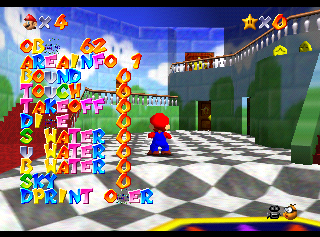
An old, debug display can be seen here. It was meant to be used for object movement flags. For the debug display to function it needs to be attached to an object. With the code on, press the GS Button while in game to enable it. Don't press it at the main menus.
The text means as follows
- Bound: Object has landed
- Touch: Object is on the ground
- Takeoff: Object has left the ground
- Dive: Object has entered water.
- S Water: Object is moving at the water's surface
- U Water: Object is moving below the water's surface
- B Water: Object is moving on the ground in water.
- Sky: Object is moving in the air.
- Out Scope: Removed movement flag, unknown what this was for, probably would have been used when an object has either unloaded or is out of the camera's view.
If you're using Project 64 for this code, it will only work on 2.0 or higher.
USA |
|---|
|
(Source: Punk7890)
Level Select#
Access#
Japan |
USA |
Europe |
Japan (Shindou) |
iQue |
|---|---|---|---|---|
|
|
|
|
|
Options#

This level select features an early version of the title screen. When enabled, it replaces the file select screen. The courses are listed in the order that their data appears in the game's memory.
When a level is selected, Mario will automatically be sent to the first Star, bypassing the Star selection screen. Exiting a course via Star collection, death, or the pause menu will bring you back to the level select screen. Attempting to access one of the removed entries causes the game to reset.
Controls:
- A: Scroll forward by 1.
- B: Scroll backward by 1.
- D-Up: Scroll forward by 1.
- D-Down: Scroll backward by 1.
- D-Right: Scroll forward by 10.
- D-Left: Scroll backward by 10.
- Start: Enter level.
- Z + C-Left + C-right + Start: Reboot game without level select
No. |
Name |
Literal Translation |
Final Location |
|---|---|---|---|
1 |
none |
- |
none |
2 |
none |
- |
none |
3 |
none |
- |
none |
4 |
TERESA OBAKE |
Boo Apparition |
Big Boo's Haunt |
5 |
YYAMA1 % YSLD1 |
Snow Mountain 1 & Snow Slide 1 |
Cool, Cool Mountain |
6 |
SELECT ROOM |
Select Room |
Inside Peach's Castle |
7 |
HORROR DUNGEON |
Horror Dungeon |
Hazy Maze Cave |
8 |
SABAKU % PYRMD |
Desert & Pyramid |
Shifting Sand Land |
9 |
BATTLE FIELD |
Battlefield |
Bob-omb Battlefield |
10 |
YUKIYAMA2 |
Snow Mountain 2 |
Snowman's Land |
11 |
POOL KAI |
Pool Stage |
Wet-Dry World |
12 |
WTDG % TINBOUTU |
Water Dungeon & Submersion |
Jolly Roger Bay |
13 |
BIG WORLD |
Big World |
Tiny-Huge Island |
14 |
CLOCK TOWER |
Clock Tower |
Tick Tock Clock |
15 |
RAINBOW CRUISE |
Rainbow Cruise |
Rainbow Ride |
16 |
MAIN MAP |
Main Map |
Outside the Castle |
17 |
EXT1 YOKO SCRL |
Extra 1 - Side-Scroller |
Bowser in the Dark World |
18 |
EXT7 HORI MINI |
Extra 7 - Moat (Mini) |
Vanish Cap Under the Moat |
19 |
EXT2 TIKA LAVA |
Extra 2 - Basement Lava |
Bowser in the Fire Sea |
20 |
EXT9 SUISOU |
Extra 9 - Fish Tank |
The Secret Aquarium |
21 |
EXT3 HEAVEN |
Extra 3 - Heaven |
Bowser in the Sky |
22 |
FIREB1 % INVLC |
Fire Bubble & In the Volcano |
Lethal Lava Land |
23 |
WATER LAND |
Water Land |
Dire, Dire Docks |
24 |
MOUNTAIN |
Mountain |
Whomp's Fortress |
25 |
ENDING |
Ending |
"The End" Image |
26 |
URANIWA |
Back Garden |
Castle Courtyard |
27 |
EXT4 MINI SLID |
Extra 4 - Mini Slider |
The Princess's Secret Slide |
28 |
IN THE FALL |
In the Fall |
Cavern of the Metal Cap |
29 |
EXT6 MARIO FLY |
Extra 6 - Mario Fly |
Tower of the Wing Cap |
30 |
KUPPA1 |
Bowser 1 |
Bowser in the Dark World (Boss) |
31 |
EXT8 BLUE SKY |
Extra 8 - Blue Sky |
Wing Mario Over the Rainbow |
32 |
none |
- |
none |
33 |
KUPPA2 |
Bowser 2 |
Bowser in the Fire Sea (Boss) |
34 |
KUPPA3 |
Bowser 3 |
Bowser in the Sky (Boss) |
35 |
none |
- |
none |
36 |
DONKEY % SLID2 |
Monkey & Slide 2 |
Tall Tall Mountain |
37 |
none |
- |
none |
38 |
none |
- |
none |
For some reason, if Peach's Castle is entered via the level select, no background music will play there. Also, it is impossible to drown in any level entered via the level select, as Mario's health meter doesn't deplete when he is underwater.
While bonus levels marked "EXT1" to "EXT9" are present (standing for "extra"), "EXT5" is missing. It may have been removed during development, or it may be that the label is simply missing from the entry for Cavern of the Metal Cap.
The use of "Donkey" for "Monkey" is a tongue-in-cheek reference to Donkey Kong.
Unused Crash Handler#

In these versions of Super Mario 64 (Europe, Shindou and iQue), there exists unused thread code (from 80241850 to 802422F0 in Europe) for the same crash handler found in Paper Mario; however, it's not initialized in neither of the versions mentioned, so it's not used. The only notable difference between both handlers is that Paper Mario prints the MM value, whereas Super Mario 64 does not.
The error cause texts are located at 0xC2820 in Europe, 0xCEF10 in Shindou and 0xD1860 in iQue.
This handler does not exist in the USA, Japanese or DD versions.
Mario Head Guide Cubes#
|
|
To do: |
Watch on YouTubePink cubes mark areas where Mario's face can be grabbed on the title screen. Normally, these cubes are invisible but changing a single line of code reveals them. Using the Gameshark codes below will make them visible.
Japan |
USA |
Europe |
|---|---|---|
|
|
|