In this Japan-exclusive title, you have the choice of playing as either a male or female character. The male character is originally a red fox, and the female character is originally a white rabbit. They are changed into human form by a wizard, who summons them to help others around the ski lodge. You perform multiple odd-jobs and race against various opponents. At the end, you are given a chance to return to your original animal state, or stay human. Either of which will affect what ending you receive.
Hidden Developer Credit#
left Super Family Gelände contains a rather run-of-the-mill error screen that appears when attempting to run the game on a PAL SNES. However, there is an extra line of text on-screen, "BY SIMA SIMA", which is outside of the visible part of the screen (most of it would be just visible in the overscan area in 239-line mode, but the game runs in the more common 224-line mode instead).
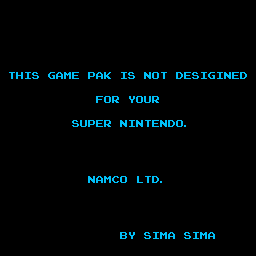
(Source: Original TCRF research)
"SIMA SIMA" likely refers to Masahiro Shimamoto, based on their use of the pseudonym "Simasima" in Super Batter Up.
(Source: Original TCRF research)
Debug Mode#
Using the Pro Action Replay code 80FF00FF will enable a debug flag with various effects.
Build Date#
left On startup, holding any button on controller 1 (except for the D-Pad) will cause a screen with the build date and time to appear.
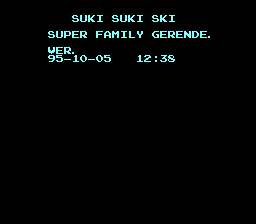
Notably, the build date places the final version of the game in late 1995, which is consistent with the copyright date on the title screen, though the game would not see release until 1998 on the Nintendo Power download service.
Pressing A from here will enable an in-game debug display and CPU meter (see below) before going to the main menu; any other button will proceed as normal. In addition, the game checks for any of the following to be held down as the screen fades out:
- B: unknown (screen stays blank)
- Y: go to tutorial
- X: go to debug menu (see below)
- Select + R: erase saved data
Debug Display#
left Enabling the debug display mentioned above causes a black line to appear on screen, its vertical position representing the amount of current CPU usage. During the game, some (barely-readable) hexadecimal numbers are also printed over the normal HUD, representing various unknown values.
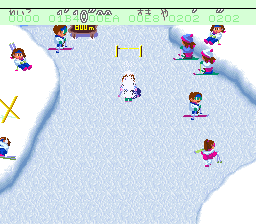
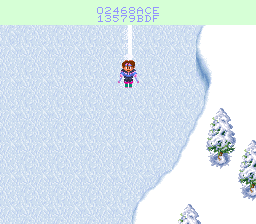
left Also, pausing the game with the debug flag enabled (either with or without the previous display enabled) will display the hex digits 0 through F in place of the "press A to retire" graphic, likely as a quick way to test and adjust its placement on-screen.
Debug Menu#
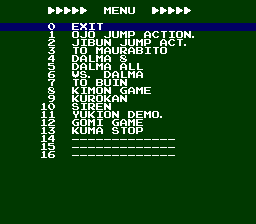
left As mentioned above, holding X when exiting the build date screen will take you to this debug menu, allowing you to easily skip to parts of the game. Selecting "exit" goes to the main menu; 15 and 16 crash the game (14 is selectable, despite being unnamed).
Controller 2#

|
Please elaborate. |
Finally, enabling the debug flag allows Controller 2 to be used to trigger various in-game occurrences (such as falling down, or completing the slope) by pressing X, Y, R, Select, or Start.
(Source: Original TCRF research)