Duplicated Level File#
Early |
Final |
|---|---|
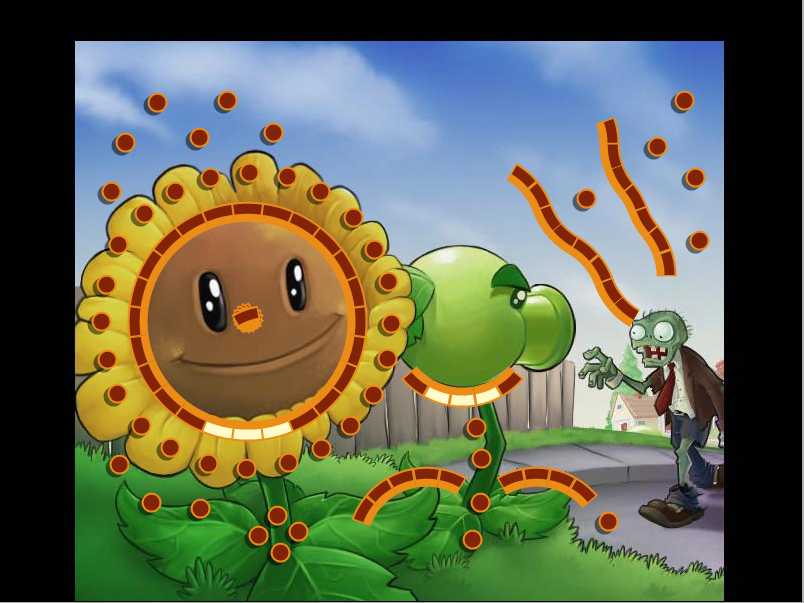 |
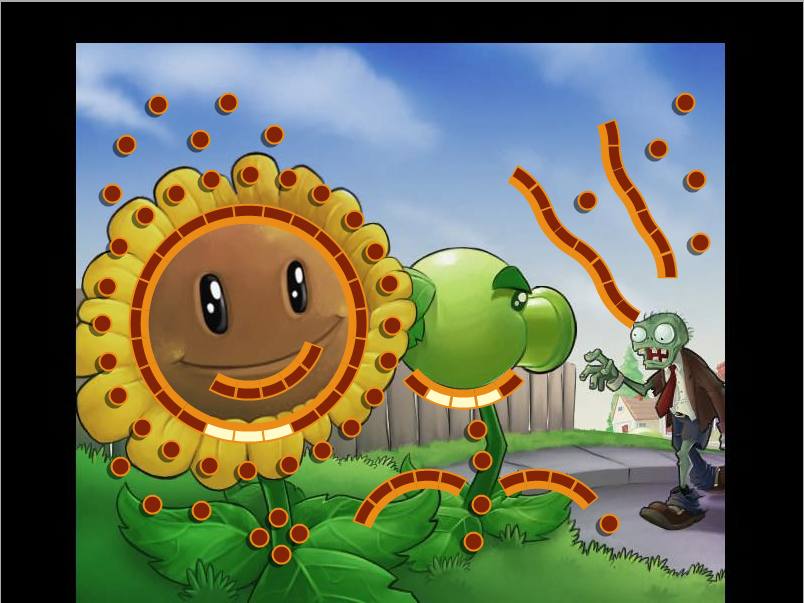 |
The Plants vs. Zombies level in the Spring level pack had an older copy of the level in the PAK file that went unused. A change to a few pegs was made.
Development Text#
// new fields:
// UniqueStyleShotsReq number of unique style shots to pass
// StyleScoreReq style shot score req to pass
// Powerups                comma delimited list of powerups ("Guide","Flippers","Multiball","Pyramid","SpaceBlast","SpookyBall","ZenBall","ShotExtender","FlowerPower","Fireball","LuckySpin","ChainLightning","MagicHat","TripleScore")
//                            NOTE: you can optionally provide a count with format "Guide=4","Pyramid=5"
//                            use number > 1000 for infinite
// Characters              characters to force pick on levels ("Jimmy Lightning","Kat Tut","Splork","Claude","Renfield","Tula","Warren","Lord Cinderbottom","Master Hu","Marina")
// GravityMod gravity multiplier (normal is 1.0)
// ProjSpeedMod gun fire speed multiplier (normal is 1.0)


// new flags: (these only take ": true" as a parameter)
// NoFreeballs             don't allow freeballs (from bucket, total miss, or score)
//  NoGreens                no green pegs on board
//  NoForceWin              don't force player to complete board in order to win challenge (must have other objectives)
//  FreeballCovered         freeball bucket always covered
// NoEndOnWin don't immediately end a level when the challenge has been won

// >>>NOT WORKING<<<
// ScorePenaltyForNoOrange scoring mod for missing orange pegs. Negative values are penalties, can also be positive for a bonus reward.

// misc:
// ThumbnailOverride use a different thumbnail picture than the matching quickplay level (note: these must be constructed by hand: copy dat file to an existing quickplay level, snapshot it, then rename to unique challenge image name)
// BackgroundOverride: use a different background picture (include full path but no extension, ex. "levels/bjorn1")
Present in trophy.cfg and level pack config files.
////////////////////////////////////////////////////////////////////////
// LEVEL DEFINITIONS
////////////////////////////////////////////////////////////////////////
//  Name: name in quick play
//  Desc: description in quick play
//  Level: filename, display name, ace score, min stage
//  Dialog: level number, text, header, character id
//  Dialog: 1,"Jolly Jimmy sez Dig on These!", "An Expansion?!?", 2
//  Decal: image name, layer, emit rate mod, x, y, hoverRectX, hoverRectY, hoverRectW, hoverRectH, hoverText, alphaCurveValLoop, deltaXCurveValLoop, deltaYCurveValLoop
//      multiple (or no) decals okay
//      emit rate mod is normally 1.0, if there are too many particles (large objects) you may want to modify it
//      trophies are hardcoded at layer 1000-1003 (1004 is in front of trophies, 999 is behind)
//      layers are also used for the unique id of the decal (use a unique layer if using duplicate images)
//      press 'd' in cheat-enabled build to see decal hover rects in main menu
//      you CAN use existing Peggle images here too, if you want
//      alphaCurveValLoop, deltaXCurveValLoop, deltaYCurveValLoop, scaleCurveValLoop are all optional
//  Decal: images/decals/xmas_decal2,       1100, 1.0, 341, 235, 341, 235, 30, 35, "Play levels from the Christmas pack!"
// OTHERS:

// uncomment this line to exclude random level selection of these levels
//ExcludeRandLevels: "bowl", "funnel", "scary", "slides", "level13web"
// don't know if this works at all
//Tip: "Don't forget to check out the new expansion levels!"
////////////////////////////////////////////////////////////////////////
// CHALLENGE DEFINITIONS
////////////////////////////////////////////////////////////////////////
Present in level pack config files, a note suggests that a cheat-enabled build can show decals in the main menu with a keypress.
//  Trophy "Sea Son's Greeting"
//  {
//      Id: 204
//      Levels: dingaling
//      Characters: Claude
//      Powerups: Flippers=1000
//      NoGreens: true
//      NoForceWin: false
//      Desc: "Beat the level using Claude and his Flippers."
//  }
Present in the Holiday 2008 level pack config file.
//Desc: "Get one Extreme Slide Style Shot and beat the level."Present in the Art Contest and Spring 2009 Challenge level pack config files.
Page "Art Contest Challenges"
{
    Desc: "Contest your skills with these new challenges!"

    Trophy "Underground"
    {
        Id: 401
        Levels: graveyard
        ScoreCeil: 100000
        NoForceWin: false
        Desc: "Beat the level but stay under 100,000 points."
        SmallDesc: "Stay under 100k"
    }

    Trophy "Super Cool"
    {
        Id: 402
        Levels: peggledas
        StyleShots: CoolClear
        NoForceWin: false
        Desc: "Use a Cool Clear style shot to beat the level. If you don't know which one that is, check the Help section!"
        //Desc: "Get one Extreme Slide Style Shot and beat the level."
        SmallDesc: "Get a Cool Clear"
    }

    Trophy "Cake A L'0range"
    {
        Id: 403
        Levels: caykee
        NumOrange: 40
        NoForceWin: false
        Desc: "Clear the 40 orange pegs to win."
        SmallDesc: "40 Orange Pegs"
    }

    Trophy "Fiery Finish"
    {
        Id: 404
        Levels: peggle3d
        ClearLevel: true
        Powerups: Fireball=1000
        Characters: "Lord Cinderbottom"
        NoGreens: true
        NoForceWin: false
        Desc: "Clear all of the pegs with Lord Cinderbottom and his Fireball."
        SmallDesc: "Clear with Fireballs"
    }

    Trophy "500,000 Rads"
    {
        Id: 405
        Levels: kidradical
        ScoreReq: 500000
        NoForceWin: true
        NoEndOnWin: true
        Desc: "Score over\n500,000 points."
        SmallDesc: "Score 500,000 points"
    }

//}
Commented out in the Art Contest level pack config file.
Level Editor#

|
To do: |
The game executable mentions strings for one.
LevelEditor/stats_cheat.dat
LevelEditor/autosave
The strings below along with their code are only present in the Windows releases and the Xbox 360 release.
Keyboard Reference
Edit
 (Multi Place)
 (Drag)
 (Make Poly)
 (Center Drag)
 (Image Drag)
 (Single Sel)
 (No Draw Sel)
 (Paused)
Edit (Order Mode)
LevelEditor/globals.dat
LevelEditor/buffer%d.dat
LevelFile
SOFTWARE\\
levels
editlevel.dat
*.dat
Save Level
.dat
autosave
LevelEditor
LevelEditor/autosave
LevelEditor/autosave%d.dat
leveleditor/editlevel.dat
autosave%d
Inspect AutoSaves?
Would you like to inspect AutoSaves?
No autosaves
No autosave data available
LevelEditor/LevelEditor.cfg
LevelEditor/editlevel.dat
Choose Group
No Choices
:
Debugging Material#
Level loader#
|
|
To do: |
The game has support for loading raw level files and their backdrops elsewhere via using a dialog related to your OS. It's possible to enable it by changing the function at the following address with one that has no operation will load it when trying to load a level or demo.
Build |
Header text |
|---|---|
PopCap.com/Steam (WW, 1.0.3.6632 [Final]) |
00408CA4 |
If loading levels this way, the word Dev will be above the word score on your scoreboard and that will write to replay data, you also cannot save high scores from levels loaded this way and the level complete dialog only offers three options, returning to the main menu, replaying the level or playing a random level. Reloading a level makes the game write the name of the level file to the game window in this form.
- %sIn-Game Debug Display#
|
|
To do:
|
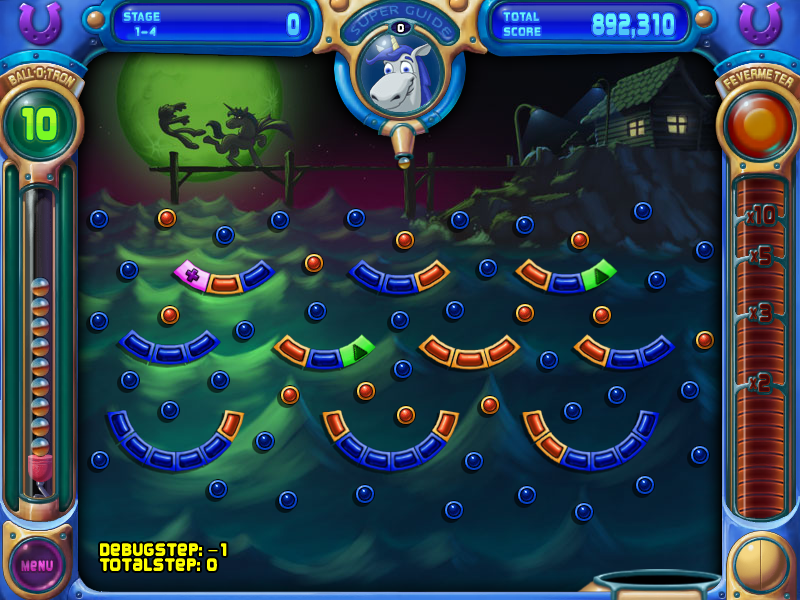
The game has a debug display that his hidden from normal gameplay. It's possible to enable it by changing the function at the following address, it is shown when a level is already loaded or is going to be loaded.
Build |
Header text |
|---|---|
PopCap.com/Steam (WW, 1.0.3.6632 [Final]) |
0040D03F |
LoadTime.h Generator#
A function that generates a LoadTime.h header file in the game asset directory is present and called by the game at the loading screen but it's normally not possible to trigger it. Changing the value to 1 will trigger it.
Build |
Address |
|---|---|
PopCap.com/Steam (WW, 1.0.3.6632 [Final]) |
00419AD6 |
Unused Text#
Source File Names#
properties/default.xml in localized distributions has a LOT of source file names mentioned. Pretty much possibly ALL the source program files of the game are in it, even the files with no text!
AIMgr.cpp
AIMgr.h
AdventureScreen.cpp
AdventureScreen.h
Antialias.cpp
Antialias.h
BSpline.cpp
BSpline.h
Ball.cpp
Ball.h
BallPeg.cpp
BallPeg.h
BlendedImage.cpp
BlendedImage.h
Board.cpp
Board.h
Brick.cpp
Brick.h
BrickPeg.cpp
BrickPeg.h
CharacterDialog.cpp
CharacterDialog.h
CharacterMgr.cpp
CharacterMgr.h
CollisionMgr.cpp
CollisionMgr.h
Combobox.cpp
Combobox.h
ContinueDialog.cpp
ContinueDialog.h
CurvedVal.cpp
CurvedVal.h
DebugMgr.cpp
DebugMgr.h
DownloadOrPlayDialog.cpp
DownloadOrPlayDialog.h
DragDropListener.cpp
DragDropListener.h
EditDialog.cpp
EditDialog.h
EditValObj.cpp
EditValObj.h
EditorWidget.cpp
EditorWidget.h
EffectMgr.cpp
EffectMgr.h
EndLevelDialog.cpp
EndLevelDialog.h
FloatingTextMgr.cpp
FloatingTextMgr.h
GameStats.cpp
GameStats.h
GlobalEditVal.cpp
GlobalEditVal.h
Gun.cpp
Gun.h
HelpScreen.cpp
HelpScreen.h
HighScoreDialog.cpp
HighScoreDialog.h
HighScoreMgr.cpp
HighScoreMgr.h
HighScoreScreen.cpp
HighScoreScreen.h
Hole.cpp
Hole.h
IUnknownHelper.h
ImageMgr.cpp
ImageMgr.h
InterfaceMgr.cpp
InterfaceMgr.h
IntroScreen.cpp
IntroScreen.h
LevelEditor.cpp
LevelEditor.h
LevelFileDialog.cpp
LevelFileDialog.h
LevelScreen.cpp
LevelScreen.h
LightningSparkEffect.cpp
LightningSparkEffect.h
Line.cpp
Line.h
LoadTime.h
LoadTimer.cpp
LoadTimer.h
LoadingScreen.cpp
LoadingScreen.h
LogicMgr.cpp
LogicMgr.h
MainMenu.cpp
MainMenu.h
ManagerBuild.cpp
MiscBuild.cpp
MiscEffectUtil.cpp
MiscEffectUtil.h
Mover.cpp
Mover.h
NameDialog.cpp
NameDialog.h
NewUserDialog.cpp
NewUserDialog.h
ObjectBuild.cpp
OptionsDialog.cpp
OptionsDialog.h
PegInfo.cpp
PegInfo.h
PhysObj.cpp
PhysObj.h
PlayerInfo.cpp
PlayerInfo.h
Poly.cpp
Poly.h
PopupListWidget.cpp
PopupListWidget.h
ProfileMgr.cpp
ProfileMgr.h
ProgressScreen.cpp
ProgressScreen.h
ReplayDialog.cpp
ReplayDialog.h
ReplayFileDialog.cpp
ReplayFileDialog.h
Res.cpp
Res.h
ScreenSaverDialog.cpp
ScreenSaverDialog.h
ScreenSaverHelp.cpp
ScreenSaverHelp.h
SlotMachineDialog.cpp
SlotMachineDialog.h
SoundMgr.cpp
SoundMgr.h
SpeechBubble.cpp
SpeechBubble.h
StageDialog.cpp
StageDialog.h
StageMgr.cpp
StageMgr.h
StageScreen.cpp
StageScreen.h
StatsMgr.cpp
StatsMgr.h
StoryScreen.cpp
StoryScreen.h
ThunderButton.cpp
ThunderButton.h
ThunderCommon.cpp
ThunderCommon.h
ThunderDialog.cpp
ThunderDialog.h
Thunderball.cpp
ThunderballApp.cpp
ThunderballApp.h
TonePlayer.cpp
TonePlayer.h
TrophyMgr.cpp
TrophyMgr.h
TrophyScreen.cpp
TrophyScreen.h
TypingCheck.cpp
TypingCheck.h
UpsellScreen.cpp
UpsellScreen.h
UserDialog.cpp
UserDialog.h
WidgetBuild.cpp
WidgetMover.cpp
WidgetMover.h
main.cpp
resource.h
Commented Dialog Text#
Dialog: 2,"Come on, primal energies of the universe, do your thing!","Brrrzap!"
Dialog: 3,"Yep, that's me flying out of\nthe cannon! I must be doing\nat least fifty!","Me-YOWWWW!"
Dialog: 4,"Hey! There hasn't been a single strand of yarn in this whole dream! What's that about?","Jump the Squid"
Dialog: 5,"It's a good thing I know what\nI'm doing!","Death Defying"
Dialog: 3,"Fling! This ball-launching could be the one of all!","Last Ball"
Dialog: 3,"Is Claude not allowed to take une souvenir? Not even ze teeny piece snipped off ze top?","Eiffel Power"
Dialog: 4,"And now I'll unhuff and unpuff and draw this fire away!","Fire Eater"
Dialog: 3,"Huh! Look at all these strange carvings! Reminds me of a game\nor something!
Dialog: 3,"Don't think about the judges or what it could mean, just sing.","Wild Thing"
The following dialog text was commented out in stages.cfg
Removed Strings#
The multilingual versions of the game have all the translated text and text to overlap in the executable for a variety of functions that are not present in public builds of the game. The text is most likely from a development build of the game, suggesting some functions were removed or stubbed after release.
Source File Name |
English |
Japanese |
Possible explanation |
|---|---|---|---|
DebugMgr.cpp |
Series: %d |
シリーズ: %d |
Display of the series number? |
DebugMgr.cpp |
Skill: %d |
スキル: %d |
Display of the skill number? |
DebugMgr.cpp |
Mouse:%d,%d&cr; |
マウス:%d,%d&cr; |
Display of mouse coordinates? The framework already has a function to draw mouse coordinates. |
HighScoreMgr.cpp |
a quick check on score values, if your ace score is set to a weird value this may not look right |
スコアがおかしな数値に設定されていて、正しくなさそうに見える場合、スコアの数値を素早くチェックします。 |
Miscellaneous display test? |
LogicMgr.cpp |
%d + %d (style) = %d (total: %d) |
%d + %d (スタイル) = %d (トータル: %d) |
Point display? |
ProgressScreen.cpp |
count: %d (%d) |
カウント: %d (%d) |
Debug progress display? |
ScreenSaverDialog.cpp |
Screensaver |
スクリーンセーバー |
Unknown. |
ScreenSaverDialog.cpp |
Enable Screensave |
スクリーンセーバーをオンにする |
Unknown. |
ScreenSaverDialog.cpp |
Enable Sound |
サウンドをオンにする |
Unknown. |
ScreenSaverDialog.cpp |
Periodically Darken Screen |
定期的に画面を暗くする |
Unknown. |
ScreenSaverDialog.cpp |
Allow Monitor Powersave Mode |
モニターの省エネモードを有効にする |
Unknown. |
ScreenSaverDialog.cpp |
Check here to set your Pego as your Screensaver. |
ここをチェックして、ペゴをスクリーンセーバーにしよう。 |
Unknown. |
ScreenSaverDialog.cpp |
Check here to allow your monitor to go into powersave mode while running the Pego Screensaver. |
ここをチェックして、ペゴスクリーンセーバーが作動中にモニターが省エネモードになるのを許可します。 |
Unknown. |
ScreenSaverDialog.cpp |
This option controls whether or not to play sounds in the Screensaver. |
このオプションで、スクリーンセーバーを音付きにするかどうかを選びます。 |
Unknown. |
ScreenSaverDialog.cpp |
This option will make the Screensaver periodically darken the screen. |
このオプションは、スクリーンセーバーが定期的に画面を暗くするようにします。 |
Unknown. |
ScreenSaverDialog.cpp |
Pego Screensaver Settings |
ペゴスクリーンセーバーの設定 |
Unknown. |
TrophyMgr.cpp |
Style Shot not found: |
スタイルショットがみつかりません: |
Error handler for style shots? |
Development Leftovers#
Windows Shortcut#
levels in the JP version contains a Windows shortcut (.lnk) file called "Shortcut to levels.lnk". With a tool like LECmd, you can get some interesting information from this file.
LECmd version 1.4.0.0

Author: Eric Zimmerman (saericzimmerman@gmail.com)
https://github.com/EricZimmerman/LECmd

Command line: -f \levels\Shortcut to levels.lnk

Warning: Administrator privileges not found!

Processing '\levels\Shortcut to levels.lnk'

Source file: \levels\Shortcut to levels.lnk
  Source created:  2022-02-12 22:47:40
  Source modified: 2022-02-12 23:06:59
  Source accessed: 2022-02-12 23:12:49

--- Header ---
  Target created:  2009-12-24 09:28:27
  Target modified: 2010-01-11 08:17:02
  Target accessed: 2010-01-11 08:18:36

  File size: 0
  Flags: HasTargetIdList, HasLinkInfo, HasRelativePath, IsUnicode
  File attributes: FileAttributeDirectory
  Icon index: 0
  Show window: SwNormal (Activates and displays the window. The window is restored to its original size and position if the window is minimized or maximized.)

Relative Path: .

--- Link information ---
Flags: VolumeIdAndLocalBasePath

>>Volume information
  Drive type: Fixed storage media (Hard drive)
  Serial number: 2AE3393C
  Label: (No label)
  Local path: D:\localization_programme\PeggleNights\Universal\ThunderballNights\levels

--- Target ID information (Format: Type ==> Value) ---

  Absolute path: My Computer\D:\localization_programme\PeggleNights\Universal\ThunderballNights\levels

  -Root folder: GUID ==> My Computer

  -Drive letter ==> D:

  -Directory ==> localization_programme
    Short name: LOCALI~1
    Modified: 2009-11-24 07:04:12
    Extension block count: 1

    --------- Block 0 (Beef0004) ---------
    Long name: localization_programme
    Created: 2009-11-20 06:37:44
    Last access: 2009-11-27 07:21:56

  -Directory ==> PeggleNights
    Short name: PEGGLE~1
    Modified: 2009-12-07 06:31:24
    Extension block count: 1

    --------- Block 0 (Beef0004) ---------
    Long name: PeggleNights
    Created: 2009-12-02 03:37:32
    Last access: 2010-01-11 07:59:14

  -Directory ==> Universal
    Short name: UNIVER~2
    Modified: 2010-01-08 01:48:54
    Extension block count: 1

    --------- Block 0 (Beef0004) ---------
    Long name: Universal
    Created: 2009-12-02 03:38:30
    Last access: 2010-01-11 07:59:14

  -Directory ==> ThunderballNights
    Short name: THUNDE~1
    Modified: 2010-01-11 04:03:46
    Extension block count: 1

    --------- Block 0 (Beef0004) ---------
    Long name: ThunderballNights
    Created: 2009-12-02 03:38:30
    Last access: 2010-01-11 08:06:32

  -Directory ==> levels
    Short name: levels
    Modified: 2010-01-11 08:17:04
    Extension block count: 1

    --------- Block 0 (Beef0004) ---------
    Long name: levels
    Created: 2009-12-24 09:28:28
    Last access: 2010-01-11 08:17:04

--- End Target ID information ---

--- Extra blocks information ---

>> Tracker database block
   Machine ID: dt-3xtdr2x
   MAC Address: 00:25:64:a3:96:aa
   MAC Vendor: DELL
   Creation: 2009-12-24 09:05:54

   Volume Droid: b421cc40-0ec1-4015-b5c2-b82aba0244a7
   Volume Droid Birth: b421cc40-0ec1-4015-b5c2-b82aba0244a7
   File Droid: 8ad10f09-f06b-11de-888d-002564a396aa
   File Droid birth: 8ad10f09-f06b-11de-888d-002564a396aa


---------- Processed '\levels\Shortcut to levels.lnk' in 0.13064370 seconds ----------Oddities#
- The Steam build of the game uses the Peggle Deluxe icon, unlike the other releases using the game's proper icon.
Internal Project Name#
Given by the original was called Thunderball, this title was called ThunderballNights.
|
The Peggle series | |
|---|---|
|
Windows, Mac OS X |
Peggle Deluxe (Prototype) • Peggle Extreme • Peggle Nights • Peggle: World of Warcraft Edition |
|
Nintendo DS |
|
|
Xbox 360, Xbox One, PlayStation 4 |
|
|
Android |
|
|
iOS |
|