This is a sub-page of New Super Mario Bros. U.

|
To do: |
New Super Mario Bros. U has quite a few unused things, ranging from unused sprite settings to entirely unused sprites. Much of it consists of leftover sprites and settings from New Super Mario Bros. Wii... even some that were unused in that game, too!
Also, a lot of ice blocks. Seriously.
Unused Sprite Settings#
Goomba#
When nybble 8 of a Goomba sprite (0) is set to 1, it will be placed behind layer 1 (the tiles that Mario can collide with) and other sprites.
Paragoomba#
The Paragoomba sprite (1) has the same unused setting as the Goomba.
Pipe Piranha Plants#
Sprites 2-13 (all of the pipe Piranha Plants, pipe Venus Fire Traps and pipe Venus Ice Traps) have an unused setting (nybble 12) that crashes the game if set to 1. The reason for this is unknown.
Koopa Troopa#
The Koopa Troopa sprite (19) has a few unused settings. One at nybble 5 will make it face right if set to 1, play an animation for coming out of an upward-facing pipe if set to 3, and play an animation for coming out of a downward-facing pipe if set to 4. (Other values are untested.) It will walk right instead of left if nybble 10 is set to 1. It will start in its shell for a few seconds upon loading if nybble 11 is set to 1.
The Giant Koopa Troopa (476) shares these unused settings.
Buzzy Beetle#
The Buzzy Beetle sprite (22) has a setting, nybble 12, that changes how it spawns. 1 makes it upside-down, 2 spawns an empty shell instead, and 3 spawns an upside-down empty shell. 2 and 3 are unused. This is a leftover setting from New Super Mario Bros. Wii.
The Giant Buzzy Beetle (606) shares these unused settings.
Spiny#
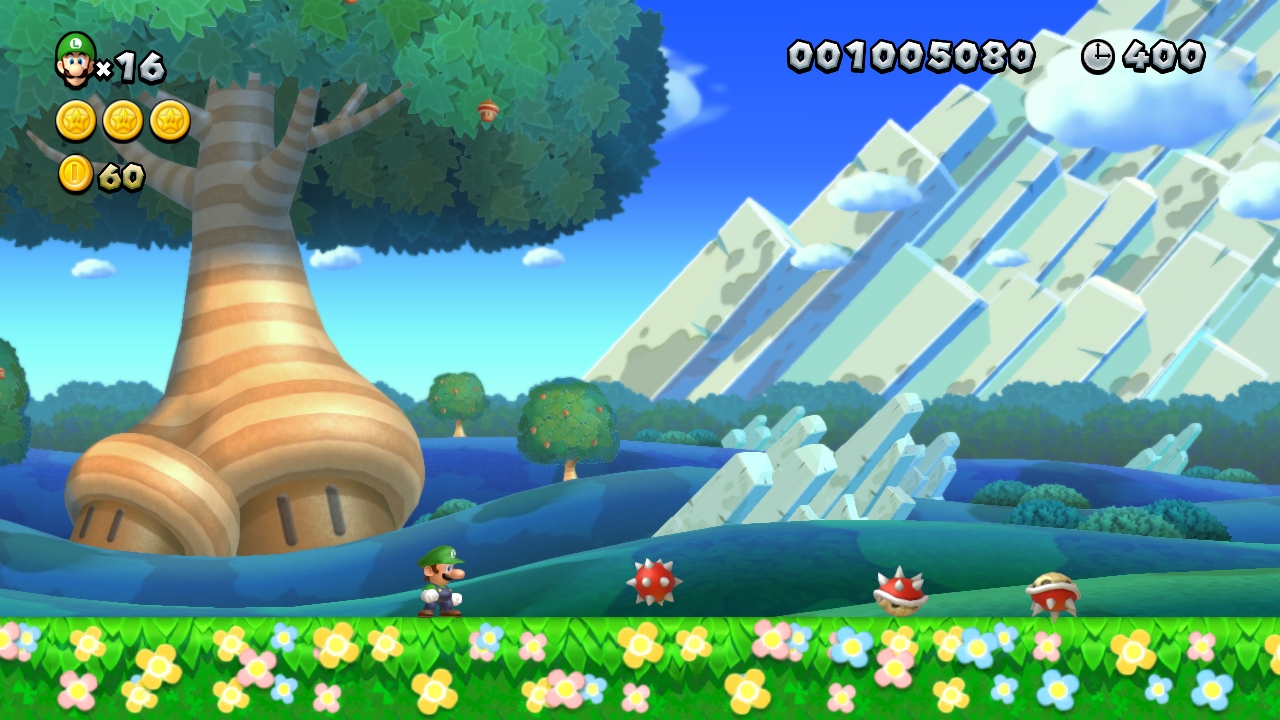
The Spiny sprite (23) has the same unused setting as the Buzzy Beetle. Additionally, sprite 24 (unused) is an upside-down Spiny.
Arrow Signboard#
The arrow signboard sprite (32) has an unused movement capability: nybbles 21 and 22 can be used to connect it to a bolt controller.
"?" Block#
The sprite for "?" blocks (59) has a rather unusual unused setting. When nybbles 9 and 10 are both set to 1, the "?" block will be placed behind tiles and other sprites, and cannot be hit by Mario by any normal means.
Coin#
When nybble 19 of a coin sprite (65) is set to F, it will drop to the ground upon spawn, as if spawned by an enemy killed by a fireball.
Huckit Crab#
When nybble 11 of a Huckit Crab (74) is set to 0, it will hop backwards. This is leftover from New Super Mario Bros. Wii.
Lava#

|
This page or section has one or more broken YouTube links. |
Lava (sprite 89) has a feature that causes giant waves to spawn, which is used in World 5-Castle (Iggy's Volcanic Castle). Despite this feature being used only once in the game, the sprite has many options to adjust the waves' behavior. Unfortunately for whoever took the time to program this flexibility, all of them are set to 0 in that stage, and are therefore unused!
Nybble |
Description |
|---|---|
14 |
Causes the lava waves to bounce up and down. |
15 |
Changes the speed at which the small waves seen on top of the giant waves animate. |
16 |
Changes the height of the small waves seen on top of the giant waves. |
17 |
Changes the width of the giant waves. |
18 |
Changes the speed of the giant waves. |
19 |
Changes the height of the giant waves. |
Enemy Generator for Pipes#
The sprite that causes other sprites to come out of pipes (98) can spawn Goombrats if nybble 11 is set to 2 or Red Koopa Troopas if it's set to 4.
Switches#
Sprites 104 and 105 are the "?" switch and the P-switch, respectively. They retain an unused setting from New Super Mario Bros. Wii which is in turn a leftover from New Super Mario Bros.: setting the flag at nybble 11 will shift it half a tile to the right.
This was necessary in the DS game because sprite positions were constrained to the tile grid. That constraint was removed for New Super Mario Bros. Wii, though, making this setting useless there and here.
The flag at nybble 8 will shift it 1 tile upwards. This option is completely useless, and there is no obvious potential use for it.
Thwomps#
The Thwomp (sprite 135) and the Giant Thwomp (136) have two unused settings. When nybble 12 is set to 2, the Thwomp will fall as soon as it loads, no matter how far away the player is. Nybbles 10 and 11 can be used to specify a specific invisible region (also known as a "location") that the player must touch to cause the Thwomp to fall.
Cannon#
When the flag at nybble 10 of the cannon sprite (176) is set, the cannon will rotate 90 degrees back and forth between firing. This is an unused leftover from New Super Mario Bros. Wii.
Moving Platforms#
When nybble 7 of a moving platform sprite (vertical: 182, horizontal: 186) is set to 1, it will have a rocky look.
Giant Falling Icicle#
The giant falling icicle sprite (184) has several leftover settings from New Super Mario Bros. Wii. When the flag at nybble 5 is set, the icicle will never fall. When the flag at nybble 11 is set, the icicle will only fall when a snake block passes beneath it. When the flag at nybble 12 is set, the icicle will tilt to the right after landing.
Fire Snake#
When the flag at nybble 12 of a Fire Snake sprite (194) is set, it will load as a small, stationary fireball, and will attack the player normally when approached. This is yet another leftover from New Super Mario Bros. Wii.
Springboard#
More leftovers from New Super Mario Bros. Wii!
The flag at nybble 5 causes the springboard (sprite 215) to always remember its position, and not return to its starting position if it goes off-screen. The flag at nybble 10 causes it to be placed behind other sprites.
Finally, a setting left over from New Super Mario Bros.: the flag at nybble 11 will shift the springboard half a tile to the right. This was necessary in the DS game because sprite positions were constrained to the tile grid. That constraint was removed for New Super Mario Bros. Wii, though, making this setting useless there and here.
Snake Block#


Setting the flag at nybble 15 of the snake block (sprite 222) will cause it to be icy and slippery, like the one in New Super Mario Bros. Wii.
Foo#
Setting the flag at nybble 12 of a Foo (sprite 229) will prevent it from blowing clouds. (It will still play the blowing animation and sound effects, but nothing will come out of its mouth.) This is very useless because it defeats this enemy's entire purpose. This is yet another leftover unused setting from New Super Mario Bros. Wii.
Muncher#

Setting the flag at nybble 12 of a Muncher (sprite 259) will cause it to be frozen in an ice cube. This is a leftover from New Super Mario Bros. Wii.
Rotating Burner#
Value 0 of nybble 11 of the rotating burner (sprite 293) is unused. This value causes the flame to rotate back-and-forth from left to right, passing through an upward position.
Note Block#
Setting the flag at nybble 13 of a note block (sprite 295) will cause it to contain an Acorn Mushroom.
Clampy#
Nybble 12 of a Clampy (sprite 298) determines what it holds in its mouth. Value 0 (nothing) and value 4 (P-switch) are both unused.
"?" Block Containing Baby Yoshis#
When nybble 12 of the "?" block that contains Baby Yoshis (sprite 380) is set to 0 or 1, it will contain a Bubble Baby Yoshi or Balloon Baby Yoshi, respectively. Only value 2, which causes it to contain a Glow Baby Yoshi, is used.
Giant Ice Block#

When nybble 18 of the giant ice block used in Layer-Cake Desert-Ice Block (Piranha Plants on Ice) (sprite 393) is set to 1, it will be 1.8x its normal width. This causes it to look unnaturally stretched.
Spinning Star#
Nybble 9 of the spinning stars from Frosted Glacier-1 (Spinning Star Sky) (sprite 395) controls their size. Value 2 is unused, which produces a spinning star larger than any seen in the game. (Higher values than 2 do not increase the size further.)
Line-Controlled Platform (535)#
Nybble 7 of the line-controlled platform sprite (535) determines its style. When set to 4, it will look like a cloud!
Line-Controlled Platform (573)#
Sprite 573 is another line-controlled platform. Nybbles 3, 4 and 13 can be used to cause it to only appear after a specific "event" is activated; unfortunately, this feature is bugged, as the platform will not move after appearing. When the flag at nybble 7 is set, it will not begin to move until the player stands on it. When the flag at nybble 9 is set, it will have a rocky appearance. The flag at nybble 11 causes it to be slippery. Nybble 16 can be used to increase the speed of the platform.
Unused Sprites and Sprite Features#
There are a total of 151 unused sprites.
Left- and Right-Facing Pipe Venus Fire/Ice Traps#
Sprites 8 and 9 are left-facing and right-facing pipe Venus Fire Traps, respectively, and 12 and 13 are left-facing and right-facing pipe Venus Ice Traps.
Upside-Down Spiny#

Sprite 24 is an unused upside-down Spiny. This is unusual because normally an upside-down version of a sprite is defined as a setting on that sprite, not a different sprite altogether. Furthermore, the normal Spiny already has an unused setting for this.
The Spiny will drop down and spin towards the player when approached.
Grrrol Duplicates#
Sprites 33 and 58 are unused duplicates of the Grrrol, and sprite 34 is an unused duplicate of the Giant Grrrol. They seem to behave identically to the used Grrrols.
Random Event Controller#
Sprite 39 can be used to enable a random event. This is a leftover from New Super Mario Bros. Wii... where it was also unused.
Porcupuffer Duplicate#
Sprite 53 is just an unused Porcupuffer duplicate.
Moving Tiltable Land Blocks#


Sprites 80 and 81 look like a metal platform and an Acorn Plains land block, respectively. They each can be set to move back and forth in a straight line (nybble 6: 0 = left, 1 = right, 2 = up, 3 = down) (distance is nybble 15) (speed is nybble 16) with adjustable delays (nybble 13 is delay before moving, nybble 14 is delay before returning). The width and height can be set (nybbles 18 and 20, respectively), and the platforms can be tilted an adjustable amount (nybble 7; increments of 22.5 degrees counterclockwise).
Thin Fog#
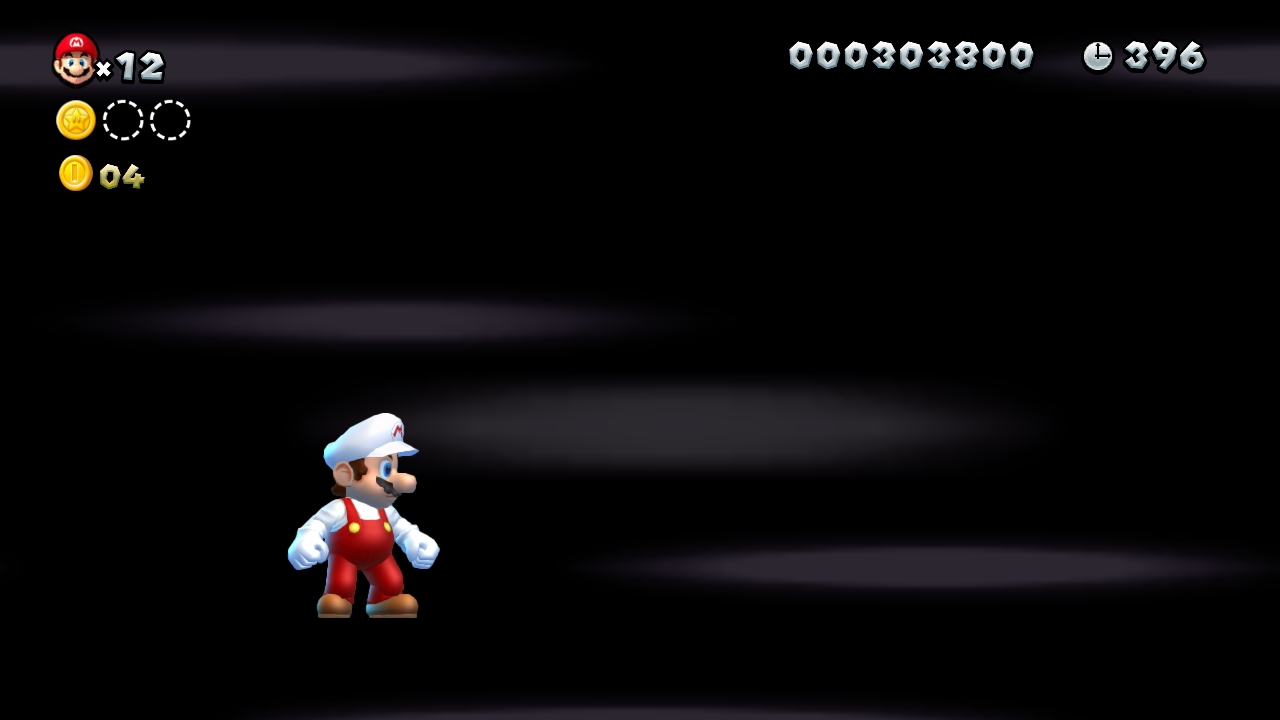
Sprite 93 creates a thin, wispy fog effect. This is a leftover from New Super Mario Bros. Wii, where it was used in ghost houses.
Bill Blaster Turret Duplicate#
Sprite 112 is a duplicate of the Bill Blaster turret.
Bubble Baby Yoshi#
Sprite 143 is a Bubble Baby Yoshi. It's bugged and can't actually spit bubbles, but works fine otherwise.
Balloon Baby Yoshi#
|
|
To do: |
A duplicate of Balloon Baby Yoshi exists. It works the same, but when it gets to the goal, it just gives a 1-UP and doesn't follow the player like what the Glowing Baby Yoshi does at default. It's possible it was intended for the Baby Yoshi Eggs, which are not in the final game.
Rising/Lowering Bill Blaster#
Sprite 172 is the Rising and Lowering Bill Blaster, an unused leftover from New Super Mario Bros. Wii. The firing direction (nybble 7), movement speed (nybble 10) and heights (nybbles 11 and 12) can all be set. It can also be positioned upside-down, as well, using the flag at nybble 5.
Wind#
Sprite 197 is what's left of the desert wind sprite from New Super Mario Bros. Wii. The graphics don't work (although they still exist in the game's files), and nothing gets pushed by the wind. If you stand next to a midway flag or a rope ladder while this is in a level, though, you can see them flutter periodically as if the wind was there.
Snow and Lava Effects#
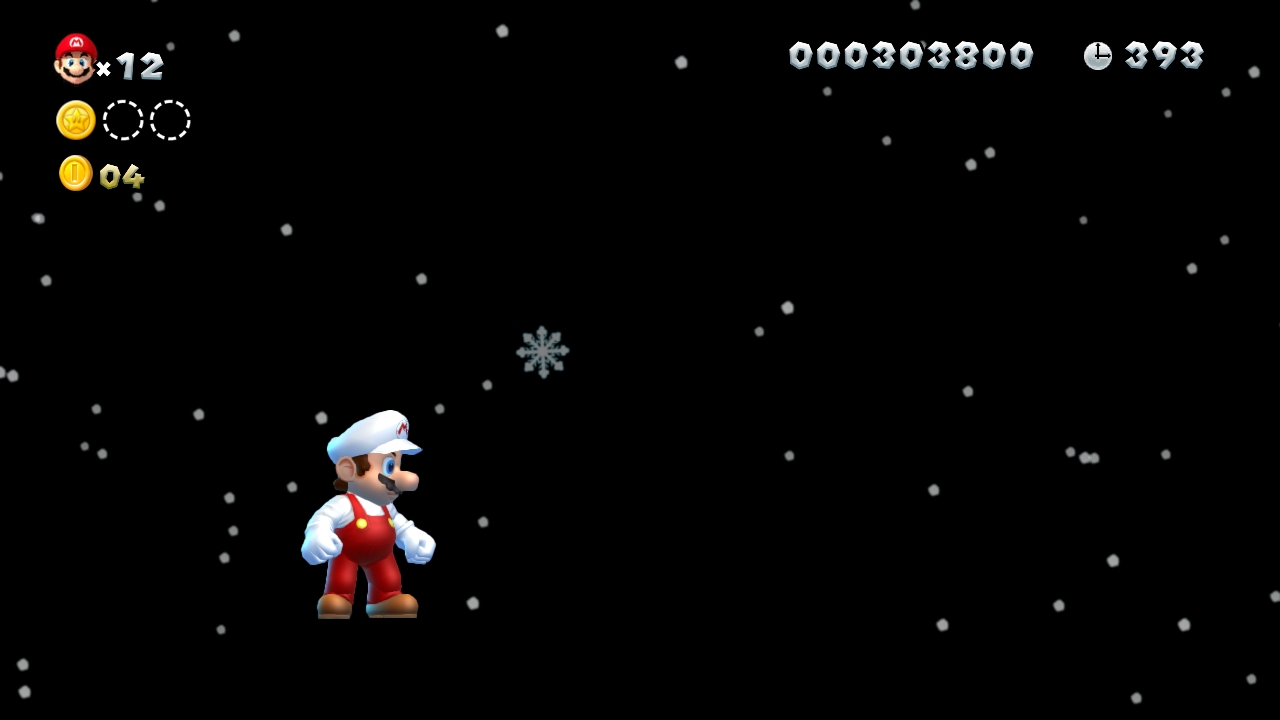
Sprite 198 creates a snow effect, and Sprite 201 creates a rising lava ash effect. The Frosted Glacier and lava-related course backgrounds can spawn these effects automatically, so this sprite isn't needed.
Carryable Ice Block#

Sprite 203 is an ice block you can pick up and carry around. The flag at nybble 10 will cause it to have a coin inside; however, the coin will be a bit glitchy if the player changes direction while holding it.
Floating "?" Block#

Sprite 205 is another leftover from New Super Mario Bros. Wii: a "?" block that can float on water.
Brick Block with Switch#

Sprite 208 is a brick block with a "?" switch. Nothing really special; it still works.
Moving Ice Block Spawner#
Sprite 226 is a moving ice block spawner, which can be set to spawn ice blocks moving in either direction (nybble 11). The size of the ice blocks can be changed with nybble 12.
Sprite 227 is similar. It's unclear what the difference is between the two.
Ice Block#
Sprite 268 can be a 1x1 ice block, a 1x2 ice chunk with a bumpy bottom shape, or 1x1 ice block that doesn't glimmer. (Nybble 12 controls this.)
Brown Tower Block#
This is a direct leftover from 1-Tower in New Super Mario Bros. Wii: a brown tower block that can move back and forth. It got a small improvement, though: it can be tilted at various angles now, using nybble 7!
Wooden Box Spawner#
Sprite 339 is a wooden box spawner. It can only spawn the orange-and-yellow ones, though.
Rotating Line of Coins#
Sprite 366 is a rotating line of coins. Not much is known about this sprite yet.
Goomba Duplicates#
Sprites 437 and 438 are duplicates of the Goomba. The used Goomba is sprite 0.
Huge Floating Snowy Boxes#
Sprite 444 creates floating snowy boxes like those seen in Frosted Glacier-Fliprus (Fliprus Lake), except far larger: at lease 4x larger than the screen size! The settings available match those of the used boxes.
"Purple" Ring#
Sprite 470 is internally called the "Purple Ring", but is disappointingly just a duplicate of the Red Coin Ring.
Single Bowser Amp#
Sprite 502 creates a single Bowser Amp. The used Bowser Amp sprites create multiple Amps each.
Falling Super Star#
Sprite 507 causes a Super Star to fall from the top-right corner of the screen at a 45-degree angle when the player enters a given invisible location.
Rolling Ice Block#
Sprite 539 is another ice block! But this one is the most interesting. It rolls back and forth. The size can be customized, as can the rolling distance and speed. Whenever a corner hits the ground, your controller will rumble. The slowest available speed is too fast to be useful for level design, and sends your controller into a rumble seizure.
Bouncy Mushroom Platform#
Sprite 542 is a bouncy mushroom platform that can be moved with a movement controller. The color, thickness and length can all be adjusted.
Solid Pipes#
Sprites 575-578 are pipes that face left, right, up and down, respectively. They differ from used pipes in that they actually create their own collisions. (All stationary pipes that can be found in the game have collisions created by invisible solid blocks, not the pipes themselves. None of the other New Super Mario Bros. games work that way. Surprise!)
Bull's-Eye Bill Blaster#
Sprite 581 is a very interesting Bull's-Eye Bill Blaster. A setting at nybble 9 can cause the "homing" to beep like a time bomb and blink three times before exploding! The height can also be customized (nybble 11), and the blaster can be turned upside-down with nybble 5.
Searching Cheep Cheep#
Sprite 592 is a green Searching Cheep Cheep that spawns when the player enters a given invisible location.
Useless / Non-functional Sprites#

|
This needs some investigation. |
|
|
To do: |
While there are many interesting unused sprites in this game, some of them just don't work at all, or at least don't work without re-adding code/assets. Thanks, Nintendo.
The "Has been fixed?" column states if the sprite has been made functional by members of the modding community.
Sprite Number |
Name |
Translation |
Description |
Has been fixed? |
|---|---|---|---|---|
102 |
環境現象くん |
"Mr. Environmental Phenomenon" |
Does nothing. |
No |
134 |
泡発生管理君 |
"Mr. Bubble Generation Controller" |
Does nothing. |
No |
177 |
回転砲台 |
"4-Way Rotating Cannon" |
Crashes due to missing "houdai_rot" model. Leftover from New Super Mario Bros. Wii. |
Yes |
178 |
回転砲台大 |
"Giant 4-Way Rotating Cannon" |
Crashes due to missing "houdai_rot_large_B" model. One of the list resources is also missing. Leftover from New Super Mario Bros. Wii. |
Yes |
189 |
クラウドブロック |
"Lakitu Block" |
Crashes due to missing "block_cloud" model. Leftover from New Super Mario Bros. Wii. |
Yes |
199 |
光るブロック |
"Glow Block" |
Crashes due to missing "block_light" model. Leftover from New Super Mario Bros. Wii. |
Yes |
202 |
プロペラブロック |
"Propeller Block" |
Crashes due to missing "block_fly" model. Leftover from New Super Mario Bros. Wii. |
Yes |
256 |
回転ブロック・キノコ |
"Rotating Mushroom Block" |
Crashes due to missing "cube_kinoko" model. The list resources are also missing. Leftover from New Super Mario Bros. Wii. |
Yes |
267 |
大甲羅 |
"Giant Koopa Shell Cave" |
Crashes due to missing "big_shell" model. Leftover from New Super Mario Bros. Wii. |
Yes |
306 |
氷ブロック |
"Ice Splinters" |
The list resources are missing. Leftover from New Super Mario Bros. Wii. |
Yes |
305/310 |
燭台 |
"Haunted Candlestick" |
Crashes due to missing "poltergeist" model. Leftover from New Super Mario Bros. Wii. |
Yes |
312 |
線キノコブロック |
"Line-controlled Rotating Mushroom Block" |
Crashes due to missing "cube_kinoko" model. The list resources are also missing. Leftover from New Super Mario Bros. Wii. |
Yes |
314 |
氷塊 |
"Big Ice Block" |
Crashes due to missing "lift_icebox" and "iron_ball" models. The list resource for the 1st one is also missing. Leftover from New Super Mario Bros. Wii. |
Yes |
319 |
一定数乗ると動くリフト |
"Move-when-on Metal Block" |
Crashes due to missing "lift_zen_yogan_down" model. Leftover from New Super Mario Bros. Wii. |
Yes |
345 |
リモコンシーソーリフト |
"Remote-controlled Tilting Girder" |
Crashes due to missing "remo_lift" model. Leftover from New Super Mario Bros. Wii. |
Yes |
355 |
床回転(穴あき土管) |
"Rolling Hill with 1 Pipe" |
Crashes due to missing "circle_ground_holeD" and "circle_ground_holeD_chika" models. The list resource for the 1st one is also missing. Leftover from New Super Mario Bros. Wii. |
Yes |
358 |
ねじ回しで動く足場 |
"Bolt-controlled Airship Platform" |
Crashes due to missing "lift_turi_ashiba" model. Leftover from New Super Mario Bros. Wii. |
Yes |
360 |
ねじ回しで動くワイヤー |
"Bolt-controlled Airship Platform Wire" |
Crashes due to missing "lift_turi_ashiba_wire" model. Leftover from New Super Mario Bros. Wii. |
Yes |
376 |
親子オブジェ・子・城 |
"Movement-controlled Silver Gear Block" |
Crashes due to missing "lift_zen_shiro" model. Leftover from New Super Mario Bros. Wii. |
Yes |
377 |
全当たりポリゴン・開閉 |
"Movement-controlled Block with Light Gem" |
Crashes due to missing "lift_zen_kaihei" model. Leftover from New Super Mario Bros. Wii. |
Yes |
405 |
親子オブジェ・子・組み合わせ |
"Unknown Multi-Size Block" |
Crashes due to missing "lift_zen_kumiawase" model. |
Yes |
436 |
グループ線キノコブロック |
"Grouped Line-controlled Rotating Mushroom Block" |
Crashes due to missing "cube_kinoko" model. The list resources are also missing. Leftover from New Super Mario Bros. Wii. |
Yes |
439 |
お化け屋敷の回る部屋 |
"Ghost House Rotating Room" |
Crashes due to missing "lift_obake_chikei_heya" model. |
Yes |
449 |
宝箱のカギ |
"Treasure Chest Key" |
Crashes due to missing "I_ship_key" model. The list resources are also missing. Leftover from New Super Mario Bros. Wii. |
Yes |
452 |
スロットチビヨッシー |
"Slot Baby Yoshi" |
Crashes. |
No |
479 |
親子オブジェ・子・警告 |
"Unknown Warning Platform" |
Crashes due to missing "lift_zen_warning" model. |
Yes |
521 |
ゴールキノコハウス描画 |
"Goal Mushroom House" |
Crashes due to missing "goal_kinoko_house" model. |
Yes |
522 |
浮き樽 |
"Floating Barrel" |
Crashes due to missing "lift_taru" model. Leftover from New Super Mario Bros. Wii. |
Yes |
529 |
クロスケー |
"Crowber" |
Crashes due to missing "crow" model. Leftover from New Super Mario Bros. Wii. |
Yes |
538 |
クッキー |
"Roto-Disc" |
Crashes due to missing "cookie" model. |
Yes |
551 |
マジックハンド・水中クッパJr.デモ用 |
"Magic Hand - Underwater Bowser Jr. for Cutscene" |
Does nothing. |
No |
555 |
玉乗りリフト |
"Ball-Balancing Lift" |
Crashes due to missing "lift_katamukiyuka" model. The list resources are also missing. Leftover from New Super Mario Bros. Wii. |
Yes |
556 |
チビヨッシー(泡)(スタッフロール) |
"Baby Yoshi (Bubble) (Credits)" |
A Bubble Baby Yoshi for the credits stage. Crashes. |
No |
572 |
DV草花発生 |
"DV Flower Generator" |
"DV" in this game stands for "distant view", i.e. course backgrounds. It's unclear what this sprite would have done with backgrounds, though. It crashes. |
No |
620 |
でかフグマンネン |
"Big Porcupuffer" |
Crashes due to missing "fuguBig" model. |
Yes |
621 |
でかフグマンネン (湧き出し) |
"Big Porcupuffer Spawner" |
Crashes due to missing "fuguBig" model. |
Yes |
Restored Objects#
|
|
To do:
|
List of non-functional objects that have been restored by members of the modding community.
A playlist containing the currently fixed objects is available here.
4-Way Rotating Cannon#
Sprite 177 is a 4-way cannon that shoots cannonballs, rotates 45 degrees, shoots again, and repeats. It also has a upside-down option. 
- Can be fixed by re-adding the actor file "houdai_rot.szs".
- Nybble 7 set to 1 makes the cannonballs follow the screen.
- Nybble 10 set to 1 makes the cannon rotate clockwise.
- Nybble 11 set to 1 makes the cannon upside-down.
- Nybble 12 set to 1 makes the cannon start diagonal.
Giant 4-Way Rotating Cannon#
Sprite 178 is a larger version of sprite 177. 
- Can be fixed by re-adding the actor file "houdai_rot_large_B.szs".
- Nybble 7 set to 1 makes the cannonballs follow the screen.
- Nybble 10 set to 1 makes the cannon rotate clockwise.
- Nybble 11 set to 1 makes the cannon upside-down.
- Nybble 12 set to 1 makes the cannon start diagonal.
Lakitu Block#
Sprite 189 is a block that when is hit, spawns a friendly lakitu that throws down coins/1-UPs. 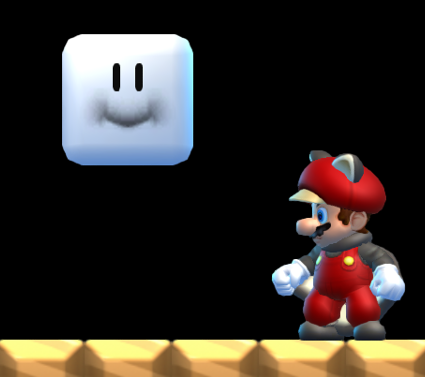
- Can be fixed by re-adding the actor file "block_cloud.szs".
- Nybble 12 changes the height that lakitu will cruise at.
- Nybble 13 set to 1 makes the sprite crash.
- Nybble 14 changes the number of coins that lakitu will throw before chucking us a 1-UP and then leaving.
Glow Block#
Sprite 199 is a portable block that when is held, creates a light circle around it. 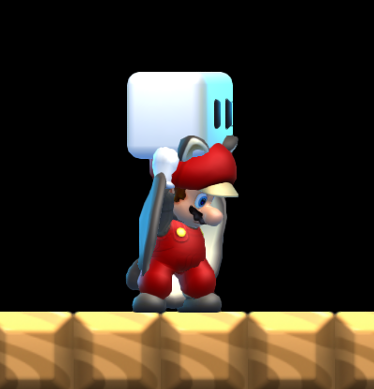
- Can be fixed by re-adding the actor file "block_light.szs".
Propeller Block#
Sprite 202 is a portable block that when is held, lets the player use the abilities of the propeller mushroom. 
- Can be fixed by re-adding the actor file "block_fly.szs".
Pivotal-rotation-controlled Mushroom Block#
Sprite 256 is a pivotal-rotation-controlled mushroom block that comes in two sizes. 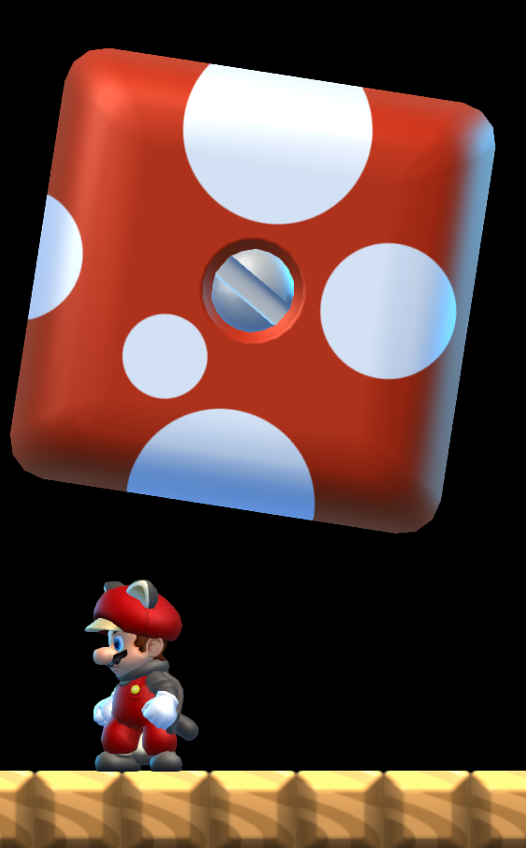
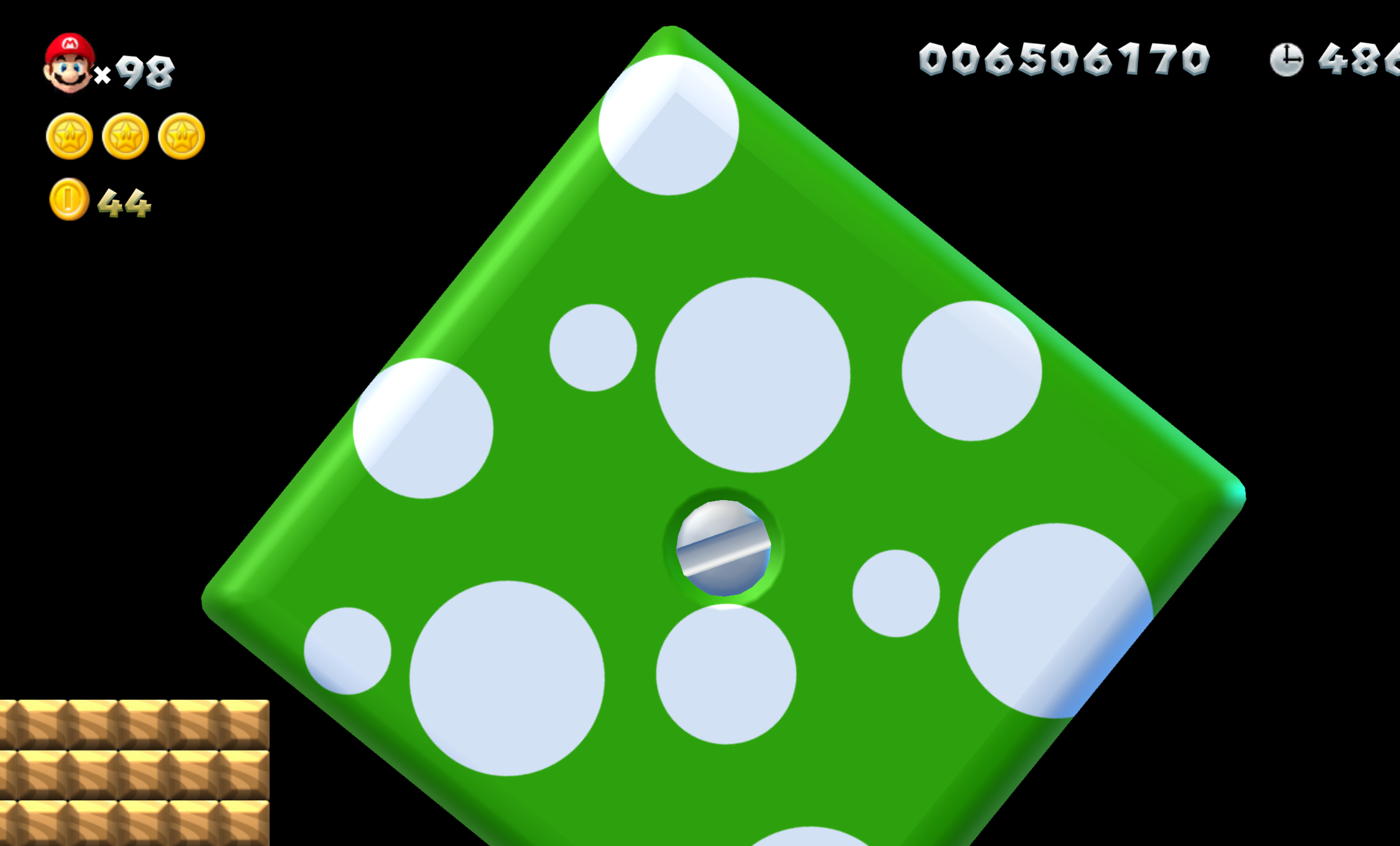
- Can be fixed by re-adding the actor file "cube_kinoko.szs".
Giant Koopa Shell Cave#
Sprite 267 is a giant koopa shell cave used that you can both enter and get on. 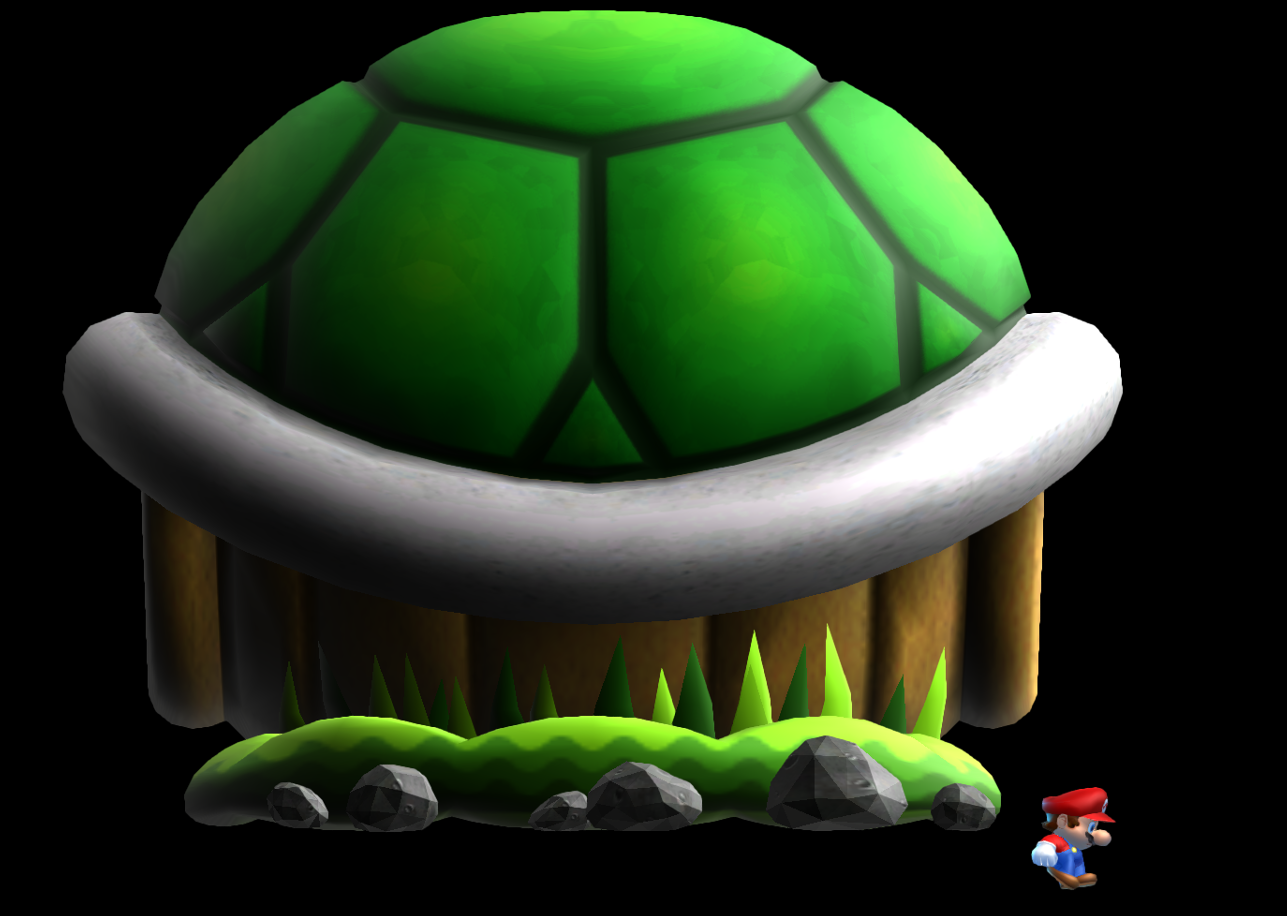
- Can be fixed by re-adding the actor file "big_shell.szs".
Line-controlled Rotating Mushroom Block#
Sprite 312 is a rotating mushroom block that moves using lines. Its size can be modified. 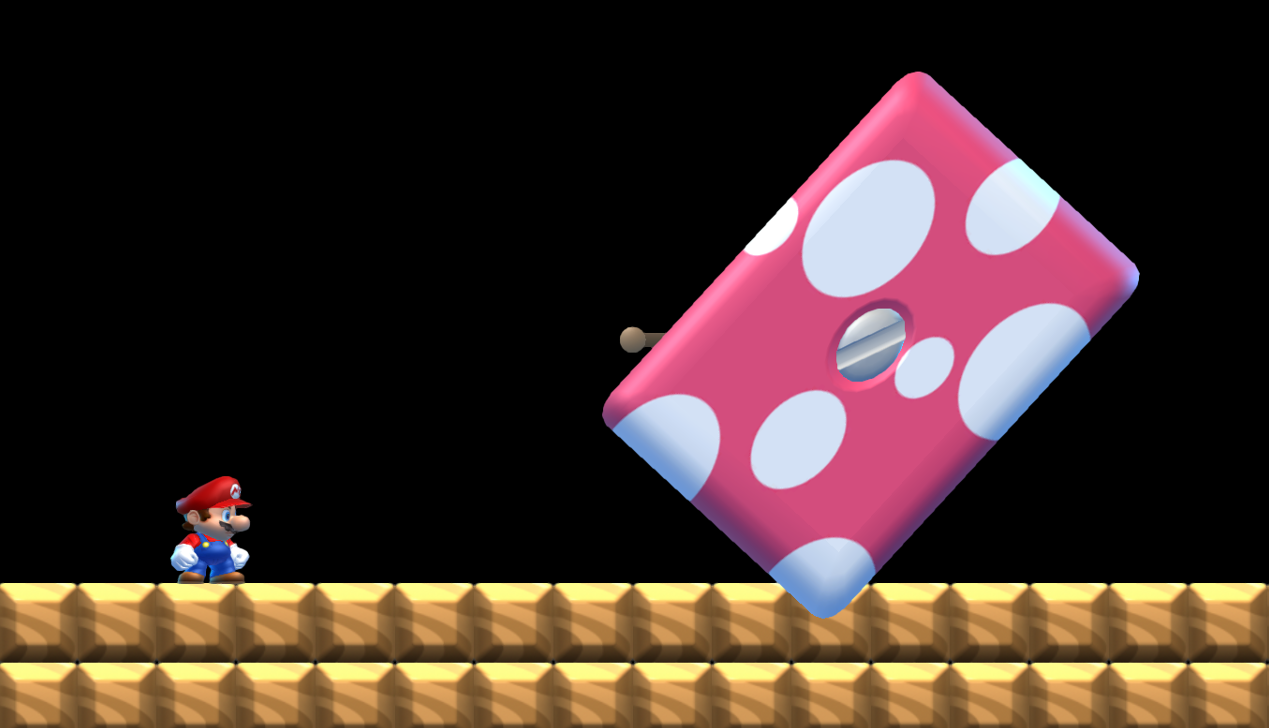
- Can be fixed by re-adding the actor file "cube_kinoko.szs".
Move-when-on Metal Block#
Sprite 319 is a multi-size metal box that moves when an object is resting on it. 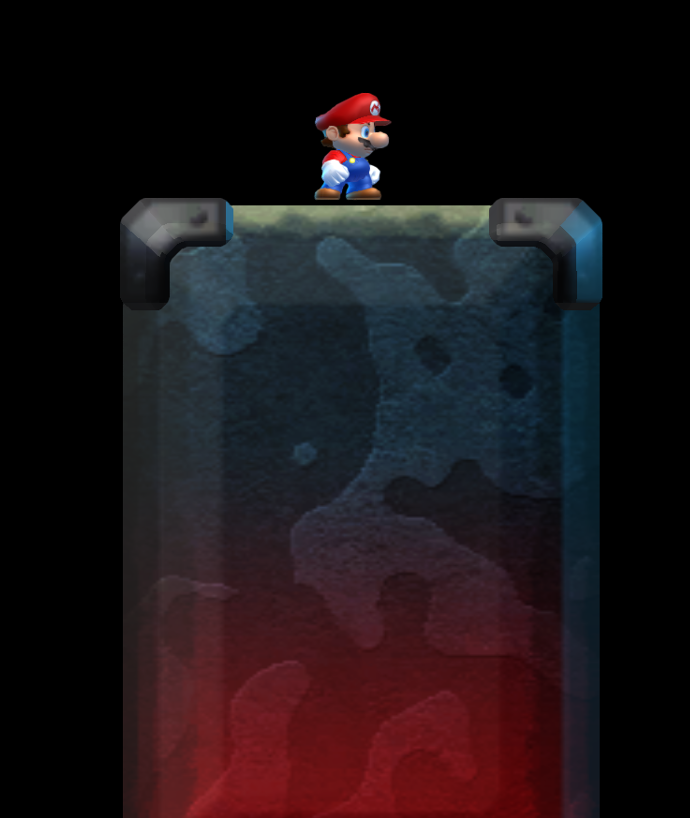
- Can be fixed by re-adding the actor file "lift_zen_yogan_down.szs".
Remote-controlled Tilting Girder#
Sprite 345 is a 14 block long metal girder that the player can control by tilting the controller. 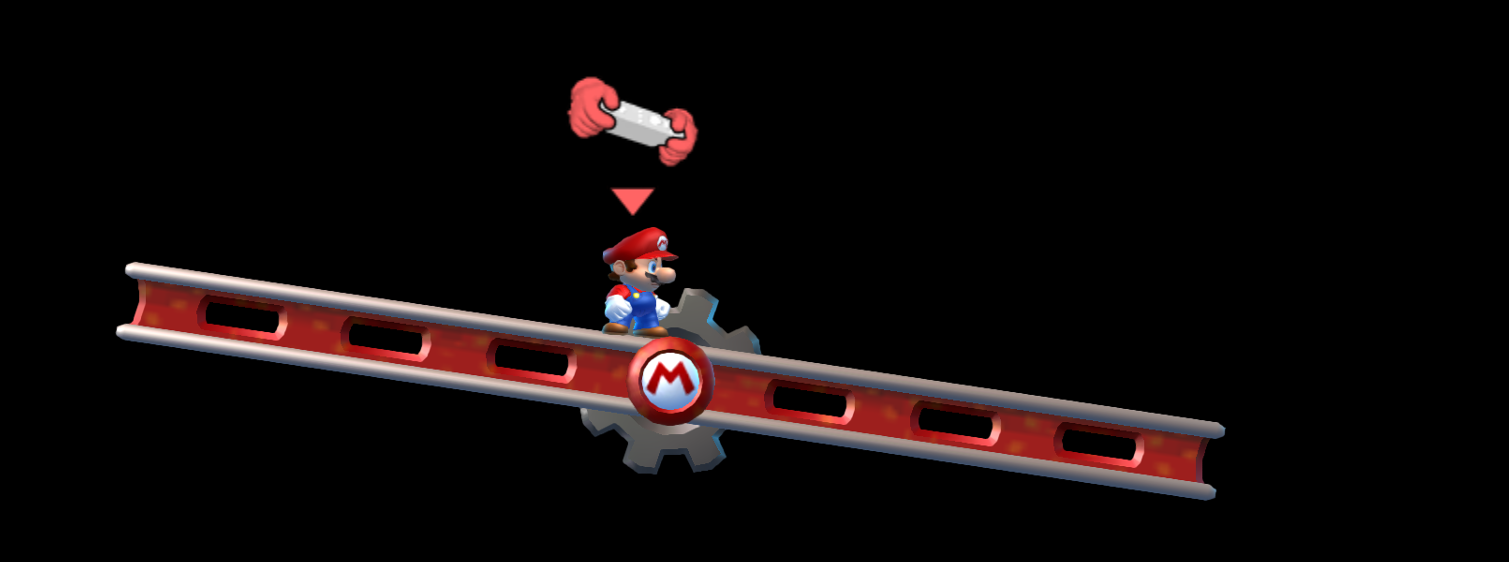
- Can be fixed by re-adding the actor file "remo_lift.szs".
Big Porcupuffer/Big Porcupuffer Spawner#
Sprite 620 is a big version of the Porcupuffer, whereas sprite 621 is its spawner. 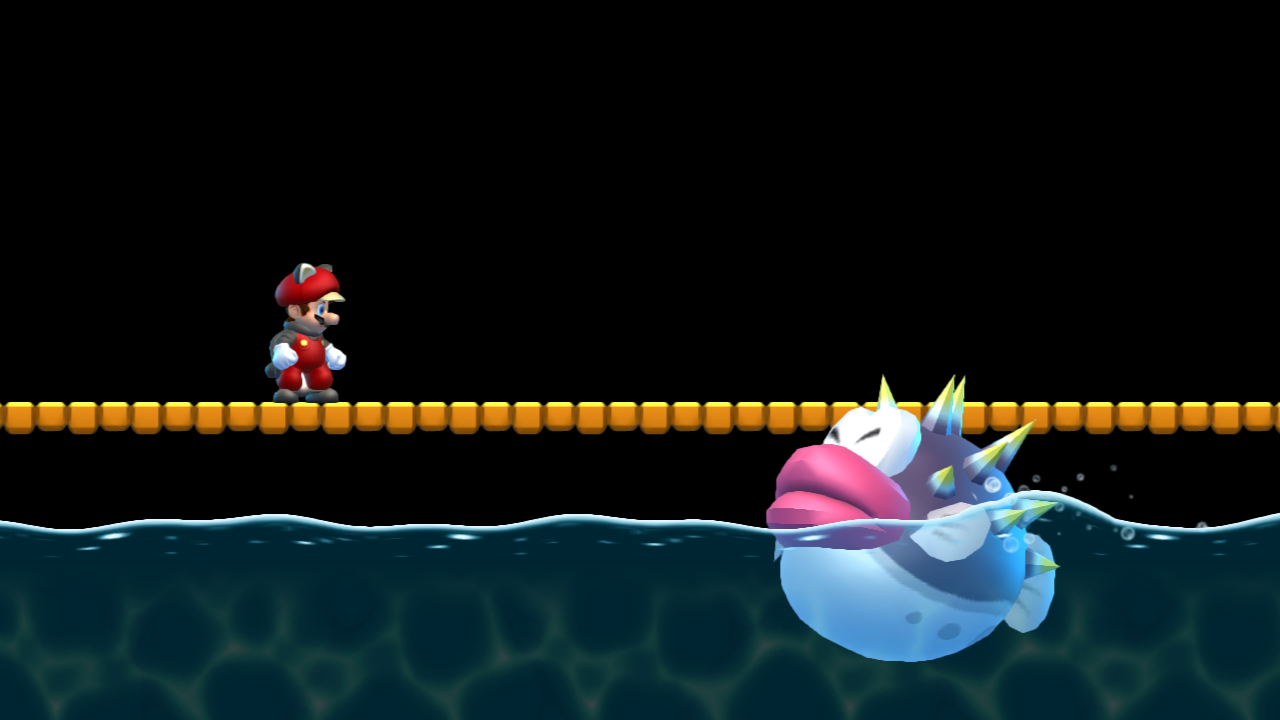
- Can be fixed by re-adding the actor file "fuguBig.szs".