Neighbours From Hell is a console remake of the first two games that were only released on Windows, combining the story of both games in one, and bringing a lot of new stuff to the table.
Sub-Page#

Unused Text#
PlayStation 2 Mentions#
A bunch of text mentioning the PlayStation 2, which for one reason or another never received a port of this game. Some of these strings are reused for the GameCube port.
String Name |
String |
|---|---|
tutorial_ps2 |
|
nocontroller_text_ps2 |
|
profiles-on-medium-all-empty-message-ngc-ps2-card |
There are no profiles stored on the Memory Card. |
too-many-profiles-message2-card-ngcps2 |
profiles on the memory card in |
profile-save-nomedium-message1-ngcps2 |
The memory card in |
profile-save-nomedium-message2-ngcps2 |
|
cleanupchoice-message-ps2-card1 |
There is not enough free space on the Memory Card (PS2) in |
cleanupchoice-message-ps2-card2 |
. You need |
cleanupchoice-message-ps2-card3 |
KB free. Delete profiles to free up space or go back to choose a different location. |
cleanupchoice-boot_menu_ps2 |
Start Browser |
medium-card0-ps2 |
MEMORY CARD 1 |
medium-card1-ps2 |
MEMORY CARD 2 |
slot-0-ps2 |
MEMORY CARD slot 1 |
slot-1-ps2 |
MEMORY CARD slot 2 |
searching-for-profiles-message-ps2 |
Please do not remove any Memory Card (PS2) |
profile-save-nomedium-caption-ngcps2 |
Memory Card removed |
loadprocess-message-ps2 |
Loading data. Do not remove memory card (PS2), controller, or reset/switch off the console. |
saveprocess-message-ps2 |
Saving Profile. Do not remove memory card (PS2), controller, or reset/switch off the console. |
deleteprocess-message-ps2 |
Deleting Profile. Do not remove memory card (PS2), controller, or reset/switch off the console. |
saveprocess-too-many-profiles-message-1-ps2 |
There are too many profiles on the Memory Card (PS2) in |
saveprocess-too-many-profiles-message-2-ps2 |
. Please choose another Memory Card or delete some profiles. |
formatprocess-message-1-ps2 |
Formatting Memory Card (PS2) in |
formatprocess-message-2-ps2 |
. Do not remove memory card (PS2), controller, or reset/switch off the console. |
formatprocess-message-1-ngc |
Formatting Memory Card in |
formatprocess-success-message-1-ps2 |
The Memory Card (PS2) in |
formatprocess-success-message-2-ps2 |
was formatted successfully |
formatprocess-error-message-1-ps2 |
Please check memory card (PS2) in |
formatprocess-error-message-2-ps2 |
and try again. |
mediaerror-headline-ps2 |
Unusable Memory Card |
mediaerror-message-1-ps2 |
|
mediaerror-message-2-ps2 |
is unusable. You can either format it or select another save location. |
format-confirm-headline-ps2 |
Format Memory Card? |
format-confirm-message-1-ps2 |
Formatting the Memory Card (PS2) in |
format-confirm-message-2-ps2 |
will erase all data on it. Do you really want to proceed? |
headline1_profile-ps2 |
KB Free |
bootup-nomedium-headline-ps2 |
No Memory Card (PS2) |
bootup-nomedium-message-1-ps2 |
Memory card (PS2) is not inserted. At least |
bootup-nomedium-message-2-ps2 |
KB is needed to save this game data. Do you want to start the game? |
bootup-nospace-headline-ps2 |
|
bootup-nospace-message-1-ps2 |
There is insufficient space on the memory card (PS2) in |
bootup-nospace-message-2-ps2 |
. At least |
bootup-nospace-message-3-ps2 |
|
bootup-nospace-nomedium-continue-ps2 |
|
bootup-nospace-nomedium-retry-ps2 |
|
bootup-corrupt-headline-ps2 |
|
bootup-corrupt-nomedium-continue-ps2 |
|
bootup-corrupt-retry-ps2 |
|
bootup-corrupt-format-ps2 |
|
bootup-corrupt-message-1-ps2 |
Memory card (PS2) in |
bootup-corrupt-message-2-ps2 |
is unformatted. Format memory card (PS2)? |
ps2_ps2 |
|
ps2_pc |
Windows Mentions#
And some mentions of Windows are hidden here as well. As before, some strings are reused for Xbox.
String Name |
String |
|---|---|
profiles-on-medium-all-empty-message-win32-harddisk |
Currently there are no saved profiles. |
cleanupchoice-message-win32 |
No space left - can't save! |
saveprocess-message-win32 |
Saving Profile - please do not turn off your computer |
medium-harddisk-win32 |
PC hard disk |
loadprocess-message-win32 |
Loading Profile. Please don't turn off your computer. |
deleteprocess-message-win32 |
Deleting Profile - please do not turn off your computer |
headline1_profile-win32-xbox-ngc |
Free Blocks |
too-many-profiles-message2-card-xboxpc |
profiles on |
xbox_pc |
Build Information#
Both platforms have a bldver.bin and cntver.bin file, showing the build number and compilation date. The Xbox version was finished first, in late October 2004, and then later in early December, the port for the GameCube was finished.
Xbox#
- bldver.bin
77
- cntver.bin
25102004-12-59-01
GameCube#
- bldver.bin
97
- cntver.bin
06122004-12-15-45
Revisional Differences#
Since the GameCube version was finished later than the Xbox version, it contains several bug fixes, potentially newly introduced bugs and some minor changes.
Impossible Mode Level Icons#
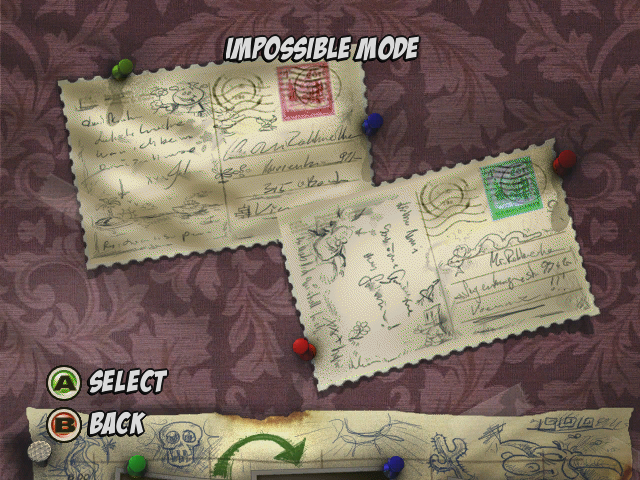
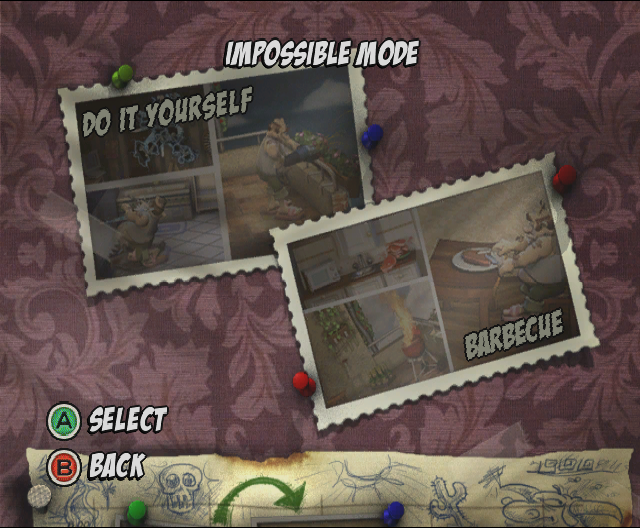
On Xbox, when a level is completed in Impossible Mode, it turns back to showing the level as locked. On GameCube it shows the regular unlocked level icons for all the completed levels, even though you can't play them after finishing in Impossible Mode anyway.
Xbox |
GameCube |
|---|---|
 |
 |
Pushed By The Neighbour#
When Rottweiler is using a door and Woody is directly in front of the door, Woody should either stay in his place on Xbox or get pushed by Rottweiler on GameCube.
Oddities#
Vacation Clothing at Home#
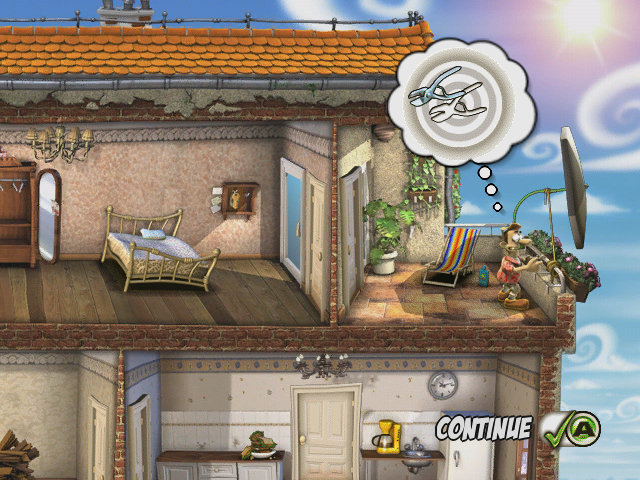
One of the actions in the level Sunny, that being cutting the neighbors parasol, changes Woody's clothing to the vacation clothing while cutting.
Impossible Mode Crash#
After Impossible Mode is complete, you won't be able to select and play any level in that game mode. Though the game still for some reason allows you to go in the menu, and if you press A, it'll crash the game.
|
The Neighbours From Hell series | |
|---|---|
|
Windows |
Neighbours From Hell: Revenge is a Sweet Game • Neighbours From Hell 2: On Vacation • Neighbours back From Hell |
|
GameCube, Xbox |
|
|
Nintendo Switch, PlayStation 4, PlayStation 5, Xbox One, Xbox Series X/S, Android, iOS |
|