 This article has a talk page!
Monster Jam: Urban Assault is a mediocre monster truck game with racing, freestyle events, and other random game modes. That's about it.

|
This needs some investigation.
|
Unused Trucks#
All of the unused trucks below can be found in the game that came before this (simply called Monster Jam).
Grave Digger Chrome#
There is a model file and texture named truckgravediggerchrome that aren't present in gameplay. Currently it is unknown if there is a way to access the truck in-game without hacks, but the model and texture can be applied to a different truck to simulate what it could look like. There is no announcer audio file mentioning this truck, so it was likely cut pretty early in development.


Brutus#
A model and texture file named truckbrutus is present in the game, but Brutus is never present in gameplay or in the list of available trucks. It's unknown as of now if the truck can be accessed in-game, but the model and texture can be applied to a different truck to make a mockup of what it could look like in-game. There is no announcer audio file mentioning Brutus, meaning it didn't make it far in development.


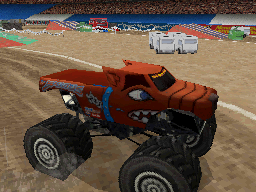
Predator#
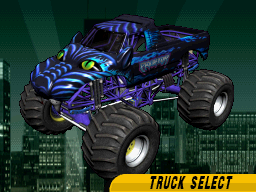
A model, texture, and truck selection image exist for Predator, but the truck is not one of the unlockable trucks in-game. Like the other two, the texture and model can be applied to a different truck to view the truck in-game. Like Brutus and Grave Digger Chrome, there is no announcer audio file for this truck.


Unused Audio#
Unknown SFX 1 The purpose for these sound effects is unknown as of now.
Announcer Clips#
For reasons unknown, a lot of announcer clips used in other versions of the game (PS2/Wii) weren't used in the DS version. There is also an announcer for Spanish and one for German as well, although there is no option to change the game language.
|
|
This needs some investigation. |
Dialog |
Clip |
Notes |
|---|---|---|
Leaving a ton of points on the board with that jump. |
Used in other versions of the game when a jump isn't very good. |
|
You can do better than that! |
Unknown where this would be used. |
|
This is it! The final head-to-head battle for the Monster Jam World Finals racing championship! |
This was probably supposed to play on the last head-to-head race on the "Speedster" section of the championship. |
|
The Monster Jam World Finals racing title is on the line! Let's go racing! |
This was likely intended to play on the last Speedster championship event. |
Debug Elements#
Models#
There is a subdirectory named debug inside the models directory containing 2 files, dbgcube.ndm and dbgsphere.ndm. These were most likely used to test 3d model functionality.
Debugging Strings#
Starting at 0x000B4280 in the ROM, there are text strings that likely display on-screen when a debugging mode is activated. It's not yet known how to activate the debug mode nor if it has been left intact.
m_bDebugDisplayPolyCount
m_bDebugDisplayCoords
m_bDebugRenderWaypointNetwork
m_bDebugRenderLevelPrimitives
QuitToDebug
m_bDebugZoneIds
m_bDebugDisable4WD
m_bDebugDisableBoost
m_bDebugDisplayNavigation
m_bDebugDisplayRaceNetwork
m_bDebugDisplayAiInterestForces
m_bDebugZoneIdsWaypointNetworkId
m_fDebugRenderCollisionNormalsWithinRadius
m_bDebugDisplayPolyCount
Some interesting cheats could come out of these...
Material Attributes#
matattr.txt lets you edit material attributes. A similar text file with the same name is also present in other titles from Torus, such as Shrek: Smash n' Crash Racing and the previous Monster Jam game.
//--------------------------------------------------------------------------------------
// Note:
//  * Friction affects sideways drift of vehicle plus acceleration & braking - default 1.0
//  * Restitution describes how "bouncy" a surface is - default 0.5
//  * Resistance slows down the vehicle when on this surface (eg. increase for deep mud to slow vehicle) - default 0.0
//--------------------------------------------------------------------------------------
//File format:
//
//MaterialId    Name                    Friction    Wheel Friction  Restitution Bumpyness   Damping
//--------------------------------------------------------------------------------------------------
0               "DEFAULT"               1.0         1.0             0.005
1               "INVISIBLEWALL"         0.0         0.0             0.005
2               "GRATING"               1.0         1.0             0.005
3               "FLESH"                 1.0         1.0             0.005
4               "PAPER"                 1.0         1.0             0.005
5               "CARDBOARD"             1.0         1.0             0.005
6               "CERAMIC"               1.0         1.2             0.005
7               "WOOD"                  1.0         1.2             0.005
8               "GRASS"                 0.8         0.8             0.005
9               "LILYPAD"               0.8         0.8             0.005
10              "PLASTER"               1.0         1.2             0.005
11              "CONCRETE"              1.0         1.2             0.005
12              "BRICK"                 1.0         1.2             0.005
13              "STONE"                 2.0         1.2             0.005
14              "THIN_METAL"            1.0         1.0             0.005
15              "THICK_METAL"           1.0         1.0             0.005
16              "SAND"                  0.8         0.8             0.005
17              "DIRT"                  0.9         0.9             0.005
18              "GRAVEL"                0.9         0.9             0.005
19              "CLOTH"                 1.0         1.0             0.005
20              "CARPET"                1.0         1.0             0.005
21              "PLASTIC"               1.0         1.0             0.005
22              "GLASS"                 1.0         1.0             0.005
23              "SNOW"                  0.8         0.8             0.005
24              "ICE"                   0.5         0.5             0.005
25              "SLIME"                 1.0         1.0             0.005
26              "WATER"                 1.0         1.0             0.005
27              "WATERPIPE"             1.0         1.0             0.005
28              "STEAMPIPE"             1.0         1.0             0.005
29              "RAZORWIRE"             1.0         1.0             0.005
30              "NOTHING"               1.0         1.0             0.005
31              "SOUNDOCCLUDER"         1.0         1.0             0.005
32              "PERCEPTIONOCCLUDER"    1.0         1.0             0.005
33              "MOVEABLEMETAL"         1.0         1.2             0.005
34              "ICEROAD"               0.6         0.6             0.005
35              "MUD"                   0.8         0.8             0.003
36              "BOOST"                 1.0         1.0             0.005
37              "HAIRPIN"               0.8         0.8             0.003
38 "LAVA" 0.8 0.8 0.005|
The Monster Jam series | |
|---|---|
|
Xbox 360, PlayStation 2, Windows, Wii |
|
|
Nintendo DS |
|