 This article has a talk page!
Legend of Legaia is what you get when you throw Wild ARMs and Xenogears into a blender. It also has one of the most messed-up storylines in any PlayStation RPG, period.
The game has native debug features, which were used to document most of what is below.
Version Differences#
Legend of Legaia has a total of 13 official releases and one (known) extra-official version (ordered by date of the executable):
- PAPX-90040 - PrePre Vol. 14 [1996-06-02] Japanese Version Taikenban - PrePre Vol. 14 (Japan) (Disc 2) (Legaia Densetsu Trial Version)
- PAPX-90055 - Regaia Densetsu [1998-08-19] Japanese Version Taikenban - Legaia Densetsu (Japan) (Demo 2)
- PCPX-96130 - Regaia Densetsu [1998-08-18] Japanese Version Over-the-Counter Version (Tentou Houei-you Movie Version) - Legaia Densetsu (Japan) (Demo 1)
- SCPS-10059 - Regaia Densetsu [1998-09-09] Japanese Version Original - Legaia Densetsu (Japan)
- SCPS-10059 - Legend of Legaia [1998-11-16] American Version PROTOTYPE - Legend of Legaia (USA) (Beta)
- SCUS-94366 - Legend of Legaia [1998-12-21] American Version DEMO - Legend of Legaia (USA) (Demo)
- SCUS-94254 - Legend of Legaia [1999-01-29] American Version Original - Legend of Legaia (USA)
- SCES-01752 - Legend of Legaia [1999-09-27] European Version Original - Legend of Legaia (Europe)
- SCES-01944 - Legend of Legaia [2000-04-05] French Version Original - Legend of Legaia (France)
- SCES-01945 - Legend of Legaia [2000-05-10] German Version Original - Legend of Legaia (Germany)
- SCES-01946 - Legend of Legaia [2000-04-26] Italian Version Original - Legend of Legaia (Italy)
- SCES-01947 - Legend of Legaia [SCES-01947] Spanish Version Original - Legend of Legaia (Spain)
- SCPS-91246 - Regaia Densetsu (レガイア伝説) [????-??-??] Playstation The Best Version (Unavailable Dumps)
- SCPS-45340 - Regaia Densetsu (レガイア伝説) [????-??-??] ??? (Unavailable Dumps)
Enabling the Debug Flag#
By reading and analyzing a RAM dump with PS2DIS, a debug flag can be easily found and its variable can be located in the memory. 
By changing the Debug Menu flag hard-coded in the game to "True" (01), it enables the user to access native debug features in the game, which include a Debug Menu (with quick debugging options such as Item Giving, Map Change, Debug Verbose, Event Flags Config, Player Stats Changer, etc..) and a Debug Mode (with low-level features such as Game Mode Change, TMD/Sound/Sprite/Music/FX/etc., Testers, and other technical settings).
You can change the debug flag to 01 with an 8-bit write instruction at the correct memory address using GameShark:
In the Japanese version (SCPS-10059):
3007D51F 0001
8-BIT WRITE INSTRUCTION AT ADDRESS '07D51F' WITH VALUE 01
In the American version (SCUS-94254):
3007B98F 0001
8-BIT WRITE INSTRUCTION AT ADDRESS '07B98F' WITH VALUE 01
(Please take note that it's recommended that you use a Developer PSX Platform/BIOS for this with 8MB of RAM, as the game expects you to be on a proper debugging environment. Not doing so makes the system more unstable and prone to work errors, crashes, glitches and other malfunctions.)
(Source: Punk7890 (PS2DIS instructions))
Debug Menu#
After this flag is enabled, pressing SELECT no longer brings up the the inventory (card system) anymore, and the player can press certain button combos to access the debug features.
SELECT + △ opens the Debug Menu: 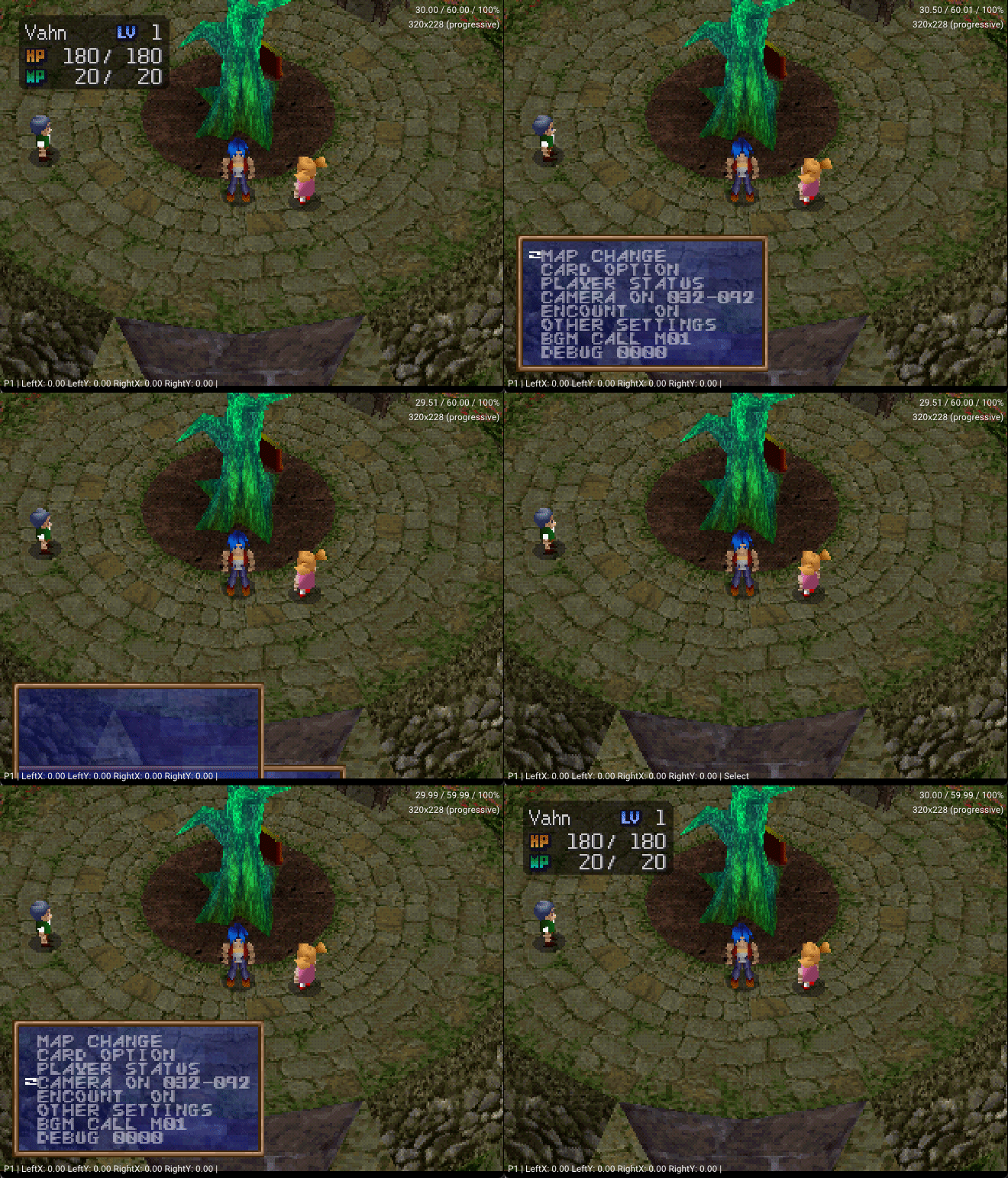 In this menu, the buttons are pretty intuitive, working much like any other menu in Legaia. Depending on your version, either O/X are Cancel/Select options.
SELECT + START starts the game in DEBUG MODE: 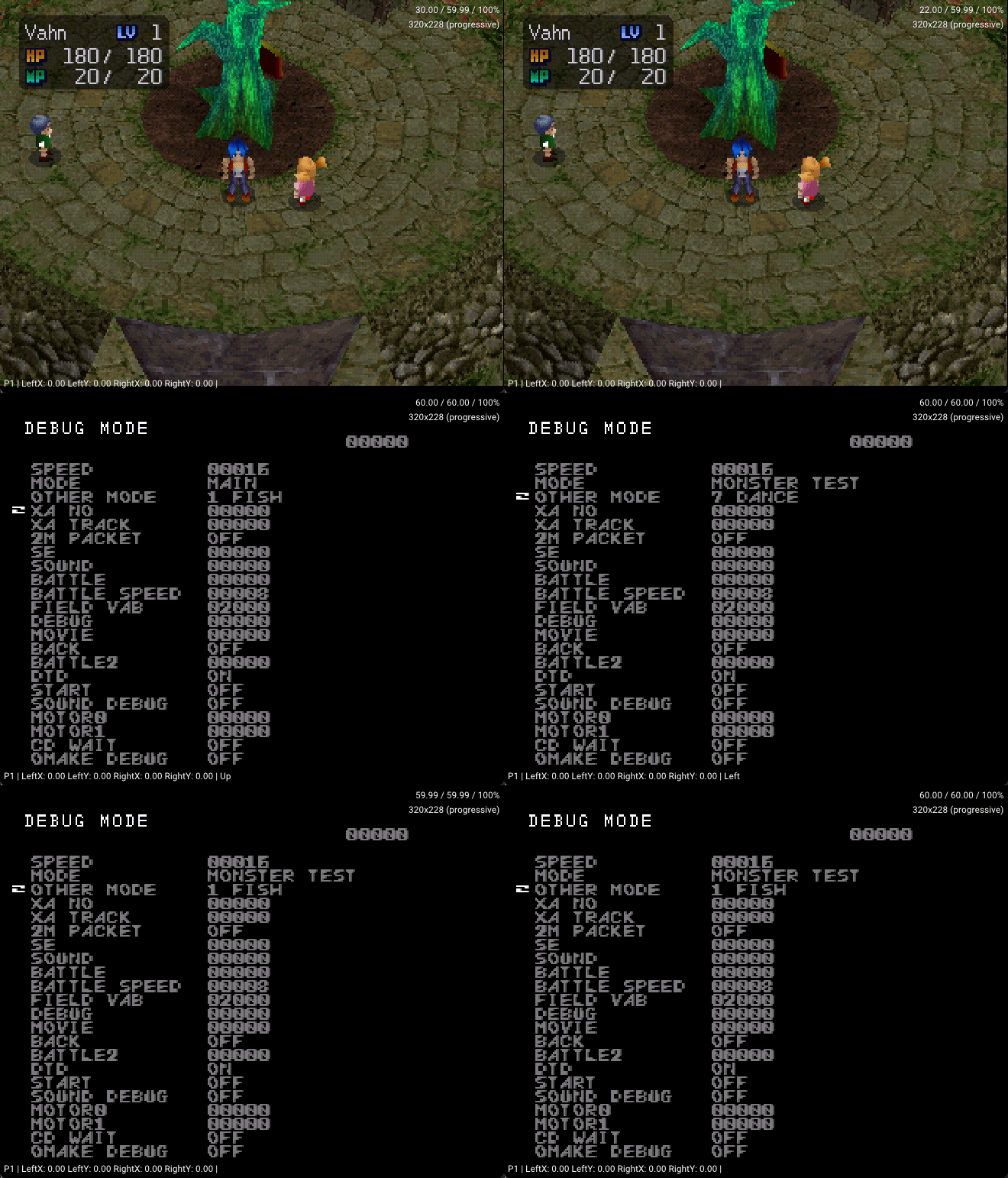
R1 + R2 + X locks the game into some kind of coordinates debugging, which also allows further camera controls:  Pressing 〇 dims out the colors/lighting, and ▢ toggles the verbose. This mode seems to have a small "+" cursor (usually in Vahn) that you can move around by holding R1 + R2 and using the D-PAD, and holding 〇 accelerates it. Pressing R1 + R2 + X again disables this mode.
Map Change#
This menu allows loading of any of the 106 Legend of Legaia maps; however, not all of them are accessible at all times or work as intended.
Map List#
Below there is a list of maps and their descriptions:
BALDEN      VIDNA
BALDEN2     VIDNA 2
BUBU1       BUMA
BUBU2       FROZEN BUMA
BYLON       BYRON
CAVE01      SNOWDRIFT CAVE
CHITEI2     FLOATING CASTLE CONTROL ROOM
CONC        CONKRAM (PAST)
CONCNOW     CONKRAM (PRESENT)
CONC2       CONKRAM (OPENING?)
CONCEND     CONKRAM (AFTER SERU DEATH)
CONC3       CONKRAM (PAST AFTER MIST)
DEENE       MT DHINI
DEROA       ABSOLUTE FORTRESS ENTRANCE
DOHATY      SEBUCUS MIST GENERATOR
DOLK        DRAKE CASTLE (MIST)
DOLK2       DRAKE CASTLE
DOMAN       USHA'S RESEARCH LAB
DREAM       NOA'S DREAMS
EDBYLON     ENDING SEQUENCE BYRON
EDBALDEN    ENDING SEQUENCE VIDNA
EDBUBU      ENDING SEQUENCE BUMA
EDDOMAN     ENDING SEQUENCE USHA
EDKOROUT    ENDING SEQUENCE SOL
EDLAST      ENDING SEQUENCE FINAL
EDRETOIN    ENDING SEQUENCE RATAYU
EDSON       ENDING SEQUENCE SOREN
EDSTATI3    ENDING SEQUECNE GONDOLA
EDTEIEN     ENDING SEQUENCE JEREMI
GARMEL      ZETO'S DUNGEON
GEREMI      JEREMI
IZUMI       HUNTER'S SPRING
JAGAROOM    JUGGERNAULT ROOM
JIJI        ANCIENT WIND CAVE
JOU     RIM ELM (JUGGERNAULT)
JOUINA      JUGGERNAUT A
JOUINB      JUGGERNAUT B
JOUINC      JUGGERNAUT C
JOUIND      JUGGERNAUT D
JOUINE      JUGGERNAUT E
JUUI1       JUGGERNAUT F
JUUI2       JUGGERNAUT G
KEIKOKU     VALLEYS OF MIST
KOIN1       SOL ROOMS A
KOIN2       SOL ROOMS B
KOIN3       SOL ROOMS C
KOIN4       SOL ROOMS D
KOIN6       SOL ROOMS E
KOIN1B      SOL ROOMS F
KOR     SOL STAIRS A
KOR3        SOL STAIRS B
KOR4        SOL STAIRS C
KOR5        SOL STAIRS D
KORB2       SOL UNDERGROUND A
KORB3       SOL UNDERGROUND B
KOROUT      SOL ENTRANCE
MAP01       WORLDMAP 01 (DRAKE KINGDOM)
MAP02       WORLDMAP 02 (SEBUCUS ISLANDS)
MAP03       WORLDMAP 03 (KARISTO KINGDOM)
NILBOA      NIVORA RAVINE
NILBOA2     NIVORA RAVINE (MELTED)
NOARU       NOARU VALLEY
OPDEENE     OPENNING MT DHINI
OPKOROUT    ?? CRASHES
OPMAP01     ?? CRASHES
OPSTATI     OPENNING STATION
OPURUD      OPENING CONKRAM
OTHER1      MINI-GAME LOCATION (FISHING)
OTHER4      ?? CRASHES
OTHER5      ?? CRASHES
OTHER6      ?? CRASHES
OTHER7      ?? CRASHES
RAYMAN      OCTAM UNDERGROUND
RAYMAN2     OCTAM UNDERGROUND 2
RETOCK      RATAYU
RETOCKIN    RATAYU INSIDE
RETONA      MT LETONA
RIKUROA2    MT RIKUROA 2
RIKUROA     MT RIKUROA
ROPEWAY     OCTAM
ROPEWAY2    ROPE WAY
RUGI        ROGUE DUNGEON
SON     SOREN
STATION     OCTAM STATION
STATION3    KARISTO STATION
STONE       GATE OF SHADOW
SUIMON      WATER GATE
TAIKU       FLOATING CASTLE
TAIKU2      FLOATING CASTLE 2
TEIEN       JEREMI GARDEN
TOWN01      RIM ELM A
TOWN0B      RIM ELM B
TOWN0C      RIM ELM C
TOWER       JEREMI TOWER
TOWN0D      RIM ELM D
TOWN0E      RIM ELM ENDING
TUNNELA     UNDERGROUND PATH A
TUNNELB     UNDERGROUND PATH B
TUNNELC     UNDERGROUND PATH C
URU     URU MAIS
URU2        URU MAIS DESTROYED
URUDRE1     VAHN DREAM RIM ELM
URUDRE2     NOA DREAM CONKRAM
URUDRE3     GALA DREAM BYRON
VELL        WEST VOZ FOREST
VOZZ        EAST VOZ FOREST
Amidst the CD files, there is uncompiled source code text containing several definitions for the game that points out the game's systems and map names, respectively, in the same order as they appear in the in-game debug system.
Card Option#
While the game's menu system is referred to as "CARD SYSTEM" (as the menu interface looks like "cards" sliding in and out of the screen), the debug menu's CARD OPTION instead refers to the Memory Card system. Accessing it brings up a Save/Load menu, which allows you to make a save or load one from anywhere in the game. (This has been known to be buggy, depending on the circumstances that you save the game in.) 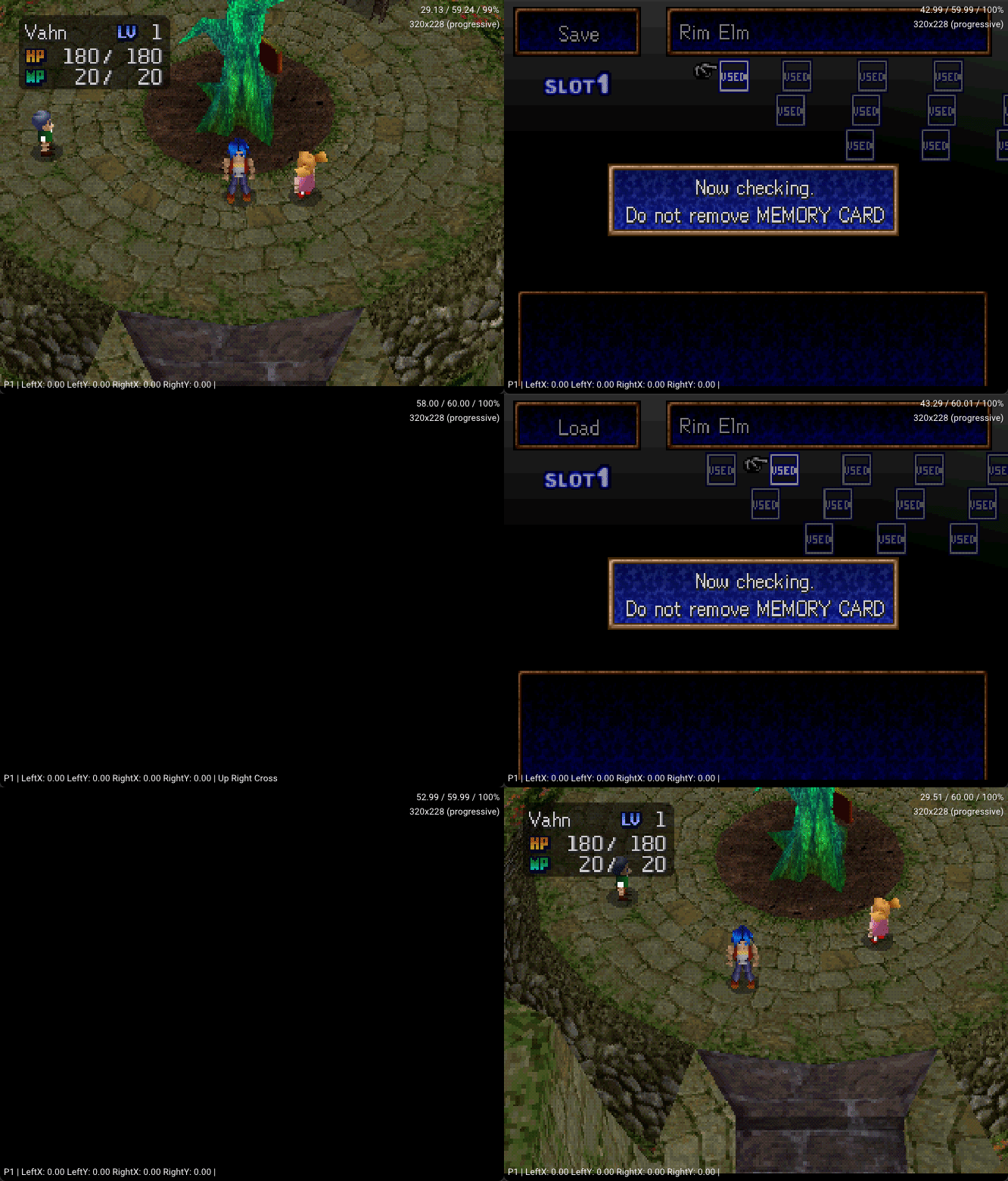
Player Status#
The Player Status menu contains several options: 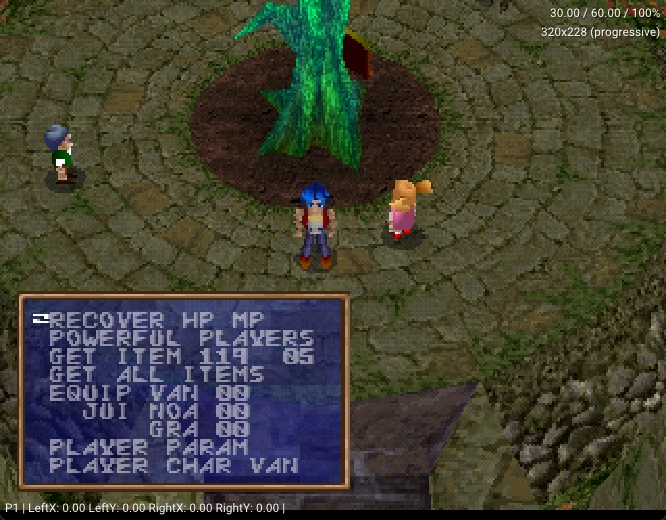
- RECOVER HP MP
Recovers all characters' HP and MP values.
- POWERFUL PLAYERS
This option levels all characters up to LVL 40 and maxes out their stats, as well as fully upgrading Ra-Seru to their respective maximum levels.
- GET ITEM X X
An item-spawning feature that allows the selection of any of the 256 items in the game to add to the inventory.
- GET ALL ITEMS
This option gives the player all of the game's items.
- EQUIP VAN 00 / EQUIP NOA 00 / EQUIP GRA 00
These are the Ra-Seru levels for each character.
Player Parameters#
This submenu can be used to change all of the characters' stats, forget all known Arts, and/or add Experience Points. 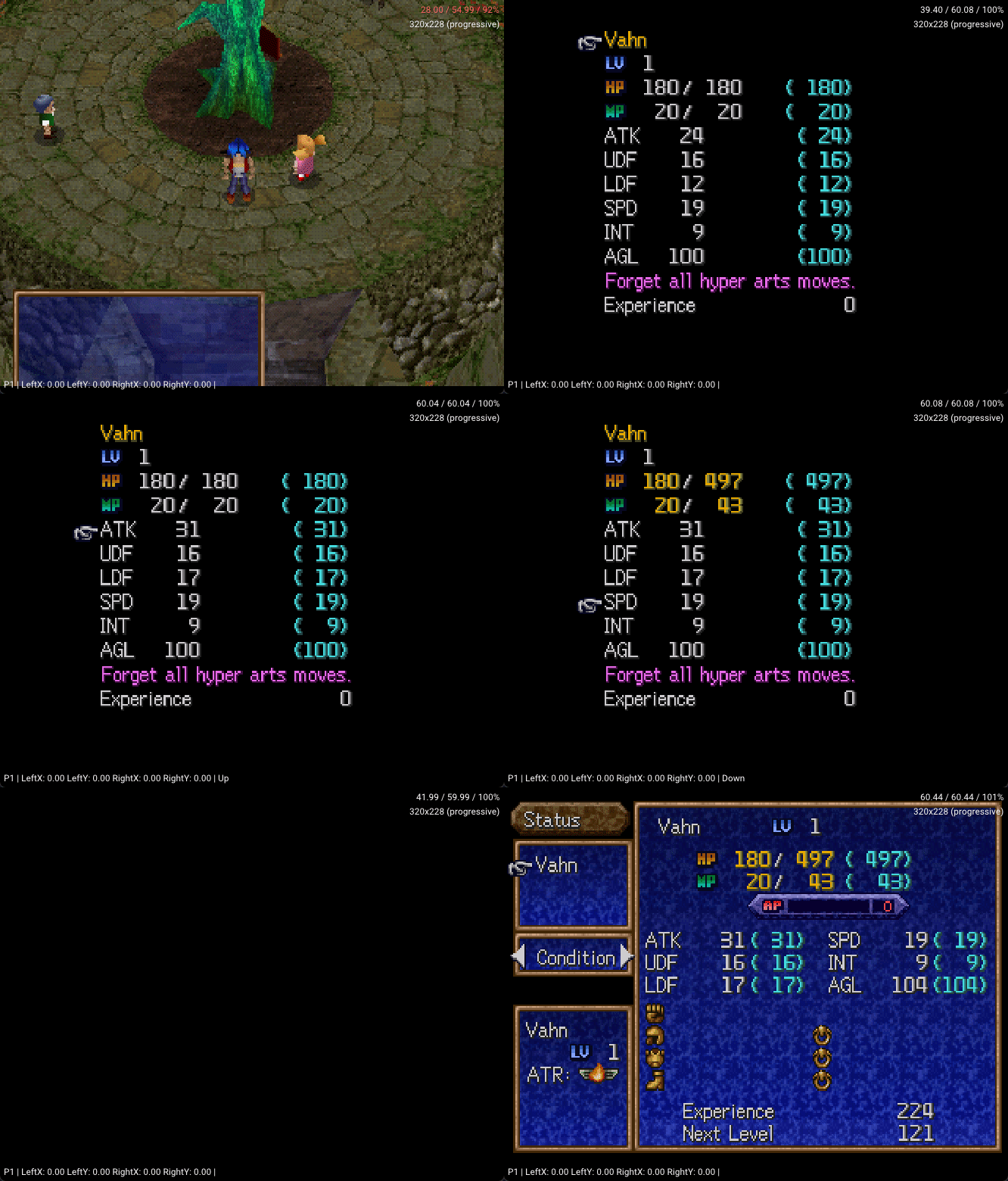
- PLAYER CHAR VAN/NOA/GRA
This changes the character shown in the field.
Camera Control#
The CAMERA option can be used to maintain or deactivate automatic camera positioning. If kept ON, it will follow the player and automatically adjust following the map's configuration, so if you change camera axis values and then move around, it will try to go back to the normal values. (Some axes do not re-configure automatically, such as AZ-AXIS/Roll.)
If turned OFF, however, the camera will be maintained wherever it's configured.
WHILE IN-GAME
HOLDING L2
UP/DOWN     D-PAD   >> VY-AXIS (PEDESTAL MOVEMENT)
LEFT/RIGHT  D-PAD   >> VX-AXIS (TRUCK MOVEMENT)
△/𐌗         BUTTONS >> AX-AXIS (CRANE MOVEMENT)
▢/〇     BUTTONS >> AY-AXIS (TONGUE MOVEMENT)
R1/R2       BUTTON  >> VZ-AXIS (ZOOM MOVEMENT)
HOLDING L2+L1
▢/〇     BUTTONS >> AZ-AXIS (ROLL MOVEMENT)

WHILE COORDINATES DEBUG IS ACTIVE (R1+R2+X)
HOLDING L2
UP/DOWN     D-PAD   >> VY-AXIS (PEDESTAL MOVEMENT)
LEFT/RIGHT  D-PAD   >> VX-AXIS (TRUCK MOVEMENT)
△/𐌗         BUTTONS >> AX-AXIS (CRANE MOVEMENT)
▢/〇     BUTTONS >> AY-AXIS (TONGUE MOVEMENT)
R1/R2       BUTTON  >> VZ-AXIS (ZOOM MOVEMENT)
HOLDING L1
UP/DOWN     D-PAD   >> WZ-AXIS (DOLLY MOVEMENT)
LEFT/RIGHT  D-PAD   >> WX-AXIS (TRACK MOVEMENT)
▢/〇     BUTTONS >> AZ-AXIS (ROLL MOVEMENT)
R1/R2       BUTTON  >> SC-AXIS (FOV MOVEMENT)
Source Code#

|
To do: |
A file called "CDNAME.TXT" can be seen within the CD. It has various definitions. The one in SCUS-94254 (US version):
#define init_data 0
#define gameover_data 1
#define town01 3
#define town0b 12
#define town0c 21
#define izumi 30
#define cave01 38
#define vell 45
#define bylon 52
#define dolk 60
#define dolk2 68
#define suimon 77
#define map01 85
#define garmel 94
#define vozz 103
#define keikoku 111
#define rikuroa2 120
#define dream 128
#define jiji 137
#define retock 145
#define rikuroa 155
#define geremi 165
#define stone 174
#define balden 182
#define conc 191
#define rayman 199
#define ropeway 207
#define dohaty 217
#define station 226
#define tunnela 235
#define map02 244
#define tower 254
#define teien 263
#define tunnelb 272
#define retockin 281
#define retona 290
#define jagaroom 300
#define tunnelc 309
#define balden2 318
#define rayman2 328
#define ropeway2 337
#define town0d 347
#define son 354
#define concnow 362
#define taiku 371
#define deene 382
#define map03 391
#define doman 399
#define bubu1 407
#define bubu2 416
#define taiku2 425
#define uru 434
#define uru2 444
#define urudre1 454
#define urudre2 465
#define urudre3 474
#define kor 483
#define kor3 492
#define kor4 501
#define kor5 509
#define korb2 517
#define korb3 524
#define korout 533
#define koin1 542
#define koin2 551
#define koin3 561
#define koin4 570
#define koin6 578
#define juui1 587
#define juui2 596
#define deroa 605
#define station3 615
#define conc2 623
#define jou 630
#define nilboa 637
#define nilboa2 646
#define jouina 655
#define jouinb 664
#define jouinc 672
#define jouind 680
#define jouine 688
#define rugi 696
#define chitei2 705
#define noaru 716
#define concend 725
#define conc3 733
#define town0e 741
#define opdeene 748
#define opstati 753
#define opkorout 758
#define opurud 763
#define opmap01 768
#define koin1b 773
#define edteien 780
#define edbylon 785
#define edbalden 790
#define edlast 795
#define edretoin 800
#define edkorout 805
#define edbubu 810
#define eddoman 815
#define edson 820
#define edstati3 825
#define battle_data 865
#define monster_data 869
#define sound_data 870
#define befect_data 872
#define player_data 876
#define sound_data2 877
#define level_up 891
#define monster_se 893
#define card_data 894
#define bat_back_dat 895
#define xxx_dat 897
#define move_program_no 972
#define other_game 974
#define monster_test 980
#define music_test 990
#define music_01 990
#define vab_01 1072
#define other1 1195
#define other4 1200
#define other5 1203
#define other6 1222
#define other7 1228
There are references to various systems such as Battle, Monsters, Sounds, Battle Effects, Player, Level Up/Experience, Card System, Battle Background, "XXX", and Mini-Games, as well as to debugging systems such as Monster Test, Music Test, VAB's, etc...
Unused Items#
There are two items in the game that cannot be obtained without hacking:
- Something Good - Yes, that's actually its name. It's an item with no description and no known effect, but can be sold for 50,000G.
- (Unnamed Accessory) - If equipped, this nameless accessory ensures you'll only fight Seru, provided you're in an area they can be encountered to begin with. Presumably used as a debugging tool.
Unused Music#
There are a few unused pieces of music hidden away in the game, which were unearthed when PSFs were ripped.
The first is a dramatic battle theme, which was taken straight from Alundra (the Zazan battle theme, to be exact). Another Alundra song is present in Legend of Legaia, and is actually used, despite the games being made by different companies and the soundtracks being composed by different people!
The second is the Wild ARMs battle theme. Probably used as a placeholder early in development, and simply left in.
Unused Enemies#


In the debug menu, if MODE is set to BATTLE, then different enemies can be fought by changing the number to the right of BATTLE and pressing Start. Two of the enemies fought in debug mode never appear anywhere in the normal game.
- 78 - Comm
- 140 - Evil Bat
Unused Graphics#
Game Over#

Japanese Text#
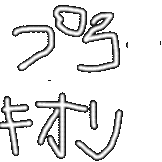
These images are in the files of the game but are never used during normal gameplay. The second image, which contains the text ぷろきおん (Procyon/Prokion, the name of the game's development studio), will appear as a placeholder if a battle background image is missing.
Regional Differences#
|
|
To do: |
Compared to the US version, in the Japanese and European versions enemies give roughly double the amount of money, 1.4-1.5 times more EXP, and are generally weaker as well.
For example, in the Japanese and European versions when defeating Gimard he gives out 55 EXP and 30 Gold; however, in the US version he gives out 42 EXP and 16 Gold. He also takes a lot more damage in the Japanese and European versions.