Despite being created in a mere six-and-a-half weeks to earn some kudos from their corporate paymasters Electronic Arts, Bullfrog's Hi-Octane still manages to hide some unused content within its files.
Sub-Pages#


Debug Overlay#
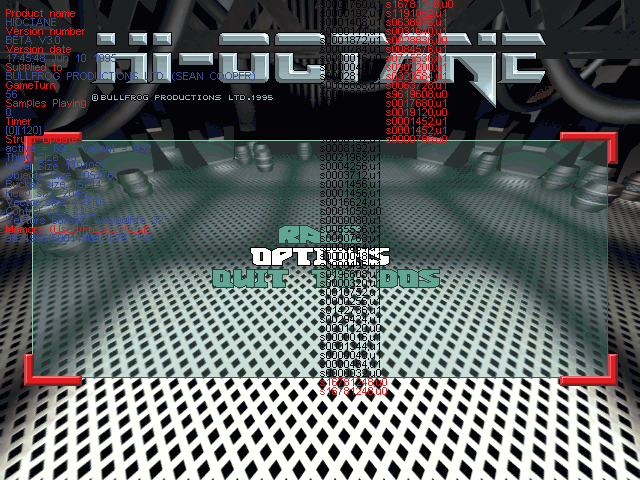
The same debug overlay as the Magic Carpet games used can be seen if Alt + V are pressed in the menus. This was originally accessible in-game as evidenced by the game's demo where this still works, but the in-game loop here has it removed. In fact it's likely the ability even to see it in the menus was an oversight, as this only works on the original version of the game, with the 1.1 update completely removing it.
Unused Items#
Invisibility

As documented in the game's manual, there was once an invisibility power up. An early icon for this is included with the game's demo, and the manual depicts a new version in the final game's icon style of a triangle power up with an eye on it, similar to the spell in Magic Carpet that is not in the final game files. In fact, the invisibility power up can be found placed throughout Hi-Octane's levels, if inspected with a fan-made tool.
It seems therefore this power up was deliberately removed and set never to spawn much like the cut barrel objects. While the power up can't spawn in the final game, it can in the demo, and if the final TMAPS.DAT file is used with the demo the invincibility icon here is used for the power up.
Unused Graphics#
TMAPS.DAT#
As in other Bullfrog games (notably Magic Carpet and the Creation demo), TMAPS.DAT contains the game's billboard textures, specifically explosions and power ups.
Green Smoke

These seem to be placeholders for smoke puff graphics. They have the same shape as one of the used graphics, and the same image appears five times throughout the file.
SRCH0-0.DAT#

A seemingly unused HUD graphic. Based on its name and appearance, it seems to have been some kind of abandoned radar panel.
(Source: Modding Wiki)
Editor Icons#
The files HSPR0-0.DAT/TAB and MSPR0-0.DAT/TAB contain what appear to be Deluxe Paint-style map editor icons. As with other Bullfrog games, HSPR0 contains high-resolution assets, MSPR0 low (medium?)-res ones.
They're mostly the same, but differ towards the end of each set. It's not known what palette they originally used, the rips below use the standard in-game palette so may be wrong. Based on their designs and their similarity to the control panel used by the Syndicate Wars Pre-Alpha editor, the icons were likely laid out as below:
HSPR0-0.DAT


MSPR0.DAT


The game has the mysterious empty EDITOR directory that may have contained the game's editor as a separate executable. Correspondence with programmer Sean Cooper suggests the editor may have been integrated into the main executable as with several other Bullfrog games, but attempts to find the editor in the code have not been fruitful.
Unused 3D Models#
There are a trio of unused barrel objects in the files BAREL0-0.DAT, BAREL0-1.DAT, and BAREL0-2.DAT. It's not clear why these were cut. There is a Thing with the type value of 3 and subtype also of value 3 placed several times across literally every map but is invisible that appears to have been this barrel object. As such strictly speaking the objects are in the game but there seems to be some kind of deliberate hardcoding to never actually show them. Possibly it's due to how crude the textures used looked, and the decision to remove them was a last-minute decision. All the barrels use the same model, they simply use different textures. If their models are substituted for other game objects, they can be viewed in-game.
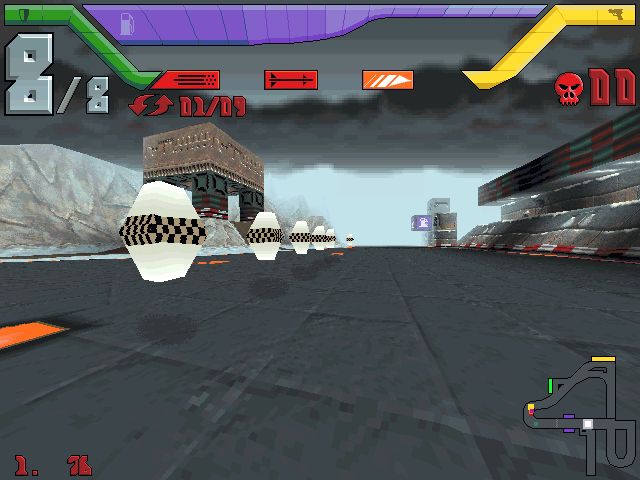


There's also this model of a triangular road sign that is not used at all, in the file SIGN0-0.DAT:

(Source: movAX13h)
Hidden Minigame#

Pressing CTRL+TAB in-game brings up a hidden tile slider puzzle game. Pressing the same again hides the puzzle.
(Source: Modding Wiki)
Unused Text#
The game has a number of unused strings that hint at cut content.
9CC48 onwards has a list of the game's vehicles, including several that are plain not in the game at all:
Train
Helicopter
Hover board
Police helicopter
Journal helicopter
Note: The model for the Police helicopter is actually still present in the files of the demo of the game.
Weapons list
9CE58
Uzi
A Syndicate fave returns? Possibly this would have been a weaker version of the minigun.
Editor Strings
Found at 91718, these seem to be strings for placing things in the game's editor.
House
Repair
Refuel
Rearm
Start
Check point
More substantial editor strings can be found at 92140.
Explosion
Explosion medium
Explosion big
Explosion massive
Bullet
Fire
Hole
Smoke
Smoke fire
Light
Earthquake
Tremor
Gas
Altitude
Shade
Move area
Swap area
Copy area
Remove area
Mark area
Sand
Water
Flare
Build Comments#
The game's executables include the build information in the same format as found in the game Magic Carpet:
Original Release
Product name HIOCTANE
Version number BETA V3.0
Version date Jun 10 1995.17:45:48
Supplied to BULLFROG PRODUCTIONS LTD. (SEAN COOPER)
V1.2 / Revised Edition
Product name HIOCTANE
Version number BETA V3.0
Version date Oct 23 1995.15:57:32
Supplied to BULLFROG PRODUCTIONS LTD. (SEAN COOPER)
Creative 3D Blaster VLB
Product name HIOCTANE
Version number BETA V3.0
Version date Oct 26 1995.20:08:46
Supplied to BULLFROG PRODUCTIONS LTD. (SEAN COOPER)
Creative 3D Blaster PCI
Product name HIOCTANE
Version number BETA V3.0
Version date Aug 08 1996.11:18:28
Supplied to BULLFROG PRODUCTIONS LTD. (SEAN COOPER)
Version Differences#
V1.2, AKA Revised Edition#
A patch released on the commercial Bullfrog's Christmas Demo CD that was sold by Bullfrog over Christmas 1995. The CD's contents were then later included on various games magazines in the following year, including PC Zone Issue 37.
The patch adds the following:
- Three new maps, including one specifically for the new Death match mode
- Death match mode where players have limited lives.
- Clone Race, a ghost time trial mode
- Hot Seat, a bizarre mode where up to eight players take it in turns to play and the computer controls all other players until it is their turn
- Splitscreen multiplayer
- A new chase camera mode activated by pressing Y that cycles between all vehicles in the race
- Redone menus, with sound options now relegated to the graphics detail menu
- The ability to rename all cars as well as just the player's
Creative 3D Blaster versions#
There were two different hardware accelerated versions of Hi-Octane created for the short-lived Creative 3D Blaster series of graphics cards using their proprietary Creative Graphics Library (CGL) API. The two 3D Blaster ports were carried out by Jan Svarovsky shortly after joining Bullfrog1, along with a CGL version of Magic Carpet Plus.
The first Hi-Octane CGL release was a bundled CD-ROM edition that came with the original VLB card model and supported only that card. A second version that supported the later more powerful PCI variant of the card was also created, but never officially released. An archive containing the executable file was acquired from a Creative Labs ex-member of staff and later uploaded to the internet2. The patch also includes a second executable called HIOSW.EXE. As its name suggests, it's just the original software renderer release of the game to use as a comparison to sell the new graphics card.
The PCI version can seen running to the right here, with bilinear filtering on the track, and no fog.
READ.ME file from the PCI patch:
Final version of Hi-Octane, must be QA'ed by both EA and Creative before can
be deemed releasable.

HIOSW files added to demonstrate hardware acceleraton vs. software only performance.

Files:
HIOCTANE.EXE should replace the one found in the EXEC directory.
HIOSW.EXE should be added to the EXEC directory.
HIOCTANE.BAT should replace the one found in the main directory.
HIOSW.BAT should be added to the main directory.
(Source: Vetz, VOGONS Forum)
References#
- Extreme Detail Graphics, svarovsky.org, August 2002↩︎
- Vetz post on VOGONS forum, December 2012↩︎
|
The Hi-Octane series | |
|---|---|
|
DOS |
|
|
Sega Saturn |
|
|
PlayStation |
|