Gungrave is a third-person shooter in the vein of Devil May Cry.

|
To do: |
Debug Menu#

A fairly simple debug menu can be accessed with the below code. With the code on, press Start button during the opening movie which is the movie before the title screen.
USA Code:

Enable Debug Menu
0011F160 00000007
20193DBC 08064F81
20193DC0 00000000
Press Start to confirm a selected option. D-Pad Up / Down moves through the menu.
Text |
Notes |
|---|---|
GO TO TITLE |
Sends you to the title screen. |
SELECT |
Changes the desired map to enter when GAME PLAY is chosen. |
GAME PLAY |
Sends you to a map based on what was chosen above. |
OBJECT VIEWER |
Sends you to a test screen to view game models. |
STAGE WALKTHRU |
This appears to allow you to view various parts of a chosen map. |
WORK METER |
When set to 1, it will draw bars on the bottom of the screen. |
CUSTOMIZE |
Mostly a regular options menu screen, except for a few exclusive items. |
SOUND TEST |
Your standard sound menu debug feature. |
MOVIE TEST |
Allows you to play all of the pre-rendered videos. |
RECORD PLAY |
Allows you to play recorded inputs. |
REPLAY |
Allows you to record button inputs during gameplay. |
WRITE REPLAY DATA |
Presumably allows you to save replay data you have made. It doesn't appear to work. |
READ REPLAY DATA |
Presumably allows you to load replay data you have made. It doesn't appear to work. |
(Source: Original TCRF research)
OBJECT VIEWER#

An object / animation viewer. You can view various special effects and animations of objects here.
Controls:
- D-Pad to rotate object.
- X to reset object.
- Circle to play / stop animation.
- L1 + D-Pad to move object.
- L1 + R1 / R2 to move object in / out.
- L1 + Triangle / Square to change animation.
CUSTOMIZE#

This mode is essentially the same as the regular options menu, however, it has an unknown OWNER option. It is unclear what it does.
SOUND TEST#

A menu that allows you to play all of the music and SFX in the game. You can also toggle reverb effects for SFX here.
Controls:
- X to play a sound over a highlighted menu option.
- Circle to stop playing a sound over a highlighted menu option.
- Start to exit.
MOVIE TEST#

Much like the sound test menu, this one allows you to play movies.
Camera Editor#
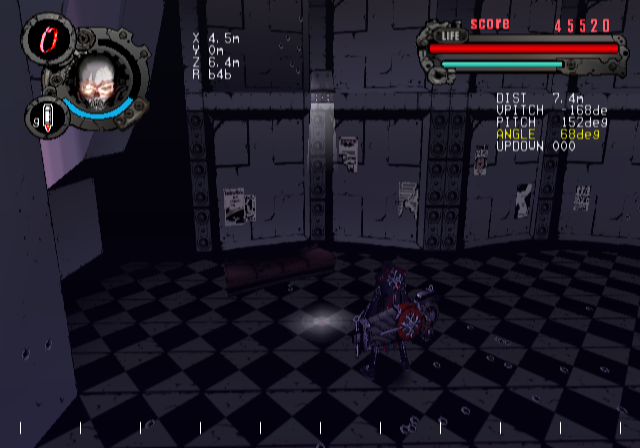
A debug camera tool that allows you to freely control the game's camera can be enabled with the below code. With the code on, hold R3 and press on the D-Pad to move through the menu and change its options while in-game.
USA Code:

L3 + Start for camera editor. Start to disable.
E002FFFD 001DB502
2060331C 00000001
2011906C 0C043A96
E002FFF7 001DB502
2060331C 00000000
2011906C 0C04A31A
(Source: Original TCRF research)
References#
|
The Gungrave series | |
|---|---|
|
PlayStation 2 |
|