Skateboarding in an X Games related game is far from being out of the ordinary, however, shredding in a museum shaped skatepark certainly isn't.
Debug Menu#


Applying the below code will replace the practice mode with a debug menu. These options lead to model viewers, special stage select options and allow you to quickly choose game modes.
USA code:

Practice Mode = Debug Menu
D1EA3DDC 00000011
01EA3DDC 00000019
(Source: Punk7890)
YTTEST_STAGE#

Allows you to select special parameters and a level of your choice. The TEST0 and TEST1 levels are no longer on the disc.
PLAYERTEST_STAGE#

Allows you to select even more special parameters and a level of your choice.
MODELCHK_STAGE#

Allows you to view player models and animations, however this mode may not work on real hardware anymore.
In-game Debug Menu#
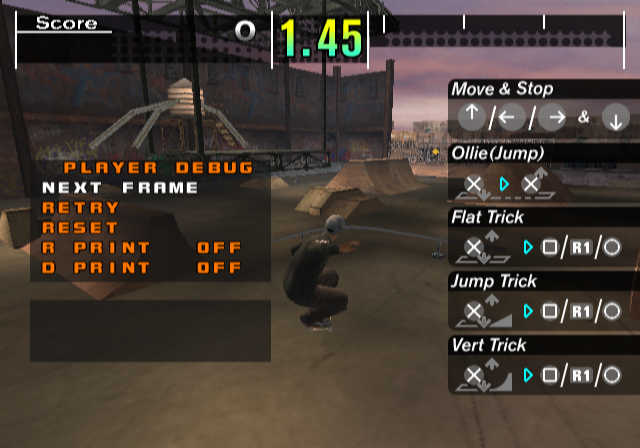
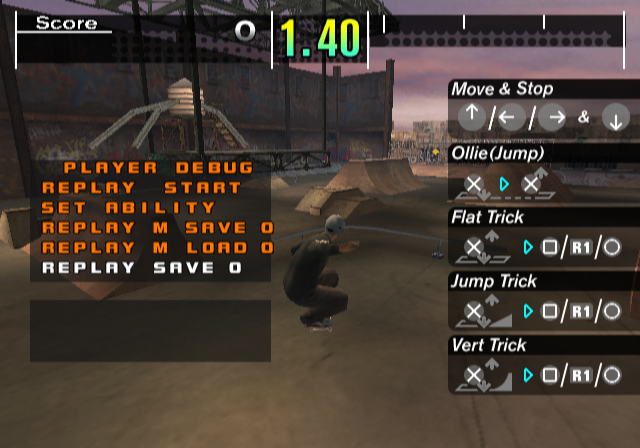
Applying the below code and pressing L3 + R3 in-game will toggle this menu. It's not clear if all of the options work, but this would allow you to toggle skater parameters and enable replays. You can also freeze frame and advance frames using this menu.
USA code:

Enable In-game Debug Menu
0018226A 00000085
Below is the full text for this menu:
NEXT FRAME
RETRY
RESET
R PRINT
D PRINT
REPLAY
SET ABILITY
REPLAY M SAVE
REPLAY M LOAD
REPLAY SAVE
REPLAY M LOAD
REPLAY SAVE
REPLAY LOAD
POLYLINE1
POLYLINE2
COMMAND  LIST
REPLAY PRINT
OUTPUT RESET
Ab.Speed
Ab.Ollie
Ab.Bal
Ab.Turn
MaxSpeed
A.Speed
WRMinSpd
Jump
RampJump
Turn
Turn2
Balance
G.Balance
JumpRot
RampRot
Gravity
Gravity2
WGravity
PlantTime
NoDecTime
PLAYER DEBUG
END
START
ON
OFF
COMMAND LIST
(Source: Punk7890)
|
The ESPN series | |
|---|---|
|
SNES |
ESPN National Hockey Night • ESPN Baseball Tonight • ESPN SpeedWorld |
|
Genesis |
|
|
Sega CD |
|
|
Game Boy Color |
|
|
Game Boy Advance |
ESPN Final Round Golf 2002 • JGTO Kounin Golf Master Mobile: Japan Golf Tour Game • ESPN International Winter Sports 2002 • ESPN Great Outdoor Games Bass 2002 |
|
PlayStation |
|
|
PlayStation 2 |
|