Based on the Dora direct-to-video movie of the same name, Dora Saves the Snow Princess is a simple platformer designed for children on the Wii, a common platform for games of these sorts.
Debug Tools#
Various debug tools can be brought up in the game by changing values in cdgame.txt.
Debug Level Select#
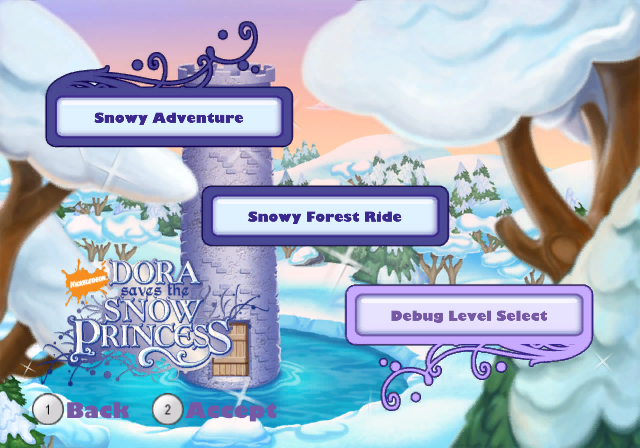
A "Debug Level Select" button on the menu can be brought up by changing LEVEL_SELECT in cdgame.txt to "ON". Selecting it allows you to load into any level of the game. Note that only a black screen appears when DEMO_LEVEL_SELECT is enabled.

Debug Menu#
Similarly to the debug level select, the debug menu can be enabled by changing various values in cdgame.txt. Then once a level is loaded, pressing Minus on the Wii Remote will bring up the debug menu in the top right of the screen and make the game pause. Some options don't seem to work and just switch back to their default values once switched.

Debug Files#
cdgame.txt#
Contains some launch options and some lines related to the Sony PSP. Likely a leftover from the engine.
COLLISION 1     64  64  64      // No-Climb
COLLISION 2     0   88  0       // Grass
COLLISION 3     255 207 55      // Gravel
COLLISION 5     65  42  9       // Wood (Rough) - half of Wood (Polished)
COLLISION 6     130 83  18      // Wood (Polished)
COLLISION 7     25  97  216     // Stone
COLLISION 10    0   0   179     // Metal (Solid)
COLLISION 11    0   0   89      // Metal (Hollow) - half of Metal (Solid)
COLLISION 12    0   255 255     // Glass

TEX_OFFSET                  1
NAME                        DORA        // Name of game
WAD                         99_99               // First WAD to read
LANGUAGE                    ENGLISH             // Territory or language
STRATDBGPATH                StratBin/       // Where the .SVM files are
USE_GCN_CONTROLLER      OFF         // JRS 07/31/2008 disable gamecube controller
USE_CLASSIC_CONTROLLER      OFF         // JRS 07/31/2008 disable classic controller
PAL                         OFF                 // PAL or NTSC
DEBUG_CHEATS                OFF         // Are debug cheats on/off
DEBUG_TEXT                      OFF              // Global enable/disable of debug info
DEBUG_MEMORY_INFO               OFF             //
DEBUG_WAD_INFO                  OFF             // Display which wads are loaded
DEBUG_SCREENPRINTS              OFF              // Display strat "screenprint" output
DEBUG_PROFILE_LABELS        OFF             //
DEBUG_STRAT_PRINTS          OFF              // Display strat "print" output
DEBUG_ASSERT_MESSAGES       OFF              // Display strat "assert" output
DEBUG_SOUND                     OFF             // Extra sound debug
DEBUG_FLY                   OFF                 // Fly-through mode on/off
DISPLAY_PARTICLE_COUNT  OFF                 //  Show particle numbers
LEVEL_SELECT                OFF                 // Level select on/off
DEMO_LEVEL_SELECT           OFF                 // Only show * levels in level select
SOUND                       ON                  // Sound on/off
HEAPSIZE                    18.5                // Size of game heap in MB
GEOMSTRATS                  0                   // Number of geometry strats
PARTICLES                   8192                // Number of particles
PERFORMANCE_METRICS         OFF                 // Whether to show the performance metrics at the bottom of the screen
SKIP_MOVIES                 OFF                 // Whether to skip the front end into movies or not
SCREENPRINT_YPOS            -220                // ASL screenprint start y position
ASSERT_YPOS                 -100                // ASL assert start y position
REGION                      0                   //   0 = USA, 1 = EUROPE, 2 = EUROPE2(ANZ), 3 = something.
KEYCODE                     BA                  // Region Code from Sony
PRODUCT_NUMBER              ULUX80210           // Product Code from Sony
START_LEVEL                 11_01               // A start level that works from start game
VIDEO_ALLOC_METHOD          STRAT

ENGINE_VERSION      "Build v3.40.0.0"

PSP                         ON
DISABLE_PSP                 OFF                 // PSP mode
SAVE_NAME                   Gemini
OFFER_MULTIPLAYER           ON                  // Turn on multiplayer options//DMK
AUTO_HOST                   OFF                 // ON=Automatically host a network game after booting.
AUTO_CONNECT                OFF                 // ON=Automatically join a network game after booting.
AUTO_NAME                   PSPNICKNAME         // Name of network game to host/join automatically.
ASL_SERIALIZATION_LEVEL     0                   // 0,1,2 Higher levels give more network debug info, but run slower.
ASL_SERIALIZATION_DEVICE    1                   // Where to write network out-of-sync logs: 0=MemStick, 1=Host
STRAT_MSG_POOL_SIZE         200
// Do not put a following comment after the SAVE_NAME

GAME_VERSION ver_13835|
The Dora the Explorer series | |
|---|---|
|
Adobe Shockwave |
|
|
PlayStation |
|
|
Game Boy Advance |
|
|
Windows |
|
|
Plug & Play |
Race to Play Park • Nursery Rhyme Adventure • Dora Saves the Mermaids |
|
V.Smile |
|
|
Adobe Flash |
|
|
Wii |
|
|
Go Diego Go! | |
|
PlayStation 2 |
|
|
Plug & Play |
|
|
See Also | |