Disney's Treasure Planet is the video game adaptation of the popular movie with some slight plot changes to allow for unique gameplay.
Debugging Features#
This game has several debugging features referenced in DISK0\SETTINGS.TXT.
; *****************************************************
; *****************************************************
; *****************************************************
;
;   Treasure Planet
;       System config file
;
; *****************************************************
; *****************************************************
; *****************************************************

; go to Level Select on startup

[Initial Level Select] = "Off"
;[Initial Level Select] = "On"

[Record Replays] = "Off"
;[Record Replays] = "On"

;[Cache Blocks] = "Off"
[Cache Blocks] = "Read"
;[Cache Blocks] = "Write"

; *****************************************************
; Region settings - comment out to disable
; *****************************************************

[Region] = "AMERICA"
[Product Code] = "SCUS-97146"
[Key Code] = "BA"
[Display] = "NTSC"

;[Region] = "EUROPE"
;[Product Code] = "SLES-50106"
;[Key Code] = "BE"
;[Display] = "PAL"

; [Region] = "JAPAN"
; [Product Code] = "SLUS-20088"
; [Key Code] = "BA"
; [Display] = "NTSC"


; *****************************************************
; Language versions enabled - comment out to disable
; *****************************************************

;[Language] = "UK English"
;[Language] = "French"
;[Language] = "German"
[Language] = "US English"
;[Language] = "Spanish"
;[Language] = "Italian"
;[Language] = "Sweedish"
;[Language] = "Dutch"
;[Language] = "Danish"


; *****************************************************
; Build tweaks
; *****************************************************
[Demo Inactive Timeout]=32000
[Demo active Timeout]=32000

[Play Movies]="Yes"
[Play Music]="Yes"
[Play Dialogue]="Yes"
[Play Ambience]="Yes"

[Unlock Levels]="No"
(Source: SlyCooperReloadCoded)
Debug Level Select#
Watch on YouTube"L1 - Testcard" doesn't appear to do anything, but "R2 - Endgame Sequence" triggers the post-credits sequence showing various characters and enemies. After it completes, the game freezes, with "CloseGame() - shouldnt ever get here" being printed to the log.
Debug Unlock All Levels#
Watch on YouTubeThe game will progress like normal until the level select screen, where all the levels will become unlocked.
Other Debugging Features#
There are several more debugging features which do exactly as they say, although some of them might not make visual changes to the game and could only be functional on development hardware. These are:
- Record Replays
- Cache Blocks
- Demo Inactive Timeout
- Demo active Timeout
- Play Movies
- Play Music
- Play Dialogue
- Play Ambience
By modifying and freezing the two-byte value at address 0x316234 in the American release then rebooting the game, you can manually change the game's settings, both the settings.txt file as well as some hidden settings. However, it's a bit confusing to use. By default, it starts at a value of 0x3A0 at boot time, but quickly switches to a value of 0x3E0.
1. The first byte appears to control the "Unlock Levels", "Play Movies", "Play Music", "Play Dialogue", "Play Ambience" options, and perhaps other settings. Changing it to 0x0 sets "Play Movies" and "Play Dialogue" to "Off". Changing it to 0x1 sets only "Play Movies" to "Off". Changing it to 0x2 sets only "Play Dialogue" to "Off". The game uses 0x3 by default. Changing it to 0x4 sets "Unlock Levels" to "On", "Play Movies" to "Off", and "Play Dialogue" to "Off". Higher values toggle a different combination of these settings.
2. The second byte is separated into its two digits, each with a different function:
- The first digit's purpose is unknown, however setting it to anything lower than 0x8 causes the game to stop doing anything after the "Sony Computer Entertainment America Presents" screen, unless the first byte is set to specific values.
- The second digit appears to control the "Initial Level Select", "Record Replays", "Cache Blocks", options and perhaps other settings. The game uses a default value of 0x0. Changing it to 0x1 sets "Initial Level Select" to "On". Changing it to 0x2 or higher makes the game crash and print the error "DevKitMalloc() - Not A Dev Kit!" to the console, indicating that the game could have more functionality if booted from a TEST or a TOOL unit. Interestingly, booting with this digit at a value of 0x1 but changing it to 0x3 will reveal a new option: Replay Mode.
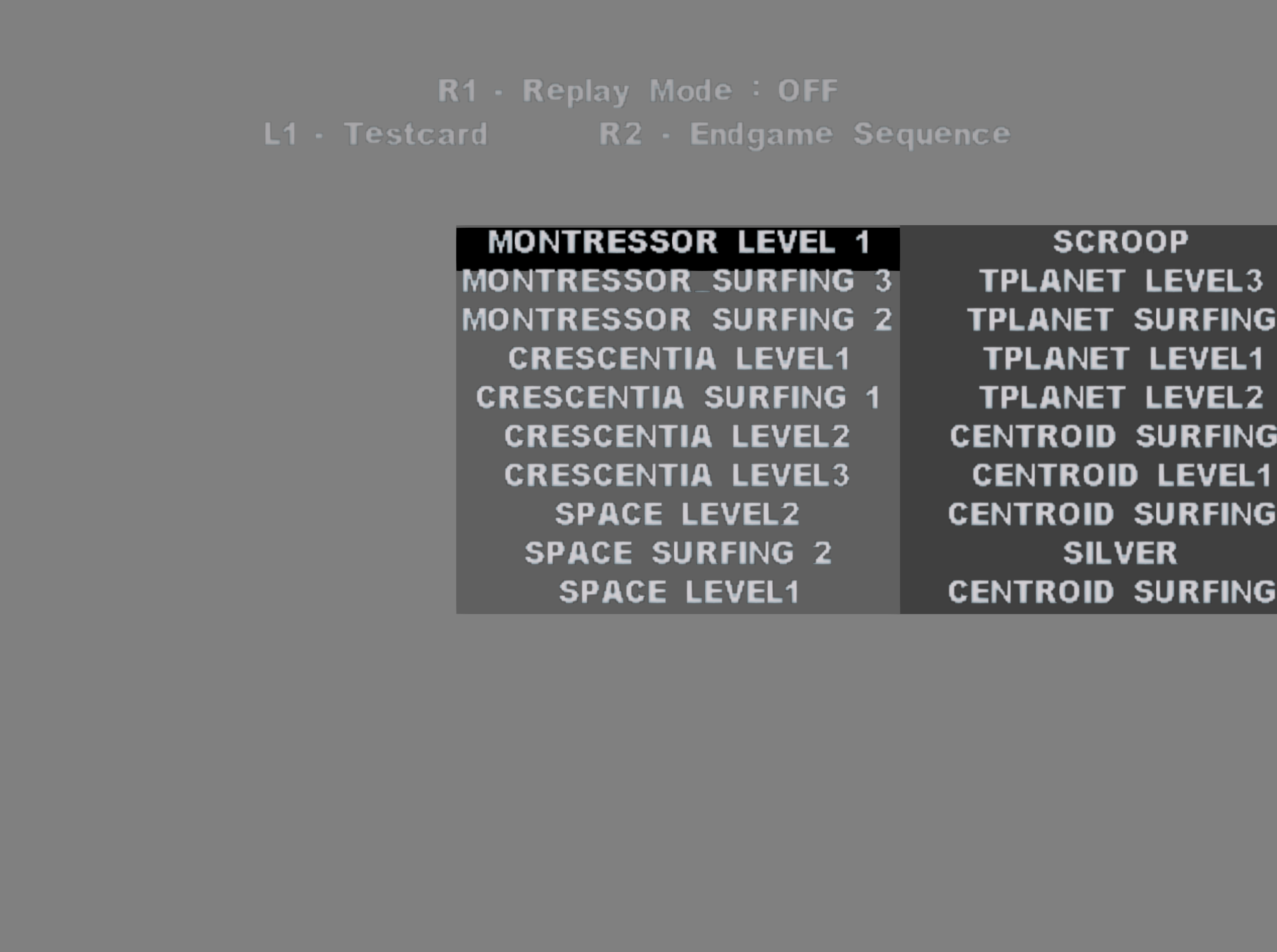
Mapped to the R1 button, you can cycle between OFF, RECORD, and PLAYBACK. OFF continues to the selected level as usual. PLAYBACK starts the automatic demo for the level you selected, just like what happens if you idle at the title screen for too long, assuming you select a level that has a valid playback file. RECORD crashes the game with the error "DevKitMalloc() - Not A Dev Kit!" being printed to console.
Some examples of different options values and their combined effects:
- 0x481 unlocks all levels, disables movies, disables dialogue, and loads the Debug Level Select on boot.
- 0x80 disables movies and dialogue.
- 0x580 unlocks all levels and disables movies.
- 0x1100 disables movies and music.
Unused Areas#
Referenced in the Debug Level Select are several unused levels which were removed from the disc:
- MODEL TEST
- SKELETON TEST
- ENEMY TEST LEVEL
- JEFFS_TEST_LEVEL
- PHILS_TEST_LEVEL
- PAULS TEST LEVEL
- CHRIS TEST LEVEL
- STUS TEST LEVEL
- matts_TEST_level
- PLAYGROUND
- DOCS_ZOO
- FRONTEND
- npc_test
- TEST_EDDY
- TEST_MIKE
- TEST_BOZ
- SURFER PLAYGROUND
- -=> AREA 51 <=- / JO_TEST_
- BADGUY TEST 2 / steves_zoo
- steves test level
- daves test level
- MATTS PLATFORM LEVEL
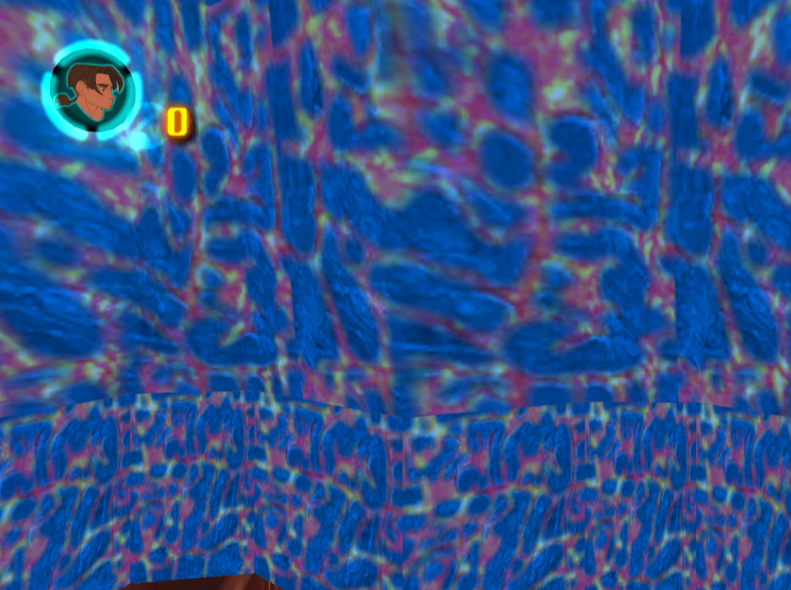
Additionally, located in the "levels" folder is a test level not present in this list, named "SPACE_PLATFORM_LAVA_007TEST". Attempting to load the level by doing rough hex-edits places the camera in the center of a blue lava rock with a stuck camera, no player character actually present. It's unknown what the rest of this level looks like.
(Source: SlyCooperReloadCoded)
Scrubbed-out Parameters#
The character Amelia has several of its parameters in DISK0\NPC_CONF.TXT dummied out, as listed below:
;[SKEL] = "jim.p2s"; [TAKE_DAMAGE_DIALOGUE_3] = 94170(Source: tikal.)
Development-Related Text#
disk0\ost\OST_Update.zip is a package containing early versions of the game's Dutch, German, Italian and Spanish text, alongside a readme file:
language_ger.eng  - German prebeta OST update
language_ita.eng  - Italian prebeta OST update
language_spa.eng  - Spanish prebeta OST update


You have to remove the _ger/_ita/_spa from the file before copying it into the build directory... you can use any prebeta build version to test these OST files, since all the language versions essentially is the same, apart from the language.eng file being replaced with a suitable OST for the given language.

so, to test the german OST language update you would do the following:

rename language_ger.eng to language.eng

copy the language.eng to ps2image\disk0\ost\

and burn a disk with the .ccz file you already have....

viola, new OST language test disk
(Source: tikal.)
Debug Menu#
In the executable is not only a full set of debugging symbols, but also a sizable amount of debugging text resembling menu options, including the string "Debug Menu" listed among menu options. Light reverse-engineering work has confirmed that if the debug menu still exists, it was not designed to be opened via the pause menu. Below are three screenshots showing some of the supposed debug menu options and other text. Yes, some, there's WAY MORE!


It should be noted that this game's PlayStation 1 predecessor has a collection of cheat codes, several of which activate debugging features, yet there are no known cheat codes for this game. The only ones you can find online were mistakenly copied from the PlayStation 1 release and spread to other websites from there.
References#
|
The Treasure Planet series | |
|---|---|
|
PlayStation |
|
|
PlayStation 2 |
|