 This article has a talk page!
 Prototype Info
 Unused Graphics"Delve into untouched optical depths where even the mantis shrimp hasn't set an eye!"
 Unused Upgrades and Achievements"Coming soon, probably."
 Unused Code"The result of years of scientific research!"
 Dungeons"Lure even greedier adventurers to retrieve your cookies. Now that's a real idle game!"
 Revision Differences"Reminiscing how things could have been, should have been, will have been."
Debug Mode#

Due to the nature of this game's progression, the developer created an easy-to access developer menu to help with debugging and testing the game. This mode can be enabled without console commands by setting the bakery's name to "(anything)saysopensesame". This will also give the player a special shadow achievement for their curiosity. This menu will stay even if the player changes their bakery's name to something else, though it will disappear if the player refreshes the window while a different name is selected. There is (at the moment) no way to open the debug mode in the Steam release, and attempting to open it crashes the game.
Entering this mode enables a few new features:
- The game adds a framerate display in the top-left corner, which hovers around 30fps by default.
- The player can purchase debug upgrades from the stats menu.
- The player can toggle whether a Wrinkler is shiny or not by clicking on it while holding the CTRL key.
In addition, the game adds a new "Dev tools" menu in the top-left corner of the screen. This menu allows the player to do just about anything within the game's limitations.
- Ascend: this triggers the ascension process. Unlike the normal "Legacy" button at the top of the screen, the game will not display a prompt asking the player for confirmation.
- x10: this multiplies the player's cookie bank by 10.
- /10: this divides the player's cookie bank by 10.
- x1k: this multiplies the player's cookie bank by 1,000.
- /1k: this divides the player's cookie bank by 1,000.
- Buy 100 of all: this causes the game to cycle through each building type, and attempt to buy 100 of each one. If it can't, it buys 100 of each building in order, and stops once it attempts to buy 100 of a building type the game can't afford.
- Sell 100 of all: this causes the game to cycle through each building type, and sell 100 of each one. Unlike the previous one, the game does not lose currency for selling, so it always successfully sells 100 of all buildings.
- Ruin the Fun: this triggers various events, and acts as an "instant win" button.
- The game sends a notification, which reads "Thou doth ruineth the fun!" This is accompanied with the subtext "You're free. Free at last."
- The player gains 999,999,999,999,999,999 (just under 1 quintillion) cookies. More cookies can be obtained by entering the command again.
- The player is given every upgrade, including debug and heavenly upgrades.
- The player is given every normal and shadow achievement, but not dungeon achievements.
- Wipe: this triggers a hard reset. Unlike the normal "Wipe save" button in the options menu, the game will not display a prompt asking the player for confirmation.
- All debugs: this unlocks every debug upgrade.
- Timers Off / Timers On: this toggles another menu, which details all the numbers used for time-based events.

To do:
Figure out what these timers correspond to. - No upgrades: this causes the game to take away every upgrade the player owns.
- All upgrades: this causes the game to give the player every upgrade, including debug upgrades.
- No achievs: this causes the game to take away every achievement the player owns.
- All achievs: this causes the game to give the player every normal and shadow achievement, but not dungeon achievements.
- Reset specials: this sets the game's widgets (Krumblor the dragon and Santa Claus) to their level 1 states.
- Max specials: this sets the game's widgets (Krumblor the dragon and Santa Claus) to their max level states.
- Prestige God Mode On / Prestige God Mode Off: this toggles whether or not the player can move upgrades around on the ascension screen, either by dragging the object around with the mouse, or by changing the coordinate numbers in a text box next to the "Aꜱᴄᴇɴᴅ" button. (This mode does not work properly, due to some input conflict with the ability to drag the ascension screen around. The object positions also reset upon refreshing the browser.)
- Debug upgrades CpS: this experimental function cycles through each individual upgrade the player owns, calculates how much each upgrade contributes to the player's CpS, and stores the data in
Game.debuggedUpgradeCpS. - The other buttons at the bottom trigger their respective golden/wrath cookie effects.
In the console versions, this menu is replaced by simple performance metrics such as an FPS counter and a frametime graph.
Unfinished Main Menu#
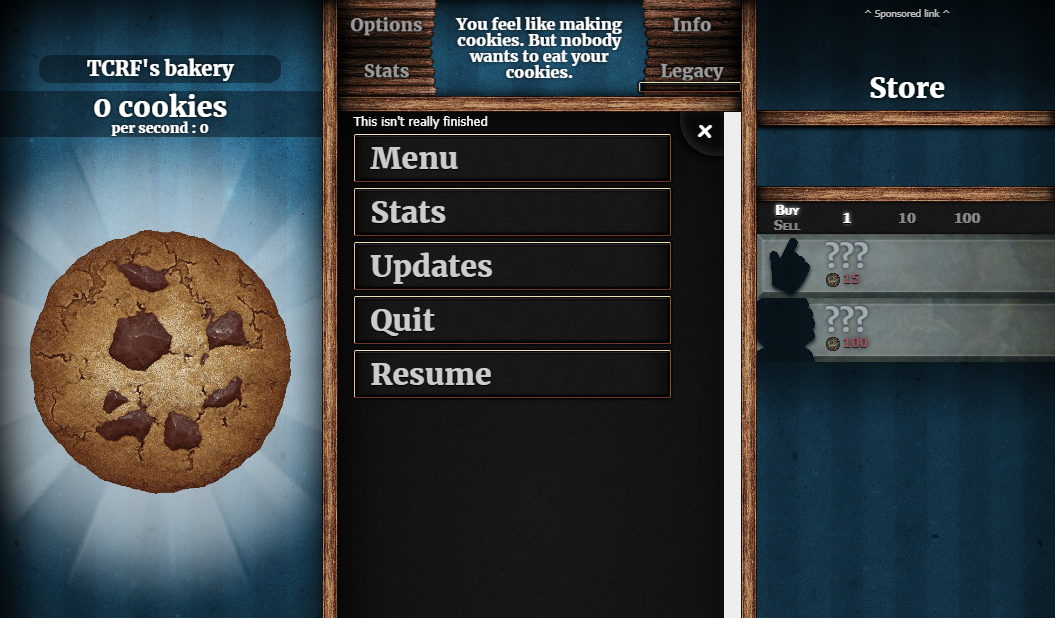
The game contains an unused "main" menu, which can be accessed by entering Game.ShowMenu('main'); in the browser's console. The text "This isn't really finished" is displayed at the top of the menu.
This menu contains a column of large buttons, most of which just lead to other menus. This seems to have been intended as an alternative method of accessing the menus, rather than clicking the tab buttons at the top-center of the screen.
- Menu: this opens the options menu.
- Stats: this opens the stats menu.
- Updates: this opens the info menu. "Updates" was the original name for the info menu, before being changed to "Info" in the Legacy Update.
- Quit: this has no effect. It is possible to force-close the browser window using a
.close()method, though this does not use it for unknown reasons. - Resume: this closes the main menu, which leads to the default building display screen. This can also be done by clicking the X button in the top-right corner.
PARTY Mode#
The game's main drawing function contains an unused "PARTY" mode, which can be enabled by entering Game.PARTY=1 in the browser's console. This causes the game to change brightness, color offset, and screen rotation at random. Apparently, the developer added this hidden mode because he "was bored and felt like messing with CSS". (Note: it is not recommended to enable this due to potential health risks, including eye strain and/or epileptic seizures.) 
The following content may induce seizures and has been hidden by default. Click to reveal: |
|---|
 |
Unused Sound Effects#
As of the Legacy Update, the game uses sound effects, which play during certain in-game events. All the game's sound effects, in their original MP3 format, can be found here.
cookieBreak.mp3#
This crumbling sound effect appears to be an alternate version of charging.mp3, which is used when the cookie explodes during the ascension animation. Compared to charging.mp3, the sound effect is lower-pitched and has a fade-in effect.
|
cookieBreak.mp3 (unused) |
charging.mp3 + thud.mp3 (used) |
|---|---|
This can be played by entering PlaySound('snd/cookieBreak.mp3'); in the browser's console.
cymbalCrash.mp3#
|
cymbalCrash.mp3 (unused) |
cymbalRev.mp3 (used) |
|---|---|
This drum cymbal crash is one of three cymbal sounds in the game's sounds. Out of all three, the only one that is used is cymbalRev.mp3, which plays alongside a short choir sample upon entering the heavenly upgrade screen.
This can be played in-game by entering PlaySound('snd/cymbalCrash.mp3'); in the browser's console.
smallCymbalCrash.mp3#
|
smallCymbalcrash.mp3 (unused) |
cymbalRev.mp3 (used) |
|---|---|
This softer drum cymbal crash is one of three cymbal sounds in the game's sounds. This sound is also unused, though it appears to be more similar to cymbalRev.mp3 than the aforementioned cymbalCrash.mp3.
This can be played in-game by entering PlaySound('snd/smallCymbalCrash.mp3'); in the browser's console.
page.mp3#
This page-turning sound may have been intended to play whenever the player selects a menu. This appears to have been replaced with clickOn.mp3 and clickOff.mp3.
This can be played in-game by entering PlaySound('snd/page.mp3'); in the browser's console.
swooshIn.mp3#
This unknown "swoosh" appears to be paired with the latter sound, similar to the aforementioned sounds clickOn.mp3 and clickOff.mp3.
This can be played in-game by entering PlaySound('snd/swooshIn.mp3'); in the browser's console.
swooshOut.mp3#
This unknown "swoosh" appears to be paired with the former sound, similar to the aforementioned sounds clickOn.mp3 and clickOff.mp3.
This can be played in-game by entering PlaySound('snd/swooshOut.mp3'); in the browser's console.
levelPrestige.mp3#
This quiet chime was intended to play whenever the player gained a prestige level. Unlike the other unused sounds, this one was programmed in the game, but it was commented out. Apparently, the developer thought the sound would get annoying to the player if they were to gain levels too quickly.
This can be played in-game by entering PlaySound('snd/levelPrestige.mp3'); in the browser's console.