 This article has a talk page!
Ben 10: Protector of Earth is the second video game based on the American animated television series Ben 10. (The first was a little obscure game on an equally obscure console, the Mattel HyperScan.)

|
To do: |
Debug Options#
The game has a text file which lists debug options for the game.
DEBUG_CHEATS            OFF                    // Are debug cheats on/off
DEBUG_TEXT              OFF                     // Display debug text/gfx
DEBUG_FLY               OFF                 // Fly-through mode on/off  (skips the level you are on and gives a time of 0 and an A ranking)
LEVEL_SELECT            OFF                 // Level select on/off  (allows access to level selection screen with all levels unlocked)
DEMO_LEVEL_SELECT       OFF                 // Only show * levels in level select (only levels with specific triggers are shown in the level select, but no levels have the trigger to show up)
SOUND                   ON                  // Sound on/off
DEBUG_SOUND     OFF         // Debug Sound info
Watch on YouTubeYou can turn debug options on by changing OFF to ON in the text file, importing the text file into the game.dir file, and building a new disc image from those files.
Alternatively, you can apply the following GameShark / CodeBreaker code for the US version of the game below to enable the debug features.
Enable Code (for console only)
901C7A18 0C071E2E

Debug Options Enable
10355DD6 00000275
This enables the debug options: DEBUG CHEATS, DEBUG TEXT, LEVEL SELECT, DEBUG SOUND, and DEBUG FLY.
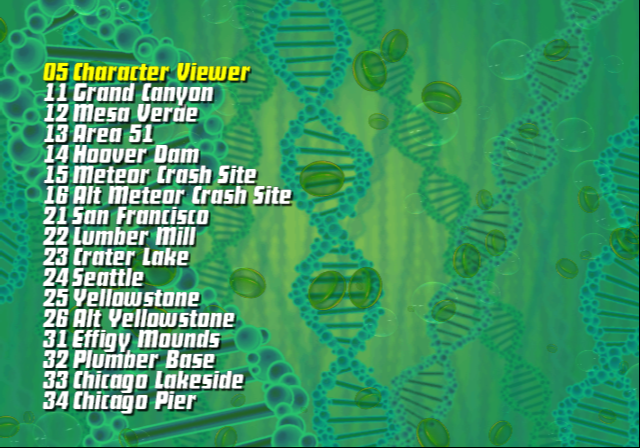
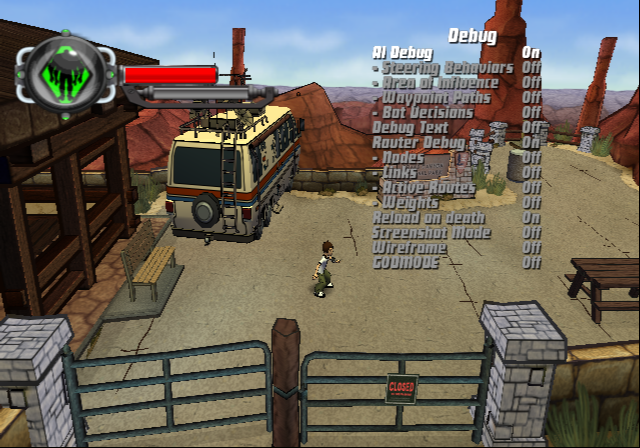

Unfinished Levels#
By using the level select debug option, you can load unfinished versions of levels that lack enemies, items, have basic textures, and missing boundaries (police lines, cars, etc).
The levels are:
- L6 CraterLake (Crater Lake)
- Historic Battlefield (Historical Battlefield)
- Basic Graybox (Bayou)
- New Orleans (New Orleans)
- DC Full Level (Washington D.C.)
Voids#
By using the level select debug option, you can load versions of levels with the word local added at the end. Loading them leads you to an empty void.
References#
|
The Ben 10 series | |
|---|---|
|
HyperScan |
|
|
PlayStation 2, Wii, PlayStation Portable |
|
|
Nintendo DS |
|
|
Unity Web Player |
|
|
See Also | |