 This article has a talk page!
Animaniacs Game Pack is a compilation of five arcade-style games featuring characters from the hit TV show Animaniacs. In each game, you play as one of the three Warner siblings: Yakko, Wakko, and Princess Angelina Contessa Louisa Francesca Banana Fanna Bo Besca III (but we'll call her Dot).

|
This needs some investigation. |
Intro/Menus#
Menu Bar#
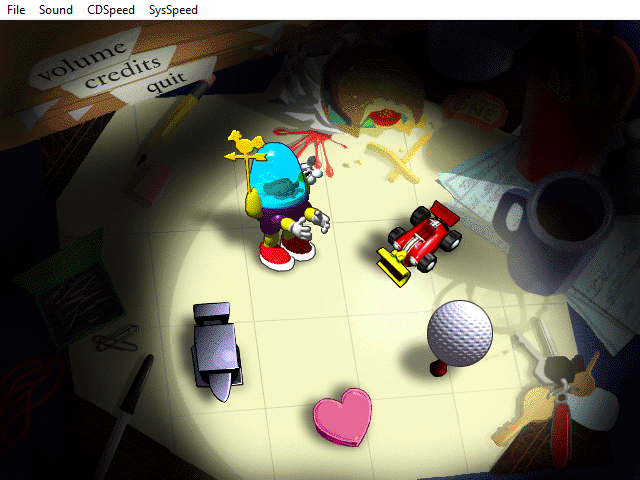
An undocumented menu bar can appear on the main menu by pressing M, from showing the credits, choosing any game, clearing high scores and quiting, with it options for "CDSpeed" and "SysSpeed".
You can't make the menu disappear unless you wait for an animation to play when doing nothing for a while.
File |
|---|
About GamePack |
Clear High Scores |
Tee Off |
Smoocher |
PropShop |
Baloney |
Belchinator |
Sound |
|---|
Win95 Mixer |
Loud |
6 |
5 |
4 |
3 |
2 |
Quiet |
Off |
CDSpeed |
|---|
High |
Minimum |
SysSpeed |
|---|
High |
Med |
Slow |
Real Slow |
(Source: Original TCRF research)
Unused Graphics#
Image |
File |
Cast |
Type / ID |
Internal Name |
Description |
|---|---|---|---|---|---|
 |
START.DXR |
Internal |
Bitmap 6 |
6 |
An earlier version of the "Insert CD" message. "Animaniacs" is misspelled. The used version of this message is stored in STARTWIN.DXR. |
 |
START.DXR |
Internal |
Bitmap 7 |
7 |
An earlier version of screen resolution/color depth message. The game is referred to by a slightly different name, "Wacky Pack CD", and "Animaniacs" is misspelled again. The used version of this message is stored in STARTWIN.DXR and is not an image; instead it is generated as text so it can show what the current resolution and color depth are compared to the recommendation. |
Baloney's Balloon Bop#
Uncompiled Script#
Text |
File |
Cast |
Type / ID |
Internal Name |
Description |
|---|---|---|---|---|---|
|
BALONEY.DXR |
Internal |
Text 43 |
43 |
A snippet of Lingo script that the developers copied into a Text element, related to sound effect assignments. |
Belchinator Too#
Cheat Codes#
The game checks for a large number of cheat codes on the pause menu. While the level select codes have been known, the rest were only discovered through decompiling the game's Lingo scripts. The codes are listed in the order that they are stored in the game's scripts.
|
|
This needs some investigation. |
Cheat |
Effect |
|---|---|
TELE1 |
Teleport to Level 1 - Loading Docks. |
TELE2 |
Teleport to Level 2 - Storage. |
TELE3 |
Teleport to Level 3 - Manufacturing. |
TELE4 |
Teleport to Level 4 - Manufacturing. |
TELE5 |
Teleport to Level 5 - Computer Center. |
TELE6 |
Teleport to Level 6 - Brain Trust. |
TELE7 |
Teleport to Level 7 - The Terrible Think Tank!! |
WACKYSACK |
Gives full ammo, all keys, full armor, full belch shield, fully reveals map, disables force fields, and removes all enemies from the level. |
FOODSTUFF |
Gives full ammo. |
FABOO |
Gives full body armor. |
DANCE |
Gives full belch shield. |
LOCKSMITH |
Gives all keys. |
SESAME |
Turns off all force fields in the level. |
PONDERING |
Fully reveals the map. |
HELLONURSE |
Grants invincibility. |
EGAD |
All enemies die in one hit. |
ALONE |
Removes all the enemies from the level, with the exception of any that are currently on screen. |
NARF |
Unknown effect. Plays the sound for breaking boxes when activated. |
MORTAL |
Disables the invincibility effect from the HELLONURSE code. |
NORMAL |
Disables the effects of other cheats, except for inventory/ammo. |
Unused Graphics#
Image |
File |
Cast |
Type / ID |
Internal Name |
Description |
|---|---|---|---|---|---|
 |
BELCH.DXR |
Internal |
Bitmap 436 |
436 |
A tile for the map device, but with the screen turned on and reading "MAP DEVICE ACTIVE". Presumably, the tile was meant to change to this once the player activated a map device, but instead nothing happens. |
Unused Audio#
Sound |
File |
Cast |
Type / ID |
Internal Name |
Description |
|---|---|---|---|---|---|
BSOUNDS.CXT |
BSOUNDS |
Sound 2 |
key |
Similar to the clips played when grabbing a colored key, but the second half has been replaced with a clip of Wakko saying "Faboo!" |
|
MONSTER1.CXT MONSTER2.CXT |
MONSTER1 MONSTER2 |
Sound 297 |
Empty |
A voice saying "Sound Missing" is located in the Cast files for Dump-T and ForkFace. Each enemy file uses Sound 297 for the projectile firing sound, but these enemies don't fire projectiles. This dummy sound effect is present to fill the slot. |
In addition, the enemy death sounds cannot be heard in their entirety in-game. The game only allows one sound effect to play at a time, so the enemy's own explosion cuts off the end of each clip. As it turns out, they tend to have a little more to say.
Sound |
File |
Cast |
Type / ID |
Internal Name |
Description |
|---|---|---|---|---|---|
MONSTER1.CXT |
MONSTER1 |
Sound 296 |
Robbie Die |
Dump-T deflates a little bit longer. |
|
MONSTER2.CXT |
MONSTER2 |
Sound 296 |
R3 Die Rats |
ForkFace says "Rats", which is completely cut off in-game. |
|
MONSTER3.CXT |
MONSTER3 |
Sound 296 |
M3 Trek Bot die |
Spark-E's death sound has a cut-off fade at the end. |
|
MONSTER4.CXT |
MONSTER4 |
Sound 296 |
Yeow |
PopCycle is supposed to say "Yeow", but in-game it ends up sounding more like "Yeo-". |
|
MONSTER5.CXT |
MONSTER5 |
Sound 296 |
R2ish die |
Ashcan 451 says "Mommy", but is partially cut off in-game. |
|
MONSTER6.CXT |
MONSTER6 |
Sound 296 |
M6 Bunny Die |
Bun-EE 2000 never gets to finish saying "Stop him". |
|
MONSTER7.CXT |
MONSTER7 |
Sound 296 |
M7 Mouse Die |
KnowBot's death sound has a cut-off fade at the end. |
Prop Shop Drop#
Unused Graphics#
Image |
File |
Cast |
Type / ID |
Internal Name |
Description |
|---|---|---|---|---|---|
 |
PROPSHOP.DXR |
scripts |
Bitmap 48 |
48 |
An early, misspelled "Success" message. |
 |
PROPSHOP.DXR |
things |
Bitmap 204 |
204 |
A tank! This was meant to be a fourth vehicle type. It seems that in the tank you would be able to shoot and destroy obstacles instead of having to avoid them. Unfortunately, this is the only graphic that remains for it. There is a lot of code still present in the game for handling the tank, including firing controls, but additional Lingo script knowledge is required to modify the game to attempt using it (due to inaccurate Macromedia Director decompilation, the scripts cannot be recompiled as-is). |
Unused Audio#
|
|
This needs some investigation. |
Sound |
File |
Cast |
Type / ID |
Internal Name |
Description |
|---|---|---|---|---|---|
PROPSHOP.DXR |
sounds |
Sound 64 |
Pickup Clean Necks |
This is supposed to be the pickup sound for the tissue boxes in Level 3, but the ice cube pickup sound is used instead. |
|
PROPSHOP.DXR |
sounds |
Sound 77 |
Pickup Cowboy Hat |
This is supposed to be the pickup sound for the cowboy hats in Level 2, but the sound effect "object shot 3" is used instead. |
|
PROPSHOP.DXR |
sounds |
Sound 111 |
jump 4 |
Based on the name and position in the cast, this may have been a jumping sound for the tank vehicle. |
|
PROPSHOP.DXR |
sounds |
Sound 121 |
land 4 |
Based on the name and position in the cast, this may have been a landing sound for the tank vehicle. |
|
PROPSHOP.DXR |
sounds |
Sound 134 |
Tank Shoot |
Sound effect for the unused tank vehicle. |
|
PROPSHOP.DXR |
sounds |
Sound 143 |
Tank |
Sound effect for the unused tank vehicle. |
|
PROPSHOP.DXR |
sounds |
Sound 144 |
Tank End |
Sound effect for the unused tank vehicle. |
|
PROPSHOP.DXR |
sounds |
Sound 145 |
Tank Start |
Sound effect for the unused tank vehicle. |
|
PROPSHOP.DXR |
sounds |
Sound 170 |
Tank hit 1 |
Sound effect for the unused tank vehicle. |
|
PROPSHOP.DXR |
sounds |
Sound 171 |
Tank hit 2 |
Sound effect for the unused tank vehicle. |
|
PROPSHOP.DXR |
sounds |
Sound 172 |
tank hit 3 |
Sound effect for the unused tank vehicle. |
|
PROPSHOP.DXR |
sounds |
Sound 173 |
end game |
Based on the name, this is supposed to be played at the end of the game, but it is never heard. |
|
PROPSHOP.DXR |
Untitled-1 |
Sound 19 |
intro10 |
An introduction for a removed tenth level! This is the only remnant of the level; no graphics, layout or music exists. Dot: Collect all the hats you can find for the romance movie, Chapeau Chateaux. Yakko: The viewers'll flip their lids for that one! |
Level Editor#

A rudimentary level editor used by the developers is hidden in the game. However, it cannot be accessed normally - the game must be in "Author" mode, meaning it is being run within the Macromedia Director editor (only possible by removing the protection on PROPSHOP.DXR). When running in Author mode, the level editor can be opened from the main menu by holding Ctrl while clicking on High Scores.
The editor allows you to navigate the levels, create and manipulate objects. Level designs can be saved as text files and loaded. The Test button will run the level with the edited design.
Level Select#

A hidden level select screen is in the game, but it is completely removed from the code and cannot be accessed through gameplay. The only way to access it is by opening an unprotected PROPSHOP.DXR in Macromedia Director and going to the marker "password". Once accessed this way, it functions normally - clicking a button will go to that level.
Uncompiled Scripts#
Text |
File |
Cast |
Type / ID |
Internal Name |
Description |
|---|---|---|---|---|---|
|
PROPSHOP.DXR |
scripts |
Text 35 |
old shot control |
Earlier code for the "shotcontrol" function which was used for the tank vehicle. |
Unused Text#
Text |
File |
Cast |
Type / ID |
Internal Name |
Description |
|---|---|---|---|---|---|
|
PROPSHOP.DXR |
Internal |
Field 140 |
140 |
What appears to be a partial level design. If saved into a text file, it can be loaded into the game using the level editor. It is made up of a mix of level themes and lacks objects, suggesting that the object definitions may have been shuffled around since the level was made. It is also not a full level, being much shorter than the final levels. |
|
PROPSHOP.DXR |
Internal |
Text 230 |
230 |
Console output of the function reference for the "fileio" Director Xtra. |
|
PROPSHOP.DXR |
Internal |
Text 231 |
231 |
Developer brainstorming notes. The idea of ramming objects is not used in the game; it may have later transformed into the tank vehicle concept, which was also removed. |
Smoocher#
Cheat Codes#
The game checks for a few cheat codes on the pause menu. These were not previously known and were only discovered through decompiling the game's Lingo scripts. When typed, a sprite will appear to confirm entry; based on the internal names for these this is believed to be a caricature of Greg Izzo, one of the programmers.
Cheat |
Sprite Displayed |
Effect |
|---|---|---|
CORNCOB |
 |
Level select cheat. A sound will play after "CORNCOB" is typed; follow up by typing anything from "LEVEL02" through "LEVEL14". The "Cheater" sprite appears to confirm entry. Then start a new game to start at the respective level you typed. |
ROSEBUD |
|
Enables and disables what is referred to in the code as "death memory". The first time this is typed, the "Harder" sprite appears, and the number of enemies remaining in each level will reset every time you die, making the game more difficult. Typing it again will show the "Easier" sprite and set the "death memory" behavior back to normal (the number of enemies remaining will stay the same after dying). |


Unused Graphics#
Image |
File |
Cast |
Type / ID |
Internal Name |
Description |
|---|---|---|---|---|---|
 |
DOT.DXR |
charcast |
Bitmap 21 |
21 |
A scratchpad testing different fonts to use for the high score screen. |
 |
DOT.DXR |
charcast |
Bitmap 568 |
Picture 3 |
The caricature used for the cheat messages, but without the blue outline. Bitmap 569 is the same but mirrored. |
 |
DOT.DXR |
charcast |
Bitmap 571 |
Picture 3 |
A scratchpad for the caricature used for the cheat messages, with a few ideas for the glowing outline. Bitmap 572 is the same but mirrored. |
 |
DOT.DXR |
charcast |
Bitmap 634 |
Picture 3 |
The caricature's jaw on its own. It's very long. |
 |
DOT.DXR |
charcast |
Bitmap 635 |
Picture 3 |
The caricature's jaw again but with a complete mouth. Again, it's very long. |
 |
DOT.DXR |
charcast |
Bitmap 636 |
Picture 3 |
The caricature's head without the mouth, presumably so that Bitmap 634 or 635 could attach to it. |
 |
DOT.DXR |
charcast |
Bitmap 658 |
Picture 3 |
A scratchpad for the "Cheater" speech bubble. The text is slightly smaller and colored orange instead of red. |
|
DOT.DXR |
dot.cst |
Bitmap 1 through Bitmap 72 |
Isometic sprites for Dot, similar in style to the Wakko sprites in Belchinator Too. Only 5 directions are shown here, as the remaining frames are the same but mirrored. Only standing and walking animations are present. Perhaps this game was going to be considerably different? |
|
 |
DOT.DXR |
Internal |
Bitmap 55 |
55 |
A primitive "Game Over" screen. |
 |
DOT.DXR |
Internal |
Bitmap 57 |
57 |
A primitive "You Win!" screen. |
 |
DOT.DXR |
Internal |
Bitmap 259 |
joyness junk for greg.PICT |
A sprite sheet/scratchpad for various designs of the TNT item. It appears that they were meant to be themed based on the level, but in the final a variant similar to the "generic" design pictured is used for all levels. |
 |
DOT.DXR |
Internal |
Bitmap 268 |
268 |
The early "generic" TNT on its own, with a message saying "dontshowme". |
 |
DOT.DXR |
Internal |
Bitmap 326 |
326 |
A crudely assembled title card for "Level 1 Round 2". Identical ones exist for the remaining 13 levels as Bitmaps 327 through 341. There are no "Round 2" levels in the game, so it is not clear what these would have been. |
 |
DOT.DXR |
Internal |
Bitmap 377 |
377 |
A "Done" button. Probably for a menu. |
 |
DOT.DXR |
Internal |
Bitmap 385 |
Picture 2 |
An unused level using primitive graphics. It also shows a placeholder HUD; in Smoocher the level backgrounds are a single image that also includes the HUD graphics. |
 |
DOT.DXR |
Internal |
Bitmap 826 |
line.1.1 |
A crudely drawn "New Game" menu item, in the same style as the early title cards. |
 |
DOT.DXR |
Internal |
Bitmap 831 |
line.2.1 |
A crudely drawn "Continue Game" menu item, in the same style as the early title cards. |
 |
DOT.DXR |
Internal |
Bitmap 836 |
line.3.1 |
A crudely drawn "Options" menu item, in the same style as the early title cards. |
 |
DOT.DXR |
Internal |
Bitmap 841 |
line.4.1 |
A crudely drawn "High Scores" menu item, in the same style as the early title cards. |
 |
DOT.DXR |
Internal |
Bitmap 846 |
line.5.1 |
A crudely drawn "Instructions" menu item, in the same style as the early title cards. |
 |
DOT.DXR |
Internal |
Bitmap 851 |
line.6.1 |
A crudely drawn "Exit Game" menu item, in the same style as the early title cards. |
 |
DOT.DXR |
menustuff |
Bitmap 132 |
132 |
A slightly more refined version of the menu, with the text faded out. This style was kept for the Options menu in the final game. |
 |
DOT.DXR |
menustuff |
Bitmap 133 |
optionpanel1 |
A slightly more refined version of the menu, with the text readable. This style was kept for the Options menu in the final game. |
 |
DOT.DXR |
menustuff |
Bitmap 134 |
optionpanel1.1 |
Highlight for "New Game" in the unused menu style. |
 |
DOT.DXR |
menustuff |
Bitmap 135 |
optionpanel1.2 |
Highlight for "Continue Game" in the unused menu style. |
 |
DOT.DXR |
menustuff |
Bitmap 136 |
optionpanel1.3 |
Highlight for "Options" in the unused menu style. |
 |
DOT.DXR |
menustuff |
Bitmap 138 |
optionpanel1.4 |
Highlight for "High Scores" in the unused menu style. |
 |
DOT.DXR |
menustuff |
Bitmap 139 |
optionpanel1.5 |
Highlight for "Instructions" in the unused menu style. |
 |
DOT.DXR |
menustuff |
Bitmap 140 |
optionpanel1.6 |
Highlight for "Exit Game" in the unused menu style. |
 |
DOT.DXR |
Untitled-1 |
Bitmap 72 |
72 |
An icon of Wakko that is used in Belchinator Too. |


Unused Audio#
There are nearly as many unused sounds as used ones!
Sound |
File |
Cast |
Type / ID |
Internal Name |
Description |
|---|---|---|---|---|---|
DOT.DXR |
Internal |
Sound 521 |
old.heart.2p |
Based on the name, presumably an old heart collection sound. |
|
DOT.DXR |
Internal |
Sound 522 |
old.heart.3p |
Based on the name, presumably an old heart collection sound. |
|
DOT.DXR |
Internal |
Sound 523 |
old.2 point |
Based on the name, presumably an old heart collection sound. |
|
DOT.DXR |
Internal |
Sound 524 |
old.Hrt1 |
Based on the name, presumably an old heart collection sound. |
|
DOT.DXR |
Internal |
Sound 541 |
Kiss 1 |
A kissing sound, which you would expect to be used in a game about kissing. The final sound set does not have any kissing sounds except a single Dot voice line. |
|
DOT.DXR |
Internal |
Sound 542 |
Kiss 2 |
Another kissing sound. |
|
DOT.DXR |
Internal |
Sound 543 |
Multi Kiss 1 |
Yet another kissing sound. It's unclear why it is called "Multi Kiss 1" when it is still a single kiss. |
|
DOT.DXR |
Internal |
Sound 571 |
TNT1 |
Alternate sound for the TNT item. |
|
DOT.DXR |
Internal |
Sound 572 |
TNT2 |
Alternate sound for the TNT item. |
|
DOT.DXR |
Internal |
Sound 575 |
TNT4 w/Bell |
Alternate sound for the TNT item. This one is very similar to the final sound, but using a slightly different explosion. |
|
DOT.DXR |
Internal |
Sound 586 |
Jmp1 |
Unused jump sound. |
|
DOT.DXR |
Internal |
Sound 587 |
Jmp2 |
Unused jump sound. A second copy of this sound is stored as Sound 601, also unused. |
|
DOT.DXR |
Internal |
Sound 588 |
Jmp3 |
Unused jump sound. |
|
DOT.DXR |
Internal |
Sound 589 |
Jmp4 |
Unused jump sound. |
|
DOT.DXR |
Internal |
Sound 631 |
Shoot 3 |
Unused shooting sound. |
|
DOT.DXR |
Internal |
Sound 632 |
Shoot 4 |
Unused shooting sound. |
|
DOT.DXR |
Internal |
Sound 633 |
Shoot 5 |
Unused shooting sound. |
|
DOT.DXR |
Internal |
Sound 634 |
Shoot1 |
Unused shooting sound. |
|
DOT.DXR |
Internal |
Sound 635 |
Shoot2 |
Unused shooting sound. |
|
DOT.DXR |
Internal |
Sound 641 |
NO HEART 1 |
The used "low hearts" sound, but without Dot's voice line at the end. |
|
DOT.DXR |
Internal |
Sound 661 |
charkill1 |
Cartoon slipping sound. The name is unclear as to whether it was meant for killing an enemy or the player dying. |
|
DOT.DXR |
Internal |
Sound 662 |
charkill2 |
Cartoon slipping sound. The name is unclear as to whether it was meant for killing an enemy or the player dying. |
|
DOT.DXR |
Internal |
Sound 676 |
deaddot1 |
Unused death jingle. |
|
DOT.DXR |
Internal |
Sound 677 |
deaddot2 |
Unused death sound. |
|
DOT.DXR |
Internal |
Sound 693 |
jump3 |
Unused jump sound. This sound is listed in the cast order alongside the used jumping sounds, but is excluded from the list of random jump sounds to use. |
|
DOT.DXR |
Internal |
Sound 705 |
lowhearts.1 |
A different "low hearts" sound, structured similarly to the used sound but with a different warning tone. |
|
DOT.DXR |
Internal |
Sound 706 |
lowhearts.1 |
Same as lowhearts.0, but without Dot's voice line. |
|
DOT.DXR |
Internal |
Sound 707 |
lowhearts.2 |
A voice saying "You need more hearts!" Yet another unused "low hearts" sound. |
|
DOT.DXR |
Internal |
Sound 728 |
shot8 |
Unused shooting sound. This sound is listed in the cast order alongside the used shooting sounds, but is excluded from the list of random shooting sounds to use. |
|
DOT.DXR |
Internal |
Sound 752 |
2 point |
Unused heart collection sound. |
|
DOT.DXR |
Internal |
Sound 753 |
2 Point.2 |
Unused heart collection sound. |
Unused Text#
Text |
File |
Cast |
Type / ID |
Internal Name |
Description |
|---|---|---|---|---|---|
|
DOT.DXR |
Internal |
Field 168 |
holddefault high scores |
An early default high score table. |
|
DOT.DXR |
Internal |
Field 422 |
lastchange |
A revision date. |
Tee Off Mini Golf#
Hole Editor#

After decompiling via ProjectorRays, open it in Adobe/Macromedia Director (so it would run in author mode) and start the game. Now in-game, press E to turn on the hole editor. (Change to a different hole so the cubes wont look like giant golf balls.)
The user is able to add, edit and delete cubes, and able to test the hole.
(Source: Original TCRF research)
Skip to Near Hole#
Press C to be near the hole. It isn't protected with needing to be run in author mode unlike the previous one.
(Source: Original TCRF research)
Uncompiled Scripts#
There are a whole bunch of old scripts lurking in various Field and Text elements. Presumably, the developers copied the contents of the scripts into these as a form of temporarily storing of a "known good" version of the script... but never removed them. Notably, this means the comments are intact; these are not recoverable when decompiling already-compiled Lingo scripts.
Text |
File |
Cast |
Type / ID |
Internal Name |
Description |
|---|---|---|---|---|---|
|
GOLF.DXR |
Internal |
Text 104 |
104 |
A very early version of the "moveball" function, which appears to only have very basic functionality implemented. |
|
GOLF.DXR |
Internal |
Field 145 |
145 |
Various global and function definitions, and a whole lot of commented out lines. |
|
GOLF.DXR |
Internal |
Text 146 |
146 |
A later, but still incomplete version of the "moveball" function. Now it appears to have checks for terrain types, but not all are implemented. There's also an interesting "put" command in there... |
|
GOLF.DXR |
Internal |
Field 190 |
190 |
An earlier version of the "formatscripts" function. |
Unused Text#
Text |
File |
Cast |
Type / ID |
Internal Name |
Description |
|---|---|---|---|---|---|
|
GOLF.DXR |
Internal |
Text 32 |
32 |
|
|
GOLF.DXR |
Internal |
Text 35 |
35 |
|
|
GOLF.DXR |
Internal |
Text 36 |
36 |
|
|
GOLF.DXR |
Internal |
Field 67 |
test9 |
Some coordinates. |
File Info#
As usual for games made with Macromedia.
File |
Director Version |
About |
Copyright |
Created by |
Modified by |
Filepath |
|---|---|---|---|---|---|---|
Most of the files |
6.0 |
0 |
0 |
Andrew Keplinger - FUNNYBONE Interactive |
Andrew Keplinger - FUNNYBONE Interactive |
Animaniacs Game Pack:files |
BELCH.DXR |
6.0 |
0 |
0 |
Keith Laverty - Funnybone Interactive |
Andrew Keplinger - FUNNYBONE Interactive |
Animaniacs Game Pack:files |
DOT.DXR |
6.0 |
0 |
0 |
Andrew Keplinger - The Cute Company |
Andrew Keplinger - FUNNYBONE Interactive |
Animaniacs Game Pack:files |
GO.DXR |
6.0 |
0 |
0 |
Keith Laverty - Funnybone Interactive |
Andrew Keplinger - FUNNYBONE Interactive |
Animaniacs Game Pack:files |
INTRO.DXR |
6.0 |
0 |
0 |
Keith Laverty - Funnybone Interactive |
Andrew Kpelinger - FBI |
Animaniacs Game Pack:files |
START2.DXR |
6.0 |
0 |
0 |
Andrew Keplinger - Vandal Grafix |
Andrew Keplinger - FUNNYBONE Interactive |
Animaniacs Game Pack:files |
WAITANIM.DXR |
6.0 |
0 |
0 |
John Piel - FUNNYBONE INTERACTIVE |
Andrew Keplinger - FUNNYBONE Interactive |
Animaniacs Game Pack:files |
Version Differences#
There are two separate versions in circulation: v1.0 and v1.0o. It appears that v1.0o was only distributed in OEM bundles with new PCs. The game's data files appear to be identical between the two versions, but changes have been made to the AutoRun executable (Teaser.exe) and setup routines.
In both versions, there is an audio file, Saucy.wav present in the root of the disc:
Audio |
Transcript |
|---|---|
The Brain: I am The Brain, your leader. I command you to play many games and be very entertained. |
This file is unused in v1.0. However, in v1.0o, it plays when Teaser.exe is opened. This appears to have been an oversight; v1.0o makes a minor change to Teaser.ini to enable this:
[Environment]
Audio=saucy.wav
(Source: Original TCRF research)
References#
|
The Animaniacs series | |
|---|---|
|
SNES |
|
|
Genesis |
|
|
Game Boy |
|
|
Windows |
|
|
Adobe Shockwave |
|
|
PlayStation |
|
|
GameCube, PlayStation 2, Xbox |
|
|
Game Boy Advance |
|
|
Pinky and the Brain | |
|
Windows |
|
|
Game Boy Advance |
|
|
See Also | |