 This article has a talk page!

|
This game was never completed and/or given a public release. |
Around 2000, Humongous Entertainment spun off a subsidiary, Gaspocket, and tasked them with creating an adventure game for children using the prerendered 3D technology that had taken the gaming world by storm. A few months into development, however, the project was quietly killed off before it was ever made public. According to developers, this was at least in part because Humongous' parent company Infogrames got poor feedback on the female protagonist from their (all-male) focus testing groups. Hmmm.
Aside from an enigmatic unused teaser in Spy Fox: Operation Ozone, the game's existence remained largely unknown until January 2016, when a former developer released a playable demo that is apparently as far along as A Gaspocket Adventure: Aliens Ate My Cookies (a.k.a. Miss Hap) ever got.
Overview#

By developers' accounts, this demo is a polished-up, reworked version of an older tech demo. It was most likely distributed to focus testing groups in order to decide whether to greenlight the game for full development. The game seems to have originally been titled (or at least referred to internally) as Miss Hap, which was also the name of the main character; this name appears frequently in the debugging strings.
This detail was apparently in flux at the time this demo was made, since according to the included manual, the full game would have followed ten-year-old Jessie Sparks on her adventure to retake six rare photographs for Dr. Crabcracker while simultaneously trying to stop Patrick Finkwater from causing Gremlins-esque hijinks by feeding aliens cookies that cause them to multiply rapidly. None of this actually happens in the demo, where Jessie instead runs through a handful of areas taking photos for Crackpot Science magazine.
The demo's graphics and music are quite polished, but the hammy voice acting, bugs, and overall lack of refinement make clear this version wasn't intended for public release. The content of the debug rooms shows the flow of the game was already completely planned out, though, and we can roughly guess how the game would have been put together based on the room select map and placeholder items.

Presumably, gameplay would have followed some variation on the "Humongous formula", with the six photos serving as plot coupons that could be collected in any order to access some final item or area to complete the alien subplot. The map lists six specific locations for the photos, so they probably wouldn't have been randomized as the "quest items" often are in Humongous games. (Photo #3 is listed twice, but probably one of them was meant to be the missing #5.) According to the item list, there were also five camera lens extensions that would probably each be needed to take a specific photo, with the first photo presumably a freebie.
The map shows that the game was divided into five areas, each with a central "hub" with an overhead viewpoint and one or two "blocker" areas connecting it to another hub, obviously to prevent progress until some puzzle was solved. According to a developer, the "Roadside Attraction" area would have featured a giant ball of string. Beyond those tidbits, it's pretty much anyone's guess how things were supposed to go.
Text#
Subtitles#
Per the usual, this game has subtitles for its dialogue but doesn't allow them to be turned on in the options menu. To enable them, add the line TextOn=1 to the hegames.ini configuration file.
Debug Output#

|
This needs some investigation. |
The game produces copious amounts of debug output if SCUMM's debug flag is set. The easiest way to see this would be to run the game in ScummVM with the debug level set to 0 or higher, but that's a bit tricky since the demo isn't currently supported in ScummVM.
Debug Features#
SPUTM Debug#
Adding the line SputmDebug=1 (or any other nonzero value) to hegames.ini activates the engine's debugging features. The only effect this seems to have is changing the game's title bar to read "current room is now x", where x is something like "bedroom" or "kids_room" depending on the current location.
Room Select#
Add the line WhosABigCheater=I to hegames.ini, then press G during gameplay. This screen would allow each room in the game to be accessed by clicking on it, except of course the game wasn't finished and only the handful of implemented rooms (in the upper-left corner) work.
Item Select#
Activated by modifying hegames.ini as for the Room Select, then pressing I during gameplay. Clicking an item crosses it out as though it had been placed in the inventory, but this has no effect since the inventory system doesn't seem to have been implemented. Even the toggling logic for this screen doesn't seem to have been finished, causing multiple clicks on the same button to frequently crash the game.
SCUMM Time#
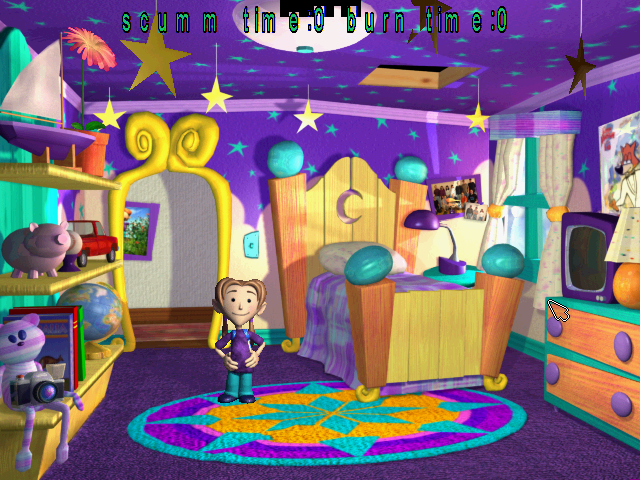
One peculiar debugging feature is always enabled regardless of other settings: Press Ctrl in Jessie's bedroom, and the game will attempt to display a message giving the "scumm time" and "burn time". Under the original interpreter, the message doesn't seem to display correctly and just corrupts part of the graphics. It does work under ScummVM, but the listed times are always zero.
Graphics#
Jessie/Hap#
Graphic |
Comments |
|---|---|
 |
A test of Jessie's talking-while-holding-camera animation for the bedroom, using an early model. (This same model appears in the devteam picture that can be photographed in the bedroom.) |
 |
Test of Jessie's idle-while-holding-camera animation. |
 |
A variation on the above? None of the finished animations directly corresponds to this one. |
|
These graphics are for the overhead view of the island. They're assigned to five different animation "frames", suggesting they were placeholders for Jessie's idling animations at each of the overhead area's exits. |


Backgrounds#
Graphic |
Comments |
|---|---|
 |
Placeholder background for room 2, which stores the interface graphics. Similar placeholders appear in many other Humongous titles—this one in particular is also found in Spy Fox 2 and Operation Ozone—so most likely they were automatically generated by a development utility for rooms without an assigned background. |
 |
Ditto for room 4 (camera-related graphics), though the font is different for whatever reason. |
 |
Some sort of placeholder background for the inventory screen with no clear use. |
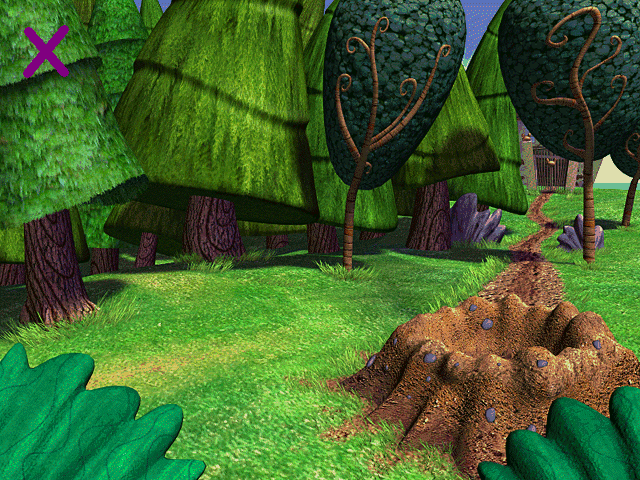 |
This is the nominal background for the UFO crash site, but it's always covered up in-game by the "real" background (which may be the reason for the purple "X" in the corner). The biggest difference is that this version doesn't have the UFO baked into it, which meshes with the manual's description of Patrick Finkwater taking it to the cookie factory. While the used background is in 16-bit color, this image is 8-bit, resulting in some nasty dithering (particularly on the sky). |
|
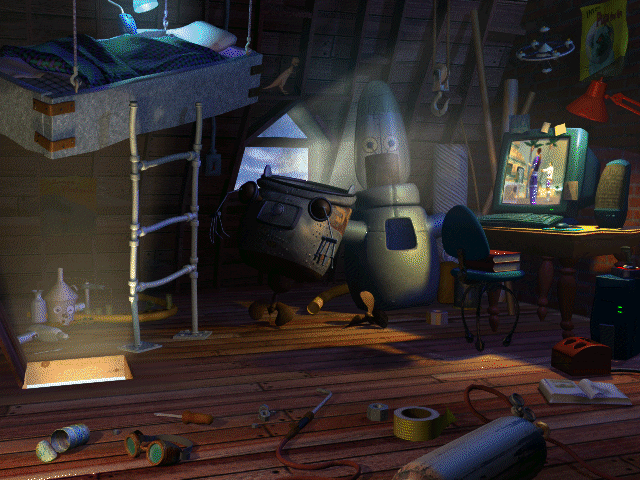
Like the above, this is the true background for Kid's room. Aside from color depth, the difference is the image on Kid's monitor, which looks like it might be a still from a movie or game—it's hard to tell at this resolution. |

Misc#
Graphic |
Comments |
|---|---|
 |
8-bit palette test graphic. Each square uses a different color in the palette. |
Items#
The game's puzzles seem to have already been planned out at the time the demo was produced, as all the items for the game already exist as crude placeholders. Helpfully, we even know what they're supposed to be thanks to some metadata in the item select screen, though there's no telling how most of them were meant to be used.
Inventory Graphic |
Name |
Comments |
|---|---|---|
 |
FlashLens |
Five of the inventory items seem to be camera extensions that would presumably each be needed to take one of the rare photos. They're specially identified by a blue background. |
 |
TelLens |
Possibly needed for Photo #4 at the Lookout? |
 |
MagLens |
Clearly needed for getting a photo of something small, but there's no really obvious candidate from the areas listed on the map. |
 |
XRayLens |
No obvious use for this one, either. |
 |
FastLens |
Almost certainly for Photo #3 (or #5), the cheetahs. |
 |
GrouchoGlasses |
|
 |
EyeGlasses |
|
 |
Crackers |
|
 |
Coupon |
|
 |
Quarter |
|
 |
LizardChow |
|
 |
Chameleon |
|
 |
RareComic |
|
 |
Cyclops |
|
 |
FishBowl |
|
 |
RubberHose |
|
 |
RubberGloves |
|
 |
Encyclopedia |
|
 |
PirateFlag |
It would be highly sensible to infer these were needed to dig up some treasure in or around the Hidden Cove, but you don't have to do it if you don't want to. |
 |
PirateHat |
|
 |
Map |
|
 |
Shovel |
|
 |
Rope |
From the ball of string at the Roadside Attraction, assuming the Sam & Max reference was carried to its logical conclusion. |
 |
MoneyKite |
|
 |
CoolCostume |
|
 |
NormalCostume |
|
 |
DorkyCostume |
|
 |
Resistor |
|
 |
Resistor2 |
|
 |
Resistor3 |
|
 |
DeadBatteries |
|
 |
SugarCube |
|
 |
Carrot |
|
 |
Plank |
|
 |
Saw |
|
 |
DiveSuit |
|
 |
KidsList |
A list of stuff to get for Kid? |
 |
Scissors |
|
 |
Lunch |
|
 |
Vase |
There are also a few sets of cursor icons to be displayed when an item is being used. Each has three variations (regular, black-and-white cursor mode, and small cursor mode):
Graphic |
Description |
|---|---|
|
The carrot, obviously. |
|
Looks like a hoe, but possibly meant to be the shovel? |
|
Skippy-brand peanut butter? No idea. Maybe the lizard chow or lunch? |


Dialogue#
Audio |
Character |
Subtitles |
|---|---|---|
Jessie |
I'm ten, going on ten and a half. |
Another generic line for Jessie to say when clicked.
Audio |
Character |
Subtitles |
|---|---|---|
Jessie |
This place could use a little redecorating. |
Probably meant to play randomly when Jessie is clicked in Kid's room, but doesn't.
Sound#
Audio |
Comments |
|---|---|
The standard Humongous Entertainment "drumroll" logo sound. The logo screens are conspicuously silent in this game. |
|
As the only other sound file in the room containing the logos, this was presumably for the Infogrames logo. |