 This article has a talk page!
This is a sub-page of Proto:Minecraft (Bedrock).

|
'This page or section details content from theFebruary 2026 Minecraft Leak.''' |

|
This needs some investigation.
|

On February 28, 2026, the source code for development versions of the Legacy Console Edition, Pi Edition, and Pocket Edition were leaked onto 4chan. Amongst the leaks is the work-in-progress source code for alpha 0.7.0 dated February 8, 2013, which can be compiled to produce a development build. It features a work-in-progress revamp of the settings screen and some debugging features not present in officially released builds. Being a very early build, it's very similar to alpha 0.6.1 and still labels itself as such. This leak contains code written after the release of Pi Edition v0.1.1 (which was itself released after Pocket Edition v0.6.1). However, some Pi Edition-specific code was never merged back into Mojang's repository and is therefore not included in this leak.
Differences#
New Options Menu#

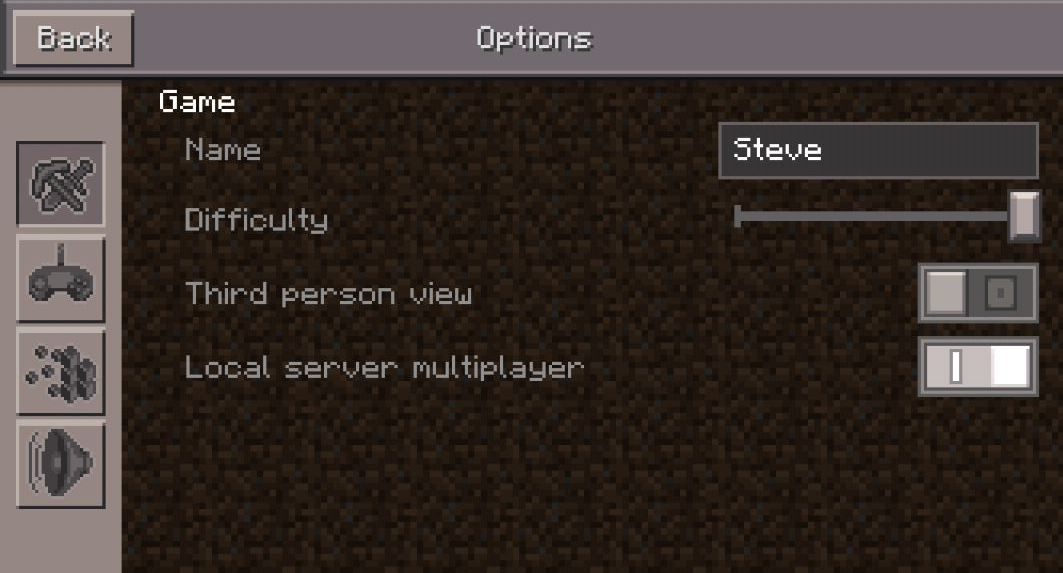
This build introduces an early version of the new options menu which replaces the original menu that used native Android/iOS pop-ups. However, the menu in its current state is very bare-bones as it lacks practically every option except an option with an unlocalized name for sensitivity. Given the state of the menu and the fact that the commented out code tries to call methods with arguments that aren't actually valid, it stands to reason that the options and the menu were being refactored at the time of development. Re-adding the options that are still present reveals that most options don't have localized strings. An earlier version of this menu is present in Pi Edition v0.1.1. In that version, the commented-out code was enabled. Notably, the game fails to read the options.txt file because it is opened in write-only mode.
Developer Johan Bernhardsson previously posted a mock-up of the new menu layout on February 4, 2013 on Twitter. The code for recreating the mock-up is present in the code, but it's completely commented out and the methods they call are also commented out.
Johan Bernhardsson Mock-up |
Development Build |
Alpha 0.7.0 |
|---|---|---|
 |
 |
 |
Smooth Lighting#
This build introduces an early implementation of Smooth Lighting, which can be toggled on the fly in Windows builds by pressing the O key. The code was technically included since the very first version of Pocket Edition, but was not toggle-able until v0.7.0.
Oddities#
- Melon seeds do not have a localized name.
Disabled Content#
The source code is rich with content that had been manually disabled at the time of development by commenting them out entirely.
Based on scripts like JConvert.py, it can be speculated that a lot of this code was generated by directly transforming the corresponding code from Java Edition. As such, it is probable that rather than being actively disabled, a lot of this commented-out code was just never implemented in the first place. This would explain why many mentioned classes like `BucketItem` show no signs of ever existing.
Items#
Present within Item.cpp and Item.h are commented out definitions for various items in the game which are either pointless to craft or haven't yet been implemented.
Numeric ID |
Description ID |
Functional? |
Notes |
|---|---|---|---|
66 |
|
Yes |
Potion effects hadn't been implemented yet during development, so eating it merely heals you to full capacity. |
69 |
|
No |
References nonexistent class |
70 |
|
No |
References nonexistent class |
71 |
|
No |
References nonexistent class |
72 |
|
No |
References nonexistent class |
73 |
|
No |
References nonexistent class |
75 |
|
No |
References nonexistent class |
77 |
|
No |
References nonexistent class |
79 |
|
No |
References nonexistent class |
86 |
|
No |
References nonexistent class |
87 |
|
No |
References nonexistent class |
90 |
|
No |
References nonexistent class |
93 |
|
Yes |
Likely disabled because the fishing rod wasn't been implemented yet. Heals you by a single heart. |
94 |
|
Yes |
Likely disabled because the fishing rod wasn't implemented yet. Heals you by three hearts. |
98 |
|
No |
References nonexistent block with the same name. |
100 |
|
No |
References nonexistent block with the same name. |
Blocks#
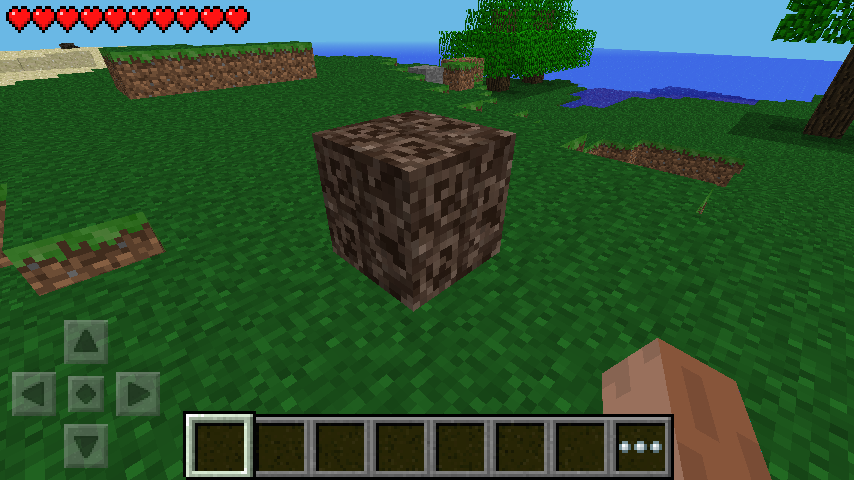
Tile.cpp contains a reference to Soul Sand on line 236. While it references a class that doesn't exist, defining it as a variable and setting it as a generic block reveals that it does at least have a texture.
World Generation Features#
|
|
This needs some investigation. |
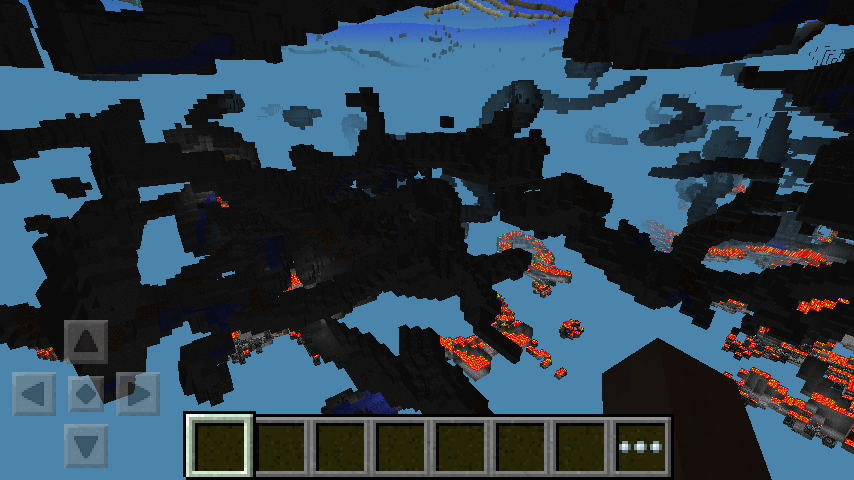
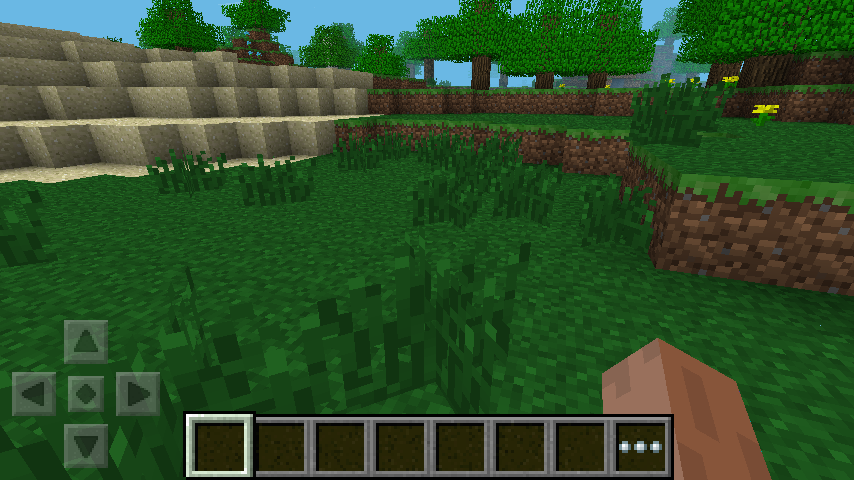
The source code contains commented out world generation features in various parts of RandomLavaSource.cpp. They can be restored by uncommenting them and making necessary fixes where necessary. Many of these would later make it into newer versions of the game.
- Lava lakes and underground water pools are implemented in
LakeFeature.h, but the code for generating them is commented out in thepostProcessmethod. - Underground caves are implemented in
LargeCaveFeature.h, but the code for generating them is commented out in thePerformanceTestChunkSource::createandRandomLevelSource::getChunkmethods. They wouldn't make it into a released version of the game until alpha 0.9.0, and even then they required a world with the Infinite world type to generate. - Random tall grass placement is implemented in
TallgrassFeature.h, but the code for generating them is commented out in thepostProcessmethod. - In
CanyonFeature.handCanyonFeature.cppthere's commented out unfinished code for the generation of early ravines. Fixing some of the code and adding CanyonFeature intoRandomLevelSource::getChunkreveals a fully functional ravine feature, noticeably the same one found unused in the Java Edition Beta 1.2 Dev Build. Ravines would be added into Pocket Edition 4 years later in the Better Together Update, making this a noticeably early implementation.

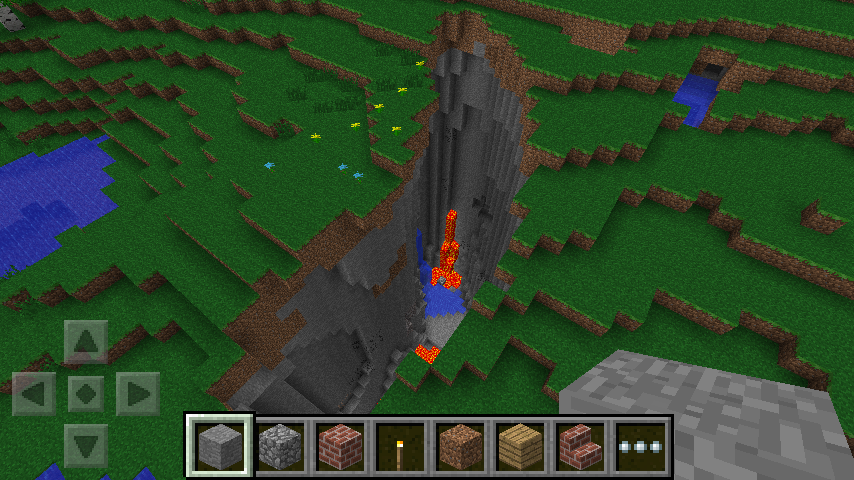
Miscellaneous or Broken Features#
MobSpawner.cppcontains commented out code inMobSpawner::finalizeMobSettingsfor spawning Spider Jockeys, seemingly directly ported from Java Edition. Even if restored to use the correct syntax, the game lacks logic to check for riding making this check useless.RandomLevelSource.cppcontains several blocks of commented out code. The first one is a block of code responsible for spawning MonsterRoomFeature presumably dungeons, but there are no files relating to MonsterRoomFeature leftover in the source code.RandomLevelSource.cppalso contains code to spawn pumpkins randomly using PumpkinFeature but just like MonsterRoomFeature, files for this feature are not present in the source code alongside pumpkins being disabled in the game's code, not seeing light until Alpha 0.8.0.Recipes.cppcontains a huge amount of commented out recipes that call for items that did not exist in the game yet or had no function or were disabled.
Pi Edition#
The leaked code was ostensibly written after Pi Edition's release. However, that does not mean that the leak fully contains Pi Edition's source code. Many changes were seemingly never merged into the main Mojang repository. Notably, this makes building Pi Edition from the unmodified source code impossible.
This is a list of the differences from Pi Edition to the leaked source code:
- Two classes are included in Pi Edition but not the leak:
MouseUnlockedScreenis a bare-bones screen that include a button that saysClosein the top-right corner and nothing else. It is never used. Notably, while it is not included in the leak, it is referenced in the Pi EditionMakefile.- An unknown class which interacts with the Raspberry Pi's GPU's "mailbox" communication interface. It includes methods for retrieving the firmware versions, and getting/setting the over-scan. This class is never mentioned in the leak. And because it does not have a VTable, its true name is unknown. Similar code can be found here.
- Options changes:
- Pi Edition does not include some of the newer options GUI changes from the leak.
- Notably, it does not use the localization API and the commented-out code in the leak is fully active.
- Other changes:
- In the official build, Pi Edition's API contains the
world.getBlockWithDatacommand. The leak's implementation ofCommandServerdoes not. - When
KeyboardInput::releaseAllKeysis called, the official binary sets thejumpingproperty to false. This (presumably) bug-fix is not included in the leaked code.
- In the official build, Pi Edition's API contains the
- The build system is totally broken:
- Pi Edition consists of two
Makefile: one for RakNet and one for the game itself. - By default, the RakNet one produces
libRakNet.sowith the option of also producinglibRaknet.a(and remember, Linux is case-sensitive). - However, the game's
Makefileexpects a file namedlibRakNet_static_O1.a. This file also searches for the library in an incorrect directory. - RakNet's
Makefileuseswildcardto retrieve the list of source files. Notably on older versions of Make, this produces a non-deterministic order. This makes the RakNet build non-deterministic, which in turn makes the game's build non-deterministic. - The game's
Makefilealso searches for the Raspberry Pi's libraries in hard-coded locations, which may have changed since 2013.
- Pi Edition consists of two
Platform Specific Differences#
The source code contains a bunch of differences which alter the game's behavior depending on the platform it was built for.
Touchscreen Mode#
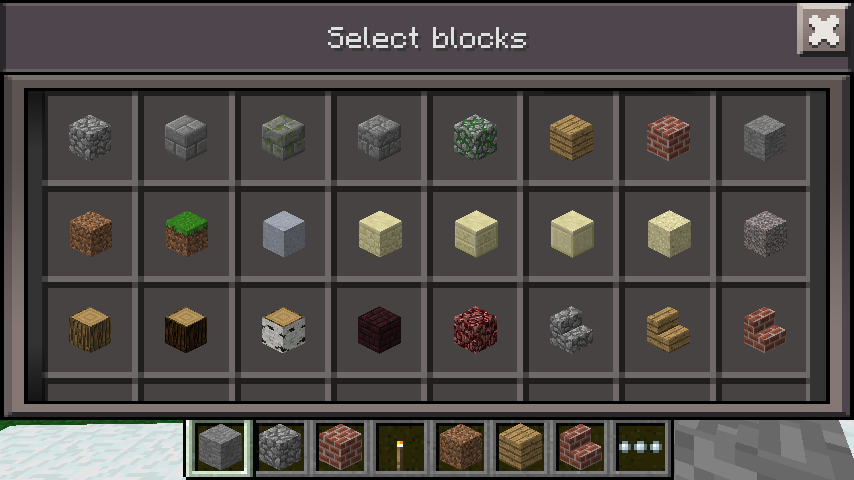
The game has two different versions of some screens for both touchscreens and non-touchscreen devices. The game chooses which version to use depending on the environment the game was compiled and run on. This is accomplished by a combination of compiler flags, a function in the platform abstraction layer, and even in-game options. In Minecraft.cpp, the method useTouchscreen determines whether to use touchscreen controls by checking both the option useTouchScreen and whether the platform supports touchscreens in the first place by calling the supportsTouchscreen method in its abstraction layer during startup. If either of those are the case, the game enables touchscreen mode1.
This behavior is slightly platform-specific and done in a rather weird fashion.
- If compiled for the Raspberry Pi,
Minecraft.cpp'suseTouchscreenmethod is hardcoded to always return false, disabling touchscreen mode and any baggage it carries entirely. - If compiled for Windows, touchscreen is always enabled by default by overriding the default implementation of
supportsTouchscreento return true. This is strange, because the default implementation does the exact same thing. - If compiled for Android, the game calls a native method within the operating system to determine whether the device itself supports it. Most standard Android devices will return true, but some devices like the Xperia Play will return false since they have their own built-in gamepad.
- Otherwise, the game assumes that touchscreen controls are supported and returns true.
Aside from the additional versions of existing screens, the game also displays an extra hotbar slot in the in-game HUD when touchscreen mode is disabled.
|
Touchscreen Mode Enabled |
Touchscreen Mode Disabled |
|---|---|
|
|
|




Title Screen#
The title screen has several minor differences.
- If compiled for the Raspberry Pi, the game tweaks the title screen to hardcode the version string to
v0.1.1 alpha, replace its branding with Pi Edition branding, removes the options button, moves the Join Game button down by a few pixels, and adds the Raknet logo in the bottom left corner. - If compiled for versions of Android prior to 2.3, the game appends
jto the end of the version string. - If compiled for iOS while the flag for demo mode is set, the game appends
(Lite)to the end of the version string. Otherwise, it appends(Demo)instead.
|
Non-Pi Builds with Touchscreen Mode Disabled |
Pi Builds |
|---|---|

|

|
World Selection Screen#
The Create World button in the world selection screen behaves differently depending on the platform.
- If compiled for the Raspberry Pi, the game automatically creates a Creative Mode world with certain settings depending on if touchscreen-mode is enabled. When it is disabled (the default) it will create a world called
worldwith the seed set to the current Unix time. However, when the touchscreen mode is disabled, it will create a world namedperfwith the same seed logic (commented-out code exists for setting the seed to/r/Minecraft). - If compiled for Windows, the game prompts the user to choose a gamemode using the gamemode selection screen from the demo. Once chosen, the game creates a world with the chosen gamemode named
perf. - Otherwise, the game defaults to showing the regular world creation menu.
Debugging Windows#
|
|
This needs some investigation. |
If compiled for Windows, upon running the executable the game opens up two additional windows alongside the main game window.
Debug Keybinds#
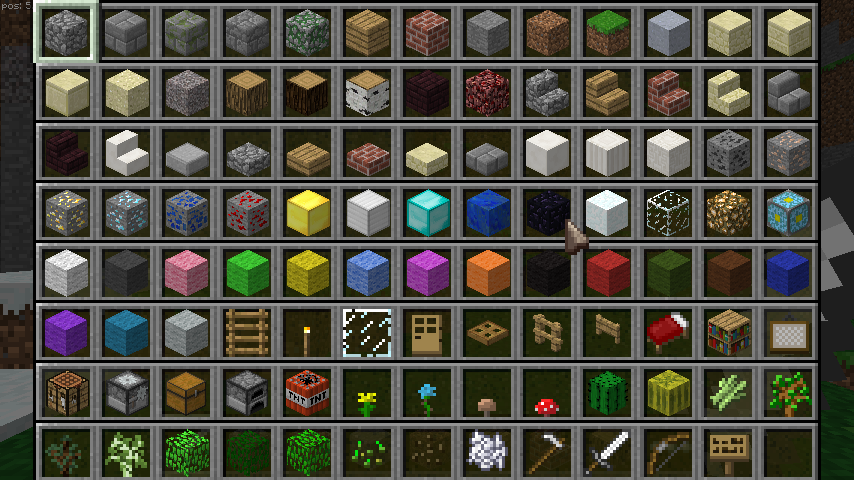
If compiled for Windows, the game offers a bunch of extra keybinds for use in debugging.
Key |
Effect |
|---|---|
F3 |
Enables a non-functional debug overlay containing what is supposed to be a framerate meter chart and pie chart. If it worked, pressing the keys 0-9 would navigate the framerate meter. |
B |
Switches your gamemode between Creative and Survival. |
C |
Clears the player's inventory and resets it to whatever defaults are set for each gamemode. |
F |
Toggles "fly" mode, which allows you to clip through blocks. To descend, press Q. To ascend, press E. |
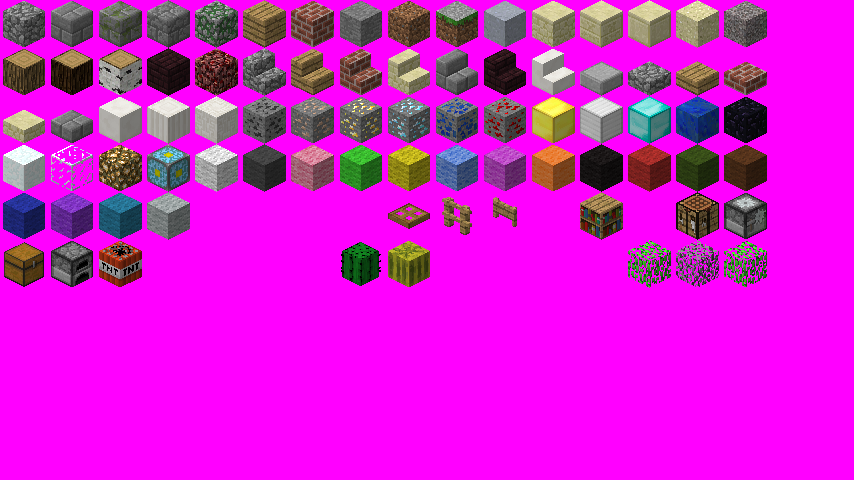
H |
Opens a debug screen containing 3D renders of pretty much every block in the game. This screen is internally called |
L |
Decreases the current render distance. |
M |
Switches the current difficulty between between Normal and Peaceful, then forces the game to immediately run 100 ticks back-to-back. |
O |
Drops everything in your inventory and toggles Smooth Lighting. |
P |
Advances the world time by 1000. |
T |
Toggles the third person view. |
U |
Reloads the graphics engine and resets the player's health. |
X |
Removes all entities in the map. |
Y |
Reloads all loaded textures and reduces the player's health to a single heart. |
Z |
Spawns random animals present in the game. |
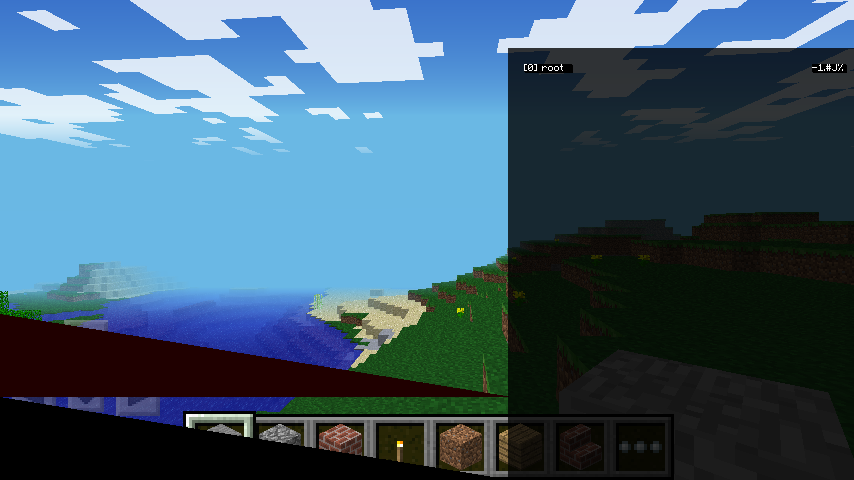
If the game was compiled with the OPENGL_ES flag disabled, pressing the P key would toggle a wireframe rendering mode. This restriction is due to OpenGL ES v1.1 not supporting wireframe rendering. This is platform-agnostic.
Inventory#
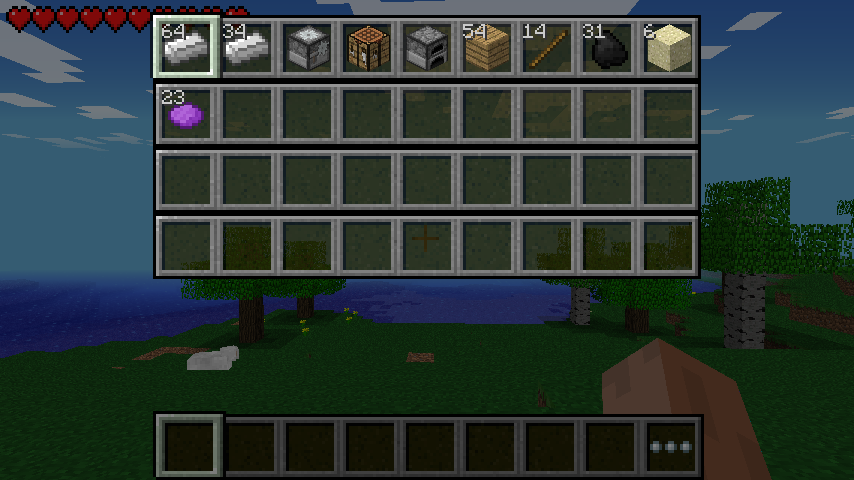
If the game was compiled for Windows, any worlds created in Survival Mode will automatically give players 98 iron ingots, 1 stonecutter bench, 1 crafting table, 1 furnace, 54 wooden planks, 14 sticks, 31 coal, 6 sand, and 23 purple dye.

Anti-Piracy#

Every time the game ticks at the title screen, it performs an anti-piracy check by calling a function in the platform abstraction layer called checkLicense and checking if the result is either 0 or 1. If it is, then it enables the buttons in the title screen and moves on. If it isn't, it throws up a licensing related error and prompts the user to purchase the game.
While this code is universal across all platforms (including the Pi edition), it turns out that the checkLicense function behaves differently between platforms:
- If compiled for Windows, the game sets an integer with a value of 0, decrements it, and then checks to see if it's less than 0. If so, it returns 0, indicating a success. Otherwise, it returns -2. Since the integer is always going to be -1 at the end every time, it will always return a success.
- If compiled for iOS, the game for some reason immediately returns 0, indicating a success. Despite this, there is extra code afterwards which would cause the anti-piracy checks to fail if it wasn't for the immediate return.
- If compiled for Android, the game calls a native function within Android which does all the checking for it. This is the only time the anti-piracy check actually works correctly.
- Otherwise, the game returns 0, indicating a success.
Dedicated Server#
The leak also contains an implementation of a basic dedicated server. It automatically creates a Creative Mode world with the seed set to the current Unix time. The world's name and directory are set by command-line arguments. It contains references to the ability to set a "server key" for API calls, but this is not implemented.
Mojang did not release an official dedicated server until Bedrock Edition 1.6.1 (almost five years newer than the contents of this leak). Previously, players were forced to use third-party software like PocketMine-MP, which often lacked critical features like Survival Mode.
Footnotes#
- An interesting side effect of this is that while you can manually turn on touchscreen mode, you can't manually turn it off if the device supports touch controls.↩︎