 This article has a talk page!
This is a sub-page of Proto:Blockland/Beta7.
General Differences#
- All regular GUI windows are very slightly transparent
- Almost all of these GUIs are able to be resized or even minimized (causing many visual issues), while this was disabled on most of these GUIs in retail.
- Rounded buttons have a white outline
- Scroll, radio and check elements are all shades of tan instead of white/grey
- Input fields have an embossed outline instead of a black outline
- The dark gray square dropdown button element class is a light lavender color.
- All scrollable areas with both vertical and horizontal scrollbars visible have a resize element at the bottom right, even though this element cant be resized.
These GUIs are missing from this beta, but are present in Retail v1:
- addBanGui
- AddOnsGui
- BrickManGui (Brick Management)
- colorGui (Color Picker)
- ColorSetGui (Avatar color set editor)
- ConnectingGui
- CreateMiniGameGui, joinMiniGameGui, MiniGameInviteGui
- DefaultControlsGui
- demoBrickLimitGui
- fastLoadWarningGui
- keyGui
- MusicFilesGui
- NetGraphGui
- NewPlayerListGui
- portForwardInfoGui
- ProgressGui
- regNameGui
- saveBricksWarningGui, SavingGui
- SelectNetworkGui
- ServerConfigGui
- TrustInviteGui
- unBanGui
- wrenchDlg, wrenchSoundDlg, wrenchVehicleSpawnDlg
These GUIs aren't in retail v1, but were carried over from v0002:
- EndGameGui - uses new main menu background, but otherwise identical to v0002
- MainChatHud - this beta adds a text shadow object, adds a "who's talking" indicator and uses more custom profiles.
- MessageHud - this beta makes some pos+size adjustments, and uses more custom profiles
- PlayerListGui - this beta adds scrolling ability to the list, and uses more custom profiles.
Main Menu (MainMenuGui)#
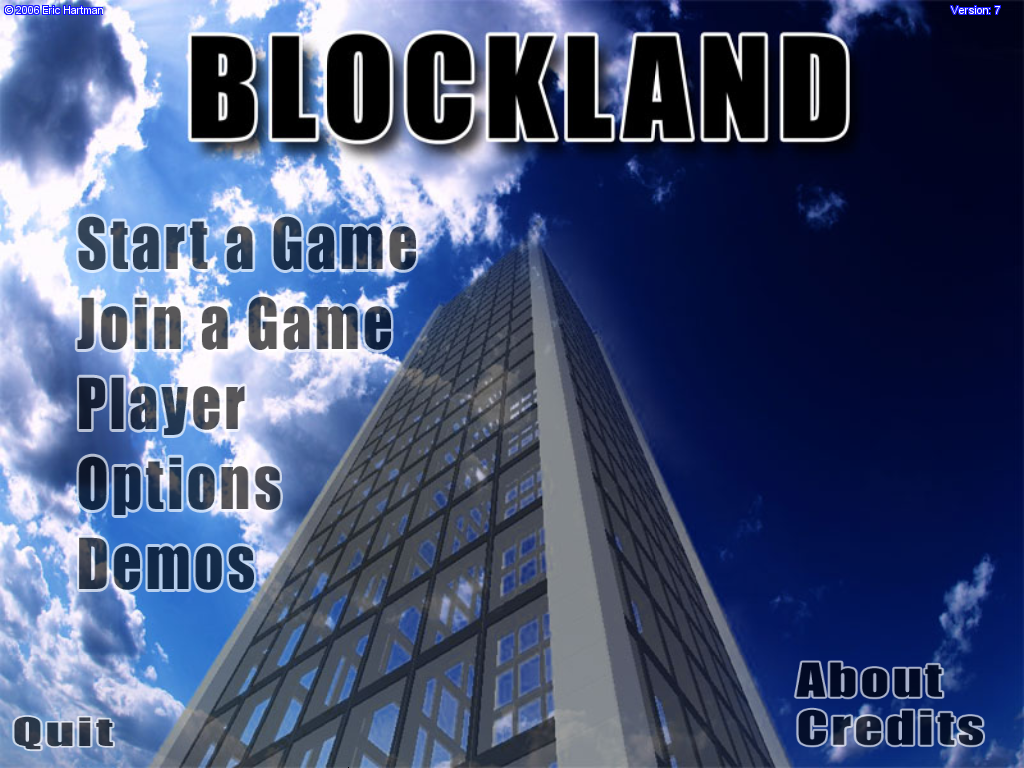
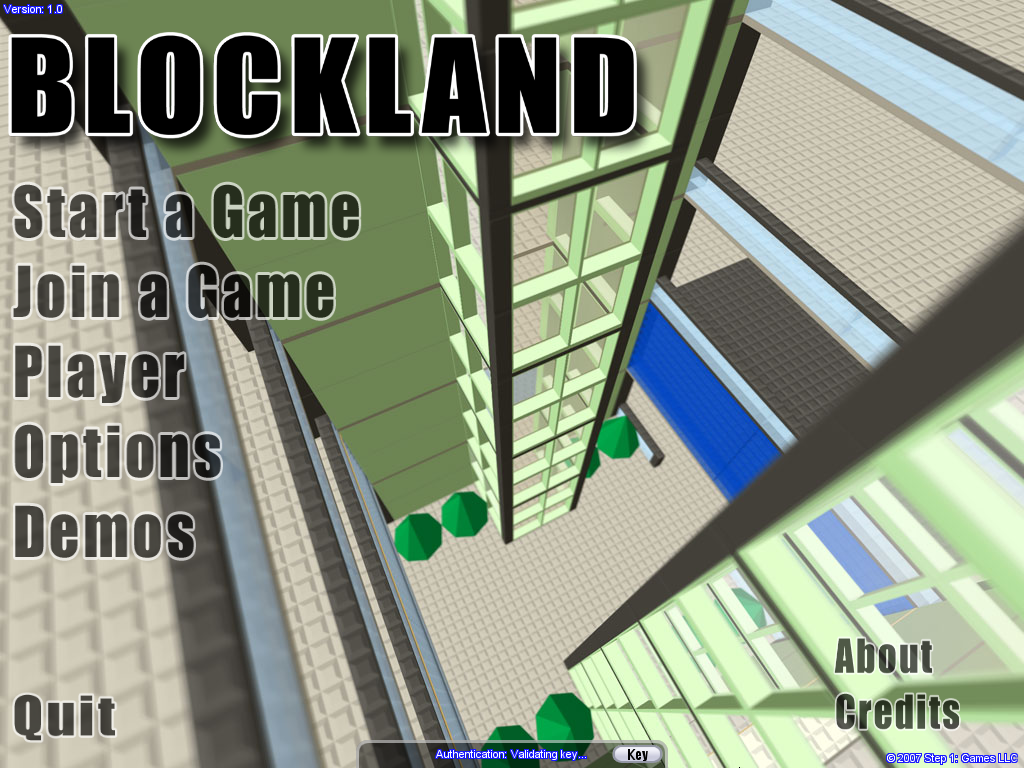
- There is no screenshots slideshow in the background, instead opting for a static image like in v0002.
- Copyright is printed in the top left corner, while the version number is in the top right. Copyright is also attributed to "Eric Hartman" instead of "Step 1: Games LLC"
- The game's title is a part of the background, instead of a separate bitmap.
- All the main buttons are the same graphics, however they have a larger left margin. No note sounds play when hovering over them.
- The Quit, About and Credits buttons are slightly squashed.
- There is no authentication status bar at the bottom, as authentication wasn't implemented yet.
|
Beta v7 |
Retail v1 |
|---|---|
|
|
Start a Game (startMissionGui)#
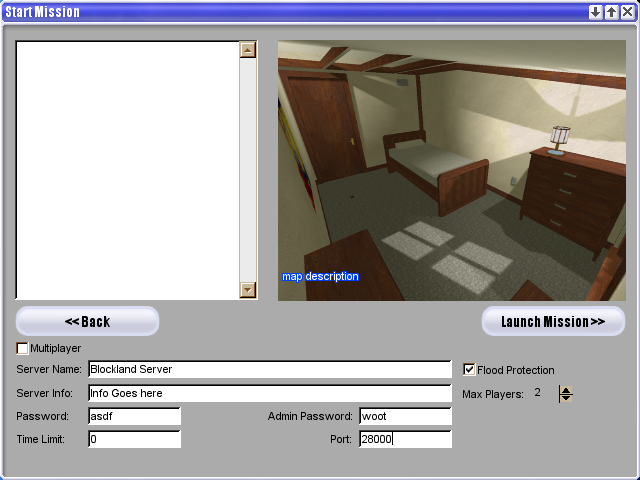
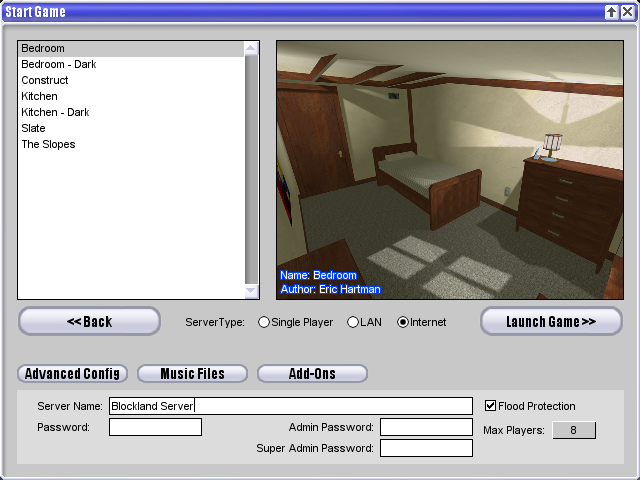
- Window is labeled "Start Mission" instead of "Start Game"
- The list of maps is always empty, even if mission files are added to the games files.
- Despite no maps being available the default preview image is of the Bedroom map, instead of the "Unknown Map" image.
- The ServerType is controlled through a single checkbox labeled "Multiplayer"
- There are no extra buttons for Advanced Config, Music Files, and Add-Ons.
- There is a text box for Server Info, which by default says "Info Goes Here"
- The default Max Players is 2.
- The default Password is "asdf", Admin Password is "woot" and there is no Super Admin Password field (Presumably because that role did not yet exist).
- There is a field present for "Time Limit" defaulting to 0.
- You can change the port in this window, whereas in the final it is moved to the Advanced Config window.
- The start button says "Launch Mission" instead of "Launch Game".
- The start button does not work whatsoever, as you cannot create servers on this client.
- Attempting to close the window does not work, you must press Esc or click the Back button.
- Resizing the window causes major element resizing issues.
|
Beta v7 |
Retail v1 |
|---|---|
|
|
Join Server (JoinServerGui)#
- "Query Internet" button is named "Query Master"
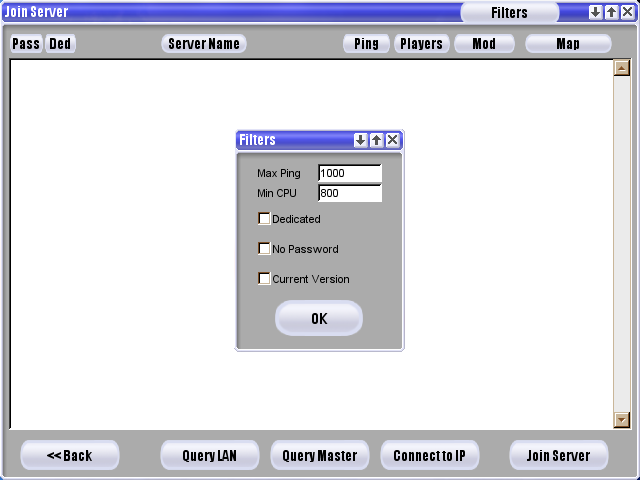
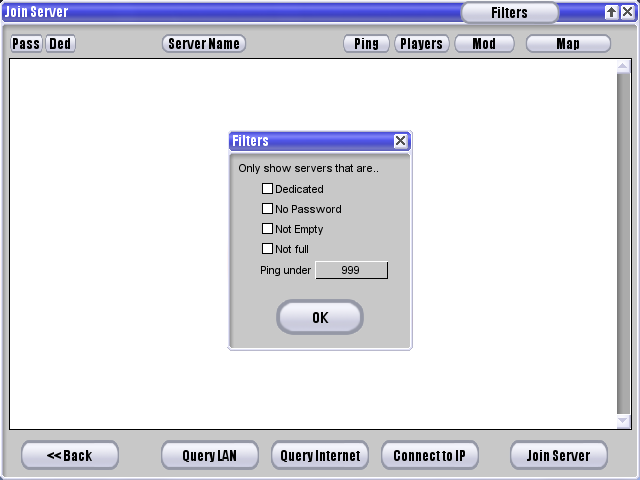
The Filters window is more barebones:
- There is no "Only show servers that are…" text.
- Ping is at the top of the list as "Max Ping" with a text field (which defaults to 1000) instead of a drop down menu. Directly under it is "Min CPU" which also has a text field, defaulting to 800. This is completely absent in retail v1.
- The check boxes underneath are more spread out, as there are only three options; Dedicated, No Password and "Current Version" which is absent from retail v1.
- There are no checkboxes for Not Empty or Not full.
|
Beta v7 |
Retail v1 |
|---|---|
|
|
Player (AvatarGui)#
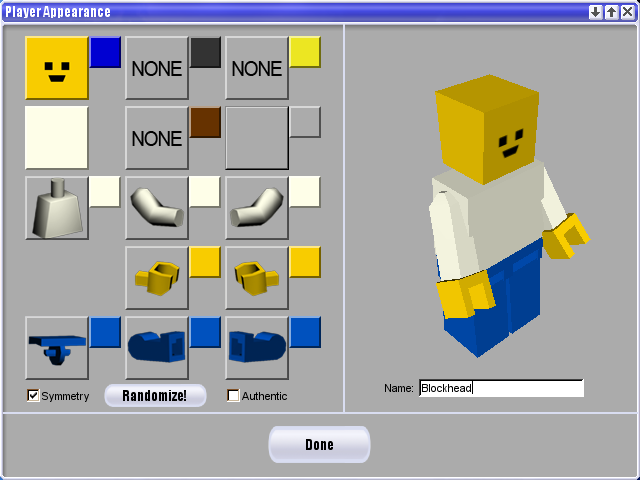
- You cannot recolor the head - the color icon is stuck as a deep blue color and clicking it does nothing.
- The icons for each player part resemble actual LEGO minifigures, which is not accurate to the playermodel in this build. These icons are leftovers from the older LEGO figure playermodel.
- The Symmetry checkbox is placed under the pants slot instead of under the torso slot.
- Player part and color buttons have embossed outlines instead of solid-color grey outlines.
- "Randomize!" Button is placed under the right leg slot instead of under the player preview.
- There is a checkmark labeled "Authentic", which restricts the colors for the player parts to actual LEGO minifigure colors. There is code for this feature leftover in Retail.
- There is no button for setting custom colors. (labeled Color Set)
- There are no fields for setting clan tags.
- LAN Name is just labeled "Name", as your online name would be set in this menu instead of on the main menu.
- The 3D preview for the player has the model standing still, instead of playing the walking animation.
- There is no background element behind the 3D preview.
- The Done button is thicker, while also narrower.
- There is no "Set Favs" bar for setting avatar favorites.
- The window can be resized, but no element adjusts size with it.
Differences in player parts and player model are documented on the Player Differences section.
|
Beta v7 |
Retail v1 |
|---|---|
|

|
Options (optionsDlg)#
- There is no "Advanced" tab.
- There are no section dividers to split the menu up into sections.
Graphics tab#
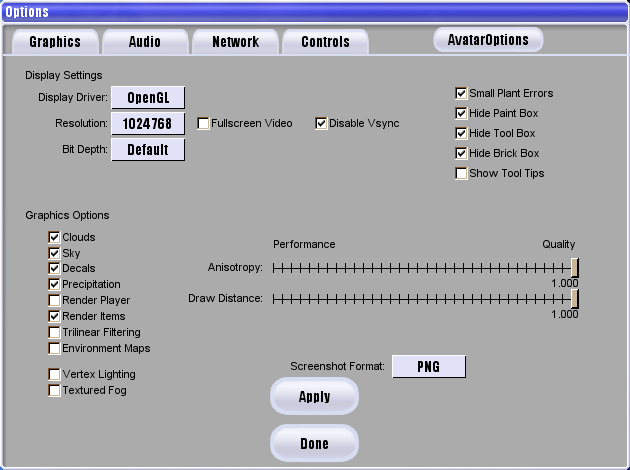
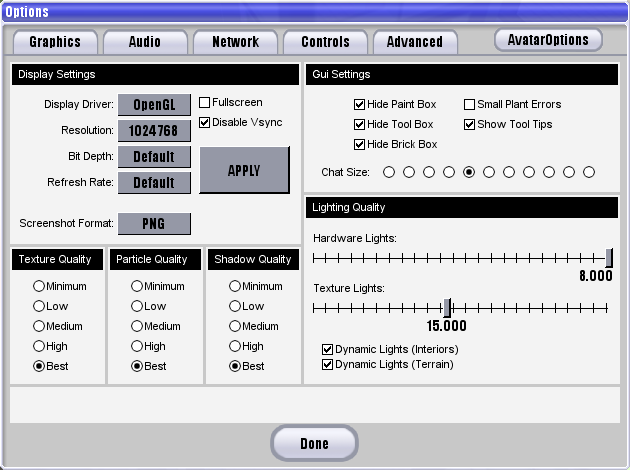
- On the "Display Driver" selector, there is the option for Direct3D - this was removed by retail v1 release.
- There is no "Refresh Rate" setting.
- The "Apply" button is at the bottom of the menu instead of being beside the display settings.
- The "Screenshot Format" selector is also moved down near the bottom of the menu.
- There is no "Chat Size" adjustment.
- There are no quality adjustments for textures, particles and shadows.
- The entire "Lighting Quality" section is missing.
- The "Graphics Options" toggles from the Advanced tab are on this page instead, along with anisotropy and draw distance adjustments.
- The rest of the options on v1's Advanced tab are missing.
|
Beta v7 |
Retail v1 |
|---|---|
|
|
Audio tab#
- The entire "Audio Options" section and its toggles are missing. The remaining settings are centered in the ui as a result.
|
Beta v7 |
Retail v1 |
|---|---|

|

|
Network tab#
- There are no "Connection type" presets available.
- There is a field letting you change the "Master Server"; the API used to retrieve the server list. In retail, this option is hardcoded instead.
|
Beta v7 |
Retail v1 |
|---|---|

|

|
Controls tab#
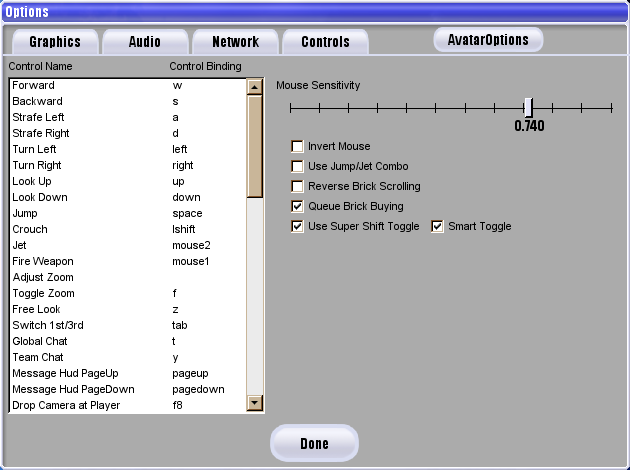
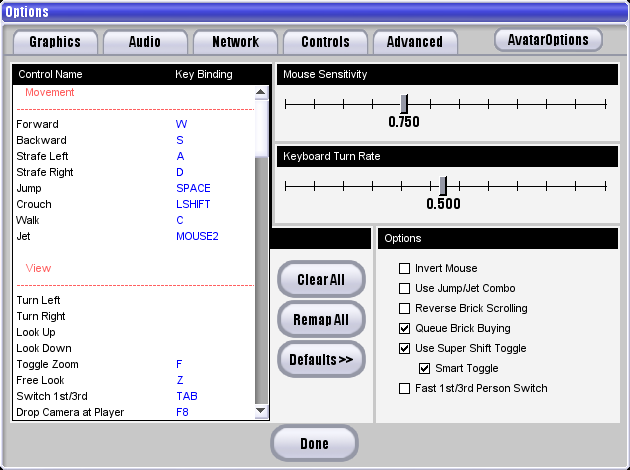
- There is no "Keyboard Turn Rate" slider.
- There are no buttons to clear/remap all binds, or set binds to defaults.
- There is no "Fast 1st/3rd Person Switch" toggle.
- The list of binds does not have any headers.
- The following binds are missing:
- "Use Bricks" ('1' is instead bound to "Use 1st Slot" here)
- "Inventory Up/Down/Right"
- "Start/Stop Recording Demo"
- "Use Light"
- "Toggle Cursor"
- "Take Hud Screenshot" and "Take DOF Screenshot"
- "Toggle NetGraph"
- "Toggle Player Names"
- "Next Vehicle Seat" and "Prev Vehicle Seat"
- "Toggle Build Macro Recording" and "Playback Build Macro"
- All emote binds (emotes not implemented yet)
- The following binds are unique:
- "Adjust Zoom", unbound by default
- "Take Panoramic Screenshot", bound to "ctrl [" by default (this function exists in retail, but is not bound to any key or otherwise shown to the user)
- The following binds changed names:
- "Fire Weapon/Tool" is "Fire Weapon" here
- "Chat Hud PageUp/PageDown" is "Message Hud PageUp/PageDown" here
- The following binds are defined in the game, but don't show on this list:
- "Walk"
- "Suicide"
- "resizeMessageHud" (unique)
|
Beta v7 |
Retail v1 |
|---|---|
|
|
Player tab#
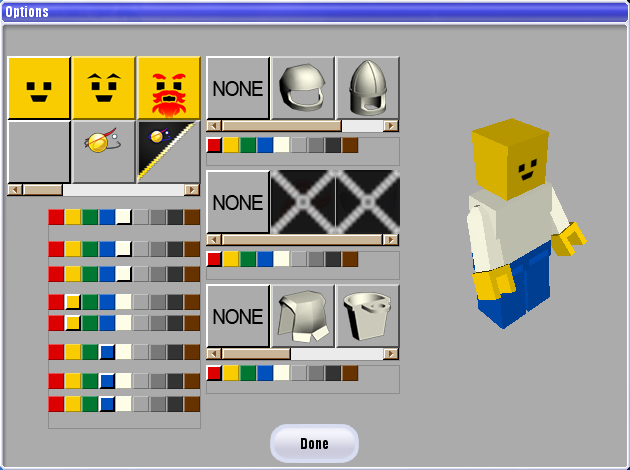
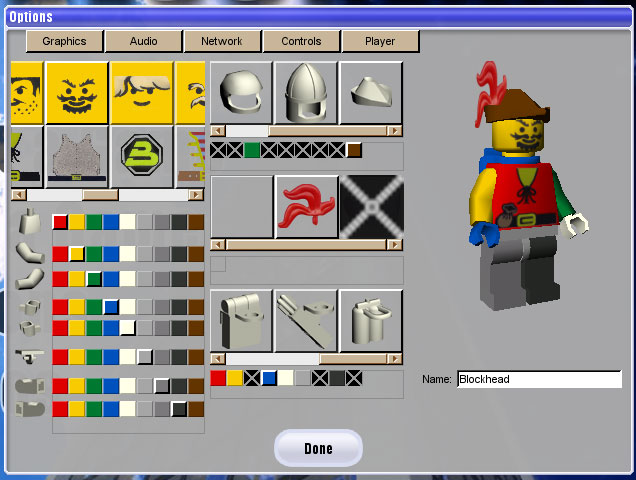
Unused functions related to an older avatar editor in a deleted Player tab (OptPlayerPane) exist in optionsDlg.cs, including loadAvatarColorMenus(), loadAvatarPrefs(), PPUpdate(), killSelectionImages(), and several sub-functions. This tab is referenced in optionsDlg::setPane() and was shown in pre-release screenshots before being moved to a separate window.
These functions try to place GUI objects inside several deleted named objects, and after creating them do not work by default due to using outdated filepaths and variable names.
When opening and closing the options menu, the game will still try to call killSelectionImages() and cause several errors in console due to the tab being deleted.
Recreated tab |
|---|
 |
|
Fixed code |
Pre-release image |
|---|---|
|
|
Demos (recordingsDlg)#
The "Demo Recordings" window is identical to retail v1, except for including a horizontal scroll bar on the list of recordings.
Help (helpDlg)#
This dialog is the same as v0002, and does not have Blockland documents yet.
|
Beta v7 |
Retail v1 |
|---|---|

|

|
About (aboutDlg)#
This dialog incorrectly lists 1.1.2 instead of 1.3, as the text has to be updated manually.
|
Beta v7 |
Retail v1 |
|---|---|

|

|
Administrator Menu (adminGui)#
- There is no BL_ID column.
- The "Player Name" column is named "Player List:"
- Every button is identically sized and all uncolored.
- There is no "Un-Ban" button, and no "Spy" button.
- None of the buttons are suffixed with " >>"
- "Destructo Wand" is named "Magic Wand" here.
- "Magic Wand" and "Change Map" buttons are positioned higher.
- There is no scrollbar on the player list.
- The menu can be resized both horizontally and vertically, while in retail v1 it can only be resized vertically.
|
Beta v7 |
Retail v1 |
|---|---|

|

|
Brick Selector (BrickSelectorDlg)#
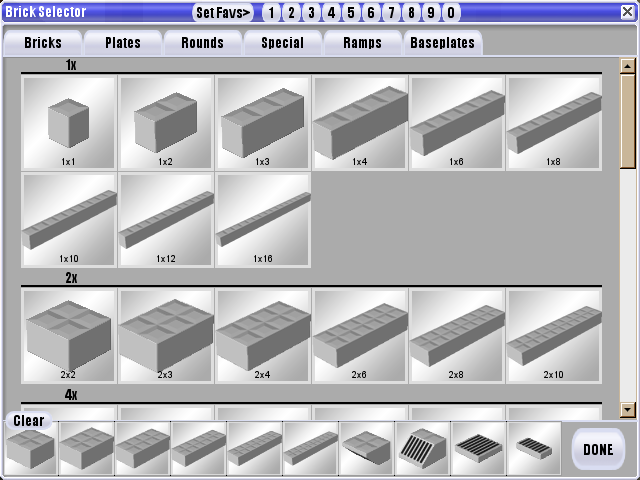
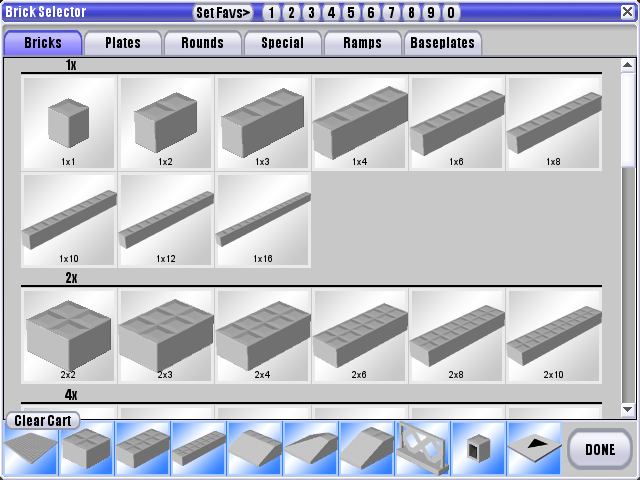
- "Clear Cart" button just reads "Clear".
- "Done" button is thinner.
- Slot backgrounds are a little darker.
- There is no blue background under the inventory slots.
- The default favorites are different.
|
Beta v7 |
Retail v1 |
|---|---|
|
|
Escape Menu (escapeMenu)#
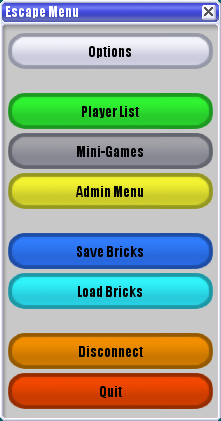
- All buttons are uncolored (which is achievable in retail with a client setting, but is colored by default)
- There is no "Player List" button, or a "Mini-Games" button.
- There is a "Call Vote" button, which does not have any command specified for it.
- There is a "Suicide" button, which just calls
clientcmdSuicide.
|
Beta v7 |
Retail v1 |
|---|---|

|
|
Load Bricks (LoadBricksGui)#
- There are no headers on the list of saves, so you can't re-sort the list at all.
- There is no "date" column.
- There is a horizontal scrollbar with no use.
- The preview image area is smaller, and has a square aspect ratio.
- There is no white background on the description area.
- The "Load" and "Cancel" buttons are centered in their area, and have been positioned on top of each other instead of beside each other.
|
Beta v7 |
Retail v1 |
|---|---|

|

|
Save Bricks (SaveBricksGui)#
- The window size is much smaller.
- There is no preview image area at all.
- The text area for the description has a lighter color background.
- Once again there are no headers on the list of existing files, nor is there any date column.
|
Beta v7 |
Retail v1 |
|---|---|

|

|
Loading (LoadingGui)#
- The loading progress bar is not centered properly, as it is slightly towards the left.
- The loading progress bar has a dark slate blue outline, with a light cyan progress fill.
In-game UI (PlayGui)#

|
To do: |
|
Beta v7 |
Retail v1 |
|---|---|
|
|
|
Beta v7 (Hide options disabled) |
Retail v1 (Hide options disabled) |
|---|---|
|
|
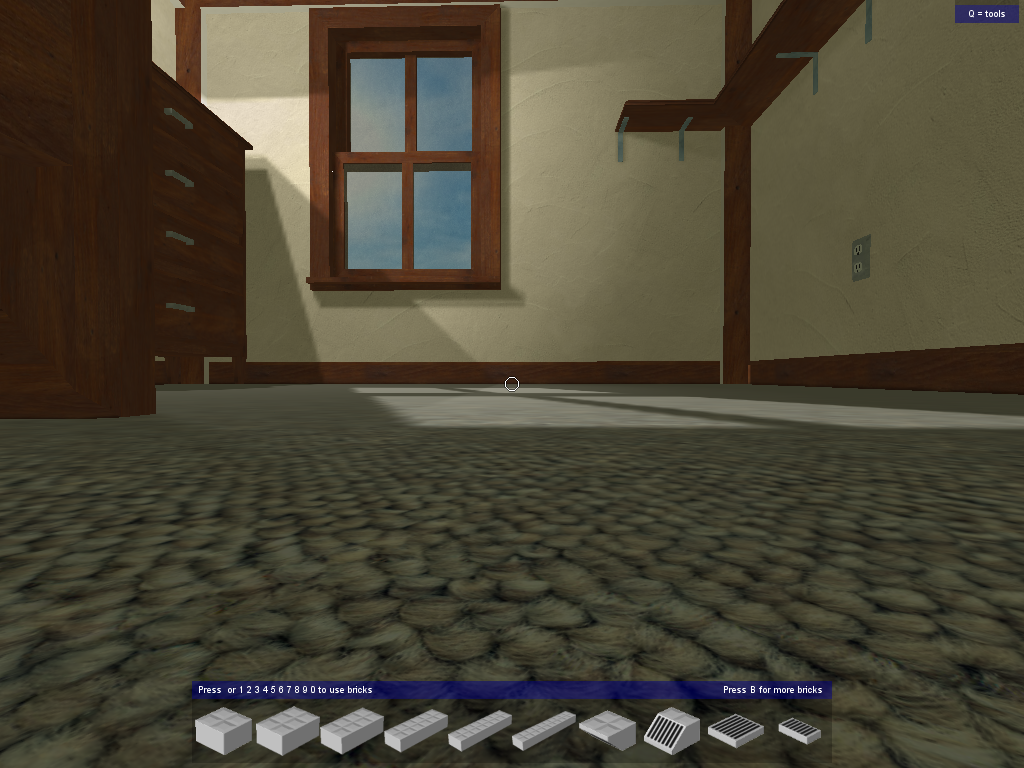
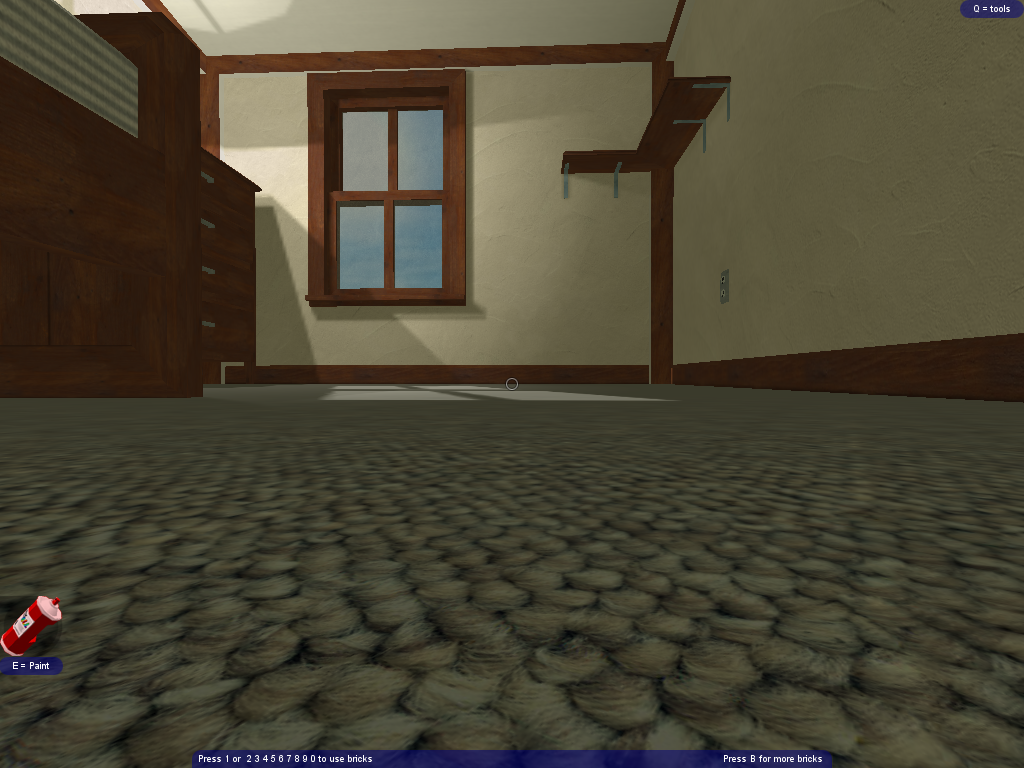
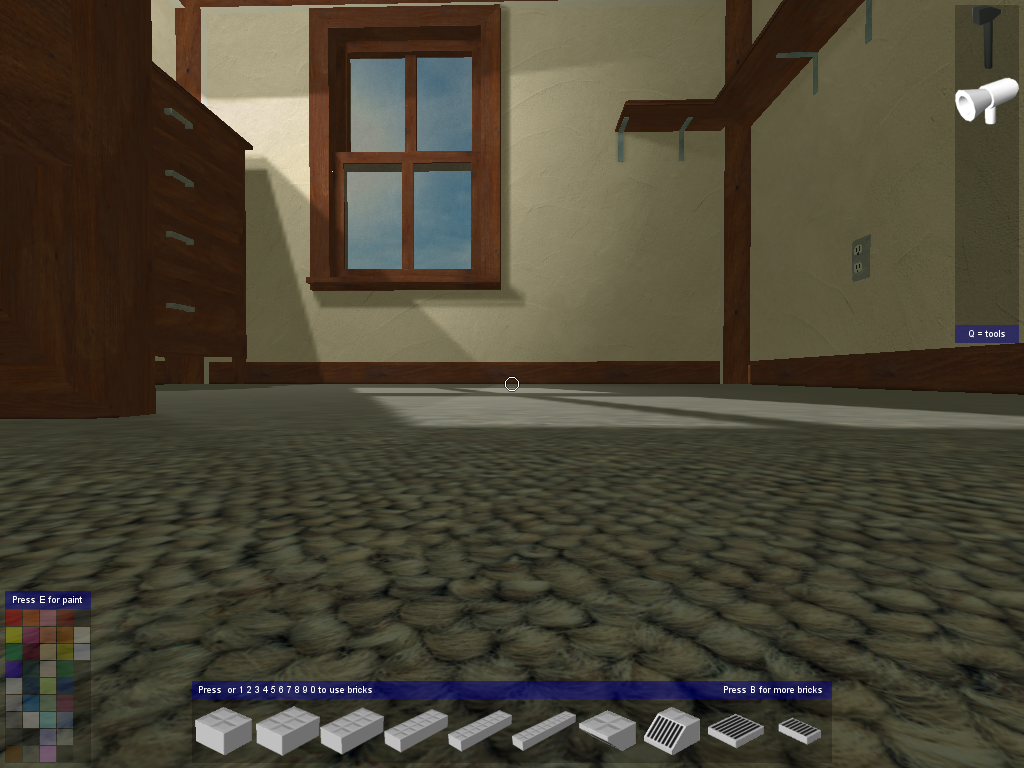
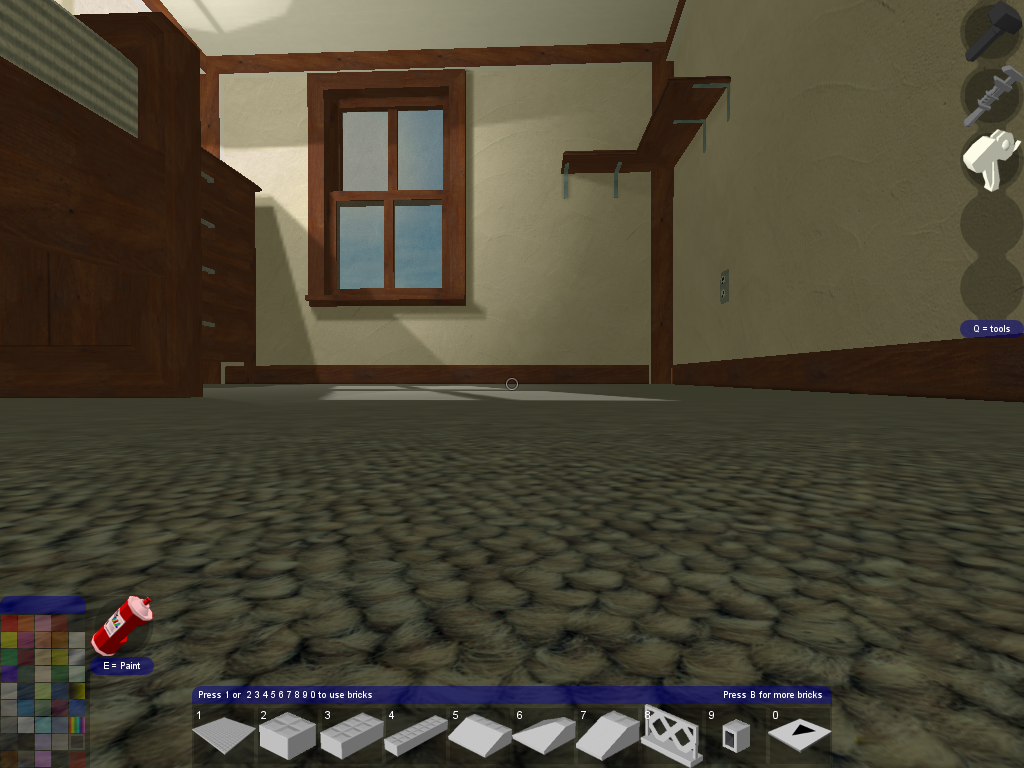
- MouseToolTip doesn't exist - the tooltip telling you that you can unlock your mouse when a URL link is posted in chat.
- There is no demo brickcount text element.
- There is no energy bar element.
- The paint can pop-out is completely hidden when not extended, as there is no paintcan graphic.
- The chat's font is Arial 14pt, with no way to change the size at all.
- Chat color 7 is a full black color rather than a dark gray, and color 8 does not exist.
- The inventory tooltip shows the bind for useBricks(), which is not an actual bind yet.
- If nothing else is equipped, the brick inventory will always show even if "Hide brick box" is enabled.
Player list (playerList)#
|
Beta v7 |
Retail v1 |
|---|---|
|

|
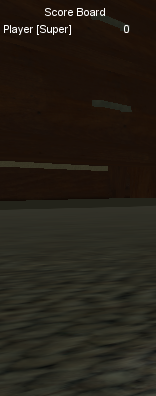
The new playerlist has not been implemented yet.
Re-bind control (RemapDlg)#
- The window is not styled typically, instead being a very basic beveled box lacking a title bar.
- The "Re-bind control" text is justified to the very left rather than the center.
- There are no additional tips for canceling or clearing a bind.
|
Beta v7 |
Retail v1 |
|---|---|

|

|