 This article has a talk page!
This is a sub-page of Development:The Legend of Zelda: A Link to the Past.
Old Button Mapping#
The 日本_Ver3\asm\zel_main files, of which there are 7, each contain the following graphical representation of an older button mapping for the SNES controller.
;*      Key input               (CONT2)     *
;*      [ken]   ---> (A)       <Y>              *
;*      [item]  ---> (B)    <B>   <X>           *
;*      [do]    ---> (X)       <A>              *
;*                                  *
;*      [KEYA1] ---> BYssudlr                   *
;*      [KEYA1L] --> AXLR                   *
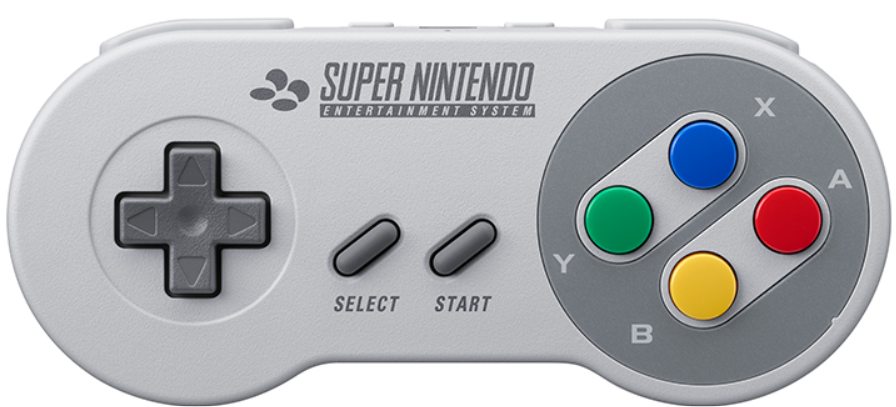
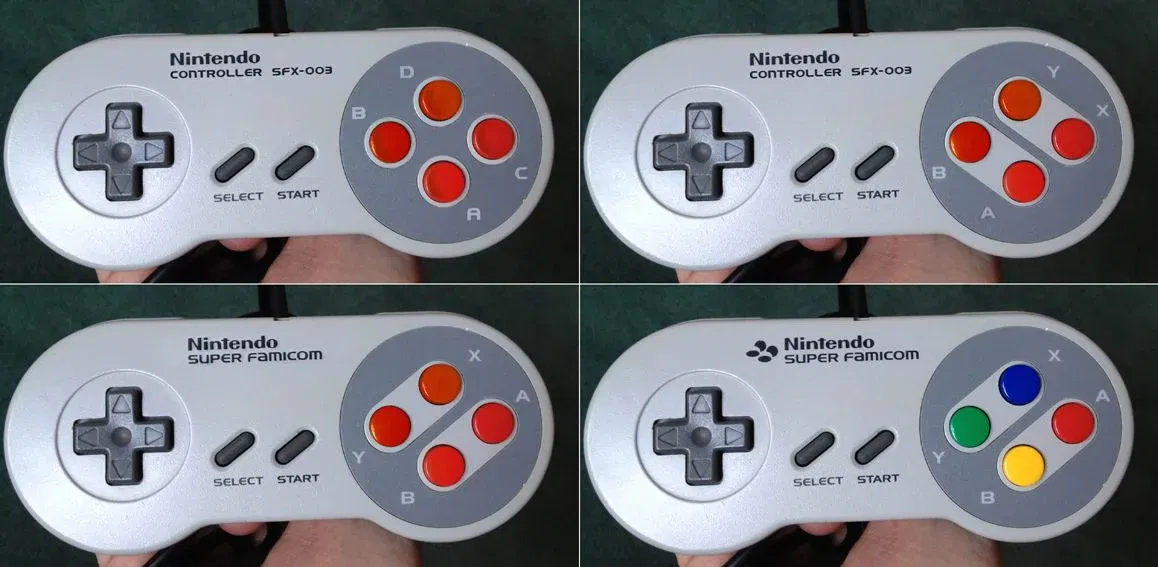
As you can see by comparing the data with the image of the final Japanese SNES controller beside it, the four right-hand face buttons are in different locations. (Clockwise from left, the early layout goes B, Y, X, A, while the final layout goes Y, X, A, B.)
It is clear from the variety of prototype SNES controllers that have surfaced that Nintendo experimented with a number of different button names and layouts. The layout in the data above matches the layout of the prototype controller in the top-right of this image.
The label KEYA1 is stated above to handle the B, Y, Select, Start, Up, Down, Left, and Right buttons, while files such as 日本_Ver3\asm\li\zel_ram1.lst indicate that it handles the A, B, Select, Start, Up, Down, Left, and Right buttons.
The label KEYA1L is stated above to handle the A, X, L, and R buttons, while files such as 日本_Ver3\asm\li\zel_ram1.lst indicate that it handles the X, Y, L, and R buttons.
Action |
SNES |
GBA |
Early |
Notes |
|---|---|---|---|---|
Move |
D-Pad |
D-Pad |
||
Talk |
A |
R |
X, Y |
The early button layout above states that X was the "[do]" (read: perform action) key. However, other data, such as the Y Button Subroutine section below, indicates that Y was also once intended to be the button for this. |
Attack |
B |
B |
A |
The A button is occasionally referred to internally as "KENKY", meaning "Sword Key". ALttP thus joins OoT and TWW in the list of Zelda games that toyed with the idea of having the sword on A. (However, going by the early button layout above, the A key was once located at the bottom of the four buttons, where the B key is today.) |
View Map |
X |
L |
||
Use Equipped Item |
Y |
A |
B |
As evidenced by the B Button Subroutine section below, B was originally going to be the button to which players could set various inventory items. (However, going by the early button layout above, the B key was once located at the left of the four buttons, where the Y key is today.) |
Open Save Menu |
Select |
Start |
||
Open Inventory |
Start |
Select |
Y Button Subroutines#
The file 日本_Ver3\asm\zel_play.asm contains sections called "player B push sub" and "B push key check sub". In practice, both concern the Y key, so they must have been named when the developers were using the prototype controller pictured higher up on this page.
The B button is only used for the sword in the final game. Instead, Link can equip items from the item select screen to Y. In Link's Awakening, you can set items to both the A and B buttons.
The order of the items in here kind of matches up with an early item list.
Content |
Translation |
|---|---|
|
|
Notes:
- "Solomon" is also seen in the early item lists. It seems to be an older name for what became the Canes of Somaria and Byrna in the final game. The "Cane of Byrna" is called バイラのつえ (baira no tsue) in Japanese, but given that it protects you from damage, it seems likely that its name is a modified form of "baria", or "barrier", as seen in this list.
- The name Solomon is Biblical reference.
- A mino is a traditional Japanese cape made out of straw.
- The Triforce is seen in the early item lists, but it's no longer a usable item in the final game.
- Three entries have been commented out.
- The Jump Boots were dropped in favor of the Pegasus Boots, used for dashing.
- There are also references to a "hane" (feather) item or action. (See 日本_Ver3\asm\zel_pysb.asm, for example.) There was a Feather in Link's Awakening.
- FER might be a weird spelling of fire, given the other questionable spelling in these files (e.g. bulesret -> bracelet).
- There's no cross item that lets you pray, but the Book of Mudora was a Bible in the Mid-1991 Overdump, and Link does a praying animation when you use it to open the entrance to the Desert Palace.
- Data later in the file suggests that praying would make all enemies freeze.
- The Jump Boots were dropped in favor of the Pegasus Boots, used for dashing.
(Source: GlitterBerri)
Y Button Subroutine#
The file 日本_Ver3\asm\zel_play.asm also contains a section called "player y push sub".
The Y button is for using items equipped from the item select screen in the final game. The A button is the context-sensitive button that allows you to perform actions like dashing and lifting things.
Content |
Translation |
|---|---|
|
|
Notes:
- See the note on praying in the B Button Subroutine section above.
(Source: GlitterBerri)
Additional Y Button Actions#
In addition to the actions above, other headers in 日本_Ver3\asm\zel_play.asm suggest that the Y button could be used to do the following.
- Perform a greeting ("aisatsu")
- Sleep ("neru")
- Dig ("horu")
- Sing ("utau")
- Dance ("odoru")
- Eat ("taberu")
- Bodycheck ("taiatari")
There's also a section called "YAMAMOTO DATA" (named for programmer Yuichi Yamamoto, who seems to have worked on the items) in 日本_Ver3\asm\z00_bg30.asm that lists the following actions.
Content |
Translation |
|---|---|
|
|
Old sprite sheets have poses that appear to correspond to these actions.
Pray |
|---|
Eat |
Sleep |
Dance |
Sing |

Magic Rods#
Other sections in 日本_Ver3\asm\zel_play.asm suggest that you could hold down the B button to charge the Magic Rods.
(Source: GlitterBerri)