
|
This page contains no introduction. |

|
To do:
|

|
'...But what does it mean?' |
Debug Menu#


An elaborate debug menu can be enabled in this game. This menu contains a lot of interesting sub functions, such as a camera editor, level select, event viewer, and sound tests among many others. Apply the code below and hold L3 + R3 while the game is first booting up to be taken to the debug menu.
Master Code (For use on an actual PlayStation 2 only)
90111810 0C0445AC
Debug Menu (Hold L3 + R3 while the game is first booting up)
D03CEB82 0000FFF9
201A4A48 2404001C
D03CEB82 0000FFFF
201A4A48 8C24C4F8
Text |
Translation |
|---|---|
タイトル |
Title |
オープニング |
Opening |
エンディング |
Ending |
デモ |
Demo |
メニュー |
Menu |
チュートリアル |
Tutorial |
終了後処理 |
Process after Finish |
避難所内 |
Inside of the Shelter |
避難所外 |
Outside of the Shelter |
町 |
Town |
城外 |
Outside of the Castle |
城内1階 |
Castle 1F |
城内2階 |
Castle 2F |
城地下 |
Castle Underground |
森 |
Forest |
地下墓地 |
Underground Graveyard |
ドック |
Dock |
ラスボス戦 |
Last Boss Battle |
キャラ劇 |
Character Act |
キャラシステム |
Character System |
マップシステム |
Map System |
エフェクト |
Effect |
イベント |
Event |
キャラ劇テスト |
Character Acting Test |
メモリーカード |
Memory card |
サウンドテスト |
Sound Test |
モデリンテスト |
Modeling Test |
みんなのテスト |
Everyone Test |
デバッグメイン |
Debug Main |
(Source: Original TCRF research)
Character System#
Selecting キャラシステム will bring you to this map. Pressing Triangle here will bring up the main debug menu. Pressing Select will bring up another one.
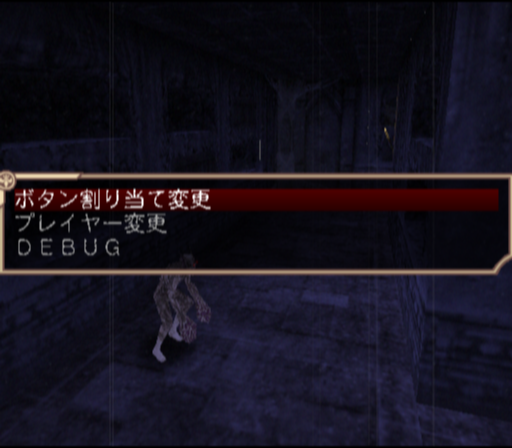
Text |
Translation |
Effect |
|---|---|---|
ボタン割り当て変更 |
Change Assigned Buttons |
It is unclear what this does exactly. |
プレイヤー変更 |
Change Player |
Allows you to select from a list of the currently loaded AI to control. |
DEBUG |
Debug |
Opens a sub menu. |
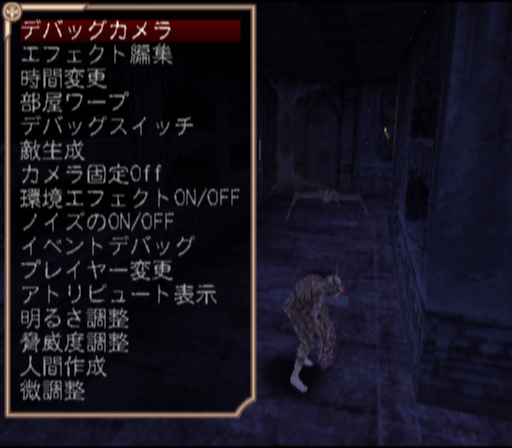
Pressing Triangle will bring you to this menu.
Text |
Translation |
Effect |
|---|---|---|
デバッグカメラ |
Debug Camera |
Crashes the game. |
エフェクト編集 |
Effect Edit |
Crashes the game. |
時間変更 |
Change Time |
Changes the current time in the map. |
部屋ワープ |
Room Warp |
This menu contains nothing to choose from. |
デバッグスイッチ |
Debug Switch |
Opens a sub menu. |
カメラ固定ON/OFF |
Camera Fixed On/Off |
|
環境エフェクトON/OFF |
Ambient Effect On/Off |
|
敵生成 |
Spawn Enemy |
Opens another menu allowing you to spawn enemies or allies. |
ノイズのON/OFF |
Noise On/Off |
Turns the background static on or off. |
イベントデバッグ |
Event Debug |
Allows you to set various game related flags. |
プレイヤー変更 |
Player Change |
Allows you to change the currently controlled player. |
アトリビュート表示 |
Attribute Display |
Enables various debug lines throughout the map. |
明るさ調整 |
Light Adjustment |
|
脅威度調整 |
Menace Value Adjustment |
|
人間作成 |
Create Human |
Spawns a NPC of your choice. |
微調整 |
Tune |
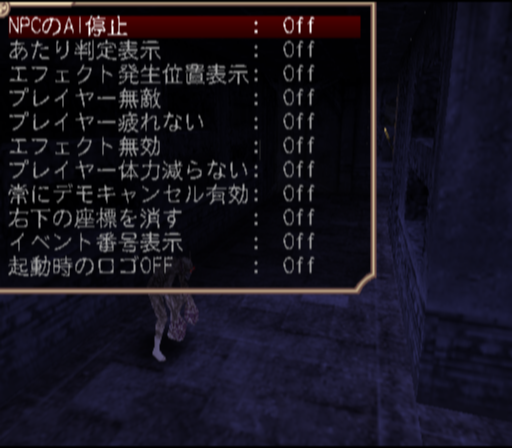
This menu allows you to set various flags, such as disable AI and toggle invincibility for all AI.
Text |
Translation |
Effect |
|---|---|---|
NPCのAI停止 |
Stop the NPC AI |
|
あたり判定表示 |
Display hit area |
|
エフェクト発生位置表示 |
Stop the NPC AI |
|
プレイヤー無敵 |
Player invincible |
|
プレイヤー疲れない |
Player will not tire |
|
エフェクト無効 |
Disable effects |
|
常にデモキャンセル有効 |
Always enable demo cancel |
|
右下の座標を隠す |
Hide coord at bottom-right |
|
イベント番号表示 |
Display the event number |
|
起動時のロゴOFF |
Disable display the logo in booting |
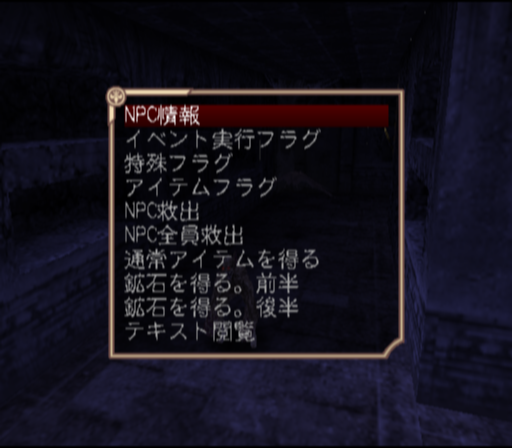
This menu appears when selecting Event Debug. This allows you to view various statues of enemies in the map.
Text |
Translation |
|---|---|
NPC情報 |
NPC Information |
イベント実行フラグ |
Event Running Flag |
特殊フラグ |
Special Flag |
アイテムフラグ |
Item Flag |
NPC救出 |
Rescue NPC |
NPC全員救出 |
Rescue All NPC |
通常アイテムを得る |
Get the Normal Item |
鉱石を得る。前半 |
Get the Mineral. First Period |
鉱石を得る。後半 |
Get the Mineral. Second Period |
テキスト閲覧 |
Watch the Text |
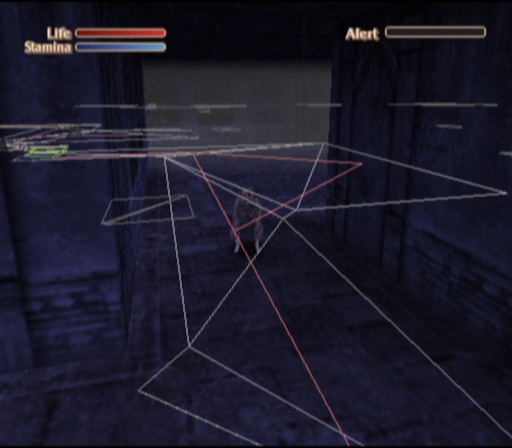
These will appear when selecting Attribute Display.
Map System#

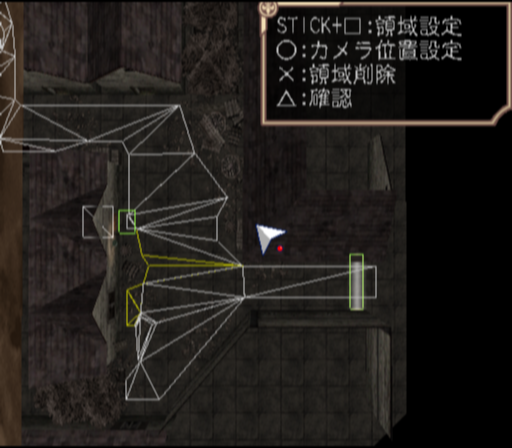
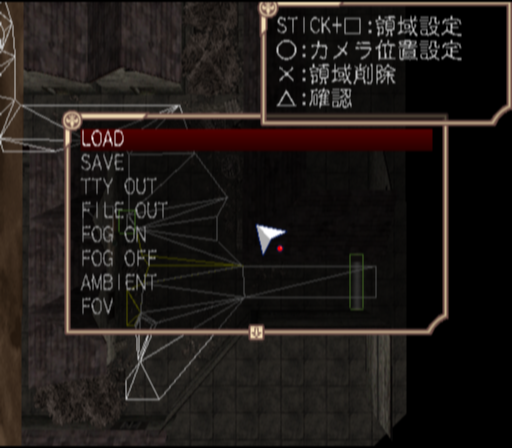
Selecting マップシステム will bring you to this menu. Here you can freely view all the maps in the game with free camera movement. There is also a camera tool where you can edit and make new camera points in maps. You can also save your edits, however it is unclear how that works.
Text |
Translation |
|---|---|
フリー |
Free |
カメラ設定 |
Camera Setting |
フォグ・環境光設定 |
Fog・Ambient Light Setting |
フォグ・環境光全出力 |
Output All Fog・Ambient Light |
カメラバックアップ |
Backup Camera |
Character Play Test#


Selecting キャラ劇テスト will bring you to this menu. Here you can set camera points, place characters on any map in the game, and view all of the game's events.
Text |
Translation |
|---|---|
カメラテスト |
Camera Test |
キャラ劇テスト |
Character Acting Test |
カメラ設定 |
Camera Setting |
キャラ配置 |
Place the Character |
アンビエント |
Ambient |
フォグ |
Fog |
エリア変更 |
Changes the Area |
セーブ |
Save |
終了 |
Exit |