 This article has a talk page!

|
This page contains no introduction. |
Debug Menu#
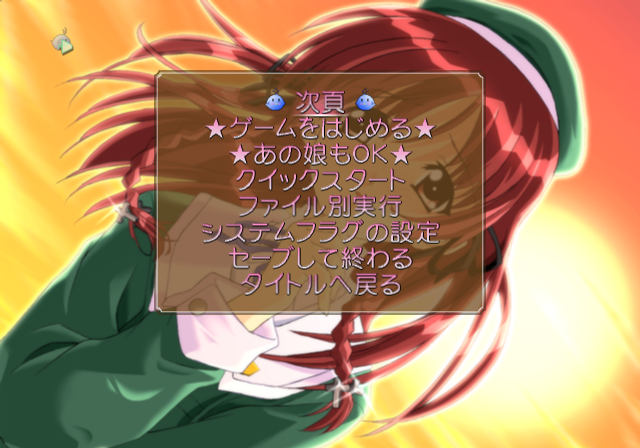
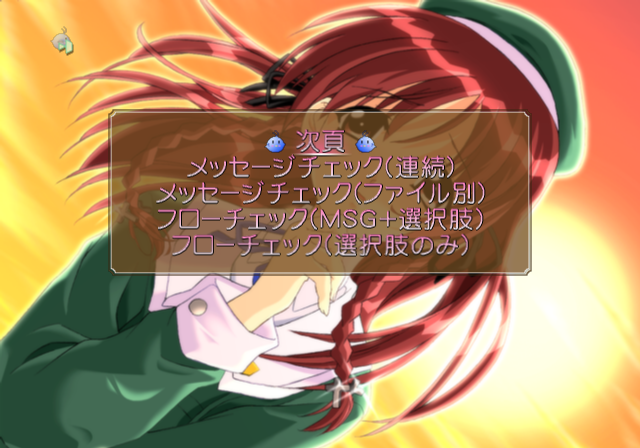
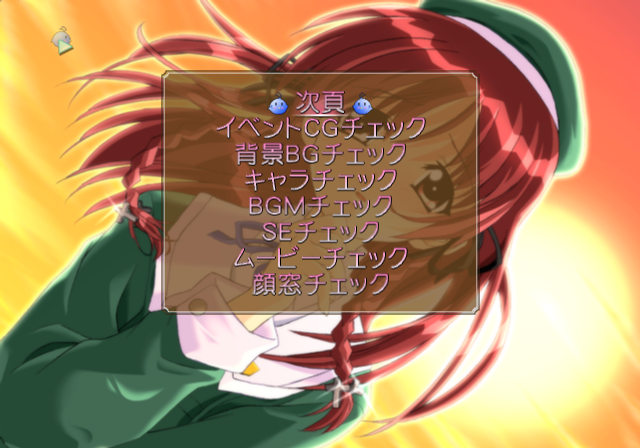
This menu contains various options to view background images, event images, and unlock certain options. It also contains various route select options. To appear in this menu, apply the below code and start a new game.
SLPS-25298 codes:

Master Code (only needed for cheat devices)
9010E870 0C0439C4

Replace New Game With Debug Menu
2027D758 00000003
Page 1:
Text |
Translation |
Notes |
|---|---|---|
次頁 |
Next page |
Next page. |
★ゲームをはじめる★ |
Start game |
Starts a new game. |
★あの娘もOK★ |
That girl is OK |
Unknown. |
クイックスタート |
Quick start |
Sends you to the title screen. |
ファイル別実行 |
Run file |
Event select menu. |
システムフラグの設定 |
System flag setting |
Presumably finishes character routes when selected. |
セーブして終わる |
Save then finish |
Saves the game then returns to the title. |
タイトルへ戻る |
Return to title |
Returns to the title screen. |
Page 2:
Text |
Translation |
Notes |
|---|---|---|
次頁 |
Next page |
Next page. |
メッセージチェック(連続) |
Message Check (continuous) |
Displays various text messages. |
メッセージチェック(ファイル別) |
Message Check (by file) |
Allows you to select messages based on the event files. |
フローチェック(MSG+選択肢) |
Flow check (MSG + choice) |
It's not clear what's different about this option. |
フローチェック(選択肢のみ) |
Flow check (only choices) |
Shows story choices only. |
Page 3:
Text |
Translation |
Notes |
|---|---|---|
次頁 |
Next page |
Next page. |
イベントCGチェック |
Event CG check |
Cycles through all of the CG images. |
背景BGチェック |
Scenery BG check |
Cycles through all of the background images. |
キャラチェック |
Character check |
Cycles through all of the character images. |
BGMチェック |
BGM check |
Doesn't work. |
SEチェック |
SE check |
Doesn't work. |
ムービーチェック |
Movie check |
Allows you to view the game's movies. |
顔窓チェック |
Face window check |
Tests character images inside a small window. |
(Source: Punk7890)
Debug Logging#
Within the game is a stubbed printf function which would have logged various background information to a debug unit. This logs information such as files being loaded. It would also report errors if any occurred. To re-enable this, apply the below codes.
SLPS-25298 code:

Re-enable printf
20123D00 080438A2
If you are playing the game on a regular PlayStation 2, you will need to use a TOOL, RDB, or a debug version of OPL to view the logs. If you are playing on an emulator, you can see this information by enabling the option "Show Console".
(Source: Punk7890)