This is a sub-page of Suikoden V.
Access

Codes:
Use the following instructions to enable the debug menu on an NTSC-U version of Suikoden V:
- If you're using a cheat device to enable the debug menu on an actual console, input the enable code below. Otherwise, skip this step.
- 901F2550 0C07C8FC.
- Now, input the code to enable the debug menu for your version of the game:
Controls:
- Press R2 + L2 then X once after to bring up the debug menu from the main menu.
- Press L3 + R3 to bring up the debug menu during gameplay. (This only works when in towns or on the world map.)
- If you use the debug menu to spawn in a map, you can press L1 or R1 to zoom in and out, and use the right analog stick to rotate the camera.
Using the debug menu to spawn in a map will also grant you all items and a ton of money.

|
To do: |
(Source: Original TCRF research)
Default Options
NEW GAME2#

This option places you at different spots in the story.
The "Test" option doesn't seem to do anything interesting.
|
|
To do: |
VIEWER#
CHARA (Hi)#
This option yields a bunch of corrupted text. None of the options here appear to be functional, and some crash the game.
CHARA (Town)#


This option allows you to view and play character animations, as well as walk around as your character of choice.
Menu Controls:
- O = Confirm
- X = Back
- Up & Down = Scroll through options
Animation Debug Controls:
- L1 & R1 = Zoom in/out
- Select = Reset camera
- O = Play action
- D-Up = Change Footstep option
- D-Left & D-Right = Change animation
|
|
To do: |
Menu 1 - New#
This menu allows you to select from only a few characters.
# |
Text |
Translation |
Description |
|---|---|---|---|
201 |
主人公平民服 |
||
209 |
リオン平民服 |
||
221 |
ゲオルグ平民服 |
||
321 |
ゲオルグ武器持ち |
||
373 |
ミアキス武器持ち |
||
401 |
主人公小序盤王族服 |
Menu 2 - 108 Stars#
This menu allows you to view the 108 Stars.
# |
Text |
Translation |
Description |
|---|---|---|---|
000 |
仮主 |
||
001 |
主人公私服 |
Hero normal cloths. |
|
002 |
ラージャ |
Raja |
|
◆003 |
ルクレティア |
Lucretia |
|
◆004 |
ゼラセ |
Zerase |
|
◆005 |
クレイグ |
Craig Laden |
|
006 |
ガレオン |
Galleon |
|
007 |
ボズ |
Boz |
|
◆008 |
ナクラ |
Nakula |
|
009 |
リオン |
Lyon |
|
010 |
タルゲイユ |
Talgeyl |
|
Example |
Example |
Example |
Example |
Example |
Example |
Example |
Example |
Example |
Example |
Example |
Example |
Example |
Example |
Example |
Example |
Example |
Example |
Example |
Example |
Example |
Example |
Example |
Example |
Example |
Example |
Example |
Example |
Example |
Example |
Example |
Example |
Example |
Example |
Example |
Example |
Example |
Example |
Example |
Example |
Example |
Example |
Example |
Example |
Example |
Example |
Example |
Example |
Example |
Example |
Example |
Example |
Example |
Example |
Example |
Example |
Example |
Example |
Example |
Example |
Example |
Example |
Example |
Example |
Example |
Example |
Example |
Example |
Example |
Example |
Example |
Example |
Example |
Example |
Example |
Example |
Example |
Example |
Example |
Example |
Example |
Example |
Example |
Example |
Example |
Example |
Example |
Example |
Example |
Example |
Example |
Example |
Example |
Example |
Example |
Example |
Example |
Example |
Example |
Example |
Example |
Example |
Example |
Example |
Example |
Example |
Example |
Example |
Example |
Example |
Example |
Example |
Example |
Example |
Example |
Example |
Example |
Example |
Example |
Example |
Example |
Example |
Example |
Example |
Example |
Example |
Example |
Example |
Example |
Example |
Example |
Example |
Example |
Example |
Example |
Example |
Example |
Example |
Example |
Example |
Example |
Example |
Example |
Example |
Example |
Example |
Example |
Example |
Example |
Example |
Example |
Example |
Example |
Example |
Example |
Example |
Example |
Example |
Example |
Example |
Example |
Example |
Example |
Example |
Example |
Example |
Example |
Example |
Example |
Example |
Example |
Example |
Example |
Example |
Example |
Example |
Example |
Example |
Example |
Example |
Example |
Example |
Example |
Example |
Example |
Example |
Example |
Example |
Example |
Example |
Example |
Example |
Example |
Example |
Example |
Example |
Example |
Example |
Example |
Example |
Example |
Example |
Example |
Example |
Example |
Example |
Example |
Example |
Example |
Example |
Example |
Example |
Example |
Example |
Example |
Example |
Example |
Example |
Example |
Example |
Example |
Example |
Example |
Example |
Example |
Example |
Example |
Example |
Example |
Example |
Example |
Example |
Example |
Example |
Example |
Example |
Example |
Example |
Example |
Example |
Example |
Example |
Example |
Example |
Example |
Example |
Example |
Example |
Example |
Example |
Example |
Example |
Example |
Example |
Example |
Example |
Example |
Example |
Example |
Example |
Example |
Example |
Example |
Example |
Example |
Example |
Example |
Example |
Example |
Example |
Example |
Example |
Example |
Example |
Example |
Example |
Example |
Example |
Example |
Example |
Example |
Example |
Example |
Example |
Example |
Example |
Example |
Example |
Example |
Example |
Example |
Example |
Example |
Example |
Example |
Example |
Example |
Example |
Example |
Example |
Example |
Example |
Example |
Example |
Example |
Example |
Example |
Example |
Example |
Example |
Example |
Example |
Example |
Example |
Example |
Example |
Example |
Example |
Example |
Example |
Example |
Example |
Example |
Example |
Example |
Example |
Example |
Example |
Example |
Example |
Example |
Example |
Example |
Example |
Example |
Example |
Example |
Example |
Example |
Example |
Example |
Example |
Example |
Example |
Example |
Example |
Example |
Example |
Example |
Example |
Example |
Example |
Example |
Example |
Example |
Example |
Example |
Example |
Example |
Example |
Example |
Example |
Example |
Example |
Example |
Example |
Example |
Example |
Example |
Example |
Example |
Example |
Example |
Example |
Example |
Example |
Example |
Example |
Example |
Example |
Example |
Example |
Example |
Example |
Example |
Example |
Example |
Example |
Example |
Example |
Example |
Example |
Example |
Example |
Example |
Example |
Example |
Example |
Example |
Example |
Example |
Example |
Example |
Example |
Example |
Example |
Example |
Example |
Example |
Example |
Example |
Example |
Example |
Example |
Example |
Example |
Example |
Example |
Example |
Example |
Example |
Example |
Example |
Example |
Example |
Example |
Example |
Example |
Example |
Example |
Example |
Example |
Example |
Example |
Example |
Example |
Example |
Example |
Example |
Example |
Example |
Example |
Example |
Example |
Example |
Example |
Example |
Example |
Example |
Example |
Example |
Example |
Menu 3 - Secondary Characters#
This menu allows you to view the secondary characters.
Menu 4 - Animals#
This menu allows you to view the game's animals.
Other#
# |
Text |
Translation |
Description |
|---|---|---|---|
000 |
ソルファレナ |
||
001 |
|||
008 |
ルナス |
||
015 |
ストームフィスト |
||
017 |
レルカー |
||
018 |
レルカー |
||
019 |
レルカー |
||
036 |
レインウォール |
||
042 |
エストライズ |
||
044 |
セーブル |
||
050 |
ハウド村 |
||
052 |
ヤシュナ村 |
MAP#

This option allows you to spawn in the map of your choice.
Menu Controls:
- O = Confirm
- X = Back
- Up & Down = Scroll through options
Menu - World Map#
# |
Text |
Translation |
Description |
|---|---|---|---|
000 |
ソルファレナ市街 |
||
001 |
太陽宮 |
||
002 |
東の離宮 |
||
004 |
西のの離宮 |
||
008 |
ルナス |
||
010 |
山岳樹林 |
||
012 |
回転橋 |
||
013 |
ストームフィスト新市街 |
||
014 |
ゴドウィン城 |
||
015 |
ストームフィスト旧市街 |
||
016 |
西の林 |
||
017 |
レルカー・ヴォリガ領 |
||
018 |
レルカー・ワシール領 |
||
019 |
レルカー・オロク領 |
||
020 |
ドラート |
BATTLE#


BATTLE Menu Controls:
- L1 + R1 = Change's category. When you enter you will be on 108 Stars. Press L1 once to go to Field maps. Here you can view all the backgrounds. L1 again for enemies.
- X = Confirm.
- O = Change costume if available.
- Left + Right (D-PAD) = Change Page.
- Up + Down (D-PAD) = Move.
Inside animation / stage viewer buttons:
- Up + Down (D-PAD) = Move.
- Left + Right (D=PAD) = Change animation options.
- O = Play animation.
- Triangle = Store animation in the List setting. This stores them and then plays them in the order they are stored in.
- X = Play animations that are stored.
- Square = Clear stored animation.
- Select = Loop selected animation. Again to stop looping.
- L3 = Toggle text on / off.
- R3 = Toggle lighting.
- L2 = Freeze animation. L2 again to unfreeze.
- R1 = Change effect displayed on char's sword.
- Start = Back.
|
|
To do: |
DEMO#

Plays cutscenes from the game.
Menu Controls:
- Up + Down + Left + Right (D-PAD) = Move.
- X = Confirm.
- L1 + R1 = Change chapter.
EFFECT#
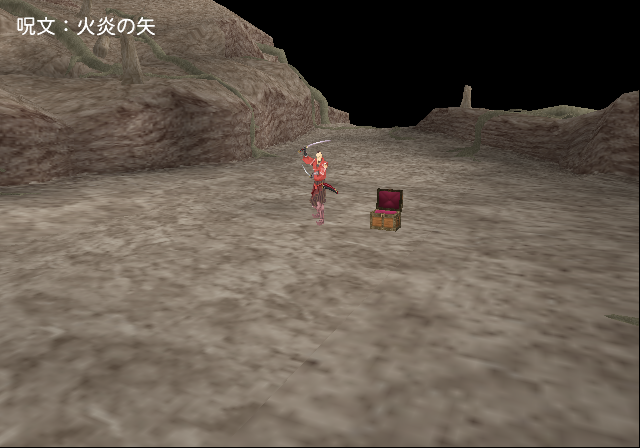
A test map to play a bunch of effects. It is not possible to tell what you're selecting as there is corrupted text in the overseas version of this game.
Controls:
- Analog Sticks = Move camera.
- L1 + R1 = Zooms in and out of the camera.
- O = Play effects.
- Right + Left (D-PAD) = Change effects in category.
- Up + Down (D-PAD) = Changes effects category.
BATTLE#

Main screen controls:
- Up + Down (D-PAD) = Move.
- Left + Right (D-PAD) = Control options of what is selected.
- Triangle = Back to main debug screen.
- O = Config party options such as equipment. Also erases items equipped in party options.
- L2 + R2 (Config party buttons) = Change more parameters for selected person.
- X = Start battle.
- First option: Select the stage background.
- Second option: Changes the enemy type to fight. First is normal battles. Second is monster packs. Third is bosses.
- Third option: Changes enemies related to second option.
- Forth option: Changes party member layout. Also saves the layout in that slot number. (Can only save and choose people in slot #0)
- Fifth is choose what party to have.
- Second to last option: Enable choice for enemy attack.
- Last option: Choose what level your party is.
|
|
To do: |
WAR#

Overworld strategy battles.
WAR CHAR VIEWER#
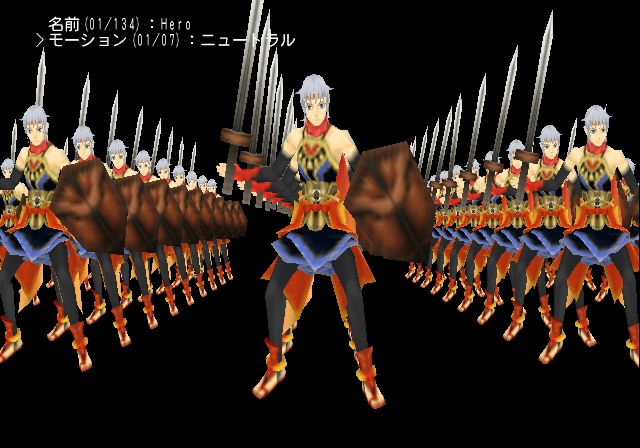
Lets you select and view animations of models that appear in overworld strategy battles.
Controls:
- Left + Right (D-PAD) = Change option.
- O = Confirm.
|
|
To do: |
CUTIN VIEWER#

Yields the same options as WAR CHAR VIEWER except for scenery and battle demos.
Controls:
- Left + Right (D-PAD) = Change option.
- Up + Down (D-PAD) = Move.
- O = Confirm.
|
|
To do: |
WAR PROG DEMO#

Controls:
- Left + Right (D-PAD) = Change option.
- Up + Down (D-PAD) = Move.
- O = Confirm.
- First option: Type of army that belongs to the protagonist. Choose with Left or Right. L2/R2 chooses who is their leader.
- Second option: Type of army that belongs to the enemy. Options same as above.
- Third and forth options: Control what map.
- Fifth option: Controls what type of army?. Some options will hang the game.
- Sixth option: Unsure.
|
|
To do: |
WAR SHIP DEMO#

Same option as WAR PROG DEMO but for sea battles. There is no map options.
Controls:
- Left + Right (D-PAD) = Change option.
- Up + Down (D-PAD) = Move.
- O = Confirm.
MINI GAME#

Play all the mini games here.
|
|
To do: |
SOUND#

This option lets you play all the SFX, music, and voices in the game.
Controls:
- Up + Down(D-PAD) = Move up and down.
- Left + Right (D-PAD) = Change option in category.
- O = Play slot number.
- Square + Triangle = Change Effect. This changes the type of echo / reverb played on slots.
- Select = Pose. No idea what it does.
- R1 = Play all voices in order (when your cursor is on voices).
- X = Stop sounds.
- L1 = Voice B. Not sure what it does.
- Start = Return to main debug menu.
NOTE: When there is a X in a slot it means it is not on the disc. Perhaps the Japanese version has some missing songs?
IKKIUCH#

Solo combat choices.
Controls:
- Up + Down (D-PAD) = Move.
- X = Confirm.
- R1 = Debug. Unsure what it does.
- L1 = Voice B. Unsure what it does.
LOADING#
Changes the loading screen icon.
Controls:
- L1 / X = Return (when in "NOW LOADING" screen).
- X = Confirm choice.
NEWSPAPER#
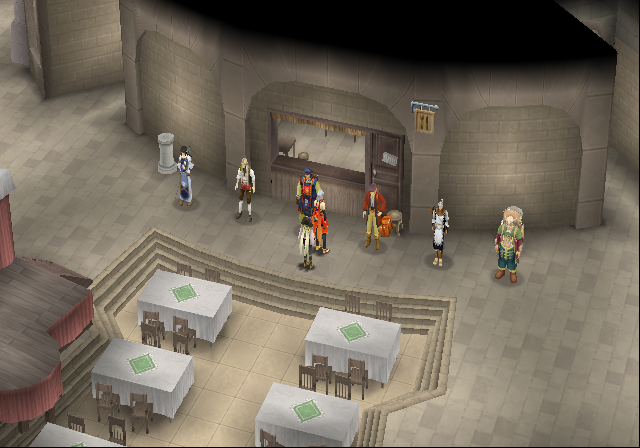
Test map with a bunch of NPCs.
Expanded Options
The following code changes "VIEWER" in main debug to more hidden debug options. These all refer to text strings and proper functions not present in the main debug menu but can be enabled. Enable the following code to replace "VIEWER" with something else:
USA |
PAL |
JAPAN |
|---|---|---|
D07DA508 0000DB08 |
D07F3E08 00006888 |
D076DA98 00003C08 |
Replace ???? with one of the following:
- 0106 = REAL TEST.
REAL TEST: Plays the opening cinematic.
SOUND TEST: Appears to be the same as SOUND in the main debug menu.
EDL ENTRY(edl test): Crashes the game.
EDL CHECK(edl test): Crashes the game.
MOVIE TEST: Plays two movies. Pressing Triangle advances the movie.
CHECKER: Allows you to play the mini game Checkers.
SHOP: Lots of various shop NPCs here. Most of them yield corrupted text.

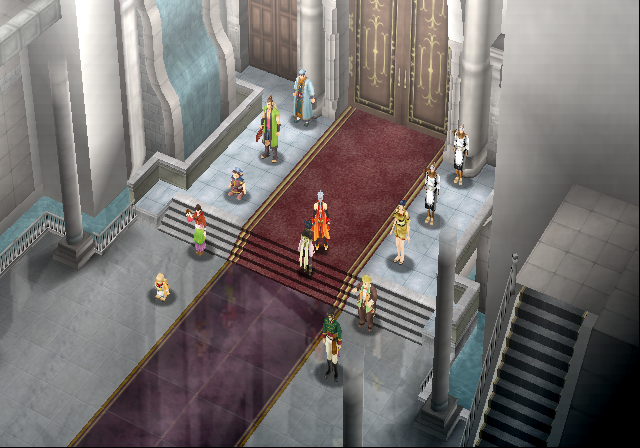
- 0107 = BATTLE2.
BATTLE: This option appears to be the same as BATTLE in the main debug menu.
BATTLE2: This option appears to be the same as BATTLE in the main debug menu.
BATTLE VIEWER: This option appears to be the same as VIEWER > BATTLE in the main debug menu.
SHINAN TEST: Combat hall option.
EDL_TEST: A test map with 4 Shoons. It's unclear if you receive any items here as the text is corrupted.

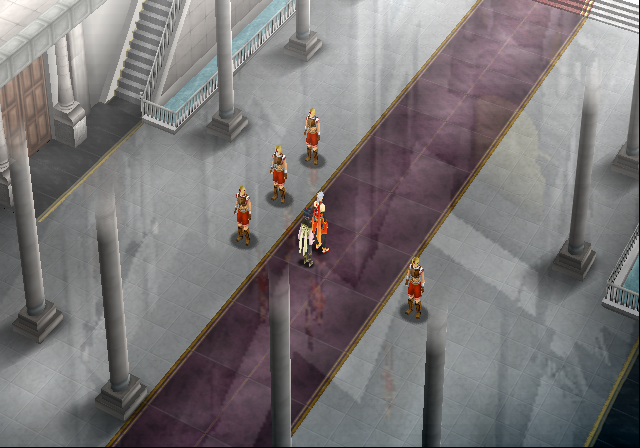
- 010A = 2DANIM_TEST.
2D_TEST: Crashes the game.
2DANIM_TEST: Draws a glowing cube on-screen. Press Circle to move it.
2DOBJ_DRAW_TEST: Crashes the game.
108ENDING: Plays the 108 Stars ending.
FEITAS: Plays a mini game.
MENU_TEST: Sends you to your castle with debug text on the left of the screen. It displays the filename NPCs of who is in your party. Pressing START here will send you back to the debug menu.
SHOP_TEST: Sends you to a Rune Shop.
MAIN_COMMAND: Sends you to the in-game pause screen.
SOUKO: Sends you to your Storage.
HENSEI: Sends you to your castle with a few shops in it. Pressing START here will send you back to the debug menu.
SEKIBAN: View all of the 108 Stars here.

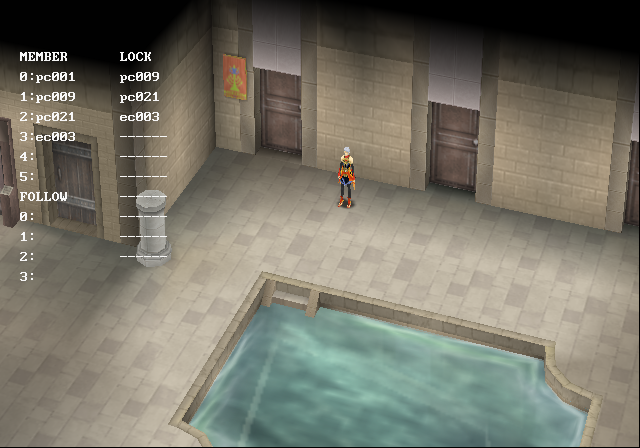
- 010B = GAM_TEST.
GAM_TEST: Seems to be a broken menu.
EFFECT_TEST: The same as EFFECT in the main debug menu.
RYUBA_SOUGI_ENSYUU: Crashes the game.
KEI_RYU: Crashes the game.
TSURI (VS SUBARU): Fishing mini game.
TSURI (KAZE DE SYOUBU!): Fishing mini game.
TSURI (OOMONO SYOUBU!): Fishing mini game.
TSURI (NANDEMO TSURIMAKURE!): Fishing mini game.
TSURI (NORMAL): Fishing mini game.
TSURI (TALK TEST): Fishing mini game. You cannot play this version, however.
URA NO URA (10-LOSE ONLY): Blind Man's Bluff mini game.
URA NO URA (30): Blind Man's Bluff mini game.
URA NO URA (NORMAL): Blind Man's Bluff mini game.
STAFF ROLL: Plays the credits.

- 0208 = EDL_TEST.
MAP TEST: Appears to be the same as VIEWER > MAP in the main debug menu.
CHARA TEST: Appears to be the same as VIEWER > CHARA (TOWN) in the main debug menu.
EDL & MAP: Appears to be the same as VIEWER > MAP in the main debug menu, however Leon is not with you.
KANTEI-YA: Sends you into Appraiser menu.
KAJI-YA: Sends you into the Blacksmith menu.
KOUEKI-JO: Sends you into the Trading Post menu.
Restaurant: Sends you into the Restaurant menu.

- 020F = STATUS_TEST.
FORM_TEST: Sends you into the Formation menu.
STATUS_TEST: Sends you into the Stats menu.
STATUS2_TEST: Sends you into the Stats menu with only a picture of Hero.
DEMO_TEST: Sends you into the Stats menu with only a picture of Hero (same as above).

(Source: Original TCRF research)