 This article has a talk page!
Stuntman was well-known for making unfortunate players bang their heads on the TVs. It's also well-known for its gameplay and amazing graphics for its time. It was followed by a sequel, Stuntmanː Ignition a few years later.
Sub-Page#

Removed Vehicles#
Information on How to Acquire These Vehicles#
Using Action Replay MAX codes, experiment with the following car modifier codes in the European version (due to Codejunkies' vague descriptions of the vehicles). An equivalent code is not yet available for North American and Japanese versions. More car modifier codes are on page 3 of the link.
With Cheat Engine & PCSX2, find the model IDs loaded in memory and experiment.
JAWS Monster Truck#
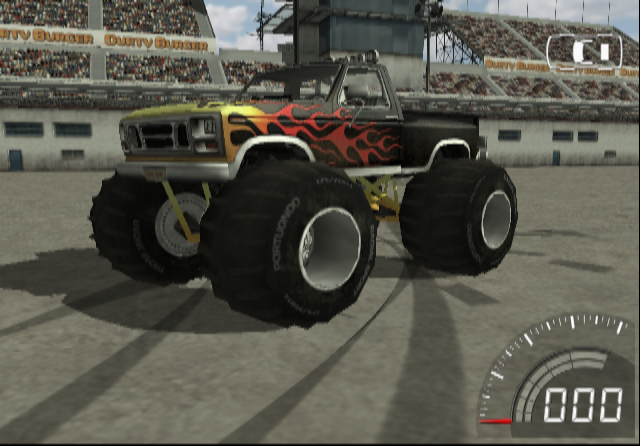

A different monster truck seen in early gameplay footage in trailers and is still present in the game, albeit unused.
Modified Blue Capri#
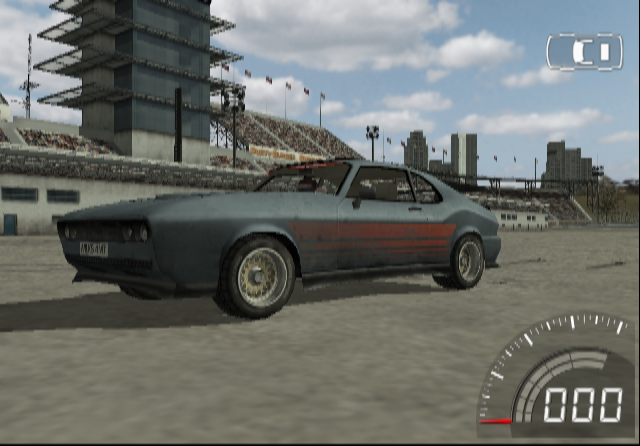
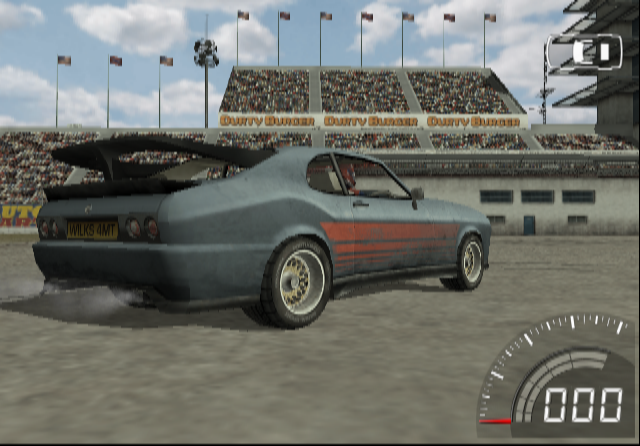
While a modified version of the yellow Capri is already available, this one was left unused.
(Source: LCPDCV/RM76)
TAKE A RIDE#
When you finish the movie "A Whoopin' and a Hollerin'" and go to the scene selection screen, a poster is visible on the texture of the scene selection screen showing an early screenshot of the game with a very high poly vehicle dashboard view reading "TAKE A RIDE."
Take-A-Ride was also the free roam option for the first three Driver games, also developed by Reflections, so that means free-roaming was planned at one point and scrapped for unknown reasons.
Also unused are text strings for every movie:
TAKE A RIDE Take a Ride They are located in "FRONTEND\MEDIA\SM\TEXT\TSTRINGS.TXT" in stuntman.img.
(Source: LCPDCV/RM76)
Unused Text, Demo Leftovers & Debugging Text#
They are located in "FRONTEND\MEDIA\SM\TEXT\TSTRINGS.TXT":
Graphics
Preset Stunt
HELLO
VOL HOLDER
TEST ICON
100
Test 1
Test 2
Test 3
Shadows
Smoke
Cache Levels
Cache Mission
Level
Mission
Arena Games
Real Game
Stunt Tests
STUNTMAN CAREER ok?
Env Mapping
6. TAKE
A RIDE
Take A Ride
6. TAKE A RIDE
4. TAKE A RIDE
TAKE A RIDE
HardCore
Development
WARNING
Cheats
For Development - No bugs please...
Some of the strings show options that are used in PC games to edit the visuals. This could mean that a PC port was planned or they were used for debugging purposes to make the game run well on the PS2.
These ones are in "FRONTEND\MEDIA\ARENA\TEXT\TSTRINGS.TXT":
LOAD EXAMPLE STUNT
Development
Save to HD
"FRONTEND\MEDIA\ARENAP\TEXT\TSTRINGS.TXT":
FRAME ADVANCE
TOGGLE OVERLAYS
TAKE SCREENSHOT
DEVELOPMENT
CHEAT - NEXT STUNT
"FRONTEND\MEDIA\SCORE\TEXT\TSTRINGS.TXT":
Level Name
Mission Name
Info Text
ABperc
Arena Show Name
"FRONTEND\MEDIA\SCORE\TRAIN\TSTRINGS.TXT":
Enter Score
Score Info
"FRONTEND\INGAME\TEXT\TSTRINGS.TXT":
Development
Toggle View
Toggle Overlays
Move Camera
Background Colour
Take Screenshot
Lighting
Fast Forward
Frame Advance
Reset Car
Damage
LEVEL NAME
MISSION NAME
PAY INFO
ACCURACY INFO
MISC MESSAGE
WireFrame Mode
Lod Distance
Reset Camera
Driver2
Draw Distance
For some reason Driver 2's name is mentioned. It is either a leftover, or not referencing Driver 2 at all - perhaps it is referencing the passenger dummy inside vehicles.
(Source: DJThanos)
A couple of error messages that can be found inside the executable.
Hex |
Text |
|---|---|
0x18D78D |
|
0x18D900 |
|