 This article has a talk page!
Debug Menu#
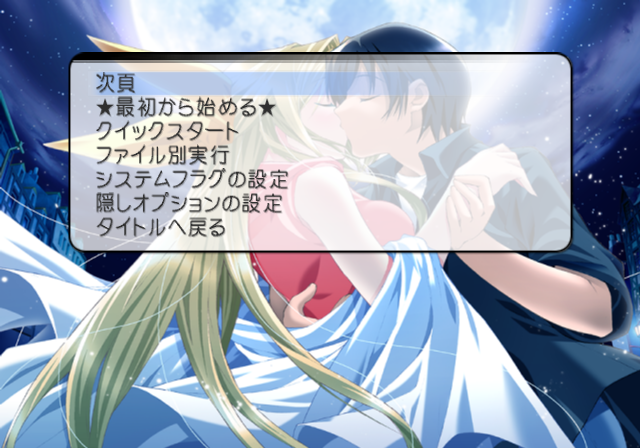
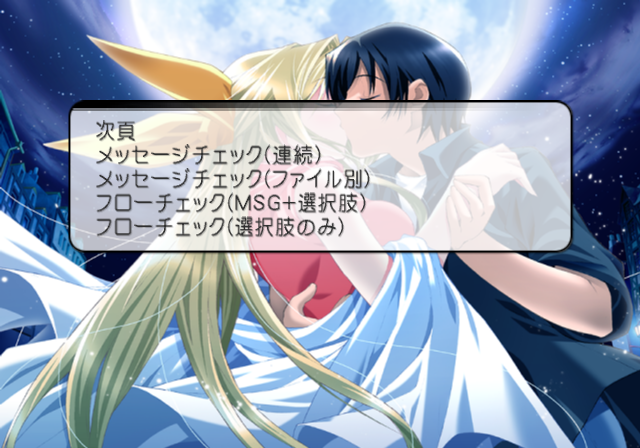

This menu contains various options to view background images, event images, and unlock certain options. It also contains various route select options. To appear in this menu, apply the below code and start a new game.
SLPM-65611 codes:

Master Code (only needed for cheat devices)
9010E8F0 0C0439E4

Replace New Game With Debug Menu
20322F20 00000003
Page 1:
Text |
Translation |
Notes |
|---|---|---|
次頁 |
Next page |
Next page. |
★最初から始める★ |
Start from the beginning |
Starts a new game. |
フローチェック |
Flow check |
Route select menu. |
クイックスタート |
Quick start |
Sends you to the title screen. |
ファイル別実行 |
Run file |
Event select menu. |
システムフラグの設定 |
System flag setting |
Presumably finishes character routes when selected. |
隠しオプションの設定 |
Hidden option settings |
Unlocks the special menu. |
タイトルへ戻る |
Return to title |
Returns to the title screen. |
Page 2:
Text |
Translation |
Notes |
|---|---|---|
次頁 |
Next page |
Next page. |
メッセージチェック(連続) |
Message Check (continuous) |
Displays various text messages. |
メッセージチェック(ファイル別) |
Message Check (by file) |
Allows you to select messages based on the event files. |
フローチェック(MSG+選択肢) |
Flow check (MSG + choice) |
It's not clear what's different about this option. |
フローチェック(選択肢のみ) |
Flow check (only choices) |
Shows story choices only. |
Page 3:
Text |
Translation |
Notes |
|---|---|---|
次頁 |
Next page |
Next page. |
イベントCGチェック |
Event CG check |
Cycles through all of the CG images. |
背景BGチェック |
Scenery BG check |
Cycles through all of the background images. |
キャラチェック |
Character check |
Cycles through all of the character images. |
キャラカラーチェック |
Character color check |
Doesn't seem to work properly. |
BGMチェック |
BGM check |
Doesn't work. |
SEチェック |
SE check |
Doesn't work. |
ムービーチェック |
Movie check |
Allows you to view the game's movies. |
BGフェードチェック |
BG fade check |
Tests various screen transition effects. |
(Source: Punk7890)
Debug Unlock All Flag#
Applying the below code will unlock all CG and music options. This flag is checked every time you enter the menu.
SLPM-65611 code:

Enable Debug Unlock Flag
10B8A3E6 00000001
(Source: Punk7890)
Unused Append Story Main Menu Option#
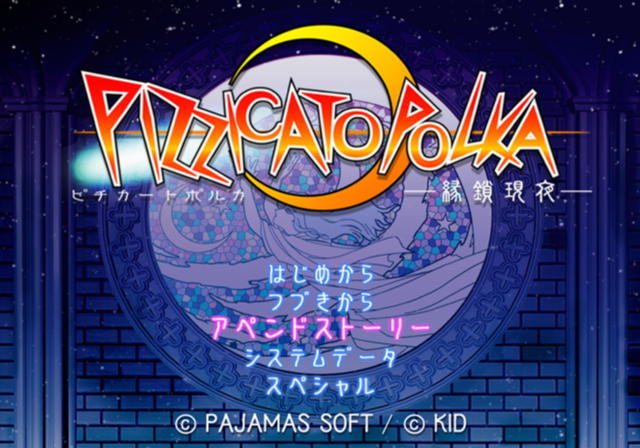
An unused Append Story option sits hidden in the main menu. Selecting it does nothing.
(Source: Punk7890)
Debug Logging#
Within the game is a stubbed printf function which would have logged various background information to a debug unit. This logs information such as files being loaded. It would also report errors if any occurred. To re-enable this, apply the below codes.
SLPM-65611 code:

Re-enable printf
20125AA8 080438C2
If you are playing the game on a regular PlayStation 2, you will need to use a TOOL, RDB, or a debug version of OPL to view the logs. If you are playing on an emulator, you can see this information by enabling the option "Show Console".
(Source: Punk7890)